Today’s world offers many possibilities related to technology. One of these remarkable technologies is VPS servers. These servers are very practical and have provided many possibilities for users and business owners. This has caused various companies and sites to appear in this field and provide various services related to Virtual servers. Our website is also one of these providers, which in turn, with the help of a professional team, tries to provide Windows VPS or Linux VPS servers with the most up-to-date facilities for its users. NeuronVM aims to provide services and wants to be one of the best providers that keep its users satisfied in all aspects. The good news is that you can get free VPS servers using a few simple methods. So, stay with us until the end of this article.
What is VPS?
A Virtual Private Server (VPS) is a type of hosting service that combines the affordability of shared hosting with the control and flexibility of a dedicated server. It’s a popular choice for individuals, businesses, and developers who require more control over their hosting environment than what shared hosting can offer.
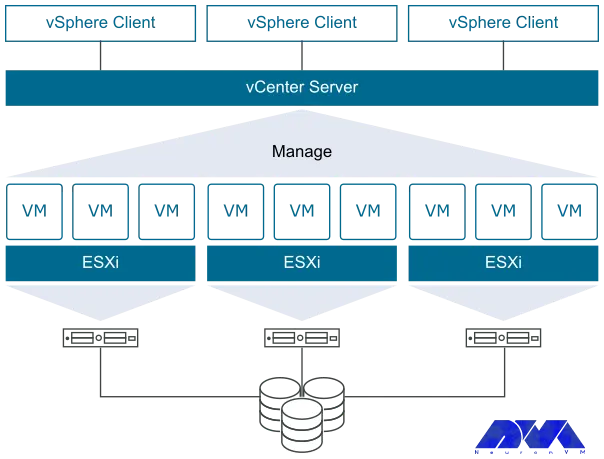
To explain more clearly, VPS is a virtual server. Physical servers are divided into several virtual servers using virtualization technology. Each virtual server operates independently and has its own resources including CPU, RAM, storage, and operating system. These virtual servers are isolated from each other, which means that performance or problems on one VPS will not affect other similar physical servers.
Tip: You can get more information by reading different articles about VPS services and How to install VPS on the NeuronVM blog.
How You Can Get a Free VPS Server?
Getting a free VPS (Virtual Private Server) can be challenging, But, there are a few hosting providers that offer free VPS hosting. One of these providers is NeuronVM. Here are two ways you can potentially get a VPS server.
Getting Free Linux VPS Through Subscribing and Following
A Linux Virtual Private Server is a virtualized server running a Linux-based operating system. It provides users with a dedicated portion of a physical server’s resources, such as CPU, RAM, and storage, while still sharing the underlying hardware with other VPS instances on the same physical server. Linux VPS hosting is a popular choice for individuals and businesses looking for a cost-effective and flexible hosting solution.
You can even use a Linux VPS hosting server just for a personal blog dedicated to your hobbies. Or if you are looking to design and develop a website for your business, a Linux virtual server will be suitable for you. People who have high traffic on the site or businesses that want more customization and development can benefit from these servers.
Now, you can use NeuronVM’s free Linux VPS service to test speed and exceptional services without paying any money. All you have to do is refer to the YouTube channel and subscribe to it. Then introduce our page to 10 people so that you can benefit from our free Linux VPS servers for one month. So don’t waste your time and get your VPS!
Getting Free Linux and Windows VPS Through Social Media
There is another way you can get free Linux or Windows VPS. There are providers who claim to offer virtual servers, but this is challenging. Caution should be exercised as many of these attractive offers may come with restrictions or hidden fees. This is the only NeuronVM site to get a free one-month Linux VPS and Windows VPS subscription in a simple way:
To get free Linux VPS or Windows VPS services, you can simply follow and subscribe to our Twitter, Instagram, YouTube, and Facebook pages at the same time. Then take advantage of the updated servers and services provided with them.
Some Significant Benefits of Using Free VPS
Using a free Virtual Private Server (VPS) can offer several benefits, especially for individuals or small businesses with limited budgets. However, it’s essential to be aware of the limitations and potential risks associated with free VPS services. Here are some significant benefits:
The most obvious advantage is that free VPS hosting requires no initial or ongoing financial commitment. so it is affordable.
Free VPS hosting provides a great platform to learn and experiment. You can practice server administration, web development, and other IT skills without the risk of losing money if something goes wrong.
This hosting service can be used to create testing and staging environments for your web applications. This helps you identify and fix problems
Web developers can use free VPS instances to develop and test websites and applications before launching them on a production server.
Free VPS services can use as an additional backup location for important data. You can also use it as temporary storage for large files.
If you have a low-traffic website or blog, This Server can be enough to host your content without the need for paid hosting plans.
If you have personal websites, blogs, or applications that do not generate significant traffic, a free VPS can be a good choice.
Conclusion
In summary, free VPS hosting can be a viable option for specific use cases, but it is essential to assess your needs and consider the limitations. It is also necessary to invest time and effort in managing and securing your server effectively. For critical or high-traffic projects, a paid VPS or cloud hosting service with better resources and support is usually a more reliable choice. This article was prepared to inform you about the free services provided by the NeuronVM website. GoodLuck!
Using Windows 10 VPS can help you access all Windows-activated license features. Also, Windows VPS hosting is popular among businesses and individuals who require a Windows-based environment for their applications but do not want the expense and management overhead of a dedicated physical server. It provides a flexible and scalable solution for hosting Windows-based services. Here, you are going to learn about Windows 10 VPS and find out how to get instant activation with cheap Windows 10 VPS.
What Is Windows 10 VPS?
A Windows VPS (Virtual Private Server) is a virtualized server environment that runs the Windows operating system. It is a type of hosting service that allows users to have dedicated access to a virtualized portion of a physical server, which runs a Windows operating system.
Windows 10 VPS is especially useful for businesses and individuals who need a Windows environment but don’t want the expense and maintenance associated with physical hardware. It allows users to harness the power of Windows 10 while benefiting from the flexibility and cost-effectiveness of virtualization and cloud computing.
Overall, Windows 10 VPS offers flexibility, cost savings, and the ability to run Windows-specific software in a virtualized environment. However, the specific benefits can vary depending on the hosting provider and the configuration you choose, so it’s important to carefully evaluate your requirements and choose a provider that meets your needs.
What are the Important Benefits of Windows 10 VPS?
Windows 10 VPS offers several important benefits for users and businesses, making it a popular choice for various applications. Here are some of the key advantages:
– Windows 10 VPS is more cost-effective than dedicated servers since you share physical hardware resources with other users.
– This version of Windows VPS runs the Windows 10 operating system. This server provides a familiar environment for users who are accustomed to the Windows ecosystem.
– Windows 10 VPS can be easily scaled up or down to meet your changing resource requirements.
– VPS hosting allows users to access their virtual server remotely from anywhere with an internet connection.
– While Windows 10 VPS shares physical hardware with other users, it typically provides dedicated resources (CPU, RAM, and storage) to each virtual server.
– Windows 10 VPS hosting often includes robust security features, including firewalls, intrusion detection, and regular security updates.
– Users have a high degree of control and customization over their Windows 10 VPS environments.
– Most VPS hosting providers offer backup and disaster recovery options. These options allow you to protect your data and quickly recover in case of unexpected events.
– You can monitor and manage your Windows 10 VPS resources using control panels and management tools.
– It offers 24/7 technical support. Windows 10 VPS ensures that you can get assistance whenever you need it, helping to minimize downtime and resolve issues promptly.
Instant Activation of Windows 10 VPS on NeuronVM
Windows 10 VPS is one of the most practical and popular services offered by different providers. NeuronVM is one of these great providers that tries to serve various up-to-date VPS and Dedicated services to the users. Here we want to introduce you to how to order an urgent cheap Windows 10 VPS service, so check the following steps carefully:
1- First, you should refer to the main page of NeuronVM. Click on the Buy VPS icon, and select Buy Windows VPS :
3- Scroll down and select the most proper plan suited to your needs:
3- Then you will be directed to the next part. You can choose the Windows 10 option among the other operating systems and also choose your Location. Press Continue.
4- Here you can review the details related to the selected service and click on the Checkout button:
Note: You can enter the Promo Code in the related box to get a good discount:
5- This section will be displayed for you if you have not yet registered on the page. So, fill in the required items and register, or if you have already registered, press the blue button:
6- Enter your email and password then press Login. Here you can choose the payment method and add any additional notes if needed. Press complete Order.
7- You can see the payment page mark the proper option and press Make Payment.
8- Finally, complete your order and fill out the payment information in the second part.
That’s it! You successfully pass the levels to buy Windows 10 VPS. You will receive related information about the purchased service through your email.
How to Access to Windows 10 VPS
Now that you have your own Windows 10 VPS, you can activate it on your system. Just type remote desktop in the taskbar search box. You will encounter the remote desktop window. So, enter your computer name and username then insert the password. Press Connect.
to be directed to the Windows 10 environment.
Conclusion
When selecting a Cheap Windows 10 VPS provider, consider factors such as server location, pricing, performance, customer support, and the specific Windows 10 version they offer. It is recommended to visit the websites of the providers or conduct online searches for the most up-to-date information and user reviews to make an informed decision. Here you figured out some information about Windows 10 VPS and learned how to get an instant activation. GoodLuck!
In our previous articles, we introduced you to RDP servers and explained how to use them. RDP servers with the advantage of remote control and monitoring provide you with more access and save you money and time. Now we want to make this article wider for you and introduce you to the advantages and other key factors by presenting a step-by-step guide to find the best RDP provider for your needs.
How to Find A Good RDP Provider?
Finding the best Remote Desktop Protocol (RDP) provider for your needs and buying RDP services involves evaluating several factors to ensure you select a service that meets your requirements in terms of performance, security, Reputation, and cost. Here’s a step-by-step guide to help you find the right RDP provider.
Define Your Needs Before Any Action
Before you start looking for an RDP provider, determine your specific needs. Ask yourself questions like:
How much budget can you spend on this?
How many simultaneous connections do you need?
What is the proper operating system to run your RDP on, (Windows or Linux)?
What level of performance and resources do you need?
Is security a priority?
Will you need strong support?
Detailed Research to Find the Best RDP Provider
Start by researching RDP service providers. Look for reviews, testimonials, and recommendations from trusted sources and users’ comments. Some popular RDP providers include Microsoft Azure, AWS, NeuronVM, Google Cloud, and specialized RDP hosting providers. Here are steps to conduct comprehensive research on RDP providers:
Start by compiling a list of potential RDP providers. You can do this through internet searches, online forums, and recommendations from colleagues. Then Determine your budget and Clearly outline your specific needs and objectives. You should look for reviews and testimonials from current or former customers. Now you can review the features and services offered by each provider.
You should consider factors such as the operating systems supported, performance, security features, and scalability. Pay attention to security, it is very critical when it comes to remote access. Do research to compare the prices of plans and so many other researches to get the right decision.
Checking the Reputation of RDP Providers
Investigate the reputation of each provider. Analyze and keep tracking the comments and descriptions from customers to measure providers’ performance, reliability, and customer satisfaction. Pay attention to recent reviews to ensure accuracy. Note that the reputation of an RDP provider can impact the quality of service, security, and overall user experience.
Research the provider’s history and background and assess the security measures. Don’t forget that a positive reputation will attract lots of users and is a measure of trust. When you’re dealing with RDP providers, you often need to entrust them with sensitive data and access to your systems. A provider with a good reputation is more likely to be trustworthy and less likely to misuse your data or breach your security.
Assessing Features and Services of the RDP Providers
This is another crucial point in finding a suitable RDP provider and you should pay attention and examine the features and various services that are offered by RDP providers. Consider factors like supported operating systems, performance metrics (e.g., CPU, RAM, bandwidth), scalability options, security features, and any additional services or add-ons to assess the value of these providers.
Some of the RDP providers may offer additional features like file sharing, collaboration tools, or integration with other services. Assessing these extras can help you choose a provider that enhances your remote work capabilities.
Also, assessing the features of RDP providers is essential to selecting the right solution for your remote access needs while prioritizing security, performance, compatibility, reliability, and user experience. It ensures that you choose a provider that aligns with your specific requirements and enhances your remote work capabilities.
Evaluating the Security Measures of RDP Providers
Security is critical when dealing with remote access. Investigate the security measures implemented by the provider, including encryption protocols, two-factor authentication, firewall protection, and data center security. RDP allows users to access remote systems and data.
If security measures are not in place, unauthorized users could potentially gain access to sensitive information, leading to data breaches and privacy violations. You should know that RDP is a common target for cyberattacks. Without robust security measures, attackers can exploit vulnerabilities to deliver malware, ransomware, or conduct other malicious activities on remote systems.
Overall, security is essential for RDP providers to protect both the providers themselves and their customers from a wide range of threats, including data breaches, cyberattacks, and regulatory violations. Implementing robust security measures helps maintain the confidentiality, integrity, and availability of remote desktop services.
Comparing the Prices of Different Providers
Compare the pricing plans of different RDP providers. Pay attention to any hidden costs, additional fees, or discounts for longer-term commitments. Make sure the pricing aligns with your budget.
Look at the different plans or tiers offered by the RDP provider. They may offer varying levels of resources, such as CPU, RAM, and storage. Consider the pricing model, whether it’s subscription-based, pay-as-you-go, or a one-time payment. Choose the one that aligns with your budget and usage patterns.
Also, you can evaluate the amount of CPU, RAM, and storage provided in each plan. Ensure that the resources meet your performance requirements without overpaying for excess capacity you won’t use.
By carefully considering these points, you can make an informed decision when comparing the prices of RDP providers and select the one that best suits your business or personal requirements.
Testing the Performance of RDP Providers
The performance of an RDP provider can significantly impact your remote working or server management experience. Here are several factors to consider when testing the performance of RDP providers:
Latency: Latency measures the delay between a user’s input and the corresponding action on the remote desktop.
Bandwidth: Adequate bandwidth is essential for transmitting data between the client and the remote desktop.
Connection Stability: A stable connection is crucial for uninterrupted work.
Image Quality: RDP should provide clear and crisp display quality. Test different resolutions, color depths, and multimedia content to evaluate image quality.
Performance under Load: Test how the RDP provider handles multiple concurrent users or heavy workloads. Assess performance degradation.
File Transfer: Assess the speed and reliability of file transfers between the local and remote systems.
Session Management: Evaluate features like session disconnect and reconnection, session sharing, and resource allocation for different users.
Scalability: Consider how well the RDP provider scales with your organization’s growth. Ensure it can handle an increasing number of users and resources.
Updates and Maintenance: Consider the ease of updating and maintaining the RDP solution, including patch management and software updates.
Assessing the Customer Support
The quality of customer support provided by RDP service providers can vary widely depending on the company and its specific offerings. When evaluating RDP providers for customer support, there are a number of things to consider, including communication channels, response time, documentation and resources, the level of knowledge and expertise, user reviews, trial period, and accessibility of the support team.
It’s important to remember that customer support can be a crucial aspect of your decision when choosing an RDP provider, as technical issues or downtime can impact your business operations. Therefore, conducting thorough research and possibly reaching out to the provider’s support team with pre-sales questions can give you a sense of their level of commitment to customer service.
Reading the Terms of Services of the RDP Provider
Thoroughly review the terms of service to avoid any misunderstandings or contractual issues in the future. After conducting extensive research, carefully weigh the pros and cons of each provider. Choose the one that best aligns with your requirements, budget, and overall objectives.
What Is the Impact of A Good RDP Provider For You?
The great thing about reputable and qualified RDP providers is that they automatically create an account for you. As a result, you don’t need to worry about managing servers. All you have to do is choose a plan that gives you full control over the server and hardware and software components.
Another thing is to choose a service that has good customer support and a good guide to help you solve any problems you may have. Therefore, the right choice will make you expand your business soon and enjoy a quality and hassle-free service.
Conclusion
Once you’ve considered all these factors, you should have a clearer vision of which RDP provider aligns best with your needs. Remember that the “best” provider can vary greatly depending on your unique requirements, so prioritize those aspects that are most crucial for your specific use case.
We have discussed RDP servers in detail in our previous articles. RDP is a remote desktop protocol. This technology has enabled users to access and control other devices remotely through the Internet. People with different jobs can use this platform and access files, run programs, or manage servers. In this section, we will examine the benefits of buying RDP for your business.
An Introduction RDP Servers
RDP servers are software applications or services running on a computer that enables remote access to that computer’s desktop and resources. Besides, it is a valuable tool for remote administration, technical support, and remote work scenarios, but you should configure and use it with security in mind to protect the remote computer and its data from unauthorized access.
If you want to have a better understanding of Admin RDP, it is like mouse movements and user keystrokes are transmitted to other people’s systems remotely, but this work is done by the Internet instead of radio waves. Then, you will see the user’s desktop screen on the main computer.
What Are the Benefits of Buying RDP Servers?
Using Admin RDP Server in a business environment can offer several significant benefits:
– Cost Savings
– Enhanced Security
– Centralized Data
– Disaster Recovery
– Scalability
– Remote Access
– Easy Collaboration
– Support and Maintenance
– Improved Productivity
– Client Compatibility
Now, let’s analyze each of these factors separately.
Buying RDP Can Save Money
Businesses can save money on hardware and maintenance costs by centralizing resources on a server and providing remote access via RDP. This reduces the need for expensive workstations or laptops and can extend the lifespan of existing hardware.
Using Remote Desktop Protocol servers can potentially lead to cost savings in certain scenarios. It can reduce hardware costs, Centralized RDP servers are typically more power-efficient than individual PCs or workstations. This can lead to significant savings on electricity bills, and managing and maintaining a central RDP server environment can be more cost-effective than maintaining multiple individual workstations.
Lastly, You can implement robust security measures at the server level and ensure that data is regularly backed up, reducing the risk of data loss and associated recovery costs.
RDP Can Help to Secure Your Connection
Remote Desktop Protocol (RDP) can help secure your connection when used properly, but it can also pose security risks if not configured and managed correctly. This protocol is a proprietary protocol developed by Microsoft that allows users to connect to and control a remote computer over a network. RDP typically offers robust security features. These features include encryption and multi-factor authentication, to protect data during remote connections. In addition, centralizing resources on a server allows for better control over security policies and access permissions.
Here are some ways RDP can help secure your connection, along with considerations for maintaining security like using strong encryption to protect the data transmitted between the local and remote computers, authentication before granting access to a remote computer, having an additional layer of security that ensures the user is authenticated before a remote desktop session is established, or configure your firewall to allow RDP traffic only from trusted IP addresses or networks. Also, You can enforce strong password policies for RDP accounts to prevent brute-force attacks.
The Effect of Centralized Data in RDP Servers
Centralized data in RDP servers can have several advantages and considerations. RDP is a proprietary protocol developed by Microsoft that allows users to connect to a remote computer over a network connection. Centralized data refers to the practice of storing and managing data on a central server rather than on individual client devices.
Storing data and applications on a central server through RDP ensures that all users have access to the latest files and software versions. This reduces data silos and version control issues.
Disaster Recovery Plan on RDP Servers
Creating a Disaster Recovery Plan (DRP) for Remote Desktop Protocol servers is crucial to ensure business continuity in the event of unexpected disasters or disruptions. RDP servers are often critical components of an organization’s infrastructure, and any downtime can lead to significant financial and operational losses.
RDP can be part of a disaster recovery plan. In the event of a hardware failure or other disaster, employees can quickly access their work environment from an alternate location, minimizing downtime.
Remember that a well-structured Disaster Recovery Plan is a dynamic document that should evolve with your organization’s needs and the changing threat landscape. Regularly test, update, and improve your plan to ensure that it remains effective in protecting your RDP servers and the critical data they contain.
Scalability Option on RDP Servers
RDP can easily scale to accommodate growing business needs. Adding new users or expanding server resources can be done relatively quickly and without significant disruption. Scalability options for Remote Desktop Protocol (RDP) involve strategies and configurations to ensure that your RDP server infrastructure can efficiently handle an increasing number of remote desktop users.
Some scalability options for RDP are listed here: Load balancing, creating Terminal Services Farms, virtualization technologies like VMware, resource allocation, network configuration, and security consideration in a way that Implement Quality of Service (QoS) policies to prioritize RDP traffic and ensure a smooth user experience, especially when bandwidth is limited.
The choice of scalability option depends on your organization’s specific requirements, budget, and existing infrastructure. It’s essential to balance performance, scalability, and security when implementing RDP scalability solutions to ensure a seamless remote desktop experience for your users while maintaining the integrity of your network and data.
Buy RDP for full Remote Access
RDP enables employees to access their work computers or servers from anywhere using an internet connection. This is especially valuable in today’s increasingly mobile and remote work environments, as it allows for flexibility in work locations. The primary purpose of Full Remote Access Using RDP is to allow individuals or administrators to manage and use a computer located in a different physical location.
This is incredibly useful for scenarios such as IT support, remote work, server management, or accessing a home computer while traveling. For security reasons, it’s crucial to use strong, unique passwords for RDP access.
Note that before you can use RDP, you need to enable it on the target (remote) computer. This is typically done by going into the computer’s settings and allowing it to accept remote connections.
The Possibility of Easy Collaboration With Buying RDP
Nowadays, remote work has become a common thing and companies are looking for remote technologies with increasing advancements and expansion across borders. However, this process is associated with various challenges. RDP servers are powerful tools that can help improve teamwork in an environment and control activities remotely.
In this way, team members can access similar files and programs from all over the world. These members can collaborate and share their ideas in real-time on a project regardless of location or distance. Also, buying RDP provides a secure environment for members. You can access various files and programs without worrying about data breaches.
In summary, collaboration with RDP enables multiple users to work together on a remote computer or server, and share resources. It’s a versatile technology widely used for remote work, technical support, and collaborative tasks where remote access and control are essential.
Support and Maintenance in RDP Services
Support and maintenance in Remote Desktop Protocol (RDP) services refer to the ongoing activities and services provided. So you can be sure of the smooth functioning, security, and availability of RDP-based remote desktop solutions. As you know, RDP is a protocol developed by Microsoft that allows users to connect to and control remote computers over a network.
IT teams can more easily support and maintain remote servers and workstations through RDP. Software updates, troubleshooting, and system maintenance can be performed remotely, reducing the need for on-site visits.
Technical support involves offering assistance to end-users and IT personnel who use RDP services. It includes addressing user issues, troubleshooting problems, and providing guidance on how to use RDP effectively. Technical support can be provided through various channels like email, phone, or live chat.
Support and maintenance in RDP services are critical for ensuring that remote desktop solutions remain secure, reliable, and efficient. These activities help organizations provide remote access to resources while minimizing downtime and addressing any issues that may arise.
How Does Buying RDP Improve Productivity?
One of the characteristics of a good remote desktop tool is that it increases productivity by adding advantages such as flexibility, improving access to important data, and adding efficiency. You can also automate important tasks such as connecting devices and editing meetings, as well as speed up work monitoring and increase productivity.
RDP can boost productivity by eliminating the need for employees to be physically present in the office. It enables employees to work from home, travel, or any location with internet access. They can reduce commute times and improve work-life balance.
The Impact of Client Compatibility on RDP Servers
Client compatibility in a Remote Desktop Protocol (RDP) server refers to the ability of different RDP clients to connect and work effectively with a specific RDP server. RDP is a proprietary protocol developed by Microsoft for remote desktop access and management of Windows-based systems.
A wide range of devices and operating systems support RDP, making it accessible to users with various hardware and software preferences. Ensuring client compatibility is crucial for a smooth and secure remote desktop experience.
Different versions of Windows and other operating systems come with their own RDP client implementations. Compatibility can be affected by the specific version of the RDP client running on the user’s device and the version supported by the RDP server. For example, Windows 10 includes an RDP client that is compatible with Windows Server 2016 and other versions.
To ensure client compatibility in an RDP server environment, it’s important to carefully assess the specific client requirements, server capabilities, and network configurations. Regularly updating and maintaining both clients and servers can help mitigate compatibility issues and enhance the overall remote desktop experience.
What Are The Best Practices When Buying RDP?
When buying RDP for remote access, it’s crucial to follow best practices. This way you can ensure the security and reliability of your connections. Here are some key best practices for using RDP:
– Implement multi-factor authentication (MFA) whenever possible to add an extra layer of security.
– Ensure that both the RDP client and server software are regularly updated with the latest security patches and updates.
– Implement the principle of least privilege (PoLP) to restrict access to only the resources necessary for the user’s tasks.
– Implement network-level security measures such as intrusion detection/prevention systems (IDS/IPS) to monitor and block suspicious traffic.
– Configure RDP to limit the number of concurrent sessions to prevent abuse and resource exhaustion.
– Keep both the client and server endpoints secure by using up-to-date antivirus software and regularly patching operating systems and applications.
– NLA requires users to authenticate before establishing an RDP session, adding an additional layer of security.
– Configure RDP to automatically disconnect idle sessions to reduce the risk of unauthorized access.
– For security reasons, consider disabling the clipboard and drive redirection in RDP sessions to prevent data leakage.
– Periodically review and update your RDP access policies to adapt to evolving security threats and business requirements.
– Implement regular data backups and disaster recovery plans to ensure business continuity in case of a security incident.
Other Alternative Programs for RDP
As we covered in this article, RDP is a popular choice for remote desktop access to Windows systems, there are alternatives available for cross-platform use, such as:
Virtual Network Computing (VNC)
TeamViewer,
AnyDesk
SSH for command-line access to Unix/Linux systems.
Conclusion
While RDP offers many benefits, it’s essential to implement it securely to reduce potential risks such as unauthorized access or data breaches. RDP server includes using strong authentication methods, keeping software up-to-date, and following best practices for network security. With the information mentioned above, we conclude that if you want to have access to all users in your business and control or monitor them, using RDP services will be a wise action.
Have you ever used RDP services? Do you know that you can make your work easier by using RDP servers and easily manage devices or other systems that are far from you with main access? Don’t waste time and take action to get these widely used servers. RDP servers have many advantages. These servers are provided to users by different providers. These companies offer cheap RDP servers to increase their sales and credibility. But the word cheap should not create a bad mentality for you because sites like NeuronVM offer their RDP services while maintaining quality and optimal services at affordable prices. Here, we will focus on the issue of where to buy cheap RDP and Boost your online performance.
Why RDP? Important Advantages of Cheap RDP Servers
Now we want to introduce you to the advantages of using cheap RDP services. So keep reading and stay Tuned!
1- You will have remote access: RDP servers enable users to access and control a remote computer from virtually anywhere with an internet connection. It is valuable for IT support and management.
2- Multi-user support is available: RDP servers can handle multiple concurrent connections, this is beneficial for collaborative tasks and remote support scenarios.
3- You can find sufficient resources: RDP is known for its efficient use of system resources. It uses compression and other optimizations to minimize bandwidth usage, ensuring a responsive user experience even over slower network connections.
4- High security: RDP servers provide robust security features, including encryption of data transmission, and strong authentication. This helps protect sensitive information and prevents unauthorized access.
5- There is the possibility of resource sharing: RDP facilitates resource sharing between the local and remote computers. Users can easily copy and paste text and files, share printers, etc.
7- This RDP service is cost-effective: RDP is often included as part of the Windows operating system, making it a cost-effective solution for remote access compared to third-party alternatives.
8- It is customizable: Administrators can customize RDP settings and policies to align with their organization’s specific needs, ensuring security and compliance.
What Are the Requirements for a RDP Access?
If your goal is to find a cheap admin RDP solution, you can consider the following options. Keep in mind that while these options may be budget-friendly, they might have limitations in terms of performance, features, or security:
Low-End Hardware: If you’re setting up your own RDP server, you can save costs by using low-end hardware. However, keep in mind that performance may be limited. It may not handle multiple simultaneous connections or resource-intensive tasks well.
Operating System: Choose a cost-effective operating system for your RDP server.
Limit Concurrent Users: If you’re using Windows Server for RDP access, choose a version that allows a limited number of simultaneous RDP connections.
Dynamic DNS: Instead of purchasing a static IP address, use Dynamic DNS (DDNS) services to map a dynamic IP address to your RDP server. This can save on IP address costs.
No-Frills Hosting Providers: Look for budget-friendly hosting providers. They offer RDP access but may not provide advanced features or extensive customer support.
Trial Periods: Take advantage of free trial periods offered by some RDP service providers to evaluate their suitability for your needs before committing to a paid plan.
Bundled Services: Some hosting providers bundle RDP access with other services like web hosting or virtual private servers (VPS), which can result in cost savings.
Self-Hosted Solutions: Consider self-hosting RDP services if you have the technical expertise. Tools like FreeRDP and XRDP can help set up RDP on your own server.
How You Can Boost Your Performance By Cheap RDP?
Improving the performance of a Remote Desktop Protocol (RDP) connection can be challenging if you’re working with limited resources, such as a low-cost RDP service.
However, there are several steps you can take to optimize your RDP experience without spending a lot of money:
1. Be careful to select the right RDP service. Choose RDP services with high performance within your budget.
2. It is better to choose a location close to your physical location. This can reduce the latency and improve connection speed.
3. Ensure that your local network is not congested. Avoid heavy downloads or streaming while using RDP.
4. Close any unnecessary applications running on the remote server to free up system resources for your tasks.
5. Opt for lightweight software on the remote server. Heavy applications can strain the server’s resources and slow down performance.
6. Ensure that hardware acceleration is enabled on both your local and remote machines if available.
7. Consider upgrading your local hardware. A faster computer with more RAM and a better graphics card can make a noticeable difference in your RDP experience.
8. Sometimes, using a VPN can improve the connection speed and security of your RDP session. However, this may not always be the case, so test it to see if it helps.
Where You Can Buy a Cheap RDP Server?
Pay attention to the points above and enjoy easy and fast remote access to your system from anywhere. If you are willing to have Cheap RDP with Administrative or full admin access, Instant delivery, and so many other options, we recommend you buy RDP services from NeuronVM and enjoy a qualified connection.
To buy a Cheap Admin RDP server from NeuronVM, you can refer to the official website and go through the steps after signing in to the page.
Conclusion
Remember that the performance of your RDP connection can be influenced by various factors. These factors can be the performance of the RDP service, your network conditions, and the capabilities of the remote server. While these tips can help, there may be limitations to how much you can boost performance with a low-cost RDP service. Consider investing in a higher-tier service if you require consistently better performance.
RDP is an acronym for Remote Desktop Protocol, which is specific to Windows servers. You can use RDP as a graphical user interface (GUI) to connect to other computers and monitor or control hosted servers. The noteworthy point is that RDP is specific to Windows systems, but it is also compatible with other operating systems such as Linux and Mac.
In the meantime, there are companies that provide RDP servers for users. These providers include services like RDP VPS that are provided for personal users and businesses. Here we will try to introduce some of these providers and give you a list of the best affordable RDP providers in 2023. Stay tuned!
An Introduction to RDP Servers
As mentioned above, Remote Desktop Protocol (RDP) orAdmin RDPservers are software or systems that enable remote access and control of a computer or server over a network. RDP is a proprietary protocol developed by Microsoft that allows users to connect to a remote Windows-based computer or server from another device, usually a client computer.
This technology is widely used in corporate and personal settings for a variety of purposes, including remote management, technical support, and telecommuting.
The main advantage of RDP servers is that they perform tasks that usually do not require close contact with the user and run 24/7. To name a few, the most common uses to buy Admin RDP servers include running BOTS (automated scripts/programs), Bitcoin mining, SEO tools, online video streaming, Forex trading software, etc.
What Are the Important Factors in Choosing a Good Provider to Buy RDP Servers?
RDP hosting providers are service companies that maintain high-performance servers in data centers, divide these servers into multiple virtual servers, and then rent these virtual servers or VPS to their customers. The magic of this service is remote access. Here we introduce you to key factors in choosing a good RDP provider:
Uptime and Reliability: You need a provider with a high uptime percentage to ensure that your RDP servers are accessible when you need them.
Performance: Ensure that the provider offers high-performance servers with sufficient resources (CPU, RAM, and storage) to handle your workload without lag or bottlenecks.
Server Location: Choose a provider with servers strategically located to minimize latency for your target users or clients.
Cost: Compare pricing plans and make sure they align with your budget. Be cautious of providers offering extremely cheap Admin RDP servers, as they may compromise on quality or security. NeuronVM is one of these affordable providers.
Scalability: Look for a provider that allows you to easily scale your RDP infrastructure up or down as your needs change.
Support: Responsive customer support can be crucial when dealing with technical issues or downtime.
Security: The provider should offer robust security measures, including firewalls, encryption, and regular security updates to protect against unauthorized access and data breaches.
Bandwidth: Consider the amount of bandwidth and data transfer included in your plan. Make sure it meets your needs, especially if you have high data transfer requirements.
User interface: Evaluate the provider’s control panel or user interface. It should be user-friendly and provide you with the necessary tools to manage your RDP servers effectively.
Top 5 Most Affordable RDP Providers in 2023
According to the reviews, in this section, we will list some affordable RDP providers in 2023 for you and explain their specifications:
1- NeuronVM
NeuronVM is one of the great affordable RDP providers that offers cheap and high-performance RDP servers. You can get rid of complicated installations and costly licenses. This provider contains cheap Admin RDP plans that are proper and suit your needs. If you are looking for cheap, fast, and reliable RDP connections, it is recommended to visit NeuronVM. At last, we can mention a significant feature of the services of this site, it will definitely be administrative access.
Advantages of NeuronVM Admin RDP:
– Having instant delivery
– 60+ locations worldwide
– 24/7 support system
– 7 days money back guarantee
– Having 100% uptime
2- 99RDP
You can use 99rdp as a great alternative for your business. One of the main advantages is not needing an administrator or specialist and it is a high-performance solution with various features. This provider easily covers your remote desktop needs. 99RDP provides private RDP, affordable RDP, and a dedicated server that has a 100% clean IP and full root admin access. Also, it offers an unlimited amount of bandwidth.
Advantages of 99rdp:
– Affordable plans
– 15 high-demand locations
– 24 hour money-back guarantee
– Great 24/7 support system
3- AmazingRDP
The goal of AmazingRDP is to provide the best service for its customers. One of the highlights of this company is that they try to provide cheap RDP servers. Different services that this company provides include Dedicated RDP, GPU, GPU RDP, and Residential VPS. You can get RDP servers through AmazingRDP and enjoy the services.
Advantages of AmazingRDP:
– High-performance hardware
– Root administrator access
– Offering bespoke OS like Windows server
– Configuration option depends on your needs with affordable price
4- HomeRDP
If you are looking for flawless websites and game-changing online programs or profitable trading bots, homeRDP is a good choice provided by KVM. Full root access, raw computing capacity, and access to fully dedicated server resources from homeRDP with a variety of customization options provide unlimited control over servers.
You can also have free operating systems and high-level control panels. The cost-effectiveness of VPS is also one of its significant advantages. Features such as IDM and SSD storage, backup, and usage control are also possible in this cheap solution.
Advantages of HomeRDP:
– Simple integration of devices.
– Risk-free service with a money-back guarantee
– 24/7 live chat and email support
– 24/7 proactive real-time professional service helps to improve stability and efficiency
– Round-the-clock help to provide the best customer services
5- QuickRDP
For more than six years, quickRDP has been the leading provider of hosting RDP, private RDP, RDP, and finally dedicated servers. This team consists of experts who work in the hosting department. The privacy of users is also their priority, and they have taken this issue very seriously among the other affordable RDP providers. In such a way that all information is strictly controlled regardless of the importance of the information.
Advantages of QuickRDP:
– 99.9% uptime
– 24/7 support in all plans and unrestricted bandwidth
– Providing installed application
– Powerful servers and great resources ensuring maximum performance
What Is the Role of RDP Providers?
RDP providers play a crucial role in enabling remote access to computers and servers. Here are the key roles and responsibilities of RDP providers:
RDP providers facilitate remote access to computers and servers. They allow users to connect to a remote desktop session and give them control over the remote machine’s graphical user interface (GUI).
IT professionals and support teams use RDP to remotely troubleshoot and maintain servers and workstations. This allows them to diagnose and fix issues without physically being on-site.
In some cases, RDP providers support multi-user environments, where multiple users can connect to a single remote server simultaneously.
RDP providers often offer features to manage and allocate resources efficiently. This includes options to limit the amount of CPU, memory, and network bandwidth that a remote session can consume, ensuring fair usage and system stability.
RDP providers implement security measures such as two-factor authentication, firewall rules, and user access controls to protect against unauthorized access and security breaches.
They often provide logging and monitoring capabilities, allowing administrators to track and audit remote sessions for security and compliance purposes.
RDP providers must ensure compatibility with different operating systems and devices.
RDP providers are responsible for ensuring secure connections between the client and the host. They implement encryption and authentication protocols to protect data transmitted over the network.
For organizations with a high number of remote users, RDP providers may offer load balancing and scalability features.
What Are the Different Cases of Using Admin RDP?
Admin RDP includes various programs. These programs can be web hosting or running other complex programs. Here we will discuss the practical uses of these applicable servers:
– They can host websites and online applications.
– These servers perform tasks automatically and execute scripts easily.
– You can host game servers using RDP.
– Data can be saved and backed up using RDP.
Conclusion
In short, RDP servers enable remote access and control of Windows-based computers and servers over a network. They play an important role in various scenarios, from IT management to remote work, and provide features to ensure security and access control. Now that you have a clear vision of RDP and find out the factors to choose the right provider, you can choose wisely and get the most affordable RDP provider.
Using Virtual Private Servers (VPS) allows you to protect your system and reduce the risk percentage, so you can safely focus on creating a path to becoming a successful trader. The usage of VPS is also a simple and affordable task in trading. Indeed, VPS has had a significant impact on algorithmic trading due to its ability to provide reliable and low-latency computing environments. Algorithmic trading involves the use of complex mathematical models and algorithms to make trading decisions in financial markets. So, This article will focus on exploring the impact of VPS on algorithmic trading.
What Is Algorithmic Trading?
Algorithmic trading is a process in the field of business to execute orders with the help of automatic and pre-programmed trading instructions to calculate elements such as time, price, and volume. If we want to explain the meaning of algorithm to you more clearly, it means a set of directions to solve a problem. These computer algorithms send part of the complete orders to the market over time.
In general, algorithmic transactions use a series of mathematical equations along with human supervision to buy and sell financial securities in the stock market. This allows companies to perform tens of thousands of transactions per second. These transactions can be used in different situations such as order execution, trend trading strategies, or arbitrage. You can use our Cheep Windows VPSservices to robot your algorithmic trading.
These algorithms are designed to follow predefined sets of rules and instructions to make trading decisions. Algorithmic trading aims to execute trades at the best possible prices and speeds, taking advantage of market inefficiencies, price discrepancies, or other opportunities that may arise.
Benefits of Using VPS for Algorithmic Trading
The benefits of VPS on algorithmic trading can be understood through the following points:
– Security: VPS providers often implement robust security measures, including firewalls, encryption, and regular updates, to protect trading algorithms and sensitive financial data. This can enhance the overall security of algorithmic trading operations.
– Lower Latency and slippage: Usage of VPS for algorithmic trading reduces the latency. VPS providers often host their servers in data centers close to major financial exchanges, which minimizes the time it takes for trading orders to be transmitted. In algorithmic trading, even milliseconds can make a significant difference. So low latency can lead to better execution of trades.
– Reliability and Stability: The VPS hosting service is a reliable and stable environment for all business activities. Unlike shared hosting, VPS servers are designed for stable performance and complete downtime. They also ensure uninterrupted access to trading platforms.
– Remote Access: VPS allows traders to access their trading algorithms remotely from various devices. This is especially useful for traders who need to make adjustments or monitor their strategies while on the go.
– Reduced Infrastructure Costs: VPS eliminates the need for traders to invest in costly hardware and IT infrastructure, as they can simply rent the necessary computing resources from the VPS provider.
– Isolation from Local Factors: Algorithmic traders may face issues related to their local internet connectivity, power outages, and other factors that could impact their trading performance. Using VPS can isolate trading operations from such local disruptions.
– 24/7 Availability: Algorithmic trading often requires continuous monitoring and execution of trades, even outside regular trading hours. VPS allows traders to keep their algorithms running 24/7 without the need to keep their personal computers on all the time.
What Are the Components of Algorithmic Trading?
In this section, we will define the main elements of developing a trading algorithm system:
Identifying a strategy: You have to choose which markets you want to trade, then develop your trading logic and define the necessary parameters for your trading logic.
Backtesting your strategy: You should backtest your strategy, that is, analyze your performance based on historical data and eliminate other biases.
Executing the strategy: In this case, you should link to a brokerage and underestimate transaction costs like trading fees.
Managing Risks: Make pre and post-trade checks to avoid losses.
Is Algorithmic Trading Easy to Do?
Whether algorithm trading is easy or not depends on various factors, including your background, experience, resources, and the complexity of the strategies you want to implement. Here are some considerations:
Financial Markets Knowledge: You need to understand how markets operate to create effective trading strategies. A solid understanding of financial markets, trading mechanisms, and asset classes (stocks, commodities, forex, etc.) is essential for you.
Strategy Development: Designing trading strategies that are profitable and can adapt to changing market conditions is a challenge. It requires a deep understanding of quantitative, technical, and fundamental analysis.
Data Analysis: Successful algorithm trading relies heavily on data analysis. You need historical and real-time market data to backtest and validate your strategies.
Technical Skills: Algorithmic trading requires a good understanding of programming languages, such as Python or R, as well as knowledge of data analysis, statistics, and financial markets.
Risk Management: Implementing robust risk management protocols is crucial to avoid significant financial setbacks.
Backtesting and Optimization: Before deploying a trading strategy in real markets, it’s important to thoroughly backtest it using historical data to see how it would have performed in the past.
Regulations and Compliance: Depending on your location and the markets you’re trading in, there might be legal and regulatory considerations to take into account.
Technology and Infrastructure: Setting up the necessary technological infrastructure, including reliable and fast data feeds, execution platforms, and server hosting, requires technical knowledge and resources.
Which VPS Platform Is Suitable for Algorithmic Trading?
Algorithms can analyze market data, identify trends, and execute trades without human intervention. Algorithmic trading has also gained popularity due to its potential for high-speed and high-frequency trading, allowing traders to take advantage of market inefficiencies and opportunities.
But if we are asked to introduce a suitable platform for doing these transactions, our suggestion is aWindows VPS is one of the most practical services of our website. A Windows Virtual Private Server can play an important role in algorithmic trading for several reasons:
– Algorithmic trading often requires round-the-clock monitoring and execution of trades. Windows VPS offers 24/7 availability.
– Windows VPS providers usually offer high uptime rates and reliable internet connections and minimize the risk of downtime.
– You can access your VPS remotely from anywhere with an internet connection.
– A Windows VPS hosted in a data center with proximity to the exchange servers can help reduce latency, ensuring faster order execution.
– Running the algorithmic trading software on a VPS can isolate it from your personal computer’s environment, reducing the risk of interference from other applications or activities.
How Can You Boost the Performance of Algorithmic Trading By VPS?
Virtual Private Servers (VPS) have had a significant impact on enhancing the performance of algorithmic trading in the financial markets. Here we will give a summary of the factors that affect trading by VPS:
You should choose a VPS plan that provides sufficient computing resources (CPU, RAM, storage) to handle your algorithmic trading strategies efficiently. In other words, a plan with dedicated resources ensures consistent performance.
The other factor is reviewing and optimizing your trading algorithms to reduce computational complexity. Efficient algorithms require less processing time, enabling faster order execution.
Focus on order types that offer faster execution, such as market orders or limit orders with a high likelihood of being filled quickly.
You can regularly monitor your VPS for performance issues, network stability, and potential bottlenecks.
Also, it is good to Implement backup and redundancy measures to ensure continuity in case of hardware or network failures. Redundant setups can help minimize downtime.
Keep your trading platform and algorithms up to date with the latest software releases and bug fixes. This can improve stability and performance.
Use latency monitoring tools to track the time it takes for your orders to be executed. This can help you identify any latency issues and optimize accordingly.
Utilize smart order routing algorithms to automatically route orders to the exchange with the best execution conditions at any given moment.
In the end, Before deploying a new algorithm or strategy, thoroughly test it in a simulated environment to ensure it performs as expected. This can help avoid costly errors in a live trading scenario.
Conclusion
It’s important to note that while VPS offers many benefits, it’s not a one-size-fits-all solution. Relying solely on VPS doesn’t guarantee success in algorithmic trading. Effective strategy development, risk management, and market knowledge remain crucial components of a successful algorithmic trading operation. By the way, we tried to give beneficial information and guide you to understand algorithmic trading and the way VPS servers can help to robot your trading.
You can use SkipFish for web application security scanning, which helps identify vulnerabilities and security issues in web applications. This open-source tool was developed by Google and is designed to evaluate the security status of web applications by performing various tests and scans. We will focus on SkipFish and will try to help you figure out how to install SkipFish on Kali Linux. So read this article carefully to get the best scanner for scanning web applications.
A full Introduction to SkipFish
SkipFish is a type of penetration testing tool that works automatically. It is open-source and was created on GitHub for security researchers. You can use this tool to collect information and test the security of websites, VPS, Admin RDP, and dedicated servers.
SkipFish has a simple structure and is one of the best penetration testing tools. This tool can target many integrated tools for testing in the target system. SkipFish can also be used to detect the security of active web applications. It can be used by security professionals, developers, and system administrators to identify potential weaknesses in web applications before they are exploited by attackers.
In the next section, you will find out some significant and practical features of SkipFish:
What Are the Significant Features of SkipFish?
SkipFish is a perfect tool for tracking enumeration.
You can use SkipFish for scanning all websites and webpages.
It is an open-source intelligence tool.
It contains a wide range of modules such as wananga, metagoofil, etc.
SkipFish is able to detect vulnerabilities in CMS such as WordPress, Joomla, and others.
SkipFish contains more than 15 modules that can be used in penetration testing.
This scanning tool is capable of detecting a wide range of subtle detects, and different security checks that involve blind injection vectors. In other words, it has Cutting-edge security logic.
SkipFish supports a wide range of odd web frameworks and mixed-technology sites like on-the-fly wordlist creation.
Another SkipFish feature is high-speed this feature contains highly optimized HTTP handling, minimal CPU footprint, and pure C code.
How to Install SkipFish on Kali Linux
Let’s start the installation process using the step-by-step instructions here:
The first step to installing the SkipFish tool is moving to the desktop and then typing the command below:
Now SkipFish will be installed in your Kalli Linux system.
As the second step, you should move SkipFish into the tool directory with the following command:
cd skipfish ls skipfish -h
At last, you will be able to see the tool’s help menu that is now active. You can use all of the flags with the tool. As soon as you download the tool, you can learn how to utilize it.
Tip: Most of the time you don’t need to install SkipFish because it comes pre-installed in Kali Linux.
What Is the Usage of SkipFish?
After the installation part, You can type the command below in the terminal to check its option:
sudo skipfish -h
We will show the usage of SkipFish with some examples.
Example 1: Use the SkipFish tool for scanning a WordPress website with the help of an IP address:
skipfish -o 202 http://192.168.1.***/wordpress
You can see the tool’s report here:
Example 2: You can scan bodegeit with the following command:
As a result, you can view all relevant data such as data, scan time, HTTP requests to hosts, HTTP errors, etc.
What Is the functionality of SkipFish?
SkipFish is a command line tool that can be run on different operating systems. To configure the scanning process, it needs to specify the target URL and various options. The generated report can be viewed in the browser to understand the security findings. The way this tool works is that it works using dictionary-based crawlers and recursive crawling and creates a map in the console of the site in question.
With the help of this tool, you can have all active security checks in the domain. Finally, SkipFish produces a report that can be further used for security assessments.
Note that security scanning tools like SkipFish are only part of a comprehensive security strategy. Regular manual security tests, code reviews, and other security measures are necessary to ensure the overall security of web applications.
Conclusion
SkipFish is now installed on your Kali Linux system and ready to be used. As we mentioned above, SkipFish is a web application security scanner, so make sure to use it responsibly and only on systems and applications you have permission to scan. Please note that software and repositories may change over time, so it’s best to refer to the official SkipFish repository or documentation for any updates or changes. Happy coding!
When we talk about a dedicated server in the United States, we have to say that it refers to a kind of physical server that is reserved or rented exclusively for an individual, organization, or company. When we compare these servers with shared hosting servers or virtual servers, we find that dedicated servers offer more performance, security, and control, because the entire server resources are reserved for one person. So, let’s analyze how you can enhance your online presence with a USA-dedicated server.
Benefits of using Dedicated Servers
As we explained in the introduction part, a dedicated server is a powerful platform with great functionality and security especially for websites and businesses with high traffic. Let’s explore more Benefits of USA dedicated server:
1- Security: Reliability and stability in dedicated servers are much more than shared hosting servers. Also, since you’re the sole user of the server, you don’t have to worry about potential security vulnerabilities arising from other users on the same machine. You can implement strict security measures, firewalls, and intrusion detection systems to protect your data and applications.
2- Better SEO Performance: Search engines generally prefer websites that load quickly and provide a seamless user experience. Dedicated servers can contribute to better website load times and lead to improved search engine rankings and user satisfaction.
3- Full Control: With a dedicated server, you have complete administrative access, allowing you to install, configure, and manage software, applications, and services as needed. This level of control is particularly advantageous for businesses with specific software requirements. You are the administrative and decide which tool or application to deploy.
4- Resources: Dedicated servers provide full access to all the server’s resources, including CPU, RAM, disk space, and bandwidth. This ensures optimal performance and responsiveness for your applications and websites, even during periods of high traffic or resource-intensive tasks.
5- Customization: A dedicated server helps you to have full control over the server’s configuration. You can customize the hardware, software, and operating system according to your specific needs. This level of customization allows you to optimize the server environment for your applications.
Features and capabilities of USA Dedicated Server
A dedicated server refers to a physical server that is entirely allocated to a single user or client. In the case of a USA Dedicated Server, it means the server is located within the United States. Here are the features and capabilities typically associated with a dedicated server:
Scalability: While dedicated servers offer a fixed amount of resources initially, many hosting providers offer scalability options. You can often upgrade your server’s components like RAM, storage, and CPU as your needs grow.
Custom IP Addresses: Dedicated servers usually come with their own dedicated IP addresses, which can be important for certain applications like running an SSL certificate for secure transactions.
Reliability: Since you have exclusive access to the server’s resources, you can expect more stable and predictable performance compared to shared hosting environments where the activities of other users can impact your site’s performance.
Technical Support: Many hosting providers offer technical support for dedicated server customers. This can be particularly valuable for resolving hardware issues, network problems, or any technical challenges you might encounter.
USA Dedicated Server performance
The best choice for a good performance is a dedicated server because it has high capacity and efficient servers. The performance of a dedicated server in the USA can vary based on several factors. Also, it contains great features and is a wise choice for businesses in the US and includes the ability to handle large volumes of traffic and supports a wide variety of applications.
There are several reasons to use this server in the US like their ability to offer higher speed, low latency rates, and low price. Also, you have the ability to choose the RAM size and CPU count to optimize your server.
A dedicated server protects your personal information and can do much more than paying for dedicated hosting at a much lower price. It is crystal clear that reliability is much higher in the dedicated server than in shared servers. Multiple data centers are dedicated to you that can handle heavy loads and help the website stay online during peak periods.
With High Uptime, You Can Always Stay Online
As we mentioned in the previous part, One of the main advantages of a dedicated server is that you can always stay online with high uptime. High uptime is a crucial factor when it comes to dedicated servers or any online services for that matter. Uptime refers to the amount of time a server or service is operational and accessible to users without interruptions. It’s usually measured as a percentage of the total time in a given period, often a month or a year.
Dedicated servers are machines that are entirely allocated to a single user or organization. They are commonly used for hosting websites, applications, databases, and other online services. High uptime ensures that your dedicated server remains available to users and customers, which is essential for maintaining a positive user experience and preventing disruptions in business operations.
To achieve high uptime, dedicated server providers often implement redundancy and failover mechanisms. Redundancy involves having backup hardware components or systems that can take over if the primary ones fail. Failover mechanisms automatically switch to these backups when an issue is detected. Additionally, regular maintenance and monitoring are essential to identify and address potential problems before they lead to downtime.
Best USA Dedicated Server Providers
In this section, we introduce the best dedicated server providers. Keep in mind that provider quality and ratings can change over time, so I recommend doing your research and reading recent reviews before making a decision. Here are a few providers that were known for their dedicated server services:
NeuronVM – Is a strong provider that offers VPS, Admin RDP, and dedicated servers with affordable prices and up-to-date services. Also, you can have free services like configuration with NeuronVM.
Bluehost – Bluehost offers dedicated hosting services, primarily targeting businesses and websites with higher traffic and resource demands.
OVHCloud – While originally a European company, OVHcloud has a strong presence in the US. They offer dedicated servers with a wide range of configurations.
HostGator – HostGator is known for its hosting services, including dedicated servers. They provide a variety of plans for different levels of traffic and resource needs.
InMotion – InMotion Hosting offers dedicated server solutions with a focus on performance, security, and customer support.
A2 Hosting – A2 Hosting provides fully managed dedicated server solutions with SSD storage and customizable configurations.
Liquid Web – Liquid Web is a hosting company that specializes in dedicated servers and managed hosting services. These services offer a variety of plans suited to different needs.
Choosing the Best Platform for USA Dedicated Server
When you want to choose a platform like Liquid Web, Hostgator, or Google Cloud Platform(GCP), try to consider the following factors:
– Geographic Location: If the location of your server is important (e.g., for latency reasons), choose a platform with data centers in the desired geographic region.
– Budget: Compare the pricing of different platforms and choose one that aligns with your budget.
– Additional Services: Consider any additional services or tools the platform offers, such as monitoring, security features, and integration options.
– Support: Look for platforms that provide reliable customer support, especially if you’re not experienced in server management.
– Technical Expertise: Consider your team’s technical skills. Some platforms require more management and expertise than others.
– Scalability: Ensure the platform can accommodate your growth in terms of resources and user traffic.
– Performance: Choose a platform that offers the performance level required for your applications or websites.
Key Points to Consider when choosing a USA Dedicated Server
You should carefully consider several key points when choosing a USA dedicated server to ensure that the hosting provider meets your needs and provides better performance. Here are some of these factors:
– Bandwidth and Network Speed
– Server Hardware Specifications
– Data Center Location
– Uptime and Reliability
– Security Features
– Cost and Budget
– Reviews and Recommendations
– Provider Reputation
– Regulatory and Compliance Considerations
Conclusion
If you want to improve your website especially the one with high traffic, it is better to choose a dedicated server. One of the strong dedicated servers is related to the USA. Using a USA dedicated server will bring lots of benefits and positive impacts to your site. Since it belongs to an individual, it is secure and you have full control of it. So pay attention to all parts of this article to get a good reason and choose a suitable server. if you have any ideas or questions, please leave a comment.