Tag: VPS Server

  • How to Install Photoshop on Admin RDP

    How to Install Photoshop on Admin RDP

    Photoshop is one of the most popular graphic software that is used to edit, reconstruct, and make changes to images within spaces and different color models such as RGB, CMYK, black and white, and so on. This software can run on Windows, Mac, and Linux operating systems through interface software. Activating and installing Photoshop is done in several ways for each of these operating systems. Photoshop software is a graphic software product of Adobe. The features, speed and AI of Photoshop have been greatly improved in the new versions. We will examine this perfect app and teach you how to install Photoshop on Admin RDP.

    Requirements

    To install Photoshop on an Admin RDP, the following requirements are recommended:

    – Processor: Intel Core i5 or higher

    – RAM: 8GB or more

    – Storage: At least 10GB of free disk space for installation and additional space for files.

    – Graphics card: NVIDIA GeForce GTX 1050 or higher with at least 2GB of VRAM.

    If you want to buy Admin RDP Server, we suggest you to test and use different plans with different locations that are presented on our website.

    How to Install Photoshop on Admin RDP

    At first, You must log in to your Creative Cloud account, but if you do not have one, sign up.

    After logging in to your account, now you can download the Photoshop program from the Creative Cloud website. Just click Download.

    Tip: First you have to buy Photoshop, then download it.

    download-photoshop

    Now you have to double-click on the downloaded file to start the installation progress.

    At this point, just follow the onscreen instructions to complete the installation of Photoshop. So in the window that opens, select the language you want and click Continue:

    installing-photoshop-on-windows-server

    Wait a few moments for Photoshop to finish. Finally, click Close:

    how-to-install-photoshop-on-windows-server

    How to Run Photoshop on an Admin RDP Server

    After installing Photoshop, you can run it by clicking on its icon on the desktop or the Start menu. In the image below, you can see the Photoshop environment:

    adobe photoshop on admin rdp

    Troubleshooting

    If you are encountering issues while trying to install Photoshop on admin RDP session, there are a few troubleshooting steps you can try:

    1) Administrative privileges: Make sure you have administrative privileges on the RDP session. To do this, right-click on the installer file and select “Run as administrator.”

    2) Antivirus software: Temporarily disable any antivirus or security software running on the RDP session. Some security applications may interfere with the installation process. Remember to re-enable the antivirus software after installation.

    3) Compatibility mode: Right-click on the installer file and select “Properties.” Under the “Compatibility” tab, enable the option to run the program in compatibility mode. Choose a previous version of Windows that you know is compatible with Photoshop.

    Conclusion

    If you Install Photoshop on Admin RDP, it provides the convenience of accessing and using the software remotely. By following this comprehensive guide, you can successfully install Photoshop on an Admin RDP by setting up the remote desktop connection, downloading and installing the Adobe Creative Cloud application, and then installing and activating Photoshop itself. With Photoshop readily available on your Admin RDP, you can now enjoy all its features and functionalities from anywhere with an internet connection.

  • How Windows VPS Maximizes Efficiency?

    How Windows VPS Maximizes Efficiency?

    Businesses are constantly seeking ways to maximize their efficiency and streamline their operations. One such solution that has gained popularity among entrepreneurs and IT professionals is the Windows Virtual Private Server (VPS). With its unique capabilities and robust features, this article delves into how Windows VPS can revolutionize the way businesses operate. This allows them to achieve peak levels of productivity and efficiency like never before. From its versatile operating system to its scalable architecture, join us as we explore the various ways in which Windows VPS empowers organizations to transform their business processes and ultimately reach their goals more efficiently.

    Understanding the Basics of Windows VPS

    A Windows VPS is a virtual operating system environment hosted on a physical server and powered by Microsoft’s Windows Server operating system. It provides users with dedicated resources and control over their virtual environment, bridging the gap between shared hosting and dedicated servers. This allows businesses to have greater flexibility and scalability while reducing costs and maintaining control over their systems.

    With its unique capabilities and robust features, this article delves into how Windows VPS can revolutionize the way businesses operate.

    A Windows VPS also offers several other advantages for businesses. One key benefit is enhanced security. With a virtual environment, businesses can isolate their resources, ensuring that sensitive information and critical applications are protected from potential breaches or unauthorized access.

    Furthermore, Windows VPS also provides the ability to easily customize and configure the virtual environment based on specific business needs. This allows for seamless integration with existing systems and applications, fostering enhanced productivity and efficiency.
    Understanding the Basics of Windows VPS

    Overall, a Windows VPS presents a comprehensive solution for businesses seeking a reliable and efficient hosting option, empowering them to focus on their core operations while having full control over their virtual environment.

    Who Needs a Windows VPS?

    Windows VPS is highly versatile and can be a valuable asset for various individuals and organizations. Specifically, it caters to:

    • Small and Medium-Sized Businesses: Windows VPS offers an affordable hosting solution with adequate resources for growing businesses. It enables them to efficiently scale their operations without the need for a dedicated physical server.
    • Developers and IT Professionals: With full administrative access, Windows VPS allows developers and IT professionals to have complete control over the server environment. It serves as an ideal platform for testing applications, creating virtual labs, and running resource-intensive tasks.
    • E-commerce Websites: A Windows VPS ensures exceptional performance, stability, and security, which are essential for running online stores and handling sensitive customer information. Its fast processing speed and dedicated resources minimize downtime and provide a seamless shopping experience.

    Maximizing Efficiency Using Windows VPS

    1. Enhanced Performance: Windows VPS offers dedicated resources, including processing power and memory, which greatly improve system performance. By eliminating resource sharing, businesses experience faster response times, smooth multi-tasking, and reduced system latency, ultimately resulting in increased efficiency.
    2. Reliability and Scalability: Windows VPS ensures high availability with guaranteed uptime, reducing the risk of downtime and associated revenue loss. Additionally, it facilitates effortless scalability, allowing businesses to seamlessly expand their hosting resources as required. This ensures smooth operations during peak periods or sudden spikes in traffic.
    Maximizing Efficiency Using Windows VPS
    1. Improved Security: Windows VPS provides a secure environment with customizable security options, including firewalls, antivirus software, and advanced encryption protocols. By isolating user instances, businesses can safely host sensitive data and applications, guarding them against external threats and potential breaches.
    2. Cost-Effectiveness: Windows VPS offers cost advantages by eliminating the need for dedicated physical servers and associated maintenance costs. It operates on a pay-as-you-go model, allowing businesses to scale resources based on their requirements, preventing unnecessary expenditure.

    Conclusion

    Windows VPS efficiency is a game-changer for individuals and organizations seeking enhanced performance, reliability, security, and scalability. This virtual environment caters to a wide range of users, from small businesses to developers and e-commerce websites, paving the way for optimized operations. By harnessing the power of Windows VPS, businesses can streamline their processes, reduce costs, and propel their success in today’s competitive digital landscape.
  • Harnessing the Power of Windows VPS for AI Applications

    Harnessing the Power of Windows VPS for AI Applications

    When considering a Windows VPS for AI applications, it’s important to evaluate your specific needs, such as processing power, storage, and any dependencies your AI software may have, to ensure the chosen proper Windows hosting solution meets your needs. Windows VPS offers several benefits for AI applications. So let’s analyze them and use the power of Windows VPS for AI applications.

    Supercharged Computing Power

    In the digital age, the source of any successful investment that works online is its hosting solution. Windows VPS hosting is considered a powerful choice with unique features such as dedicated resources, customizable options, and strong hardware.

    windows VPS advantages for AI

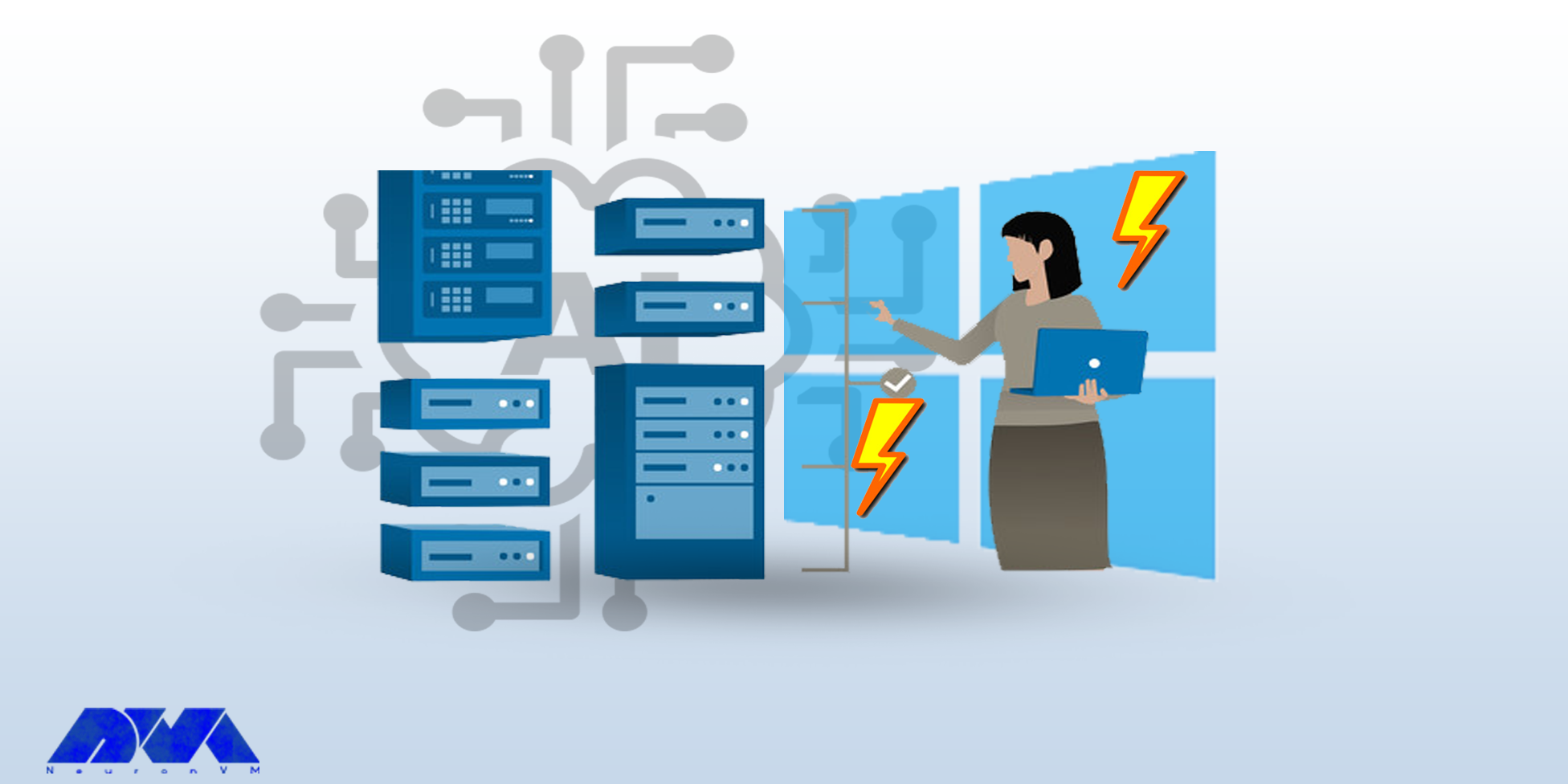
    The impact of supercharged computing power, especially when hosted on Virtual Private Servers (VPS), on AI applications is significant and multifaceted.

    The supercharged computing power provided by VPS enhances the capabilities of AI applications, enabling faster processing, more complex models, real-time capabilities, and increased accessibility for a wide range of users and organizations. However, careful consideration of security and scalability is crucial for realizing the full potential of VPS in the context of AI.

    NeuronVM is one of the most reliable and powerful providers of Windows VPS. So, move and purchase a VPS service to enjoy artificial intelligence and ease your work.

    Enhanced Security and Privacy

    Windows VPS providers often implement strong security measures that help protect your AI applications and data from potential threats.

    VPS servers generally provide strong security and protection measures for users’ data and resources. It is also possible to provide compliance certificates on these servers, which is important for businesses in regulated industries.

    Therefore, the security of these servers provides users with confidence and the use of artificial intelligence can be done safely.

    Cost-Effectiveness and Scalability

    One of the beauties of working with Windows VPS is its flexible environment, which can be easily expanded or reduced according to your needs. This advantage is very significant for artificial intelligence applications because these applications have different computational requirements.

    wiwndows VPS advantages for AI

    So, Windows VPS allows you to easily scale your computing resources as needed and meet the computing needs of different AI applications. Also, VPS hosting is often more affordable than maintaining physical servers, especially for small to medium AI projects. You can choose a hosting plan that fits your specific resource needs.

    Seamless Integration with Windows Ecosystem

    Seamless integration with the Windows VPS ecosystem can offer several benefits for AI applications, but developers should carefully assess the specific needs and considerations of their applications to make informed decisions. It’s essential to strike a balance between leveraging the advantages of the Windows environment and addressing any challenges that may arise during development and deployment.

    Also, integration with Windows services and APIs (Application Programming Interfaces) can provide AI applications with additional functionalities, such as accessing file systems, databases, and other Windows-specific features. This can enhance the overall capabilities of the AI application.

    The Windows ecosystem offers a variety of development tools and frameworks that can facilitate the development and deployment of AI applications. Familiar tools such as Visual Studio and support for popular AI frameworks can streamline the development process.

    Accessibility and Remote Collaboration

    You can access your resources from anywhere by purchasing Windows VPS and an internet connection. In this way, it becomes easier to manage and monitor artificial intelligence programs. Even if you don’t have a physical presence in the data center. With a Windows VPS, you can remotely access your AI environment from anywhere, facilitating convenient management and monitoring of your applications.

    Conclusion

    Artificial intelligence, which is advancing rapidly, has attracted the attention of many users and has a lot of use. Considering the factors mentioned in this post, we can conclude that Windows VPS is a wonderful host for AI programs. So, by purchasing a Windows virtual server, benefit from this professional and practical assistant without any problems. Contact us with a comment, if you have any questions.

  • Empowering Digital Marketing Strategies with Windows VPS

    Empowering Digital Marketing Strategies with Windows VPS

    Nowadays, businesses are constantly seeking ways to stand out from the competition and enhance their online presence. One effective strategy that has gained significant traction is the use of Windows Virtual Private Servers (VPS) in digital marketing. Windows VPS offers numerous benefits and features that can empower businesses to achieve their marketing goals more efficiently and effectively. In this article, we will explore the various ways in which Windows VPS can bolster digital marketing efforts and help businesses stay ahead in the rapidly evolving online landscape.
    Introduction to Windows VPS in Digital Marketing

    Before delving into the benefits of Windows VPS, let’s first grasp the concept behind it. A Virtual Private Server is essentially a virtual machine that provides dedicated resources and a unique IP address. This allows businesses to control their online operations seamlessly. Windows VPS, specifically designed to run on Windows operating systems, offers enhanced compatibility and familiarity to businesses already using Windows-based software for their digital marketing campaigns.

    Windows VPS Introduction

    The Benefits of Windows VPS for Digital Marketing

    Digital Marketing Windows VPS offers several advantages that can significantly boost marketing strategies. Firstly, by utilizing a VPS, businesses gain complete control over their hosting environment, ensuring maximum uptime and stability. Additionally, Windows VPS allows for easy scalability, enabling businesses to adapt to fluctuating demands and accommodate sudden spikes in website traffic or marketing campaigns.

    Moreover, Windows VPS offers robust security features, protecting sensitive data and customer information, essential in the age of cyber threats and data breaches.

    Windows VPS offers numerous benefits and features that can empower businesses to achieve their marketing goals more efficiently and effectively.

    Enhancing Website Performance with Windows VPS

    One of the most crucial aspects of any digital marketing strategy is a well-optimized website. Windows VPS can play a vital role in enhancing website performance. With dedicated resources and lower server load compared to shared hosting, businesses can experience faster page load times, smoother user experience, and decreased bounce rates. This improved website performance not only leads to higher conversion rates but also positively impacts search engine rankings, contributing to better organic visibility.

    Enhancing Website Performance with Windows VPS

    Harnessing SEO Capabilities through Windows VPS

    Search Engine Optimization (SEO) is integral to any digital marketing campaign. Windows VPS offers businesses additional tools and resources to improve their SEO efforts. With dedicated IPs, businesses can build a strong backlink profile without the risk of sharing an IP with potentially malicious websites.

    Harnessing SEO Capabilities through Windows VPS

    Windows VPS also enables businesses to run SEO tools and software continuously, ensuring comprehensive analysis, optimization, and monitoring of their website’s SEO performance.

    Leveraging Windows VPS for Social Media Marketing

    Social media marketing has become an indispensable part of digital marketing strategies. Windows VPS provides businesses with a reliable and controlled environment to execute their social media initiatives seamlessly.

    By utilizing Windows VPS, businesses can automate social media scheduling, manage multiple social media accounts simultaneously, and leverage powerful social media management tools. Such capabilities enhance productivity, consistency, and engagement, enabling businesses to reach and connect with their target audience more effectively.

    VPS for Social Media Marketing

    Windows VPS: A Powerful Tool for Email Marketing

    Email marketing remains one of the most potent channels for customer engagement. Windows VPS offers exceptional support for email marketing initiatives. With dedicated resources, businesses can send large volumes of emails efficiently without the risk of being classified as spam.

    Email Marketing

    Windows VPS also provides businesses with enhanced deliverability, improved tracking and reporting capabilities, and the ability to efficiently manage email lists and campaigns. These features contribute to a more effective and successful email marketing strategy.

    Conclusion

    In the vast digital marketing landscape, businesses must empower themselves with the right tools and technologies to stand out and succeed. Windows VPS offers a wide array of benefits, from enhancing website performance, harnessing SEO capabilities, leveraging social media marketing, to optimizing email marketing efforts. By embracing Windows VPS, businesses can strengthen their digital marketing strategies, drive growth, and establish a strong online presence. Digital Marketing Windows VPS has become an indispensable tool for businesses aspiring to thrive in the ever-evolving online world.

  • The Clever One’s Guide to Buying Windows 10 VPS

    The Clever One’s Guide to Buying Windows 10 VPS

    Today we gonna learn “The Clever One’s Guide to Buying Windows 10 VPS”. However, before we start this tut there are some points to remember. Whether you are a tech enthusiast, developer, or business owner, our Windows 10 virtual server is tailored to meet your specific requirements. You need a Windows VPS with an uptime % 99.99, Connection without delay, simple, scalable, customizable, and affordable prices.

    Windows 10 virtual server is a virtual machine you can use as a dedicated environment to your web projects, So get ready to elevate productivity.

    How to Order a Windows 10 VPS

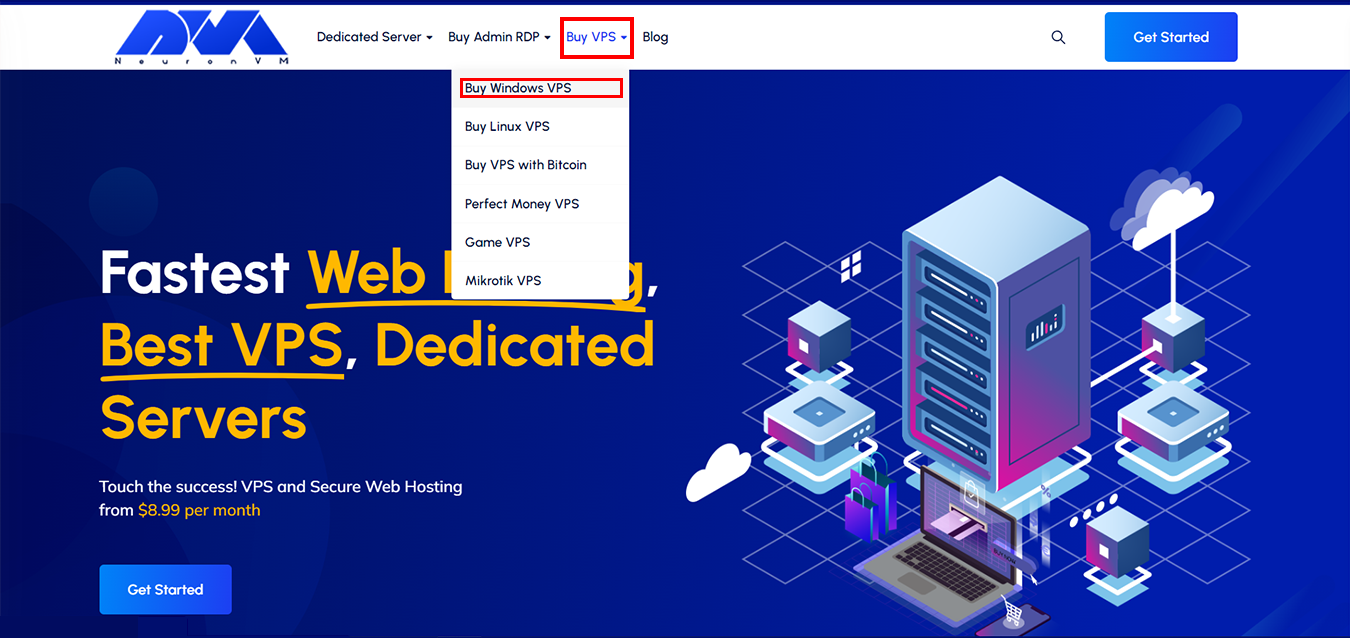
    To begin! Go to the NeuronVM website, Click on “Buy VPS” then choose “Buy Windows VPS“:

    NEURONVM-HOME-PAGE

    Windows 10 Virtual Server Plans

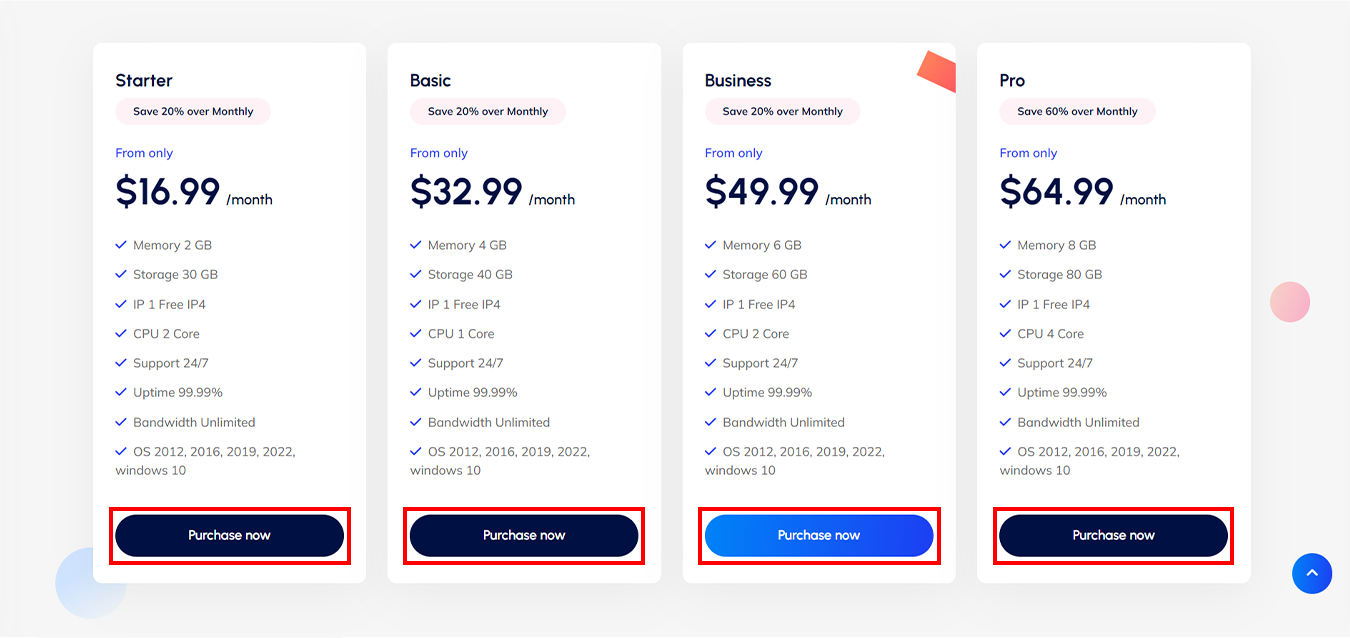
    Choose a plan that fits your goals:

    NEURONVM-AVAILABLE-WINDOWS VPS PLANS

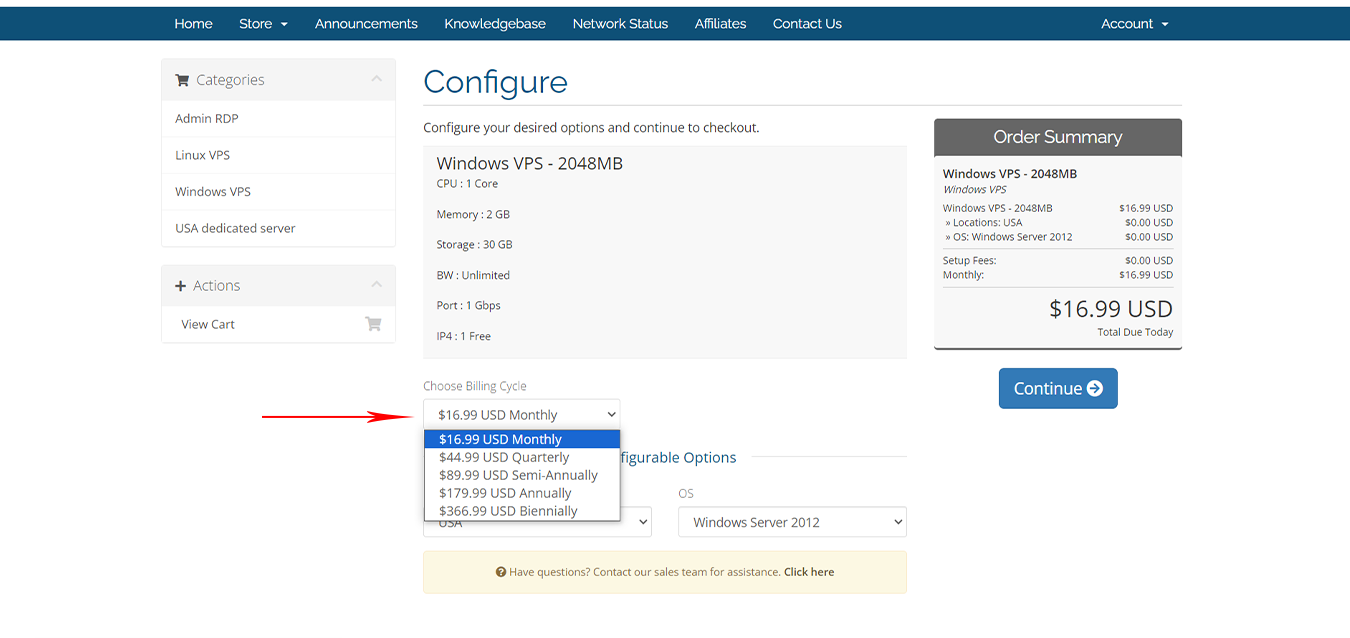
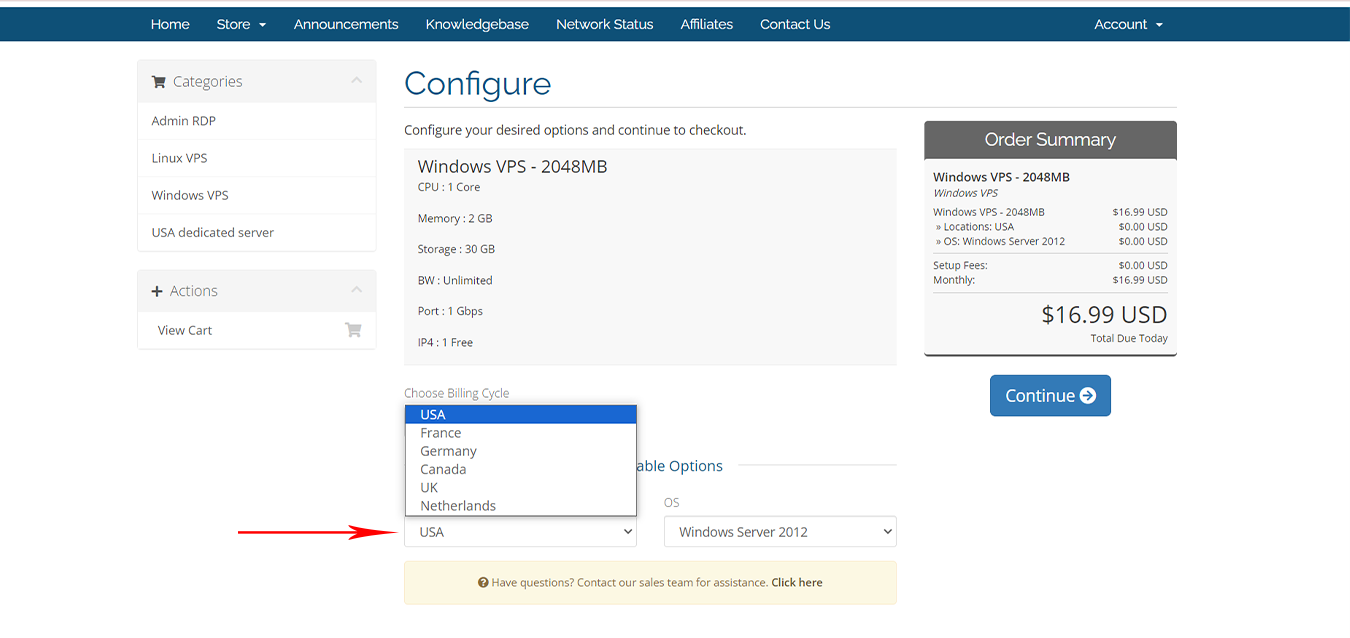
    Choose your ” Billing Cycle “:

    NEURONVM-CONFIGURE-PAGE

    Next, choose one of the 6 available options for the location:

    NEURONVM-SELECT-LOCATION-PAGE

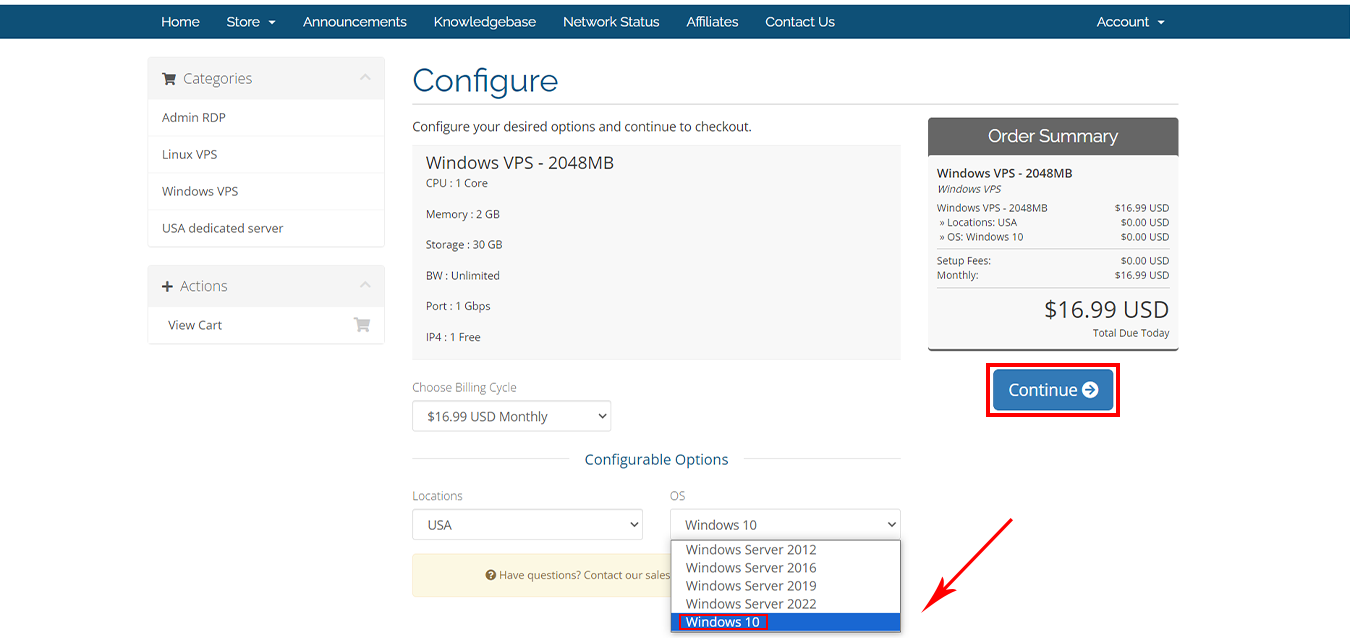
    At this stage, to buy a Windows 10 VPS, select the ” Windows 10 ” option from the operating systems, And press ” Continue “:

    how to select OS for windows VPS

    If you have any promo code apply that and checkout:

    NEURONVM-CHECKOUT-PAGE2

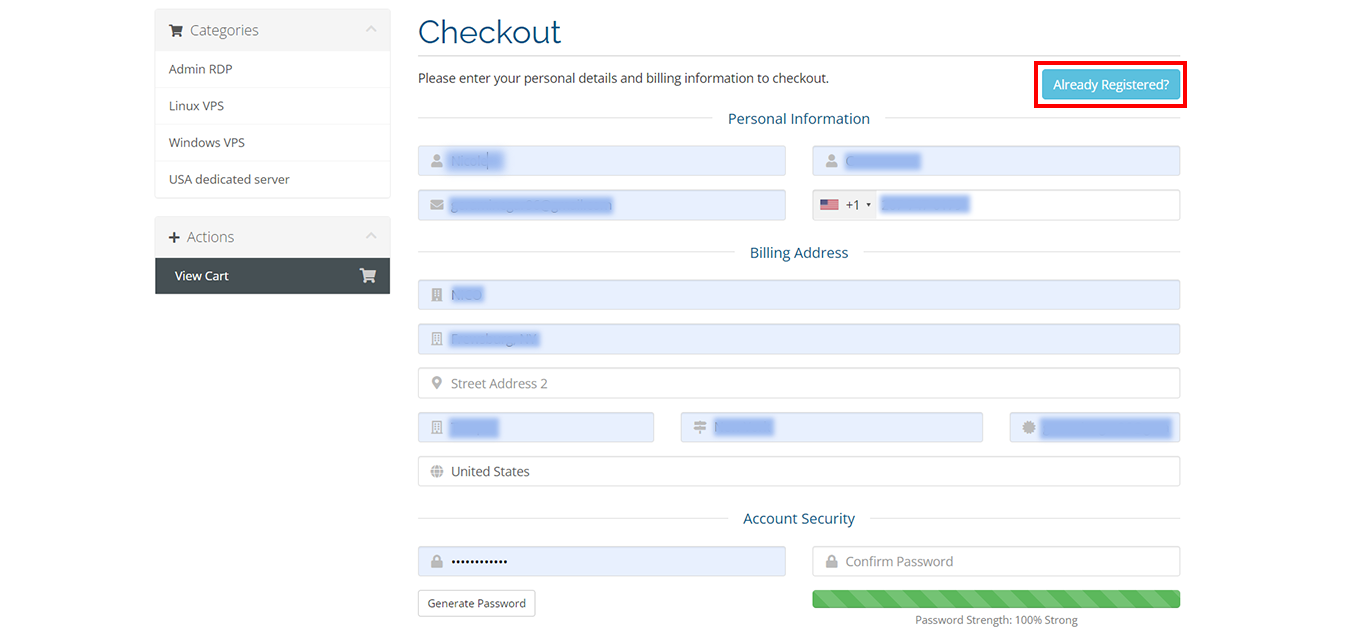
    Fill blanks with your ” Personal Details ” and scroll down for more:

    NEURONVM-CHECKOUT-PAGE2

    Windows 10 Virtual Server Payment Methods

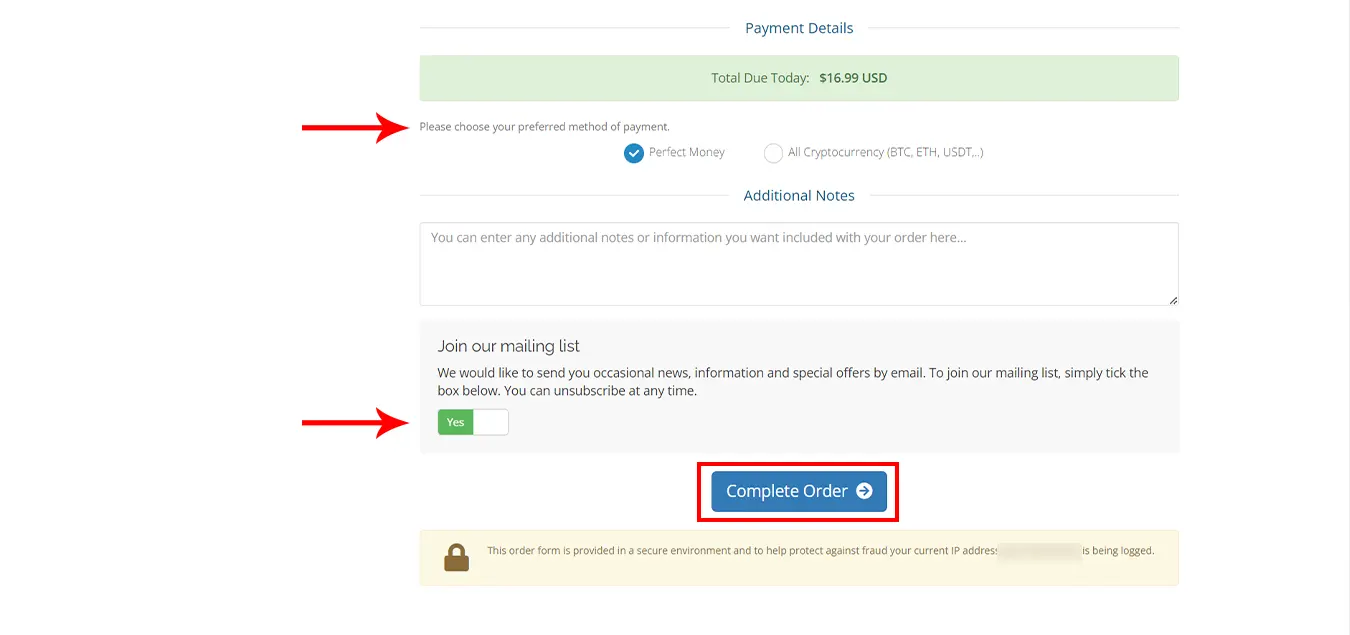
    You can choose your method of payment ” Perfect Money ” Or ” All Cryptocurrency like BTC, ETH, USDT.. “:

    NEURONVM-PAYMENT- for windows 10 vps

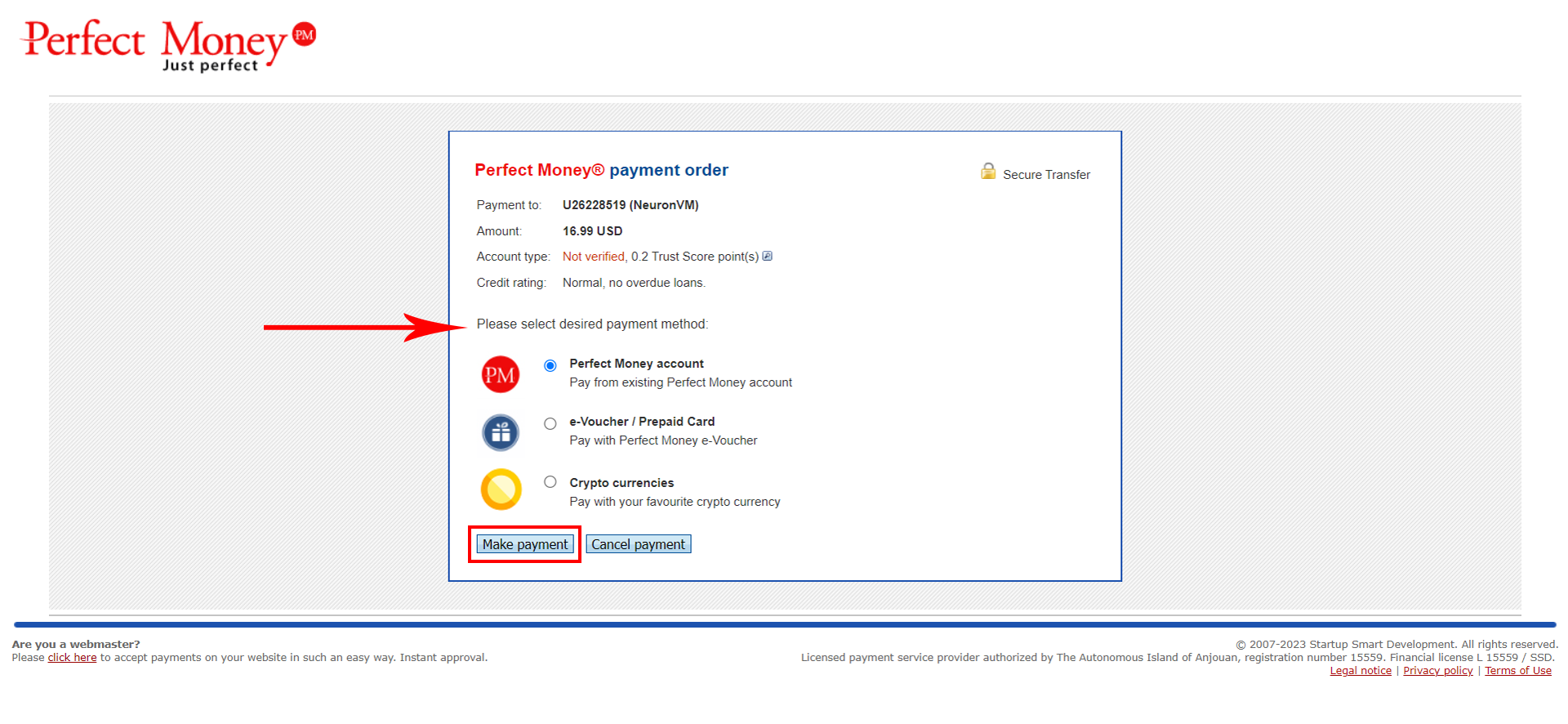
    Please select the desired payment method:

    buy windows 10 vps with perfect money

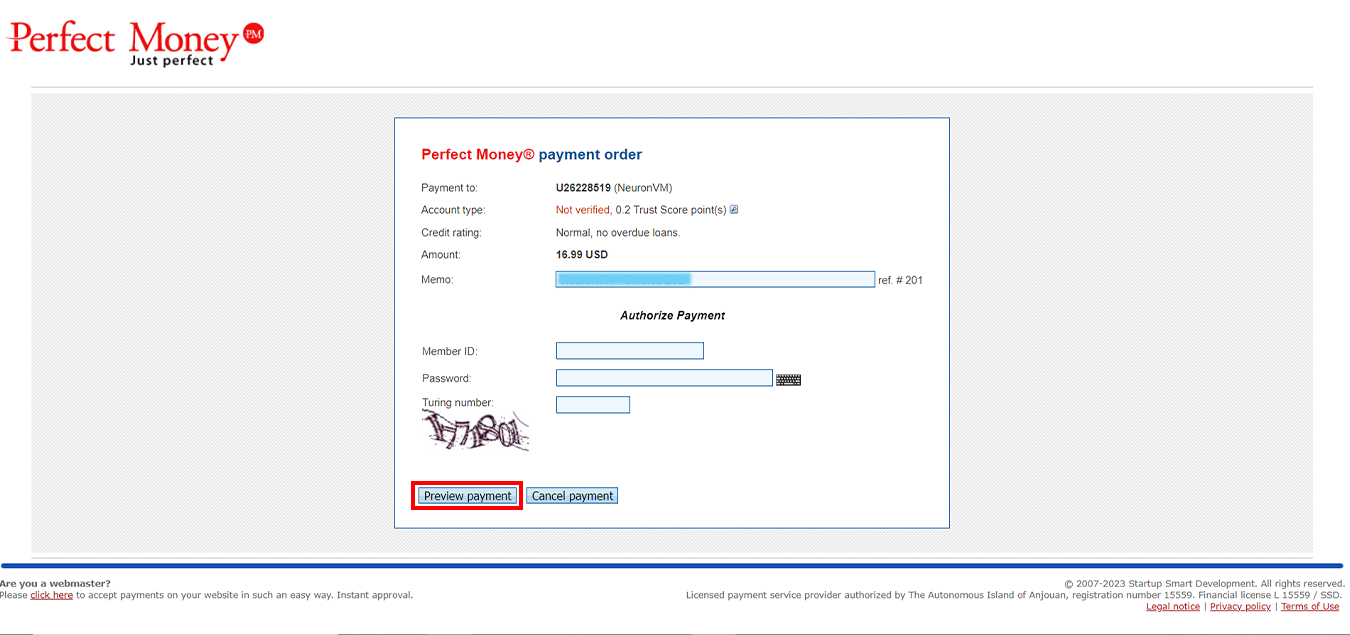
    Please fill “ Member ID “, ” Password ” and ” Turning number “:

    perfect money windows 10 vps

    Your purchase is now completed. Your desired server information will be sent to your email after a few minutes.

    Conclusion

    Thank you for being with us! For more information, visit the website.
    If you have a problem or question in any of the above steps, you can contact our experts 24/7 via ticket section in your user area.

  • The Smart Guide to Purchasing Linux VPS with LTC

    The Smart Guide to Purchasing Linux VPS with LTC

    Most organizations use virtual servers to reduce server hardware costs and reduce electricity and energy costs. Also, Virtual servers play a key role in building applications, tools, or environments.

    Another one of the best features of a Linux virtual server is its unlimited ability to provide the resources you need. If you need the best Linux VPS, follow the instructions in this guide to the end of this tutorial

    How to Select Linux VPS

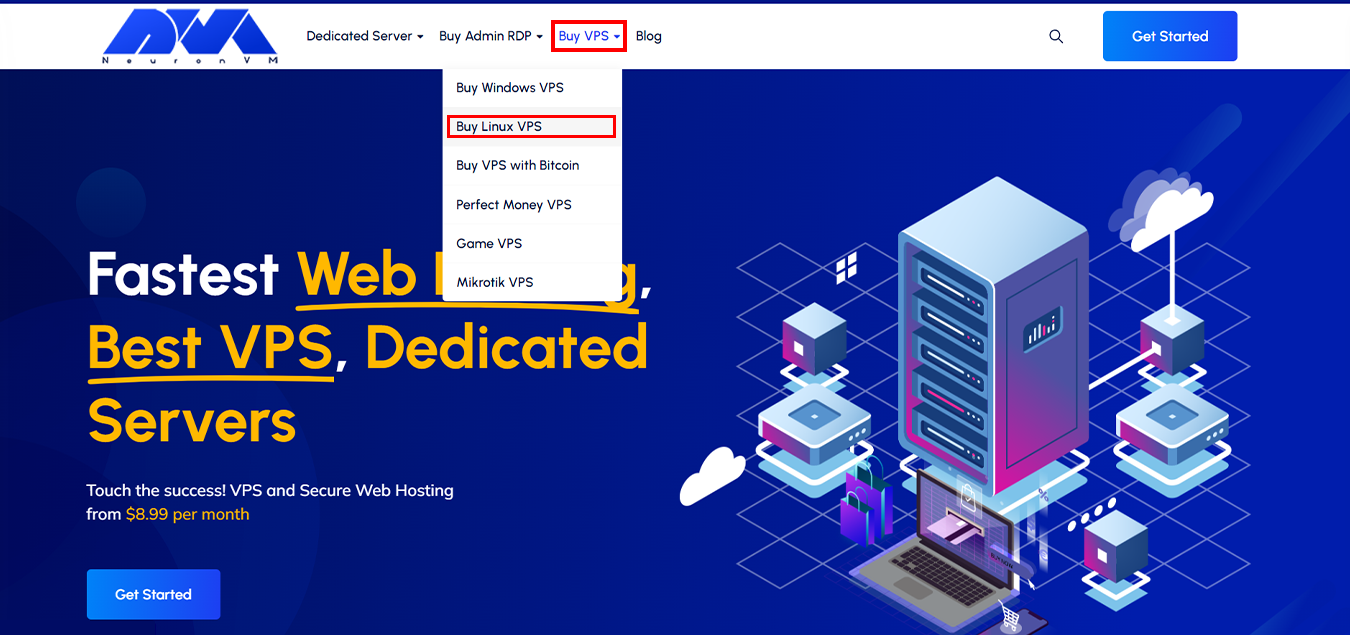
    To start the process, On the home page of Neuronvm, Select “Buy Linux VPS” option from the  “Buy VPS” menu:

    NEURONVM-HOME-PAGE

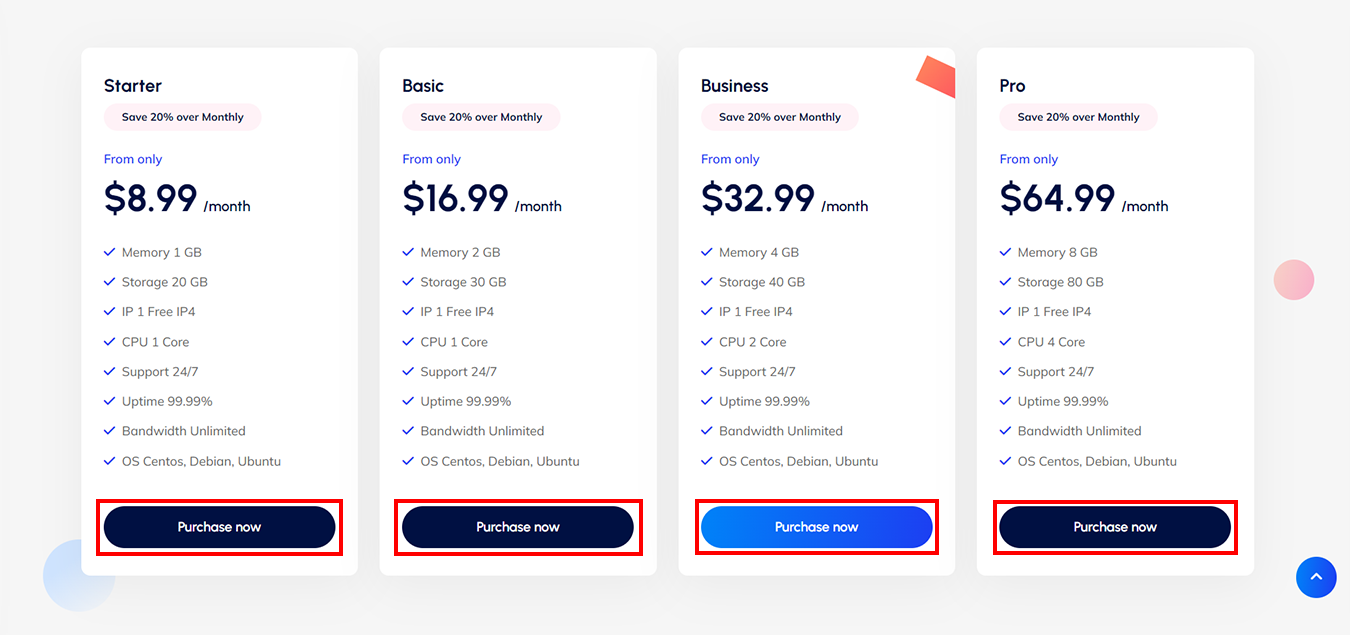
    Scroll down to choose the plan that suits your business goals:

    NEURONVM-AVAILABLE-LINUXVPSPLANS

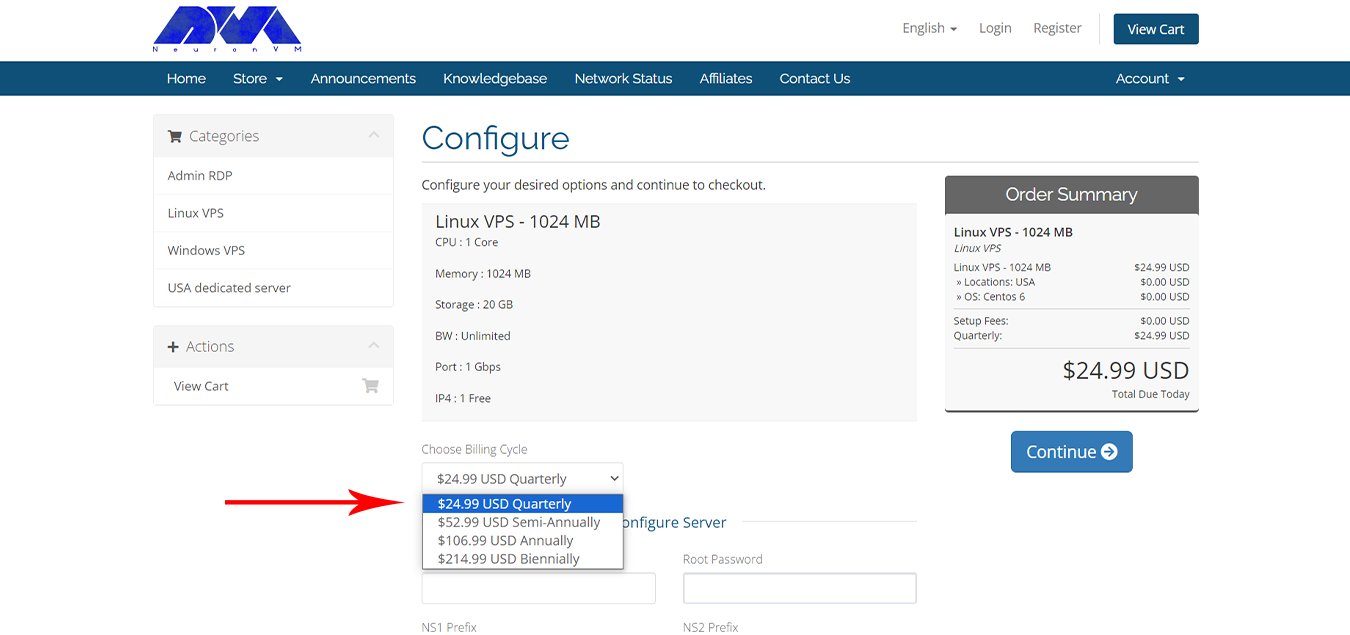
    Please choose the billing cycle slots, for your service according to your preference:

    NEURONVM-CONFIGURE-PAGE4

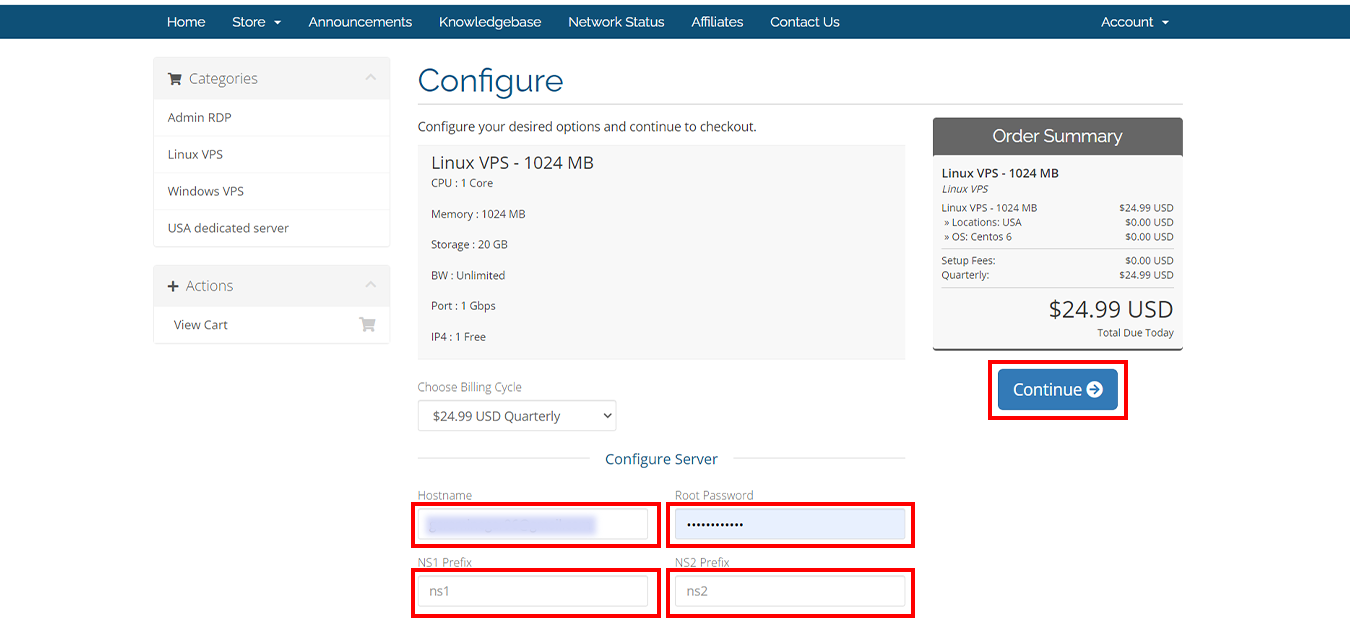
    On the configuration page, Carefully complete the billing cycle and server configuration options:

    Attention: Fill in the fields with “ns1” and “ns2“.

    NEURONVM-LINUXVPS-CONFIGURE-PAGE

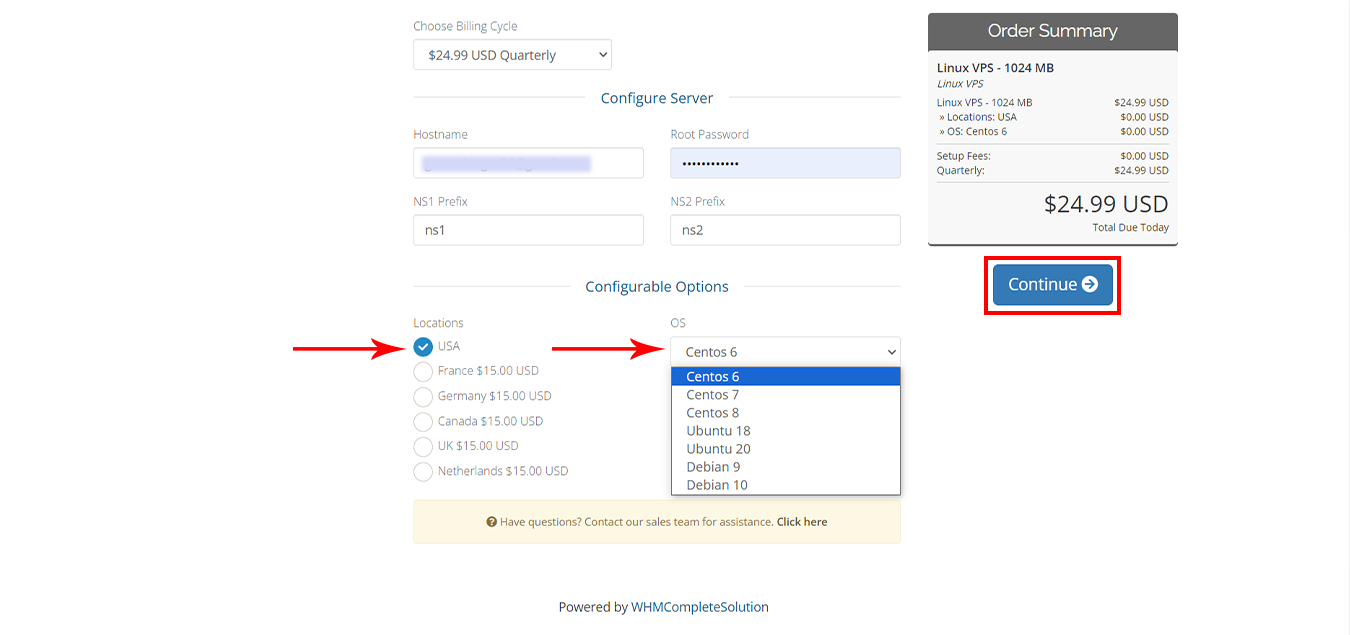
    Choose your desired location and operating system. Afterward, select “Continue“:

    NEURONVM-CONFIGURE-PAGE5

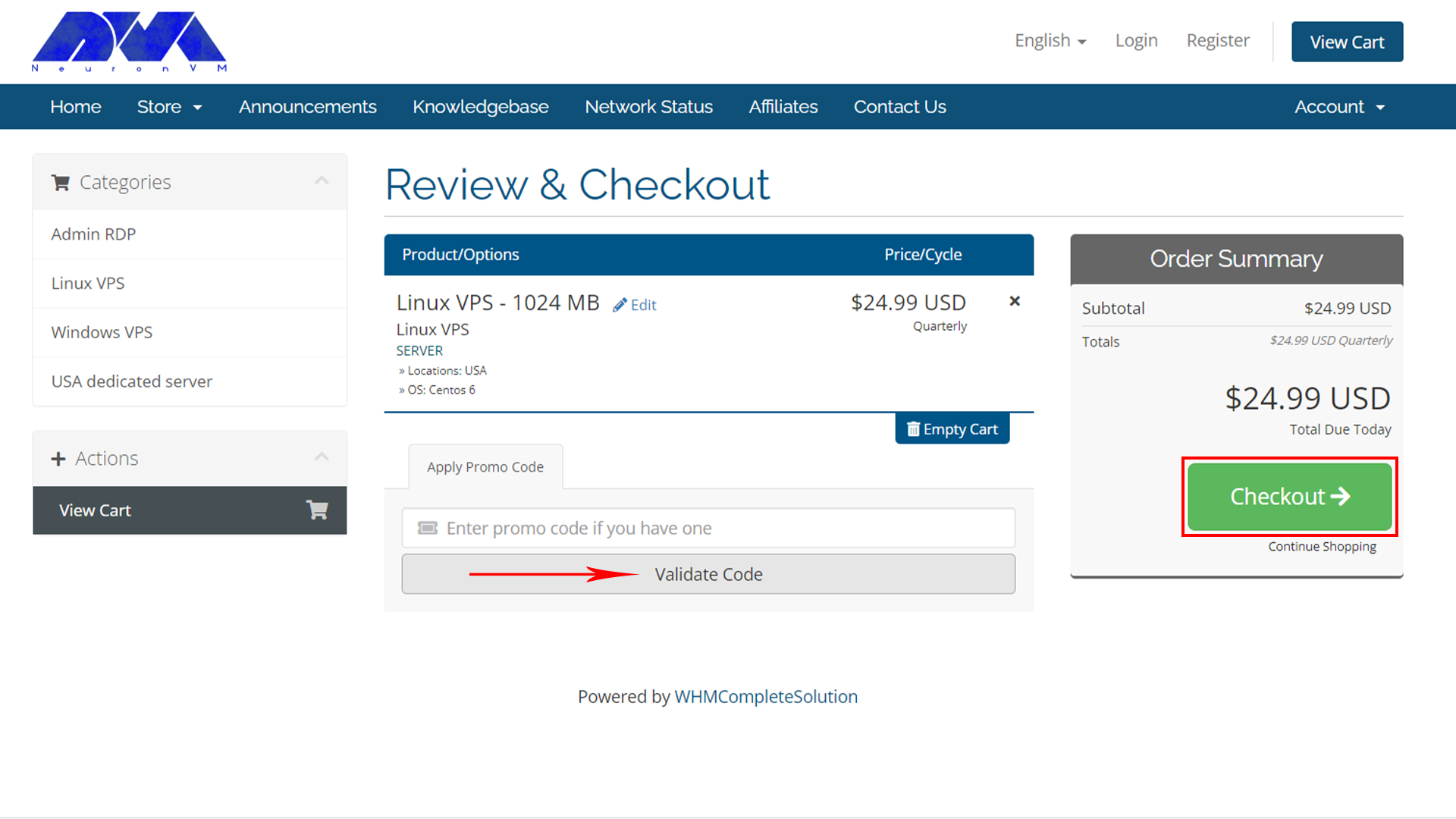
    At this stage, Please enter your own discount code and checkout:

    NEURONVM-CHECKOUT-PAGE

    Fill in your personal information with accuracy, But if you already have an account click on “already registered“:

    NEURONVM-CHECKOUT-PAGE2

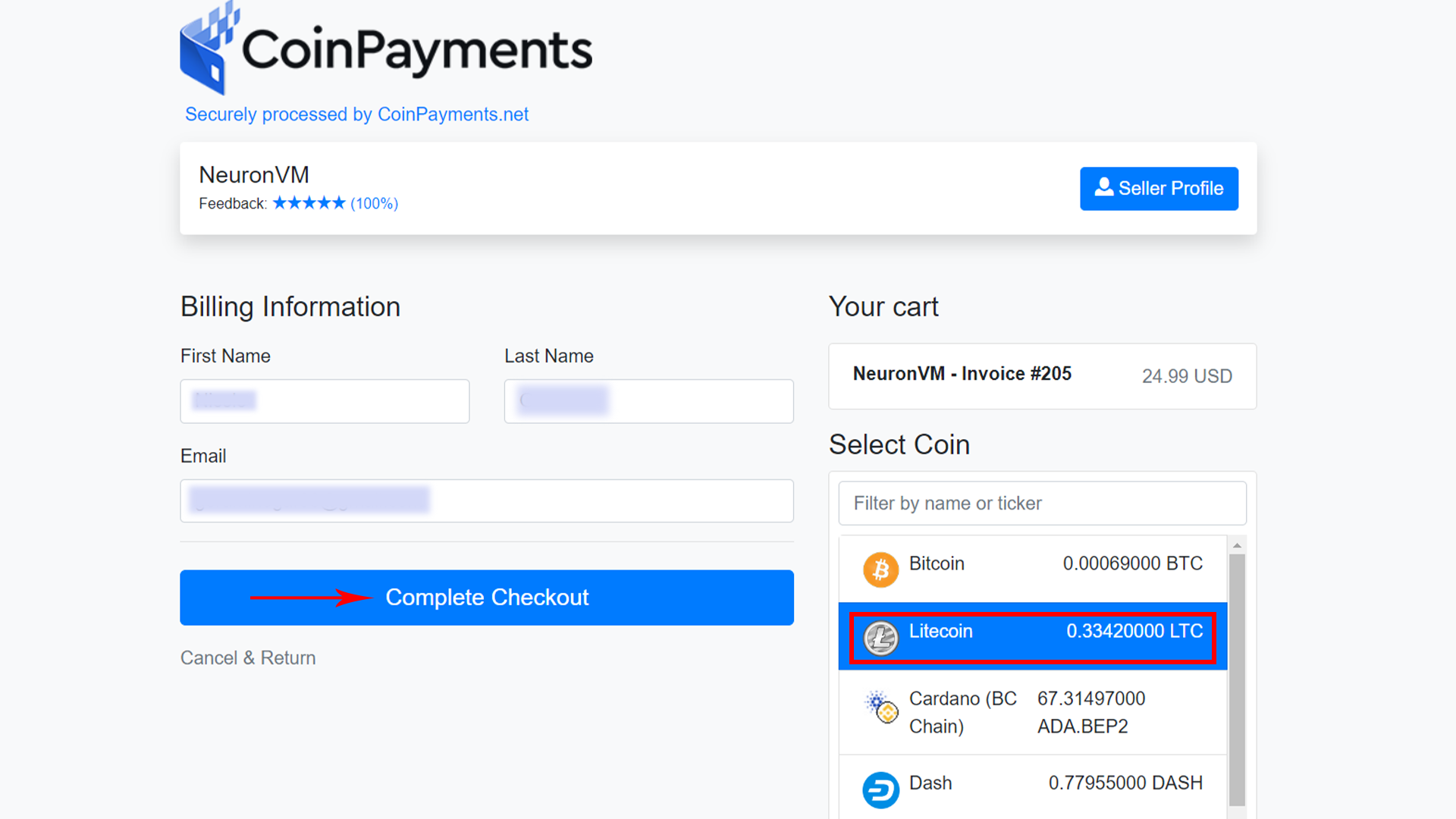
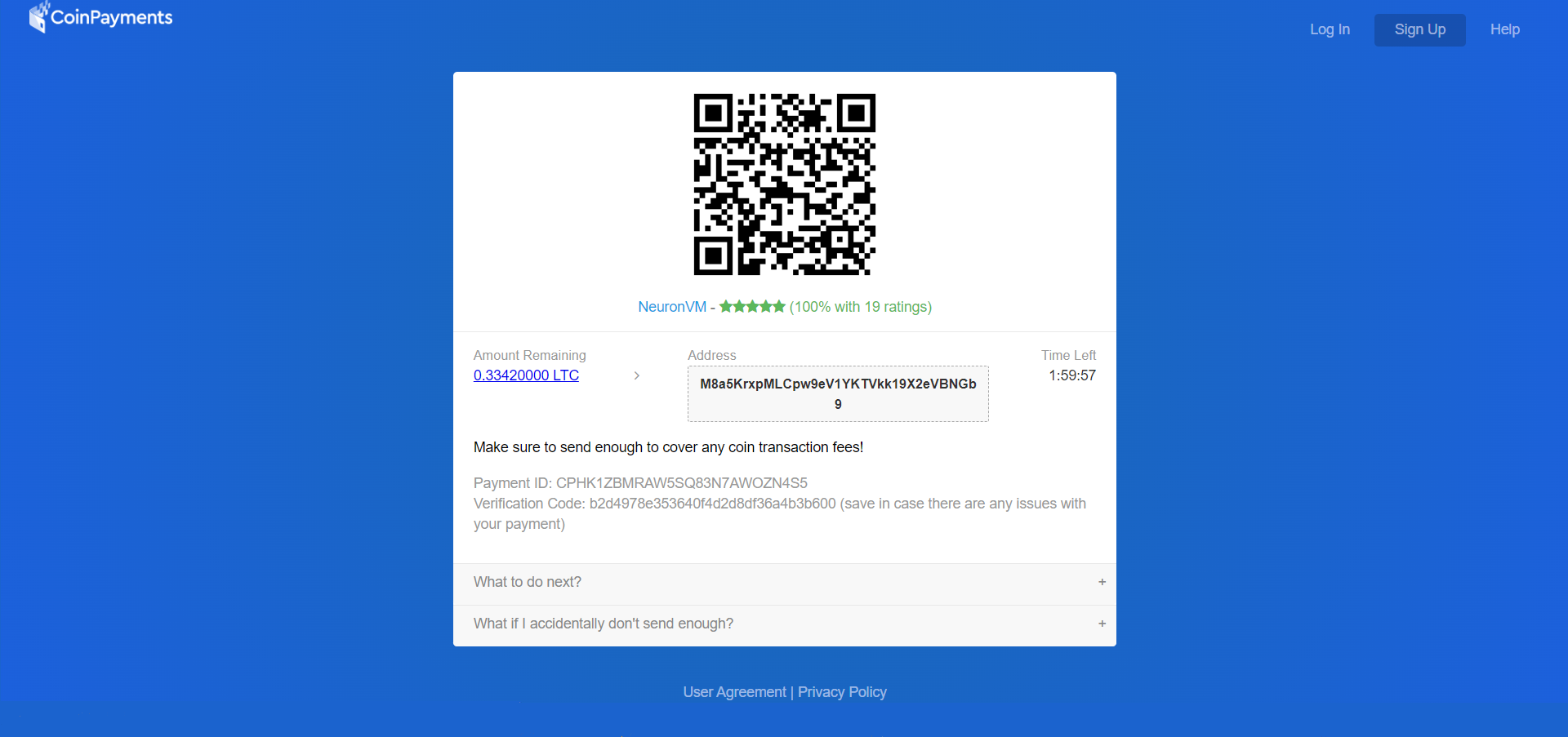
    Select “All Cryptocurrency (BTC, ETH, USDT, …)” to pay through LTC, And tap to “Complete Order“:


    To complete the order choose “Litecoin” and click on “Complete Checkout“:

    NEURONVM-LTC-PAYMENT-PAGE

    Complete your payment by the indicated deadline:

    NEURONVM-LTC-PAGE

    If the sales invoice is completed, it will be displayed.

    Conclusion

    In this article, we tried “How to Purchase Linux VPS with LTC from NeuronVM”, In case of problems, We are ready to serve you around the clock, We will get back to you in no time!

    NEURONVM-PAYMENT- for windows 10 vps
  • Gain Control and Flexibility with USA RDP

    Gain Control and Flexibility with USA RDP

    USA RDP (Remote Desktop Protocol) allows users to gain control of a remote computer located in the United States from anywhere in the world. This technology provides individuals with the flexibility to access and use a computer that is physically located in the US, giving them the ability to perform various tasks remotely. In this article, we will explain to you how to Gain Control and Flexibility with USA RDP.

    How can we have more control over our online activities?

    Using USA RDP can provide you with increased control over your online activities and enhance your overall internet experience. Here are some steps you can take to gain control:

    How can we have more control over our online activities

    1. Choose a reliable RDP provider: Select a reputable provider that offers USA-based servers. Look for providers with a solid track record, good customer reviews, and affordable pricing plans.

    2. Check server locations: Ensure that the provider has multiple server locations in the USA. This will give you more flexibility in choosing the location that best suits your needs.

    3. Opt for dedicated resources: Consider opting for a dedicated USA RDP instead of a shared one. Shared RDPs can be more affordable, but they might have limitations in terms of resource allocation and performance. A dedicated RDP will offer you a more stable and reliable connection

    4. Strong security measures: Make sure the RDP provider offers robust security measures like data encryption and two-factor authentication. This will help protect your online activities and ensure that your connection is secure.

    5. Customization options: Look for an RDP provider that allows you to customize your RDP environment. This could include selecting the operating system, installing specific software, or adjusting resource allocation according to your requirements. This level of customization will give you more control over your RDP experience.

    6. Reliable customer support: Ensure that the RDP provider offers reliable customer support that is available 24/7. In case you encounter any issues or need assistance, having responsive customer support will be crucial in gaining control over your RDP.

    How can we have more control over our online activities 2

    By following these steps, you can gain control and enjoy a seamless online experience with a USA RDP. Remember to also comply with the terms of service and laws in your country to ensure that your activities are legal and ethical.

    Flexible Work Solutions: Discover the Benefits of USA RDP

    Flexible work solutions have become increasingly popular in today’s workforce, and one of the tools that enables this flexibility is the use of USA RDP. This service allows individuals to access their work computers or servers remotely from anywhere in the world, using only an internet connection.

    Flexible Work Solutions Discover the Benefits of USA RDP

    Here are some of the key benefits of using USA RDP for flexible work solutions:

    1. Location Independence: One of the biggest advantages of USA RDP is that it allows individuals to work from anywhere, as long as they have an internet connection. This is particularly beneficial for individuals who prefer a nomadic lifestyle or need to travel extensively for work. It eliminates the need for physical office space and allows individuals to work from the comfort of their own homes or any other location of their choice.

    2. Cost Savings: With USA RDP, businesses can save on various costs associated with maintaining physical office spaces. This includes rent, utilities, office equipment, and other operational expenses. Instead, employees can work remotely, reducing the need for a physical office and enabling businesses to allocate their budget to other important areas.

    3. Increased Productivity: Studies have shown that remote workers tend to be more productive compared to those working in traditional office settings. USA RDP provides individuals with the flexibility to work during their most productive hours without the distractions often found in office environments. This results in increased efficiency and output.

    4. Work-Life Balance: USA RDP allows individuals to achieve a better work-life balance. Remote work enables employees to spend more time with their families, reduce commuting time, and have more flexibility in managing their personal commitments. This flexibility often leads to higher job satisfaction and overall happiness.

    Choosing the Best USA RDP Provider

    Choosing the best provider depends on your specific needs and requirements. Here are some factors to consider while selecting a provider:

    Choosing the best USA RDP provider

    – Server Locations: Ensure that the provider has servers located in the USA to ensure low latency and reliable connections.

    – Performance and Speed: Look for a provider that guarantees high-performance servers with fast network speeds, as this directly affects your browsing, streaming, and downloading experience.

    – Security and Privacy: Prioritize providers that offer strong encryption protocols to protect your data and ensure your online activities remain private.

    – Scalability: If you anticipate needing to scale your operations, consider providers that offer flexibility and scalability in terms of server resources and upgrade options.

    – Customer Support: Look for providers that offer 24/7 customer support, preferably through multiple channels such as live chat, email, and phone, to assist you in case of any technical issues.

    – Pricing and Plans: Compare pricing plans offered by different providers, considering factors such as server specifications, bandwidth allowance, and additional features like dedicated IP or DDoS protection.

    Our website (NeuronVM) offers USA RDP service to users at a competitive price compared to other competitors, the highest quality and efficiency, and 24/7 support.

    Read in this article Why NeuronVM is the Best Place to Buy USA Admin RDP?

    How to Buy USA RDP from NeuronVM

    How to Buy USA RDP from NeuronVM

    Buying USA RDP involves selecting a reliable service provider, comparing pricing plans, selecting the desired specifications, and making an online payment. Once the payment is confirmed, the user receives the RDP credentials to access a remote desktop located in the USA. You can learn how to Buy USA Admin RDP by Crypto from NeuronVM by referring to the article.

    Conclusion

    In conclusion, utilizing USA RDP provides individuals with the advantage of increased control and flexibility in their online activities. Whether it is for personal or business purposes, having access to a reliable and secure RDP can greatly enhance productivity and efficiency in today’s digital world.

  • Bitcoin Boulevard to France: Unlock RDP possibilities

    Bitcoin Boulevard to France: Unlock RDP possibilities

    In a today’s world, Remote Desktop Protocol (RDP) has become an integral part of businesses and individuals across the globe. The ability to access computers or servers remotely provides unprecedented convenience and flexibility. When it comes to purchasing RDP, opting for various locations like France can offer distinct advantages. Notably, the ability to buy France RDP with Bitcoin presents an easy and secure method to acquire this invaluable service. In this article, we will explore the benefits of using France RDP and how businesses and individuals can harness its potential.

    France wavering flag

    The Advantages of Using France RDP

    France has a distinct internet infrastructure, with features that set it apart from other countries.

    Firstly, France has achieved high broadband penetration rates, as a result of significant investments by both the government and private service providers. This has led to widespread access to high-speed internet connections.

    Additionally, France has extensively deployed fiber-optic networks, allowing for fast and reliable internet access across homes and businesses. The backbone infrastructure in France is relatively centralized, particularly in cities like Paris, resulting in efficient routing and high-speed connectivity.

    The country also boasts a number of established internet exchange points (IXPs), which facilitate the exchange of internet traffic between different networks and ISPs, leading to improved local and regional internet performance.

    The Advantages of Using France RDP

    France’s regulatory environment plays a crucial role in shaping its internet landscape. The country promotes competition among ISPs, resulting in a diverse market with multiple players offering different services. This competitive environment drives innovation and enhances the quality and affordability of internet services.

    Furthermore, France places a strong emphasis on privacy, with stringent regulations in place to protect users’ personal information. Notably, the General Data Protection Regulation (GDPR) applies to any entity processing personal data of individuals within the EU, ensuring data protection and privacy.

    Additionally, France advocates for content localization policies, requiring certain digital content to be available in French and compliant with local regulations. This includes streaming platforms, online marketplaces, and search engines providing localized versions for French users.

    How to Buy France RDP with Bitcoin?

    There are not many providers out there that have the bitcoin as one of their payment options, let alone selling it based on location. NeuronVM is one of the few places you can easily buy your needed services and pay with cryptocurrencies like Bitcoin. In this section I’m going to show you how you can buy France RDP with Bitcoin without facing any issues. Here we go:

    Buying France RDP
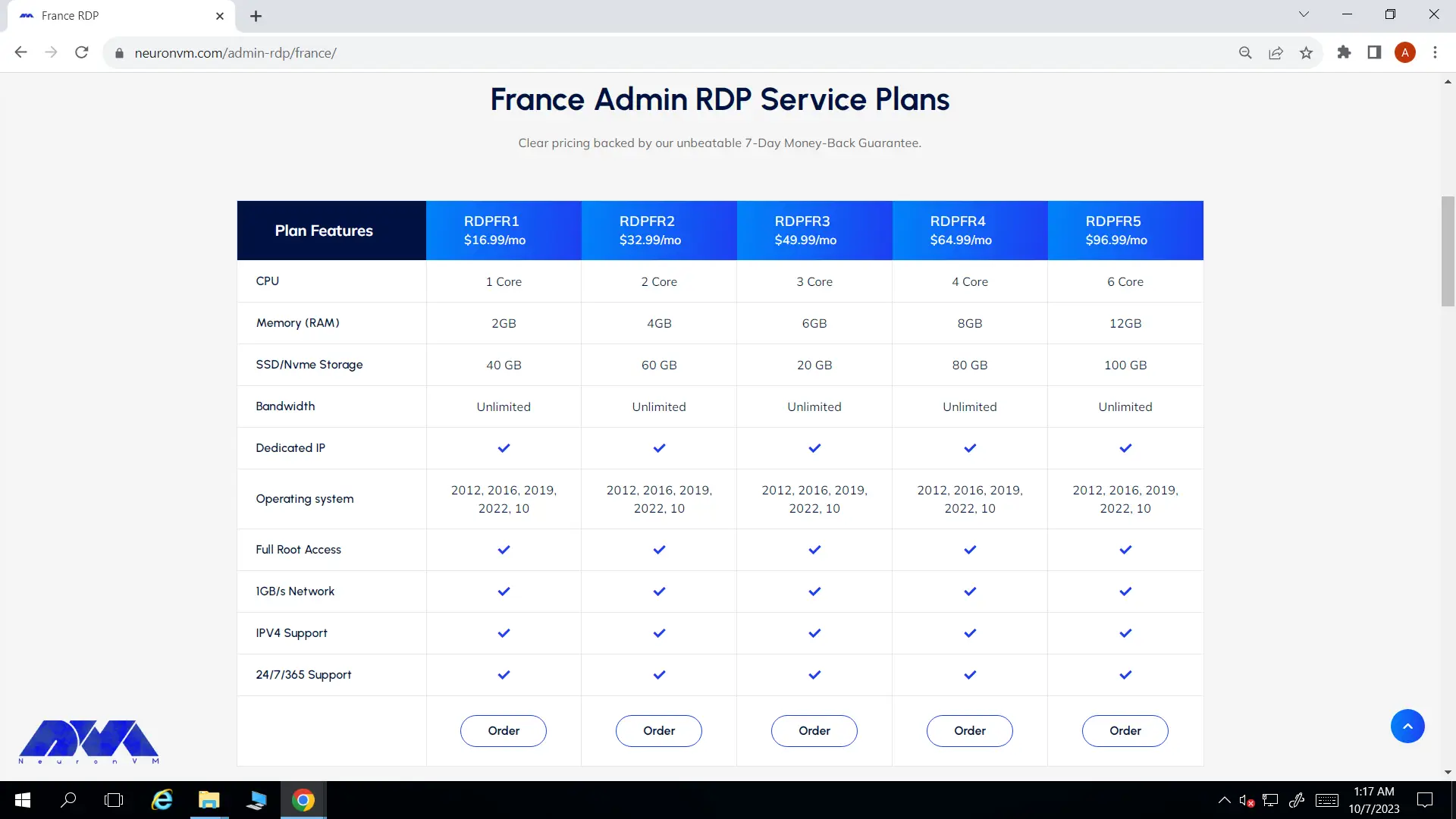
    • On France RDP page, scroll down and you will see the different plans listed there. Choose your preferred plan and click on Order.

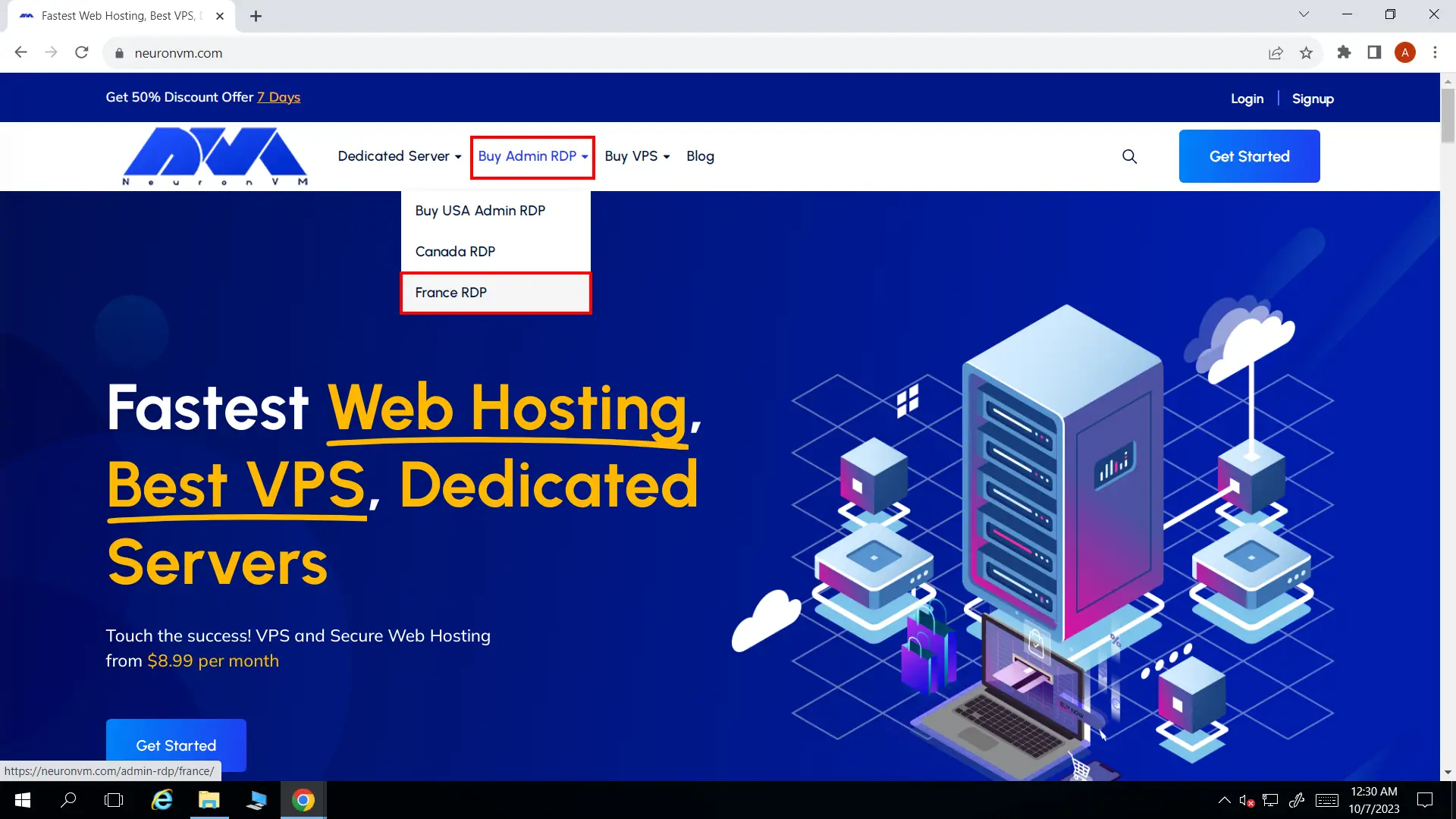
    Choosing preferred plan
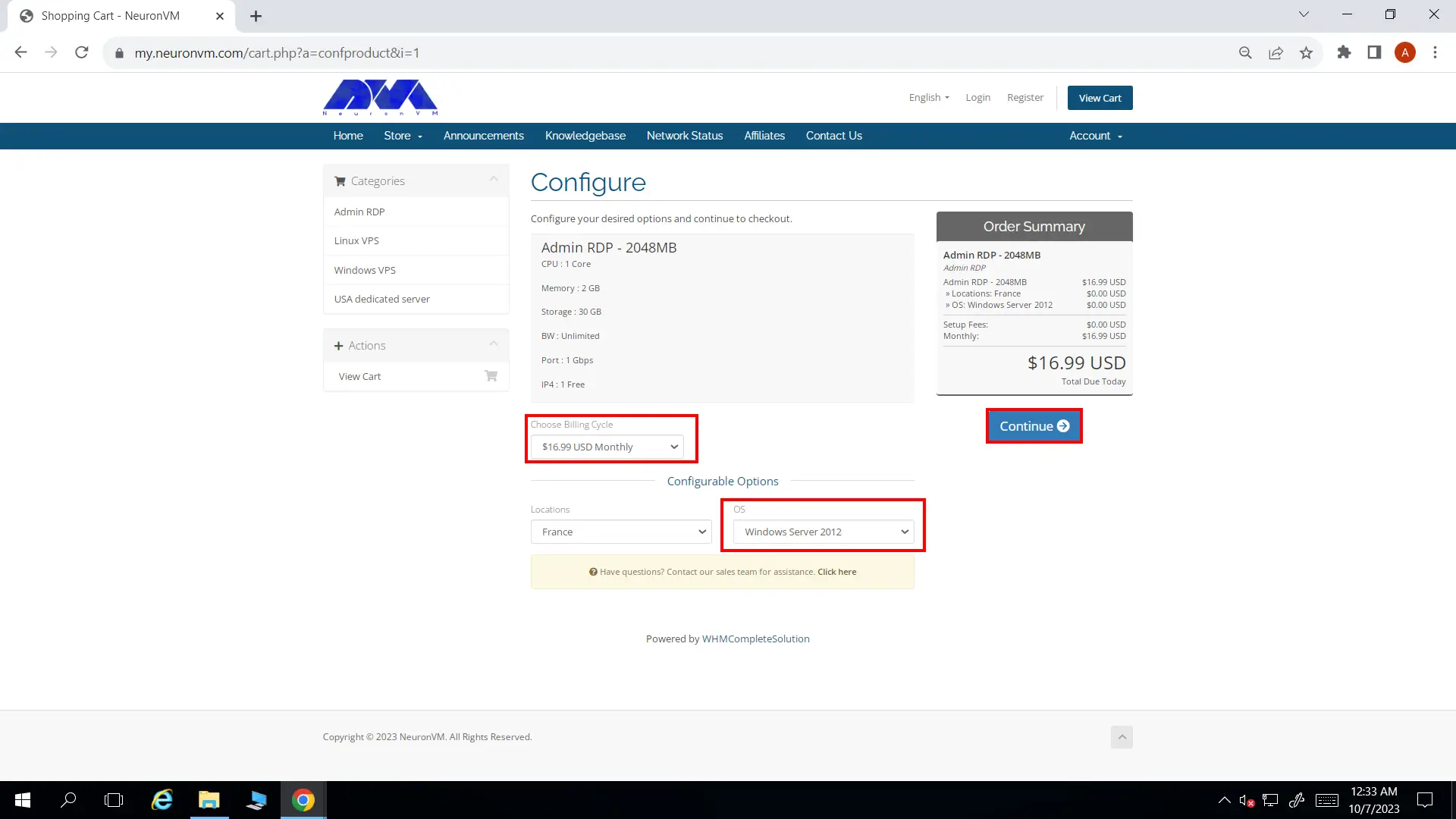
    • You’ll be landed on configure page. You can change a few options like Preferred OS and the Billing Cycle to your liking.
    Configure
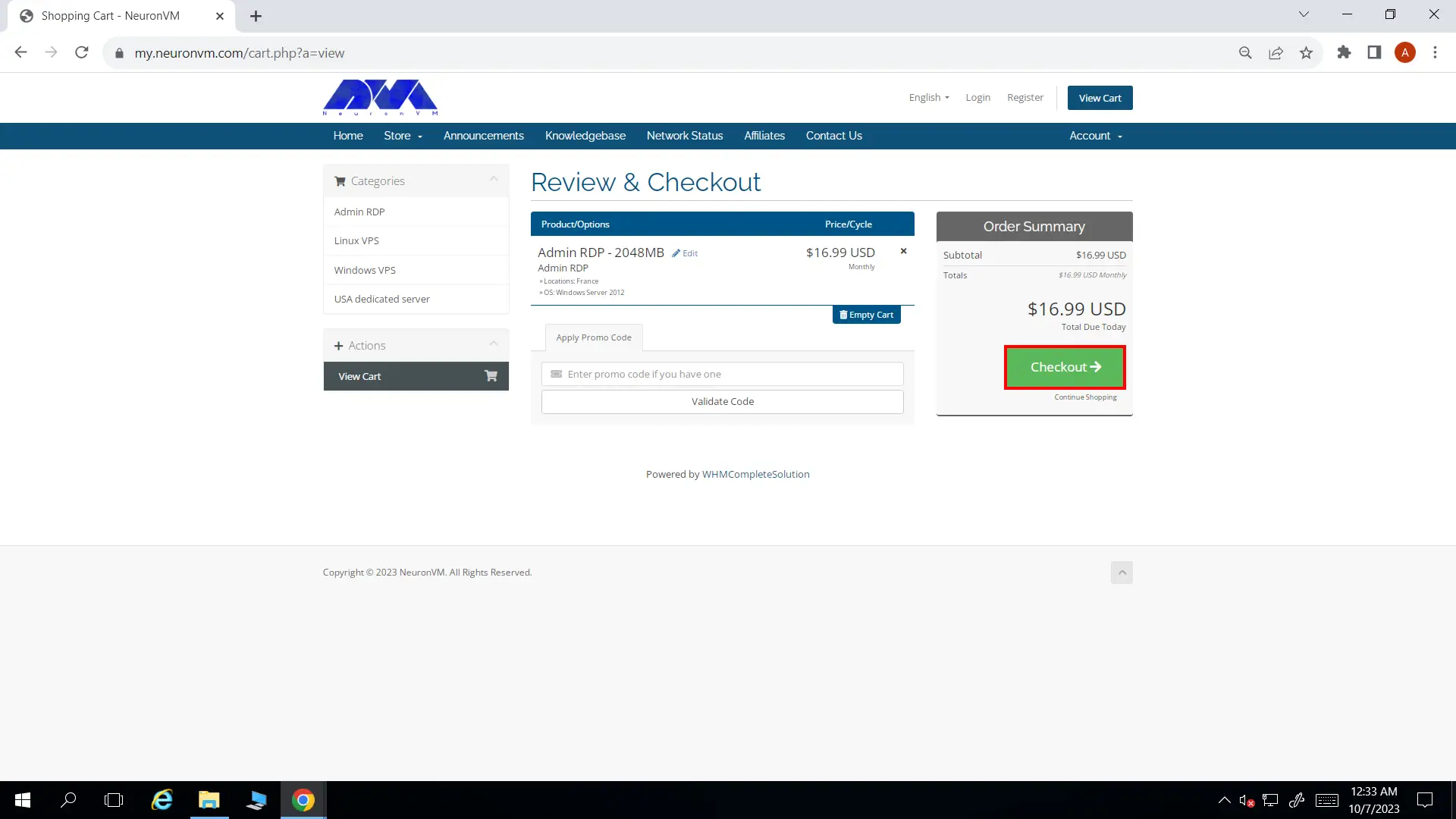
    • In Review and Checkout page you can enter a promo code if you have any, then click on Checkout button and proceed.
    Review and checkout
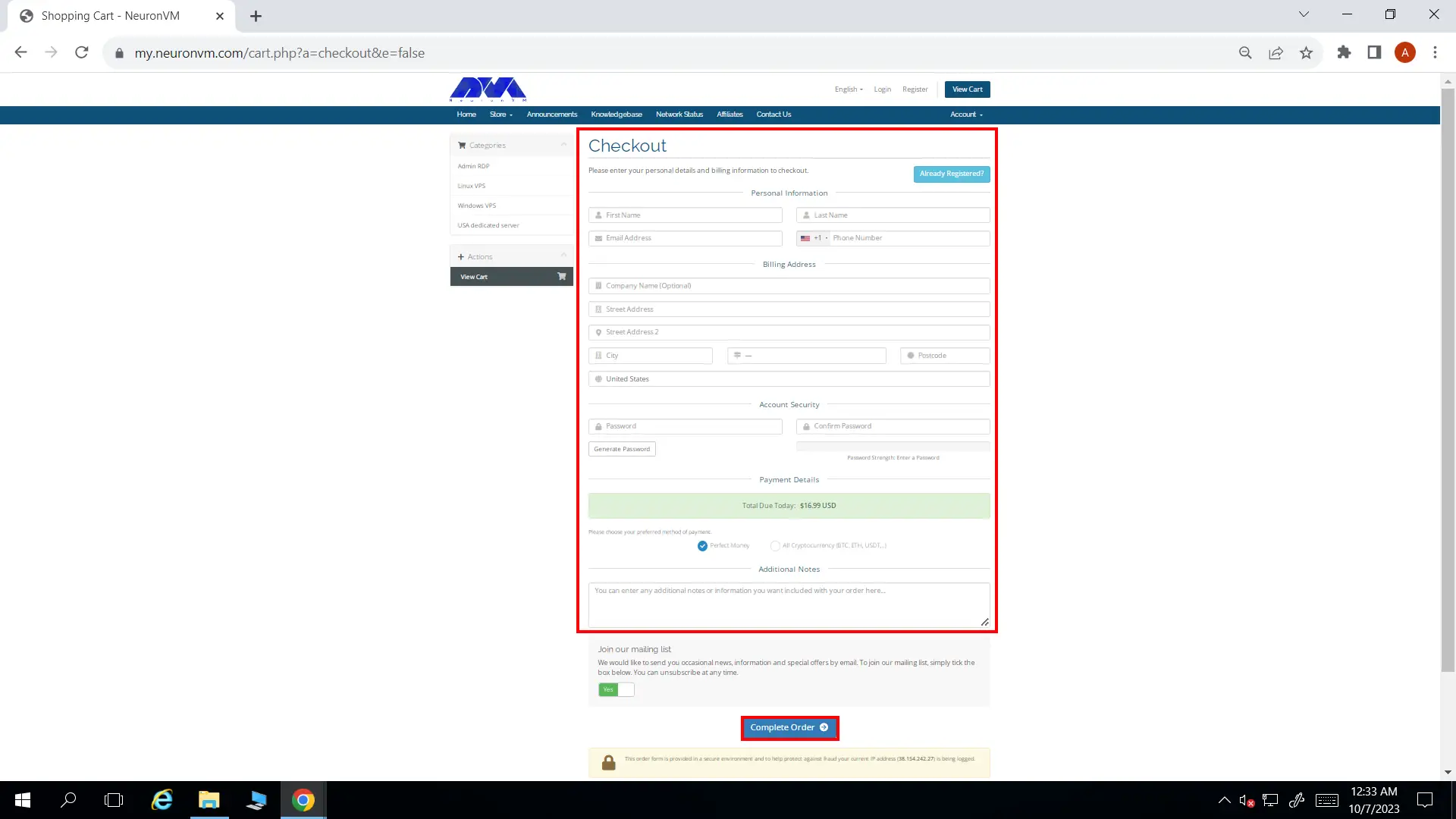
    • NeuronVM will require some of your information to complete the ordering process. If you’ve registered in our website before, you can simply click on Already Registered button. At the bottom of the page, choose All Cryptocurrencies and then click on Complete Order.
    Complete Order
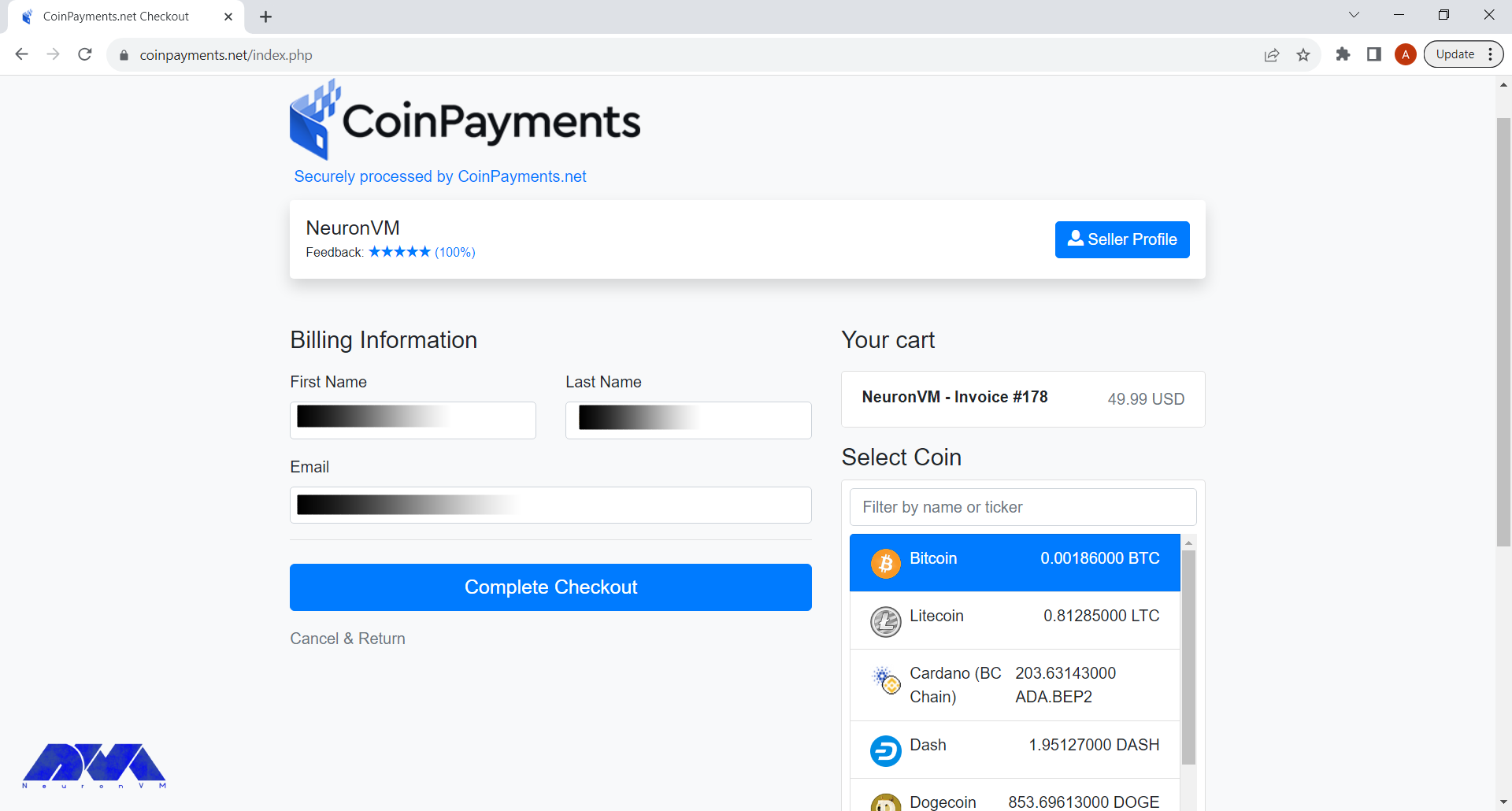
    • In the final step, choose Bitcoin as your preferred cryptocurrency and complete the buying process.
    Bitcoin France RDP

    After the payment is done, NeuronVM will instantly provide you with your France RDP and you can start using it. Remember if you had any issues going through this process, you can either comment down below or contact our friendly support team. We will get back to you in no time.

    Conclusion

    In conclusion, France RDP offers a multitude of benefits for businesses and individuals seeking reliable remote access solutions. The enhanced performance and connectivity provided by France’s strong network infrastructure ensure seamless and high-speed remote access experiences. Moreover, opting for France RDP means benefiting from advanced security measures, including robust data protection regulations and reliable server monitoring, reducing the risk of data breaches or cyberattacks.

    Conclusion: Why should you buy France RDP

    From a business perspective, France RDP allows companies to expand their reach globally, serving clients and customers from around the world with ease. Additionally, it offers cost-effective solutions, saving on hardware costs, maintenance, and operational expenses compared to setting up on-premises infrastructure.

    For individuals, France RDP provides access to enterprise-level software and resources at a fraction of the cost, enhancing productivity while saving on personal investments.

    With the ability to purchase France RDP using Bitcoin, the process becomes even more convenient and aligned with the modern trend of digital transactions. Embracing France RDP empowers users to bridge geographical barriers, streamline operations, and leverage the remarkable benefits of remote desktop protocol. So, embark on the Bitcoin Boulevard to France and unlock the infinite potential of RDP.

  • Get the Best of Windows 10 VPS and Buy it Now with BTC!

    Get the Best of Windows 10 VPS and Buy it Now with BTC!

    If you want to get the most out of Windows 10 VPS, you have to optimize its performance, security, and Usability. Also, the most important point about a Windows 10 VPS is that it should be a reliable, and efficient tool that supports your specific goals and requirements. It is cheaper than a dedicated server with a user-friendly and strong virtualize. Also, Windows 10 VPS is a good choice for you because you will have server resources exclusively. Here we will focus to get the best of Windows 10 VPS and buy it with bitcoin (BTC).

    Why Windows 10 VPS is the Best Choice?

    While Windows 10 VPS can be an excellent choice for certain use cases, it may not be the best option for everyone. You can use this server when your workflow or applications require Windows-specific software that is not available or easily adaptable to other operating systems, then a Windows 10 VPS is a natural choice.

    It ensures compatibility and seamless operation of such software. Also, Businesses and organizations that rely on Microsoft Active Directory for user management, authentication, and group policies may find Windows 10 VPS to be the best choice due to its seamless integration with these services.

    Windows 10 VPS allows you to stay up to date with the latest Windows security patches and updates using Windows Update. It ensures the security and stability of your server.

    It’s essential to consider the following factors when determining if a Windows 10 VPS is the best choice for you:

    • Windows licensing can add to the overall cost of hosting a Windows 10 VPS, making it potentially more expensive than Linux alternatives.
    • If your applications and workflow are not dependent on Windows-specific software, a Linux VPS might offer a cost-effective and efficient alternative.
    • If you or your team have expertise in Linux, it may be more practical to choose a Linux VPS and adapt your workflow accordingly.
    • Ensure that your VPS plan provides sufficient resources (CPU, RAM, storage) to meet your needs. Windows 10 typically has higher resource requirements compared to Linux.

    Now if you decide to buy a Windows 10 VPS server, we can recommend NeuronVM website, which is a reliable provider and can satisfy you because of 24/7 professional support and a variety of locations. It also is a great company with the purpose of giving the best services at a reasonable cost.

    How to Buy Windows 10 VPS With Bitcoin?

    Buying a Windows 10 VPS with Bitcoin involves a few steps, but it is really easy and fast. You’ll need to find a VPS provider (NeuronVM) that accepts Bitcoin as a payment method, create an account with them, select your desired Windows 10 VPS plan, and make the payment using Bitcoin. Follow the instructions below:

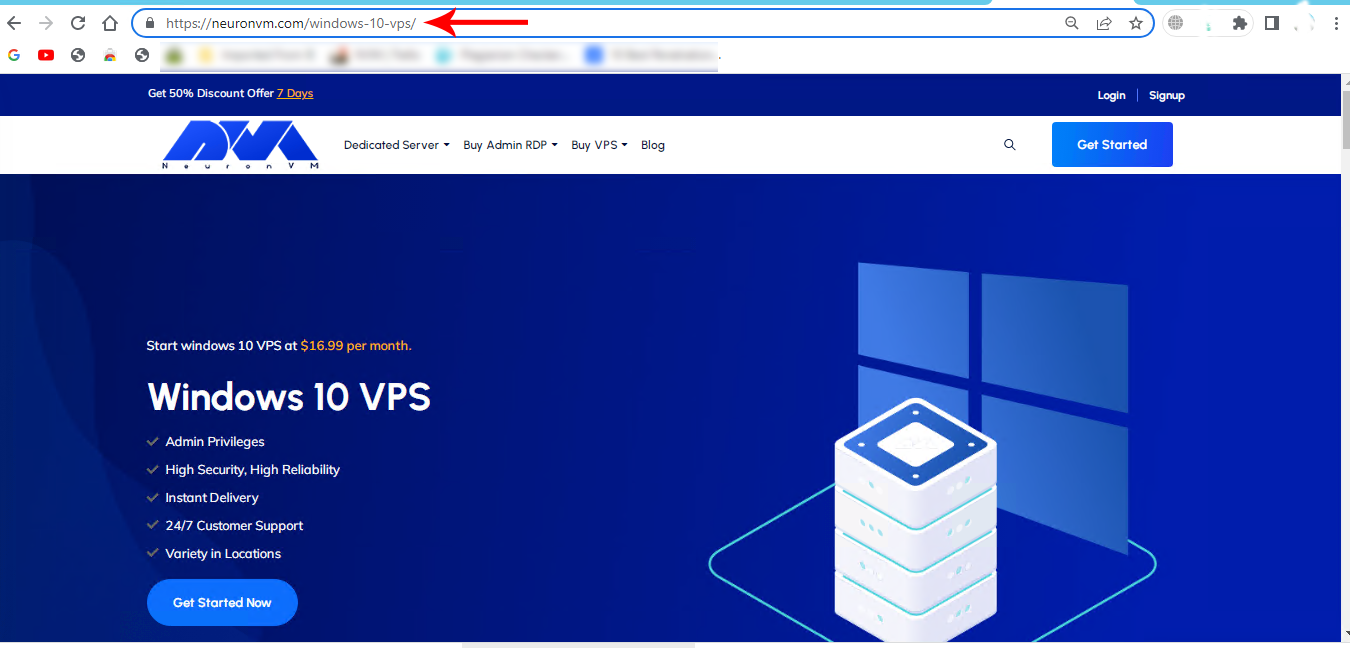
    As the first step, refer to the Windows 10 VPS page on the official NeuronVM website to Buying a Windows 10 VPS:

    buy windows 10 vps

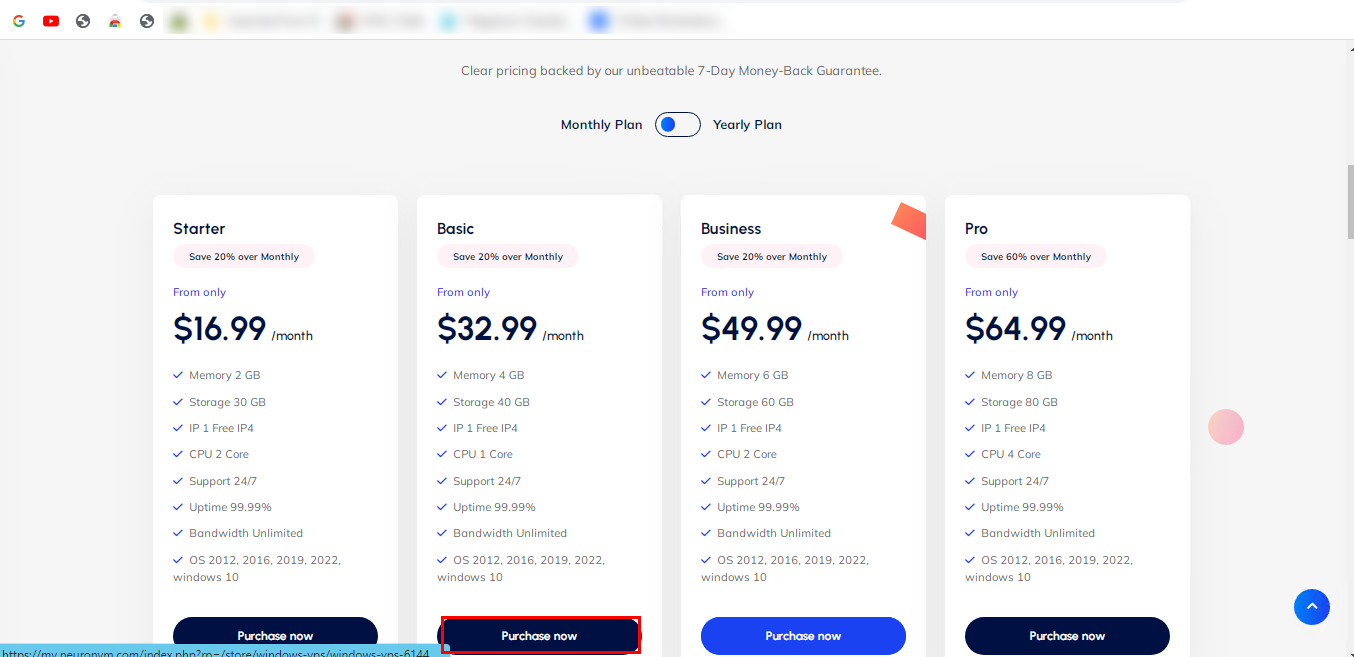
    Scroll down and choose the desired plan. Click on Purchase Now:

    how to buy windows 10 vps

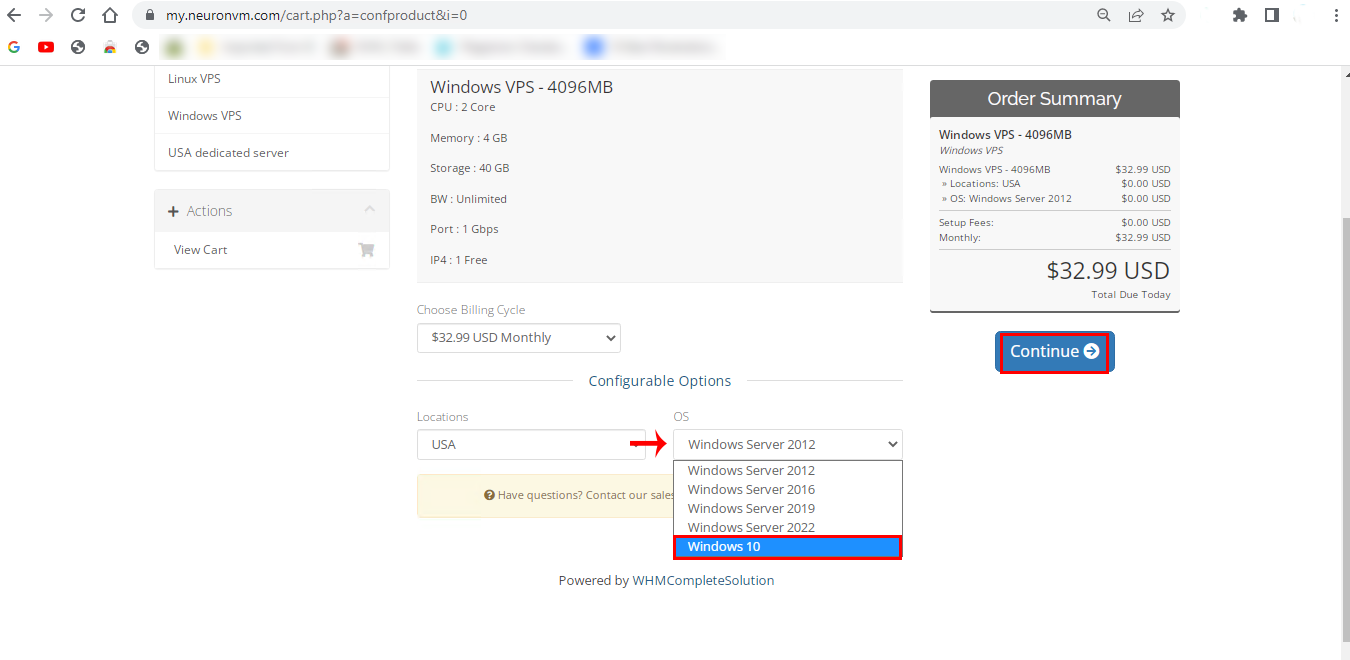
    In the next part, choose the Windows 10 option in the OS box. Also, you can choose your location here. Then click on Continue:

    Choose Operating System windows vps

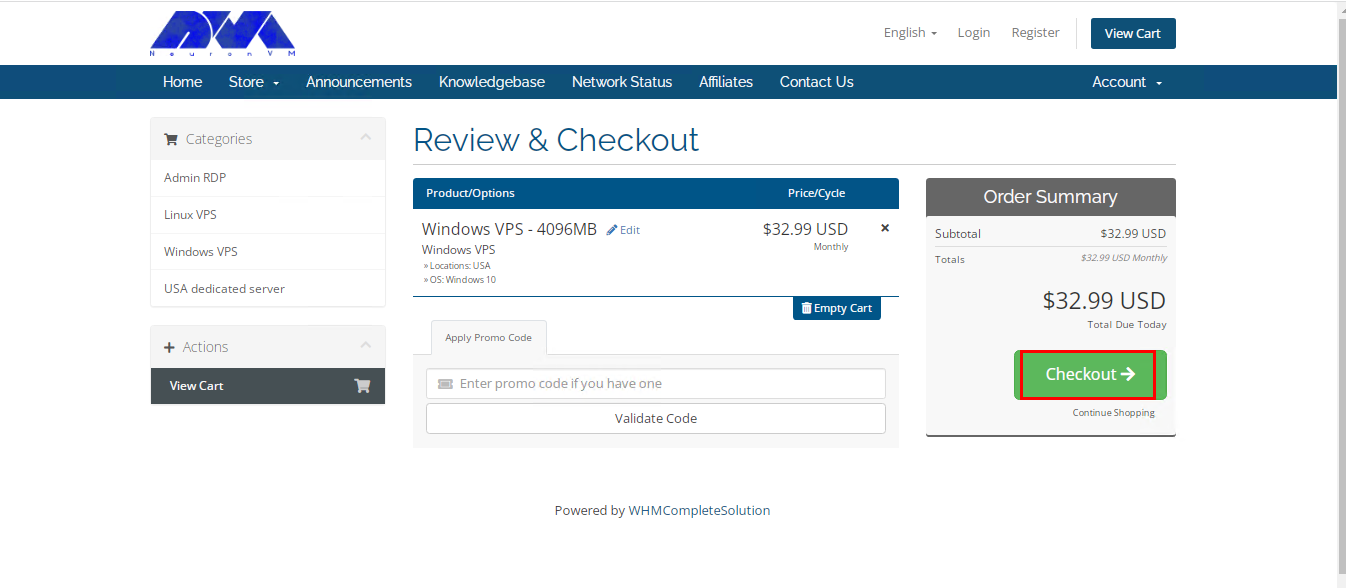
    Now you can review the details of the chosen plan. Click on Checkout and continue:

    Tip: you have the opportunity to insert the Promo Code for a discount.

    review and checkout in neuronvm

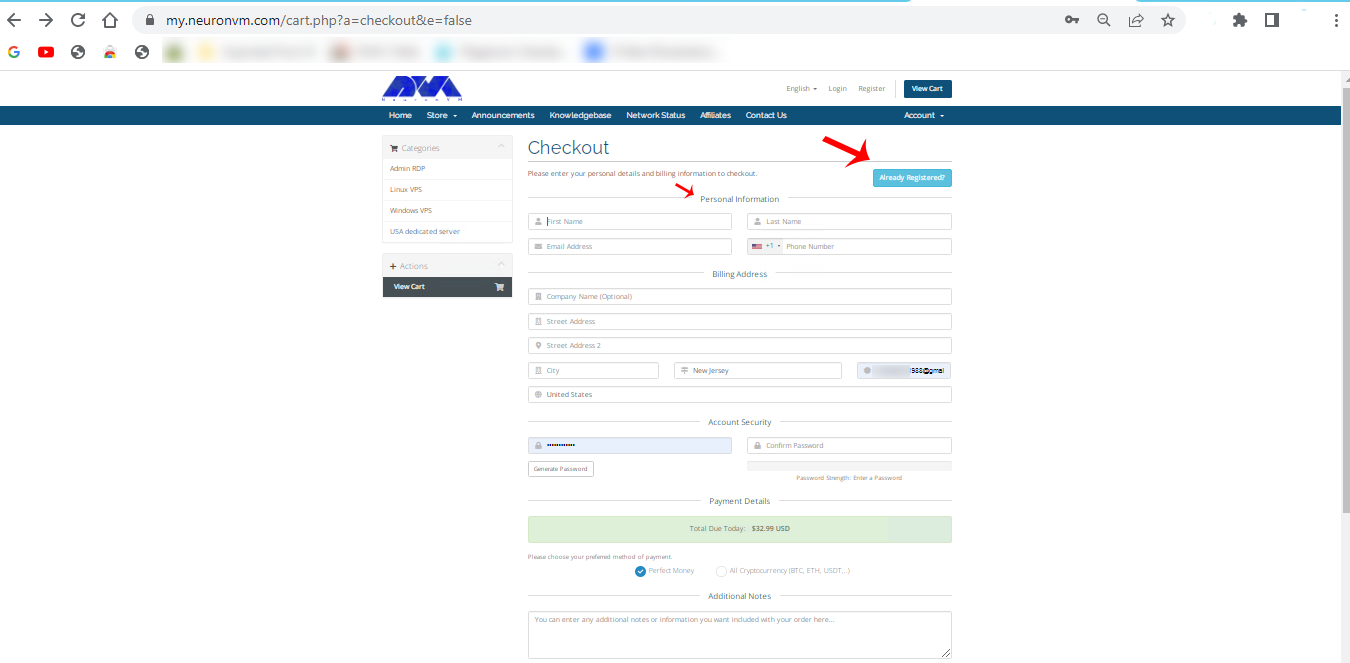
    Here is the sign-in section. you can insert the related information and sign in, or you can press Already Registered and insert your email and password to go through the purchase process:

    sign in page of neuronvm

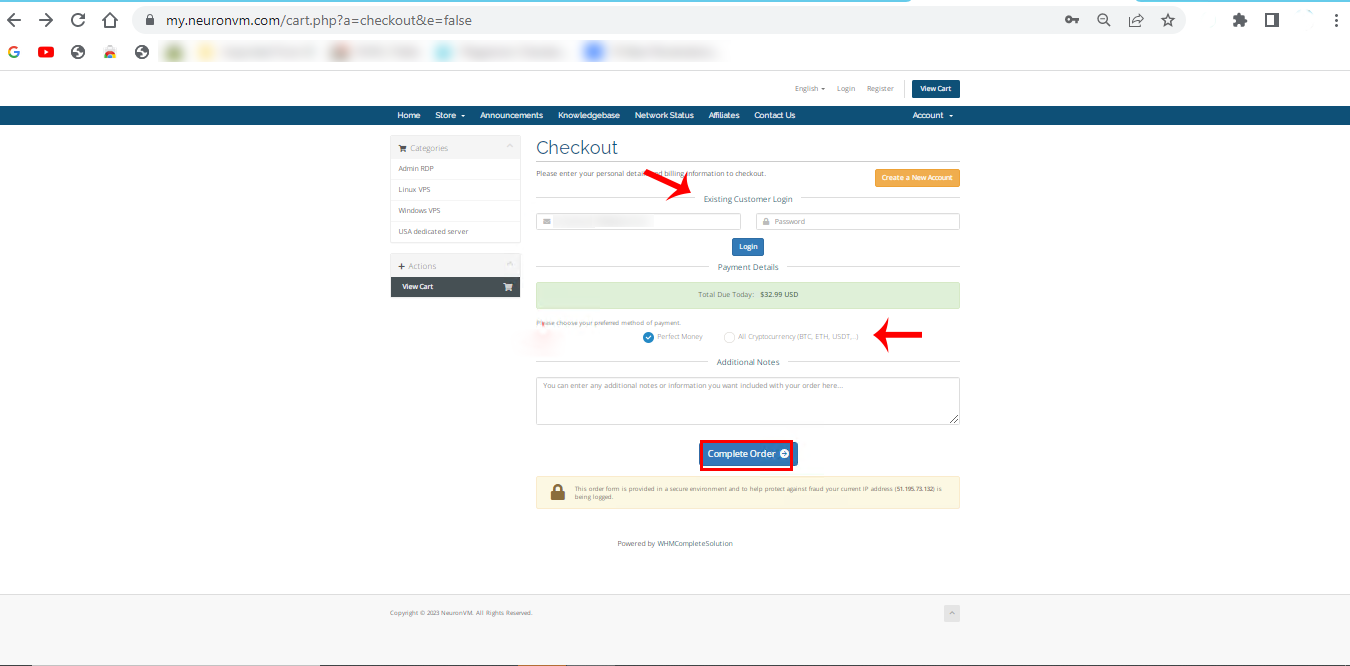
    Here you can choose the payment method and add if you need to mention any notes. click on complete Order:

    Tip: Your choice should be All Cryptocurrencies (Bit, Eth,…) to use Bitcoin for your purchase that is windows 10 VPS with BTC.

    sign in page of neuronvm

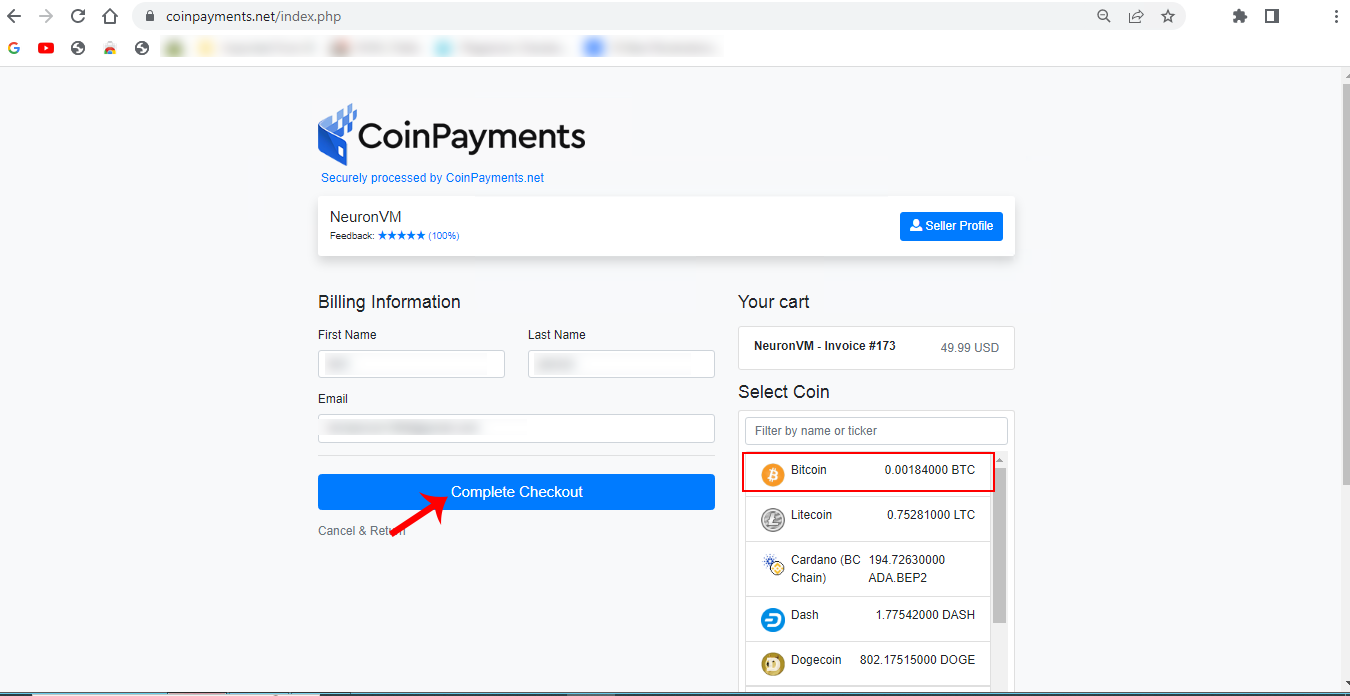
    You will see the payment page. Insert personal information and choose Bitcoin, then click on Complete Checkout:

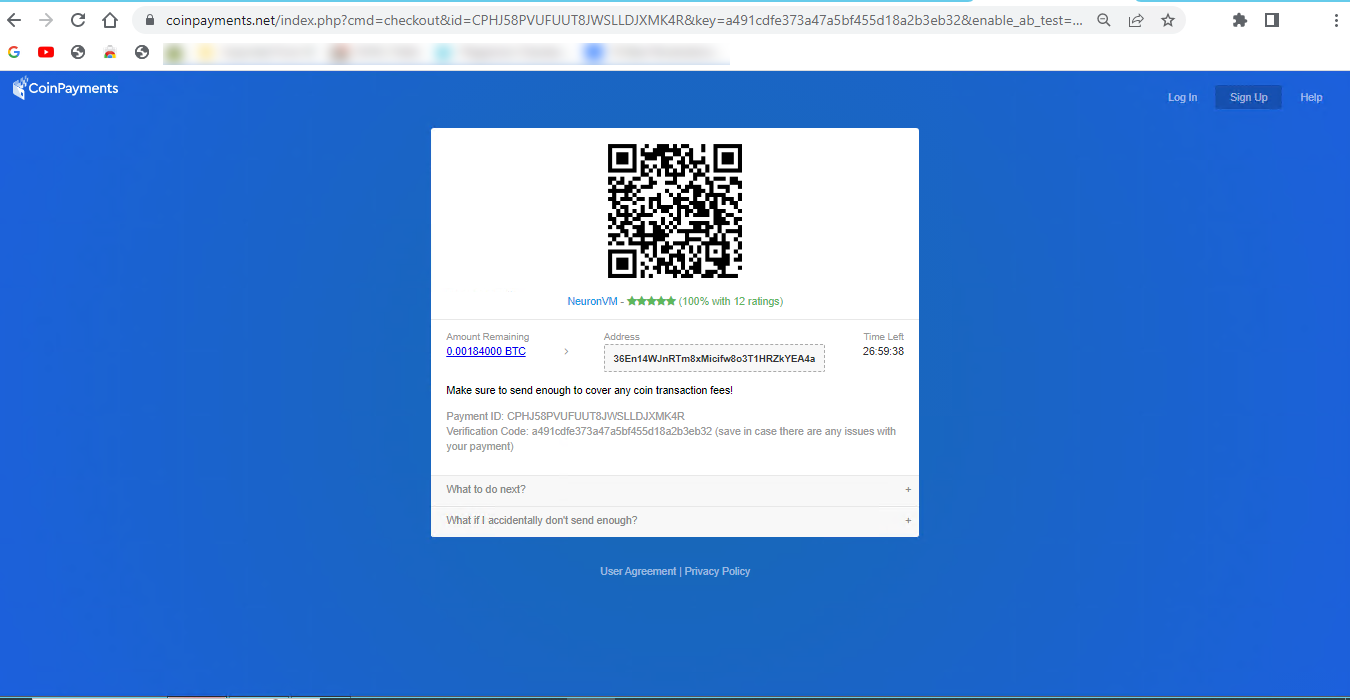
    coinpayments section

    Here is the Payment ID and your payment information. confirm it and make the payment.

    Payment ID and confirmation

    As soon as you complete your payment, you will receive the related details about your Windows 10 VPS server.

    Best Practices to use Windows 10 VPS?

    Using a Windows 10 Virtual Private Server comes with its own set of best practices to ensure that your virtual environment is secure, efficient, and well-maintained. Here are some best practices for using a Windows 10 VPS:

    – Start by selecting a reputable VPS provider known for its reliability, customer support, and security. For example: NeuronVM.com

    – Use strong, unique passwords for remote access, and consider using SSH keys for added security.

    – Keep your Windows 10 VPS up-to-date with the latest security patches and updates to protect against vulnerabilities.

    – Configure the Windows Firewall to only allow necessary traffic, blocking unnecessary ports and services.

    – Install and configure antivirus and anti-malware software to protect your VPS from threats.

    – Setup regular automated backups to ensure that your data is safe and can be easily restored in case of data loss.

    – Enable encryption for data in transit and at rest, especially if you’re handling sensitive information.

    – If using RDP to access the VPS, change the default RDP port, use strong passwords, and consider implementing Network Level Authentication (NLA) for enhanced security.

    – Keep an eye on resource usage (CPU, RAM, disk space) to ensure your VPS is performing optimally. Adjust resources as needed.

    – Enable auditing and review logs to monitor user activities and detect any suspicious behavior.

    Troubleshooting Common Issues of Windows 10 VPS

    Here are some common Windows 10 VPS issues and steps to troubleshoot them:

    1- You have a slow performance problem

    Solutions:

    • Check CPU and memory usage using Task Manager. Identify resource-hungry processes.
    • Consider upgrading your VPS resources if they are consistently maxed out.
    • Optimize startup programs and services using the “msconfig” utility.

    2- Some problems related to networking

    Solutions:

    • Test your internet connection on the VPS using the “ping” command to see if it’s responsive.
    • Check for any firewall rules that might be blocking traffic.
    • Ensure your VPS has the correct DNS settings.

    3- Blue Screen of Death (BSOD) problem

    Solutions:

    • Record the error code displayed on the BSOD.
    • Search for the error code online to find specific solutions.
    • Update drivers and Windows to the latest versions.
    • Check for hardware issues, especially if BSODs are frequent.

    4- Lack of Disk Space Issues

    Solutions:

    • Use the “Disk Cleanup” utility to free up disk space.
    • Uninstall unnecessary programs or move data to an external drive.
    • Consider expanding your VPS’s disk space if you consistently run out.

    If you’re unable to resolve the issue, consider seeking help from your VPS hosting provider or a knowledgeable colleague. They may have access to additional tools and resources to diagnose and fix the problem.

    Conclusion

    Ultimately, whether a Windows 10 VPS is the best choice for you depends on your individual circumstances, application requirements, and budget constraints. Remember that the specific steps and details of buying Windows 10 VPS with BTC may vary depending on the VPS provider you choose. We hope you got how beneficial can Windows 10 VPS be for your business, so don’t waste your time and enjoy your server.