The ability to handle high traffic is crucial for any online business, website, or application. With the constant growth of internet usage, ensuring that your platform can handle a surge in visitors is a top priority. This is where a dedicated server comes into play. Handling high traffic can become a nightmare for many. Here, we’ll talk about how a dedicated server handles high traffic. We will delve into the importance of high traffic handling, the benefits of using a dedicated server, how dedicated servers handle high traffic, load balancing techniques, and finally, guide you on choosing the right dedicated server provider for effective high traffic handling.
Understanding the Importance of High Traffic Handling
For any online platform, the ability to accommodate high traffic volumes is vital for success. When your website or application experiences a surge in visitors, it should still maintain quick loading times, reliability, and efficiency. A seamless user experience is crucial, as high bounce rates due to slow loading times can significantly impact your business or website’s credibility. Ensuring that your dedicated server can handle high traffic is essential for user satisfaction and overall success.
The ability to handle high traffic is crucial for any online business, website, or application. With the constant growth of internet usage, ensuring that your platform can handle a surge in visitors is a top priority.
The Benefits of Using Dedicated Servers
A dedicated server stands out among other hosting options when it comes to handling high traffic. Unlike shared hosting, where multiple websites share the same server resources, a dedicated server provides you with exclusive resources, including processing power, storage, and memory. This ensures that your platform can handle high traffic with ease without being affected by the activities or resource usage of other websites.
Moreover, dedicated servers offer enhanced security, customization options, and scalability, making them an ideal choice for handling high traffic.
The ways that Dedicated Server Handles High Traffic
A dedicated server is specifically designed to handle high-traffic loads. With powerful hardware and top-notch infrastructure, it can efficiently process requests and deliver content to numerous users simultaneously. The exceptional processing power of dedicated servers enables them to handle heavy workloads, processing large volumes of data quickly and effectively.
Additionally, dedicated servers employ robust network connectivity to ensure seamless communication between the server and the users accessing the platform, resulting in fast response times and minimal latency.
Load Balancing Techniques for High Traffic Handling
To further optimize high-traffic handling, dedicated servers utilize load balancing techniques. Load balancing distributes traffic across multiple servers, preventing overload on a single machine by dividing the load among several interconnected servers. This not only ensures efficient resource utilization but also minimizes the risk of downtime due to server overload.
Load balancing techniques such as round-robin, weighted round-robin, or IP hash ensure that each server within the dedicated server cluster handles traffic evenly, maximizing performance and reliability.
Choosing the Right Dedicated Server Provider for High Traffic Handling
Selecting the right dedicated server provider is crucial for effective high-traffic handling. NeuronVM, a leading dedicated server provider, offers a wide range of solutions specifically optimized for handling high-traffic loads. With NeuronVM’s cutting-edge infrastructure, powerful hardware, and superior network connectivity, your dedicated server will effortlessly handle high traffic without compromising performance or user experience. By partnering with NeuronVM, your platform can stay ahead of the competition, ensuring that your dedicated server handles high traffic effectively.
In an increasingly digital world, ensuring that your online platform can handle high traffic has become a key factor in the success of any business or website. A dedicated server offers the ideal solution for high-traffic handling, providing exclusive resources, enhanced security, and scalability. By choosing the right provider, such as NeuronVM, you can guarantee that your dedicated server handles high traffic effectively, offering a seamless user experience and ensuring your online presence remains stable, reliable, and scalable. Don’t let high traffic become a limitation; leverage the power and efficiency of a dedicated server to unlock your platform’s full potential.
Dedicated servers that are growing, help you host your site on your own server and are significantly more advanced and powerful than shared hosting. Among the features that lead to the superiority of end servers, we can mention fast processors, high memory of GB to TB, data transfer, and extensive storage. These features will have a great impact on the optimization of your site. Of course, it should be noted that providing dedicated servers is not cheap, but it is worth spending. In this section, we will try to collect the best dedicated server providers on the market for you.
A Brief Understanding about Dedicated Servers
A dedicated server refers to a physical computer that is exclusively used by an individual, organization, or application. Unlike shared hosting, where multiple users share resources on the same server, a dedicated server provides exclusive access to all of its resources (such as processing power, memory, and storage) to a single user or entity. This exclusivity ensures better performance, control, and security.
Managing a dedicated server requires a certain level of technical expertise. Users should be familiar with server administration, security practices, and troubleshooting to make the most of a dedicated server hosting arrangement.
7 Best Dedicated Server Providers 2023
If you have a large online business, corporate website hosting, or a custom project, you should look for a dedicated server. Because a powerful project must be managed with a server that provides you with sufficient resources and necessary security measures. In this section, we will review the top 8 dedicated servers.
Another one of the best dedicated server hosting in the market is NeuronVM, which is advancing and becoming known with reasonable costs compared to the services provided. Also, by choosing Nero, you can have your own dedicated server with fully dedicated resources, full security, and high speed.
Different Features of NeuronVM:
The features of Neron’s dedicated server include 24-hour support and the possibility of paying with digital currencies. Also, the amount of RAM from 16 to 128 GB is also available for different applications. Notably, if you need additional storage space, more RAM, or increased processing power, our dedicated servers can easily meet your needs.
2) InterServer
InterServer is a web hosting provider that offers various hosting services, including dedicated hosting. This hosting offers the cheapest dedicated server hosting on the list. Interserver offers various programs and ideas about customization. You can use 11 different designs and customize each of them according to your needs.
Different Features of Interserver:
Server resources vary depending on the application you are considering. You can offer 1 to 2 TB of SSD storage and 15 to 118 GB of RAM. You can also configure your server as desired.
3) HostGator
If you are looking for a set of web solutions that are very flexible, HostGator hosting is a good option for you. This hosting provider includes full and semi-managed options, Windows, and Linux operating systems with extensive server resources.
Different Features of HostGator:
You can get different resources depending on your plan. The core provided in this hosting is between 4 and 8 cores. Also, 1 TB hard disk and 1 TB of SSD memory along with 8 to 30 GB of RAM are features of HostGator. You will have the option to choose between SSD or HDD storage in the mid-level plan:
4) DreamHost
One of the reasons why DreamHost is known is its low-cost and resource-rich shared hosting plans. On the other hand, it also provides users with managed and powerful dedicated hosting services. This hosting has 9 different plans, all of which include full root access, 100% uptime, and unlimited bandwidth.
Different Features of DreamHost:
If we want to mention the features of Dreamhost, we can say that it has 3 standard plans of Intel Xeon 4-Core 8-Thread system with 1 TB of HDD memory. The amount of RAM also varies from 4 to 16 GB. You can choose your resources between 16GB and 64GB RAM, 2TB HDD, and 240GB storage:
5) Liquid Web
If you want to work professionally, Liquid Web hosting is already in the field of advanced VPS servers and dedicated servers. Fast, secure, and reliable hosting for large and heavy projects or enterprise websites will be effective with this powerful provider.
Different features of Liquid Web:
The features of Liquid Web resources include 4-32F core, 16-64GB RAM, high storage capacity from 240-480GB, and 5-8TB bandwidth based on user needs. These features make it possible to host medium to large websites without running out of resources. Another unique feature of Liquid Web is the ownership of all its data centres, which are spread across Arizona, Michigan and Amsterdam:
6) BlueHost
One of the best options for dedicated hosting, especially for users who are looking for unmanaged hosting, is BlueHost. This company offers Linux-dedicated server hosting specifically. Among its positive results, we can mention the provision of a free cPanel with root access in all programs.
Different Features of BlueHost:
The features of this dedicated server hosting will vary based on the plan you choose. These devices have 4 to 8 cores, up to 2 TB of HDD memory and 8 to 30 GB of RAM. The bandwidth is unlimited and comes without SSL:
7) InMotion Hosting
If you want to have a dedicated Linux server managed with cPanel, Inmotion Hosting will be a good choice for you. This hosting is also useful for those who wish to purchase a bare metal server. If you keep your host hardware up to date, you will have better performance, smart routing technology, and high-quality security features.
Different Features of Inmotion Hosting:
Features of Inmotion Hosting managed and unmanaged servers include software configuration options. The plans of this hosting have 4 to 32 cores, 1 TB SSD, and 2 to 2×3.2 NVME hard drives. RAM options are also between 16 GB and 512 GB ddr4 RAM:
Comparison of the Best Dedicated Server Providers
In this section, a list of reliable and well-known dedicated server providers will be reviewed. This list will help you choose your server provider with a better mindset and a wiser decision:
*******
Server Uptime
Number of CPU Core
RAM
Price
NeuronVM
99.9%
4*
32GB
From $160.99 per month
InterServer
100%
2*
15GB
From $70.00 per month
HostGator
99.9%
4*
8GB
From $89.98 per month
DreamHost
100%
4*
4GB
From $149.00 per month
Liquid Web
100%
4*
16GB
From $75.00 per month
BlueHost
100%
2*
8GB
From $89.98 per month
InMotion Hosting
99.9%
4*
16GB
From $89.99 per month
Best Dedicated Server Providers in 2023
The Key Factors to Consider Dedicated Server
Dedicated servers can be used in various fields and you should pay attention to choose the right server for your field of activity. In the previous section, we reviewed the comparison table of the top 8 dedicated servers for you, now after the required reviews, we will tell you what field each of these servers is used for:
NeuronVM _ Is the best for hosting in every field.
InterServer – This is great if you are looking for the best cheap dedicated hosting.
HostGator – Is suitable for fully and semi-managed server hosting.
DreamHost – With DreamHost, you can have highly configured managed servers.
Liquid Web – This one is the best dedicated hosting in every field.
Bluehost – This server is proper for unmanaged server hosting.
InMotion Hosting – This one is perfect for resource-rich unmanaged solutions.
Conclusion
This article was prepared to give a list of the best and latest dedicated servers provided worldwide. We tried to explain about each hosting provider and some important features of them. Also, a comparison table was shown to make it easy to choose and purchase the best and most suitable dedicated hosting for users. So read carefully and make your choice.
A dedicated server is a hosting service that provides an entire physical server exclusively to one client or website. In contrast to shared hosting, where multiple websites share server resources, a dedicated server offers complete access to all the server’s resources, such as processing power, RAM, storage, and bandwidth. By using a dedicated server, the client gains full control over server configuration, software installations, and security settings. This level of control allows for superior customization, flexibility, and performance, making it ideal for resource-intensive applications like high-traffic websites, online gaming, large e-commerce platforms, or other demanding tasks. In this article, we will examine the benefits of buying a dedicated server, which we recommend you follow us until the end.
Reasons for using a Dedicated Server
Reasons why someone might choose to use a dedicated server:
Optimal Performance: Dedicated servers excel in performance compared to other hosting options, like shared hosting. The server’s resources are exclusively available for your website or application, enabling efficient handling of high traffic volumes and resource-intensive tasks.
Tailored Customization: Enjoy complete control over the server’s configuration with a dedicated server, allowing customization according to your specific needs. This flexibility allows installation and operation of any required software or applications for your website or business operations.
Enhanced Security: Dedicated servers offer heightened security compared to other hosting services. As the sole user of the server, you have full control over security protocols and can implement your own measures to protect your data.
Easy Scalability: Dedicated servers provide effortless scalability, allowing seamless upgrading or downgrading of server resources as your business needs evolve. This flexibility ensures your website or application can handle increased traffic without any slowdowns or downtime.
Improved SEO Ranking: A dedicated server contributes to better search engine optimization (SEO) performance for your website. Search engines favor fast-loading and reliable websites, and dedicated servers meet both criteria, resulting in improved search engine rankings.
Exclusive IP Address: Dedicated servers come with a unique IP address solely dedicated to your website or application. This benefits applications affected by shared hosting’s IP reputation, like SSL certificates or email marketing.
What are the most important Advantages of a Dedicated Server?
High-performance computing power and resources that are solely dedicated to a single user or organization enhance performance and reliability. This ensures optimal performance without the need to share resources with other users.
Full control over security measures, including firewalls, antivirus software, and data encryption, increases security. This provides a higher level of protection against potential security breaches compared to shared hosting environments.
Greater flexibility and customization options are offered by dedicated servers. You have complete control over the server’s hardware, software, and operating system, allowing you to tailor it to your specific needs and optimize performance according to your requirements.
Scalability is a key advantage of dedicated servers. They are highly scalable, allowing you to easily expand resources such as CPU, RAM, and storage as your business grows. This scalability ensures that your server can accommodate increasing demands without experiencing performance issues.
Website loading speed is improved with dedicated servers. They often offer faster website loading times and response rates compared to shared hosting. There is no congestion caused by other websites since the server resources are dedicated to a single user, resulting in a quicker and smoother user experience.
Better control and management is provided by a dedicated server. You have complete administrative access, allowing you to install and configure software applications, customize settings, and manage server resources. This level of control simplifies server management, making it easier to troubleshoot issues and optimize performance.
Dedicated server provides a unique IP address for your website, unlike shared hosting where multiple websites share a single IP address. This offers advantages such as better email deliverability and improved search engine rankings.
Cost-effective and efficient hosting of multiple websites on a single server is possible with a dedicated server. This is beneficial for businesses or individuals that manage multiple online properties.
Who is a Dedicated Server suitable for?
Dedicated servers cater to a variety of individuals and businesses, including:
1. Large businesses and corporations benefit from dedicated servers due to their provision of ample storage, processing power, and control over the server environment. This makes them ideal for organizations with high traffic websites, complex applications, and extensive databases.
2. E-commerce websites find dedicated servers advantageous as they ensure reliable performance, fast loading times, and enhanced data protection. This is especially important for online stores with high volumes of transactions and demanding security requirements.
3. Dedicated servers are commonly used by gaming enthusiasts and communities to host multiplayer games. This facilitates better performance, lower latency, and an improved user experience.
4. Web hosting providers utilize dedicated servers to offer greater flexibility, scalability, and customized solutions for their clients.
5. IT professionals can make use of dedicated servers to exercise complete control over server configurations, software installations, and security settings. This enables them to leverage their expertise for specific project requirements.
6. Media and streaming platforms, such as streaming services, content delivery networks, and media platforms, require dedicated servers to handle large amounts of data traffic. This ensures smooth streaming and downloads for their users.
Overall, dedicated servers are suitable for individuals and businesses in need of high-performance, secure, and customizable hosting solutions that cater to their specific requirements.
How to buy a Dedicated Server from NeuronVM
Buying a dedicated server offers numerous advantages, including improved security, performance, and customization options. It allows you to have full control over your hosting environment while benefiting from professional management and support from the hosting provider.
Buying a dedicated server, in conclusion, is a worthwhile investment for businesses and individuals. It offers numerous advantages such as improved performance, reliability, security, and customization options. This exclusive hosting solution ensures optimal website or application performance, meeting specific requirements effectively.
Are you ready to take your website or online business to the next level? If so, it might be time to consider using a dedicated server. While shared hosting may be suitable for beginners or small websites, a dedicated server offers the most control, flexibility, and power. In this guide, we will walk you through the process of mastering the art of dedicated servers. From choosing the right server to configuring it for optimum performance, you’ll be equipped with the knowledge to make the most of this powerful hosting solution.
Determining Your Requirements
Assessing your needs with a dedicated server requires a thorough understanding of your business requirements, resource demands, and growth projections. Here are some key factors to consider:
1. Performance and Scalability: Determine the level of performance required by your applications and consider any potential growth in traffic, users, or data. Evaluate if your current hosting environment can handle the increasing load or if a dedicated server is necessary to ensure optimal performance.
2. Security: Assess the sensitivity of your data and the level of security required. Dedicated servers offer enhanced security features, such as dedicated firewalls and isolated environments, which can be crucial for industries prone to cyber threats or compliance requirements.
3. Customization and Control: Evaluate whether your applications require specific configurations, software installations, or specialized environments. Dedicated servers provide complete control and flexibility, allowing you to tailor the server infrastructure to your exact needs.
4. Cost Considerations: Assess the cost implications of moving to a dedicated server. Calculate the expenses associated with hardware, software licensing, maintenance, and ongoing operational costs. Compare this with the potential benefits and savings from improved performance, scalability, and security.
5. Technical Expertise: Determine if you have the necessary technical expertise or if you require managed dedicated server services. Managed options provide assistance with server setup, maintenance, security, and troubleshooting, allowing you to focus on your core business.
6. Redundancy and High Availability: Evaluate your need for redundancy and high availability. Dedicated servers can be configured with failover solutions, clustered environments, or load-balancing setups to ensure consistent performance and minimal downtime.
7. Support and Service Level Agreements (SLAs): Consider the level of technical support and SLAs needed for your business. Evaluate the responsiveness, availability, and expertise of the hosting provider’s support team.
Selecting the Perfect Hardware
Choosing the right hardware for a dedicated server depends on several factors including the specific requirements of your server workload, budget considerations, and future scalability needs.
Here are some key hardware components to consider when choosing a dedicated server:
Processors (CPU)
Memory (RAM)
Storage
RAID Controllers
Network Connectivity
Power Supply
Server Chassis and Cooling
Remote Management and Monitoring
Scalability
It is recommended to get in touch with our support experts by sending a ticket from the user area to assess your specific needs and select the most suitable hardware for your dedicated server setup.
Operating System Selection
The next step is choosing an operating system (OS) for your server. Popular choices include Linux distributions like Ubuntu, CentOS, or Debian, as well as Windows Server OS. Consider your familiarity with the OS, compatibility with your applications, and any specific requirements when making your decision.
Server Setup
Setting up a dedicated server can be a complex process, but with the right knowledge and guidance, you can master the art of dedicated servers. Here are the key steps in server setup:
Step1: Plan and determine server requirements:
Define the purpose of the server, including the operating system, software, storage, memory, and bandwidth needed.
Step2: Choose a hosting provider:
Select a reliable hosting provider that offers dedicated server hosting services.
Step3: Order and provision the server:
Place an order for the dedicated server with the chosen hosting provider. Provide necessary information, such as the desired configuration, billing details, and initial setup requirements.
Step4: Configure network settings:
Determine the IP address allocation and set up the network configuration, such as assigning static IP addresses, configuring DNS settings, and configuring firewalls.
Step5: Install the operating system:
Install the preferred operating system on the server. This may include Windows Server, Linux distributions like Ubuntu or CentOS, or other customized versions.
Step6: Server hardening:
Enhance the security of the server by applying necessary security measures, such as setting up a strong password policy, disabling unnecessary services, configuring firewall rules, and installing security software.
Step7: Configure server settings:
Customize server settings according to the desired requirements, including optimizing performance, storage configuration, and network settings.
Step8: Backup and disaster recovery:
Establish regular backup processes and implement strategies for disaster recovery to ensure data integrity and availability.
Step9: Testing and optimization:
Test the server to ensure it is functioning properly and optimize its performance by fine-tuning configurations, monitoring system performance, and applying necessary updates and patches.
Tip: It is important to follow best practices and consult with professionals or technical support resources when setting up a dedicated server, as the process can be complex and may require advanced knowledge in server administration and security measures.
Security First: Fortify Your Server
One of the most crucial aspects of managing a dedicated server is ensuring its security:
– Start by installing a firewall to protect against unauthorized access.
– Regularly update your OS and installed software, and consider implementing security measures like two-factor authentication and strong passwords.
– Regularly monitor logs for any suspicious activity.
Software Installation and Server Optimization
Installing software and optimizing a dedicated server involves several steps. Here is a general outline of the process. In the first step, we will examine how to install software on a dedicated server:
1) Connect to the dedicated server using remote desktop software or SSH.
2) Update the operating system to ensure it has the latest security patches and software updates.
3) Install necessary software packages for your server. This could include web servers (such as Apache or Nginx), database servers (such as MySQL or PostgreSQL), programming languages (such as PHP or Python), and any other required applications.
4) Configure the software settings and make any necessary changes to meet specific requirements.
5) Test the installed software to ensure everything is working correctly.
To maximize the performance of your dedicated server, it’s important to optimize its configurations. This includes fine-tuning settings like PHP memory limit, web server caching, and database optimization. Additionally, consider implementing content delivery networks (CDNs) and load balancers to improve website speed and handle high traffic efficiently:
1) Optimize the server’s resources by adjusting server parameters and settings, such as memory allocation, disk read and write buffers, and network configurations.
2) Implement caching mechanisms to improve server performance, such as opcode caching for PHP or content caching for web servers.
3) Enable Gzip compression to reduce the size of files transmitted between the server and clients.
4) Configure server-level caching solutions, such as Varnish or Redis, to store frequently accessed data in memory for faster retrieval.
5) Implement a content delivery network (CDN) to distribute static resources across multiple servers globally for improved speed and reliability.
6) Monitor server performance and utilization using server monitoring tools, and make any necessary adjustments to ensure optimal performance.
Monitoring and Maintenance
Monitoring your server’s performance is crucial for identifying and resolving issues promptly. Implement monitoring tools that track resource usage, server uptime, and website performance. This allows you to identify potential bottlenecks, troubleshoot problems, and optimize your server for the best user experience.
Monitoring tools can be very helpful in ensuring the smooth functioning and optimal performance of a dedicated server. Here are some popular monitoring tools that can be utilized:
Nagios
Zabbix
PRTG Network Monitor
SolarWinds Server & Application Monitor
Datadog
New Relic
These monitoring tools can be installed on the dedicated server to continuously monitor its performance, identify any issues or bottlenecks, and enable proactive troubleshooting and optimization.
Scaling and Future-Proofing
Scaling and future-proofing dedicated servers involves ensuring that the infrastructure can handle increasing demands and technology advancements in the future. Here are some key considerations:
Scalability: A dedicated server should have the option to scale its resources vertically (increasing individual components like CPU, RAM, or storage) or horizontally (adding more servers to a cluster). This allows the server to handle increasing traffic and workload requirements.
Upgradable hardware: Choose a dedicated server provider that offers flexibility in upgrading or replacing hardware components. This ensures that your server can accommodate future advancements in hardware technology without requiring a complete replacement.
Network capacity: Ensure that the dedicated server provider has sufficient network capacity to handle increasing data transfer requirements. This includes sufficient bandwidth, low latency, and scalability to accommodate higher data volumes.
Virtualization support: Dedicated servers that support virtualization technologies such as VMware, Hyper-V, or KVM allow for efficient resource utilization and scalability. This enables the easy deployment of additional virtual machines as needed.
Redundancy and high availability: Consider redundancy options like RAID configurations for data storage, redundant power supplies, and network connections. High availability configurations, such as clustering or load balancing, can ensure that your server remains online even in the event of hardware or network failures.
Future technology support: Stay updated with emerging technologies and trends in server hardware, software, and networking. Regularly review your server infrastructure and consider upgrades or enhancements to keep pace with the latest advancements.
By incorporating these considerations, you can ensure that your dedicated server infrastructure is scalable, adaptable to future requirements, and can effectively handle increasing demands.
In this day and age, businesses require reliable and secure hosting solutions to ensure their online presence is always up and running smoothly. Dedicated server offer a high level of performance and control. This makes them an ideal choice for businesses with advanced hosting needs. If you’re looking to purchase a dedicated server with Perfect Money, this ultimate guide will provide you with the necessary insights to make an informed decision. So let’s dive in and see how it’s done!
Understanding Dedicated Servers
Dedicated servers are physical machines solely dedicated to hosting a single website or application. Unlike shared hosting, where you can host multiple websites on the same server, dedicated servers offer exclusive resources, including CPU power, RAM, storage, and network connectivity.
This exclusivity guarantees optimal performance and flexibility, allowing businesses to handle heavy traffic loads, resource-intensive applications, and large-scale databases. By investing in a dedicated server, you have full control over server configuration, software installations, security measures, and more.
When opting for a dedicated server with Perfect Money payment, it is crucial to consider your specific requirements. Evaluate aspects such as the required CPU and RAM capacity, storage size, bandwidth limits, and the level of technical support offered by the hosting provider. Additionally, assess other factors such as server location, network uptime guarantees, scalability options, and data center certifications.
The Benefits of Purchasing Dedicated Servers with Perfect Money
Perfect Money is a reliable and convenient payment system that offers numerous benefits when purchasing dedicated servers. Firstly, it ensures fast and secure transactions, eliminating the risk of fraud or unauthorized access.
Second, it provides flexibility, allowing users to choose from various currencies and easily convert them. Additionally, Perfect Money offers competitive fees, enabling cost-effective server purchases.
Moreover, users can enjoy seamless integration with different platforms, making the buying process more efficient and convenient.
Lastly, Perfect Money’s user-friendly interface and customer support ensure a smooth experience, enhancing user satisfaction when acquiring dedicated servers.
Finding a Reliable Dedicated Server Provider Accepting Perfect Money
Once you have determined the specifications and features you need for your dedicated server, the next step is to find a reputable hosting provider that accepts Perfect Money as a payment method. Conduct thorough research to identify top-notch hosting companies that meet your requirements and have positive customer reviews. Look for providers with extensive industry experience, a diverse range of server configurations, and excellent customer support.
Exploring online forums, review websites, and social media can help you gather valuable insights from other users’ experiences. Check for any reported downtime issues, the performance of servers, and the provider’s responsiveness to customer concerns.
Additionally, it is essential to ensure that the hosting provider offers the necessary security measures, such as firewalls, DDoS protection, and regular backups, to safeguard your data.
Here at NeuronVM, we are providing different hosting solutions, with dedicated servers being one of the most important services. If you’re willing to buy dedicated server, the next section is written for you.
Step by Step Guide for Buying Dedicated Server with Perfect Money
So if you’re planning to buy a dedicated server, this is the section you’ll be looking for. There are not many providers out there that give you the option to buy this service using Perfect Money, but here at NeuronVM, we really want everyone to start their business as soon as possible and not worry about things like payment method.
There are a few steps you must take to buy a dedicated server with perfect money. Here, I’ll show you how!
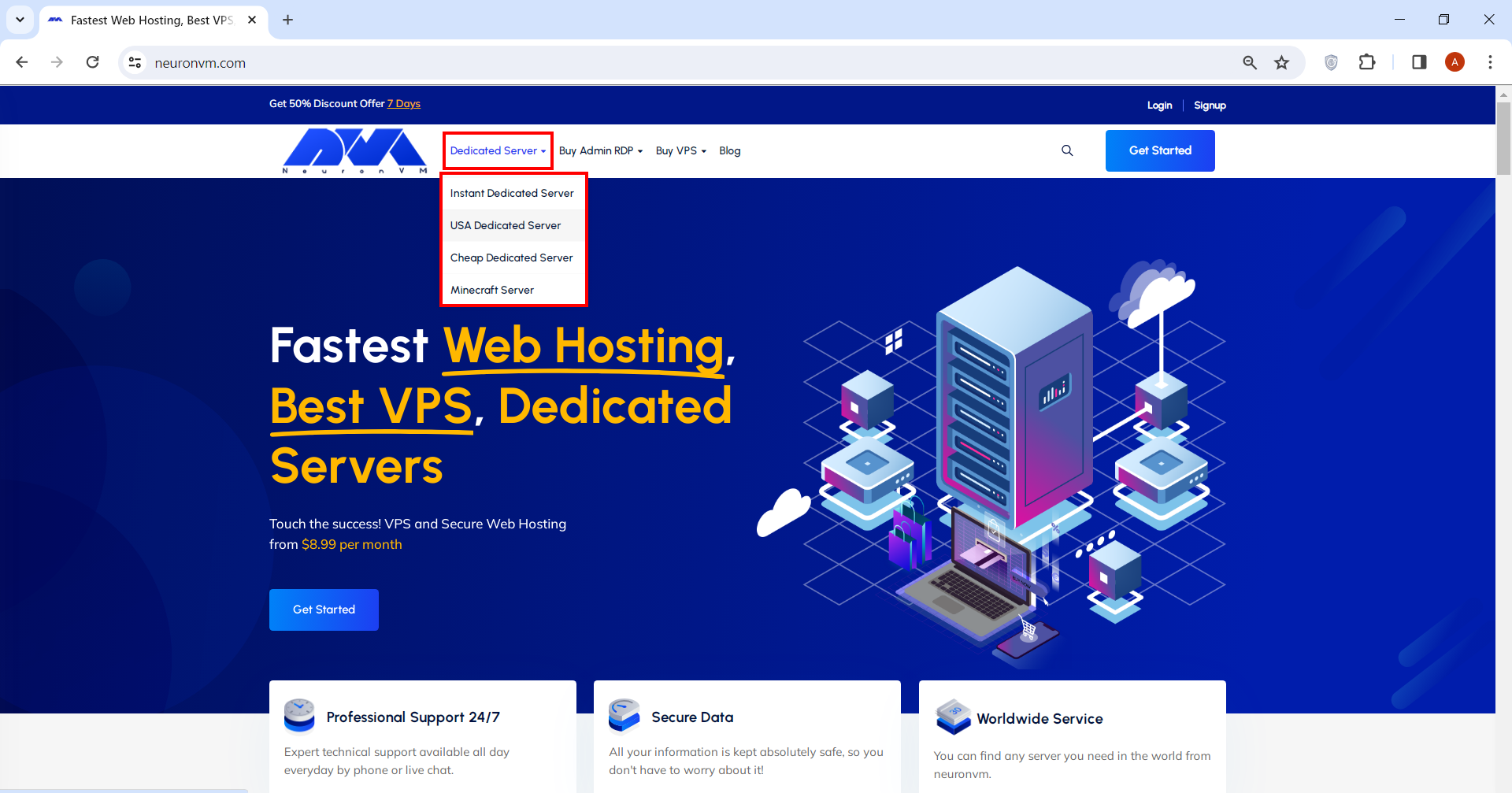
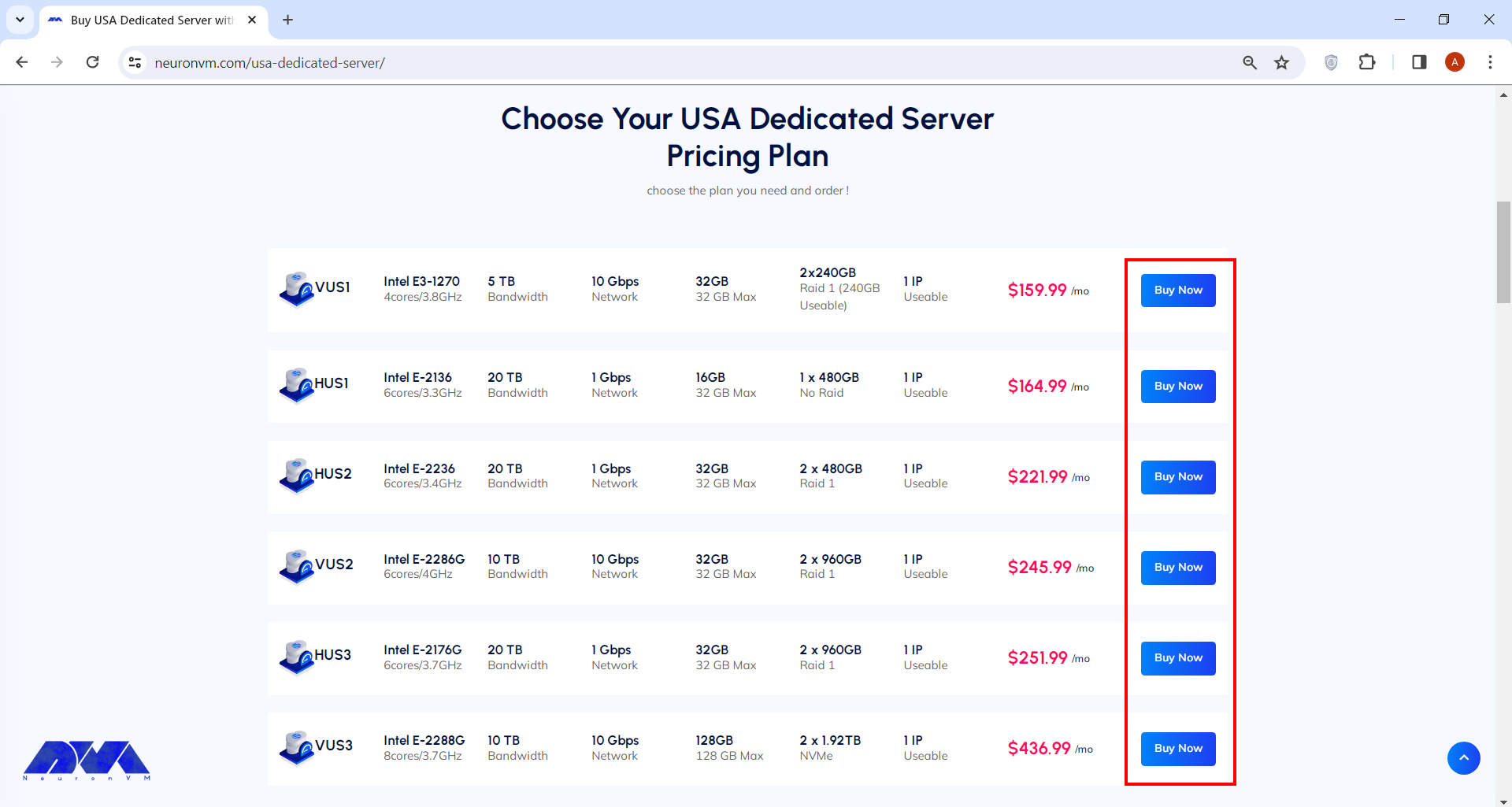
Go to our main page. From the menu above, you can choose a Dedicated Server option and see the plans. (for the sake of this tutorial I choose USA dedicated server, but the other ones are just the same).
You can choose your preferred plan on this page. After that, you can simply click on Buy Now and proceed.
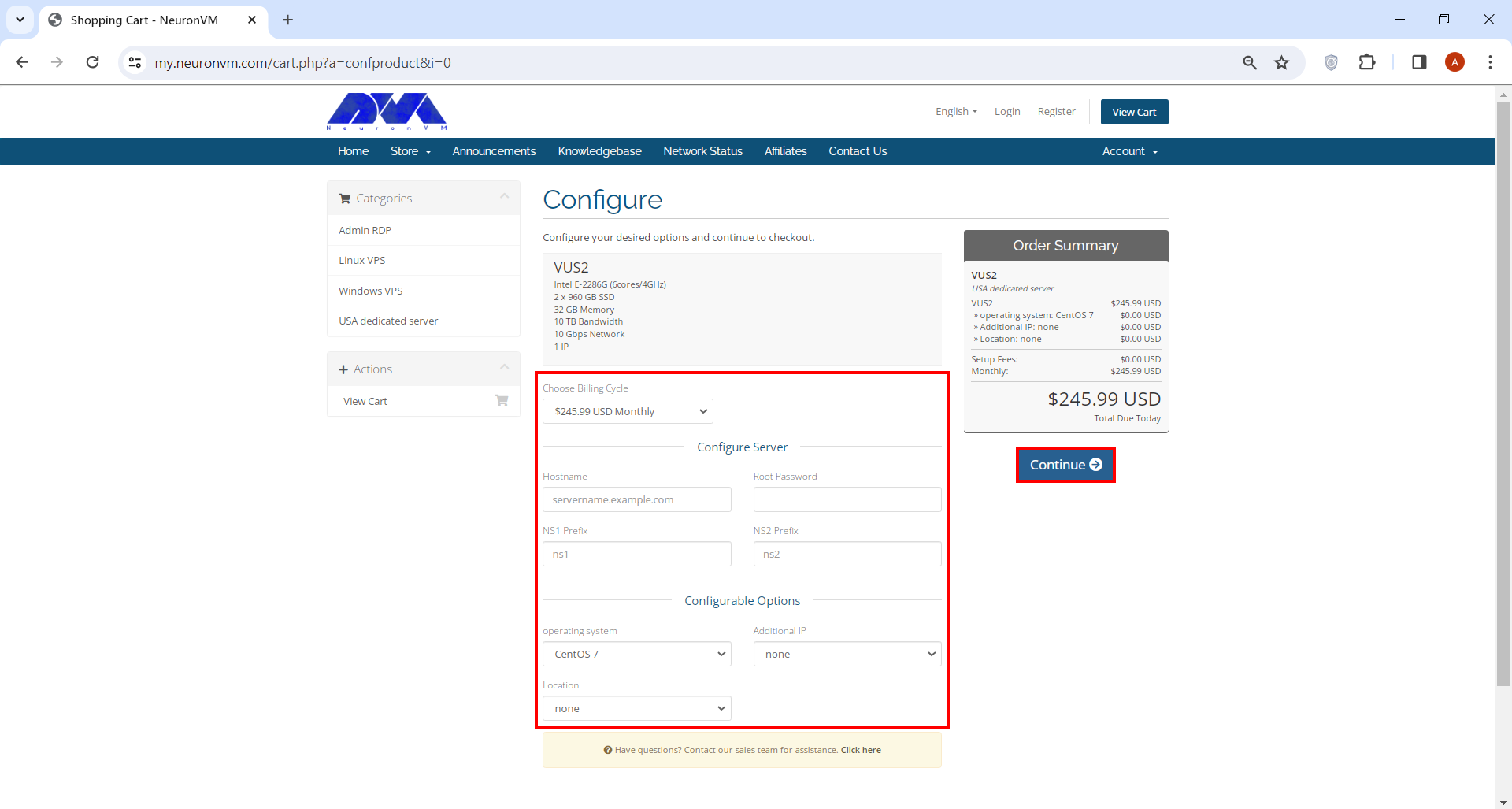
You’ll be directed to our shopping card webpage where you have to fill a few forms before you can proceed. You can also change options like operating system, billing cycle and location on this page.
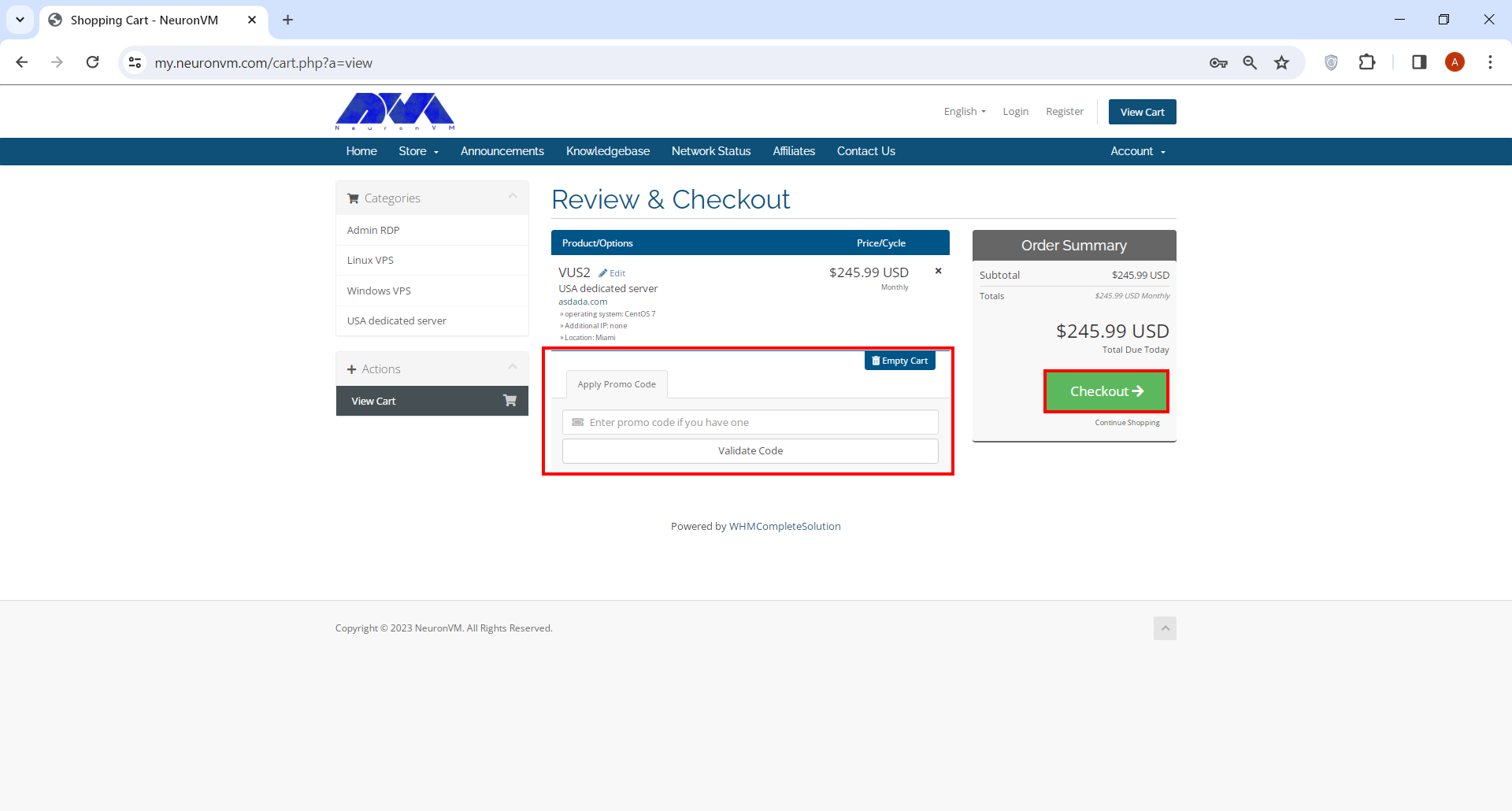
Review & Checkout page is where you can enter your promo code if you have any. Click on the Checkout button when you’re done.
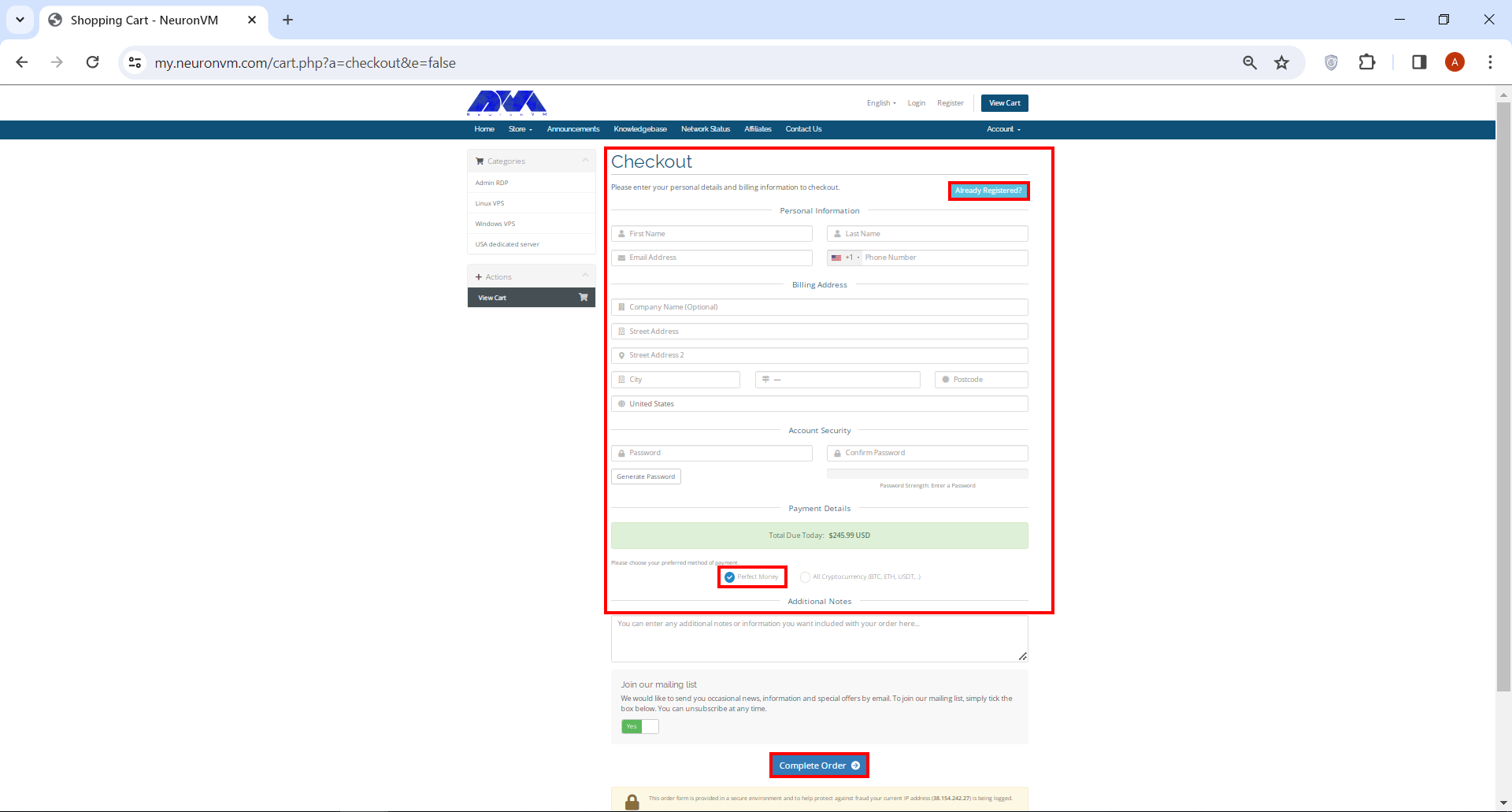
On Checkout page you have to enter a number of personal information. If you’ve signed up before, simply click on Already Registered button. At the bottom of the page, under Payment Details section, check Perfect Money box and finally click on Complete Order.
That’s it! Now you can purchase the dedicated server of your choice with Perfect Money. Remember we have a dedicated support team on NeuronVM who is there for you 24/7, so don’t hesitate to ask any questions you might have in mind.
Conclusion
Investing in a dedicated server with Perfect Money as the payment method offers businesses a secure and hassle-free solution for their hosting needs. By understanding the significance of dedicated servers, identifying reliable providers accepting Perfect Money, and following through with the purchase process, you can confidently establish a robust online presence for your business. Remember, taking the time to research, analyze, and compare different hosting options will ensure you make an informed decision that aligns perfectly with your specific requirements.
We have discussed RDP servers in detail in our previous articles. RDP is a remote desktop protocol. This technology has enabled users to access and control other devices remotely through the Internet. People with different jobs can use this platform and access files, run programs, or manage servers. In this section, we will examine the benefits of buying RDP for your business.
An Introduction RDP Servers
RDP servers are software applications or services running on a computer that enables remote access to that computer’s desktop and resources. Besides, it is a valuable tool for remote administration, technical support, and remote work scenarios, but you should configure and use it with security in mind to protect the remote computer and its data from unauthorized access.
If you want to have a better understanding of Admin RDP, it is like mouse movements and user keystrokes are transmitted to other people’s systems remotely, but this work is done by the Internet instead of radio waves. Then, you will see the user’s desktop screen on the main computer.
What Are the Benefits of Buying RDP Servers?
Using Admin RDP Server in a business environment can offer several significant benefits:
– Cost Savings
– Enhanced Security
– Centralized Data
– Disaster Recovery
– Scalability
– Remote Access
– Easy Collaboration
– Support and Maintenance
– Improved Productivity
– Client Compatibility
Now, let’s analyze each of these factors separately.
Buying RDP Can Save Money
Businesses can save money on hardware and maintenance costs by centralizing resources on a server and providing remote access via RDP. This reduces the need for expensive workstations or laptops and can extend the lifespan of existing hardware.
Using Remote Desktop Protocol servers can potentially lead to cost savings in certain scenarios. It can reduce hardware costs, Centralized RDP servers are typically more power-efficient than individual PCs or workstations. This can lead to significant savings on electricity bills, and managing and maintaining a central RDP server environment can be more cost-effective than maintaining multiple individual workstations.
Lastly, You can implement robust security measures at the server level and ensure that data is regularly backed up, reducing the risk of data loss and associated recovery costs.
RDP Can Help to Secure Your Connection
Remote Desktop Protocol (RDP) can help secure your connection when used properly, but it can also pose security risks if not configured and managed correctly. This protocol is a proprietary protocol developed by Microsoft that allows users to connect to and control a remote computer over a network. RDP typically offers robust security features. These features include encryption and multi-factor authentication, to protect data during remote connections. In addition, centralizing resources on a server allows for better control over security policies and access permissions.
Here are some ways RDP can help secure your connection, along with considerations for maintaining security like using strong encryption to protect the data transmitted between the local and remote computers, authentication before granting access to a remote computer, having an additional layer of security that ensures the user is authenticated before a remote desktop session is established, or configure your firewall to allow RDP traffic only from trusted IP addresses or networks. Also, You can enforce strong password policies for RDP accounts to prevent brute-force attacks.
The Effect of Centralized Data in RDP Servers
Centralized data in RDP servers can have several advantages and considerations. RDP is a proprietary protocol developed by Microsoft that allows users to connect to a remote computer over a network connection. Centralized data refers to the practice of storing and managing data on a central server rather than on individual client devices.
Storing data and applications on a central server through RDP ensures that all users have access to the latest files and software versions. This reduces data silos and version control issues.
Disaster Recovery Plan on RDP Servers
Creating a Disaster Recovery Plan (DRP) for Remote Desktop Protocol servers is crucial to ensure business continuity in the event of unexpected disasters or disruptions. RDP servers are often critical components of an organization’s infrastructure, and any downtime can lead to significant financial and operational losses.
RDP can be part of a disaster recovery plan. In the event of a hardware failure or other disaster, employees can quickly access their work environment from an alternate location, minimizing downtime.
Remember that a well-structured Disaster Recovery Plan is a dynamic document that should evolve with your organization’s needs and the changing threat landscape. Regularly test, update, and improve your plan to ensure that it remains effective in protecting your RDP servers and the critical data they contain.
Scalability Option on RDP Servers
RDP can easily scale to accommodate growing business needs. Adding new users or expanding server resources can be done relatively quickly and without significant disruption. Scalability options for Remote Desktop Protocol (RDP) involve strategies and configurations to ensure that your RDP server infrastructure can efficiently handle an increasing number of remote desktop users.
Some scalability options for RDP are listed here: Load balancing, creating Terminal Services Farms, virtualization technologies like VMware, resource allocation, network configuration, and security consideration in a way that Implement Quality of Service (QoS) policies to prioritize RDP traffic and ensure a smooth user experience, especially when bandwidth is limited.
The choice of scalability option depends on your organization’s specific requirements, budget, and existing infrastructure. It’s essential to balance performance, scalability, and security when implementing RDP scalability solutions to ensure a seamless remote desktop experience for your users while maintaining the integrity of your network and data.
Buy RDP for full Remote Access
RDP enables employees to access their work computers or servers from anywhere using an internet connection. This is especially valuable in today’s increasingly mobile and remote work environments, as it allows for flexibility in work locations. The primary purpose of Full Remote Access Using RDP is to allow individuals or administrators to manage and use a computer located in a different physical location.
This is incredibly useful for scenarios such as IT support, remote work, server management, or accessing a home computer while traveling. For security reasons, it’s crucial to use strong, unique passwords for RDP access.
Note that before you can use RDP, you need to enable it on the target (remote) computer. This is typically done by going into the computer’s settings and allowing it to accept remote connections.
The Possibility of Easy Collaboration With Buying RDP
Nowadays, remote work has become a common thing and companies are looking for remote technologies with increasing advancements and expansion across borders. However, this process is associated with various challenges. RDP servers are powerful tools that can help improve teamwork in an environment and control activities remotely.
In this way, team members can access similar files and programs from all over the world. These members can collaborate and share their ideas in real-time on a project regardless of location or distance. Also, buying RDP provides a secure environment for members. You can access various files and programs without worrying about data breaches.
In summary, collaboration with RDP enables multiple users to work together on a remote computer or server, and share resources. It’s a versatile technology widely used for remote work, technical support, and collaborative tasks where remote access and control are essential.
Support and Maintenance in RDP Services
Support and maintenance in Remote Desktop Protocol (RDP) services refer to the ongoing activities and services provided. So you can be sure of the smooth functioning, security, and availability of RDP-based remote desktop solutions. As you know, RDP is a protocol developed by Microsoft that allows users to connect to and control remote computers over a network.
IT teams can more easily support and maintain remote servers and workstations through RDP. Software updates, troubleshooting, and system maintenance can be performed remotely, reducing the need for on-site visits.
Technical support involves offering assistance to end-users and IT personnel who use RDP services. It includes addressing user issues, troubleshooting problems, and providing guidance on how to use RDP effectively. Technical support can be provided through various channels like email, phone, or live chat.
Support and maintenance in RDP services are critical for ensuring that remote desktop solutions remain secure, reliable, and efficient. These activities help organizations provide remote access to resources while minimizing downtime and addressing any issues that may arise.
How Does Buying RDP Improve Productivity?
One of the characteristics of a good remote desktop tool is that it increases productivity by adding advantages such as flexibility, improving access to important data, and adding efficiency. You can also automate important tasks such as connecting devices and editing meetings, as well as speed up work monitoring and increase productivity.
RDP can boost productivity by eliminating the need for employees to be physically present in the office. It enables employees to work from home, travel, or any location with internet access. They can reduce commute times and improve work-life balance.
The Impact of Client Compatibility on RDP Servers
Client compatibility in a Remote Desktop Protocol (RDP) server refers to the ability of different RDP clients to connect and work effectively with a specific RDP server. RDP is a proprietary protocol developed by Microsoft for remote desktop access and management of Windows-based systems.
A wide range of devices and operating systems support RDP, making it accessible to users with various hardware and software preferences. Ensuring client compatibility is crucial for a smooth and secure remote desktop experience.
Different versions of Windows and other operating systems come with their own RDP client implementations. Compatibility can be affected by the specific version of the RDP client running on the user’s device and the version supported by the RDP server. For example, Windows 10 includes an RDP client that is compatible with Windows Server 2016 and other versions.
To ensure client compatibility in an RDP server environment, it’s important to carefully assess the specific client requirements, server capabilities, and network configurations. Regularly updating and maintaining both clients and servers can help mitigate compatibility issues and enhance the overall remote desktop experience.
What Are The Best Practices When Buying RDP?
When buying RDP for remote access, it’s crucial to follow best practices. This way you can ensure the security and reliability of your connections. Here are some key best practices for using RDP:
– Implement multi-factor authentication (MFA) whenever possible to add an extra layer of security.
– Ensure that both the RDP client and server software are regularly updated with the latest security patches and updates.
– Implement the principle of least privilege (PoLP) to restrict access to only the resources necessary for the user’s tasks.
– Implement network-level security measures such as intrusion detection/prevention systems (IDS/IPS) to monitor and block suspicious traffic.
– Configure RDP to limit the number of concurrent sessions to prevent abuse and resource exhaustion.
– Keep both the client and server endpoints secure by using up-to-date antivirus software and regularly patching operating systems and applications.
– NLA requires users to authenticate before establishing an RDP session, adding an additional layer of security.
– Configure RDP to automatically disconnect idle sessions to reduce the risk of unauthorized access.
– For security reasons, consider disabling the clipboard and drive redirection in RDP sessions to prevent data leakage.
– Periodically review and update your RDP access policies to adapt to evolving security threats and business requirements.
– Implement regular data backups and disaster recovery plans to ensure business continuity in case of a security incident.
Other Alternative Programs for RDP
As we covered in this article, RDP is a popular choice for remote desktop access to Windows systems, there are alternatives available for cross-platform use, such as:
Virtual Network Computing (VNC)
TeamViewer,
AnyDesk
SSH for command-line access to Unix/Linux systems.
Conclusion
While RDP offers many benefits, it’s essential to implement it securely to reduce potential risks such as unauthorized access or data breaches. RDP server includes using strong authentication methods, keeping software up-to-date, and following best practices for network security. With the information mentioned above, we conclude that if you want to have access to all users in your business and control or monitor them, using RDP services will be a wise action.
When we talk about a dedicated server in the United States, we have to say that it refers to a kind of physical server that is reserved or rented exclusively for an individual, organization, or company. When we compare these servers with shared hosting servers or virtual servers, we find that dedicated servers offer more performance, security, and control, because the entire server resources are reserved for one person. So, let’s analyze how you can enhance your online presence with a USA-dedicated server.
Benefits of using Dedicated Servers
As we explained in the introduction part, a dedicated server is a powerful platform with great functionality and security especially for websites and businesses with high traffic. Let’s explore more Benefits of USA dedicated server:
1- Security: Reliability and stability in dedicated servers are much more than shared hosting servers. Also, since you’re the sole user of the server, you don’t have to worry about potential security vulnerabilities arising from other users on the same machine. You can implement strict security measures, firewalls, and intrusion detection systems to protect your data and applications.
2- Better SEO Performance: Search engines generally prefer websites that load quickly and provide a seamless user experience. Dedicated servers can contribute to better website load times and lead to improved search engine rankings and user satisfaction.
3- Full Control: With a dedicated server, you have complete administrative access, allowing you to install, configure, and manage software, applications, and services as needed. This level of control is particularly advantageous for businesses with specific software requirements. You are the administrative and decide which tool or application to deploy.
4- Resources: Dedicated servers provide full access to all the server’s resources, including CPU, RAM, disk space, and bandwidth. This ensures optimal performance and responsiveness for your applications and websites, even during periods of high traffic or resource-intensive tasks.
5- Customization: A dedicated server helps you to have full control over the server’s configuration. You can customize the hardware, software, and operating system according to your specific needs. This level of customization allows you to optimize the server environment for your applications.
Features and capabilities of USA Dedicated Server
A dedicated server refers to a physical server that is entirely allocated to a single user or client. In the case of a USA Dedicated Server, it means the server is located within the United States. Here are the features and capabilities typically associated with a dedicated server:
Scalability: While dedicated servers offer a fixed amount of resources initially, many hosting providers offer scalability options. You can often upgrade your server’s components like RAM, storage, and CPU as your needs grow.
Custom IP Addresses: Dedicated servers usually come with their own dedicated IP addresses, which can be important for certain applications like running an SSL certificate for secure transactions.
Reliability: Since you have exclusive access to the server’s resources, you can expect more stable and predictable performance compared to shared hosting environments where the activities of other users can impact your site’s performance.
Technical Support: Many hosting providers offer technical support for dedicated server customers. This can be particularly valuable for resolving hardware issues, network problems, or any technical challenges you might encounter.
USA Dedicated Server performance
The best choice for a good performance is a dedicated server because it has high capacity and efficient servers. The performance of a dedicated server in the USA can vary based on several factors. Also, it contains great features and is a wise choice for businesses in the US and includes the ability to handle large volumes of traffic and supports a wide variety of applications.
There are several reasons to use this server in the US like their ability to offer higher speed, low latency rates, and low price. Also, you have the ability to choose the RAM size and CPU count to optimize your server.
A dedicated server protects your personal information and can do much more than paying for dedicated hosting at a much lower price. It is crystal clear that reliability is much higher in the dedicated server than in shared servers. Multiple data centers are dedicated to you that can handle heavy loads and help the website stay online during peak periods.
With High Uptime, You Can Always Stay Online
As we mentioned in the previous part, One of the main advantages of a dedicated server is that you can always stay online with high uptime. High uptime is a crucial factor when it comes to dedicated servers or any online services for that matter. Uptime refers to the amount of time a server or service is operational and accessible to users without interruptions. It’s usually measured as a percentage of the total time in a given period, often a month or a year.
Dedicated servers are machines that are entirely allocated to a single user or organization. They are commonly used for hosting websites, applications, databases, and other online services. High uptime ensures that your dedicated server remains available to users and customers, which is essential for maintaining a positive user experience and preventing disruptions in business operations.
To achieve high uptime, dedicated server providers often implement redundancy and failover mechanisms. Redundancy involves having backup hardware components or systems that can take over if the primary ones fail. Failover mechanisms automatically switch to these backups when an issue is detected. Additionally, regular maintenance and monitoring are essential to identify and address potential problems before they lead to downtime.
Best USA Dedicated Server Providers
In this section, we introduce the best dedicated server providers. Keep in mind that provider quality and ratings can change over time, so I recommend doing your research and reading recent reviews before making a decision. Here are a few providers that were known for their dedicated server services:
NeuronVM – Is a strong provider that offers VPS, Admin RDP, and dedicated servers with affordable prices and up-to-date services. Also, you can have free services like configuration with NeuronVM.
Bluehost – Bluehost offers dedicated hosting services, primarily targeting businesses and websites with higher traffic and resource demands.
OVHCloud – While originally a European company, OVHcloud has a strong presence in the US. They offer dedicated servers with a wide range of configurations.
HostGator – HostGator is known for its hosting services, including dedicated servers. They provide a variety of plans for different levels of traffic and resource needs.
InMotion – InMotion Hosting offers dedicated server solutions with a focus on performance, security, and customer support.
A2 Hosting – A2 Hosting provides fully managed dedicated server solutions with SSD storage and customizable configurations.
Liquid Web – Liquid Web is a hosting company that specializes in dedicated servers and managed hosting services. These services offer a variety of plans suited to different needs.
Choosing the Best Platform for USA Dedicated Server
When you want to choose a platform like Liquid Web, Hostgator, or Google Cloud Platform(GCP), try to consider the following factors:
– Geographic Location: If the location of your server is important (e.g., for latency reasons), choose a platform with data centers in the desired geographic region.
– Budget: Compare the pricing of different platforms and choose one that aligns with your budget.
– Additional Services: Consider any additional services or tools the platform offers, such as monitoring, security features, and integration options.
– Support: Look for platforms that provide reliable customer support, especially if you’re not experienced in server management.
– Technical Expertise: Consider your team’s technical skills. Some platforms require more management and expertise than others.
– Scalability: Ensure the platform can accommodate your growth in terms of resources and user traffic.
– Performance: Choose a platform that offers the performance level required for your applications or websites.
Key Points to Consider when choosing a USA Dedicated Server
You should carefully consider several key points when choosing a USA dedicated server to ensure that the hosting provider meets your needs and provides better performance. Here are some of these factors:
– Bandwidth and Network Speed
– Server Hardware Specifications
– Data Center Location
– Uptime and Reliability
– Security Features
– Cost and Budget
– Reviews and Recommendations
– Provider Reputation
– Regulatory and Compliance Considerations
Conclusion
If you want to improve your website especially the one with high traffic, it is better to choose a dedicated server. One of the strong dedicated servers is related to the USA. Using a USA dedicated server will bring lots of benefits and positive impacts to your site. Since it belongs to an individual, it is secure and you have full control of it. So pay attention to all parts of this article to get a good reason and choose a suitable server. if you have any ideas or questions, please leave a comment.
In the fast-paced world of online business, ensuring the security and reliability of websites and services is paramount. Enter load balancing, a game-changing solution that not only enhances performance but also safeguards against potential threats. In this article, we delve into the powerful world of load balancing, exploring how it revolutionizes the way we secure and protect our digital assets. Get ready to discover the best way to fortify your websites and services for a seamless and secure online experience.
What is Load Balancing?
In an Orchestra the conductor ensures that every instrument is perfectly synchronized to create a harmonious melody. In the IT world, Load Balancing plays a similar role. It distributes incoming traffic across multiple servers to optimize performance and prevent any single server from becoming overwhelmed. Like a highway with multiple lanes, each lane dynamically adjusts its speed to accommodate the flow of vehicles, ensuring a smooth and efficient journey for all. This method not only enhances the speed and reliability of websites and applications but also acts as a guardian against downtime, unleashing a symphony of seamless user experiences. Let us advise you to use the cheap dedicated server plans prepared on our website to enjoy their optimality and excellent performance.
What are the benefits of Load Balancing?
Load balancing swoops in to save the day by distributing the workload efficiently among multiple servers, ensuring optimal performance and preventing any single server from feeling overwhelmed. With load balancing, you can kiss those dreaded downtime moments goodbye and say hello to lightning-fast response times. It’s like having a secret weapon against crashes and bottlenecks, ensuring your users always have a smooth and seamless experience. Plus, it’s not just about speed and reliability; load balancing also enhances scalability. This allows your website or application to handle increasing traffic with ease.
Different ways of securing the website
Securing a website and its services is of utmost importance in today’s digital landscape. There are several ways to fortify your online presence, and one effective method is through load balancing. This method involves distributing incoming network traffic across multiple servers, ensuring that no single server becomes overwhelmed and susceptible to attacks. This not only enhances the website’s performance and availability but also adds an extra layer of security.
Another way to secure your website and services is through the use of SSL/TLS certificates. These certificates encrypt the communication between the user’s browser and the website, safeguarding sensitive information from potential eavesdroppers. SSL/TLS certificates establish a secure connection by verifying the website’s identity and ensuring the integrity of the transmitted data. By implementing SSL/TLS certificates, you not only protect your users’ privacy but also gain their trust, as they can easily identify your website as a safe and secure platform.
Combining load balancing with SSL/TLS certificates provides a comprehensive security solution for your website and services. Load balancing ensures that your servers can handle high volumes of traffic. It prevents any single server from becoming overwhelmed and vulnerable to cyber threats. Additionally, SSL/TLS certificates encrypt the data transmitted between the user and the website, providing an extra layer of protection against potential attacks. This powerful combination enhances the performance and availability of your website and instills confidence in your users, knowing that their information is secure. With load balancing and SSL/TLS certificates in place, you can rest assured that your website and services are fortified against potential security breaches.
Securing Website and Services using Load Balancing
Securing a website and its services is crucial in today’s digital landscape. Cyber threats are becoming increasingly sophisticated. One effective strategy is implementing load balancing. This method, distributes traffic across multiple servers, preventing overload and vulnerability. It improves performance, and availability, and adds an extra layer of security. It also ensures that even if one server is compromised, others remain intact, preventing breaches or disruptions.
Moreover, load balancing plays a significant role in safeguarding against Distributed Denial of Service (DDoS) attacks. These malicious attacks aim to overload your website with an overwhelming amount of traffic, rendering it inaccessible to legitimate users. By distributing the traffic across multiple servers, this method can effectively mitigate the impact of such attacks. It acts as a shield, absorbing and filtering out malicious traffic, preventing it from overwhelming any single server. This ensures that your website remains up and running, providing uninterrupted service to your users. In summary, the method we talked about, not only improves the performance and availability of your website but also defends it against cyber threats and ensures a secure online experience for your users.
Conclusion
In conclusion, load balancing is an essential strategy for securing websites and services. Distributing the workload across multiple servers enhances performance and scalability and also improves the overall security posture. By implementing a robust load-balancing solution, organizations can achieve better performance, increased availability, and ultimately, a more secure online presence.
With the increase in users’ embrace of the digital world and its developments, the use of advanced technologies has become a critical factor in the success of their business. Among these technologies, dedicated servers are the most essential tools. These servers are robust, separate platforms organizations use to host applications, websites, and databases with high security and performance. The point that should be paid attention to is choosing the right dedicated server provider. This tutorial is aimed at analyzing how to choose a perfect dedicated server for business success.
Advantages of using Dedicated Servers
A dedicated server is a perfect platform to manage your website and business especially when you have higher traffic and high profile clients. Here we recommend you to buy and use the Cheap Dedicated Server plans provided on our website. Let’s analyze some of the advantages of this platform:
Perfect Dedicated Server
Dedicated Hardware
The most significant advantage of this server is that it offers dedicated hardware, and you don’t have to share it with anyone. Also, all of the resources belong to you.
Higher Level of Security
As your server is completely private and dedicated, there is no risk of penetration risk from other sites. Also, you are able to install various security software that is proper for your needs and modify them to the website.
No Purchase or maintenance cost
Another advantage that you will have with a dedicated server is that there is no cost to buy or maintain hardware equipment.
Dedicated IP Address
Each dedicated server comes with its own unique IP address, which is important for certain applications and SSL certificate implementations.
Full Administrative Control
With a dedicated server, you have root access or full administrative control. This level of control allows you to install and configure software and applications according to your preferences.
Performance and Reliability
Dedicated servers provide exclusive access to all server resources, like CPU, RAM, and storage. This translates to better performance and reliability, as there are no competing users or applications that can impact server performance.
Quick Customization
You have complete control over the server’s configuration using a dedicated server. You can choose the hardware specifications, operating system, software, and security settings to meet your specific needs.
Factors to consider when choosing a dedicated server
There are factors to consider when you want to choose a dedicated server:
– You have to consider the performance requirements of your website. For example, the number of users expected for the website or the type of service you want to provide with your server are some of these factors.
– Potential downtime is another factor to consider. You should keep in mind that most visitors do not stay on your site for more than 3 seconds. So, be careful in choosing your dedicated server because your server must have excellent uptime and stability.
– When choosing a dedicated server, you should consider scalability, as your website traffic may increase steadily over the next few years. That is, you should choose a host that does not have to change its provider with increasing activities. So scalability of your server is important.
– Try to consider the final monthly prices for the dedicated server over the anticipated time of use. When choosing a hosting provider your budget should include the setup fees.
– Make sure your dedicated server is capable of providing 24/7 support.
– Server backup is among the most critical points to consider when you want to choose a dedicated server. Be careful about available options for backing up your data.
Types of Dedicated Servers
You can choose your server from different types of dedicated servers. the following are 7 main types of them:
– Standard dedicated server
– Cheap dedicated server
– Enterprise dedicated server
– High-performance dedicated server
– Unmetered dedicated server
– Managed dedicated server
– High bandwidth dedicated server
Server specifications and performance
According to your needs, the specific requirements of your dedicated server vary. The most important requirements are as follows:
Storage: The choice of storage depends on your performance and capacity needs. For optimal performance, consider using Solid State Drives (SSDs) as they offer much faster read/write speeds compared to traditional Hard Disk Drives (HDDs).
RAM: The amount of RAM you need will depend on the applications and services you plan to run. For most general-purpose servers, a minimum of 8GB RAM is recommended. However, for more resource-intensive tasks like virtualization or large databases, you may need 16GB or more.
Processor or CPU: Choose a server with a modern and powerful CPU. Multi-core processors like Intel Xeon or AMD EPYC are commonly used for dedicated servers. The number of cores and clock speed will determine the server’s processing capabilities.
Operating System: Choose an operating system that suits your applications and expertise. Popular choices for dedicated servers include various Linux distributions (e.g., CentOS, Ubuntu Server) and Windows Server.
Data Center Location: Select a data center location that is geographically close to your target audience to reduce latency and improve the overall user experience.
Scalability and future growth
Scalability and future growth are essential considerations when choosing a dedicated server for your business or project. A dedicated server is a powerful hosting solution that provides exclusive resources and full control over the server’s configuration, making it an ideal option for high-traffic websites, resource-intensive applications, and large-scale projects.
Security features and protocols
Dedicated servers are equipped with robust security features and protocols to protect both the server and data. Here, we will introduce some of the security features:
– Firewalls
– Encryption
– Access Control
– Two-factor Autentication
– Regular updates and Patching
– Monitoring and Logging
– Backups and Disaster Recovery
– Denial-of-service Protection
– Antivirus Softwares
Managed vs. Unmanaged Dedicated Servers
Managed and unmanaged dedicated servers refer to two different types of hosting services for websites or applications. Here we will analyze the differences between these two:
Managed Dedicated Server: A type of hosting service is managed dedicated server where the hosting provider considers all the technical aspects and maintenance of the server on behalf of the client. That is, the hosting company manages server setup, security updates, configuration, troubleshooting, monitoring, and regular maintenance tasks.
Unmanaged Dedicated Server: An unmanaged dedicated server, on the other hand, is a hosting service where the client is responsible for all server-related tasks, including server setup, software installation, security, monitoring, and maintenance. The hosting provider only ensures that the server is connected to the network and functional.
Choosing the right Hosting Provider
There are some factors to consider if you are going to choose a dedicated server hosting provider. These factors can be hardware specifications, security features, network performance, customer support, or price. So check and evaluate these factors to choose a provider that meets your needs and can effectively support your website needs.
Perfect Dedicated Server
Budgeting and pricing considerations
In this section, we will discuss the things that should be considered when considering the budget and prices of a dedicated server for businesses:
– Server specifications: The hardware configuration of a dedicated server will have a significant impact on its price. Key components to consider include a processor (CPU), RAM, storage type (HDD or SSD), storage capacity, and network bandwidth.
– Server Location: The physical location of the server can affect pricing due to differences in data center costs and regional demand. Servers located in popular data center locations or high-demand areas may be more expensive.
– Billing cycle: The frequency of billing can affect the total cost. Most providers offer options such as monthly, quarterly, or annual billing. Choosing longer billing cycles often comes with a discount.
– Bandwidth and data transfer: Some providers may have data transfer limits or charge additional fees for exceeding bandwidth limits. Make sure you understand the data transfer terms to avoid unexpected charges.
– Server Scalability: If your resource needs increase in the future, look for providers that offer scalable solutions. In this way, you can upgrade your server without having to migrate.
– Credibility and Support: Evaluate the credibility and customer support of the dedicated server provider. Look for reviews and testimonials to ensure you choose a reliable company that offers excellent customer service.
– Long-term planning: Consider your long-term hosting needs when setting your budget. A server that meets your current needs may not be sufficient for future growth.
– Special Offers and Discounts: Be on the lookout for promotions, discounts, and special offers from dedicated server providers. These can save money, especially if you commit to long-term contracts.
Case studies and success stories
Some general success stories and benefits of using a perfect dedicated server are mentioned here. So you can take a look and get more information about them:
– Resource-Intensive Applications: Certain applications, such as machine learning algorithms, simulations, and rendering tasks, require significant computational power and memory. Dedicated servers with powerful CPUs and ample RAM can efficiently handle these resource-intensive workloads.
– Gaming Servers: Online gaming companies often utilize dedicated servers to host multiplayer games. Dedicated servers offer low latency and high performance, providing a seamless gaming experience for players around the world.
– Large-scale Web Applications: High-traffic web applications and websites, like social media platforms and content-sharing sites, benefit from dedicated servers to manage vast user databases and deliver real-time content updates to a global audience.
– Big Data and Analytics: Organizations dealing with big data and complex analytics tasks often employ dedicated servers to handle data processing and storage requirements efficiently. Dedicated servers can be optimized for specific data-intensive tasks, providing faster data analysis.
– High-Performance Databases: Large-scale databases that require fast read and write operations, like in banking or logistics, benefit from dedicated servers with high-speed storage solutions, such as NVMe SSDs.
– Software Development and Testing: Software development companies often use dedicated servers to host development environments and testing platforms. This approach allows them to create isolated and stable environments for testing without impacting production systems.
– E-commerce Websites: Many successful e-commerce websites have relied on dedicated servers to handle their growing traffic and ensure fast loading times. These websites often experience spikes in traffic during sales events, and dedicated servers offer the necessary resources and reliability to handle such surges without compromising performance.
Conclusion and final thoughts
This tutorial was presented to give you a clear understanding of choosing a perfect dedicated server for business success. Here, you figured out the advantages of a dedicated server, factors you should consider when choosing a server, and different types of dedicated servers. Also, we tried to compare managed and unmanaged servers, some points about budgeting, and other noticeable factors you need to know before choosing the proper server. we hope you enjoyed this article.
FAQ
Is it possible to use a dedicated server for small businesses?
If you are a small business owner with needs such as high resources, sensitive security requirements, or features such as customization and server control, you can use dedicated servers. But if your budget is limited, a dedicated server will not be affordable.
Is it possible to upgrade or downgrade the dedicated server?
You have the possibility to upgrade or downgrade server resources such as CPU or RAM and memory according to your needs. Of course, the related costs may change according to the providers.