When you request a website page in a web browser, it involves some steps. The browser sends the request to the server, the server returns the assets, and the browser finally provides a response. But in reality, the performance is not that simple. Varnish cache is one of the technologies that web servers use to provide content faster. This technology is a reverse proxy. We prepared this article and discussed the benefits of using Varnish Cache on website speed and performance.
What is Varnish Cache?
As mentioned in the introduction, Varnish is a reverse proxy and works by storing a copy of the page in memory and serving it when you want to revisit the page. The basis for choosing this copy is based on request headers such as URL and request method, which is also calling page cache.
With the help of Varnish cache, you no longer need to reload the pages of your online store, and this is very beneficial for you because you will have a lightning-fast online store. We suggest that you use theWindows VPS server plans provided on our website to launch your website and run Varnish Cache on it. When you request a web page, you’ll see the cached version instead of waiting for the original web server to generate it from scratch. This reduces loading and makes websites more responsive, thus improving the user experience. It should also be noted that Varnish helps you control how pages are cached using HTTP cache control headers.
What are the Benefits of Varnish Cache on Website Speed and Performance?
Varnish Cache is used for both static and dynamic content. This applicable solution is an excellent way to increase not only your website speed but also your performance:
Benefits of Varnish Cache on Website Speed
One of the most impressive advantages that varnish provides is a speed boost for your website. The reason for this effect is due to the following:
– When delivering objects, the cache server acts faster than the origin server because the workload is less intensive and varied on the first one.
– The Cache server provides assets that don’t change frequently. These can be files like CSS and Javascript. So, it causes a reduction in the burden on the origin server.
– The processing time for the backend server database is lower and it causes a decrease in the TTFB (Time to First Byte).
– When the server is experiencing downtime, the varnish can act as part of a highly available environment that serves cache content.
– When the original server becomes unavailable, Varnish cache can continue to serve cached content and provide users with some access to the site instead of a complete outage.
– Varnish Cache can accelerate HTTP requests by handling tasks such as compression, SSL termination, and connection pooling. This frees up your web server to focus on generating dynamic content.
– Varnish Cache can reduce network latency by serving content from servers that are physically closer to the user.
– Search engines, like Google, consider website speed as a factor when ranking search results. websites with faster loading shows higher rank in search engine results pages, leading to increased organic traffic.
Benefits of Varnish Cache on Website Performance
The level of performance which is associated with Varnish cache, is one of the prime advantages of using this app. Let’s see what can be the benefits of Varnish for your website performance:
– Varnish Cache can be deployed on multiple servers or instances, distributing the caching load and enhancing the overall scalability of your web infrastructure. This is particularly useful for handling traffic spikes and high loads.
– Varnish allows you to set rules for cache expiration and cache invalidation. This ensures that when content changes on your website, the old cached versions are automatically removed, and users receive the most up-to-date content.
– Varnish can act as an SSL/TLS termination point, offloading the encryption and decryption workload from your web servers. This can improve performance by allowing your web servers to focus on serving content rather than handling encryption.
– Varnish allows you to proactively load certain content into the cache before it’s even requested. This can be especially useful for anticipating traffic spikes or for ensuring that critical content is readily available.
– Varnish Cache offers extensive configuration options that allow you to fine-tune caching behavior to match your specific website’s needs. This includes setting cache lifetimes and defining cache variations based on headers, cookies, and so on.
– Varnish is capable of caching both static and dynamic content. It can intelligently cache dynamic content by respecting certain rules or parameters, enabling you to serve frequently requested dynamic pages faster without constantly hitting your application server.
– By serving cached content directly from memory, Varnish Cache offloads a significant portion of the requests from your web server.
Conclusion
As we mentioned in this article, you can use Varnish Cache to boost your website’s speed and performance. The benefits of Varnish Cache on your website can be more than what we presented here, but these two are significant. Varnish configuration is complicated and needs specialist knowledge but it is worthwhile because, with the right parameters, a great performance boost will be achieved. we hope you enjoyed this content.
FAQ
Is varnish still using on websites?
Yes, many providers use Varnish as part of their technology stack and make it a vital part of the modern web infrastructure.
Is it possible to cache dynamic contents by Varnish?
Varnish caches all the server responses and refreshes every two minutes. So, yes, it helps with caching dynamic content.
DNS servers or Domain Name Server is responsible for converting URLs and domain names into IP addresses so that computers can understand and use them. On the other hand, we have FTP or File Transfer Protocol which is a standard network protocol used for transferring files from one host to another over a TCP-based network. We will present this tutorial to give a full explanation of DNS and FTP and also find out which one is the backbone of your website’s functionality.
Understanding DNS (Domain Name System)
It is very important to know the concept of DNS and its functionality. If a user tries to enter a website from a personal computer, laptop, or tablet using the internet, the user should use DNS. So, understanding the usage of DNS is very important:
Browsers and other Internet activities rely on DNS to provide the information needed to connect users to remote hosts as quickly as possible. DNS mapping is distributed across the Internet in a chain of authorities. ISPs, access companies, as well as governments, universities, and other organizations typically have dedicated ranges of IP addresses and an assigned domain name. They also run DNS servers to manage the mapping of those names to those addresses. Most URLs are built around the domain name of the web server responsible for receiving client requests. Before we start and deal with the main issue, we recommend you use the cheap dedicated server plans of our website to setup DNS.
Importance of DNS in Website Functionality
DNS is a critical component of website functionality. Without DNS, users would have to remember the IP address of every website they want to visit, which would be impractical. DNS allows users to access websites using user-friendly domain names, making it easier to navigate the internet. In addition, DNS helps to distribute traffic to different servers, ensuring that the load is evenly balanced and the website remains accessible even under heavy traffic.
DNS Configuration Process
Configuring DNS can be a complex process, but most web hosting providers offer tools and guides to make it easier. The first step is to choose a DNS provider. It can be either your web hosting provider or a third-party provider like Cloudflare or Google DNS. Once you’ve chosen a provider, you’ll need to set up your DNS records. These records include information about your domain name, IP address, and other settings. This process can vary depending on your web hosting provider and the type of DNS records you need to setup.
One common issue with DNS configuration is DNS propagation, which refers to the time it takes for DNS changes to take effect. This can be frustrating for website owners who need to make changes quickly. Note that it’s important to be patient and allow time for the changes to propagate. Another common issue is DNS caching, which can cause outdated information to be displayed. Clearing your DNS cache can help resolve this issue.
Common DNS Problems and How to Troubleshoot Them
Even with proper configuration, DNS issues can still occur. One common issue is DNS resolution failure, which occurs when a DNS server is unable to resolve a domain name. The reason may be a variety of factors, including incorrect DNS records, network connectivity issues, or DNS server errors. To troubleshoot this issue, start by checking your DNS records to ensure they are correct. You can also try using a different DNS server or contacting your web hosting provider for assistance.
Another common issue is DNS hijacking. This problem occurs when a malicious actor redirects traffic from a legitimate website to a fake website. This can be difficult to detect, but there are tools available to help identify and prevent DNS hijacking. It’s also important to keep your DNS records secure and to use strong passwords to prevent unauthorized access.
Understanding FTP (File Transfer Protocol)
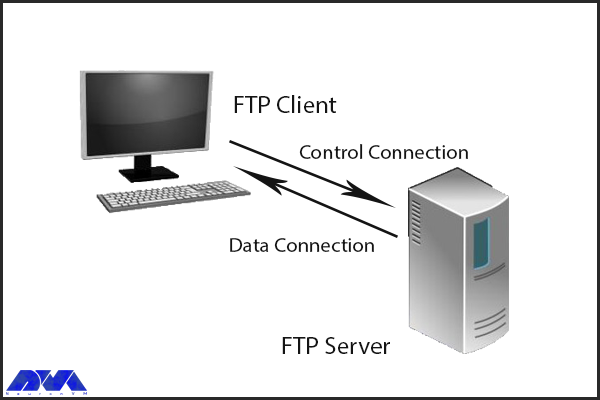
FTP, or File Transfer Protocol, is another critical component of website functionality. It is used to transfer files between computers and servers, allowing website owners to upload and manage their website files. FTP works by using a client-server model, where the client (usually a web developer or website owner) connects to the server using a username and password and then transfers files between the two computers. The importance of FTP in website functionality cannot be overstated. Without FTP, website owners would need to manually upload and manage their website files, which would be a time-consuming and error-prone process. FTP also allows website owners to easily make changes to their website files, ensuring that their website stays up-to-date and secure.
Importance of FTP in Website Functionality
FTP is an essential component of website functionality, as it allows website owners to upload and update content on websites. Without FTP, website owners would need to manually upload files to their servers, which would be time-consuming and prone to errors. FTP makes it easy to update content and ensure that the website is always up-to-date.
FTP Configuration Process
Configuring FTP is typically done through a web hosting control panel or FTP client software. The first step is to create an FTP account, which includes a username and password that the client will use to connect to the server. Once the account is created, the client can then connect to the server using an FTP client like FileZilla or Cyberduck. From there, they can transfer files between their computer and the server.
One common issue with FTP configuration is connection errors, which can be caused by incorrect login credentials or firewall settings. To troubleshoot this issue, double-check your login credentials and ensure that your firewall is not blocking FTP traffic. Another common issue is file transfer errors. It can be caused by file permissions or file size limits. To troubleshoot this issue, ensure that your file permissions are properly configured and your FTP client is set up to handle large file transfers.
Common FTP Issues and How to Troubleshoot Them
Even with proper configuration, FTP issues can still occur. One common issue is FTP connection timeouts, which occur when the client is unable to connect to the server. This can be caused by network connectivity issues or server errors. To troubleshoot this issue, try connecting to the server from a different network or contacting your web hosting provider for assistance.
Another common issue is FTP data transfer errors, which occur when files are transferred incompletely or with errors. This can be caused by a variety of factors, including file size limits, file permissions, or network connectivity issues. To troubleshoot this issue, ensure that your file permissions are properly configured and that your FTP client is set up to handle large file transfers.
DNS vs FTP: Which one is the backbone of your website’s functionality?
Both DNS and FTP are critical components of website functionality, but they serve different purposes. DNS is responsible for translating domain names into IP addresses, allowing users to access websites using human-readable names. FTP, on the other hand, is used to transfer files between computers and servers, allowing website owners to upload and manage their website files.
While both DNS and FTP are important, DNS is arguably the more critical component. Without DNS, users would be unable to access your website, regardless of how well it’s configured. FTP, on the other hand, is important for website management but does not directly impact user experience. That being said, both DNS and FTP are essential to ensuring that your website runs smoothly and efficiently.
Conclusion
In conclusion, DNS and FTP are both critical components of website functionality. DNS is responsible for translating domain names into IP addresses. While FTP is used to transfer files between your computer and your website’s server. Both are essential for ensuring that your website runs smoothly and remains accessible to users. While configuring DNS and FTP can be a complex process, website owners need to understand how they work and how to troubleshoot common issues. Whether you’re a seasoned webmaster or a newbie to the world of website management, understanding DNS and FTP is essential for the success of your website.
FAQ
What is the exact role of DNS?
It turns domain names into IP addresses and allows browsers to find websites and other resources.
Is there any need for IP in FTP?
FTP client and internet connection are needed for using FTP. Aso you will need to know the FTP server’s IP addresses or hostname.
If your website traffic is high or you expect to experience high traffic on the website in the future, then be sure to get information about Linux VPS and learn about its benefits. Also, if you want to have more control over your web hosting server, Linux virtual server will be the best option for you. We will examine why Linux VPS hosting is perfect for developers.
What is Linux VPS Hosting?
When it comes to Linux hosting, it means using a Linux operating system as the base server for your web hosting. The most important functional component in running programs on any device, especially servers, is the operating system. A host is a link that allows all hardware on a server to communicate with and respond to application requests.
An operating system is so essential even for single-user systems and more importantly web servers. Because web servers need to manage all the hardware for multiple users.
Benefits of Linux VPS Hosting for Developers
One of the most affordable web solutions on the market is Linux VPS. Here, we will try to introduce some benefits of Linux VPS hosting that can be significant and effective in your choice. Let’s consider some of them:
Flexibility and Customization Options
Linux offers web hosting administrators unprecedented flexibility because of the design philosophy with which it was built. The highly adaptable nature of this server means that it can fit into almost any environment imaginable. The concept of building blocks in Linux is what makes it so powerful in this regard. Linux is made up of several distinct areas that generally work together.
The related areas in Linux VPS are Kernal, Bootloader, Daemons, Shell, Package Managers and Packages, and Desktop Environment. These items are working together to make a Linux distribution. This is the point that flexibility in Linux comes from.
Cost-Effective Solution
In general, Linux virtual servers or VPS are more expensive than shared hosting, but their cost is cheaper than dedicated hosting. On our website, a high-performance VPS is not significantly more expensive than shared hosting plans. If we want to mention the advantages of VPS over shared hosting, you will understand why VPS is worth a lot. Especially if you want managed VPS hosting.
Regarding Linux virtual servers, we should mention that since their operating system is open source and free, as a result, there is no need to pay a monthly license fee. The virtual server means that the prices are adjusted according to the needs of the customers.
Enhanced Security Measures
Whatever server you use, Linux or Windows, your server is only as secure as you configure it to be. Fortunately, Linux leads the way in this regard and offers many options that you can work with to make it much harder to break into. Of course, this goes back to how Linux is designed. Of course, you must have managers who are professional enough and give you the necessary knowledge to secure the server.
The ability of Linux allows users to activate only the services they need and helps to reduce possible vulnerabilities. Any program, service, or open port is a potential weakness through which attackers can use it to infiltrate or attack the server. If you configure Linux properly and tightly enough, attacks have no chance of success. These items are accompanied by the usual defense of most web servers such as scanning and detection of malware.
Reliable Performance and Scalability
When your website has high traffic, it means that the server has to do more work and use more resources. Another advantage of Linux VPS servers is that they are scalable so that you can meet the needs of your server and consider a significant amount of resources if needed to ensure stability. This type of fluctuation generally stops a shared server. Linux provides a significant amount of utilities to perform various tasks, one of the most powerful of which is the shell. Finally, if your site suddenly needs more resources, Linux VPS hosts can increase these resources quickly and easily.
Access to a Wide Range of Development Tools and Technologies
Shared hosting offers limited control to website owners, so they can’t install whatever tools or technology they want on their environment. But VPS hosts are not like that. Users who use Linux VPS hosting use a wider range of services. For example, if you do not want to use the email functionality on your server, you can turn off or remove programs such as BIND or the webmail program. The Neuronvm website provides root access to VPS for its users, and in this way, you can make any changes, access tools, or delete them.
Conclusion
By using virtual private servers, you can manage your website without slowing down and causing damage. Note that the use of VPS hosting is increasing day by day and the demand for it has increased too. So, this article tried to be a helpful guide to introduce you to Linux VPS hosting and some benefits of that for developers.
FAQ
What can be the difference between Linux VPS and Windows VPS?
The flexibility in Linux VPS hosting is more than Windows VPS. The reason is that it is cheaper and easier to add processing resources on Linux. In selecting CMS Linux supports more choices.
Since the creation of the Internet, the priority was to send packets without defects and damage, and for this reason, the Internet space is an inherently insecure space. All the programs you use on the Internet, such as e-mail, web, messaging systems, etc., are built according to global standards, but it is still not possible to talk about their security with certainty. For this reason and due to the importance of security, in this article we are going to compare VPN vs RDP. We will also tell you Which One Offers Better Security for Your Remote Workforce?
Understanding the Risks of Remote Work
Nowadays, remote working has become a very popular and common method all over the world. Especially now that companies are allowing their employees to do their jobs remotely. But on the other hand, the rise of remote work has created a new range of challenges for businesses that want to keep their sensitive information safe.
Among the risks that users may face when working remotely are:
Email fraud and phishing
Cyber attacks on Remote work infrastructure
Increased attack levels
Weak passwords
Webcam Hacking
Insecure Connections
Lack of awareness of cyber security
Lack of monitoring
As more employees work outside the traditional office environment, companies must find new ways to manage and monitor access to data. After reading this article, you can choose and buy the plan you want from the high-quality and high-speed Admin RDP plans provided on our website. You can also contact our experts if you need support.
What is VPN and how does it work?
A VPN or virtual private network is one of the best tools to protect your internet privacy. A VPN encrypts your connection, hides your IP address, and keeps you private while browsing the web, shopping, and banking online. While virtual private networks were once a new technology solution, they are now an essential tool.
Using a VPN, all your data traffic is sent through an encrypted virtual tunnel. This encryption prevents hackers and profiteers from accessing your organizational information. A VPN establishes a point-to-point connection between your device and the global Internet and allows a user to access another computer from their PC using tunneling protocols. In order to protect your organization’s data and prevent information from being tracked in transit, traffic is often encrypted with network encryption protocols such as SSH or IPsec.
VPN vs RDP
Enterprise VPNs are now used by various businesses. Encryption increases security and privacy. Encryption is a method of converting plain text into a set of unreadable codes. A key or decryptor converts codes into readable information. When you use a VPN, only your device and the VPN provider contain the decryption key, and if someone tries to spy on you, they will only see a series of characters.
Note that instead of sending your internet traffic (eg online searches, uploads, and downloads) directly to your ISP, a VPN first routes your traffic through a VPN server. That way, when your data is finally transmitted to the Internet, it will appear to come from the VPN server, not your personal device. Without a VPN, your IP address is visible on the web. It is interesting to know that VPN as an intermediary hides your IP address by redirecting traffic.
What is RDP and how does it work?
Remote Desktop Protocol (RDP) is a widely used software that allows you to connect to your Windows server in another location. Using this protocol, you can connect to your Windows server, open files, and use them, just like you use your system. Finally, the RDP protocol puts your Windows system and server under your complete control remotely, so that you can use it without any problems.
In the following, we intend to describe the use of the RDP protocol:
Image transfer between the user’s computer and the Windows server
The ability to transfer sound from a Windows server to a computer
Encrypt all information exchanged between you and the server
The ability to access all computer files inside the server using the File System Redirection system
Having access to the printer and any system connected to the server
To understand how RDP works over the internet, consider a drone. You can control your drone by pressing buttons and through radio waves. The use of multi-user remote desktop protocol (RDP) also has almost the same process; Sending your mouse movements and keyboard keys to the desired Windows server. with the difference that this work is done on the internet and not with radio waves. The Windows server desktop appears on the computer screen as if you were sitting behind the main server.
VPN vs RDP
A remote desktop creates a separate path between you and the RDP server over the Internet, where data is sent and received. Mouse movements, keyboard keys, server screen information, and all other required information are sent in this channel with the help of TCP/IP protocol. Also, the RDP connection encrypts all the information between the user and the server so that the user and the remote desktop can experience a secure connection.
VPN vs RDP: Key Differences
RDP is a service that allows you to host your website in a virtual environment, while VPN is a user-centric tool that allows you to browse various websites safely and securely. Probably the only thing that an RDP and a VPN have in common is the virtualization aspect of each service.
RDP is a type of web hosting service. This means it gives you a personal space on the online server to keep your data safe and secure. This will help you to host your website better to get more traffic. While a VPN is a virtual private network that hides your real IP address from hackers and spammers. This makes all your data unreadable so no one can track your online activities. This significantly helps to maintain your privacy and security.
In the rest of this article, we will discuss the key differences between RDP and VPN and examine each one thoroughly.
Security Features of VPN
VPNs use a variety of different protocols. Older protocols, such as PPP and PPTP, are considered less secure. Note that VPN security, like other security programs such as antiviruses, may sometimes malfunction and fail to function fully. VPNs protect your IP and internet history, but they cannot prevent outsiders from attacking your system.
Using a VPN alone cannot protect you from Trojans, viruses, bots, or other malware. It is better to use an antivirus on your system. This is because once malware gets into your system, it can steal your data, whether you have a VPN or not. For this reason, do not forget to use antivirus. Of course, when your VPN has a problem, you are definitely at risk. For this reason, be sure to use a reliable VPN provider so that you are at less risk.
Here are some types of security protocols:
IP Security Protocol (IP Sec)
Layer Two Tunneling Protocol (L2TP)
SSL and TLS protocols
Point-to-Point Tunneling Protocol (PPTP)
SSH protocol (Secure Shell)
Secure Socket Tunneling Protocol (SSTP)
Internet Key Exchange, Version 2 Protocol (IKEv2)
OpenVPN
Security Features of RDP
remote desktop provides users with various security settings such as 128-bit encryption and NLA; So you won’t necessarily need a VPN. Of course, due to its high popularity and the existence of Remote Desktop in most modern versions of Windows, this software has become the main target of many hackers. To solve this problem, in recent years, Microsoft has defined several security updates for the RDP protocol. Because of this, an RDP connection can be very secure. However, remember that it is the responsibility of admins and technical support to ensure security patches are installed, and remote users only have access to the hardware resources they need to do their jobs.
Pros and Cons of VPN
Geolocation Spoofing: With a VPN, it appears as if your connection to the Internet is coming from a different location. This issue allows users to remove the restrictions of their country regarding access to some specific sites or the restrictions of the sites themselves due to geographical location.
High Security: Since the communication goes through the encrypted tunnel, no one but the VPN provider can know about it. These encrypted communications prevent data collection by ISPs, hackers, and other malicious and spying agents. If the site you are looking for uses HTTPS, the VPN server will not be able to see the content of your request and will only be informed of the website you have visited.
Better Privacy: Because your ISP prevents your activity from being tracked, the websites you visit also cannot identify your geographic location.
Cost and Variety: With a little effort, you can create your own VPN. Also, there are many providers that provide access to servers in hundreds of countries. Some of these providers offer mobile and desktop apps, while others simply require you to connect to a server through open-source software.
Lower Speed: A VPN connection is often slower than a regular connection. This makes sense once you put at least one extra step between your device and websites. For example, if you’re in the UK and using an Australian server, not only should you expect some lag, but the server’s download and upload speeds will also slow down.
Legal Issues: Some countries have banned the use of VPNs and identify users by implementing methods such as Deep Packet Inspection. In these countries, trying to hide internet traffic can lead to legal issues.
Pros and Cons of RDP
If we want to tell you about the benefits of RDP, we must mention the following:
Exclusivity of processor resources, main memory, and information storage space
The possibility of dedicated remote management
Ability to install desired software
The ability to upgrade resources in the shortest possible time
Having a dedicated IP
Ability to manage the server such as turning off or turning on the server by accessing the server control panel
Ability to quickly troubleshoot and transfer information to another RDP machine
Among the disadvantages of RDP, we can mention the dependence on the network and the need to have a powerful RDS.
Need Powerful RDS: If there is a need to use RDP on a large scale, a powerful Remote Desktop Service (RDS) is needed to monitor all RDP connections.
Requires a powerful network: A reliable network connection is required for the client computer to successfully connect to the host computer. Otherwise, the entire Remote Desktop service may fail.
By connecting to a remote PC, the destination computer is locked for local use and the local user cannot use the system at the same time or see what the remote person is doing.
Choosing the Right Solution for Your Remote Workforce
All in all, both services are very valuable for businesses. RDP increases website performance, while VPN increases the security of your data. If your business is growing, an RDP may be right for you. This type of hosting has a high level of customization, which is suitable for those who need to use specific software or programs. In addition, you can do almost everything over an RDP on a dedicated server, but at a lower cost.
On the other hand, a VPN is very useful for those who travel a lot, work remotely, or hold client meetings in public places. No matter where your destination is, it hides your IP address and provides you with a secure network. For any job where data security is critical, it’s best to invest in a VPN.
Conclusion
Both RDP and VPN services have their uses in the business world, and many online companies choose to use one or both services. RDP is a premium hosting option for businesses that need speed to scale and maintain a website with consistently high traffic. For those who work remotely or travel a lot, a VPN can also be a useful solution. In fact, both technologies can be valuable additions to your online toolbox.
Are you ready to take your online presence to the next level? Well, get ready to unlock the secrets! In this guide, we’ll reveal five awesome techniques that will improve your dedicated server’s performance. So, brace yourselves and prepare to immerse in the world of dedicated servers.
Introducing a Dedicated Server
First things first, what exactly is a dedicated server? Well, imagine having a server all to yourself. Yep, that’s right! A dedicated server is like having your own personal playground in the world of web hosting. Unlike shared hosting where you share server resources with other users, a dedicated server is exclusively yours. This means you get to enjoy enhanced performance, speed, and security. It’s perfect for businesses or individuals who have high-traffic websites, or simply crave more control over their online presence.
Now let’s talk about the perks of having a dedicated server. One of the biggest advantages is the level of customization it offers. Since you have the entire server to yourself, you can configure it to meet your specific needs. Another great perk is the reliability and stability that comes with a dedicated server. With no other users hogging up the resources, you can ensure a consistent and smooth performance for your website or application.
Also, let’s talk about scalability. As your online presence grows, so do your needs. With a dedicated server, you have the flexibility to scale up or down as required. Whether you need more CPU power, RAM, or storage, you can easily upgrade your server to accommodate the increasing demands of your website or application.
So there you have it folks, an introduction to the wonderful world of dedicated servers. It’s like having your own little corner of the internet, tailored to your exact needs. We also suggest you visit the Cheap Dedicated Server plans presented on our website.
What is the impact of a Dedicated Server in improving your business?
There are many ways that a dedicated server can help you improve your business. First of all, it will enhance the performance and reliability of your website. With a dedicated server that’s all yours, you’ll have access to all its resources, ensuring you high speed, strong bandwidth, and storage capabilities. This means your website or application can handle increased traffic without experiencing slowdowns or crashes, which results in a smooth user experience and improved customer satisfaction. Additionally, a dedicated server offers better security measures as you have full control over your server’s configuration and can implement advanced security protocols to guard your data and protect against hackers and cyber-attacks.
Also, a dedicated server allows you to customize the server environment to meet your specific business requirements. You have the flexibility to install and configure software, choose the operating system, and optimize settings for better performance. This level of customization ensures that your server aligns perfectly with your business needs.
How can we improve the performance of a Dedicated Server?
To improve the performance of a dedicated server, there are a few simple ways you can try. Some of these ways are well known. For example allocating the server’s resources, like CPU and RAM to avoid overloading or updating the server’s software. Monitoring and optimizing the performance of your database, such as improving queries and indexing, is also important. But there are a few other ways to improve dedicated servers, which we’re gonna tell you about.
Here are 5 secret techniques to improve a dedicated server:
Enable caching on Your Dedicated Server
By caching frequently accessed data or content, the server can store and deliver it more efficiently. This reduces the time it takes to retrieve information and minimizes the load on the server’s resources. This also leads to faster response times and increased website or application loading speeds for visitors or users. Caching also helps to optimize the server’s bandwidth usage, as it reduces the need to repeatedly fetch and transmit data from external sources. Overall, enabling caching on your dedicated server significantly enhances its efficiency and ensures a smoother and more responsive experience for your audience.
Optimize JavaScript and CSS delivery
Another technique to improve the dedicated server is optimizing JavaScript and CSS delivery. By efficiently delivering these resources, the server can reduce the time it takes to load web pages, resulting in a faster and smoother user experience. This optimization technique involves minimizing the file sizes of JavaScript and CSS files, combining multiple files into a single one, and utilizing techniques like compression. All things considered, optimizing JavaScript and CSS delivery helps to maximize the server’s resources, improve website loading times, and enhance user satisfaction.
Adjust priority settings
Prioritizing tasks such as database queries, network traffic, or system maintenance can significantly optimize server performance. This leads to improved user experience and overall productivity. Also by carefully managing the priority levels of different processes and applications, server administrators can ensure that critical tasks receive the necessary attention they require. This allows for better utilization of server resources, enhanced responsiveness, and smoother operation.
Use a proxy server
A beneficial technique for improving a dedicated server is using a proxy server. By acting as an intermediary between a user and the internet, a proxy server can mask the user’s IP address, making it difficult for websites to track their online activities. This helps protect sensitive information and maintain anonymity. Additionally, a proxy server can cache frequently accessed web pages, reducing the load on a dedicated server and improving its overall performance. This allows for faster and more efficient browsing, benefiting both the user and the server.
Keep your server updated and secure
Regular updates ensure that your server is benefiting from the latest software and security patches and bug fixes. Updating the server means you can benefit from improved stability, increased efficiency, and optimized performance. Additionally, keeping your server secure, protects it from potential cyber-attacks and vulnerabilities. Regular security measures such as installing firewalls, using strong passwords, and implementing intrusion detection systems help safeguard your server and its data. By maintaining the security and updating your dedicated server, you can ensure its optimal performance and protect it from potential risks.
Conclusion
So there you have it! five techniques that you can use to step up your dedicated server today. Implementing the five techniques to improve the performance of a dedicated server can significantly enhance its efficiency and effectiveness. It’s important to always monitor and find better ways to improve the performance of your servers.
The database is one of the main and most important elements that every software element needs to work. A website, a simple mobile application, an operating system, or an accounting application that is supposed to work with specific data, content, or information needs a database to store this information in a systematic classification for use in the application. MariaDB is one of these databases that we are going to fully review in this article and tell you the Top 10 Benefits of Using MariaDB for Your Database.
What is MariaDB?
MariaDB is a professional database that can fully cover your database needs. Many big names in the world of software and the internet have changed their process and addressed the users of this robust database. MariaDB is a well-rooted database that has evolved from one of the most powerful databases out there.
This database started its work in early 2008. Compared to other database programs and platforms that exist, MariaDB can be considered a new program. Of course, other platforms have been presented after this platform and have made good progress, but MariaDB, using MYSQL foundations, was able to make good progress and gain the attention of many programmers. We suggest you visit the Linux VPS server plans provided on our website and don’t miss the exceptional opportunity to have a powerful and high-speed server.
Top 10 Advantages of MariaDB for Database
1) Security measures
Security is a major concern for any website owner. Hacking attempts are increasing every year and a breach can have serious consequences. Consequently, it is important to ensure that your database management software is properly secured.
MariaDB security measures include:
Built-in security checks and passwords
PAM and LDAP authentication
User role
Database encryption
Another unique point of MariaDB is its RBAC role-based access control. This feature has been introduced since version 10.0.5 and makes access management easier.
2) Fast and Efficient Performance
The performance of your site is very important. Especially when the site’s loading speed drops. For example, most users expect a website to load in less than two seconds. Failure to achieve this time can lead to an increase in the bounce rate.
MariaDB considers engine-independent table statistics when optimizing queries. The MariaDB-based website also offers a range of useful resources on how to further optimize performance, as well as performance strategies, for various data representations. This includes system variables, buffers, stores, threads, performance improvements in database type, and encryption technology. This means that MariaDB is much less likely to negatively impact your site’s page speed.
3) Proper Support
Whether you’re a beginner or an experienced user, there will likely be times when you need extra support. Those licensed to dedicated MySQL products have access to Oracle Premier Support, which provides 24/7 assistance. MariaDB support is the same but has some additional features, such as a guaranteed response within 30 minutes! The continued use of this platform by these companies can be another reason for the importance of using MariaDB.
4) Storage Engines
Storage engines have been well developed in MariaDB and can provide new features to users. XtraDB and Aria can be mentioned among the mentioned storage engines.
5) Database Views
One of the main things that has been optimized is database views. A database view shows the information that will be provided to the user in the form of a virtual table based on the user’s request from the database. This virtual table can have related columns, each of which is in a separate table. Likewise, it may also collect different records and provide the user with a query answer at once.
6) Virtual Columns
Virtual columns can consider one of the great innovations for MariaDB, which greatly reduced the computational load of various programs. At the end of the tables of this database, a virtual column that does not belong to the database and is located in software and virtual form is created. This column will be able to perform mathematical operations and formulas that are requested from it on different rows of the application table and save it.
With this, it is no longer necessary to extract information from the tables in the program source and perform calculations on them. The program simply accesses that column and reads the necessary calculated information from it. If the calculation is done in the program, the system resources are consumed, and the execution time increases. This makes the database a little bigger, but the system resources are used more optimally.
7) Column Store
Columnar storage is one of the features built into MariaDB. By using this possibility, you can store the desired data in column form. This is in stark contrast to previous methods where data was stored in rows. In row storage, a lot of volume and time was spent due to the different data of each column. But this work has made it possible to use compressions and different techniques to increase the speed, and it can be very useful for big data as well as in the topic of Big Data.
8) MyRocks Support
MyRocks offers a database system (RockDB), which can considering the best in data compression. By using the MyRocks engine, you will have the ability to take advantage of the compression features of this database. It is also possible to move data between these two databases and change the basis of your database without making any changes.
9) Thread Pooling
Thread Pooling was created exclusively for MariaDB. This feature completely revolutionized the way databases work, allowing each access to the database to have a thread. This feature gives the database a special account that handles data requests with pooling software techniques. In this technique, a section named Pool is created, which acts like a list, and all requests are placed in it. Then the database elements manage and respond to these requests with different and sometimes multiple threads.
With this, your database will be able to respond to queries and requests for information faster. This feature provided by MariaDB has been expanding and many databases are leaning towards it.
10) Implementation and Authorization
This software runs on Windows, Linux, and macOS operating systems. It is available on Intel and IBM Power8 hardware platforms and runs as a service on multiple cloud platforms. Supported programming languages include C++, C#, Java, Python, and others. MariaDB Galera’s Linux-based cluster implementation has also been developed to provide a concurrent multi-master cluster option for MariaDB users. However, the API that connects the database to Galera Cluster, another open-source technology, starts in MariaDB by default, eliminating the need to load a separate cluster.
Conclusion
MariaDB is one of the reliable platforms that has proven itself in practice according to the comments and reviews we have done. Perhaps these introduced benefits are so tempting that you have thought of building your site’s database or the application you are planning to build on MariaDB and use it.
FAQ
What is the solution for the MariaDB server not accepting connections from other hosts or networks?
To fix this problem, you need to configure the server to allow remote access, give privileges to the remote user, and check the firewall settings.
You probably heard about Domain Name Servers (DNS) before. DNS servers are used to translate human-readable domain names to machine IP addresses. Using DNS you don’t need to insert long numbers when you are going to enter a website. Instead, you can use domain names like example.com and be directed straight to your destination website. Now, this article considers analyzing the role of DNS servers in website performance and speed, so keep reading to get more.
What is DNS Server?
DNS works like a kind of internet phone book and is an identifier for your website. This means that users can quickly access their desired online information and website through a domain name like neuronvm.com. The role of DNS is to translate domain names to IP addresses so that browsers can load Internet resources correctly. A unique IP address is allocated to every device connected to the internet and is the identification of the device. We recommend you use the cheap dedicated server plans offered on our website to set up your own DNS server.
Explanation of IP Address
An IP address is a set of numbers that characterize devices connected to the Internet. All internet devices from smartphones to tablets and routers have a dedicated IP. These IP addresses allow computers to communicate with other computers. The structure of the IP address can be expressed with an example: 192.168.1.1 is an example of an IP address. This code contains information about your computer’s location and provider information.
The Effect of DNS Servers on the Speed and Performance of the Website
DNS servers affect your website in various aspects. If we want to mention two of them, we can mention the speed and performance of the website.
The Role of DNS Servers on Website Speed
DNS is not directly related to your internet speed, but since it causes identification and direct connection with the target website, it can affect the speed of displaying a web page on your computer. Also, modifying the router’s DNS servers can help improve your overall speed. There are many programs and machines available to help you find the best server for your router.
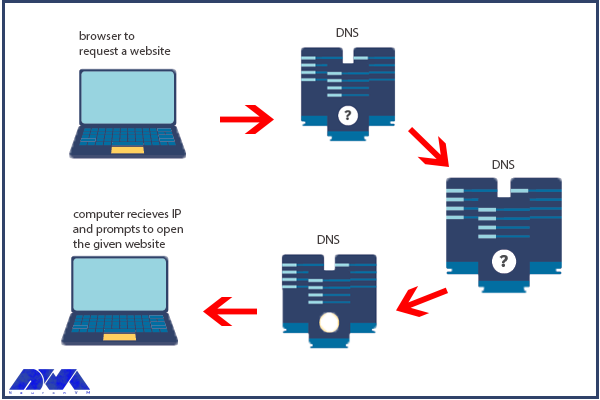
One of the most effective tools for finding IP addresses is DNS Lookup. The process is that the browser must first find the appropriate IP address to display the relevant website. For example, if you type the domain name neuronvm.com and press enter, it will operate to find the IP address associated with the domain name and connect to the website:
DNS servers are provided in different types such as recursive DNS servers, TLD name servers, Root DNS servers, and authoritative DNS servers. These servers work together to fix domain names into IP addresses.
Ways to Decrease the Effect of DNS Servers on Website Speed
DNS servers are responsible for domain name resolution and the speed of this process affects the loading time, so to speed up this task you can choose a reliable high-performing authoritative DNS server provider. These servers are the only type of server that you have the option to go with your preferred provider. But the root and TLD servers do not give you this possibility. So, to increase the speed of website DNS resolution, you should choose a reliable and fast authoritative server provider. Note that a valid DNS Server provider is different from a web hosting provider. In web hosting, you store the contents or data of your website, but in DNS hosting, domain DNS records are stored.
Another way to reduce the effect of DNS servers is to use DNS cache. Of course, if the IP is already stored, the effect of the DNS servers will not matter, because the browser does not have to wait for the IP address to be delivered by the valid server. So always go with a reliable server to ensure fast DNS resolution speed. Of course, if the IP is already stored, the effect of the DNS servers will not matter, because the browser does not have to wait for the IP address to be delivered by the valid server. So always go with a reliable authoritative server to ensure fast DNS resolution speed.
In using authoritative DNS servers, you can use different providers. But this choice will be different according to your circumstances. For example, if convenience is important to you and you don’t want to deal with record keeping, you can use your web hosting provider. But if you focus on DNS resolution speed, Cloudflare will be a good choice.
The Role of DNS Server on Website Performance
Regarding the performance of the website, suppose you have a website that works slowly, and you have no idea about the reason because the hardware and CPU configuration of the system is suitable and you have high-speed RAM. Also, all code and programs are optimized but website pages still take time to load.
After a lot of searching and debugging, you realize that the problem is with the website’s TTFP. Another reason for this problem can be your DNS resolution time, i.e. it takes time to convert the domain name to IP address. During the process of website performance testing, your business may suffer and a lot of time will be spent to find the reason for this slowness. So we must know what the domain name system is and what its role is:
DNS servers in website performance
Important Factors to Improve Website Performance
Here are some factors to consider if you want to improve your website performance:
Not using low TTL
A shorter TTL makes the user’s machine request again for the domain faster. You can use the high TTLs to make sure that the information is stored locally in the DNS ISP and the user’s computer and affects multiple users.
Backup plan
It is good to have a backup plan, even if you use a big DNS management company.
Unreliable Registered
If you want to build the next page with 100K hits in a second, you have to be sure that your DNS server can handle the load or assign your NS record to anyone with reliability.
Capacity
You need to make sure of the capacity of your servers because if you want to receive a lot of requests, you need to have a lot of capacity or let someone else handle your DNS.
Conclusion
DNS is an important issue in the field of websites. These servers have an important role in identifying websites and as told before they act as a phonebook. This article tried to focus on DNS servers and their impact on the website’s performance and speed. Also, we tried to analyze each of them and explain how they can affect the website. We hope you enjoy this article.
FAQ
Are DNS servers effective in search speed?
You can improve internet search speed by changing your DNS to something other than what your ISP Provides.
What is the way of increasing web performance using DNS?
By caching the A records or IP addresses they receive from DNS queries for a set amount of time.
Every domain or website you visit uses one or more specific DNS. Now what is DNS and where is it located on the website and how does it work? These are the questions that may arise in the minds of users. DNS is a universal system that all websites and domains use, and without it, no website will survive. In this article, we are going to tell you What is a DNS Server and How Does it Work? We suggest that you do not miss this interesting post and stay with us until the end.
What is DNS?
DNS stands for Domain Name System, which converts a website’s domain name to an IP address. All computers on the Internet, from smartphones or laptops to website servers, identify and communicate with each other using numbers. These are called IP numbers.
When you want to enter a website and communicate with its server, you don’t need to enter its IP address. Instead, you only need to enter the domain name of the website and leave the operation of converting the “domain name to IP” to DNS. By doing this, the human-understandable domain name becomes a machine-understandable IP.
There are various plans for a dedicated server on our website. You can do the DNS configuration on a cheap dedicated server provided on our website.
What is a DNS Server or Nameserver?
When you enter a website address, you need to connect to the server IP associated with your domain. Now, where is this information and how does the system understand which domains belong to which server? A DNS server or Nameserver acts like a phone book and records all DNS records and IPs related to them. In other words, its task is to provide DNS information related to domains.
Usually, web hosting services manage nameservers. Every host or server you buy has its own IP address that needs to be registered. Each DNS server is responsible for storing information about the domain and IP servers in itself so that it can send the information when called. The DNS inside the Nameservers are spread all over the world and it should be available to all of them for identification. Therefore, domain DNS registration may take up to 48 hours.
Each Nameserver has its own DNS address that can store records of many domains and IPs. For example:
Ns1.neuronvm.com
Ns2.neuronvm.com
Each domain name must be at least two-way bound to DNS. Because the server and the main server and subsequent servers are used for times when the main server is not available. When a website’s domain address is called, your server’s IP information is read from the DNS server and sent to the browser, and then a request to receive the information is sent to your server.
How Does DNS Work?
As we said, DNS is responsible for returning the IP from the domain. This operation is carried out in several steps until finally, a valid and healthy IP address reaches the user. It is a little difficult to find the IP address of the website among all the DNS servers in the world, which is made easy by the DNS architecture. Each of these steps will help you find the original DNS by sorting out where the DNS is stored. For example, first, the DNS zone and then the DNS servers related to their back-domain are checked in order to reach a suitable location.
1) DNS Recursor
In the first step, the user’s request is sent to this section. This section communicates with the set DNS servers to find the IP. To do this, it sends queries to the next three parts, i.e. Root Nameservers, Top-level Domain Nameservers, and Authoritative Nameservers, to find the right IP.
2) Root Nameservers
This section is for finding the DNS root zone or DNS from its zone. This section is responsible for responding to requests placed in the same DNS zone. Finally, a list of valid servers matching the domain’s TLD will help find the IP address.
3) Top-level Domain Nameservers
It is responsible for keeping the IP related to the TDL of the domain and sends the existing IP and reaches the fourth stage.
4) Authoritative Nameserver
Returns the real and final IP address. At this stage, there are two types of servers: the first server is the main server, which is the main IP set in the first DNS, and the second server is your alternate and backup DNS. If the primary server fails, it uses the secondary server and returns the final IP.
What is a DNS Cache?
A cache system means temporarily storing data in a closer location, which leads to improved performance and faster response. DNS caching means storing DNS information in the closest location to the user. When sending subsequent requests, the DNS response is read from the user’s cache and no more requests are sent to the DNS chain. Finally, CPU bandwidth consumption decreases, and website loading speed increases. DNS data can be stored in various cache locations and for a specific time period in terms of TTL.
DNS Cache Location in the Browser
By default, web browsers support DNS caching and store information about each DNS for a certain period of time so that the DNS response can be read from the browser when it is reloaded. When you open a domain address, before sending a DNS request, the browser cache is first checked, and if there is no information, the request is sent to the DNS chain. In the Chrome browser, you can see the status of the current DNS cache by going to the following address:
chrome://net-internals/#DNS
The Best DNS Servers
Usually, the web hosting service provides you with DNS servers, but you can still change your domain’s DNS. There are free and paid DNS servers that are very fast and secure and use security tools such as firewalls and request filters. Next, we will introduce some of the top DNS servers.
Cloudflare: Cloudflare is one of the DNS provider services that provides many features to users. In addition to security, Cloudflare prevents DDoS attacks and other attacks and optimizes the security and loading speed of your website with security services and optimized architecture.
Google Public DNS: Google’s DNS service, which is called Google Public DNS, is slightly different from Cloudflare’s service and is designed for more experienced users. This service has its own uses and facilities that you can use if needed.
Quad9: Quad9 DNS service is famous for its speed. Also, the service claims to be able to block malicious websites and users using its data.
Conclusion
DNS is the communication system between the domain name and the server IP, which ultimately shows the server information to the user. DNS consists of 4 parts, all of which eventually reach the IP server. Also, there are different ways to change domain DNS records (such as NS records and A records) you can connect your server IP to your domain in different ways. Another point is that you can use DNS services to maintain security and speed.
FAQ
Is it safe to change DNS?
It depends. They are always at risk of hacking and to increase security, you can use DNS services.
Should we use private DNS?
Yes, private DNS can provide you with more security compared to other DNS.