Tag: Linux Tutorials

  • Boosting Performance: How to Optimize MongoDB on Your Debian Server

    Boosting Performance: How to Optimize MongoDB on Your Debian Server

    What is your suggestion to boost the performance of your server? This article has been prepared to examine how to optimize MongoDB on your Debian server and boost your performance. This database’s work depends on how it uses the underlying resources, and its task is to store data on disk and memory. MongoDB uses a CPU for its performance and a network for communication with users or clients. So, let’s go deeper and examine this issue from different aspects.

    Understanding the performance bottlenecks in MongoDB

    When performance issues appear, it indicates that the database is running at full capacity, so it’s time to add extra capacity to the system database. Especially, since the working program of the system must be located in the physical memory. Of course, performance problems may be temporary and related to high traffic load. Here, are some common issues with the performance of MongoDB:

    – It is possible that the high network delay between applications and MongoDB servers will cause a delay in data recovery and updating.

    – If the profiles are misused, it can severely affect the performance of the query, so you need to create the appropriate profiles for administrators.

    – As mentioned before, the performance of MongoDB completely depends on the underlying hardware. So if the RAM is insufficient or the disks are slow or the processor is weak, they will cause problems.

    – Poorly designed queries that do not use indexes effectively can cause significant performance degradation.

    – If the replication is done slowly, it may affect the data access among the members of the replica set and lead to an increase in the read latency.

    – The mechanism that MongoDB uses to maintain data integrity is the locking mechanism. Excessive lock contention may reduce concurrency and cause performance problems.

    – In sharding, the wrong choice of shard key or unbalanced distribution of data among shards may cause uneven distribution of queries and performance loss.

    Analyzing Server Hardware Requirements for MongoDB

    Note that the following requirements are crucial before you start to use MongoDB on your server:

    – A Linux VPS Server with Debian OS

    – A minimum of 10 GB of free disk space and also extra necessary space to hold MongoDB data.

    – A minimum of 4 GB RAM

    – A proper network connection

    – 64-bit architecture

    Optimizing MongoDB configuration parameters

    If you need to optimize MongoDB configuration parameters, you can follow the following settings:

    optimizing performance in MongoDB

    Optimize MongoDB on Your Debian Server

    Locking Performance

    Databases receive different data from users and these operations are not sequentially. In a way, one user may access data while the other is in the middle of updating. these may cause conflict. To solve this problem, the concept of locks for locking documents and collections was introduced by databases. By initiation of the lock, no other user can read or modify your data until the lock is released.

    MongoDB provides valuable metrics to help you check whether the lock is degrading your database performance. the related commands are:

    db.serverStatus().globalLock
    db.serverStatus().locks

    Using these parameters, you can examine the request that created the lock and take the necessary action to improve MongoDB performance.

    MongoDB Logging

    Mongodb entry is in the log path settings and is located in the /var/log/mongodb/mongod.log directory. You can also find the MongoDB configuration file in /etc/mongod.conf.

    In order to change the verbosity of a component, the following query is helpful:

    db.setLogLevel(2, "query")

    Run the following command to clear the log file before doing profiling:

    db.runCommand({ logRotate : 1 });

    WieredTiger Cache

    Wieredtiger is the storage engine that was created after mmapv1 and you need to replace this storage engine with mmapv1 which is deprecated. Also, when it comes to concurrent management and performance, the second option is a better choice.

    Note that the cache size is important to ensure the correct performance of Wiredtiger. So you should check if you need to change its default size or not. In order to store the entire working set of the application in the cache, it must be large enough.

    Now, to check the cache usage status, apply the following command:

    db.serverStatus().wiredTiger.cache

    You will encounter a large amount of data but you should consider three of them:

    – For the maximum size of the cache => wiredTiger.cache.maximum bytes configured

    – For the size of the data currently stored in the cache => wiredTiger.cache.bytes currently in the cache

    – And for the size of the dirty data => wiredTiger.cache.tracked dirty bytes in the cache

    By finding out the size of the parameters used, you will know whether you should increase the size of the cache or not. If the applications are read-heavy, you can use wiredTiger.cache.bytes read into cache parameter.

    Free Performance Monitoring

    MongoDB has a free performance monitoring feature for parallel collections and standalone instances in the cloud. When you enable this feature by configuration, the data that has been checked will be sent to the cloud service. There is only one command for this configuration and then you are provided with a web address so that you can access the performance statistics. To enable free monitoring, run the following command:

    db.enableFreeMonitoring()

    As you get the URL in your output, paste it on the web browser and monitor performance statistics after a single MongoDB command. As a result, the dashboard will show the necessary metrics:
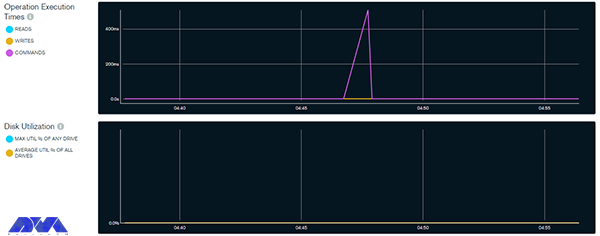
    Performance Monitoring on MongoDB

    Optimize MongoDB on Your Debian Server

    Use the command below to disable this feature:

    db.disableFreeMonitoring()

    Indexing strategies for improved query performance

    One of the crucial aspects of database management systems that can significantly impact query performance is indexing. By creating appropriate indexes on the columns frequently used in queries, you can speed up data retrieval and improve overall system efficiency. Here are some indexing strategies for improved query performance:

    – Using the ESR rule which means Equility, Sort, and Range

    – Creating indexes for supporting queries:

    – Sorting query results by using indexes:

    – Using component indexing

    – Avoiding over-indexing

    – Ensuring indexes fit in RAM

    – Creating queries to ensure selectivity

    – And etc.

    Utilizing replica sets and sharding for scalability

    If we want to understand the concept of sharding more, it should be said that it is a form of scaling known as horizontal scaling or downscaling. The reason is that additional nodes are introduced for load sharing. Limitless scalability is provided with this horizontal scaling to manage large data volumes and excessive workloads. You can access infinite scalability using sharding, but in practice, you will scale proportionally to the number of servers you add. The possibility of having each additional piece increases storage and operational space, so the server can store more data.

    A replica set in a MongoDB database refers to a group of MongoDB instances or servers that store the same data. Here the instance acts as the master node that handles all write operations. This is while other nodes act as secondary nodes and repeat the data from the primary node. In the meantime, if the primary node is unreachable, it will automatically go to one of the secondary nodes.

    When you combine replica sets and sharding in MongoDB, you create a highly available and horizontally scalable database architecture.

    Monitoring and troubleshooting MongoDB performance issues

    Monitoring and troubleshooting MongoDB performance issues are crucial to maintaining a healthy and efficient database. MongoDB is a famous database, but like all platforms, it may contain some problems. Here are troubleshooting and how to do monitoring MongoDB issues:

    – You can use monitoring tools to obtain information about the performance of the MongoDB instance. One of these tools is (MMS) or MongoDB cloud manager, which can be used to track and analyze various performance metrics. Also, you can use third-party monitoring solutions.

    – Establish baseline performance metrics during normal operations. This will help you identify deviations when problems occur.

    – Pay attention to server-level metrics such as CPU usage, memory usage, disk I/O, and network activity. Resource bottlenecks can affect database performance.

    – Monitor the lock percentage to identify potential contention issues. Long-running or blocked operations can lead to performance bottlenecks.

    – Review your MongoDB configuration settings and adjust them based on your hardware capabilities and workload needs.

    – If your database grows and reaches its hardware limits, consider sharding to distribute data across multiple servers.

    – Keep your MongoDB version up to date to take advantage of performance improvements and bug fixes.

    – Monitor the health of your server’s hardware components (such as disks, and RAID controllers) to identify potential problems.

    – Regularly run benchmark tests to measure database performance under simulated real-world conditions.

    Note that troubleshooting the performance problems of this database may require a combination of the above steps or some trial and error. So before applying changes to production systems, test the changes in a controlled environment and be sure to make a backup before making changes.

    Best practices for backing up and restoring MongoDB databases

    Back up and restoring MongoDB databases is important to ensure data integrity and disaster recovery. In this part, we will try to show some best practices to follow:

    – Use automation tools or scripts to perform backups automatically. This helps avoid human errors and ensures consistency in the backup process.

    – Maintain multiple copies of backups in different locations, such as on different servers or in cloud storage. This ensures that if one backup fails, you have another copy available for restoration.

    – Versioning Backups: Consider versioning your backups to track changes over time. This can be helpful if you need to restore a specific point-in-time snapshot.

    – MongoDB provides built-in tools like Mongodump and mongorestore for backing up and restoring data. These tools are efficient and straightforward to use.

    – Set up monitoring and alerts for backup jobs to ensure they run as expected. Monitoring can also help you identify any anomalies in the backup process.

    – Back up the system databases like admin, local, and config. These databases contain essential metadata and configuration information for the MongoDB cluster.

    – Keep your backup files secure and restricted to authorized personnel only. Encryption of backup files is recommended, especially if they are stored in external storage or cloud services.

    – Schedule regular backups of your MongoDB databases. The frequency of backups may depend on the volume of data and how frequently it changes. Daily backups are generally recommended for most scenarios.

    When taking backups, ensure that data is in a consistent state by using the –oplog option with mongodump. This includes the database and any related data.

    Performance optimization tools and techniques for MongoDB

    You can use different tools and techniques to improve performance in MongoDB we will mention some of them for you:

    – Sharding

    – Replica set

    – Avoiding a huge number of indexes

    – Using projections

    – Journaling

    – Batch operations

    -Using appropriate data types

    Conclusion and final thoughts

    MongoDB is one of the most well-known and practical databases used to gather and store data. It is a flexible and non-relational documentation database. This article was prepared to give a full and comprehensive guide about MongoDB and tried to examine some aspects to boost performance and optimize MongoDB on the Debian operating system. We will be pleased if you share your ideas and questions on this field.

    FAQ

    Is MongoDB suitable for large data?

    Definitely. This database is great for large-data

    Which one is slower; MongoDB or SQL?

    Regarding storing unstructured data, it should be said that MongoDB works much faster than SQL. So depending on the type of data you collect, you may benefit significantly from this.


  • Crunch: A Powerful Password Generation Tool in Kali Linux

    Crunch: A Powerful Password Generation Tool in Kali Linux

    Kali Linux is a Debian distribution operating system that comes with many installed tools. This operating system is provided to help with security checks and penetration testing. In this post, we decided to introduce a powerful password-generation tool in Kali Linux (Crunch).

    What is Kali Linux?

    When we use the word Linux, we mean the entire Linux operating system. All Linux operating systems have different distributions, each of which has its name and is privately distributed and supported by a company. One of the types of Linux distribution is Kali Linux.

    Kali Linux is a security version of the Linux operating system that is mostly designed for security penetration testing. With the variety of plugins and security applications that come with it, this operating system makes it a suitable tool for penetration testing, reverse engineering, and security research.

    kali linux

    Kali Linux is actually a unique operating system that is using by everyone, both good and bad. It can be used to discover and fix security vulnerabilities. One of the applications of Kali Linux is hacking with Kali Linux and penetration testing with Kali Linux, which both security experts and hackers do. In other words, Kali is like a sharp knife in the toolbox.

    What is Crunch and how does it work?

    The crunch tool is a tool in the field of creating a password list and is one of the most powerful in this field. In other words, the Crunch tool is a word list generator where you can use a standard or any character set to generate word lists. Word lists are creating by combining and permuting a set of characters. You can select the number of characters and the size of the list.

    This program supports numbers and symbols, uppercase and lowercase letters separately, and Unicode. Among the important features of this tool, the following capabilities can be mentioned:

    • The possibility of generating a password list with 2 different combinations and replacement methods
    • Support letters, numbers, symbols
    • Ability to combine letters, numbers, symbols
    • Ability to be case-sensitive
    • The ability to stop and resume the password list creation process

    How to install Crunch in Kali Linux

    Before starting the installation, we recommend that you use the Linux VPS server plans provided on our website and benefit from the high quality and speed of these servers. After getting familiar with Crunch and its capabilities in the previous sections, now it’s time to learn how to install it. Installing Crunch on Kali Linux is very easy, just run the following command:

    sudo apt install crunch

    This will download and install the crunch package from the official Kali Linux repository. You may need to enter your password and confirm the installation.

    To check if Crunch is installed correctly, you can run the following command:

    crunch -h

    This will display the help page of Crunch, which shows the usage, syntax, and options of the tool. You can also see some examples of how to use Crunch to generate wordlists.

    Generating passwords with Crunch

    After installing Crunch, at this stage, we want to teach you how to generate passwords with Crunch. To do this, you must follow the steps below.

    password generation in kali linux

    To create a word list of specific numbers, you can run the following command. Note that this command produces a list of 110 one- and two-digit number words with all combinations of the numbers 0, 1, 2, 3, 4, 5, 6, 7, 8, 9. It is interesting to know that you can use the alphabet.

    crunch 1 2 0123456789

    Now you can save the created word list in a file by running the following command. The command you see creates a list, and then it copies the same into a text file called wordlist.txt:

    crunch 1 2 0123456789 >wordlist.txt

    Now you can use the following command to save the list of words in a file with the -o option:

    crunch 1 2 0123456789 -o wordlist.txt

    Another way to create a password list is to use the rainbow charset file that you can see below:

    crunch 2 3 -f /user/share/rainbowcrack/charset.txt

    You can use the pattern to create a list of words. In the following command, you can use 4 characters, @ % and ^:

    crunch 10 10 -t manav^%%%%

    ,: used for all capital letters.

    @: Used for all lowercase letters.

    %: Used for all numeric characters.

    ^: Used for all special characters.

    Finally, to create a list of words by changing strings or characters, you can use the following command:

    crunch 1 10 -p Hello Manav

    Tips for creating strong and secure passwords

    As you read in this article, Crunch is a password-generation tool in Kali Linux. But it is interesting to know some tips about generating strong passwords. A good and secure password is one that cannot be guessed and is not exposed by the methods used by hackers. Hackers use Kali Linux OS to find your password by combining numbers, letters, and symbols. They can easily find short passwords in seconds.

    As such, strong passwords consist of a combination of upper and lower case letters, numbers, and special symbols such as punctuation. A good password should be at least 12 characters long, although we recommend using a longer password. In general, the following are the necessary parameters for a good and secure password:

    1) A good password has at least 12 characters; The longer your password is, the better.

    2) It has uppercase and lowercase letters, numbers, and symbols; A password that is a combination of these is harder for hackers to find.

    3) It’s not made of a memorable keyboard track.

    4) It is not made according to your personal information.

    5) It is unique and different for each account.

  • Why MongoDB is the Best NoSQL Database for Ubuntu: Benefits and Features

    Why MongoDB is the Best NoSQL Database for Ubuntu: Benefits and Features

    We live in a data-driven world and these data should be organized and easily accessible information. This leads to the need for a database. The database is the structured data or information that is organized and stored in a computer for fast searching and retrieval. The purpose of this guide is to introduce MongoDB and examine why MongoDB is the best NoSQL database for Ubuntu. Read the article carefully to understand the benefits of this great database.

    What is MongoDB?

    We can use two main types of databases: SQL (relational) and NoSQL (non-relational). MongoDB is a non-relational database system. It is a non-relational database system. This database is flexible and is now used as backup information storage for many prominent businesses and organizations such as Forbes and Facebook. If we want to compare two databases, it should be said that relational databases store data in columns and rows. Organizations such as Oracle use a relational database management system (RDBMS). However, NoSQL databases store schema-less and unstructured data inside multiple collections and nodes. Non-relational databases do not require static tables, scale horizontally, and support bounded join queries. If you need to set up a virtual server, we recommend you use the Linux VPS server plans provided on our website.

    Why MongoDB is the Best NoSQL Database for Ubuntu

    MongoDB Database for Ubuntu

    Benefits of using MongoDB

    MongoDB has lots of features that we will introduce most important ones:

    – It is easier and cheaper to maintain the Nosql database. Also, NoSQL databases have features such as easier data distribution, automatic repair, and simpler data models. All these benefits require lower administrative costs and thus lower costs.

    – This database is open-source, so include lower server costs. NoSQL databases like MongoDB use cheaper servers, which means that the price of storing and processing data per gig is significantly lower.

    – MongoDB is highly scalable and easy to use. Because NoSQL databases like MongoDB scale horizontally, you are able to scale by adding more machines to your resources.

    – MongoDB has an integrated cache system. System cache improves data output performance.

    – There are no scheme problems for MongoDB. It means you can put data into a NoSQL database without a predefined schema, so you are able to change data models and formats without any disruption in applications.

    – MongoDB offers many useful features (Ad-hoc queries, aggregates, bounded aggregates, file storage, indexing, load balancing, replication, and server-side JavaScript execution), so we can say it is user-friendly.

    Features of MongoDB

    In this section, you can find out 5 most important features of the MongoDB database:

    – Scalability: vertical and horizontal scaling is supported by MongoDB.

    – MongoDB keeps and stores data in documents using key-value pairs instead of rows and columns, which makes the data more flexible.

    – MongoDB performs load balancing through vertical or horizontal scaling, without a separate or dedicated load balancer.

    – There is no need for a blueprint for managing data cause MongoDB is a schema-less database.

    – High availability is provided in MongoDB because two or more MongoDB instances are used, so it is replicable.

    MongoDB vs. other NoSQL databases

    We mentioned before that MongoDB is a type of NoSQL. It is an open-source and user-friendly software written in C++ that makes it fast and flexible. The main difference between NoSQL and MongoDB is that NoSQL is a tool that you can store and retrieve data in a non-relational database while MongoDB is actually document-oriented and belongs to NoSQL.

    NoSQL is the abbreviation of “not only SQL” or “no SQL”. which is called We have different types of NoSQL databases like documents, key-value, graphs, etc. and MongoDB is a type of NoSQL. As a result, MongoDB is easy to use and free. It is scalable and has high performance. On the other hand, NoSQL databases have distributed architecture and help increase data consistency.

    MongoDB and Ubuntu compatibility

    MongoDB and Ubuntu have been widely compatible, which seems to continue in later versions. It is a popular NoSQL database, and Ubuntu is a widely used Linux distribution. Both are well-supported platforms with active communities, making it relatively straightforward to run MongoDB on Ubuntu.

    To check the compatibility with the latest versions available in 2023, I recommend consulting the official documentation and release notes for MongoDB and Ubuntu. The official websites for MongoDB and Ubuntu will provide you with the most up-to-date information on system requirements and compatibility.

    Setting up MongoDB on Ubuntu

    MongoDB and Ubuntu have been widely compatible, which seems to continue in later versions. MongoDB is a popular NoSQL database, and Ubuntu is a widely used Linux distribution. Both are well-supported platforms with active communities, making it relatively straightforward to run MongoDB on Ubuntu. To check the compatibility with the latest versions available in 2023, it is recommended to consult the official documentation and release notes for MongoDB and Ubuntu. The official websites for MongoDB and Ubuntu will provide you with the most up-to-date information on system requirements and compatibility.

    Key features of MongoDB for Ubuntu users

    As told before, MongoDB is a popular NoSQL database that provides a flexible and great platform to manage and process large amounts of unstructured data. Here you will figure out some other features of MongoDB for Ubuntu users:

    1- There is no need for predefined schema. MongoDB can store any type of data so users have flexibility to create fields in a document.

    2- A good feature of using documents is that they map to native data types in various programming languages. Also, embedded documents reduce the need for database joins.

    3- Mongodb is a useful database for companies with big data applications because horizontal scalability is its main function.

    4- Various storage engines are supported by MongoDB and it provides pluggable storage engine APIs to let third parties develop their own storage engines.

    5- One of the most impressive features of DBMS is the built-in aggregation that allows the user to run MapReduce code directly on the database. MongoDB also has its own file system called GridFS. The advantage of using a file system is to save files larger than the limit of 16 MB per document.

    Best practices for using MongoDB on Ubuntu

    Here, we will show some of the best practices for using MariaDB on Ubuntu:

    – By default, MongoDB allows access without authentication, which can be a security risk. Always enable authentication and create strong passwords for users with appropriate privileges. This can help protect your data from unauthorized access.

    – Configure your firewall to restrict access to the MongoDB server. Limit access to only the necessary IP addresses or ranges, and block public access if not required.

    – Keep an eye on your MongoDB server’s performance. Use tools like MongoDB’s built-in profiler and third-party monitoring tools to identify performance bottlenecks and optimize your queries and indexes accordingly.

    – Implement a backup strategy to prevent data loss. MongoDB provides various backup methods, such as mongodump or replica sets. Choose the one that suits your needs and schedule regular backups.

    – Query performance can be improved by properly designed indexes. Analyze your queries and create lists of frequently used fields in queries to speed up data retrieval.

    – High availability and data redundancy is provided by replica sets. They ensure that your data is replicated across multiple servers and prevent data loss in case of hardware failure.

    – Journaling helps ensure data consistency in the event of a system failure. It is recommended to enable journaling in the MongoDB configuration.

    – Updating large documents in MongoDB, can lead to fragmentation. Instead, consider using the “$set” operator to change specific fields in the document.

    – Connection pooling helps manage the number of open connections to the MongoDB server, optimizing resource usage and improving performance.

    – It is recommended to use the official MongoDB repository. This ensures that you get the latest stable version and updates.

    Conclusion

    Many organizations use MongoDB for their customer service applications. This applicable database is an open-source and document-oriented tool to save your data. Our tutorial is a good guide to give a brilliant comprehension of MongoDB structure and helps you get more information about its benefits and features on the Ubuntu operating system. Also, some points to compare this database and its relation to NoSQL were examined for a better result. Finally, if you have any questions, leave a comment here.

    FAQ

    What makes MongoDB prominent among others?

    MongoDB offers many advantages. A full cloud-based developer data platform is the significant one. Also, flexible document schema and code native data access are other good features of this tool.

    How many spaces are needed for MongoDB?

    1 GB of RAM per 100,000 assets is required for MongoDB.

  • The Great Linux Debate: Comparing CentOS and Ubuntu

    The Great Linux Debate: Comparing CentOS and Ubuntu

    Choosing an operating system for your server can be a really confusing task due to the huge list of options available. Especially if you want to use your own server with a Linux distribution. There are many choices, but none are as popular as Ubuntu or CentOS. Whether you’re a pro or a beginner, it usually comes down to choosing between the two options. It is safe to say that there is no direct decision. In the post you will read, the comparison of CentOS and Ubuntu will be done using different parameters.

    What is Linux?

    The Unix operating system was developed and expanded in 1971 by the American Telephone and Telegraph Company. This operating system was expensive and not all people could easily use it. Therefore, the Linux system, which is very similar to Unix and its sub-branches, was chosen as a successor.

    In 1991 Torvalds Linux created the Linux kernel. Linux operating system is supported by many companies. Among the most important tasks of the Linux kernel, the following can be mentioned:

    • Data storage: Data storage is done in memory that works with random access, in permanent memory, or virtual file system.
    • Access to the computer network
    • Timing
    • Using input and output tools such as a mouse, keyboard, webcam, and USB flash drive
    • Security: This security can include the security of resources as well as users and different user groups.

    Types of Linux distribution (distro) is an operating system that is made of a software package based on the Linux kernel and often a package management system. Linux users usually get their operating system by downloading one of the Linux distributions. A typical Linux distribution includes the Linux kernel, GNU tools and libraries, additional software, documentation, a window system, a window manager, and a desktop environment.

    To know more about Linux software, you should know its famous distributions. The following distributions are among the most famous:

    • Debian
    • Cloud Linux
    • CentOS
    • AlmaLinux
    • Rocky Linux
    • Ubuntu
    • Mint
    • Kali Linux
    • OpenSUSE

    In the rest of this article, we will do a full review of CentOS and Ubuntu distributions and compare them in terms of security, stability, ease of use, and package management.

    centos vs ubuntu

    What is CentOS?

    The CentOS operating system (Community Enterprise Operating System) is a server operating system. CentOS is a free distribution of Linux supported by communities and there is no need to pay for it. CentOS is based on the Enterprise version, which is known as the server version of the RedHat Linux distribution. The versions of CentOS that enter the market are basically the mirror version of the versions introduced in Red Hat Enterprise Linux. By choosing this popular distribution, there is no need to pay exorbitant fees to buy Enterprise products.

    In most organizations, RHEL is used as the main server, and CentOS is used as a backup and redundant server. This issue will cause other organizations not to need to hire several system administrators, and only by hiring a system administrator who has mastered RHEL, the organization’s CentOS management will be done.

    From the perspective of architecture, this distribution has the ability to support x86, x64, and i386 architectures and even PowerPCs. CentOS also supports GNOME and KDE desktops and this operating system can be used as a server and workstation.

    Advantages of CentOS:

    This operating system is chosen by many users and organizations for several reasons. Some of the important advantages of CentOS are:

    • Open-Source
    • Establishment in the industry
    • Long term support
    • Active community
    • Stability

    What is Ubuntu?

    Ubuntu is a popular free and open-source Linux-based operating system that you can use on your PC or Linux VPS server. It’s a massive project that helps millions of people worldwide run machines built with free and open-source software on various devices.

    Linux comes in many shapes and sizes, with Ubuntu being the most popular version on desktops and laptops. Note that when we say Ubuntu is free, we don’t mean that it costs only; Rather, unlike most proprietary software (such as Windows and macOS), free and open-source software allows you to edit its code and install and distribute as many copies as you like. You don’t pay to use it; So, so not only is Ubuntu free to download; But you can use it as you want.

    Advantages of Ubuntu:

    There are many reasons to use Ubuntu, but here are the most important ones:

    • This program is free and open source.
    • It is easy to install and test. In fact, you don’t need to be an expert to install it.
    • It is beautiful and user-friendly.
    • It’s stable and fast, typically loading in less than a minute on modern computers.
    • It does not have any important viruses and is immune to harmful Windows viruses.
    • is up to date; Because Canonical releases new versions every 6 months and provides regular updates for free.
    • It is supported and you can get all the backups and guidance you need from the global FOSS community and Canonical.
    • Among the different versions of the Linux operating system, Ubuntu has the most support.

    The differences between CentOS and Ubuntu

    CentOS and Ubuntu are both popular operating systems for web servers in the software operations market. CentOS is basically built on the Linux framework and Linux distribution to provide a free and supported computing platform. Ubuntu is also basically an open-source distribution of Linux and it is considered one of the popular cloud operating systems it runs in most cases and places such as desktop and cloud environments and almost everything related to the Internet.

    In the rest of this article, we will compare Ubuntu and CentOS in terms of security, stability, ease of use, and package management.

    CentOS vs. Ubuntu: Security

    Ubuntu is updated frequently. A new version is published every six months. Ubuntu offers LTS (Long Term Support) releases every two years, supported for five years. These different versions allow users to choose whether they want the “latest and greatest” or the “tried-and-true”. Due to frequent updates, Ubuntu often includes newer software in newer versions. This feature can be fun to play with new features and technologies but can conflict with existing software and configurations.

    CentOS is rarely updated. This is partly because the CentOS development team is smaller. It is also due to extensive testing on each component before release. CentOS versions are supported for ten years from the release date and include security and compatibility updates. However, a slow release cycle means a lack of access to software updates. If they have failed to release these updates to the main repository, you can either install the updates manually.

    CentOS, on the other hand, is based on the Linux framework and is therefore very secure and protected through 3 layers of security. Ubuntu also has good security layers, but sometimes it may be prone to web threats due to frequent updates.

    Regardless of the differences between CentOS and Ubuntu, both are secure with regular updates.

    CentOS vs. Ubuntu: Stability

    The stability of an operating system means that its bugs are fixed quickly. Stability is one of the most important things that affect the performance of servers because an error can lead to the loss of information or server down. This in itself is considered an irreparable disaster, which is associated with a large financial burden. CentOS operating system consists of a strong kernel so its stability is guaranteed and it is better than other Linux distributions.

    One of the reasons that makes Ubuntu suitable for beginners is its stability. You may have heard that if you use Linux, you should be well aware of how to manually fix things and use the command line. This is definitely not the case with Ubuntu. Stability is the main reason why Ubuntu is the first choice of operating system for beginners. Once you’re done with the installation process, all you have to do is keep the packages up-to-date on your system, nothing else. Since packages are tested before being included in the official repositories, you can be sure that your system won’t crash when you install new software. Ubuntu is stable enough to run on servers where uptime and performance are a priority.

    CentOS vs. Ubuntu: Ease of Use

    Ubuntu has gone a long way in designing its system to be user-friendly. The graphical interface is intuitive and easy to manage with useful functionality. Running applications from the command line is simple. But on the other hand, CentOS is more suitable for users with more expertise in this field.

    CentOS is primarily based on Red Hat Linux and is more difficult to learn than Ubuntu due to its smaller community and less documentation. In Ubuntu, it is easier to learn due to the support of more communities and the large number of tutorials and books on the market and the Internet.

    CentOS vs. Ubuntu: Package Management

    A software package is an archive of compiled binary files, resources needed to build the software, and scripts to install and run the software. A package also includes a list of packages in the form of dependencies that must be installed on the system to run the desired software. While the features and facilities of this package manager are very similar in different Linux distributions, the format of packages, tools, and commands are different.

    In Ubuntu, the package format is deb. APT (Advanced Packaging Tool) provides commands for various tasks with packages, including installing, updating, removing, and finding packages in repositories. APT commands act as front-end and high-level commands for the low-level dpkg tool. dpkg can be used to install package files that are on the system. You can also use the apt-get and apt-cache commands (the older version of the apt command) to manage packages in most Debian-based distributions.

    CentOS uses rpm format packages. In CentOS, the yum tool is used to manage the packages in the repositories as well as the packages on the system. The low-level rpm tool can also be used to install the package files that are on the system. In recent versions, the dnf command is used instead of yum.

    Which is better for your needs: CentOS or Ubuntu?

    In this section, in general, by providing several different parameters, including the origin, purpose, support model, how to install programs and application communities, we will give you the opportunity to decide which is better for your needs depending on your needs.

    CentOS and Ubuntu are both Linux operating systems, but they are based on different Linux distributions. Next, we explore the key differences between CentOS and Ubuntu.

    1) Origin: CentOS is developed from Red Hat’s commercial operating system. For this reason, CentOS is commonly used as a commercial-grade Linux distribution. While Ubuntu is developed from the roots of Debian and is known as a Linux distribution based on the Debian family.

    2) Purpose: CentOS is primarily designed for server environments and business and enterprise uses. Ubuntu is often considered a general purpose, desktop distribution and is suitable for everyday use, servers, and desktop systems.

    3) Support model: CentOS typically uses a long-term support model. This means that released versions of CentOS will be updated and supported for a long time. In contrast, Ubuntu comes with two standard versions, namely LTS (Long-Term Support) and regular (non-LTS) versions. LTS versions receive security updates and support for five years, while non-LTS versions receive support for about nine months.

    CentOS consists of a set of Red Hat software, including the Apache web service, MySQL, and Python programming language. On the other hand, Ubuntu uses software such as LibreOffice, Evolution e-mail program, and Firefox browser.

    4) How to install applications: CentOS uses the YUM (Yellowdog Updater Modified) package manager, while Ubuntu uses the APT (Advanced Package Tool) package manager. These two package managers work with differences in syntax and functionality.

    5) User Communities: Both CentOS and Ubuntu have strong and active user communities. However, the Ubuntu user community is much larger and more active, and there are more discussions about Ubuntu. This means more resources, online tutorials, and community support from users.

    Ultimately, choosing between CentOS and Ubuntu depends on your needs, preferences, and uses. If you need a stable and reliable operating system for servers and business use, CentOS is a good choice. If you need a desktop Linux distribution for daily use and development of software and games, Ubuntu can be a good option. Also, if you’re looking for a larger user community and the most training and support resources, Ubuntu might be the best option. However, to choose between CentOS and Ubuntu, it is better to consider your personal needs, skills, and experience and determine the best option for you by testing and experimenting with both distributions.

    Conclusion

    To conclude this comparison of CentOS and Ubuntu, both are famous and one of the best Linux distributions that have their own advantages and disadvantages. Choosing one is easy if you consider your needs and are willing to do some work. The purpose of this article was to compare CentOS and Ubuntu and provide an overview of the differences between these two Linux distributions to facilitate the decision-making process.

  • Exploring the Features of Kali Linux: A Comprehensive Overview

    Exploring the Features of Kali Linux: A Comprehensive Overview

    If you are looking for a popular operating system that is useful in security positions and for computer forensic experts, you should turn your attention to Kali Linux. This operating system has many features that are very important in the field of cyber security. This article is presented for exploring the features of Kali Linux and will try to give a comprehensive overview of that.

    What is Kali Linux?

    Kali Linux is an open-source Linux distribution that is based on Debian and introduced in 2013. The Kali Linux operating system is a powerful tool developed to perform tasks such as ethical hacking and manipulation of network tools. The most important advantage of this system is that it is free. To install and run Kali Linux, we recommend you use our high-speed and high-quality Linux VPS servers.

    What are the Most Significant Features of Kali Linux?

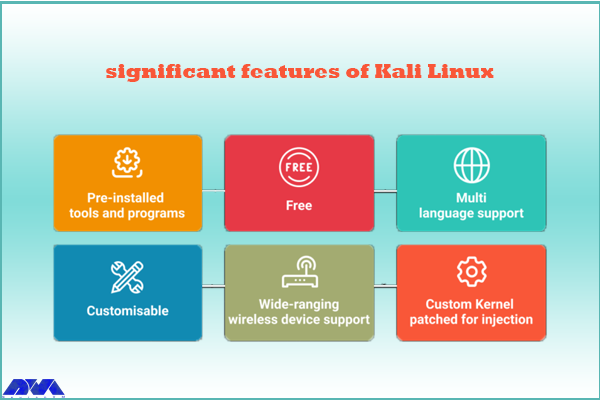
    The perception of penetration testing has changed over the years. Kali Linux is also a penetration testing tool and is one of the systems that comes with many features. These features are as follows:

    features of Kali Linux

    – Kali Linux contains more than 600 penetration testing tools like Burn Suite, Nmap, Wireshark, Air crack-ng, Metasploit framework, John the Ripper, and so on. These are practical tools for penetration testing and hacking.

    – Kali Linux is provided free and open-source.

    – It is capable of supporting various USB and wireless devices and interfaces.

    – Packages and repositories in Kali Linux are GPG signed.

    – Filesystem Hierarchy Standard (FHS) is maintained in Kali Linux.

    – It supports multiple languages.

    – The users can customize Kali Linux appearance as their choice cause it is completely customizable.

    – It supports MRMEL and ARMHF which makes it available on a wide range of ARM devices like Raspberry Pi.

    – Another prominent feature of Kali is that it supports accessibility features for visually impaired users with voice feedback and braille hardware support.

    – There is regular customization and patching of the kernel for any vulnerability in Kali Linux.

    What are Some Other Special Features of Kali Linux?

    – Live Boot system is supported by Kali Linux using a USB device without any touching of the host operating system.

    – ISOs are customizable on Kali Linux. Every security researcher has their own needs. Users can produce a custom-optimized ISO file with a selected set of meta-packages.

    – Kali is equipped with an encryption mechanism for persistent volume(s). This way, The saved files are able to be secured using Luks Nuck containers.

    – You can use Kali from the Windows Subsystem for Linux or WSL. Use Win-Kex for this reason.

    – Kali NetHunther is a free, open-source Android application and is useful for common attacks such as Bluetooth attacks or USB HID attacks, and so on.

    – Another feature is Kali Undercover. You can blend the appearance of Kali with Windows OS. So, if you activate the Kali Undercover feature, the menu and your desktop will look like Windows OS.

    – Kali is able to support any platform. You can run Kali on ARM, Bare Metal, Cloud, Containers like Ducker and Alsovirtual box, and VMware.

    What are the Negative Points Of Kali Linux?

    – This operating system is a little bit complicated and is not beginners friendly.

    – If you run this system from a virtual machine, It’s possible that all the hacking tools do not work properly.

    – A lot of junk space is taken by Kali.

    Conclusion

    Kali Linux is one of the most advanced operating systems for penetration testing and as mentioned in this article, it contains more than 600 tools such as Nmap and Wireshark. It is mainly used for advanced penetration testing and security auditing. we recommended this platform to professionals and advanced users because it is not beginners friendly. Read this content to get more familiar with the greater features of Kali Linux. If you have any questions, leave a comment here.

    FAQ

    Is Kali a good choice for gaming?

    Game developers don’t focus on Linux because it contains just 2% of the users. As a result, It is not designed for hardcore gaming and Kali is not either.

    How much RAM is needed for Kali Linux?

    You can setup Kali as your basic secure shell server with no desktop with 128 MB RAM but note that 512 is recommended. Also, 2 GB of disk space is needed.

  • A Full Introduction to CWP

    A Full Introduction to CWP

    CWP or Control Web Panel is an application software for server management in Linux systems, which was previously known as a Linux panel. This system has many features for managing servers, which makes learning easy for beginners who don’t have much experience in using the command line. So, here we will analyze and try to give a full introduction to CWP.

    What is CWP?

    As we mentioned before, CWP is a management system that is created for Linux distributions specifically AlmaLinux. It is produced to allow users to manage, edit, and maintain website content without requiring advanced technical knowledge. This control panel has a simple and understandable area where the navigation menu is in the form of a sidebar with other subsections. We suggest that you choose and buy from the cheap but high-quality Linux VPS server plans offered on our website to set up the CWP control panel.

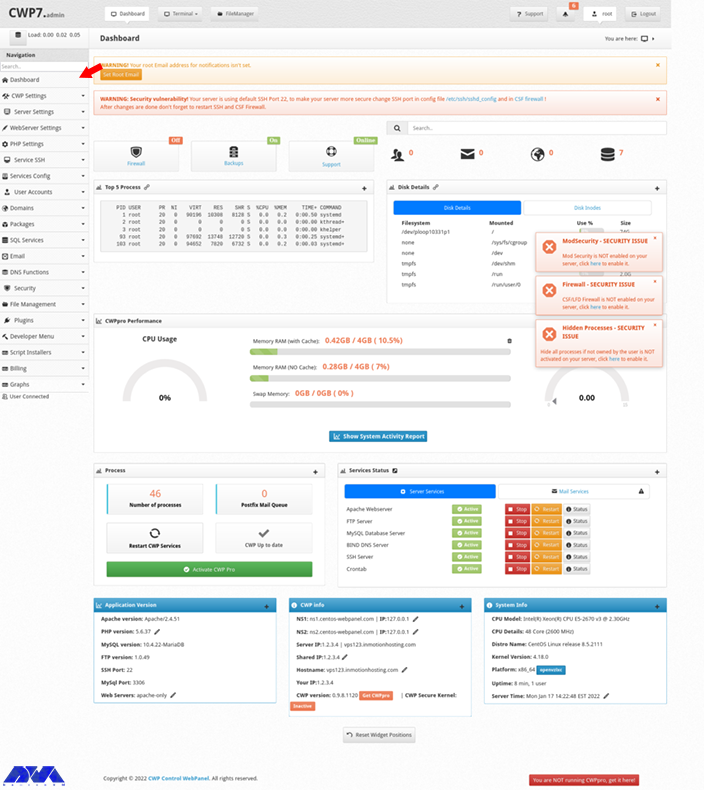
    The dashboard is like the image below:

    cwp dashboard

    Important Features of CWP

    CentOS Web Hosting servers or the CWP has many features. In this section, we try to analyze the most notable ones for you:

    – CWP is equipped with user-advanced features and makes it possible to easily manage websites with modern and advanced user interfaces.

    – This control panel provides complete support for the automation of processes. You can set a billing software to help with the creation of user accounts or run user backups or cronjobs, etc.

    – It contains a powerful file manager. Also, you can manage FTP users and user limits with CWP.

    – The advanced file manager is equipping with a code editor that makes it easy to manage your websites.

    – This control panel contains many security and safety features that are dedicating to you. These security functions are integrating into CWP:

    cwp security

    – CWP has several monitoring tools. These tools are NetData, Live monitoring of MySQL process, an AI bot, and so on.

    – An advanced backup system with daily, weakly, and monthly backup options in all fields.

    – CWP helps you configure client packages and service plans so easily.

    – Multiple billing systems are supporting by CWP. These systems are WHMCS, Hostbill, Wisecp, and Blesta.

    What Is the difference between Free and CWPpro?

    As the name suggests, you can get the free version of CWP and use it without any payment, but it has features that require a premium version. These features are:

    – The ability to create unlimited CWP users

    – Having sales agents

    – Immediate update of CWP and ModeSecutity

    – Using multiple versions of PHP simultaneously

    – Migration tools for Cpanel

    – Providing additional system security solutions

    Note that, these are all for use in the CWP interface and you can log into the terminal to update the software or install your web security.

    Conclusion

    This article is prepared to introduction to CWP or Control Web Panel and makes a clear understanding of it for you. By studying the features and analyzing this control panel, you can see how useful and applicable is CWP. We hope you enjoyed the content.

    FAQ

    How secure is CWP

    The security in this control panel depends on various factors like implementation, authentication mechanisms, regular updates, and secure coding practices that are completely effective in this field.

    Cpanel or CWP; Which one is better?

    CWP provides a completely free package, whereas, Cpanel is a paid version.

  • What is RedHat?

    What is RedHat?

    RedHat is a software company that combines open-source Linux operating system components with related applications into distribution packages that customers order. In this comprehensive article, we will tell you what is RedHat and introduce you to it completely.

    Introduction To RedHat and its products

    RedHat offers open-source software used by DevOps engineers and businesses, including operating system platforms, storage, middleware, and management products, as well as training, support, and consulting services. Dell, IBM, and Oracle also support the RedHat platform and open-source application community.

    Note that to order a Linux VPS server, you can visit NeuronVM’s popular and cheap plans.

    a- RedHat Linux open-source products include, but are not limited to:

    b- RedHat Package Manager (RPM) program for installing, removing, and managing software in Linux.

    c- RedHat Ansible is an open-source IT configuration management (CM) developer tool and IT automation platform.

    d- RedHat Atomic Host is a variant of RedHat Enterprise Linux optimized for hosting containerized application platforms.

    e- RedHat CloudForms is a virtual machine and container management product based on VMware, RedHat Virtualization, Microsoft Azure, OpenStack, AWS EC2, Google Cloud, and RedHat OpenShift.

    f- RedHat Enterprise Linux (RHEL) is a Linux operating system distribution developed for the commercial market that provides centralized certificate management and cloud security updates.

    g- RedHat’s OpenShift Container Platform is a cloud computing and microservice container platform used in conjunction with Kubernetes to provide traffic and identity management, telemetry, and policy enforcement.

    h- RedHat Virtualization (RHV) is an enterprise-class virtualization platform.

    i- RedHat Enterprise Linux environments, Satellite is part of RedHat’s four-piece system management tool suite for enterprise IT, which also includes Ansible, CloudForms, and the RedHat Insights service.

    What are RedHat services?

    what is redhat

    Application services

    1- RedHat fuse

    2- RedHat Fuse Online

    3- RedHat JBoss Enterprise Application Platform (JBoss EAP)

    4- RedHat JBoss web server

    5- RedHat AMQ

    6- RedHat 3scale API Management

    7- RedHat Data Network

    8- RedHat CodeReady Studio

    9- RedHat Decision Manager

    10- RedHat Process Automation Manager

    Cloud Computing

    1- RedHat Certificate System

    2- RedHat Directory Server

    3- RedHat Quay

    Data services

    1- RedHat Gluster Storage

    2- RedHat Ceph Storage

    3- RedHat OpenShift Data Foundation

    Management

    1- RedHat Smart Management

    2- RedHat Insights

    3- RedHat Advanced Cluster Management for Kubernetes

    4- RedHat Advanced Cluster Security for Kubernetes

    RedHat Services

    1- RedHat Open Innovation Labs

    2- RedHat training and certification

    3- RedHat Consulting

    Data Services and Cloud Computing

    – RedHat Hyperconverged Infrastructure (RHHI)

    Advantages of choosing RedHat for Business

    A large number of active Internet servers are currently supported by solutions developed by RedHat. In the public mind, the North Carolina-based organization is best known for its RedHat Enterprise Linux operating system.

    Redhat Secure Design

    RedHat and RedHat Enterprise Linux are widely recognized and admired for their highly secure engineering. Currently, this Linux distribution, which runs on IBM servers, has even reached the Common Criteria certification, the highest level of security certification in the world, which is allowed for use in government organizations. There are several reasons why the RedHat products have achieved such an advanced level of security.

    Enterprise Linux does not require the use of third-party tools that can be dangerous to fix security flaws. It is also inherent in the transparency of open-source products, and the constant scrutiny they undergo from many independent parties makes it very difficult for malicious actors to create problems.

    RedHat Open APIs

    RedHat maintains a policy of providing open application programming interfaces and provides its customers with flexible tools to create the solutions they need. Open APIs also mean the freedom to build to your specifications.

    RedHat Thorough Product Testing

    RedHat has a policy of testing new hardware before entering the market. Currently, the company uses its various relationships with hardware manufacturers to ensure the performance of its products and those that have been available to consumers for years.

    RedHat Cyber ​​Security Quick Response

    Currently, the RedHat security response team is actively tracking vulnerabilities to resolve them quickly. The team also has a track record of fixing more than 98% of critical vulnerabilities within a day of discovery, and the secret to this rapid response can be attributed to RedHat’s close working relationships with its partners, cybersecurity organizations, and the larger open source community. searched.

    RedHat Legal Protection

    RedHat’s open-source assurance program provides some important legal protections to its subscribers. Under this program, RedHat agrees to replace or modify the disputed portion of the Software while enabling Customer to continue using the Software without interruption. In addition, if another party sues for the alleged infringement, the customer will be provided with an attorney at RedHat’s expense.

    RedHat Cutting-Edge Philosophy

    RedHat has all the qualities to continue striving for innovation rather than settling for stagnation. The company maintains relationships with a large circle of hardware and software vendors, as well as a number of standard-setting industry organizations, ensuring that the company can respond quickly to technology and business trends. RedHat was a founding member and sponsor of the Advanced Message Queuing Protocol (AMQP) working group, which promotes this widely accepted open messaging protocol standard.

    RedHat Scalability

    When we talk about scalability, we refer to the capacity of a platform or application to handle increased operational needs without compromising its performance. A properly scalable platform is invaluable in our fast-moving technological society. A company can also easily experience a sudden increase in activity that it does not anticipate. Unless equipped for such a contingency, the system may be affected by this increase and have potentially harmful effects on the Company’s dealings with customers and vendors. RedHat Enterprise Linux is designed to provide maximum scalability to meet the fluid operational needs of the enterprise sector.

    RedHat Support

    RedHat’s technical support team is available 24/7 to provide the help and solutions you need to keep everything running smoothly. Currently, each of their support engineers holds a RedHat Certified Engineer certification or has years of relevant industry experience. You can also get the answer you need whenever you need it. In addition, RedHat has a policy of supporting its products not only around the clock but also over a long period of time and is committed to supporting the original versions of its software for up to ten years. It also guarantees full version compatibility.

     RedHat Reasonable Cost

    Currently, RedHat software and services operate on a subscription model, and the result is that it allows the company to avoid many support costs often associated with software hardware of this type. As a RedHat Subscription customer, you will not incur licensing, upgrade, or user access fees.

    RedHat Flexible Subscription Options

    RedHat gives its customers a lot of freedom with their subscriptions, which can be easily moved from one server to another, even from a physical server to a virtual server. Subscriptions are also not tied to any specific software version, thus giving customers more options in managing their workloads.

    RedHat Effective Training Options

    Any platform or app can be more trouble than it’s worth if the user can’t effectively use the training options. Also, in our fast-paced, high-tech world, it’s important to be able to find solutions immediately.

    Conclusion

    RedHat is an innovative open-source solution that anyone dealing with proper server operating systems or cloud applications will come across RedHat sooner or later. It identifies both the American software company and Linux distributions with the same name. RedHat symbolizes RedHat’s commitment as an agent in action for open-source in the digital world. In this Tutorial, you learned What is RedHat? We hope this article was useful for you.