Blog

  • The Art of Ubuntu Server Monitoring: Best Practices and Tools

    The Art of Ubuntu Server Monitoring: Best Practices and Tools

    A system monitoring tool, also known as monitoring software or system monitor, is a type of software or application used to observe, manage, and collect data about the performance and behaviour of a computer system or network. These tools are essential for IT professionals and system administrators to ensure that systems are running efficiently, identify and address issues, and gather data for analysis and reporting. Here we will introduce the best Ubuntu server monitoring tools, keep reading.

    The Best System Monitoring Tools for Ubuntu

    Whether you are a regular user or a system administrator, maintaining the smoothness of the computer and network infrastructure is very important. So to monitor your system, especially Linux OS or Linux VPS, you need to use a monitoring tool to monitor all system activities such as CPU performance, and memory code, Monitor the network, and track the status of other connected devices.

    7 Best Ubuntu Server Monitoring Tools

    Let’s find out the Ubuntu server monitoring tools

    Htop

    Htop is an interactive system monitoring tool for Linux operating systems. It is similar to the traditional top command but provides a more user-friendly and dynamic interface for monitoring system resources and processes.

    Htop allows you to view and manage system metrics in real-time, making it easier to identify and diagnose performance issues on your system. This is suitable for consoles and terminals, that’s why it supports text mode.

    Htop has many features that are used in FreeBSD, macOS, and OpenBSD Linux. This tool provides information such as working time, tasks, and load average. You can also change the color settings in the user interface to suit your needs. Htop supports real-time signals and custom scripts.

    Htop Monitoring Tool

    Stacer

    Stacer is an open-source tool used for system monitoring and optimization. System administrators can easily manage system resources and tasks with this tool. Its wonderful user interface and modern structure make you feel comfortable using it.

    Stacer has many tools that help manage start-up programs and clean essential package caches, program logs, crash logs, cache, and garbage in the system cleaner tab. You can start or stop high-speed services, also, remove programs that you no longer need.

    You can see the network activity for the last 60 seconds in the CPU, RAM, disk, and average CPU resource tab. It helps you have an apt repository that can be used to remove, enable, and disable any repository. Those using Ubuntu can take advantage of this to edit closed repositories.

    Stacer monitoring tool

    Glances

    Another monitoring tool for Ubuntu is Glances, which is written in Python and is cross-platform. This tool adjusts automatically depending on the size of the terminal and displays all the information in a single window. It shows all the necessary information as much as possible.

    You can use glances in client/server mode and monitor the system through the web or terminal. As a result, having all the necessary information at once is one of the positive points of this tool. Other features of Glances include the use of a web interface for remote monitoring.

    Tip: Using this tool for Linux running low-end programs may be a bit difficult because more CPU resources are required.

    glances

    BashTOP

    It can be said that another interesting and reliable tool for monitoring the Ubuntu system is Bashtop. This tool displays usage statistics of processors, disks, memory, network, and other resources. This tool is perfect for desktop and computer users. But it doesn’t work much for system administrators because it won’t satisfy their demands.

    Also if we want to compare it with Htop it is a bit slower. Bashtop is easy to use and has a beautiful and perfect user interface.

    bashtop

    Vtop

    Vtop is provided as a free and open-source tool that is responsible for monitoring the system of Ubuntu and other Linux distributions. This tool allows you to monitor and manage the system at the same time. It is especially useful for system administrators, developers, and anyone interested in monitoring system performance in a more user-friendly and interactive way.

    More specifically, Vtop is a command-line tool and interactive system monitoring tool that allows users to view real-time statistics and information about the performance of their computer or server. It’s similar to the popular top tool that provides a dynamic view of system processes and resource usage, but Vtop adds some extra features and a more user-friendly interface.

    Vtop monitoring tool - ubuntu server monitoring tools

    Atop

    If we want to introduce an advanced interactive system and process monitor for you, Atop is certainly one of the best that displays the load on Linux and Bubuntu systems. You can view the most important hardware resources such as CPU, disk, network, or memory. Or for a more detailed and longer review, record the use of resources permanently.

    In other words, It provides detailed insights into system resource usage and process-level information, making it a valuable tool for system administrators and those interested in monitoring and troubleshooting system performance.

    atop monitoring tool - ubuntu server monitoring tools

    Gotop

    Gotop is a system monitoring and resource usage visualization tool for the command line and is graphical. It is designed to provide real-time information about system resource consumption, such as CPU usage, memory usage, and processes, in an easy-to-read and interactive format.

    Gotop is typically used by system administrators and users who prefer command-line interfaces for monitoring their system’s performance. Unlike Atop and Vtop, Gotop doesn’t use node.js and is written in the Go language.

    Gotop - ubuntu server monitoring tools

    The Best Practices to Use Ubuntu Monitoring Tools

    Monitoring your Ubuntu system is crucial to ensure its performance, stability, and security. Ubuntu provides various tools and practices for effective system monitoring. Here are some best practices for using Ubuntu monitoring tools:

    1- For more comprehensive monitoring, you can also consider tools like Prometheus, Grafana, Zabbix, and Nagios. Choose the tools that best suit your monitoring needs.

    2- Ensure that your Ubuntu system is up-to-date. Regularly run sudo apt update and sudo apt upgrade to keep your system and monitoring tools current.

    3- Tools like Iftop and Nload can help you monitor network traffic and bandwidth usage. Consider netstat and ss for examining network connections.

    4- Use tools like df and du to monitor disk space. You can also set up alerts for low disk space using monitoring solutions like Nagios.

    5- If you’re running specific services or applications, setup monitoring for those using tools like Prometheus with exporters or application-specific monitoring agents.

    6- Employ tools like fail2ban to monitor and protect against unauthorized access attempts. Tools like Logwatch can also help you keep an eye on security-related events.

    7- Write custom scripts to monitor specific parameters or services and set up alerts through email, SMS, or other notification methods when thresholds are breached.

    8- Consider centralizing your logs using tools like the ELK stack or similar solutions. Centralized logs make it easier to search, analyze, and correlate information.

    9- Document your monitoring setup, including the tools you use, configurations, alert thresholds, and procedures to follow when alerts are triggered.

    10- Regularly review your monitoring configuration and make adjustments as necessary.

    Effective system monitoring is an ongoing process. Regularly assess your system’s performance, adjust your monitoring tools and practices as needed, and ensure that you are always ready to respond to potential issues.

    Conclusion

    The tools described in this section are the best Ubuntu server monitoring tools that can be used for Linux systems, especially Ubuntu. There are other tools available in this regard, but the mentioned items have been tested and as a result, the necessary reviews have been provided for you. We hope that the above information was useful for you and helped you make the right choice. Thanks for your cooperation.

  • The Great Linux Rivalry: Debian vs Ubuntu

    The Great Linux Rivalry: Debian vs Ubuntu

    The world of Linux is vast and diverse, with numerous distributions catering to different preferences and needs. Among these, Debian and Ubuntu stand out as two of the most popular choices. Both Debian and Ubuntu share a common ancestry, but they have distinct characteristics and qualities that fuel the never-ending debate of “Debian vs Ubuntu.” In this article, we will delve into the intricacies of these two operating systems, examining their origins, usability, package management, and community support to shed light on the great Linux rivalry.

    By the way, you can get a Linux VPS today with the distribution of your choice and start your Linux journey.

    The Origin Story

    The Origin Story Debian and Ubuntu both trace their roots back to the Linux operating system, but their paths diverge in terms of their origins. Debian, founded in 1993 by Ian Murdock, was one of the pioneering Linux distributions. Its primary aim was to create a stable and reliable operating system by adhering to rigorous quality standards.

    Debian’s commitment to the principles of free software, emphasizing the importance of open-source code and community collaboration, has been a defining feature. As a result, it has built a strong reputation among developers and users who value stability, security, and the ability to customize their Linux environment extensively.

    Understanding the origins of Debian and Ubuntu sheds light on the ongoing Debian vs Ubuntu debate. While both distributions share a common heritage, they have evolved to serve different user needs.

    On the other hand, Ubuntu emerged in 2004 as a Debian-based distribution, with Mark Shuttleworth leading its development. Ubuntu aimed to bring the power of Linux to a broader audience by prioritizing user-friendliness and ease of installation. Unlike Debian, which had a reputation for being more suitable for experienced users, Ubuntu targeted newcomers to Linux with its intuitive interface and straightforward installation process.
    This focus on accessibility helped Ubuntu gain popularity rapidly, especially among home users, students, and those transitioning from other operating systems.

    Debian vs Ubuntu Origin Story

    Debian vs Ubuntu: Usability and User Experience

    One of the key factors that differentiates Debian and Ubuntu is their approach to usability and user experience. Debian emphasizes stability and reliability over ease of use, making it an ideal choice for experienced users and server environments.

    On the contrary, Ubuntu places great importance on providing a user-friendly interface, intuitive installation process, and comprehensive device compatibility, catering to a broader audience, including newcomers to the Linux ecosystem. This variance in usability often leads to divergent opinions among Linux enthusiasts evaluating Debian vs Ubuntu.

    Debian vs Ubuntu: Usability and User Experience

    Package Management Systems

    Another critical aspect that sets Debian and Ubuntu apart is their package management systems. Debian utilizes its advanced package management tool, Advanced Package Tool (APT), along with Debian packages (DEB). APT ensures effective dependency resolution, seamless updates, and a vast repository of software packages.

    Ubuntu leverages the same APT system but evolves it further with its own graphical front-end package manager called Ubuntu Software Center. Moreover, Ubuntu also introduced Snap packages, allowing for enhanced software distribution with stronger isolation.

    The differences in packaging systems between Debian and Ubuntu can greatly influence the software installation and management experiences for users on each platform.

    Package Management Systems

    Community Support and Philosophies

    In the world of open-source software, community support plays a vital role, and Debian and Ubuntu boast vibrant and dedicated communities.

    Debian, with its focus on stability and free software principles, has built a devoted community centered around openness and transparency.

    Ubuntu, with its emphasis on user-friendliness, attracts users seeking a more polished and accessible experience.

    Both distributions benefit from active communities that provide extensive documentation, support forums, and constant development efforts, contributing to the longevity and success of Debian and Ubuntu.

    Community Support Debian and Ubuntu

    General Overview: Debian vs Ubuntu

    Here’s a quick comparison between these two popular Linux distributions:

    FeaturesDebianUbuntu
    Target AudienceExperienced users, developers, and server administratorsGeneral desktop and server users
    Release CycleStable and conservative release cycle with longer intervals between major updatesSix-month release cycle with a focus on the latest software packages
    Package ManagementUses apt package manager with .deb packagesAlso uses apt package manager with .deb packages
    Snap PackagesDoes not natively support Snap packages by defaultSupports Snap packages for easy software installation
    Desktop EnvironmentOffers a wide range of desktop environments and window managersUses GNOME as the default desktop environment, but provides several other options
    Commercial SupportProvides community support and professional support through third-party companiesOffers professional support through Canonical Ltd, the company behind Ubuntu
    PopularityHighly respected in the open-source community with a strong focus on stabilityOne of the most popular Linux distributions for desktop and server usage

    Final Words

    While the Debian vs Ubuntu rivalry sparks lively debates among Linux enthusiasts, the reality is that both distributions offer valuable and distinct experiences. Debian’s stability and principles are favored by those seeking control and reliability. On the other hand, Ubuntu appeals to a broader audience, with its user-friendly interface and ease of use. Ultimately, choosing between Debian and Ubuntu boils down to personal preferences, and the desired balance between stability and convenience. Regardless of which camp one aligns with, both Debian and Ubuntu serve as powerful representatives of the Linux ecosystem, pushing the boundaries of open-source software.

    FAQ

    Q: Which operating system is more up-to-date in terms of software packages?

    A: Generally, Ubuntu tends to have more up-to-date software packages compared to Debian. Ubuntu’s release cycle is more frequent, allowing for quicker updates. Debian, on the other hand, follows a more conservative approach to ensure stability.

    Q: Which operating system has better community support? Debian or Ubuntu?

    A: Both Debian and Ubuntu have strong and active communities. Although Ubuntu’s community support is often considered more extensive and user-friendly due to its larger user base and focus on a user-friendly experience. Debian also has an active community, particularly among experienced users and developers.

    Q: Can software developed Debian run on the Ubuntu and vise versa?

    A: Yes, software developed for Debian can generally run on Ubuntu without issues since Ubuntu is based on Debian. However, compatibility issues may arise in some cases when dealing with very specific system configurations or software packages.

    Q: Is Debian or Ubuntu recommended for servers?

    A: Debian is considered the go-to choice for servers due to its stability, extensive software repositories, and long-term support options. Its robust security updates and conservative nature make it reliable for critical server environments. Ubuntu also offers server editions with similar features, but Debian’s reputation makes it a popular choice among server administrators.

  • What is Minecraft Server?

    What is Minecraft Server?

    Running a Minecraft server can be a rewarding experience, but it requires time, effort, and possibly some technical know-how. Make sure to stay up to date with the latest developments in the Minecraft server community to provide the best possible experience for your players. It can be said that this game is such that anyone can setup a Minecraft server for themselves, and then invite other players to join this game and advance the game. This article focuses on Minecraft servers to explain what is this gameplay.

    A Comprehensive Guide to Minecraft Server

    A Minecraft server is a dedicated or hosted computer system that allows multiple players to connect and play this popular game from Sandbox, together in a shared world. These servers provide a platform for players to interact, collaborate, and compete in a variety of game modes and environments.

    Minecraft game is a competitive and cooperative game among the participants. This fascinating game can be played online and in real-time. The important thing is that you need a dedicated server to play this game with others, i.e. a shared online computer.

    The game interior is designed in such a way that participants can build construction projects together or create works of art, just like the real world.

    what is Minecraft server

    As we mentioned above, to own and use a Minecraft server you will need a dedicated server. NeuronVM is one of the reliable providers that offers Minecraft on a dedicated server. Yes! you can use the benefits of this provider’s dedicated server for Minecraft.

    That means you can experience complete control, advanced performance, and more confidence. Enjoy this integrated gameplay with the least delay in performance. So don’t waste time and say goodbye to the limitations of shared hosting to continue your adventure with this wonderful game.

    What Are the Plugins and Mods of Minecraft?

    Plugins and mods can greatly enhance and customize your Minecraft server, offering a wide range of new features, gameplay options, and server management tools. Here’s an overview of the difference between plugins and mods, as well as some examples of each:

    Plugins are add-ons or extensions for Minecraft server software. They allow server administrators to modify the server’s behaviour and introduce new features without altering the core game files. Plugins are typically written in Java and are compatible with server software that supports the Bukkit API.

    Examples of Minecraft plugins:

    • Essentials: Adds essential commands and features like /home, /tpa, and /warp for players.
    • WorldEdit: Provides powerful world editing and building tools for server admins.
    • Lockette: Allows players to lock chests, doors, and other containers to prevent unauthorized access.
    • Vault: A permissions API that enables integration with various other plugins.

    Mods, short form of modifications, are custom changes made to the game’s code or assets. They typically require both the server and client to have the same mod installed. While mods can significantly alter the game, they are not officially supported by Mojang (the company behind Minecraft) and can lead to compatibility issues.

    Examples of Minecraft mods:

    • Optifine: A client-side mod that enhances graphics, improves performance, and adds advanced visual features.
    • Biomes O’ Plenty: A mod that introduces new biomes, landscapes, and plants to the game.
    • Tinkers’ Construct: Adds new tools, weapons, and smelting systems for players to use.
    • JourneyMap: Provides a map and minimap for players to explore and mark their surroundings.

    Tip: It’s essential to note that when using mods, both the server and the client must have the same version of the mod installed for compatibility. Using mods can introduce compatibility issues and potential conflicts In contrast, plugins are often easier to manage and maintain, as they work with server software that supports the Bukkit API and doesn’t require players to install anything on their clients.

    What are the Features of a Minecraft Server?

    Minecraft based on providers and its own program, includes various features. These features make players experience a stable and enjoyable game environment. Some of these features include:

    Customization

    The customization option in the Minecraft server allows you to change server settings and gameplay elements based on player preference. These settings include things like server rules, plugins, or existing mods. We can also customize the player experience, security settings, and performance.

    The possibility of Configuration

    Minecraft server configuration means you can choose options and set up the server. In this way, the performance of your server will be optimized. Proper configuration makes your gaming experience enjoyable and continuous.

    There are different settings for Minecraft hosting. The choice depends on things like the number of players, available resources, or the complexity of the game. Also, choosing a VPS or a dedicated server will also be effective.

    Control Panel

    The control panel has the role of an intuitive user interface for the server. Server administrators can make settings this way, add plugins, and monitor user permissions. Several different tools can be used to monitor and increase server performance. cPanel is one of the most widely used control panels.

    Providers like NeuronVM create these custom control panels to meet customer needs. These solutions may offer a unique interface or proprietary features.

    Possibility of Scalability

    Scalability means the server’s ability to manage the number of players. It means that the functionality should be extended without a negative impact on performance and stability. Minecraft servers also include two main scaling options. vertical and horizontal.

    In vertical scaling, by increasing the RAM capacity, the server hardware also increases, and the purpose of this work is to increase performance. The vertical scaling feature is useful for smaller servers with limited resources.

    In contrast, sub-horizontal scaling involves adding more servers. in such a way that it distributes the load and provides more resources for the server. This sustainable solution manages the increase in user demand.

    Great Protection

    The protection feature in Minecraft servers plays an important role and makes the server safe and stable from threats such as hacking, virus infection, or DDoS attacks. The high security of the server includes the privacy of the users and prevents disruption of the game.

    Protecting servers and players includes many defense strategies that hosting companies offer. Among these strategies, it is possible to mention the deployment of a half-firewall and the use of DDoS protection.
    Resource Allocation

    If we want to explain the allocation of resources in Minecraft servers more, it refers to the distribution and management of server resources. These resources include CPU, RAM, or server memory. Allocating resources helps to maintain a fast and responsive server environment. This will attract and retain players. The high processing of the game is related to the power of CPU and RAM.

    Different Types of Minecraft Server

    Minecraft is a versatile game that allows players to create and join various types of servers, each offering a unique gameplay experience. Here are some different types of Minecraft servers:

    what are Minecraft server types

    Creative Servers: In creative mode, players have unlimited resources and can fly, making it easy to build elaborate structures without the need to gather materials.

    Survival Servers: These are the most common types of Minecraft servers. In survival mode, players must gather resources, build structures, and protect themselves from mobs (hostile creatures). The goal is to survive and thrive in the game world.

    PvP Servers: PvP servers are dedicated to combat and competition among players. They can take various forms, such as faction-based PvP, kit PvP, or even custom game modes.

    Mini-Game Servers: Mini-Game servers host a variety of mini-games within Minecraft. These can include games like Spleef, Parkour, Hunger Games, and more. Players compete against each other, and the focus is on quick and fun gameplay.

    Role-Playing Servers (RPG): On RPG servers, players take on roles and immerse themselves in a virtual world. They create characters, follow storylines, and interact with others in a role-playing fashion.
    Economy Servers: These servers focus on a player-driven economy. Players can buy and sell items, create shops, and engage in trade to accumulate wealth and resources.

    Vanilla Servers: These servers aim to maintain a mostly vanilla Minecraft experience with few or no mods or plugins. They provide the classic, unaltered gameplay.

    Educational Servers: Some servers are designed for educational purposes, allowing players to learn and explore topics such as history, science, or architecture within Minecraft.

    We can introduce lots of other Minecraft server types, These are just some of them. The type of server you choose to play on depends on your preferences and the kind of Minecraft experience you’re seeking.

    Best Practices to Use Minecraft Server

    Running a Minecraft server can be a fun and rewarding experience, but it’s important to follow best practices to ensure a smooth and enjoyable gaming environment for your players. Here are some best practices to use when running a Minecraft server:

    – Choose a dedicated server or host on a powerful machine with sufficient CPU, RAM, and storage to handle your player load.

    – Setup automated backups of your server to prevent data loss in case of crashes or errors.

    – Try to back up your world every day. Use automated backups.

    – Protect your server with strong, unique passwords, and use a whitelist to control who can join. Regularly update your server software.
    – Establish clear server rules and enforce them. Consider appointing moderators or administrators to help manage the server and deal with rule-breakers.

    – Use plugins or mods to enhance gameplay, but be cautious about overloading the server with too many, as this can affect performance.

    – Schedule regular server maintenance to perform updates and backups. Also, optimize server performance.

    – Optimize server settings in the server.properties file, such as view distance, tick speed, and max players, to suit your hardware and player needs.

    – Try to install an anti-cheat plugin and kick out malicious players automatically.

    – Before adding new plugins or major changes, test them in a separate environment to ensure they won’t negatively impact the server.

    Conclusion

    In short, you can use the Minecraft server as an optimal solution for creating and managing game experiences that are customized according to your needs. The impressive features of this server improve performance, high security, and round-the-clock support, making it a great choice for gamers and developers. So, by purchasing this attractive server, experience an enjoyable and limitless game with your friends. Happy Minecrafting.

  • Innovative Infrastructure: Investing in VPS with Bitcoin

    Innovative Infrastructure: Investing in VPS with Bitcoin

    Investing in VPS (Virtual Private Server) with Bitcoin allows individuals to enjoy the benefits of both digital currencies and technological advancement. Bitcoin, being a decentralized and secure digital currency, offers a reliable payment method for purchasing VPS services. With its growing acceptance by businesses around the world, Bitcoin ensures an anonymous and fast transaction process. Investing in VPS with Bitcoin provides users with numerous advantages, including enhanced data security, scalability, and improved website performance. Additionally, as Bitcoin gains more value over time, the investment in VPS services with Bitcoin may yield substantial returns, serving as an opportunity for both short-term and long-term investors. Overall, Bitcoin and VPS synergistically combine to provide a futuristic and efficient investment avenue.

    Benefits of VPS with Bitcoin

    With the rise of Bitcoin as a global digital currency, many have realized its potential beyond traditional transactions. VPS hosting allows you to enjoy numerous advantages when paying with Bitcoin.

    Firstly, Bitcoin payments offer enhanced security, as transactions are decentralized and encrypted. Additionally, using Bitcoin allows you to maintain anonymity and privacy, as no personal or financial information is required during the purchase process.

    Furthermore, Bitcoin’s global nature ensures that you can effortlessly invest in VPS services from anywhere in the world, minimizing restrictions and enabling seamless cross-border transactions.

    When you opt for VPS with Bitcoin, you gain access to a plethora of reliable hosting providers with various plans tailored to suit your specific needs. From robust security measures to exceptional customer support, VPS providers offer an all-inclusive experience that fosters growth and stability for your online ventures.

    Benefits of Bitcoin VPS

    Finding the Right VPS Provider

    Investing in VPS with Bitcoin offers flexibility and convenience, but it’s crucial to select the right provider for your needs. Start by researching reputable hosting companies that accept Bitcoin as a payment method. Consider factors such as server locations, uptime guarantees, scalability options, and add-on services like backups and DDoS protection.

    During your search, it is essential to read reviews and customer testimonials to ensure the VPS provider aligns with your desired level of quality and reliability. Engage with their customer support team to clarify any queries you may have and evaluate whether their responsiveness and expertise meet your expectations.

    By investing time in this research, you can find a VPS provider that will be your trusted partner in the digital landscape. You can test the NeuronVM website to buy and invest in the server using Bitcoin.

    Bitcoin with VPS provider

    How to Buy a VPS with Bitcoin

    Well we talked about finding the right VPS provider for your business and what are the most factors to consider when doing so. Here at NeuronVM we provide Bitcoin VPS with a premium quality. Plus, we have 7 days of money back guarantee, so you absolutely don’t have anything to worry about. If you want to buy a VPS, be it Windows VPS or Linux VPS, here are a few steps you can take:

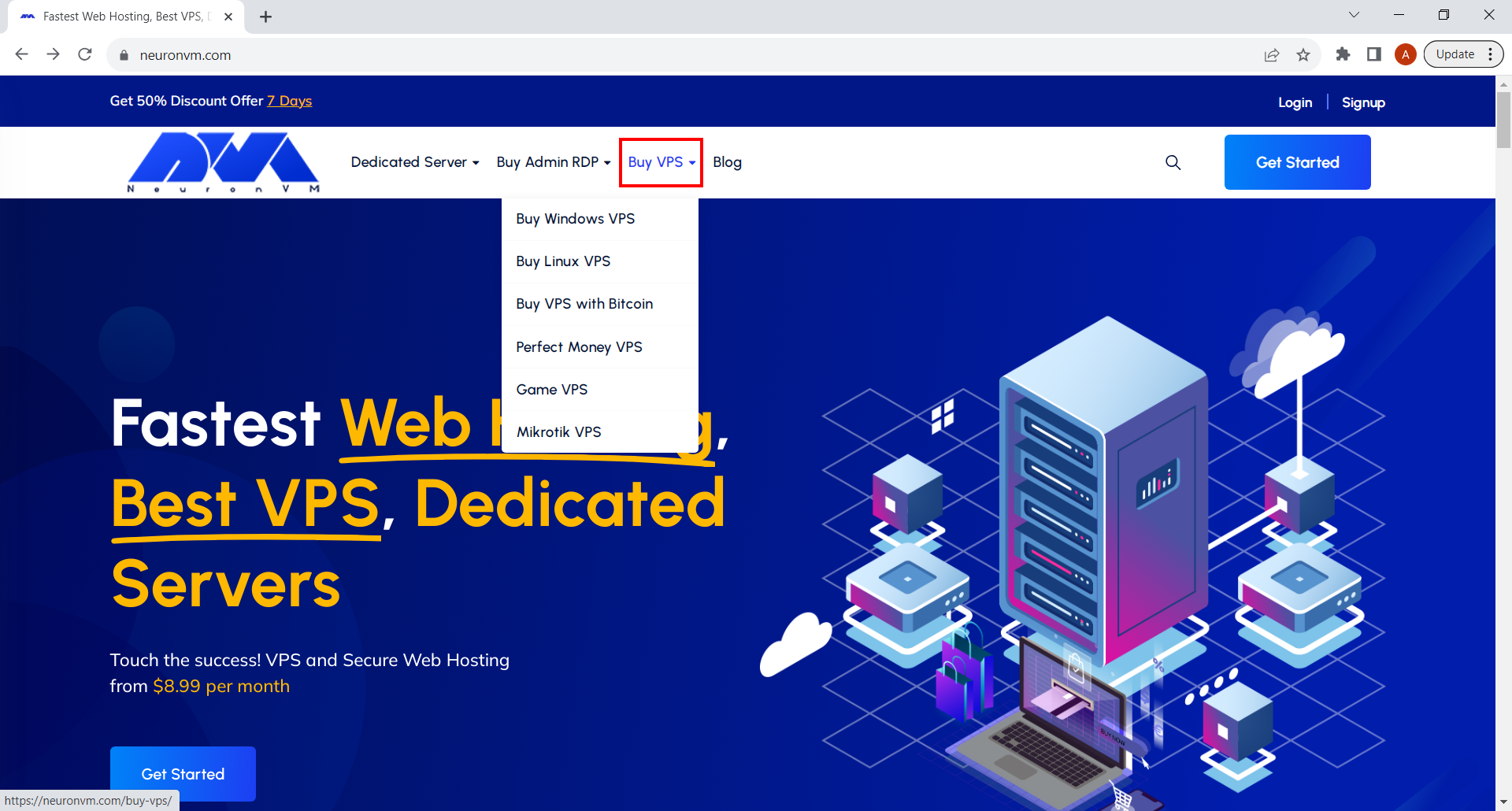
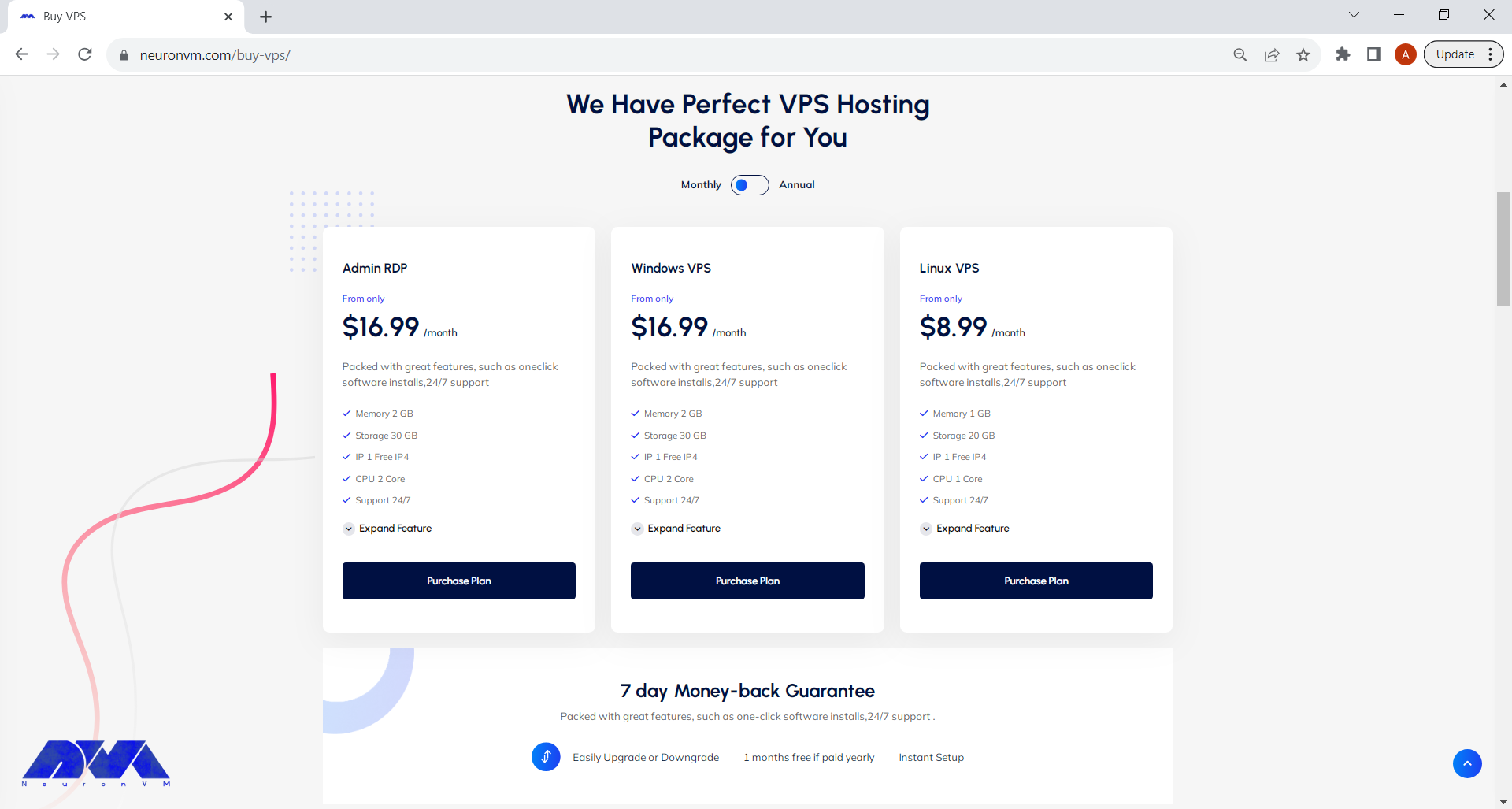
    • Simply go to our website’s main page and on the menu above, select Buy VPS and then click on your preferred VPS or just click on Buy VPS page and proceed.
    Buy VPS
    • Choose the plan you need click on Purchase Plan.
    Choose preferred plan

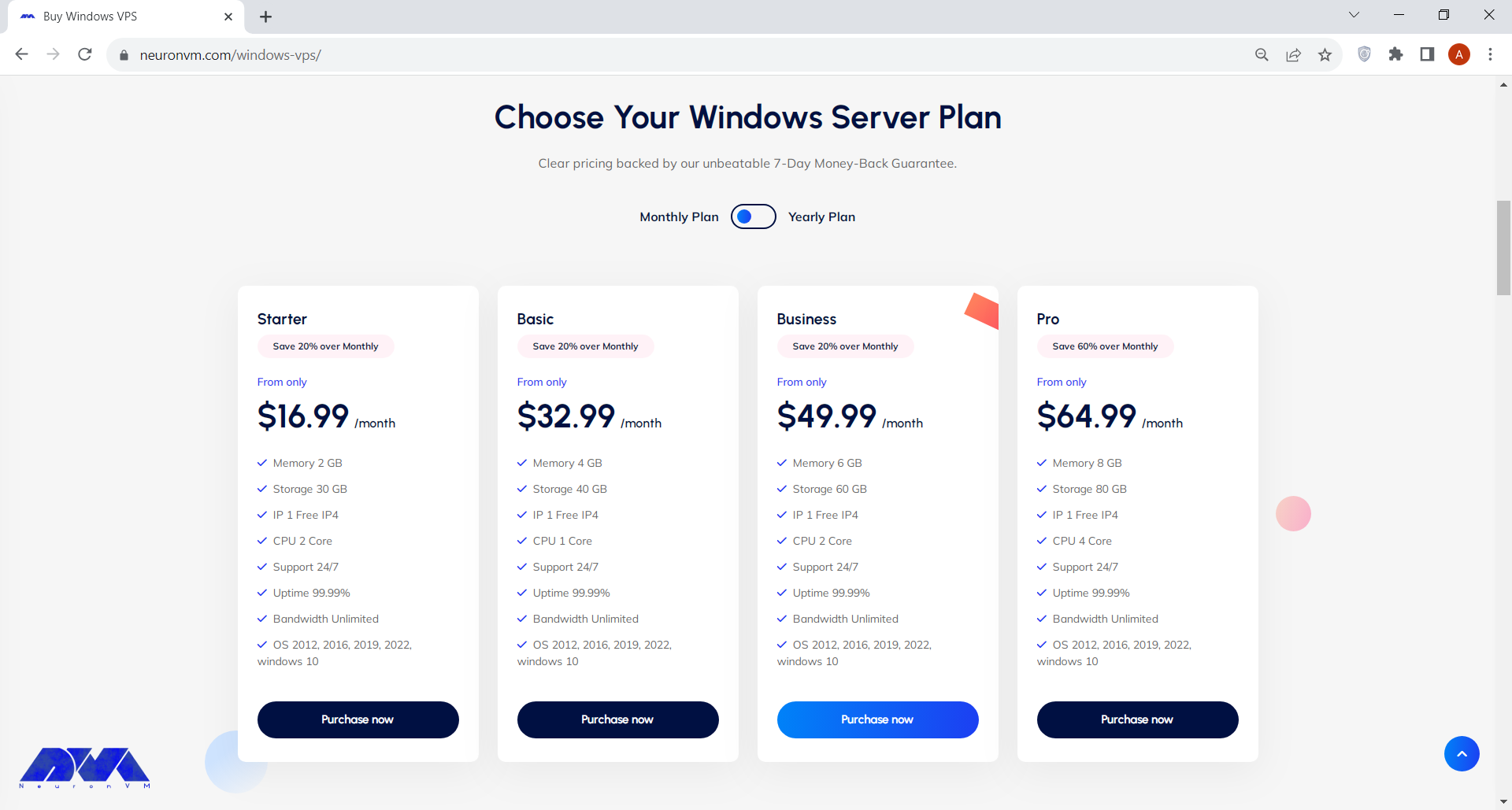
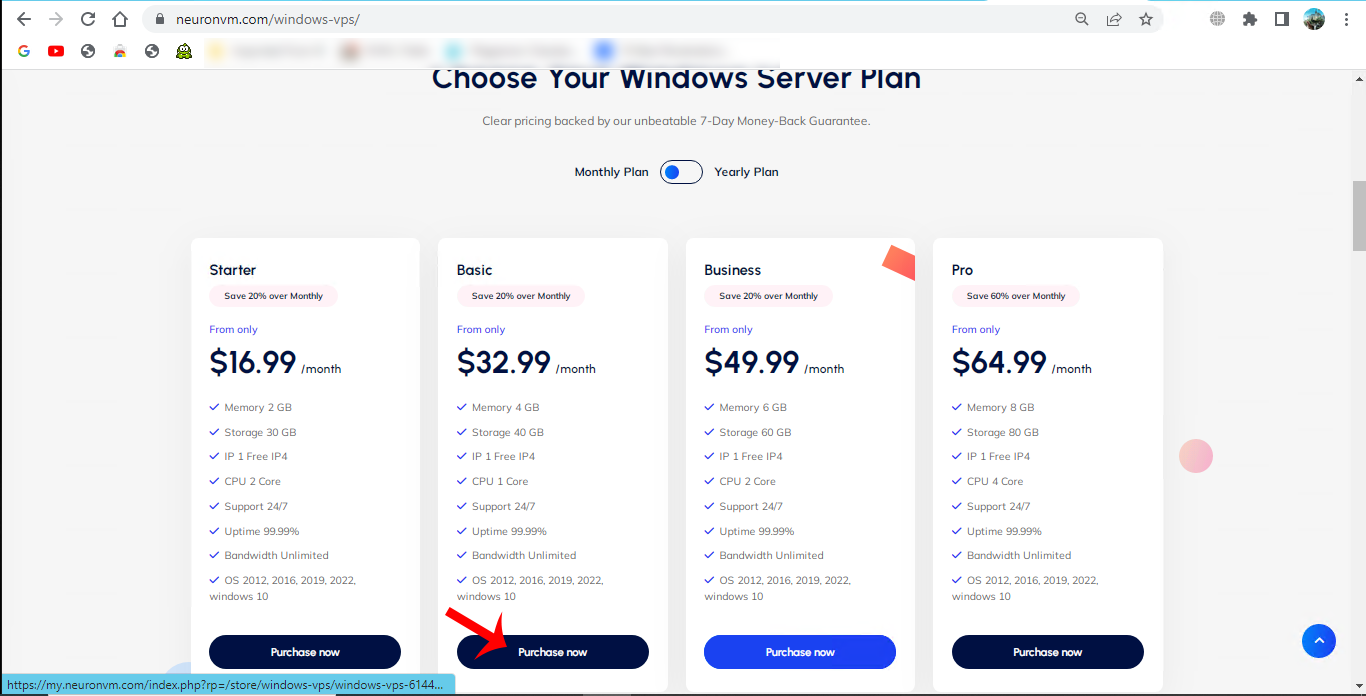
    Here we choose Windows VPS server plan by clicking on Purchase Plan:

    bitcoin vps server

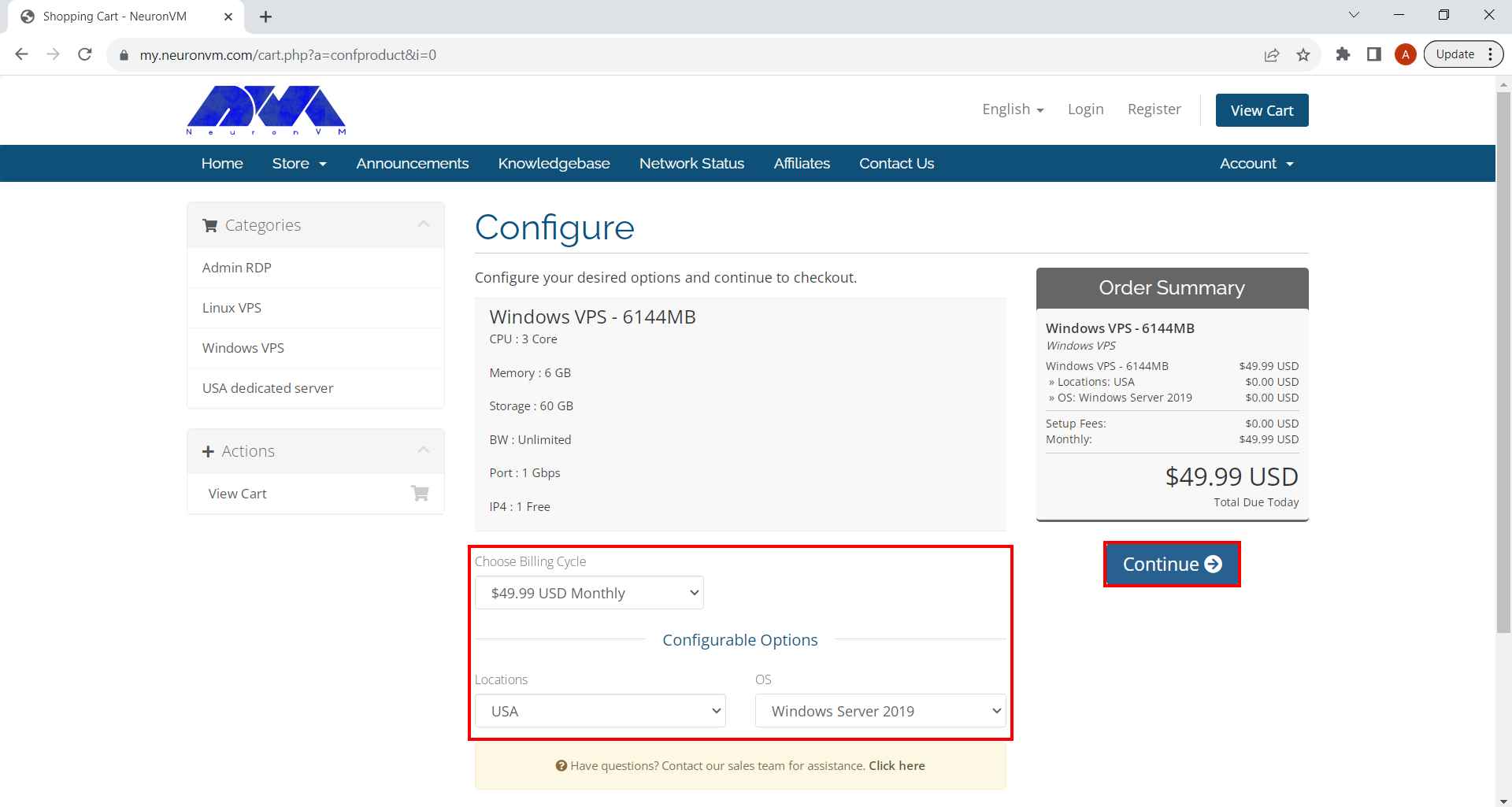
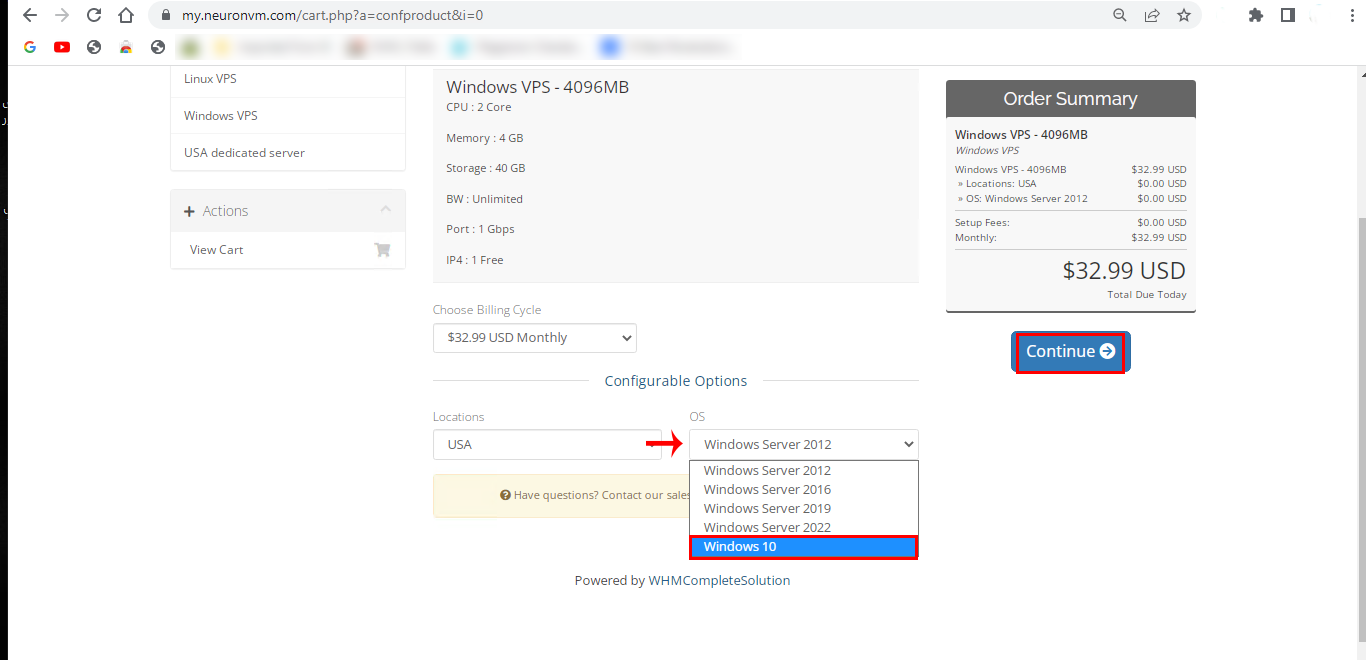
    It will direct you to the page shown below. Under “Configure Server” section. You can change the options like Operating Server, Location and Additional IP. When you’re done, click on Continue and proceed.

    Configure vps server
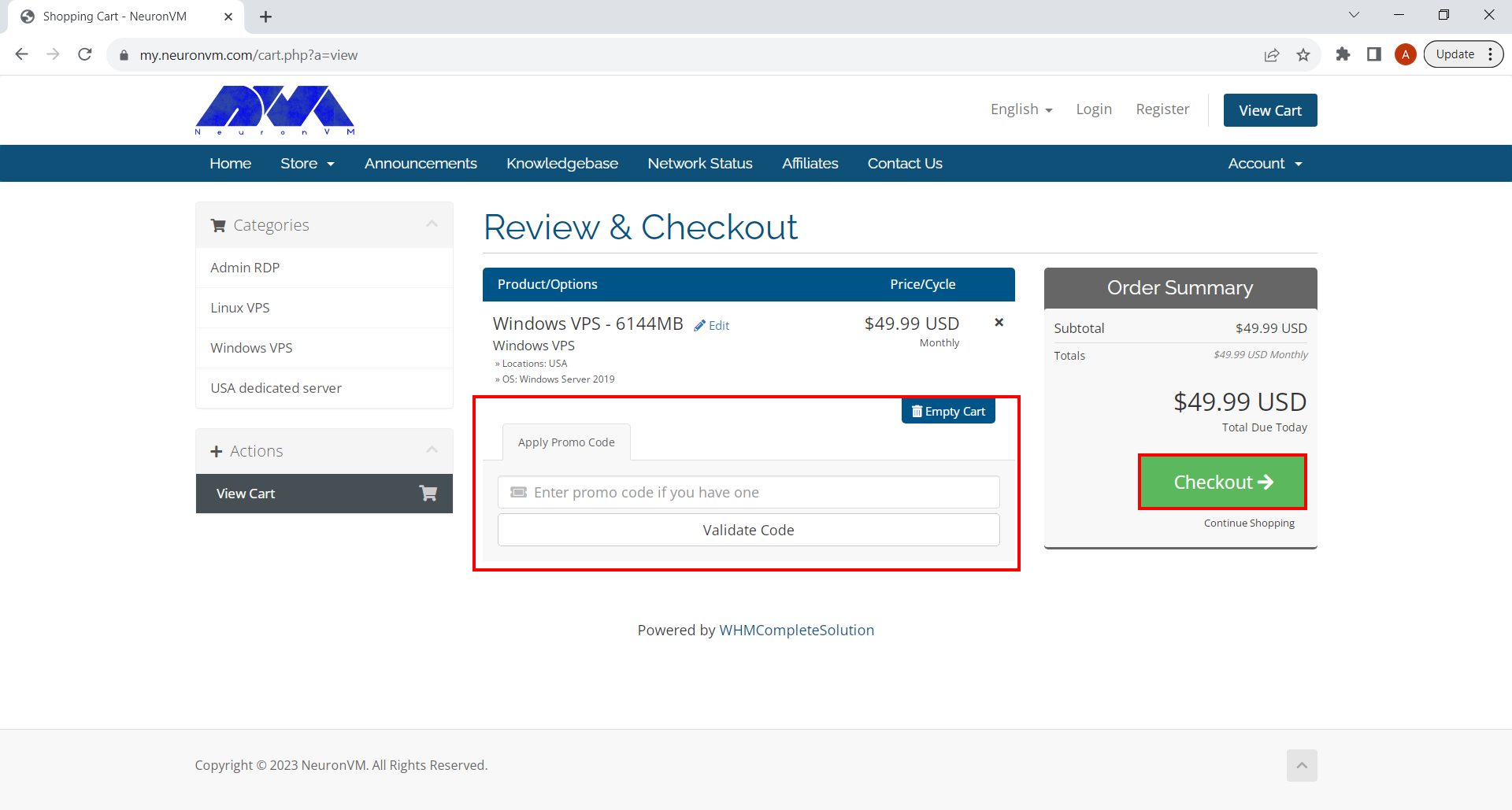
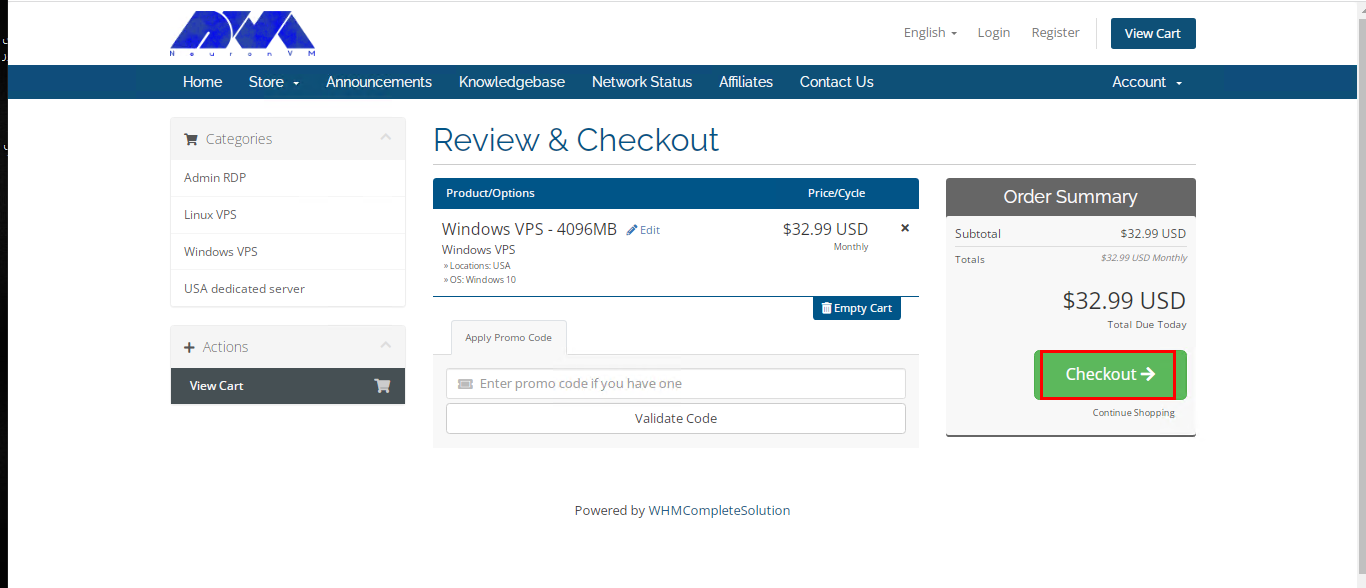
    • You’ll be landed on Review and Checkout pay where you can simply review the items in your shopping card and enter a promo code to apply discounts. After you’re done, click on Checkout button and proceed.
    Review & Checkout vps
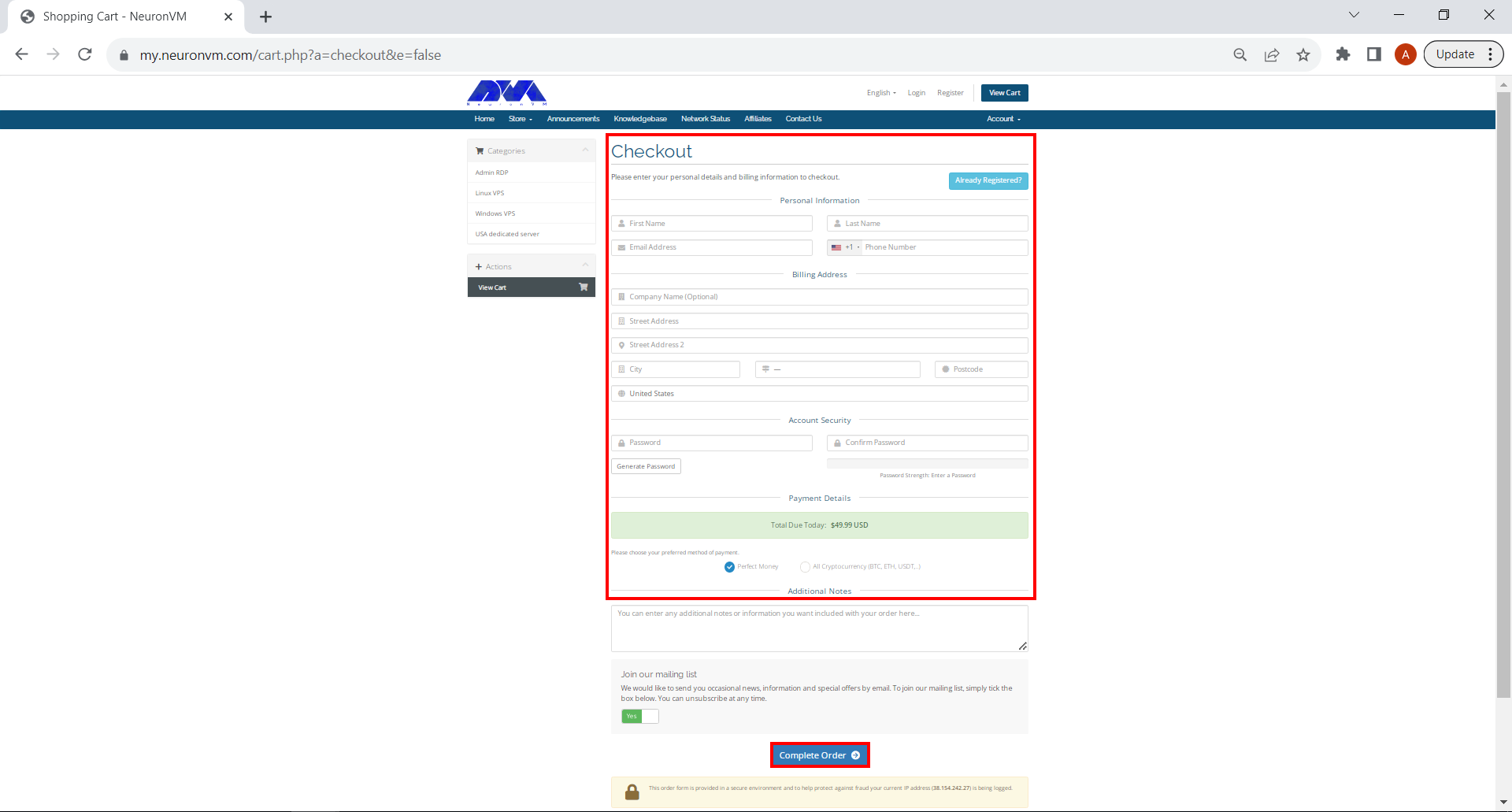
    • Fill the form if you haven’t signed up before. After that you can choose your All Cryptocurrency and click on Complete Order button down below.
    buy bitcoin vps from neuronvm
    • In the last section, you can choose Bitcoin as your preferred method of payment and finalize the purchase.
    Buy VPS with Bitcoin.

    That’s it! Regardless of which OS you choose, NeuronVM will instantly deliver the VPS and you can start using it right away. Remember we’re here for you 24/7, so if you faced any problems regarding setting up and using your VPS, don’t hesitate do contact us!

    Setting Up Your VPS with Bitcoin

    Once you have chosen the VPS provider that fulfils your requirements, the process of purchasing a VPS with Bitcoin is straightforward. Begin by signing up for an account with the hosting provider or logging into your existing account.

    Setting up the VPS

    Next, you will be presented with a Bitcoin wallet address to which you can send the payment. Launch your preferred Bitcoin wallet application and initiate the transfer to the provided address. After confirmation, the VPS provider will usually generate your server credentials and send them via email. Finally, configure your server settings, access your VPS, and begin leveraging its capabilities to enhance your online presence.

    Conclusion

    Investing in VPS with Bitcoin has many benefits. It provides better security and makes it easier to access globally. When you use Bitcoin to buy VPS hosting, you can keep your personal information private. You can also make transactions across borders smoothly. You also get reliable and convenient service from trusted hosting companies. As cryptocurrency disrupts traditional finance, it’s a good idea for both businesses and individuals to embrace new technology like VPS with Bitcoin. Join the revolution and take advantage of the amazing potential of VPS with Bitcoin now.

  • The Best Remote Desktop Admin Tools for Admin RDP

    The Best Remote Desktop Admin Tools for Admin RDP

    The great thing about remote desktop admin tools is that you can access everything from your system wherever you are. In this way, you can monitor and control systems without leaving your device to check things in other systems, or a locally saved file. You can help other users and solve their problems with the help of this tool. Now we want to review these remote management tools and check the best remote desktop admin tools for admin RDP.

    5 Best Remote Desktop Admin Tools for Admin RDP

    When it comes to using Admin RDP, you have several options for remote desktop tools, with the most common being Microsoft’s own Remote Desktop Client and third-party alternatives. Here are the best remote desktop admin tools to keep in mind:

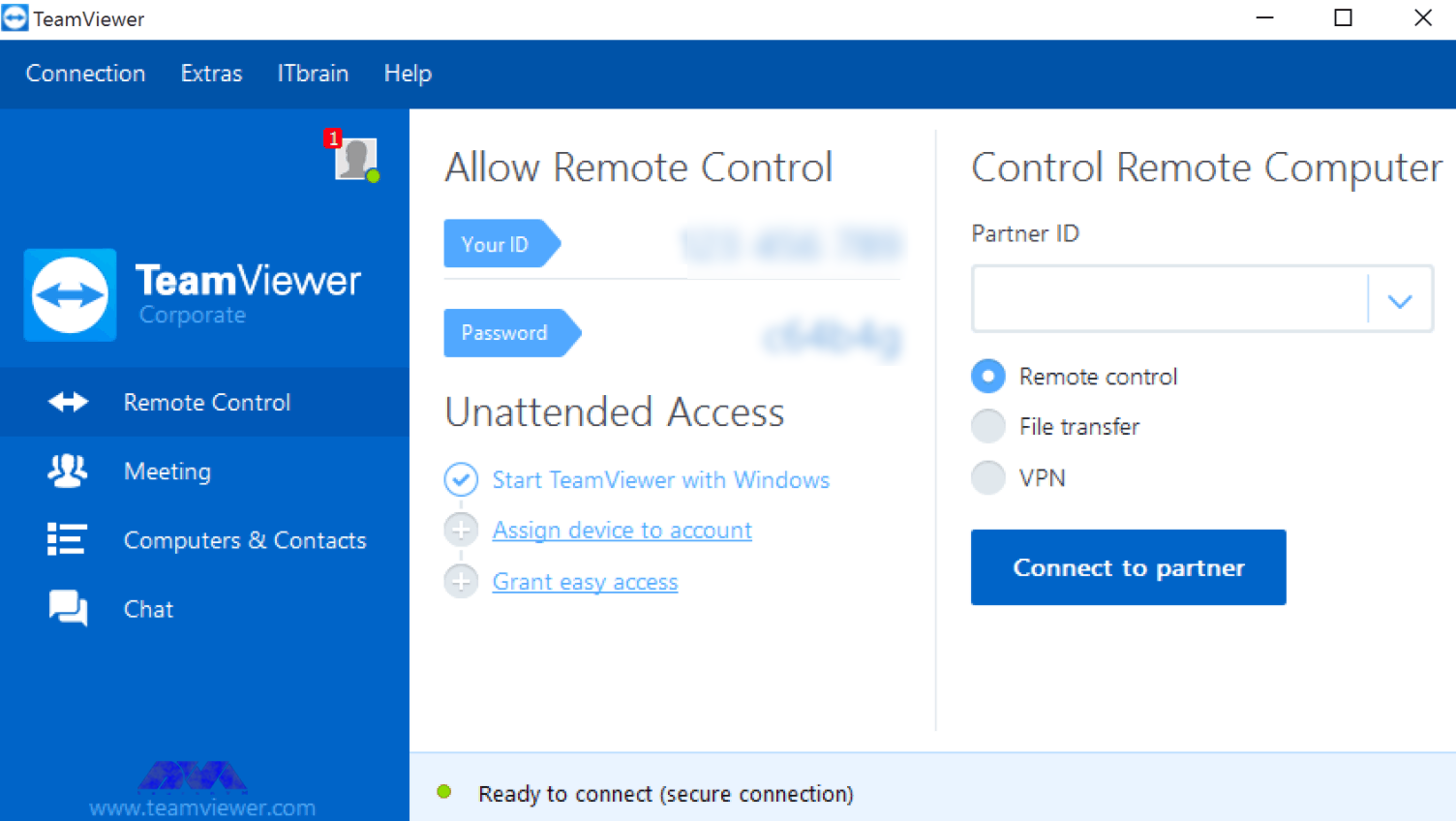
    TeamViewer

    You can do everything with TeamViewer. This tool is easy to use and very useful for providing support. TeamViewer is a powerful platform that has no problem accessing devices. Its best features include file transfer, video chat, and remote voice, which make it one of the most complete tools.

    What makes TeamViewer one of the best tools is its personal version, which is offered for free but includes all the features. The only downside is that you can’t use the free version for anything.

    If you are the only person who can access the devices of other members, TeamViewer will be a good option for you. Or if you need to remotely access your home server from time to time, this tool is the best option. But you can also use it in larger organizations. In short, if you have a small business, you can find cheaper alternatives.

    teamviewer

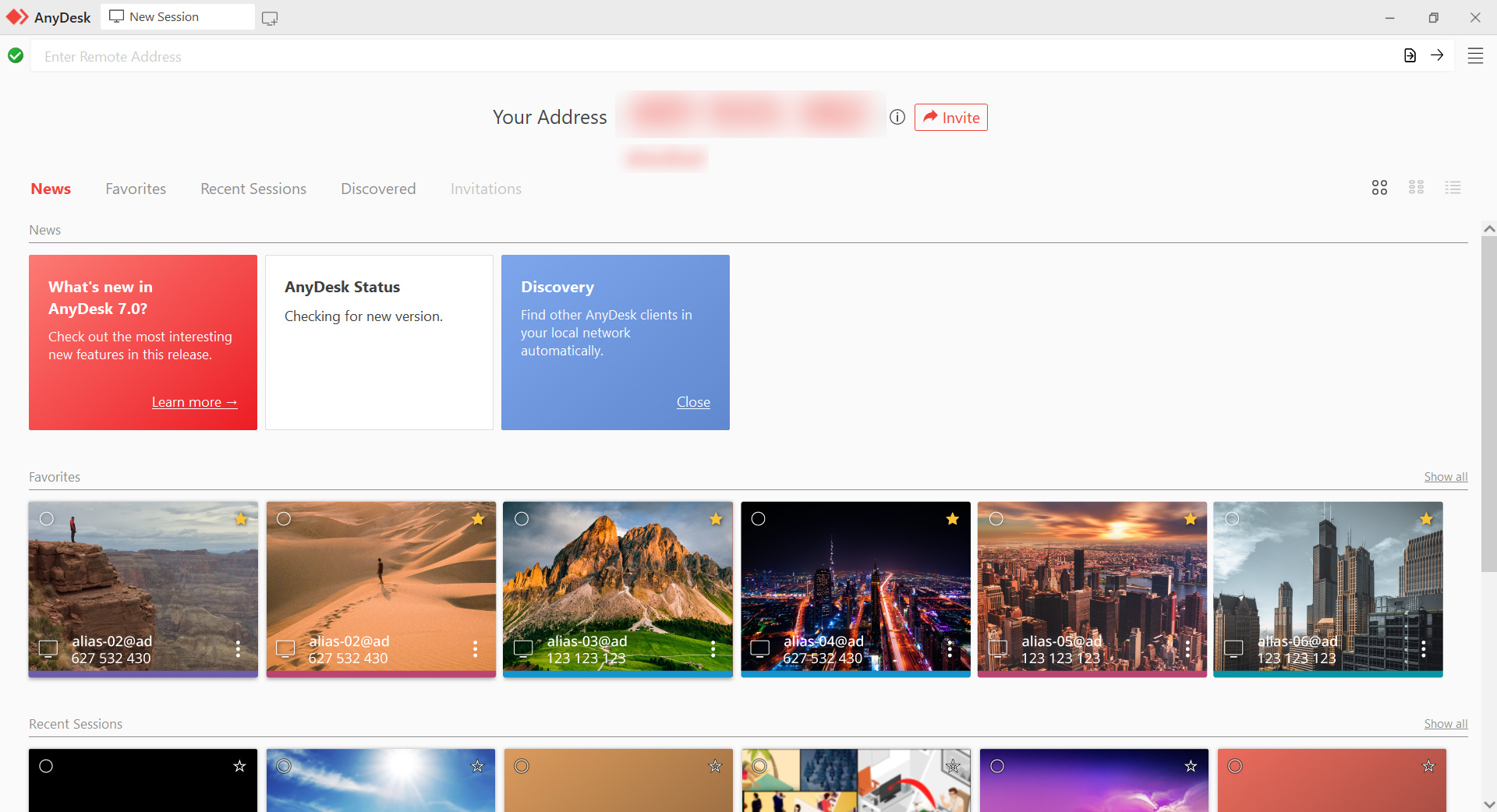
    AnyDesk

    AnyDesk is a versatile and user-friendly remote desktop tool that is suitable for personal, business, and professional use. Its focus on performance, ease of use, and security make it a popular choice for remote desktop access and support scenarios.

    It is another cross-platform remote desktop tool known for its speed and low latency. It’s not RDP-based but is often used as an alternative. While AnyDesk is secure, it’s essential to use it responsibly and follow security best practices. Always protect your AnyDesk address and access permissions to prevent unauthorized access.

    Anydesk_

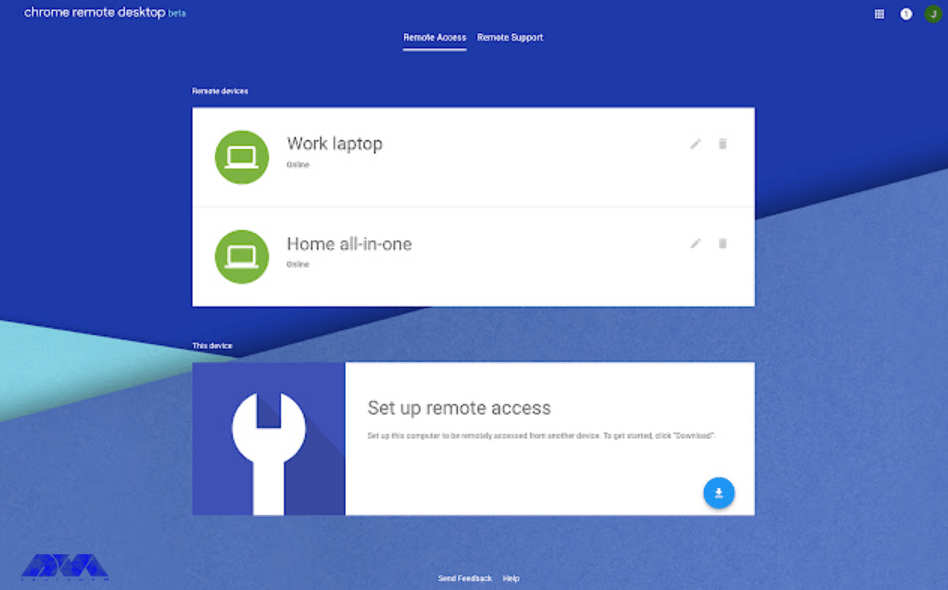
    Chrome Remote Desktop

    Chrome Remote Desktop is a free remote management software developed by Google. With the help of this tool, users can remotely connect to computers or other devices with Google Chrome or Chrome Remote Desktop and control them. A secure and convenient tool for remote operation, support, and monitoring.

    You can use this tool to connect to your workplace device from anywhere. Also, you can see your screen, share your instructions, and control other computers. chrome remote desktop with its easy-to-use and versatile structure is a useful tool for freelancers and workers.

    Chrome Remote Desktop remote desktop tool

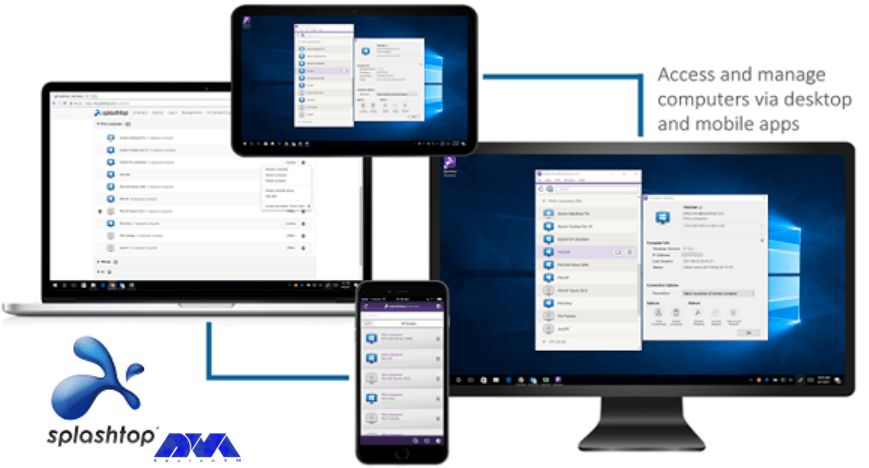
    Splashtop

    The Splashtop tool has a great performance. You will surely be satisfied with its performance. One of the advantages of this remote management tool is to transfer files by dragging and dropping between different operating systems.

    Splashtop is also equipped with voice chat. Its only disadvantages are that it has a complicated setup and its pricing is not reasonable. Instead, it has a very strong support and customer service team that can actively help you and answer your questions.

    This product was created with businesses in mind. Businesses for whom customer service is important. Its competitive price shows that it is reliable, works well, and is useful for large businesses.

    splashtop tool

    Parallels Access

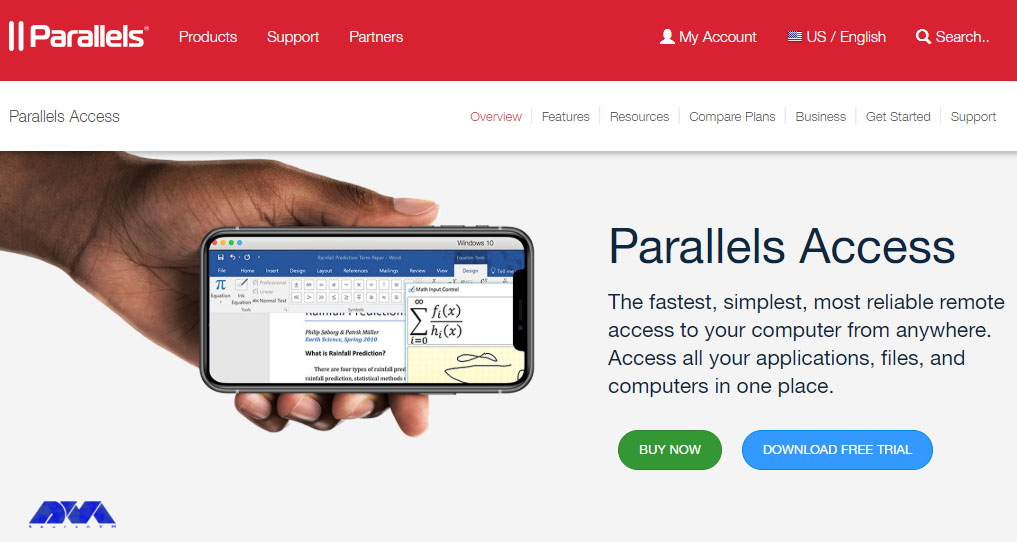
    Another useful and excellent tool for remote access is parallel access. which is a simple and reliable solution with the ability to access your computer from anywhere in the world. For example, if you want to use your mobile phone to access the system remotely, this tool will be very useful.

    parallel access tool

    So as you notice it is a mobile-focused remote desktop solution and designed to make remote control of your computer from mobile devices easy and efficient.

    Conclusion

    When choosing a remote desktop tool for RDP, you should consider factors such as platform compatibility, security features, ease of use, and the specific needs of your remote access tasks. Additionally, ensure that you follow best practices for securing remote desktop connections to protect your data and systems from potential threats because by using unsecured remote management tools, hackers can easily penetrate your important data and even access your camera. Here we tried to introduce the best remote desktop admin tools so that you can make a wise choice and secure your system.

  • The Best Way to Buy Cheap Admin RDP Server With BTC

    The Best Way to Buy Cheap Admin RDP Server With BTC

    In today’s digital age, the demand for reliable and affordable administrative Remote Desktop Protocol (RDP) servers is soaring. With the rise of Bitcoin as a decentralized and secure digital currency, it has become increasingly popular among tech-savvy individuals to buy these servers using Bitcoin. In this article, we will explore the best way to purchase cheap admin RDP server with BTC, providing you with valuable insights and information on this exciting trend.

    Understanding the Benefits of Admin RDP Servers

    Admin RDP servers play a crucial role in the smooth functioning of businesses and organizations, allowing users to access and control remote systems in a secure and efficient manner. These servers offer numerous benefits, such as enhanced productivity, centralized management, and improved data security.

    By integrating Bitcoin as a payment method, users can take advantage of the decentralization and anonymity that this digital currency offers, ensuring their transactions remain confidential and secure.

    When considering the purchase of admin RDP servers with BTC, it is important to choose a reputable provider that guarantees a seamless experience and meets your specific requirements. Look for providers who prioritize customer support, offer competitive pricing, and maintain high levels of security for your sensitive data.

    Cheap Admin RDP Server With BTC

    Finding Reliable Providers Accepting Bitcoin Payments

    As the popularity of Bitcoin continues to rise, an increasing number of providers are accepting BTC as a payment method for admin RDP servers. However, not all providers offer the same level of quality and reliability. It is essential to research and choose a provider that offers a robust infrastructure, high uptime, and strong encryption protocols to ensure your data remains safeguarded.

    To find the best providers, consider reading online reviews, comparing prices and features, and seeking recommendations from trusted sources. Look for providers with a proven track record in the industry, as well as those who offer scalable solutions to accommodate growing business needs.

    By thoroughly vetting potential providers, you can choose the one that fits your budget, technical requirements, and aligns with your overall business strategy.

    You can simply get in touch with us by emailing us or by commenting on this post. We will help you find what you need. Plus, we’ve got all you need! In the next section I will show how you can by an Admin RDP server with BTC the easy way.

    Best Bitcoin Server Provider

    How and Where to Buy an Admin RDP Server with BTC

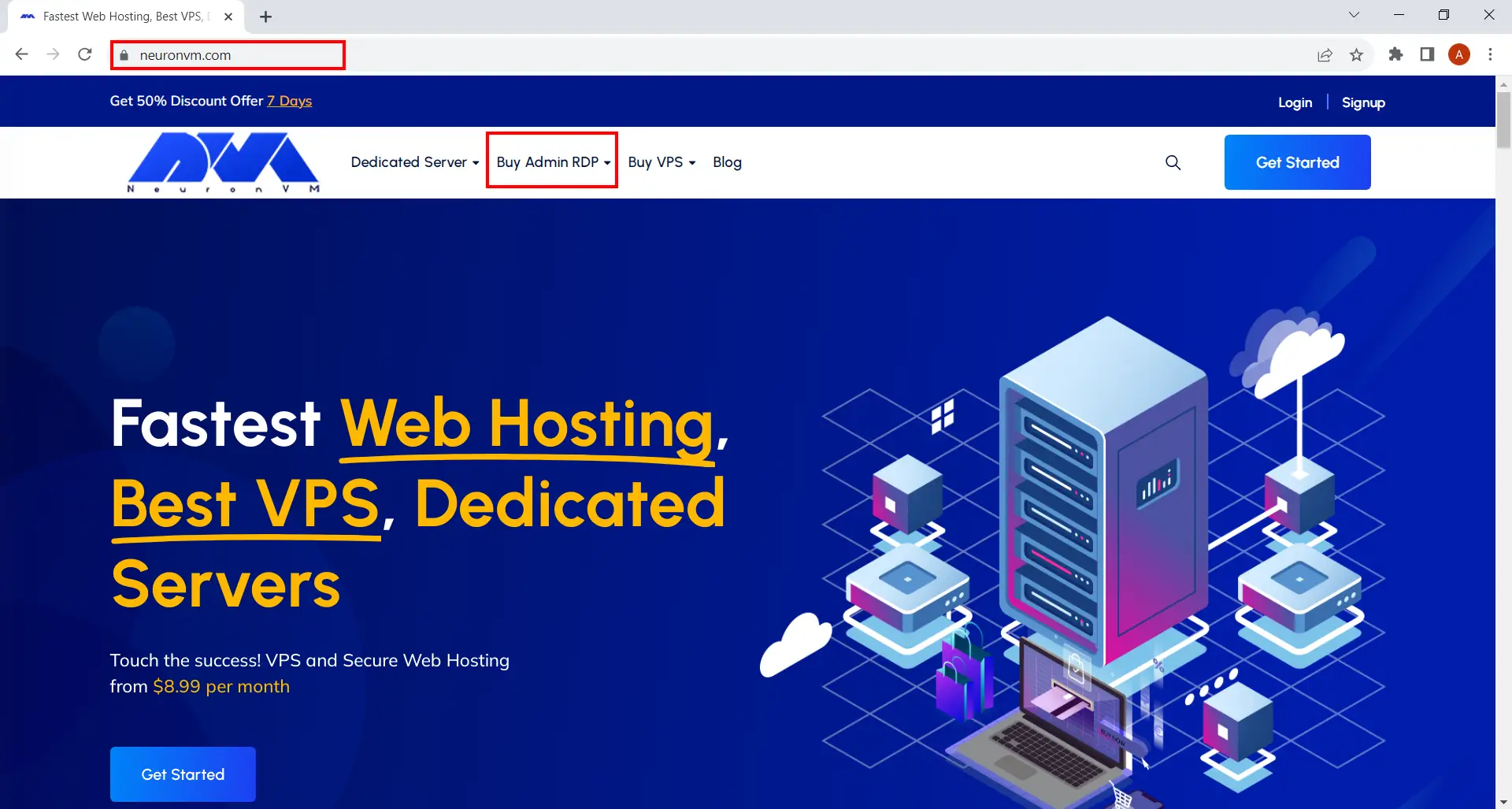
    Well this is the practical part of the article. I’m going to tell you how you can purchase an Admin RDP server with BTC from NeuronVM. Here we go:

    Buy an Admin RDP Server with BTC
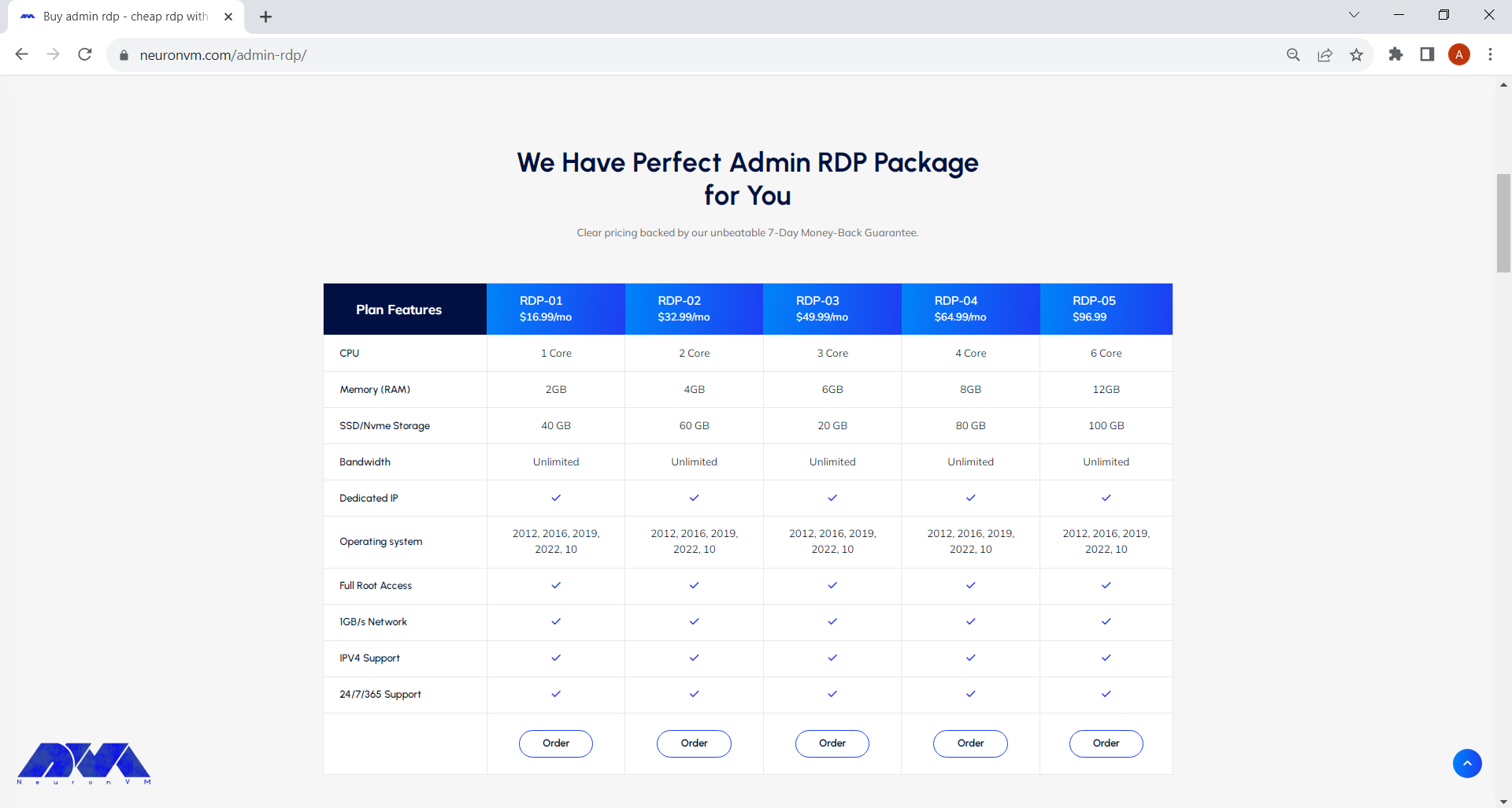
    • Select your preferred plan from the list. I suggest you read the plan features carefully before purchasing the RDP.
    Choose preferred plan
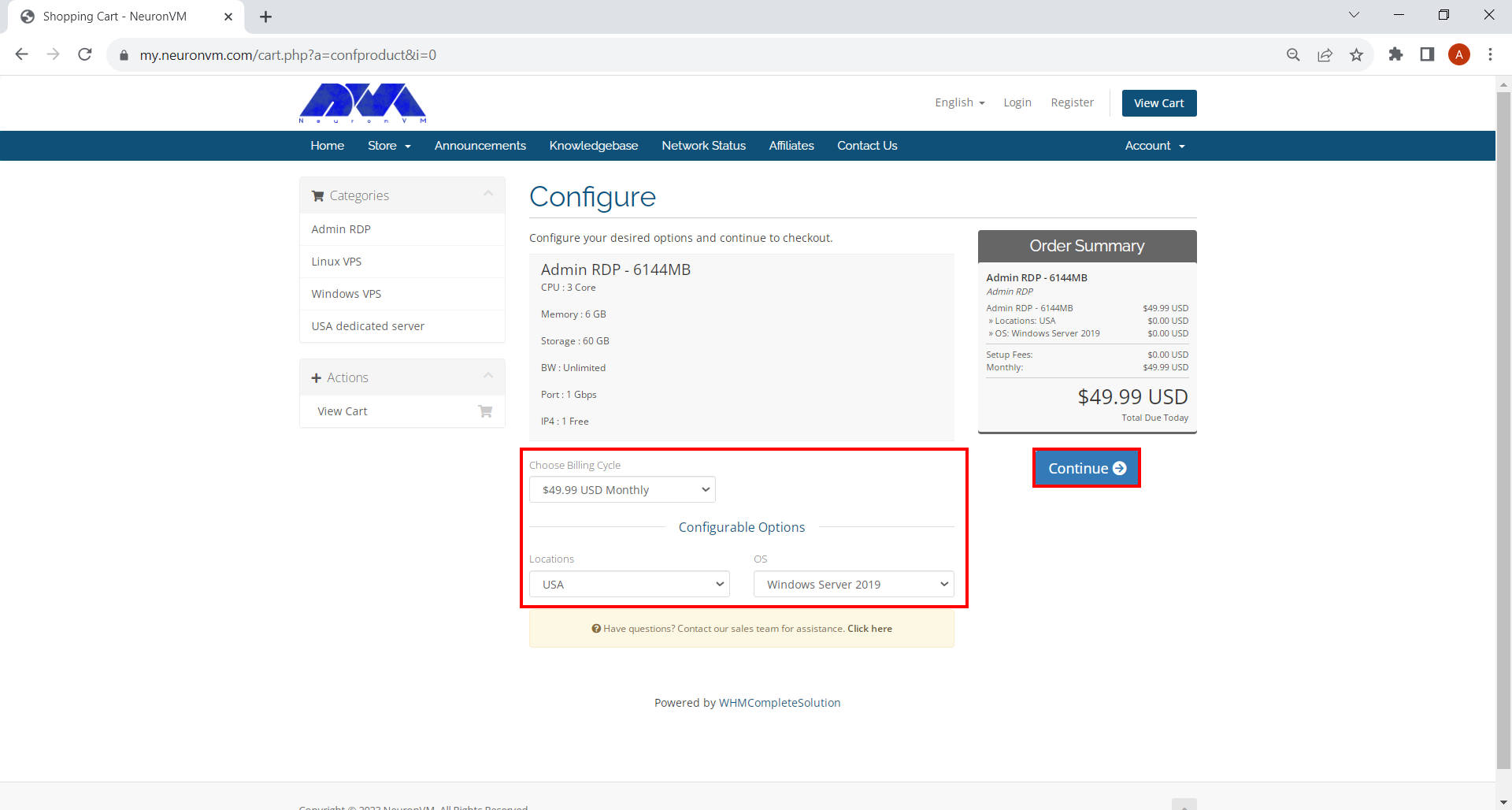
    • Choose OS, Location and the Billing Cycle of your choice and hit Continue.
    admin rdp configuration
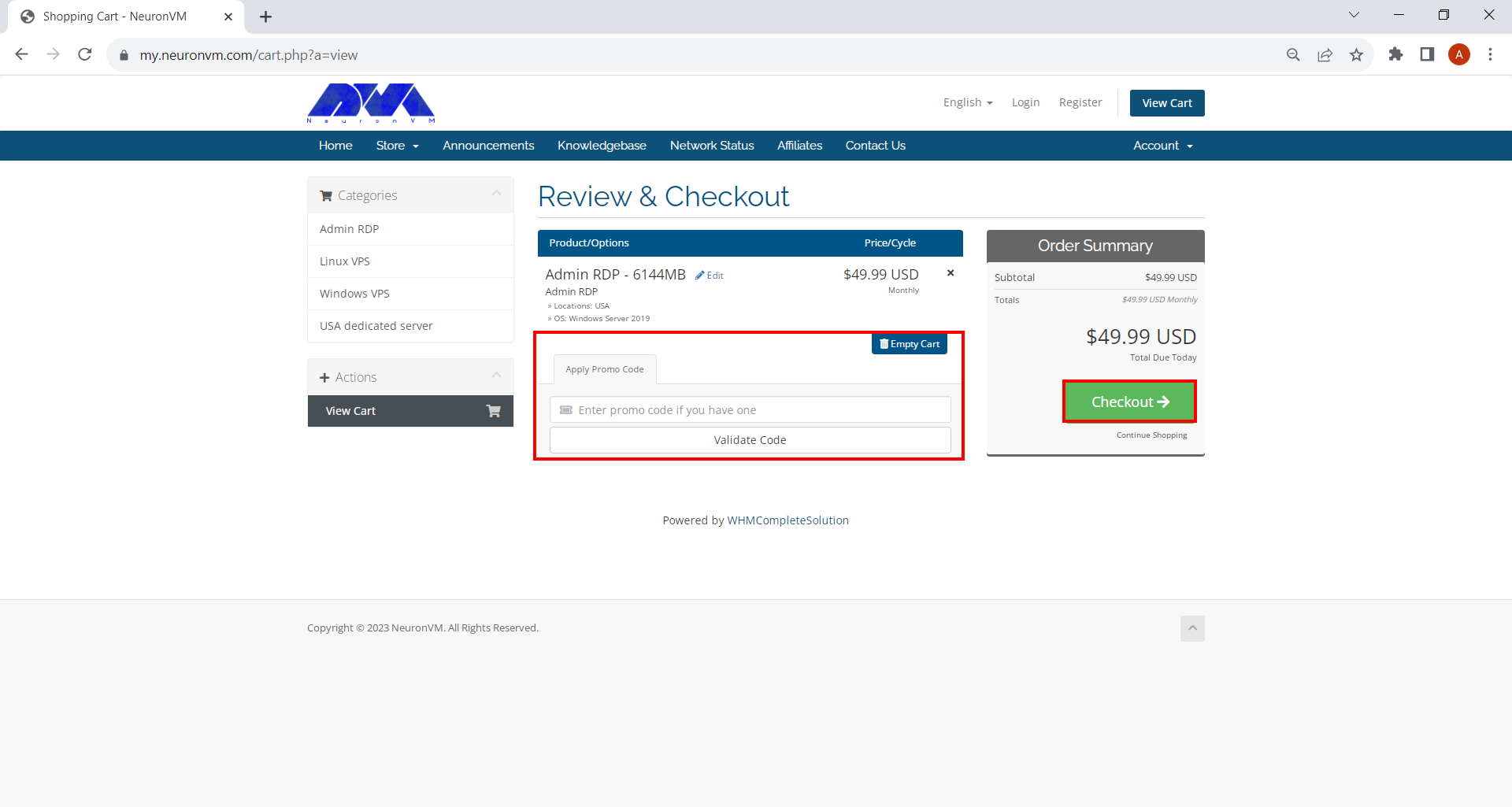
    • If you have a promo code, enter it in the box shown on this page. Click on Checkout and proceed.
    admin rdp promo code

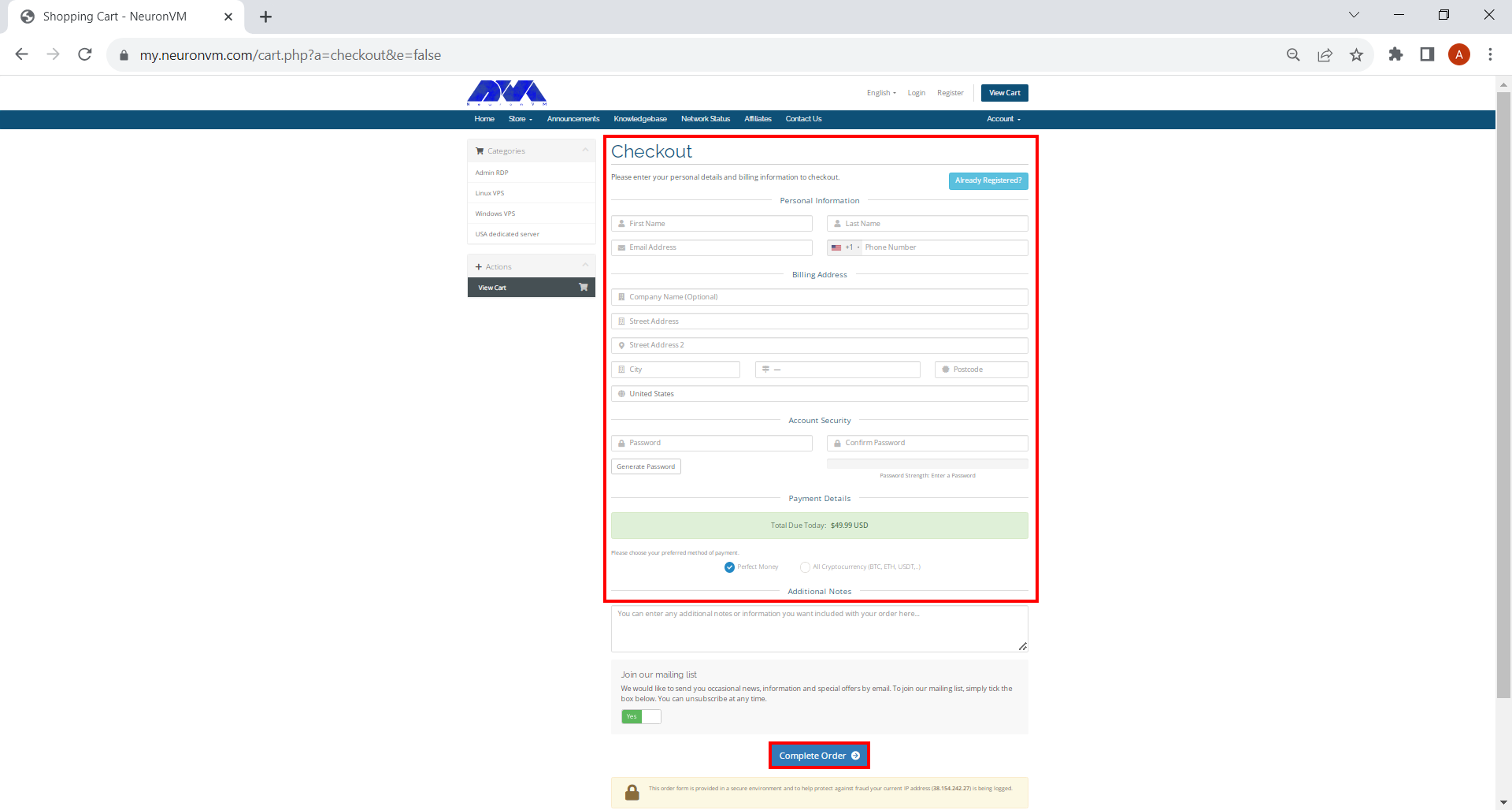
    If you haven’t signed up before, you should fill out the form on this page.

    Complete buying server

    Once you’re done, choose all cryptocurrency. This will allow you to use Bitcoin for the payment. Then click on Complete Order and finalize your order.

    • Choose Bitcoin as your preferred currency and finalize the purchase.
    Choose Bitcoin as Preferred Currency

    There you go! The rest is on us. We will instantly deliver your Admin RDP server and you can use it with no limitations. Remember we have 24/7 support team here, so if you had any problems buying or using this service, don’t hesitate to contact us!

    Key Considerations When Purchasing Admin RDP Servers with BTC

    Before finalizing your purchase of admin RDP servers with BTC, there are several key considerations to keep in mind. Firstly, assess your required specifications, such as processing power, storage capacity, and network speed, to ensure the server can handle your anticipated workload effectively. Additionally, verify that the provider offers round-the-clock technical support to address any potential issues promptly.

    Purchasing Admin RDP with BTC

    Furthermore, it is essential to evaluate the provider’s data backup and disaster recovery plans. This ensures that your valuable data remains protected even in the event of unforeseen circumstances. Finally, consider the scalability options offered by the provider, as it is crucial to have the flexibility to adapt your server resources as your business expands.

    Conclusion

    Purchasing a cheap admin RDP server with BTC offers numerous advantages in terms of security, anonymity, and convenience. By understanding the benefits of admin RDP servers, finding reliable providers accepting Bitcoin payments, and considering key factors before making a purchase, you can make an informed decision that meets your business requirements. Take the time to research and choose a provider that aligns with your needs, providing you with a reliable and cost-effective solution for your remote server needs.)

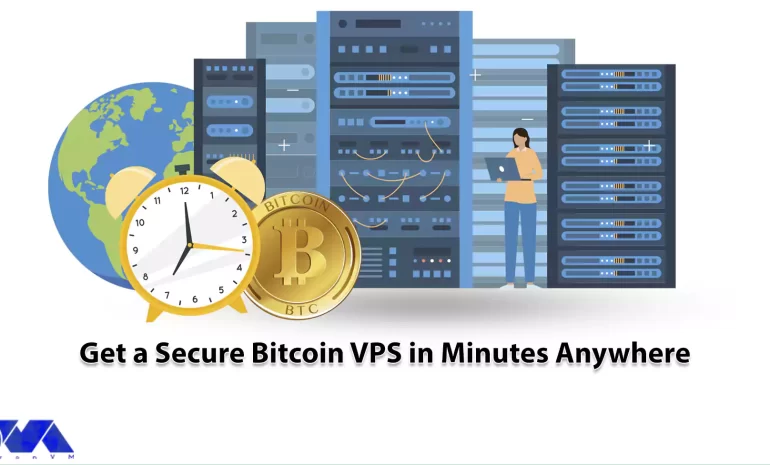
  • Get a Secure Bitcoin VPS in Minutes Anywhere

    Get a Secure Bitcoin VPS in Minutes Anywhere

    Starting an online business has many aspects that must be considered to succeed. For example, finding employees, training them, or developing the desired product. Another important thing in this regard is having a virtual private service that you can trust. The important points in having a virtual server are having full control, root access, and good performance. Especially if you have a high-traffic website, using VPS is the best option. Bitcoin VPS is one of the most secure servers among the various VPS services. Let’s learn how to get a secure Bitcoin VPS.

    What Is Bitcoin VPS?

    Bitcoin was created in 2009 by an anonymous person or group of people using the pseudonym Satoshi Nakamoto and is based on a whitepaper titled “Bitcoin: A Peer-to-Peer Electronic Cash System.” Now when we say Bitcoin VPS, that means you can buy any VPS service like Linux VPS, Windows VPS, or other services using Bitcoin.

    When using a Bitcoin VPS, it’s essential to keep security and privacy in mind, especially if you are dealing with cryptocurrencies. Make sure you follow best practices for securing your server and consider using hardware wallets or cold storage solutions to store your Bitcoins securely, rather than keeping them directly on the server.

    Additionally, be cautious of phishing attempts or malicious software targeting cryptocurrency users, as the digital currency space can attract various threats.

    What are the Benefits of Choosing VPS Using Bitcoin?

    Choosing a VPS provider that accepts Bitcoin as a payment method can offer several benefits, particularly for those who value privacy, security, and flexibility. Here are some advantages of using Bitcoin to pay for your VPS:

    – Privacy: Paying with Bitcoin allows you to maintain a higher level of privacy compared to traditional payment methods.

    – Security: Bitcoin transactions are secured by cryptographic protocols, making them highly secure.

    – Global Accessibility: Bitcoin is a decentralized digital currency that can be used worldwide. It doesn’t rely on traditional banking systems or currency exchange rates.

    – Fast Transactions: Bitcoin transactions are often processing faster than traditional banking methods, especially for international payments. This can result in quicker VPS activation and access to your server resources.

    – Control: Bitcoin payments give you more control over your finances. You don’t need to rely on third-party payment processors, banks, or credit card companies.

    – Avoiding Financial Censorship: In some cases, traditional payment methods can be subject to censorship or restrictions imposed by financial institutions or governments. Bitcoin provides a censorship-resistant payment option.

    – Flexibility: You can make Bitcoin payments using various wallet software and platforms. This action gives you flexibility in how you choose to manage your Bitcoin holdings.

    – Global Economy: Bitcoin is not tied to any specific country’s economy, making it less susceptible to inflation or currency devaluation.

    Overall, paying for a VPS with Bitcoin can be a valuable option for individuals and businesses seeking greater privacy, security, and financial control when acquiring hosting services.

    Where Can We Buy a Bitcoin VPS?

    Improve your online presence, start your VPS, and use cryptocurrencies like Bitcoin. Some providers allow you to pay with Bitcoin. You can easily get the server you need from anywhere in the world, without restrictions.

    The availability of Bitcoin as a payment option for VPS providers may vary, so you should check this before purchasing.

    The possibility of payment by Bitcoin is only possible on some server providers, NeuronVM is one of them. This site has tried its best to provide all its virtual services with up-to-date features and strong support. Also for more access, it has made the possibility of payment by Bitcoin.

    How to Get a Bitcoin VPS?

    As we mentioned before, the availability of Bitcoin as a payment option for VPS providers may vary, so you should check this before purchasing. Fortunately, NeuronVM is an ideal option in this field.

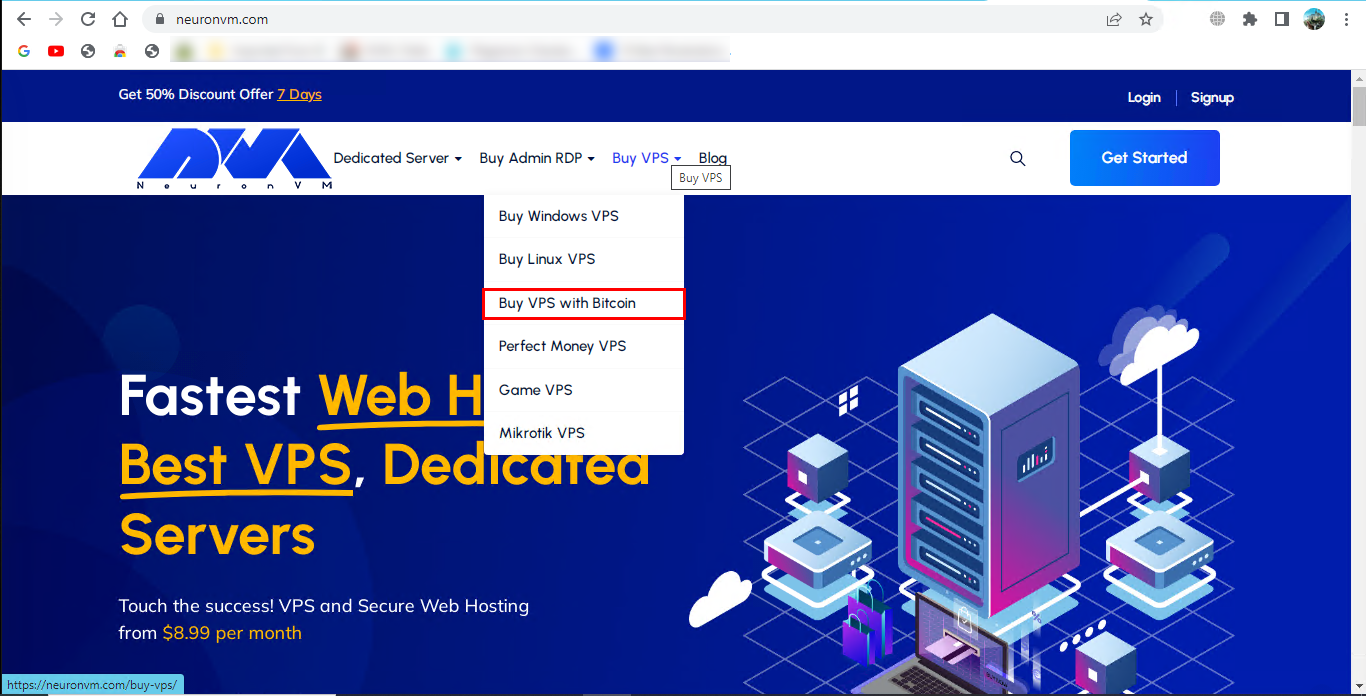
    So, if you want to buy a Bitcoin VPS, as a first step, you can go to NeuronVM website and start the purchase process by clicking on Buy VPS and then select Buy VPS with Bitcoin.

    BUy bitcoin vps

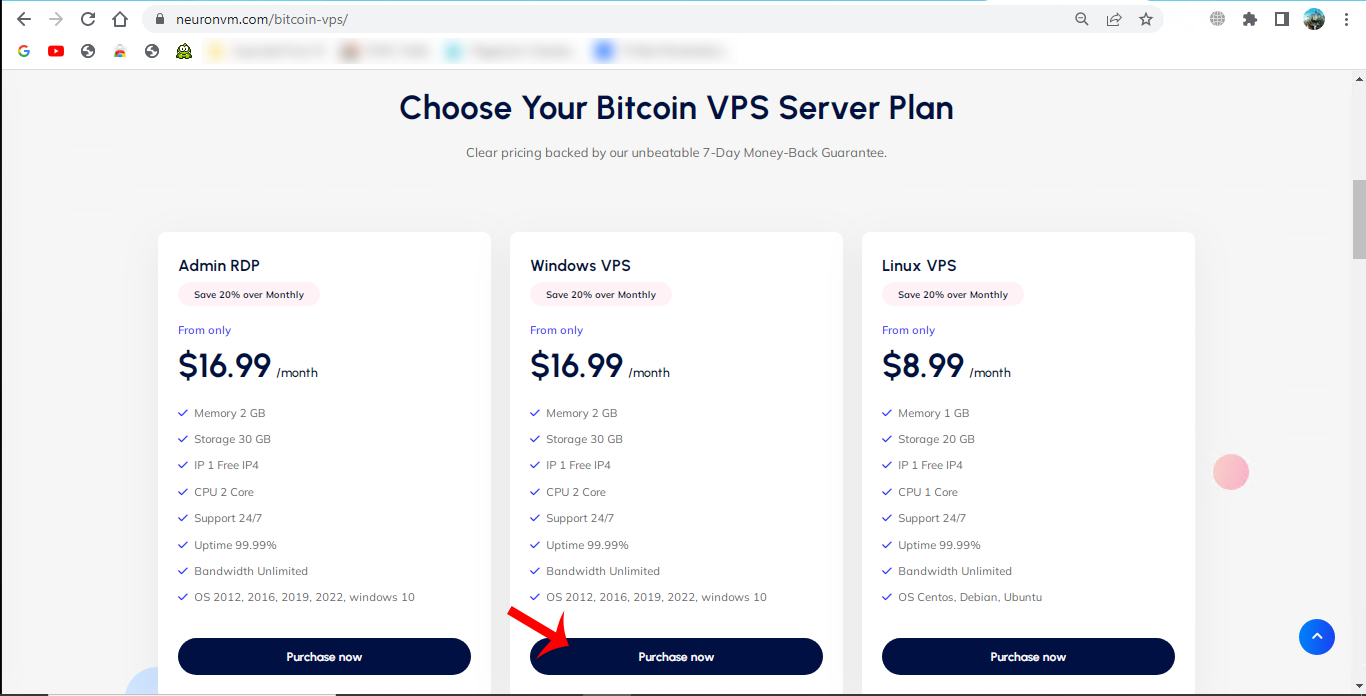
    Now scroll down to choose desired plan of Bitcoin VPS (Admin RDP, Windows VPS, Linux VPS):

    choose bitcoin vps plan

    We chose Windows VPS, Here, you can see your desired Windows VPS plan:

    choose windows vps plan

    You will see details of your plan and choose the proper windows operating system. Also you can select your desired location and press Continue:

    windows vps plan details

    Now, you can review the details of chosen plan. Also you can use the Promo Code to get discount. Press Checkout button:

    review and checkout section

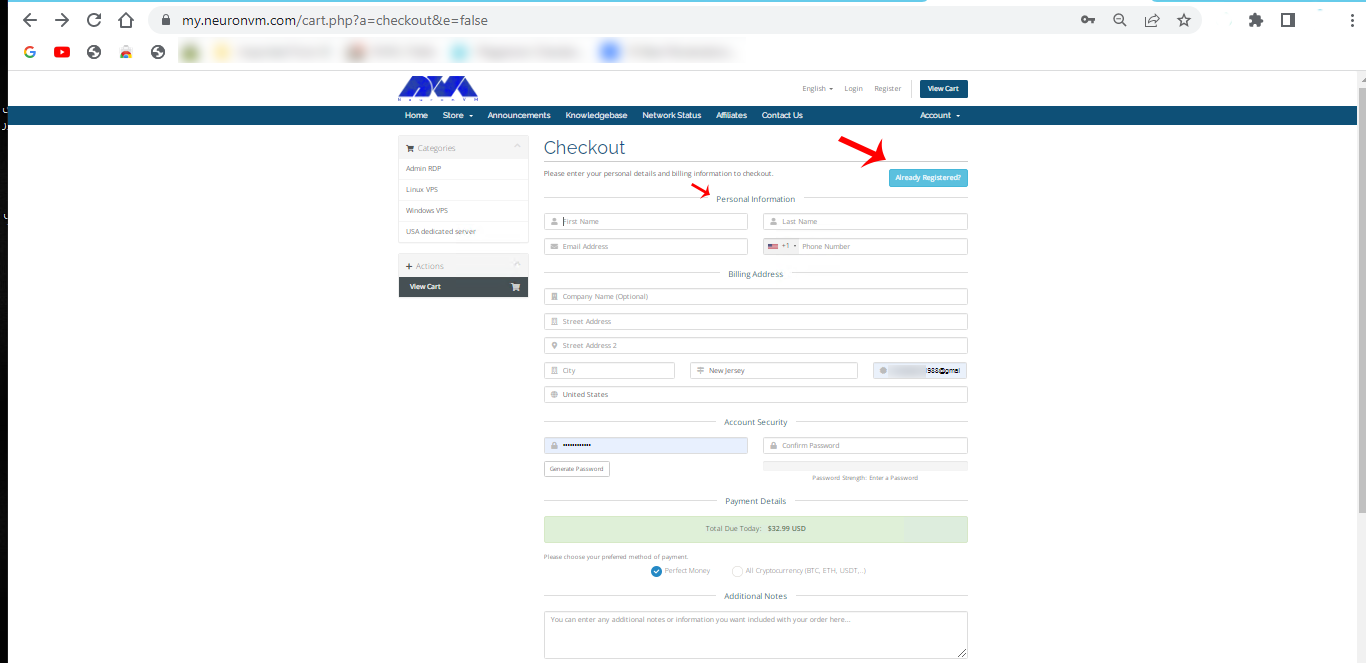
    Here you should fillout the personal information to sign up or If registred before press Already Registered tab:

    sign up section of windows vps

    Enter email and password to login. You can add additional notes and extra explanation if needed. Now you can choose the payment method, so select All Cryptocurrencies which contains Bitcoin and press Compelet Order to do the payment:

    login and purchase section

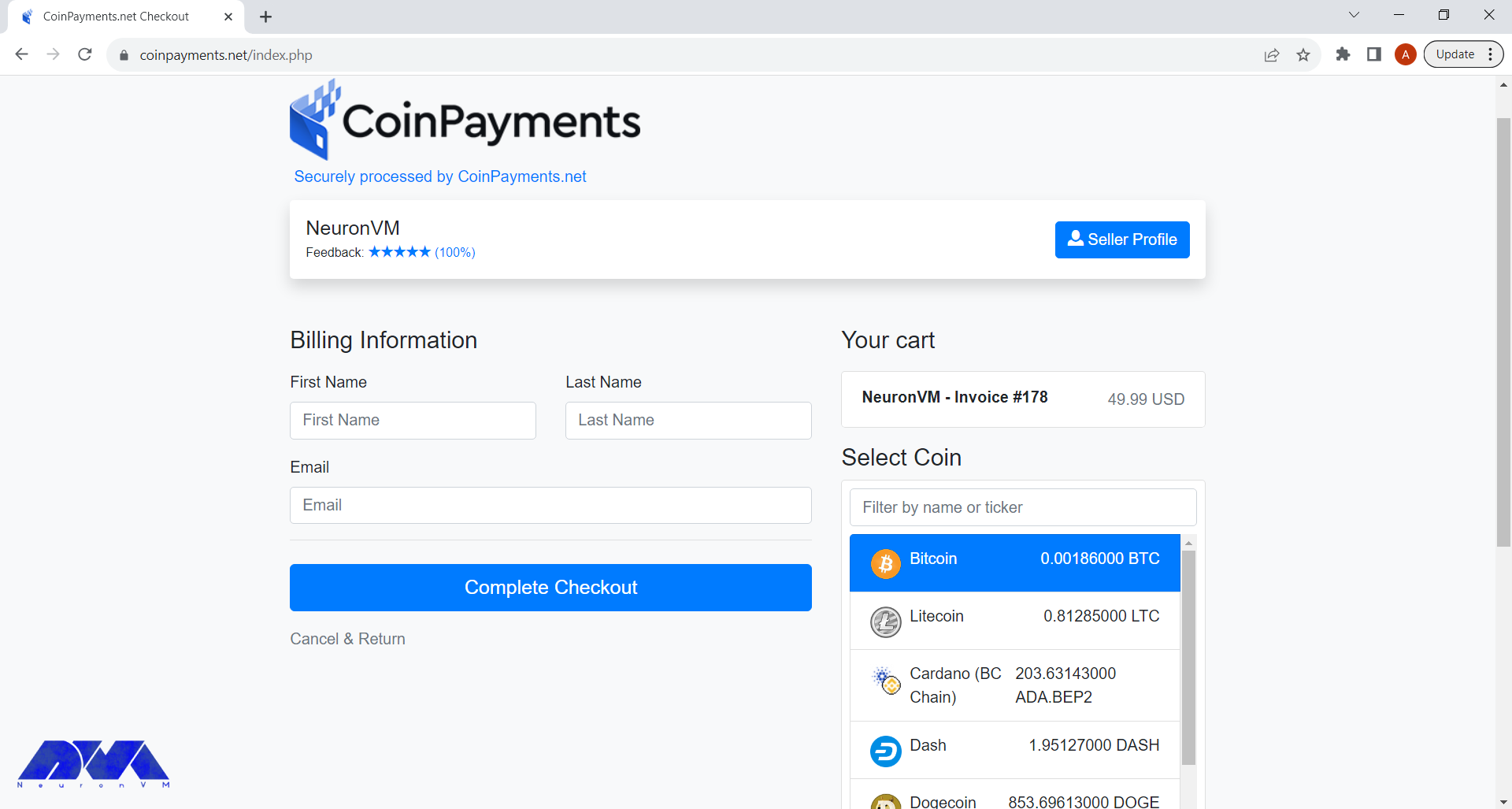
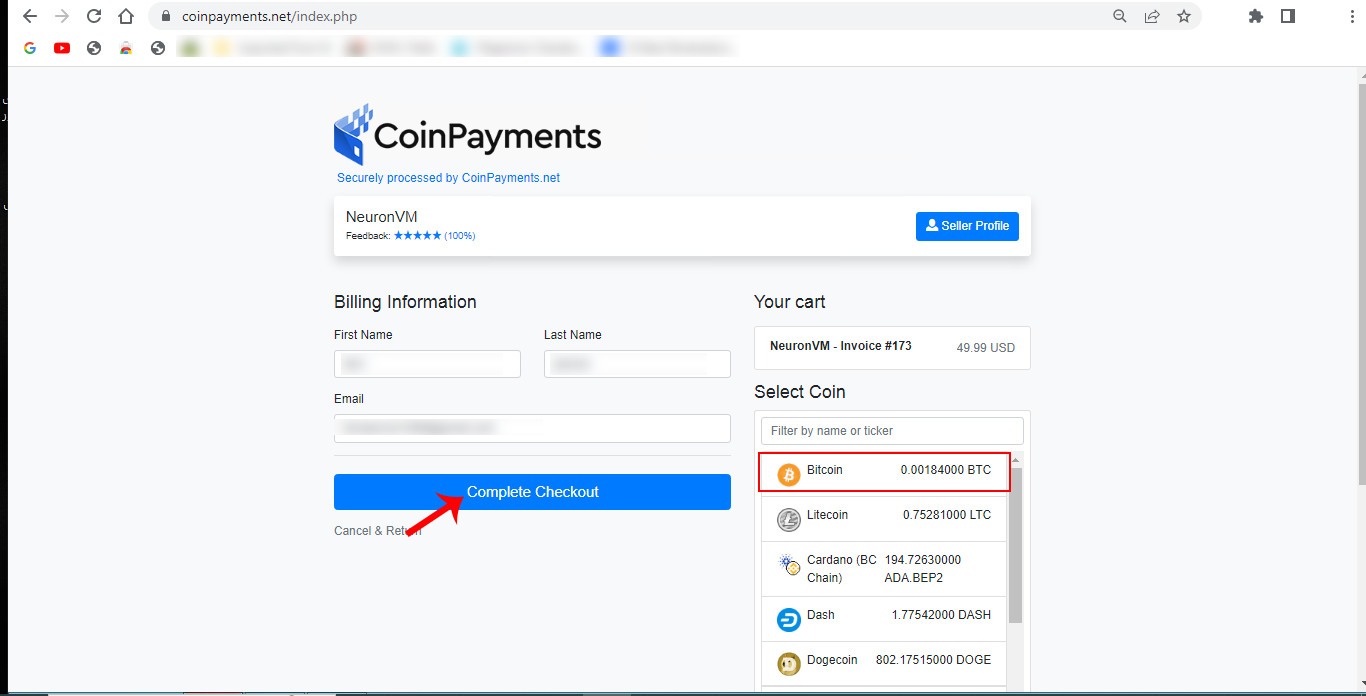
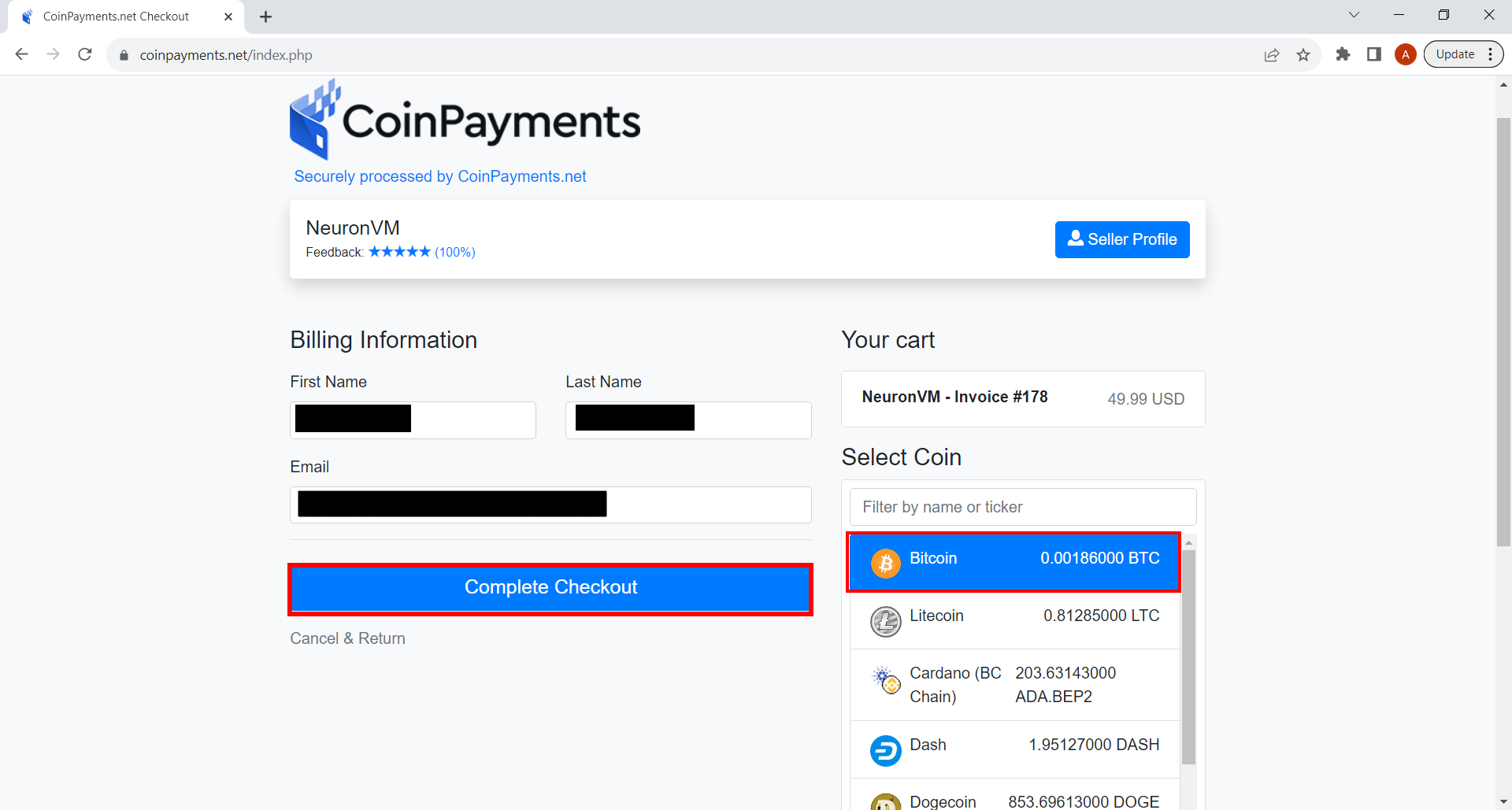
    On payment page enter related information and choose Bitcoin. Click on Compelete Checkout:

    coinpayments section

    This section is the last part. check the Payment ID and payment information. then confirm and finish the process. the purchased server information will sended to your mailbox in seconds.

    Important Steps to Help You Secure a Bitcoin VPS

    Securing a Bitcoin VPS is essential to protect your cryptocurrency holdings and ensure the safety of your transactions. Here are some steps to help you secure your Bitcoin VPS:

    1- Select a trusted VPS provider with a good track record of security. Look for providers that offer strong encryption, DDoS protection, and regular security updates. NeuronVM is one of the most reliable and secure providers for Bitcoin VPS.

    2- Create a strong, unique password for your VPS. It should be a combination of letters (both uppercase and lowercase), numbers, and special characters.

    3- Regularly update the operating system and all software on your VPS.

    4- Configure a firewall to restrict access to your VPS. Only allow necessary traffic, such as SSH and Bitcoin-related connections.

    5- If you store a Bitcoin wallet on your VPS, make sure it’s encrypted. Use a strong passphrase to protect the wallet. Avoid storing large amounts of cryptocurrency on a VPS.

    6- Regularly backup your Bitcoin wallet and any critical data stored on your VPS.

    7- Setup monitoring tools to detect unusual or unauthorized access attempts.

    8- Turn off any unnecessary services or daemons running on your VPS to reduce the attack surface.

    9- Periodically review your VPS configuration and security measures to ensure they are up-to-date and effective.

    10- Keep yourself informed about the latest security threats and vulnerabilities related to Bitcoin and VPS hosting.

    Security is an ongoing process, and it’s crucial to stay vigilant and proactive in safeguarding your Bitcoin assets on a VPS. Always exercise caution and use best practices to minimize the risk of theft or loss.

    Conclusion

    Finally, it should be said that Bitcoin is an excellent and reliable way to pay for hosting servers. This type of payment can be made from anywhere. It is also very quick and easy, which is a big plus. As a hosting server provider, we approve and support cryptocurrency payments and we hope more providers will adopt this process.

  • Discover Secure and Affordable Linux VPS Hosting Options

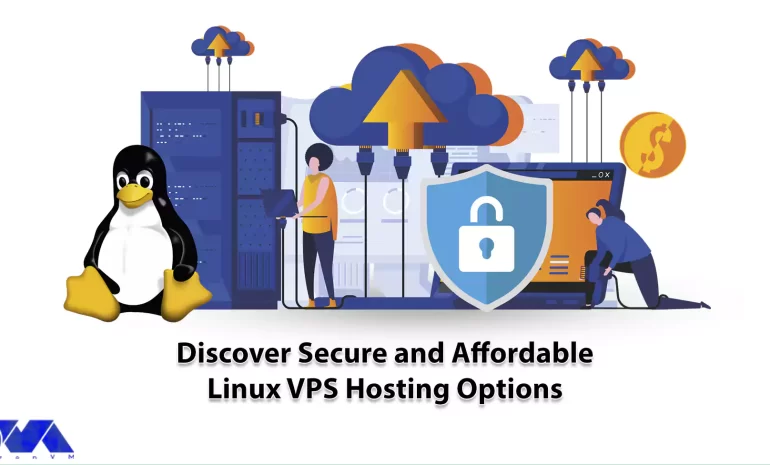
    Discover Secure and Affordable Linux VPS Hosting Options

    When it comes to hosting a Virtual Private Server or VPS with a Linux operating system, you have several options to choose from. VPS hosting provides you with more control, flexibility, and scalability compared to shared hosting. Also note that when choosing a Linux VPS hosting provider, consider factors such as budget, technical expertise, your preferred specific Linux distribution, server location, scalability options, and customer support. Here we will help you discover secure and affordable Linux VPS hosting options, so keep studying.

    Everything About Linux VPS Hosting

    Linux VPS hosting is a popular choice for hosting websites, applications, and services on the internet. It combines the flexibility and control of a dedicated server with the cost-effectiveness of shared hosting. It is a popular choice for VPS hosting due to its security and open-source nature. Common Linux distributions used for VPS hosting include Ubuntu, CentOS, Debian, and Fedora.

    Linux VPS hosting can be an excellent choice for individuals, businesses, and developers looking for a flexible, cost-effective, and highly customizable hosting solution. However, it does require some technical expertise for setup and maintenance, so consider your own skill level and needs when choosing a hosting solution.

    secure and affordable Linux VPS

    Significant Options of Linux VPS Hosting

    In comparison to shared hosting, it should be said that a Linux virtual private server offers more control, more security, and better performance. Let’s analyze key features and important options that encourage you to buy Linux VPS hosting. You can purchase this great service from NeuronVM, which is one of the most reliable providers with a variety of VPS and dedicated servers.

    Having Great Control and Flexibility

    We may have already mentioned that Linux server offers more control and flexibility than shared hosting. At the same time, you will have root access, and you can install all the programs and software you need.

    Another feature of these virtual servers is the ability to configure the server settings according to the user’s desired specifications. Using Linux hosting provides you with the use of resources in a dedicated way, which means you don’t have to share CPU or RAM. This is reassuring because there is less competition for the same resources.

    Also, maintain detailed documentation of your server configurations, settings, and procedures. This is invaluable for troubleshooting and future reference.

    Having great control and flexibility on a Linux VPS requires a combination of technical knowledge, regular maintenance, and proactive monitoring. It’s important to strike a balance between control and security, ensuring that your server remains stable and protected while still meeting your specific needs.

    Great Scalability For Growing Websites

    Scalability in the context of a Linux VPS refers to the ability to easily and efficiently handle increasing workloads, traffic, and resource demands as your needs grow. It is obvious that you need to expand your website. Linux hosting provides you with a lot of scalability in this field.

    So, you can have more resources with less cost and less effort. Dedicated resources allow you to use them as much as you need. Achieving scalability in a Linux VPS involves several aspects:

    – Vertical Scalability: This involves increasing the resources (CPU, RAM, storage) of your VPS by upgrading the plan or instance.

    – Horizontal Scalability: This involves adding more VPS instances to distribute the workload. You can use load balancers to distribute incoming requests among multiple VPS instances. This is a common strategy for handling high-traffic websites or applications.

    – Auto-scaling: Some VPS providers offer auto-scaling features, where the number of VPS instances automatically adjusts based on traffic or resource usage.

    – Database Scalability: Scaling your database is often a significant part of scalability.

    As you scale, security becomes even more critical. Implement robust security measures, including firewalls, intrusion detection systems, and regular security audits, to protect your VPS infrastructure.

    Linux VPS is More Cost-effective than a Dedicated Server

    If you want to have access to more resources and more power than shared hosting but can’t spend a lot of money, the best option for you is Linux virtual servers. There are several reasons why Linux VPS is cost-effective:

    affordable Linux VPS hosting

    – Linux is an open-source operating system, which means it is freely available to anyone.

    – With Linux, you are not tied to a single vendor. You can choose from various distributions (distros) and software packages, which fosters competition and can lead to cost savings.

    – Linux can run on a wide range of hardware, including older or less powerful machines.

    – Linux is known for its security and stability, which can reduce the costs associated with system downtime, data breaches, and malware infections.

    – Many Linux distributions offer LTS releases with extended support periods, often up to five years or more. This reduces the need for frequent OS upgrades and associated costs.

    When considering all the factors mentioned above, Linux often results in a lower TCO compared to proprietary alternatives. While initial setup and training costs may vary, the long-term savings can be substantial.

    High-Security Features

    Securing a Linux VPS is crucial to protect your data and server from potential threats and attacks. Here are some high-security features and best practices you can implement on a Linux VPS:

    – Firewall Configuration: Use a firewall like iptables or a more user-friendly front-end like ufw to control incoming and outgoing traffic.

    – SSH Hardening: Secure SSH access by disabling root login, using key-based authentication, and changing the default SSH port (if applicable).

    – Regular Updates: Keep the server’s software and packages up to date by regularly applying security updates.

    – Fail2Ban: Install and configure Fail2Ban to block repeated login attempts from malicious IP addresses. This helps prevent brute force attacks on SSH and other services.

    – Web Application Firewall (WAF): If you’re hosting web applications, consider using a WAF like ModSecurity to protect against web-based attacks, such as SQL injection and XSS.

    – File System Hardening: Use file system permissions (chmod, chown) to limit access to critical system files and directories. Implement the principle of least privilege.

    These are some of the practices to have a highly secured Linux VPS. Train yourself and your team on best security practices to minimize the risk of human error.

    How to Buy Linux VPS from NeuronVM

    Now that you realize how beneficial Linux VPS is and how it can improve your programs and website Let’s find out about the step-by-step instructions to get one:

    To get a full guide about buying Linux VPS from NeuronVM, refer to the official page or study the article The Cost-Saving Benefits of Buying Linux VPS.

    Best Practices For Using Linux VPS Hosting

    To make the most of your Linux VPS hosting, it’s important to follow best practices for security, performance, and management. Here are some key recommendations:

    – Select a reputable hosting provider that offers good uptime guarantees, customer support, and a range of Linux distributions to choose from.

    – Choose a Linux distribution that suits your needs and expertise. Popular choices include Ubuntu, CentOS, Debian, and Fedora. Ensure that the distribution is regularly updated for security patches.

    – Use the package manager of your chosen Linux distribution (e.g., apt, yum, or dnf) to automate updates.

    – Configure a firewall (e.g., iptables or firewalld) to restrict incoming and outgoing traffic. Allow only the necessary ports for your applications and services.

    – Consider using tools like Fail2ban to protect against brute-force attacks.

    – Implement a robust backup strategy to protect your data. Create automated backups and store them offsite for disaster recovery.

    – Setup monitoring tools (e.g., Nagios, Zabbix, or Prometheus) to track server performance, resource usage, and security events. Configure alerts to notify you of any issues.

    – Monitor and optimize resource usage (CPU, RAM, and disk space) to ensure optimal server performance. Tools like htop and sysstat can help with this.

    – Periodically review your server for unused software, files, and accounts. Remove anything unnecessary to reduce the attack surface and improve performance.

    – Use containerization technologies like Docker or virtualization with solutions like KVM or VirtualBox to isolate applications and services for better security and resource management.

    – Limit SSH access to only trusted IP addresses, use strong SSH keys, and disable password-based authentication to protect against unauthorized access.

    – Consider using a control panel like cPanel, Plesk, or Webmin to simplify server administration tasks.

    Conclusion

    Linux VPS hosting can be an excellent choice for individuals, businesses, and developers looking for a flexible, cost-effective, and highly customizable hosting solution. However, it does require some technical expertise for setup and maintenance, so consider your skill level and needs when choosing a hosting solution. We hope this content was useful for you. Please comment if there are any ideas or questions.

  • How to Harness the Advantages of Windows VPS

    How to Harness the Advantages of Windows VPS

    Advantages of Windows VPS (Virtual Private Server) are countless. There is a world of benefits for individuals and businesses that use Windows VPS, offering a flexible and cost-effective solution for hosting websites, running applications, managing databases, and much more. In this article, we will explore the benefits that Windows VPS brings to the table, including enhanced security, scalability, and control, as well as improved performance and reliability. By understanding the potential of Windows VPS, readers will be equipped with the knowledge necessary to harness its power and optimize their digital operations.

    A Brief Introduction of Windows VPS

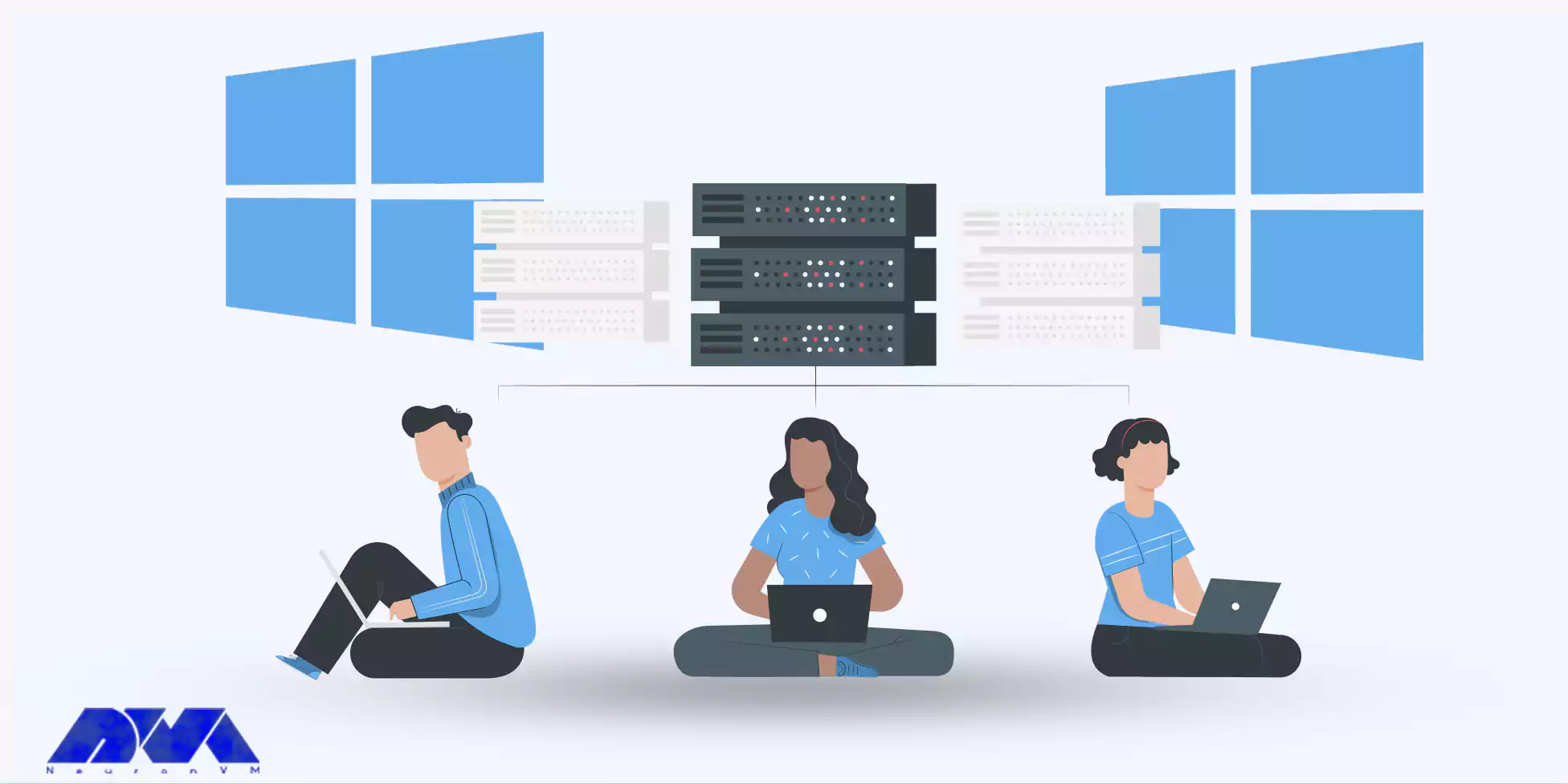
    Windows VPS, or Virtual Private Server, is a type of web hosting that uses virtualization technology to divide a physical server into multiple virtual servers. Each virtual server operates independently, giving users the experience of having a dedicated server. Windows VPS specifically uses the Windows operating system, providing users with the familiarity and convenience of using Windows software and applications.

    One of the key advantages of Windows VPS is the ability to have complete control over the server environment. Users can install and configure any software they need, giving them the flexibility to customize the server to their specific requirements.

    Additionally, Windows VPS offers high levels of security and stability, ensuring that users’ data and applications are protected. With Windows VPS, businesses and individuals can have a reliable and efficient hosting solution that caters to their specific needs.

    Advantages of Windows VPS

    Advantages of Windows VPS for Businesses and Individuals

    Windows VPS offers several benefits for both businesses and individuals.

    For businesses, Windows VPS provides a cost-effective hosting solution compared to dedicated servers. With the ability to share server resources, businesses can reduce their hosting costs significantly without compromising on performance or security. Additionally, businesses can easily scale their server resources as their needs grow, allowing for seamless expansion.

    Individuals can also benefit from using Windows VPS. Windows VPS provides a reliable and stable platform for hosting personal websites, blogs, or online portfolios. Users can take advantage of Windows-specific applications and tools to enhance the functionality of their websites.

    Moreover, Windows VPS allows users to host multiple websites on a single server, reducing costs and simplifying management. Whether for businesses or individuals, Windows VPS offers a powerful hosting solution that provides the necessary features and resources at an affordable price.

    Key Factors to Consider when Choosing a Windows VPS Provider

    When it comes to selecting a Windows VPS provider, several key factors need to be considered to ensure a seamless experience.

    Firstly, you should evaluate the reliability and performance of the provider’s infrastructure. Look for providers that offer high-quality hardware, redundant network connections, and robust data centers. A sturdy infrastructure ensures that your Windows VPS operates smoothly without any downtime or performance issues, allowing you to focus on your core activities without interruptions.

    Moreover, make sure the provider offers scalable resources that can effortlessly accommodate the growth of your applications and website. This ensures that you can easily upgrade your resources as your needs evolve, preventing any potential limitations from hindering your online presence.

    At NeuronVM, we understand the importance of these key factors and prioritize them in our top-notch Windows VPS services. With a solid infrastructure consisting of cutting-edge hardware and redundant network connections, we ensure the highest level of reliability and performance for our clients.

    Our data centers are equipped with advanced cooling systems and backup power supplies, guaranteeing uninterrupted service delivery. In addition, NeuronVM provides scalable resources that effortlessly adapt to the changing demands of your applications and website.

    Buy Windows VPS

    Best Practices for Optimizing and Harnessing the Advantages of Windows VPS

    To fully optimize and harness the advantages of Windows VPS, there are several best practices you can follow.

    Firstly, ensure that you regularly update your operating system and software to benefit from the latest improvements and security patches. By staying up to date, you can enhance the performance and stability of your Windows VPS.

    Secondly, optimize your website or applications by implementing caching mechanisms, compressing files, and minimizing unnecessary scripts. This will significantly improve your website’s speed and responsiveness, providing a better user experience.

    Additionally, take advantage of the advantages of Windows VPS by utilizing the available resources efficiently. Optimize memory and CPU usage, and properly allocate resources to different applications or services. This will prevent any resource bottlenecks and ensure smooth operations.

    Lastly, regularly monitor and analyze the performance of your Windows VPS. Utilize monitoring tools to identify any potential issues or bottlenecks before they impact your website or applications. By implementing these best practices, you can optimize your Windows VPS experience and take full advantage of its capabilities.

    Final Words and Conclusion

    In conclusion, harnessing the advantages of Windows VPS can greatly enhance productivity, security, and scalability for businesses of all sizes. With its ability to create virtual environments tailored to specific needs, Windows VPS offers a cost-effective solution with the flexibility to accommodate growing demand. By providing seamless integration with Windows-based software and applications, it enables businesses to efficiently manage and streamline their operations.

    Furthermore, the robust security features of Windows VPS safeguard sensitive data and protect against cyber threats. With its easy setup and user-friendly interface, Windows VPS becomes an accessible option for businesses seeking a reliable and efficient hosting solution. By harnessing the advantages of Windows VPS, businesses can optimize their IT infrastructure, maximize resources, and ultimately achieve improved performance and success.