Blog

  • What to Consider When Purchasing a Dedicated Server

    What to Consider When Purchasing a Dedicated Server

    In today’s increasingly digital world, businesses and individuals alike are heavily reliant on online infrastructure to establish an online presence, run business operations, or host content. A dedicated server is a vital component that provides enhanced performance, security, and control, making it a popular choice for those seeking optimal server resources. However, selecting the right dedicated server can be a daunting task given the myriad of options available in the market. This article aims to provide a comprehensive guide to help you make an informed decision when purchasing a dedicated server.

    Understanding the Basics

    Before we discuss the important points that you need to know when purchasing a dedicated server, we first intend to define and introduce the goals of a dedicated server in the next section. Then we will explain the types of dedicated servers. Please stay with us.

    how to purchase a dedicated server

    Definition and Purpose of a Dedicated Server

    A dedicated server is a type of hosting service where an entire physical server is leased to a single user or organization without sharing resources with any other users. The user has full control over the server’s resources, including processing power, memory, storage, and bandwidth.
    The purpose of a dedicated server is to provide high-performance and reliable hosting for websites, applications, or any other online services that require a significant amount of resources. It is commonly used by large businesses, e-commerce websites, gaming servers, and organizations with high traffic or specific requirements that cannot be met by shared hosting or virtual private servers.

    By having exclusive access to the server, dedicated hosting offers several advantages over other hosting options, such as improved security, flexibility to customize server configurations, better scalability, and the ability to handle high traffic loads. It also allows for faster response times and optimized performance, as the resources are not shared with other users.

    Types of Dedicated Servers

    – Managed dedicated server: This is a type of dedicated server that is fully managed by the hosting provider. They take care of all server maintenance and management tasks, including security updates, backups, and performance optimization.

    – Unmanaged dedicated server: In contrast to managed dedicated servers, unmanaged servers put the responsibility of server management entirely on the client. The hosting provider only provides the physical server and network connectivity, leaving all server administration tasks up to the client.

    – Bare metal server: This is a physical server that is dedicated solely to one client and does not share resources with other clients. It offers full control, customization options, and superior performance compared to virtualized servers.

    – High-performance computing (HPC) server: These dedicated servers are designed specifically for high-performance computing tasks, which require massive processing power, low-latency networking, and large memory capacity. HPC servers are commonly used in scientific research, engineering simulations, and financial modeling.

    – Game server: Dedicated game servers provide optimized performance, low-latency network connections, and high-capacity storage for hosting multiplayer online games. These servers are specifically designed to handle the high demands of gaming applications.

    – Storage server: Storage servers are dedicated machines optimized for storing large amounts of data. They usually have multiple hard drives or solid-state drives (SSDs) configured in RAID arrays for data redundancy and better performance.

    – Backup server: These dedicated servers are used to store and manage backup copies of important data and files. They are designed to provide high storage capacity, data protection, and easy retrieval of backed-up data.

    These are just a few examples of the various types of dedicated servers available. The choice of a dedicated server largely depends on the specific needs and requirements of the client or organization.

    Key Considerations in Selecting a Dedicated Server

    When selecting a dedicated server, it is important to consider several key factors.

    First, evaluate your specific requirements such as processing power, storage capacity, and bandwidth. Consider the server’s reliability, security measures, and technical support provided by the hosting company. Look for flexibility in customization and scalability options. Pricing should also be taken into account, weighing the features and benefits offered against the cost. Lastly, assess the server’s compatibility with your operating system and applications.


    In the following sections, we will explain each of the mentioned items.

    Performance and Scalability

    Performance refers to the ability of a server to handle and process tasks efficiently and effectively. The performance of a dedicated server depends on several factors, including the hardware specifications of the server, such as the processor, RAM, storage capacity, and network connectivity. It is important to choose a dedicated server with sufficient resources to meet your specific needs. For example, if you are running resource-intensive applications or websites, you may need a server with a powerful processor and ample RAM to handle the workload without slowing down or crashing.

    Performance and Scalability of dedicated server

    Scalability, on the other hand, refers to the ability of a server to easily accommodate increased demands or workload in the future. If your business grows or experiences a surge in traffic, you may need to scale up your server resources to ensure optimal performance. It is essential to choose a dedicated server that allows for easy scalability, such as the ability to upgrade CPU, RAM, or storage capacity without significant downtime or data migration.

    Here are some important considerations for performance and scalability when buying a dedicated server:

    1. Hardware Specifications

    2. Bandwidth and Network Connectivity

    3. RAID Configuration

    4. Managed Services and Support

    5. Scalability Options

    6. Monitoring and Analytics

    Security and Reliability

    Here are some key points to keep in mind:

    security and reliability of dedicated server

    – Physical Security: Choose a data center facility that has robust physical security measures in place, such as 24/7 security monitoring, video surveillance, and access control systems. This ensures that only authorized personnel can access the server.

    – Network Security: Look for a dedicated server provider that offers firewall protection, intrusion detection systems, and DDoS mitigation techniques. These measures will help safeguard your server from external threats.

    – Redundancy: Ensure that the data center has redundancy in power supply, network connectivity, and cooling systems. This redundancy helps eliminate single points of failure and ensures that your server remains operational even in the event of a power outage or network disruption.

    – Uptime SLA: Check whether the provider offers a Service Level Agreement (SLA) guaranteeing a certain level of uptime. A higher uptime guarantee (e.g., 99.99%) indicates the provider’s commitment to providing reliable service.

    – Backup and Disaster Recovery: Inquire about the backup and disaster recovery options offered by the server provider. Regular backups and a solid disaster recovery plan are crucial for data protection and continuity in case of unforeseen events.

    – Support and Monitoring: Assess the level of support provided by the server provider. Round-the-clock technical support ensures that any issues or concerns can be addressed promptly. Additionally, proactive monitoring of server health and performance helps identify and resolve potential issues before they affect the server’s reliability.

    – Reputation and Reviews: Research the reputation and customer reviews of the dedicated server provider. Look for feedback regarding security breaches, downtime incidents, or overall customer satisfaction to gauge their reliability.

    – Scalability: Consider your future growth plans and check if the dedicated server provider offers options to easily scale your server resources as needed.

    Server Management

    There are several server management aspects that should be considered. These include:

    – Operating System (OS): Consider the OS options available for your dedicated server. Choose an OS that is compatible with your applications and offers robust security features.

    – Server management control panel: Determine if the server comes with a control panel, such as cPanel or Plesk. These control panels simplify server management tasks like creating email accounts, managing DNS settings, and installing applications.

    – Security measures: Ensure that the dedicated server has appropriate security measures in place, such as firewalls, intrusion detection systems, and DDoS protection. Additional security features like SSL certificates and regular backups can also be beneficial.

    – Server maintenance: Understand the maintenance policies and procedures for the dedicated server. Check if the provider offers regular updates, security patches, and hardware maintenance to keep your server up-to-date and secure.

    Hardware and Network Infrastructure

    When purchasing a dedicated server, it is essential to consider the hardware and network infrastructure aspects. These factors directly impact the performance, reliability, and scalability of your server. Here are some key aspects to consider:

    1. Processor: Look for server-grade processors from reputable brands like Intel or AMD, with multiple cores and high clock speeds to handle demanding workloads efficiently.

    2. RAM: Determine the amount of RAM required based on your server’s intended usage. More RAM allows for better multitasking and the ability to handle concurrent user requests and applications efficiently.

    3. Storage: Consider the type and capacity of storage required. SSDs (Solid State Drives) and NVMe are faster and more reliable than traditional HDDs (Hard Disk Drives). Opt for storage configurations like RAID (Redundant Array of Independent Disks) for enhanced data redundancy and performance.

    4. Bandwidth: Assess the available network bandwidth provided by the hosting provider. Ensure it meets your requirements for transferring data to and from the server, especially if you anticipate high traffic or resource-intensive applications.

    5. Location: Consider the physical location of the dedicated server. Opting for a server located closer to your target audience can reduce latency and improve the user experience.

    Pricing and Service Agreements

    Considering the budget is essential when selecting a dedicated server. This section discusses the various pricing models, such as upfront costs, monthly rentals, and additional fees. Additionally, it advises readers to carefully review service-level agreements (SLAs) to understand the scope of services provided, response times for support, and any service guarantees offered.

    So, aspects of pricing and service agreements will help you make an informed decision when purchasing a dedicated server, ensuring that you choose a provider that meets your requirements and provides value for money.

    Conclusion

    In conclusion, when purchasing a dedicated server, it is crucial to evaluate factors such as your specific needs, scalability, security measures, reliability of the provider, and cost. By considering these aspects, individuals and businesses can make an informed decision that aligns with their requirements for optimal performance and seamless operations.

  • Choosing the Right Control Panel for Your Linux VPS

    Choosing the Right Control Panel for Your Linux VPS

    Setting up and managing a Linux VPS involves various tasks, including server administration, software installation, and system configuration. To simplify and streamline these processes, many VPS providers offer control panels that provide a graphical interface to perform these tasks. However, different control panels have different features and capabilities, making it crucial to choose the right one for your needs. In this guide, we will discuss the key factors to consider when choosing the right control panel for your Linux VPS.

    Understanding Your Requirements

    In order to choose the right control panel for your Linux VPS, you need to understand your requirements. Consider factors such as the level of expertise needed to operate the control panel, the features and functionalities required, the scalability and flexibility offered, and the compatibility with your operating system and software.

    It’s important to choose a control panel that suits your specific needs and enhances your VPS management experience.

    Types of Control Panels

    There are several control panels available for Linux VPS, each offering different functionalities. Let’s take a look at some popular options:

    1. cPanel/WHM

    cPanel is one of the most widely used control panels known for its intuitive interface and extensive feature set. It offers features like website management, email configuration, database administration, and more. Its companion tool, WHM (Web Host Manager), allows administrators to manage multiple hosting accounts.

    cpanel control panel

    Some key features of cPanel include:

    – Website management: cPanel allows users to easily create, modify, and delete websites, domains, subdomains, and email accounts.

    – File management: It provides a File Manager tool for uploading, organizing, and editing files on the server.

    – Database management: cPanel supports popular database systems like MySQL, allowing users to create and manage databases effortlessly.

    – Security: The control panel includes options for managing passwords, SSL certificates, access restrictions, and firewall configurations, ensuring website security.

    – Email management: cPanel offers various tools for managing email accounts, including email forwarding, autoresponders, spam filters, and webmail access.

    – Backup and restoration: It allows users to schedule automatic backups, and provides easy restoration options in case of data loss.

    – DNS management: cPanel provides a DNS Manager to edit DNS records, configure name servers, and manage domain aliases.

    2. Plesk

    Plesk is a comprehensive control panel that provides a user-friendly interface and supports both Linux and Windows environments. It offers a wide range of features, including website management, email setup, database administration, and security options.

    plesk control panel

    Here are some key features of Plesk:

    – User-friendly interface: Plesk provides a clean and intuitive interface that makes it easy to manage multiple websites and servers from one central location.

    – Website management: Plesk allows users to easily create, manage, and deploy websites, including managing domains, files, FTP accounts, and databases.

    – Server management: It offers comprehensive server management features, such as server monitoring, resource allocation, security settings, and software updates.

    – Security enhancements: Plesk includes various security tools and features to protect websites and servers from threats, such as firewall management, SSL certificate installation, and backup and restoration options.

    – Cloud integration: Plesk seamlessly integrates with popular cloud platforms, such as AWS and Microsoft Azure, allowing users to easily deploy and manage cloud-based applications and services.

    – Collaboration tools: Plesk enables collaboration between users, allowing multiple users to access and manage websites and servers simultaneously.

    – Developer tools: It provides a range of developer-friendly tools and features, including support for multiple programming languages, integration with popular development platforms, and easy deployment of applications.

    3. CentOS Web Panel (CWP)

    CWP (CentOS Web Panel) is a free web hosting control panel designed for CentOS Linux distribution. It provides a range of features to simplify the management of web servers and websites.

    cwp control panel

    Some of its key features include:

    – Web server management: CWP provides tools for managing web servers like Apache and Nginx. Users can easily configure virtual hosts, SSL/TLS certificates, and rewrite rules.

    – DNS management: CWP includes a DNS management tool that allows users to easily manage DNS zones, A records, MX records, and more.

    – Email management: Users can create and manage email accounts, forwarders, autoresponders, and mailing lists with CWP’s email management features.

    – Database management: CWP supports various database management tools like MySQL and phpMyAdmin, allowing users to create and manage databases easily.

    – Software installation: CWP includes a software installer that allows users to easily install popular web applications like WordPress, Joomla, and Magento.

    – System monitoring: CWP provides tools for monitoring system resources, network bandwidth, and service statuses to ensure efficient server performance.

    – Backup and restore: CWP offers an easy-to-use backup and restore tool, allowing users to create and restore backups of their websites and databases.

    4. DirectAdmin

    DirectAdmin is a web hosting control panel software that provides an efficient and user-friendly interface for managing web hosting services. It offers a range of features that make it a popular choice for both administrators and end-users.

    directadmin control panel

    One of the key features of DirectAdmin is its easy installation process, which allows users to quickly set up and configure their web hosting environment. It also provides a comprehensive set of tools for managing domains, including the ability to create and edit DNS records, add and remove subdomains, and manage email accounts.

    DirectAdmin also includes a file manager that allows users to easily upload, download, and manage their website files. It supports popular scripting languages such as PHP, Perl, and Python, enabling users to develop dynamic websites.

    Additionally, DirectAdmin offers a range of security features, including IP blocking, SSL/TLS support, and password-protected directories, to protect websites and data from unauthorized access.

    Its advanced features include support for multiple languages, automated backups, server monitoring tools, and integration with popular software applications such as WordPress and Joomla.

    5. Webmin/Virtualmin

    Webmin is an open-source control panel that provides a powerful web-based interface for system administration tasks. Virtualmin, built on top of Webmin, adds domain and virtual hosting management capabilities. This combination is a great choice for tech-savvy users looking for flexibility and customization.

    webmin control panel

    Some of the key features of Webmin include:

    – Server Configuration: Users can easily configure their server settings such as network interfaces, firewall rules, and system services.

    – User and Group Management: Webmin provides a user-friendly interface for managing users and groups, including creating and deleting accounts, setting permissions, and managing passwords.

    – File Management: It allows users to navigate and manipulate files and directories on the server, including uploading, downloading, and editing files.

    – System Monitoring: Webmin offers tools to monitor system resource usage, network connectivity, and system logs, giving users insights into server performance and potential issues.

    – Software Package Management: Users can conveniently install, update, and remove software packages on their server using Webmin, simplifying package management operations.

    – Web-based Server Control: Webmin provides a web-based interface for starting, stopping, and restarting server services such as Apache web server, MySQL database server, and many others.

    – SSL/TLS Certificate Management: With Webmin, users can generate and manage SSL/TLS certificates, enabling secure communication over HTTPS.

    Parameters that you should Consider when Choosing the Right Control Panel

    When choosing the right control panel for your Linux VPS or a particular application, there are several parameters that should be considered:

    A. User-Friendliness

    Consider the ease of use and user-friendliness of the control panel. If you are a beginner or lack technical expertise, opting for a control panel with an intuitive interface can greatly simplify the management of your VPS.

    B. Features and Functionality

    Different control panels offer varying sets of features and functionalities. Evaluate the features that are essential for your VPS management, such as domain management, email configuration, database administration, security options, one-click installation of applications, and SSL certificate management. Choose a control panel that offers the necessary features to meet your requirements.

    C. Support and Documentation

    Ensure that the control panel you select has good support and documentation available. Having access to comprehensive documentation, tutorials, and a responsive support team can be crucial when encountering issues or needing assistance.

    D. Resource Requirements

    Consider the resource requirements of the control panel software itself. Some control panels may consume significant server resources, which could affect the overall performance of your VPS. Make sure your VPS specifications are sufficient to accommodate the control panel of your choice.

    Comparison of control panels: Overview

    Here’s an overview of cPanel, Plesk, CWP (CentOS Web Panel), DirectAdmin, and Webmin:

    FeaturescPanelPleskCWPDirectAdminWebmin
    Operating System SupportedLinux, WindowsLinux, WindowsLinuxLinux, FreeBSDLinux, Unix
    User InterfaceGraphicalGraphical/Command LineGraphicalGraphicalGraphical/Command Line
    Control PanelHighly responsiveModern and IntuitiveEasy-to-useEasy-to-useFeature-rich and Customizable
    Web Server SupportApache, Nginx, LitespeedApache, Nginx, LitespeedApache, Nginx, LitespeedApache, Nginx, LitespeedApache, Nginx, Lighttpd
    Database SupportMySQL, MariaDB, PostgreSQLMySQL, MariaDB, PostgreSQLMySQL, MariaDB, PostgreSQLMySQL, MariaDB, PostgreSQLMySQL, MariaDB, PostgreSQL
    Email SupportYesYesYesYesYes
    DNS ManagementYesYesYesYesYes
    File ManagerYesYesYesYesYes
    Security FeaturesSSL/TLS, Firewall, Malware ScanSSL/TLS, Firewall, Malware ScanSSL/TLS, Firewall, Malware ScanSSL/TLS, Firewall, Malware ScanSSL/TLS, Firewall, Malware Scan
    PricingCommercial, paid licenseCommercial, paid licenseFree and Paid versionsCommercial, paid licenseOpen-source, free
    Comparison of control panels

    Conclusion

    Selecting the right control panel for your Linux VPS is an important decision that can greatly impact your VPS management experience. Assess your specific requirements, evaluate different control panel options, consider user-friendliness, features, support, and resource requirements. By following this comprehensive guide, you will be better equipped to make an informed decision, ensuring a smooth VPS management experience.

  • The Ultimate Guide to Finding the Best Canada RDP Provider

    The Ultimate Guide to Finding the Best Canada RDP Provider

    In today’s digital age, Remote Desktop Protocol (RDP) solutions have become increasingly essential for individuals and businesses alike. Whether you need to access your work computer remotely or require a hosting solution for your website or other applications, choosing the right and the Best Canada RDP provider is vital. This article aims to provide a comprehensive guide to help you navigate the key factors to consider when finding the best Canada RDP provider.

    What is RDP? Benefits of using RDP services

    RDP stands for Remote Desktop Protocol. It is a proprietary protocol developed by Microsoft that allows users to connect and access a computer remotely over a network.

    Benefits of using RDP services

    The benefits of using RDP services include:

    – Remote Access: RDP allows users to access and control their computer from anywhere in the world as long as they have an internet connection. This is particularly useful for remote workers, IT professionals, and individuals who need to access their computer while traveling.

    – Collaboration: RDP enables collaboration by allowing multiple users to connect to and work on the same computer simultaneously. This is beneficial for team projects where multiple individuals need to access and edit files or software.

    – Efficient Resource Utilization: RDP services utilize the computer’s resources, such as processing power and storage, rather than relying on the user’s device. This enables the user to access and run resource-intensive applications and software without overloading their own device.

    – Enhanced Security: RDP services provide secure connections by encrypting the data transmitted between the local and remote computer. Additionally, RDP allows users to configure access permissions and restrict certain functionalities, ensuring better security and control over the remote computer.

    – Centralized Management: RDP services allow administrators to centrally manage and monitor multiple computers or servers from a single location. This simplifies IT management and troubleshooting tasks, as administrators can quickly access and resolve issues on remote computers.

    The benefits of using RDP services

    Key Considerations in Selecting a Canada RDP Provider

    When selecting a Canada RDP provider, key considerations include the provider’s reliability, network speed, data security measures, customer support availability, and pricing plans. These factors ensure a smooth and secure remote desktop experience for users. In the following, we will explain some of these things to you.

    Server reliability and uptime

    When choosing the best RDP provider, server reliability and uptime are crucial factors to consider. A reliable RDP provider ensures that their servers are stable and perform consistently without frequent breakdowns or disruptions.

    High uptime guarantees the availability of the service, meaning you can access your remote desktop whenever you need it, maximizing productivity. Selecting a provider with excellent server reliability and consistently high uptime helps ensure a smooth and uninterrupted remote desktop experience.

    Network performance and speed

    When assessing the network performance and speed of a potential RDP provider, it is crucial to consider factors such as latency, bandwidth, and reliability. A dependable RDP provider should prioritize low latency, ensuring quick and responsive remote connections without delays. High bandwidth availability is also essential for seamless data transfer and smooth streaming.

    A reliable network infrastructure with minimal downtime is fundamental for uninterrupted remote work or access to resources. These considerations guarantee optimal network performance, enhancing the overall user experience.

    Data security and privacy measures

    The data security and privacy measures become crucial. It is important to select a provider that ensures robust encryption protocols such as SSL/TLS, uses two-factor authentication, and implements regular security audits. These providers should have strict access controls, data backups, and secure data centers with advanced firewalls and intrusion detection systems.

    Their privacy policy should be transparent, guaranteeing the protection of user data and prohibiting the sharing of information with third parties.

    Key Considerations in Selecting a Canada RDP Provider

    Scalability and flexibility of RDP plans

    RDP plans offer exceptional scalability and flexibility when selecting the best provider. Scalability allows users to easily upgrade or downgrade their resources based on their specific needs, ensuring efficient allocation of resources and cost-effectiveness.

    RDP plans accommodate different user requirements, such as high-performance computing, data storage, or intensive applications, with customizable options. This flexibility enables users to tailor their RDP experience to their unique preferences, ensuring a seamless and efficient remote desktop solution.

    Customer support and assistance

    A reliable RDP provider should have a dedicated customer support team that is readily available to assist potential users in selecting the right RDP plan that suits their specific needs and requirements. Their support should be prompt, knowledgeable, and willing to address any queries or concerns raised by customers.

    The customer support team should have a firm understanding of the features and benefits of different RDP plans offered by the provider. They should be able to explain these features clearly to customers, helping them make an informed decision.

    In addition to providing assistance in plan selection, the customer support team should also guide customers through the setup and installation process. They should provide clear instructions and troubleshooting tips, ensuring a smooth and hassle-free experience for the users.

    Furthermore, a good RDP provider should offer ongoing customer support throughout the subscription duration. They should be available to address any technical issues, provide updates and patches, and handle any other concerns or questions that may arise.

    Why we Recommend you to Buy Canada RDP from NeuronVM?

    Canada RDP Provider would provide a brief overview of the best RDP service providers in Canada. It would highlight the features offered by these providers, such as high-performance servers, secure connections, affordable plans, and reliable customer support. We recommend buying Canada RDP from NeuronVM for several reasons:

    1. Affordable prices:

    NeuronVM offers competitive pricing for their Canada RDP plans, making it a cost-effective solution for individuals or businesses.

    2. Reliable performance:

    Their RDP servers are built with high-performance hardware, ensuring a smooth and efficient experience for users. You can expect fast and reliable connections without any significant downtime.

    3. Data security:

    NeuronVM takes data security seriously. They employ robust security measures to protect your sensitive information and ensure confidentiality.

    4. Flexible plans:

    NeuronVM offers a variety of plans with different specifications and pricing options, giving you the flexibility to choose the one that best fits your requirements and budget.

    5. 24/7 customer support:

    They provide round-the-clock customer support, so you can reach out to them anytime you encounter any issues or have questions about their services.

    NeuronVM.com offers a reliable and affordable solution for anyone looking to buy Canada RDP, making it a recommended option for individuals or businesses in need of remote access to Canadian servers.

    Conclusion

    Choosing the best Canada RDP provider requires careful consideration of your requirements, network performance, security measures, pricing plans, and customer support. By following the comprehensive guideline outlined above, you can find a reliable RDP provider that meets your remote access needs, enhances productivity, and ensures a smooth and secure computing experience.

  • High-Speed Hosting: Windows VPS for Faster Loading Websites

    High-Speed Hosting: Windows VPS for Faster Loading Websites

    Do you know that your business is greatly affected by the speed of the website and its loading time? Speed is one of the most important factors in keeping your customers and increasing the conversion rate. You can test this work and reach your own conclusion. Because most online users will leave the website if they encounter a slow website speed. So, you should look for effective ways to increase the speed of the website. One of the wisest and best ways is to use a Windows VPS. Therefore, it is recommended to use a high-speed hosting Windows VPS for faster loading of websites.

    A Brief Explanation of Windows VPS

    A Windows VPS (Virtual Private Server) is a virtualized instance of a Windows-based operating system running on a physical server. It utilizes virtualization technology to partition a physical server into multiple virtual servers, each functioning independently with its own dedicated resources, including CPU, RAM, storage, and network connectivity.

    what is windows VPS

    Benefits of Windows VPS on Website Loading Speed

    A Windows VPS can contribute to faster loading of websites due to several factors:

    1- VPS provides dedicated resources, ensuring consistent performance. With Windows VPS, you get a portion of a physical server solely for your use, reducing resource contention.

    2- Windows VPS offers better customization and scalability. You can optimize server configurations to suit your website’s needs, enhancing its efficiency. The Windows operating system also supports various web development technologies, allowing you to use tools that align with your website requirements.

    3- VPS hosting typically includes features like SSD/NVMe storage and high-speed network connections, positively impacting website loading times. The improved server response times result in quicker data retrieval and delivery to users.

    Windows VPS Impact on Website Speed

    The impact of a Windows VPS on website loading speed depends on various factors, including the VPS specifications, server configuration, and the efficiency of the web hosting environment. Generally, a well-configured Windows VPS can provide good performance for hosting websites. Factors that can influence website loading speed on a Windows VPS include:

    impact of windows vps on website speed
    1. Server Resources: Adequate CPU, RAM, and disk resources are essential for smooth website performance. Ensure that your VPS has sufficient resources to handle the traffic and demands of your website.
    2. Server Location: The geographical location of your VPS can affect the latency and loading times for visitors. Choose a server location that is geographically closer to your target audience.
    3. Web Server Software: The choice of web server software on your Windows VPS, such as IIS (Internet Information Services), can impact website performance. Ensure that the server software is properly configured for optimal performance.
    4. Network Connectivity: A stable and high-speed internet connection for your VPS is crucial. Ensure that the hosting provider offers reliable network connectivity to minimize latency.
    5. Content Optimization: Optimize your website’s content, images, and code to reduce page load times. Compressing images, using browser caching, and minimizing HTTP requests can contribute to faster loading speeds.
    6. Security Software: While security is essential, resource-intensive security software can impact performance. Choose security solutions that strike a balance between protection and performance.

    A Great Provider For Windows VPS

    The things mentioned above will certainly help you a lot to have a better understanding of Windows VPS. But where can you get these amazing servers?

    Many companies provide Windows virtual server services. One of these companies is NeuronVM.

    NeuronVM is one of the strong and reliable websites that provide services such as VPS and Dedicated servers and pays attention to providing up-to-date and reliable services.

    Because quality and trust are the first conditions in choosing a virtual server. One of the best services of this site is Windows VPS. This server, which can be provided from +60 different locations, is professionally supported 24/7 hours a day by NeuronVM.

    As a result, considering the above conditions, it is one of the best options for buying Windows VPS. For more information, see the Why Do I Need Windows VPS Hosting? Article.

    Conclusion

    Note that regular monitoring and optimization of your Windows VPS can help maintain optimal website loading speed. The main purpose of this post was to clarify and gain a correct understanding of how Windows VPS can affect the speed of your website. Enjoy your server, and if you encounter problems, consult your hosting provider or a system administrator to fine-tune the server configuration.

  • The Ultimate Guide to Get Free RDP

    The Ultimate Guide to Get Free RDP

    Remote Desktop Protocol (RDP) allows users to access their computer or server from anywhere in the world. With the rising demand for remote work, the concept of Free RDP has gained popularity. This article reviews the benefits of free RDP and describes the terms and conditions for receiving free remote desktop services from NeuronVM for one month.

    Get Free RDP for a week

    NeuronVM provides free RDP to all users from the USA location. To get this server, it is enough to send a ticket after registering on the site and declare your request to get free RDP and use this free server for one week. only this!

    If you want to use USA free RDP for one month, you must read the next part of this article and fulfil the mentioned conditions.

    Do not worry, you do not have a difficult task ahead.

    Let’s go! 🚀✨🏃🏼‍♀️🏃🏻

    Conditions for Receiving USA Free RDP for One Month from NeuronVM

    While free remote desktop services can be beneficial, you should know that getting USA free RDP for one month comes with certain conditions. Below are some common conditions to get free USA RDP for a period of one month: 😮

    1. Follow NeuronVM on Twitter, Facebook and Instagram

    Conditions for Receiving USA Free RDP

    The first condition to get free remote desktop is to follow our page (NeuronVM) on Twitter, Facebook and Instagram.

    Unlock the Power of Technology with NeuronVM: Connect, Innovate, and Transform! 💥💻

    👥 Join NeuronVM social networks and stay in the loop with the insightful articles, and exclusive behind-the-scenes sneak peeks! 💡

    🐦 A. Follow us on Twitter for quick updates, real-time discussions, and engaging polls! 📣🗣️

    📖 B. Like our Facebook page to dive into in-depth tech articles, expert opinions, and helpful tutorials! 📚📰

    📸 C. Tap that follow button on Instagram to feast your eyes on stunning visuals, exciting product launches, and exclusive event highlights! 📸🌐

    Follow NeuronVM’s social networks, and introduce it to your friends.

    Then, send us your documents via ticket and get one month’s free USA RDP from us! 🚀🌟

    2. Subscribe to the NeuronVM Youtube Channel

    🎬 Subscribe to NeuronVM YouTube channel and discover the ultimate solution for all your needs. 🎥

    📣 Introduce NeuronVM to your friends and give yourself the chance to experience the power of Free Remote Desktop. Forget about limitations and embrace a seamless USA RDP server experience like never before.

    You also have the opportunity to become a sponsor for our informative and entertaining videos. Show your support and unlock even greater benefits! 👌

    Conditions for Receiving USA Free RDP - neueonvm

    🔴 Join the NeuronVM youtube channel today and discover the key to unlocking a world of possibilities. Say goodbye to laggy RDP servers and say hello to the smoothest RDP experience imaginable. ▶️

    🚀Subscribe now, introduce NeuronVM to your friends, or even become a sponsor, and enjoy Free RDP for one month. 🏆🌟

  • The Hidden Gem of Minecraft: Unraveling the Hypixel IP Address

    The Hidden Gem of Minecraft: Unraveling the Hypixel IP Address

    Minecraft has been a sensation in the gaming world for its endless possibilities and creative gameplay. Among various popular servers, Hypixel stands out as a hidden gem waiting to be explored. Unraveling the Hypixel IP address can unlock a whole new level of excitement and adventures. In this comprehensive guide, we will delve into the details of Hypixel, its IP address, and how to connect to this incredible Minecraft server.

    What is Hypixel?

    Hypixel is a multiplayer online gaming server for the video game Minecraft. It is one of the largest and most popular Minecraft servers in the world, known for its variety of game modes and community-driven content. The server was created by Simon Collins-Laflamme and Philippe Touchette in April 2013 and has since gained a massive player base.

    hypixel ip address minecraft

    Unique Features of Hypixel

    1. Game Modes and Minigames:

    Hypixel offers a wide range of game modes and minigames within Minecraft. These include popular modes like Skyblock, Bed Wars, SkyWars, Arcade Games, UHC (Ultra Hardcore), and many more.

    2. Custom Content:

    Hypixel features a plethora of custom-made content created by the server’s development team and community members. This includes custom maps, quests, items, and game mechanics that enhance the gameplay experience and keep players engaged.

    Unique Features of Hypixel

    3. Competitive Gameplay:

    Hypixel offers competitive multiplayer modes where players can compete against each other and climb the leaderboard. This competitive aspect adds an extra level of excitement and skill-based challenges for players who enjoy testing their abilities against others.

    4. Support for Large Player Base:

    Hypixel is designed to accommodate a large number of players simultaneously, offering a highly scalable infrastructure to handle the server’s massive player base. This ensures that players can connect and enjoy the server without experiencing significant lag or connection issues.

    5. Social Features:

    Hypixel promotes a social and interactive gameplay experience. Players can chat with each other, join guilds, participate in forums and events, and engage in cooperative or competitive gameplay with friends and other players from around the world.

    Hypixel IP Address: The Key to Adventure

    Finding the IP address of a specific server, such as Hypixel, can sometimes vary based on the server setup. However, there are a few common methods to find the Hypixel IP address:

    Hypixel IP Address The Key to Adventure

    – Hypixel Website: Visit the official Hypixel website and look for their server IP or connect address. This information is often displayed prominently on the website homepage or in the server details page.

    – Minecraft Server Lists: Various Minecraft server lists such as Minecrafthub or Minecraftservers feature Hypixel as one of the top servers. These websites usually provide server information including the IP address. Simply search for Hypixel on these server lists and find the IP address listed.

    – Online Communities and Forums: Engaging with the Minecraft community on platforms like Reddit, Discord, or Minecraft-specific forums can lead to the discovery of the Hypixel IP address. Community members often share server details, including the IP address, to help others join and play.

    Remember, it is important to ensure the IP address you find is from a legitimate and trusted source. Be cautious of any sources claiming to provide the official Hypixel IP address if they are not directly from the Hypixel website or verified by reliable community sources.

    Important Rules and Guidelines

    Once you have the Hypixel IP address and decide to join the server, it’s essential to familiarize yourself with the server’s rules and guidelines. Hypixel, like any other server, has rules in place to ensure a fair and enjoyable experience for all players. Some important rules and guidelines on Hypixel may include:

    Important Rules and Guidelines

    No cheating or hacking: Hypixel strictly prohibits the use of any client modifications or hacks that give unfair advantages. This includes x-ray texture packs, aimbots, or any form of hacks.

    Respect other players: Treat other players with respect and avoid any form of harassment, discrimination, or bullying. This includes using inappropriate language, targeting specific players, or spamming.

    No griefing or stealing: Avoid intentionally damaging or disrupting other players’ creations and stealing their items. Respect others’ property and gameplay experiences.

    Don’t advertise or share personal information: Avoid sharing personal information about yourself or others. Advertising or promoting external servers, websites, or products is generally not allowed.

    Follow the staff’s instructions: Hypixel has a team of staff members responsible for maintaining order in the server. Follow their instructions, cooperate with them, and report any issues or rule violations you observe.

    How to Connect to Hypixel

    To connect to Hypixel, the popular Minecraft server, follow these step-by-step instructions:

    How to Connect to Hypixel

    Step1. Open the Minecraft Java Edition launcher on your computer.

    Step2. Log in with your Minecraft account credentials.

    Step3. Once logged in, click on the “Play” button to open the Minecraft game.

    Step4. In the Minecraft main menu, click on “Multiplayer” to access the multiplayer server list.

    Step5. Click on the “Add Server” button to add a new server to your list.

    Step6. In the “Server Name” field, enter a name for the Hypixel server (e.g., Hypixel).

    Step7. In the “Server Address” field, enter the IP address`.

    Step8. Click on “Done” to add the Hypixel server to your server list.

    Step9. Once the server is added, click on it in the multiplayer server list and click on the “Join Server” button.

    Minecraft will start connecting to the Hypixel server. Wait for the connection to be established.

    Frequently Asked Questions (FAQs)

    Can I join Hypixel with a cracked Minecraft account?

    No, Hypixel does not allow players with cracked accounts to join their server. You must have a legitimate Minecraft account to access Hypixel.

    Is Hypixel free to play?

    Yes, Hypixel is a free-to-play server. However, there may be additional features or perks that can be unlocked through in-game purchases.

    Are there any age restrictions to join Hypixel?

    No, there are no specific age restrictions to join Hypixel. However, Hypixel does have rules in place to ensure a safe and welcoming environment for all players.

    Can I play on Hypixel through Minecraft: Bedrock Edition?

    No, Hypixel is only available on the Java Edition of Minecraft. It is not compatible with Minecraft: Bedrock Edition, which includes platforms such as Xbox, PlayStation, and mobile devices.

    Conclusion

    The Hypixel IP Address has remained a well-kept secret, elevating the server to the status of a hidden gem in the Minecraft community. The mysterious nature of its location adds to the allure and intrigue of the server, making it a must-visit for avid gamers. Unravelling this address allows players to access the Hypixel server, a renowned and highly popular Minecraft server with a multitude of game modes and features. By gaining access to Hypixel, players can experience the best of Minecraft PvP, minigames, and creativity. The Hypixel IP address is a must-know for any Minecraft enthusiast seeking an unforgettable gaming experience.

  • Exploring Windows VPS: A Cost-Effective Alternative to Dedicated Servers

    Exploring Windows VPS: A Cost-Effective Alternative to Dedicated Servers

    Windows VPS is a hosting server that operates on the Windows operating system, allowing users to remotely access a virtualized environment. By providing a dedicated portion of a physical server, cost-effective Windows VPS offers a dependable and budget-friendly solution for website hosting, application management, and diverse workloads. Moreover, it combines the advantages of virtual server technology with the familiarity and compatibility of the Windows operating system.

    Advantages of Windows VPS server

    The advantages of using a Windows VPS server include:

    1. Affordability: Windows VPS servers are cost-effective comparing to dedicated servers, yet still provide sufficient resources for hosting websites or running applications.

    2. Flexible scalability: Windows VPS servers can easily scale resources to match your needs. Through virtualization technology, you can adjust allocated resources such as CPU, RAM, and storage as needed.

    3. User-friendly interface: Windows operating system is familiar to many users, making server management and configuration easier. It also supports a wide range of software and applications and provides a user-friendly interface.

    buy windows vps

    4. Enhanced security: Windows VPS servers offer strong security features including built-in firewalls, regular security updates, and advanced encryption. You can also configure additional security measures to ensure the safety of your data.

    5. Remote accessibility: With a Windows VPS server, you can manage and access your server remotely from anywhere using Remote Desktop Connection. This provides convenience for server management.

    6. Reliable technical support: Windows VPS servers often provide reliable technical support to quickly resolve issues and ensure smooth server operations with minimal downtime.

    7. Customization options: Windows VPS servers allow customization of the server environment to meet specific needs. You can install and configure software, set up custom security measures, and optimize server performance according to your requirements.

    Application and functionality of Windows VPS server

    Here are several applications and functions of a Windows VPS server:

    1. Website Hosting: A Windows VPS server is suitable for hosting websites and web applications. It provides a flexible and reliable platform capable of handling high volumes of traffic. It supports popular web development technologies such as ASP.NET, PHP, and Microsoft SQL Server.

    2. Remote Desktop Access: Users can remotely access their virtual machine on a Windows VPS server using the Remote Desktop Protocol (RDP). This allows them to utilize Windows-based applications, access files, and carry out administrative tasks from any location with an internet connection.

    3. Virtual Desktop Infrastructure (VDI): Windows VPS servers can be utilized to establish virtual desktops for multiple users. This is beneficial for organizations aiming to deliver a consistent user experience across various devices and locations. Each user obtains their own virtual machine with independent resources and access to Windows desktop applications.

    cost effective windows vps applications

    4. Application Hosting: Windows VPS servers are frequently employed for hosting specific applications that require a Windows environment. For instance, businesses may use a Windows VPS to operate Microsoft Exchange Server for email services, Microsoft SharePoint for collaboration, or Microsoft Dynamics for customer relationship management.

    5. Development and Testing: Developers and software testers can employ a Windows VPS server for their development and testing environments. It provides a separate space where they can develop, debug, and test software without impacting their local systems. The server can be easily configured with different software versions and environments as needed.

    6. Data Backup and Storage: Windows VPS servers can be utilized for data backup and storage purposes. Users can upload their files, documents, and system backups to the server to ensure data redundancy and availability. The server can also be configured as a network storage location accessible by multiple users.

    The Best Alternative to a Dedicated Server

    Determining the best alternative to a dedicated server involves considering several factors, and the suitability of a Windows VPS depends on specific needs and requirements. Here are some factors to keep in mind:

    The first option is cost: In comparison to a dedicated server, a Windows VPS is typically more cost-effective. Sharing resources among multiple users significantly reduces the overall cost, making it an appealing option for budget-conscious individuals or businesses.

    The second option is scalability: A Windows VPS provides greater scalability options than a dedicated server. Upgrading or scaling resources like CPU, RAM, and storage is easier with a VPS, while doing so with a dedicated server can be complex and time-consuming.

    The third option is performance: Although a dedicated server generally offers better performance, modern Windows VPS offerings utilize high-performance hardware such as solid-state drives (SSD) and powerful processors. This ensures optimal performance for most applications and workloads.

    The fourth option is control and customization: Dedicated servers offer complete control and customization options, but a Windows VPS also provides admin privileges, allowing users to install and configure software according to their needs. However, some limitations may still apply due to shared infrastructure.

    The fifth option is support and management: Setting up, maintaining, and troubleshooting dedicated servers typically require extensive technical knowledge. Windows VPS providers often offer managed services, including server setup, regular backups, security updates, and technical support, making it a more user-friendly choice.

    How to Buy an Affordable Windows VPS server from NeuronVM

    To Buy an Affordable Windows VPS server from NeuronVM, just follow the steps below.

    Step 1: Go to the NeuronVM website and click Buy Windows VPS from the Buy VPS menu:

    buy windows vps from neuronvm

    Step 2: On the Windows VPS page, scroll down a little and select the plan you need and then click on Purchase now:

    choose your desired windows vps plan

    The next step is configuration. Determine the Billing Cycle, location and operating system you want and click on continue:

    windows vps config section

    In the next step, after checking your chosen plan, if you have a discount code, type it and click Validate Code. Then click Checkout:

    get windows vps

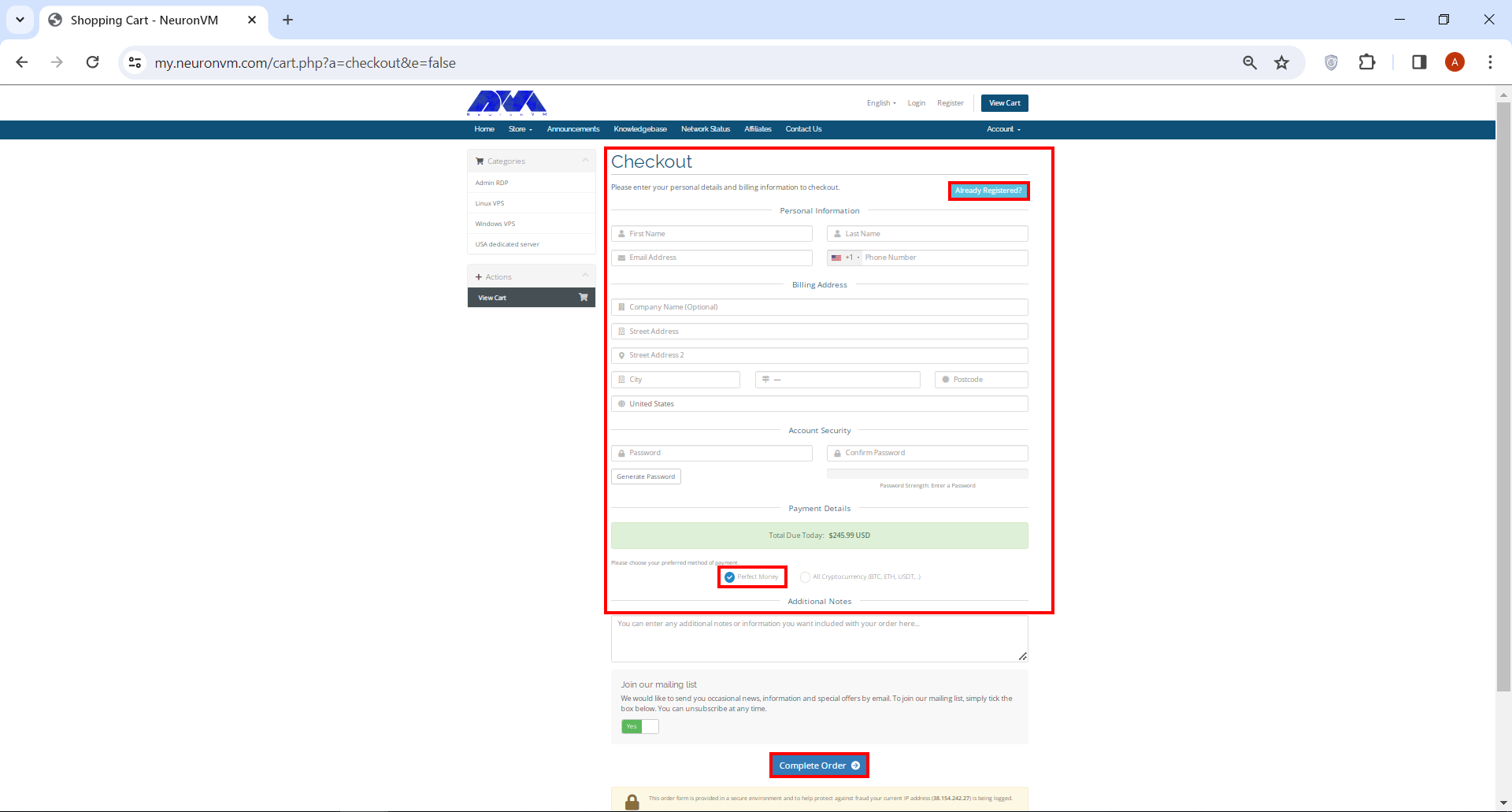
    Fill the required fields with your information to register. If you have already registered, click on Already Registered. Then type your email address and password to enter the user account and login. On the next page, choose one of the payment methods and click on Complete Order:

    register on neuronvm

    ***

    login to neuronvm

    By clicking on Make payment in Perfect Money payment method and entering Member ID and password, your purchase will be completed successfully:

    buy perfect money vps

    Note that in the shortest time and after a few minutes, the information about your purchased service will be sent to you via email.

    Conclusion

    In conclusion, cost-effective Windows VPS solutions offer a budget-friendly option for individuals and businesses seeking reliable and scalable hosting services. With affordable pricing and a wide range of features, these VPS plans provide excellent value for money while ensuring high performance and flexibility.

  • The Ultimate Guide to Creating a Foolproof Backup on Ubuntu Server

    The Ultimate Guide to Creating a Foolproof Backup on Ubuntu Server

    Foolproof Backup refers to a backup system or strategy that is designed to be highly reliable and virtually error-free, making it almost impossible for data to be lost or corrupted. It typically involves the use of multiple backup techniques and redundant systems to ensure that data is securely stored and can be easily recovered in the event of hardware failures, human errors, or other disasters. This is a useful post that most Ubuntu users are looking for. Therefore, we suggest you not to waste time and start with the Creating a Foolproof Backup on Ubuntu Server guide.

    What is Foolproof Backup?

    A foolproof backup system often includes features such as automated backups that run on a regular basis, encryption to protect data from unauthorized access, off-site storage to guard against physical damage or theft, versioning to preserve different versions of files, and verification mechanisms to ensure the integrity and accuracy of the backups.

    foolproof backup on ubuntu server

    The goal of a foolproof backup is to provide users with peace of mind, knowing that their data is properly safeguarded and can be restored quickly and efficiently when needed. We also suggest you to choose and use one of the Linux VPS server plans with Ubuntu distribution provided on our website to back up your Ubuntu server.

    Step by Step Guide to Creating a Foolproof Backup on Ubuntu Server

    Creating a foolproof backup system is essential to protect your data and ensure business continuity. Here is a step-by-step guide to creating a foolproof backup on Ubuntu Server.

    Step1: Identify critical data:

    Begin by identifying the critical data you want to back up. This could include important documents, databases, configuration files, and any other data that is essential for your server’s operation.

    Step2: Choose a backup location:

    Decide where you want to store your backups. It is recommended to choose a separate physical location or external storage device to prevent data loss due to physical damage or system failures.

    Step3: Install backup software:

    Ubuntu Server offers various backup software options. One popular choice is rsync, a command-line utility that allows efficient syncing of files between servers.

    You can install rsync using the following command:

    sudo apt install rsync

    In order to launch rsync as a service on Ubuntu, you need to create the /etc/rsyncd.conf file and then copy /lib/systemd/system/rsync.service to /etc/systemd/system/rsync.service.

    After doing this, finally restart rsync using the following commands:

    sudo nano /etc/rsyncd.conf
    sudo cp /lib/systemd/system/rsync.service /etc/systemd/system/rsync.service
    sudo systemctl restart rsync

    Step4: Create a backup script:

    Create a shell script that automates the backup process. This script should include the necessary rsync commands to transfer data from the server to the backup location. For example, you could use the following script:

    #!/bin/bash
    rsync -avz --delete /path/to/source/ /path/to/backup/

    Replace “/path/to/source” with the directory or file you want to back up and “/path/to/backup” with the backup destination you prepared. The -avz options enable archive mode (preserving permissions, ownership, and timestamps), verbose output, and compression.

    Save this script as “backup.sh” in an easily accessible location, such as /usr/local/bin/.

    chmod +x backup.sh

    Test the backup script Before running the backup script:

    ./backup.sh

    Step5: Setup a cron job:

    Use cron to schedule regular backups automatically. Open the cron configuration file using the command:

    sudo crontab -e

    Add the following line to run the backup script daily at midnight:

    0 0 * * * /usr/local/bin/backup.sh

    Or, you can add a new line at the end of the file with the following syntax:

    * * * /path/to/backup.sh

    This example will run the backup script every minute.

    Save the file and exit the editor. The backup script will now be executed at the specified time.

    backup on ubuntu server

    Modify the backup script to redirect the output to a log file by adding the following line to the script:

    rsync -avz --delete /path/to/source /path/to/destination > /path/to/backup.log 2>&1

    Replace “/path/to/backup.log” with the file path where you want to save the log file

    Troubleshooting Common Issues of Backup on Ubuntu Server

    Here are some troubleshooting steps for backup issues on Ubuntu Server:

    1. Check the backup software or tool being used

    2. Verify backup settings

    3. Check for sufficient disk space

    4. Verify permissions

    5. Check for errors in backup logs

    6. Test backup and restore

    7. Check system resources

    8. Update packages and software

    9. Network connectivity

    10. Consider alternative backup solutions

    Conclusion

    In conclusion, creating a foolproof backup on Ubuntu Server is essential for ensuring data security and minimizing the risk of data loss. By following a systematic approach and utilizing appropriate backup tools, users can effectively backup their data and restore it when needed, enhancing the overall reliability of their server.

  • The Hidden Powers of the ‘grep’ Command in Linux

    The Hidden Powers of the ‘grep’ Command in Linux

    Linux, an open-source operating system, offers a vast array of commands that empower users to navigate their systems efficiently. One such command, ‘grep,’ holds exceptional power in searching and manipulating text. Derived from the phrase “globally search a regular expression and print,” ‘grep’ is an indispensable tool for Linux users who seek quick and accurate data retrieval. In this article, we will explore the various capabilities of the ‘grep’ command in Linux and highlight its hidden powers.

    Introduction to the ‘grep’ Command in Linux

    The ‘grep’ command, commonly referred to as the Global Regular Expression Print, is a command-line utility that permits users to search for specific patterns or regular expressions within files and directories. Its primary function is to analyze input data and present only the lines that match the given criteria, making it an invaluable tool in system administration, programming, and data analysis.

    grep Command in Linux

    Different uses of ‘grep’ command in Linux

    The syntax of the ‘grep’ command is straightforward: ‘grep pattern file’. To use the ‘grep’ command effectively, users need to understand the pattern they seek and provide the appropriate file input. Whether searching for a single word, a phrase, or a combination of characters, ‘grep’ offers a myriad of options to refine the search results.

    The ‘grep’ command offers numerous useful features. It not only enables searching for patterns within files but also allows for recursive searching in directories, ignoring case sensitivity, displaying line numbers, and more. By utilizing additional command-line options, users can fine-tune their search criteria and tailor the output to their specific needs.

    Searching for Text Patterns with ‘grep’

    The ‘grep’ command primarily locates and displays lines containing a specific pattern or expression. It can search within a single file or multiple files at once, quickly sifting through data to give precise results. This tool is essential for log file analysis, code debugging, and data extraction tasks.

    Example: Suppose you want to search for the word “example” in a file called “sample.txt”. The command would be:

    grep "example" sample.txt


    grep command for text patterns
    regex

    Advanced Regular Expressions with ‘grep

    Regular expressions (regex) amplify the power of the ‘grep’ command, enabling users to search for complex and dynamic patterns. By utilizing special characters and meta-characters, users can design intricate rules to capture desired information accurately. This advanced usage of ‘grep’ allows for intricate data extraction, making it an indispensable tool for developers and data analysts.

    Example: Suppose you want to search for lines that start with either “apple” or “banana” in a file called “fruits.txt”. The command would be:

    grep "^(apple|banana)" fruits.txt

    Using ‘grep’ with File Input and Output

    Apart from searching within individual files, ‘grep’ can also process data from standard input and direct the output to various file formats. This flexibility allows users to integrate ‘grep’ seamlessly into their scripts and automate various tasks. By combining ‘grep’ with other Linux commands, such as ‘sed’ or ‘awk,’ users can perform intricate text manipulations with ease.

    Example: Suppose you want to search for the word “hello” in a file called “text.txt” and save the output to another file called “output.txt”. The command would be:

    grep "hello" text.txt > output.txt
    Input Output
    Searching Multiple Files

    Searching Multiple Files and Directories with ‘grep’

    The ‘grep’ command is great for searching multiple files and directories together. It can scan through the entire file system hierarchy using recursive mode and given file or directory paths. System administrators and programmers find it perfect for locating scattered information across files or folders.

    Example: Suppose you want to search for the word “error” in all the text files within the current directory and its subdirectories. The command would be:

    grep "error" *.txt

    Customizing ‘grep’ Output Format

    The ‘grep’ command provides numerous options for customizing its output format. Whether it’s displaying matched lines alongside their surrounding context, highlighting search results, or suppressing non-matching lines, ‘grep’ offers immense flexibility. By tailoring the output to their preferences, users can streamline their workflow, efficiently extracting the desired information.

    Example: Suppose you want to search for the word “success” in a file called “log.txt” and display only the line numbers and matching lines. The command would be:

    grep -n "success" log.txt
    Customizing 'grep' Output Format
    Enhancing 'grep' Efficiency and Performance

    Enhancing ‘grep’ Efficiency and Performance

    To maximize the efficiency and performance of the ‘grep’ command, users can employ various strategies. For instance, they can selectively search specific file types. Additionally, they can exclude certain directories from the search. Another option is to use the ‘-f’ option to specify patterns from an external file. Furthermore, users can utilize parallel processing with the ‘-P’ option. By implementing these techniques, users can significantly enhance the speed and effectiveness of ‘grep,’ thus enabling them to process data swiftly and accurately.

    Example: Suppose you want to search for the word “performance” in a large log file called “huge.log” and only display the first 10 occurrences. The command would be: 

    shell grep -m 10 "performance" huge.log 
    Different uses of 'grep' command in Linux

    Conclusion and Final Thoughts

    In conclusion, the ‘grep’ command stands as a dominant tool in the Linux environment, providing users with exceptional capabilities in searching, manipulating, and extracting data. With a broad range of applications, ‘grep’ allows users to effectively analyze extensive data and derive valuable insights. Moreover, by integrating ‘grep’ into their workflows, Linux users can unlock its hidden potential and significantly enhance their productivity.