Category: Tutorials

  • Why You Should Move to a More Powerful Dedicated Server?

    Why You Should Move to a More Powerful Dedicated Server?

    In this article, we are going to explain to you Why You Should Move to a More Powerful Dedicated Server. When you plan to set up a website to start your business, you also need a hosting space for it. In the meantime, you have different choices. From shared hosting and virtual server to dedicated server. Each of these spaces can serve you in some way. If your site is newly established and is not going to grow much, or in other words, you have a small online business, it is better to go for shared hosting. But if you want to bring the best performance to your site, our Dedicated Server plans will undoubtedly be the best option for you.

    Before buying a dedicated server, we suggest you read the article What to Consider When Purchasing a Dedicated Server.

    5 Reasons for choosing a powerful Dedicated Server

    In general, a dedicated server is considered to be your most powerful choice for hosting your website and software. The power and speed that these servers give you is incredible. The amount of resources you have available is very high and you can see the best performance of your site or software. There are various reasons for choosing a dedicated server. In the following, we will discuss the main reasons for this choice.
    Why You Should Move to a More Powerful Dedicated Server

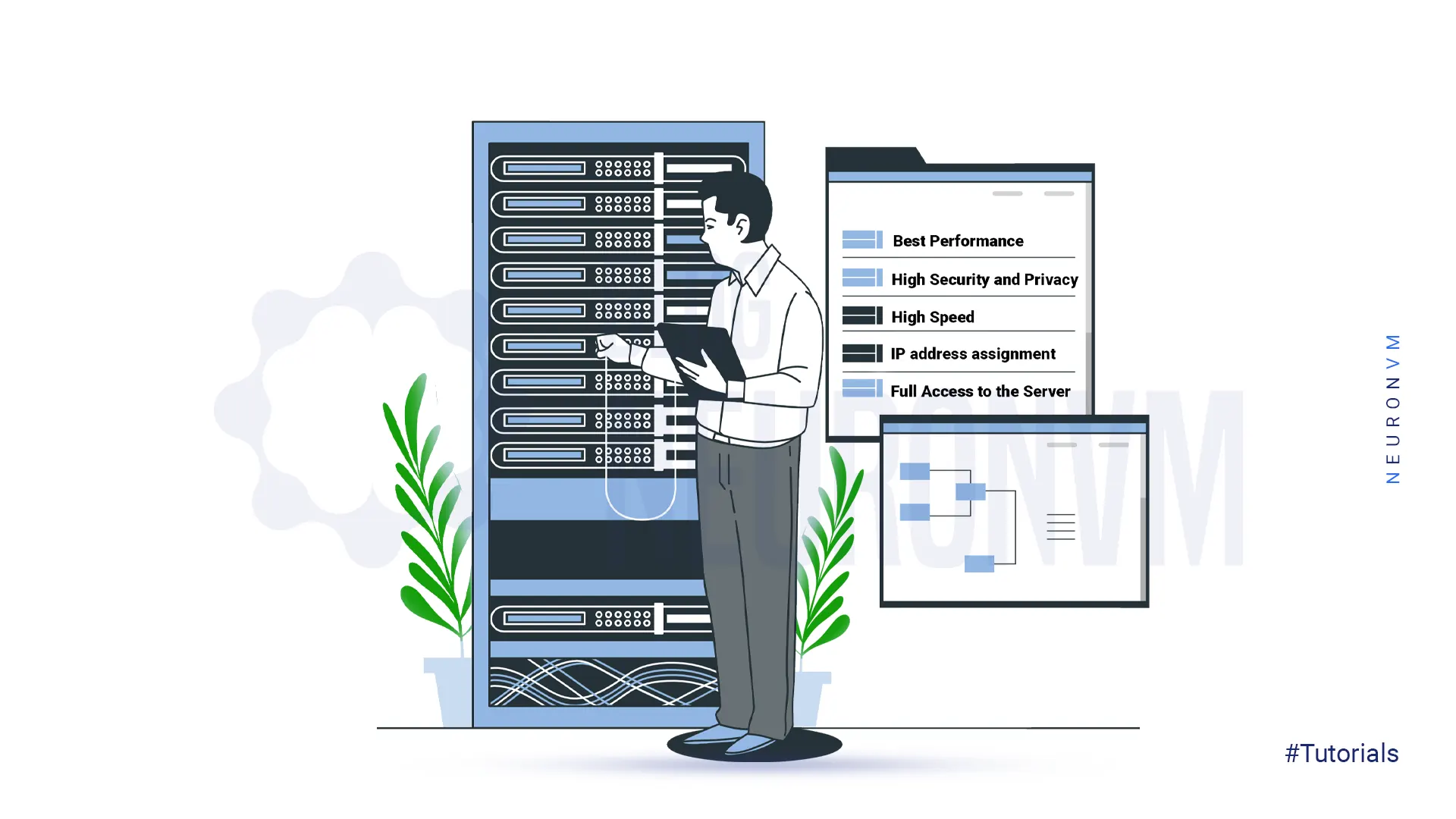
    1. Get the best Performance of the site or Software

    By purchasing a dedicated server, you can witness the best performance of your website or software. The high bandwidth and uptime of NeuronVM dedicated servers ensures that you see the best version of your site’s performance. Even when you receive a lot of traffic, you can serve visitors without any problem due to the high processing power of these servers. These benefits do not exist in shared services such as shared hosting, and if you are looking for such features, you should consider getting a dedicated server.

    2. High Security and Privacy

    Security is one of the most important parts of business. When your business operates in virtual space and online, the importance of security increases many times. One of the risks that threaten you in shared services is the loss of information. Even your website may not be attacked directly, but due to the shared service, your site will be at risk during attacks. But these problems do not exist in powerful dedicated servers. Because this service is completely provided to you and you are responsible for establishing and maintaining security and installing the required software. So, if you have sensitive data or customer information, it is better to be careful in choosing a powerful dedicated server.

    3. High Speed

    These days, speed is the first word for users. Today’s users don’t give your website a chance to load. If your site does not load in less than 3 seconds, they will simply leave it and never visit it again. Therefore, you should pay a lot of attention to this issue. Slowness is one of the main problems people face when using shared services. But if you use NeuronVM dedicated server, you will experience high and incredible speed because all the resources are at your disposal. The use of more optimized and stable infrastructure, high-level data center equipment and powerful CPU will increase the speed of your site.

    4. IP address assignment

    When you use shared services such as shared hosting, you must also share your IP address with other sites. Because you share the resources with them and it works in the same way in IP. But in a dedicated server, this issue is different. Maybe you think what is the importance of this issue? In fact, it should said that if one of the sites on your server has a low rank or produces spam, it can negatively affect the performance or rank of your site. But having a powerful dedicated server ensures that your site has a unique IP address. Also, NeuronVM has the ability to provide users with additional IPs at the lowest cost.

    5. Full ownership and Access to the Server

    This is one of the main reasons why website owners are looking for a dedicated server. Especially those people whose site is full of important and vital information. With a powerful dedicated server, you can choose the software and operating system you want. In fact, by purchasing a dedicated server, you will have complete control over the root or SSH level of your server.

    Conclusion

    In this article, we explained 5 reasons why you should move to a more powerful dedicated server. By purchasing a dedicated server from the NeuronVM website, you can see the best performance in every part you use. Affordable prices, high security, high speed, bandwidth, etc. are the advantages of our powerful dedicated servers. It is also possible to change the configurations according to the customer’s request. If you want to buy a dedicated server, you can choose and buy the plan you want by sending a ticket and receiving a consultation.
  • What is RDP Server and How to can connect to Admin RDP?

    What is RDP Server and How to can connect to Admin RDP?

    RDP Server, or Microsoft Windows Server OS, is a series of Enterprise-class server operating systems designed to share services with multiple users and extensive control over data storage, applications, and shared networks. One of the most common and convenient ways to connect to a Windows server is to use Remote Desktop Connection or Admin RDP. This article is about  What is RDP Server and How to can connect to Admin RDP. You can connect to a remote computer or Windows server using the RDP admin over the Internet or over a local area network. RDP gives users full access to the tools and software installed on the Windows server.

    What is an RDP Server?

    RDP Servers are versions of Microsoft Windows operating systems that are specifically designed to be installed and run on servers. Due to the fact that organizations, offices, and many companies have large or medium-sized computer networks, they use servers. These servers have to service and manage hundreds and sometimes thousands of computers. Therefore, the operating system that is installed on these servers must have the necessary facilities and capabilities to manage the network and respond to it.

    RDP Server or Windows Server is mainly using in business and enterprise suites. The appearance of Windows Server may not be much different from regular Windows of the same age. Because the programming foundation of both types of Windows is common, many of their capabilities are common. Because of this, programs such as web browsers and image editors can be downloaded and installed on both types of Windows. Even their desktop environment, including the taskbar, start button, and page layout, is similar, and native Windows applications such as Notepad can be seen on Windows Server. However, there are many differences between a normal Windows application and a Windows server.

    What is RDP Server and How to can connect to Admin RDP

    What does the RDP Server do?

    Because RDP Server is designed for large businesses and enterprise environments, it has a variety of enterprise software. Some of the features of Windows Server for this purpose are:

    1. Active Directory: Active Directory is one of the most important features of Windows Server, consisting of several different services that are used to manage computers and other networked equipment. The network administrator uses Active Directory to create domains and users on the network and grant them various permissions.

    2. Dynamic Host Configuration Protocol (DHCP): DHCP automatically assigns a unique IP address to each network-connected device. DHCP facilitates and accelerates the addressing of network nodes and avoids problems such as duplicate IP address allocation.
    3. File Server: A file Server can consider as a centralized storage system that can be accessed by multiple systems and network users. Large companies and organizations usually need this feature, so this possibility is anticipating in Windows Server. Users with related work tasks can share their files on the network using File Server if they have the relevant permissions.

    Advantages of RDP Server

    RDP Server, or Windows Server operating system, was added to the Microsoft Windows family in 2000 and was particularly popular from the beginning. Numerous roles and features of the Windows Server operating system were very useful for network administrators in setting up service and network control, and this was the reason for its increasing popularity.

    Some of the roles of the Windows Server operating system are:

    1. Active Directory Certificate Services

    2. Active Directory Domain Services

    3. Active Directory Federation Services

    4. Active Directory Rights Management Services

    5. File and Storage Services

    6. Hyper-V

    7. Remote Desktop Services

    8. Web Server IIS

    9. Windows Deployment Services

    Today, with the development of the network world, many roles and features have been added to the RDP server operating system, each of which has its own important and unique capabilities.

    How to Connect to Admin RDP

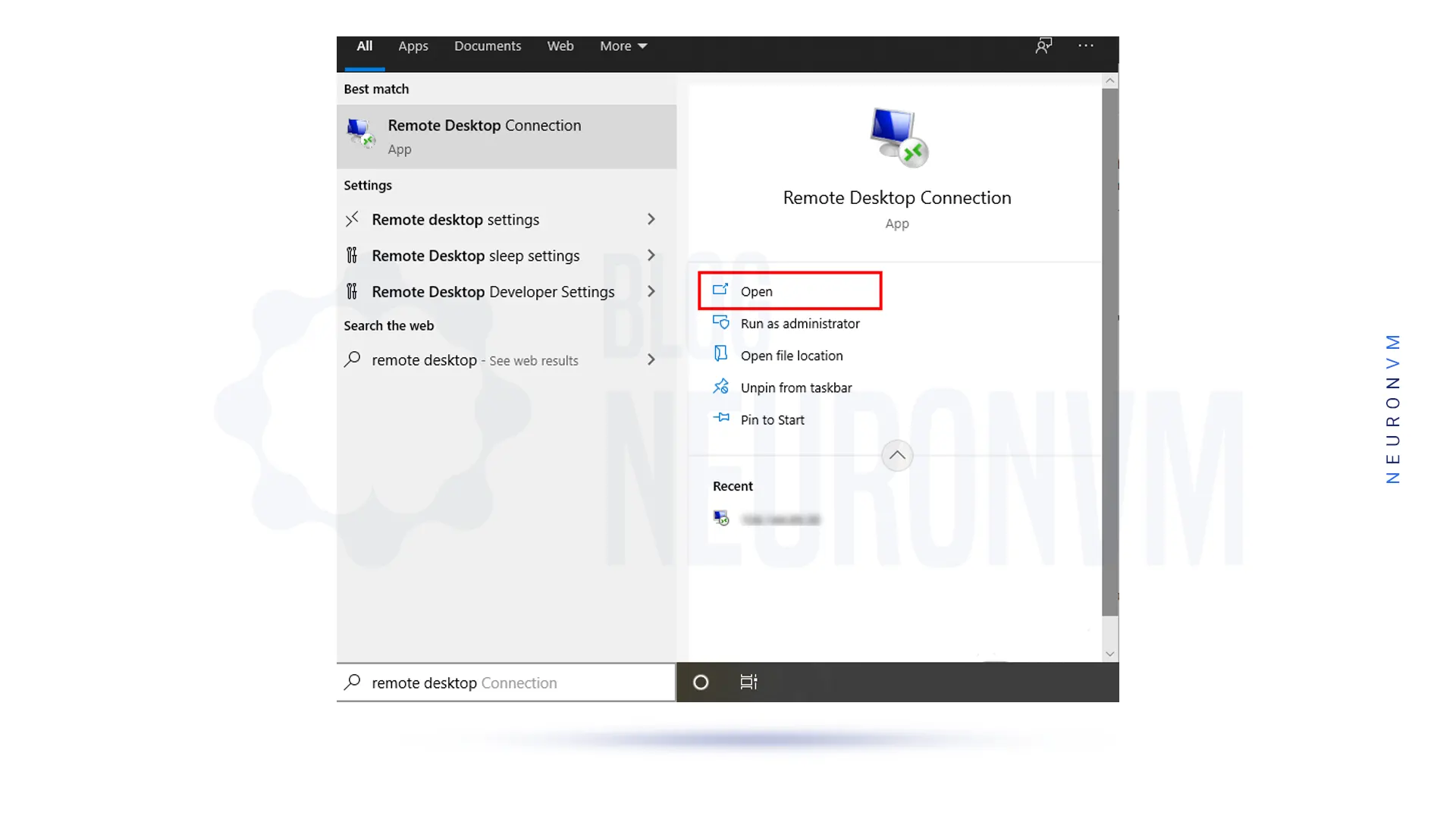
    In the first stage, you should type the phrase remote desktop in the search section of the taskbar menu. Then you see Remote Desktop Connection as one of the options, select it:

    how-to-open-rdp-admin

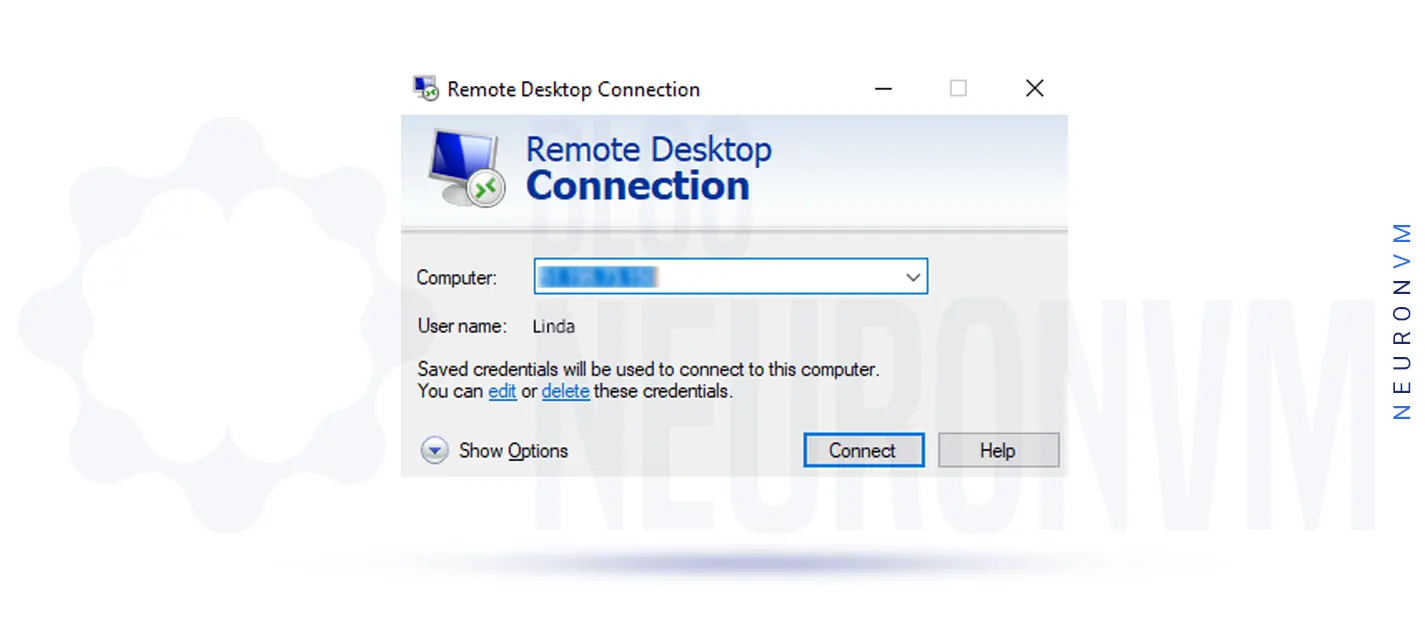
    Then in the Remote Desktop Connection window, you need to enter the destination IP address and then click Connect:

    Connect-to-Admin-RDP

    Note: If the default remote port direction has changed, you need to enter IP: Port. For example, you need to enter 123.456.7.8:12345. Which is 123.456.7.8 destination IP address and 12345 connection port.

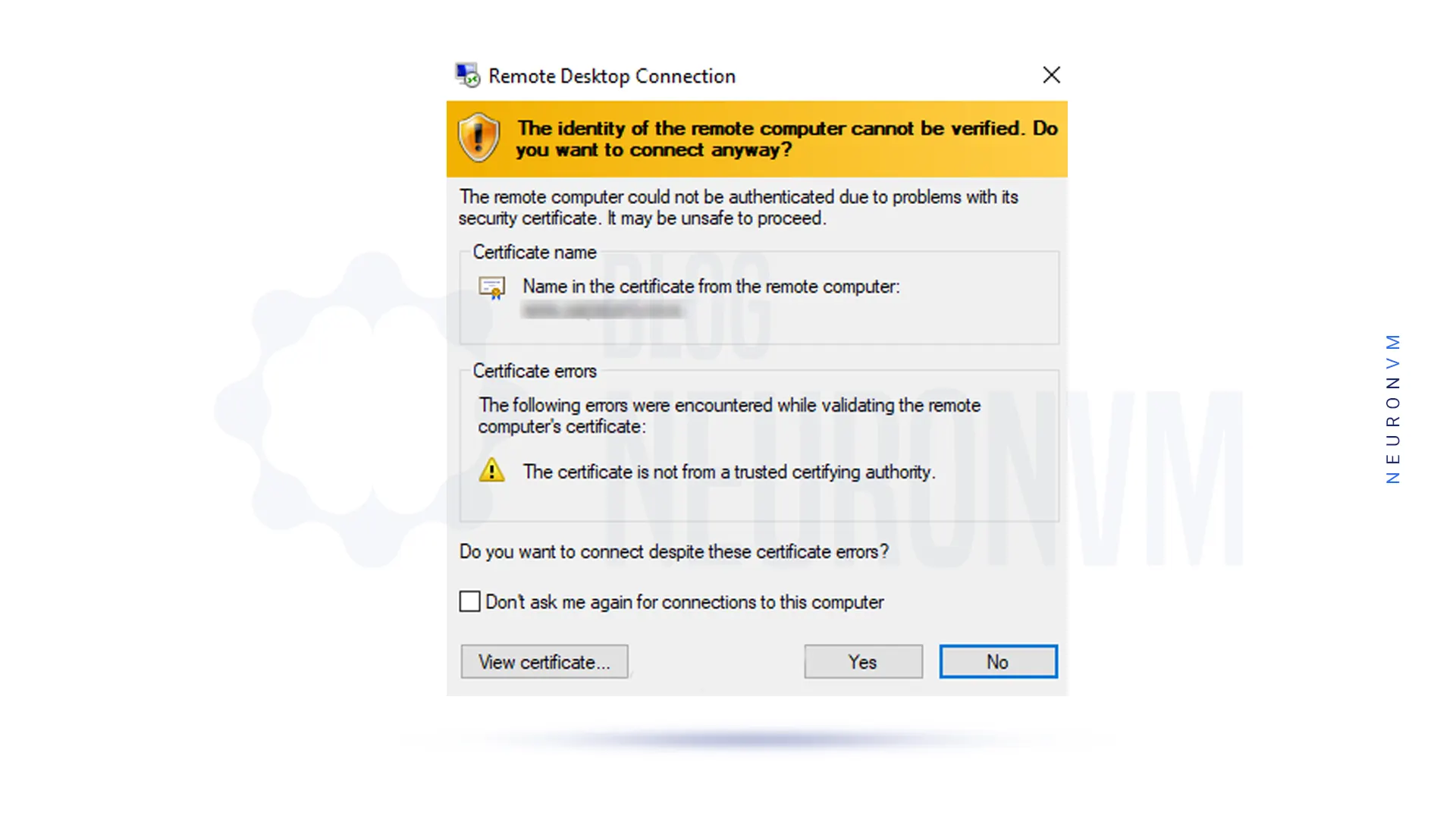
    In this step, if the security message appears to confirm the identity of the second system, click Yes:

    remote-desktop-connection

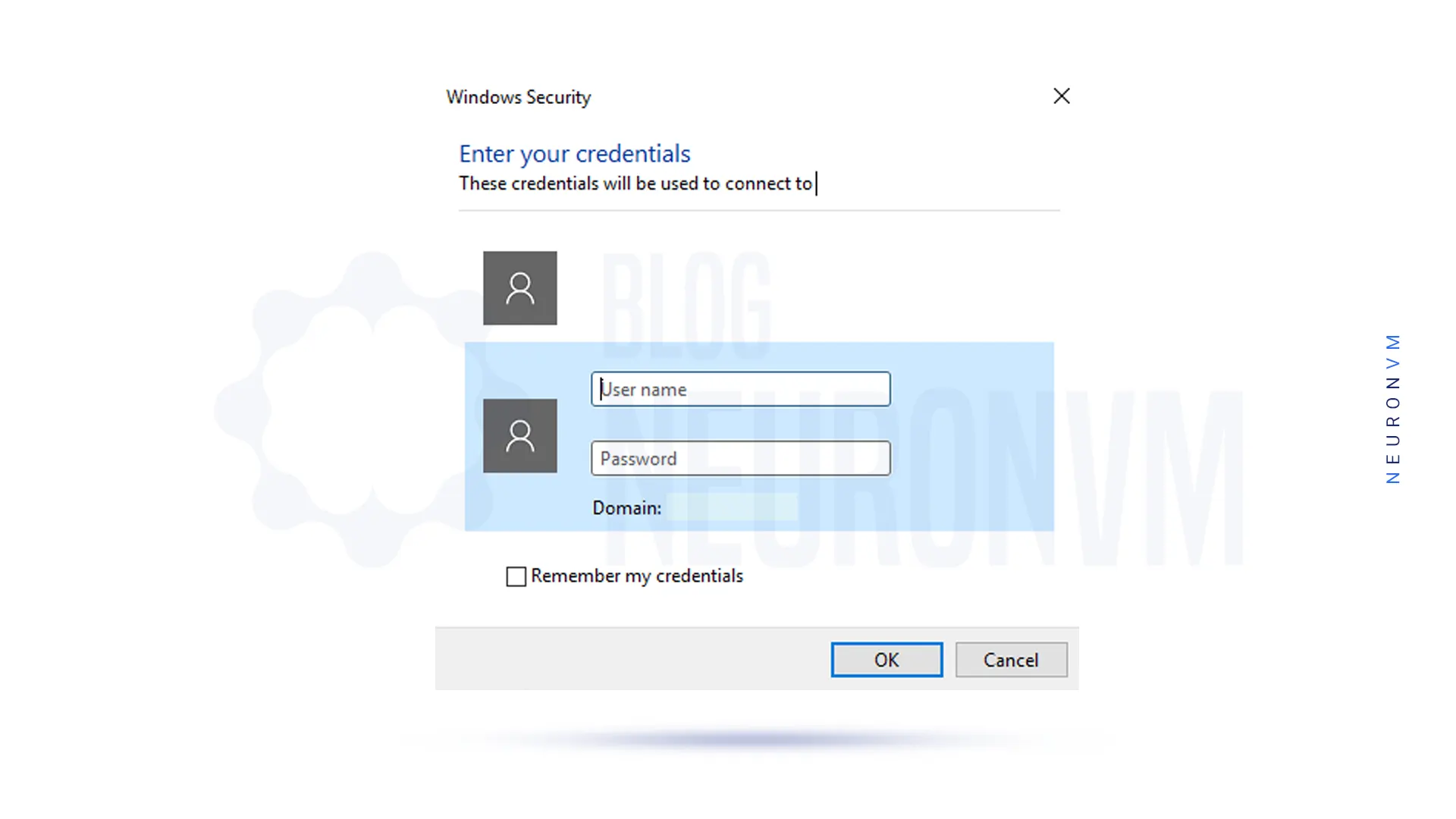
    In the next step, you will be asked for your username and password, and you will need to enter the username and password of the destination Windows user interface.

    Then click on OK:

    windows-security-in-opening-windows-server

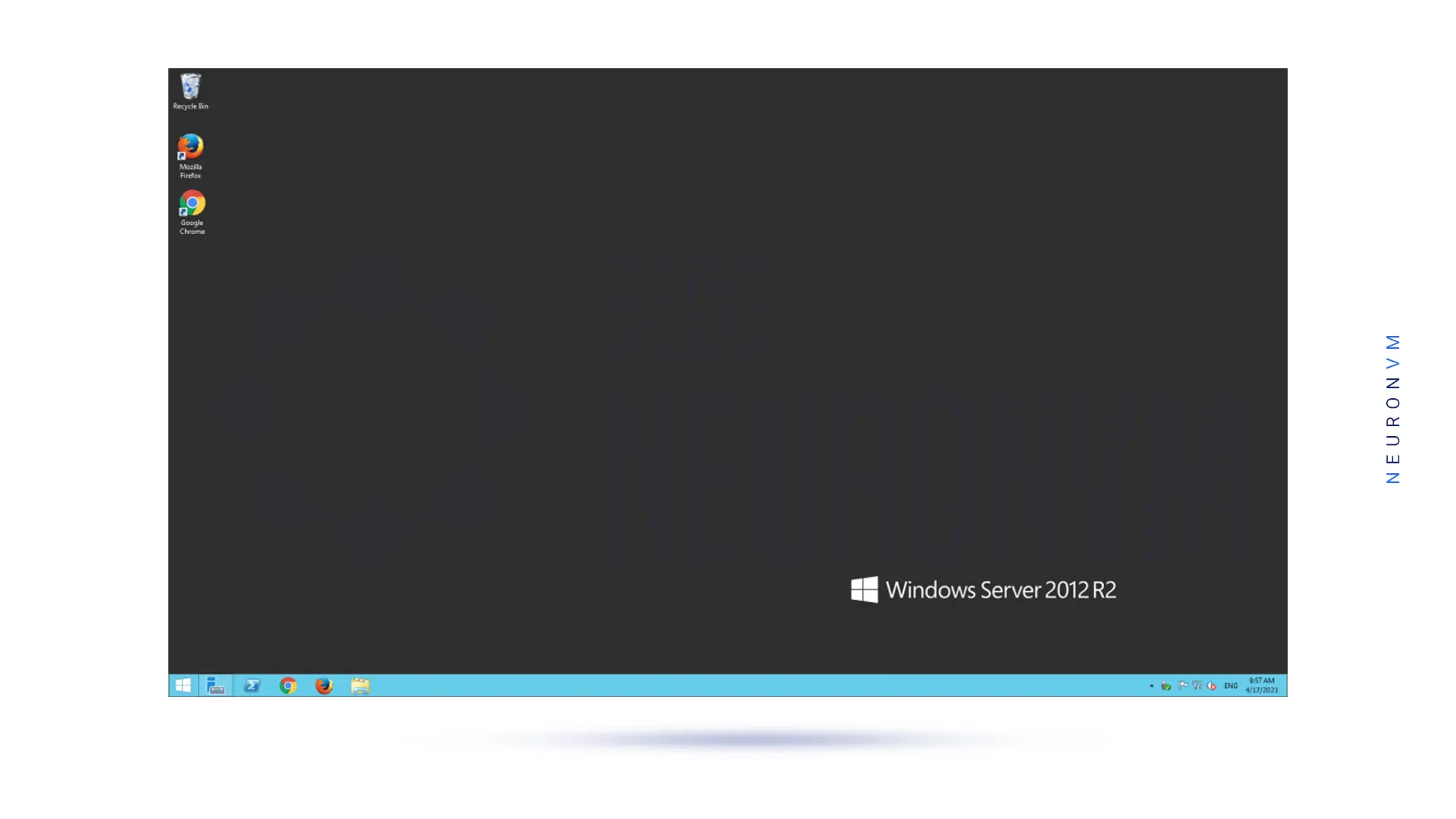
    By performing the above steps correctly, you will enter the desktop environment of the second system and have full access to it:

    windows-server-environment

    Conclusion

    Connecting to an Admin RDP server can provide users with the flexibility and convenience of accessing their computers remotely. By following the steps outlined in this guide, users can easily set up and connect to an Admin RDP server to access their desktops, files, and applications from anywhere in the world. The Remote Desktop Protocol is a powerful tool that can improve productivity, streamline IT support, and enhance remote collaboration. We suggest you read the article The Best Way to Buy Cheap Admin RDP Server With BTC.
  • Get Game VPS with Bitcoin: The Ultimate Gamer’s Paradise

    Get Game VPS with Bitcoin: The Ultimate Gamer’s Paradise

    In the ever-evolving world of gaming, players are constantly searching for ways to enhance their gaming experiences. From immersive graphics to seamless multiplayer modes, the quest to conquer virtual realms has never been more exhilarating. And now, with the emergence of Game VPS with Bitcoin, the ultimate gamer’s paradise is within reach like never before. In this article I’m going to take you into the world of Gaming VPS and show you how can you buy one with Bitcoin or any other cryptocurrency you’ve got in your wallet. So let’s dive in!

    A Brief Introduction

    Game VPS, or Virtual Private Server, is a game-changer for every avid gamer out there. It provides a dedicated virtual environment solely for gaming, ensuring optimal performance and zero latency. With Game VPS, you no longer have to worry about sharing server resources with other users, as you have complete control over your gaming environment. This means no more frustrating lag, no more interruptions, and no more compromises on your gaming experience.

    1 Introduction-to-Game-VPS

    By choosing Game VPS, you can enjoy a seamless and immersive gaming experience like never before. Bitcoin offers a convenient and secure payment method, allowing gamers from all around the world to easily acquire their own Game VPS. Basically you don’t have to use traditional payment methods and pay lots of commission per transaction. Embrace the future of gaming with Game VPS and Bitcoin.
    Future of Game VPS in the Gaming World

    Now, let’s talk about the future of Game VPS in the gaming world. Brace yourselves, because it’s going to be mind-blowing! As technology continues to advance at warp speed, we gamers crave nothing less than the most immersive and seamless gaming experiences. And that’s where Game VPS steps in to save the day. With its lightning-fast connections and dedicated resources, it’s the ultimate game-changer. But wait, it gets even better!

    2 Future-of-Game-VPS-in-the-Gaming-World

    Thanks to the rise of cryptocurrencies like Bitcoin, getting your hands on a Game VPS has become easier than ever. Just imagine, enhanced gameplay, reduced latency, and an overall improved gaming experience, all while using your favorite digital currency. The future holds endless possibilities for Game VPS, my fellow gamers. Get ready to level up and embrace the gaming revolution of Game VPS with Bitcoin. It’s time to conquer new virtual worlds like never before!

    Which Games You Can Play on a Game VPS?

    The beauty of Game VPS is that it supports a wide range of games, catering to every gamer’s taste. Whether you’re a fan of intense first-person shooters, immersive role-playing games, or adrenaline-pumping racing games, Game VPS has got you covered. Popular titles like Fortnite, Call of Duty, Minecraft, World of Warcraft, and many more can be played effortlessly on a Game VPS.

    3 Which-Games-You-Can-Play-on-a-Game-VPS

    With the dedicated resources and high-speed connections provided by Game VPS, you can experience these games like never before. Say goodbye to frustrating lag and say hello to seamless gameplay with Game VPS with Bitcoin. It’s time to take your gaming adventures to the next level and explore a whole new realm of possibilities.

    How to Get Game VPS with Bitcoin

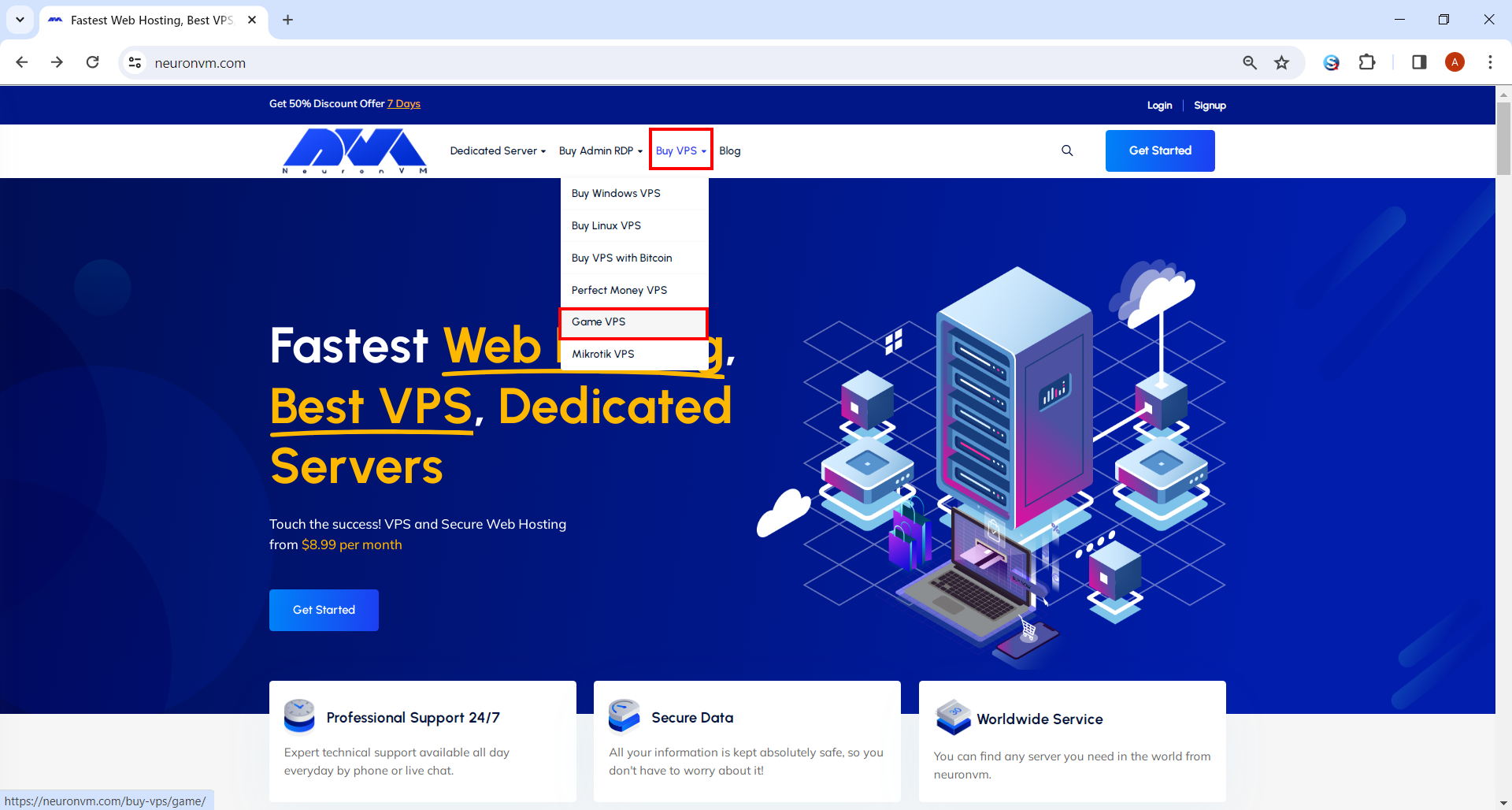
    Game VPS page in neuronvm
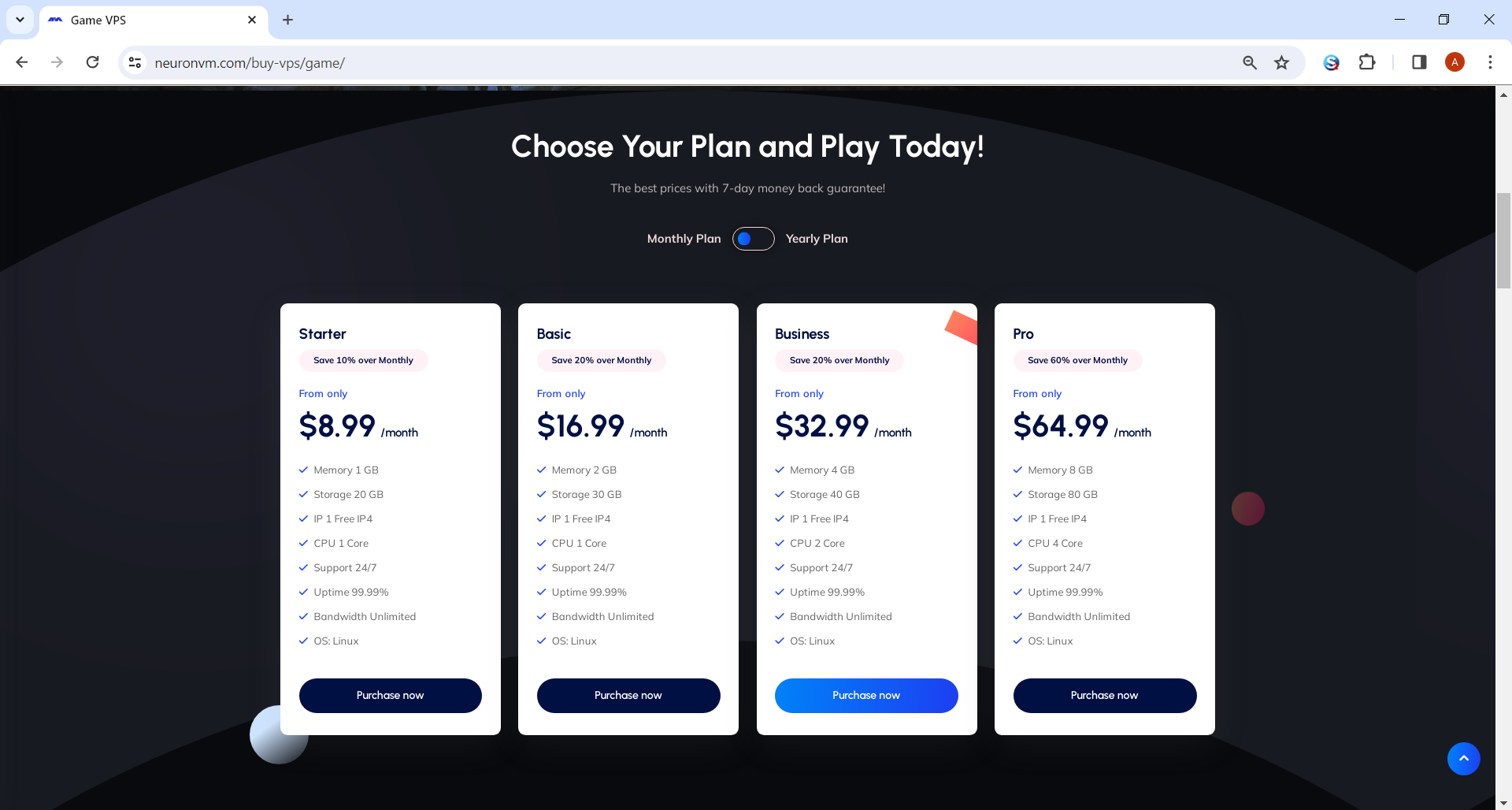
    • Choose the plan you need and click on Purchase Plan.
    Choosing game vps plan
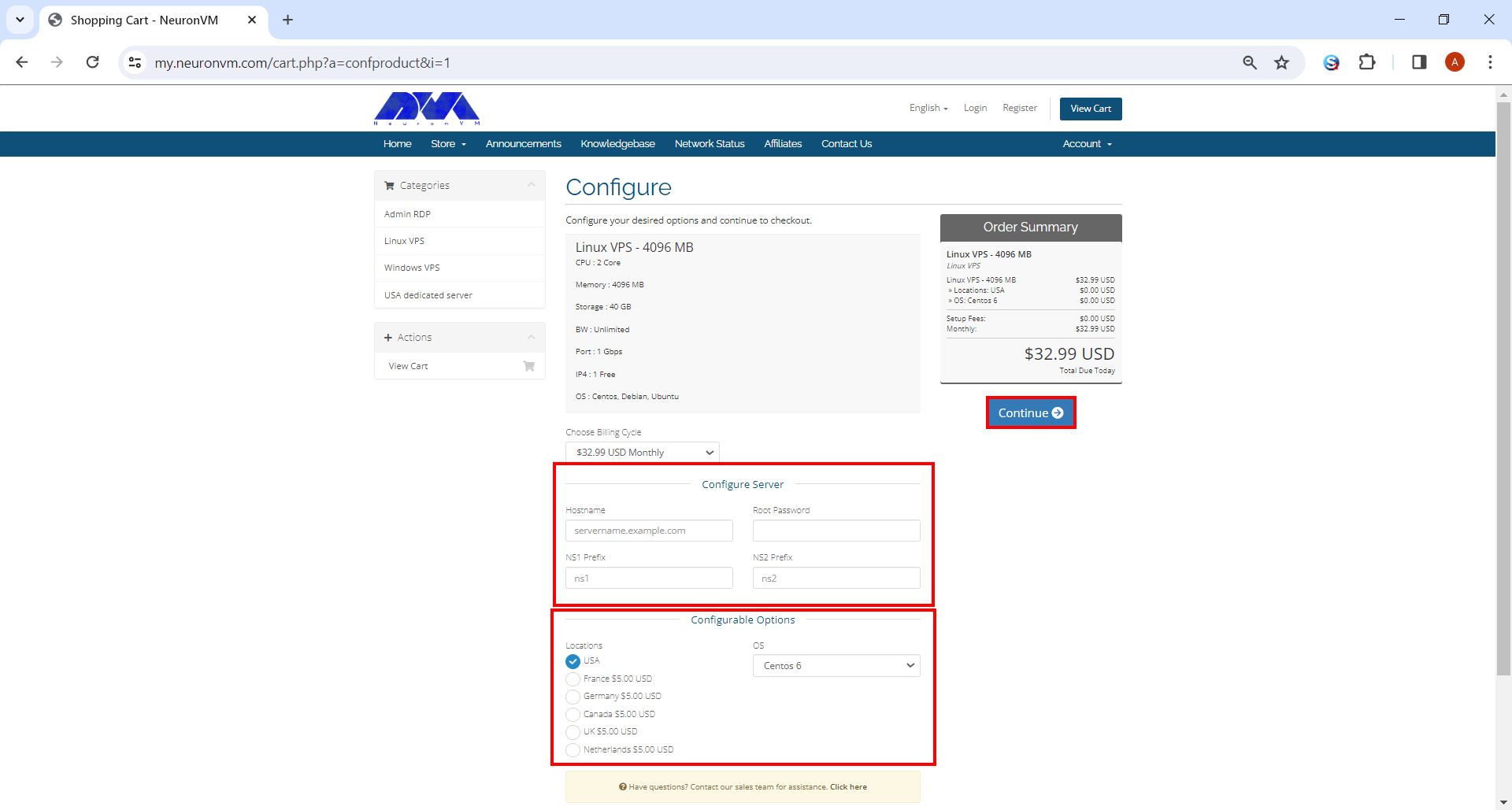
    • It will direct you to the page shown below. Under “Configure Server” section you should fill the boxes like Hostname, Root Password, NS1 and NS2 Prefix. You can also choose the OS and the location of your liking. When you’re done, click on Continue and proceed.
    Configure server to Buying Game VPS
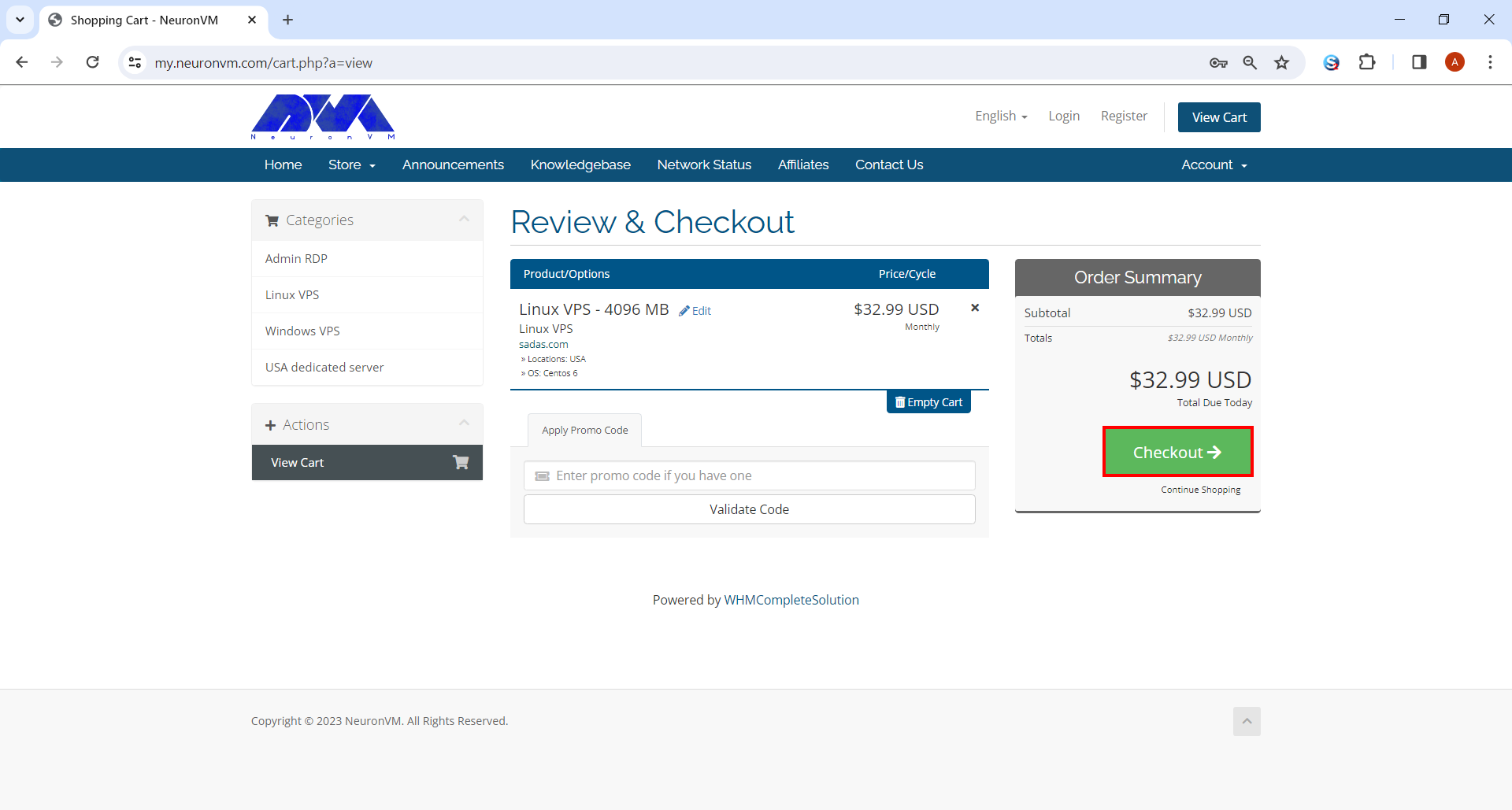
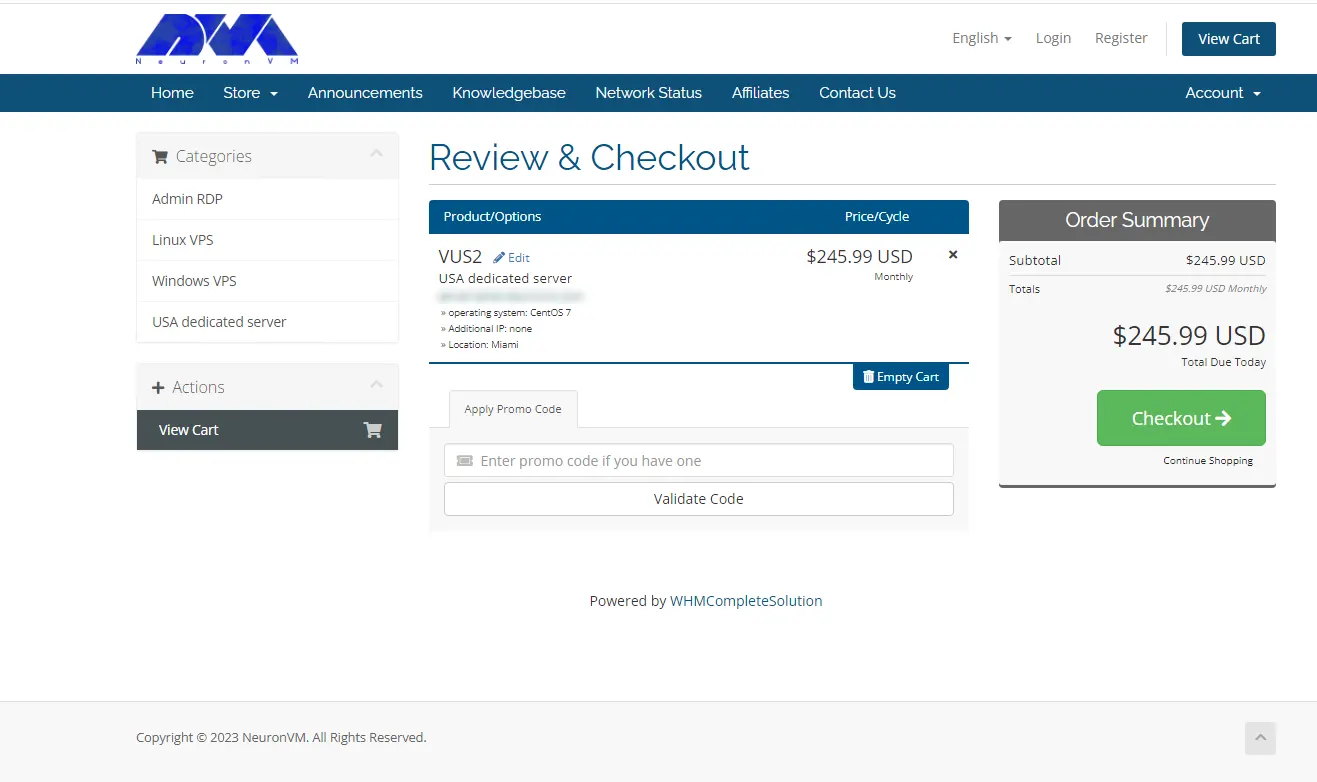
    • You’ll be landed on Review and Checkout pay where you can simply review the items in your shopping cart and enter a promo code to apply discounts. After you’re done, click on the Checkout button and proceed.
    Review and Checkout
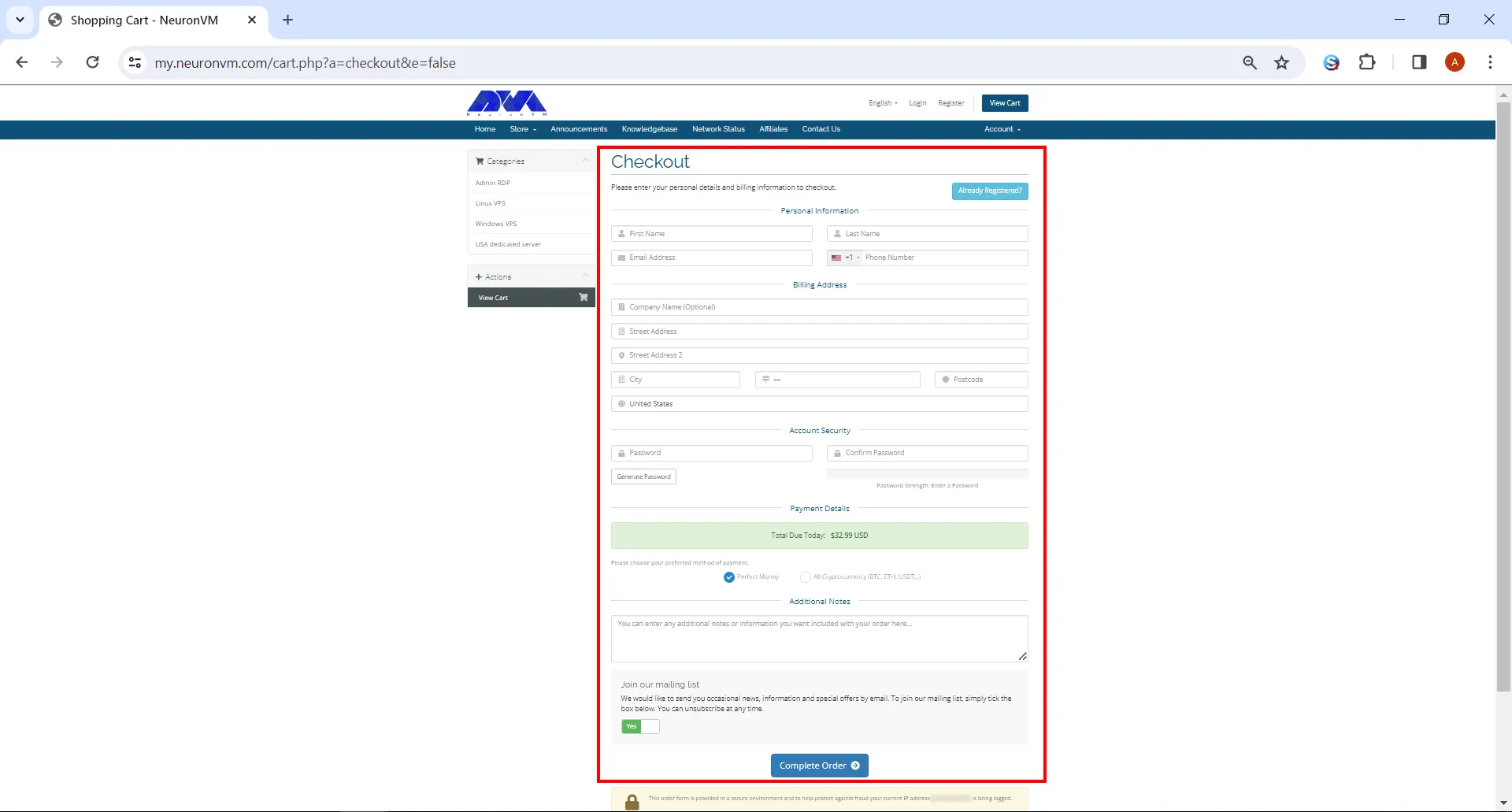
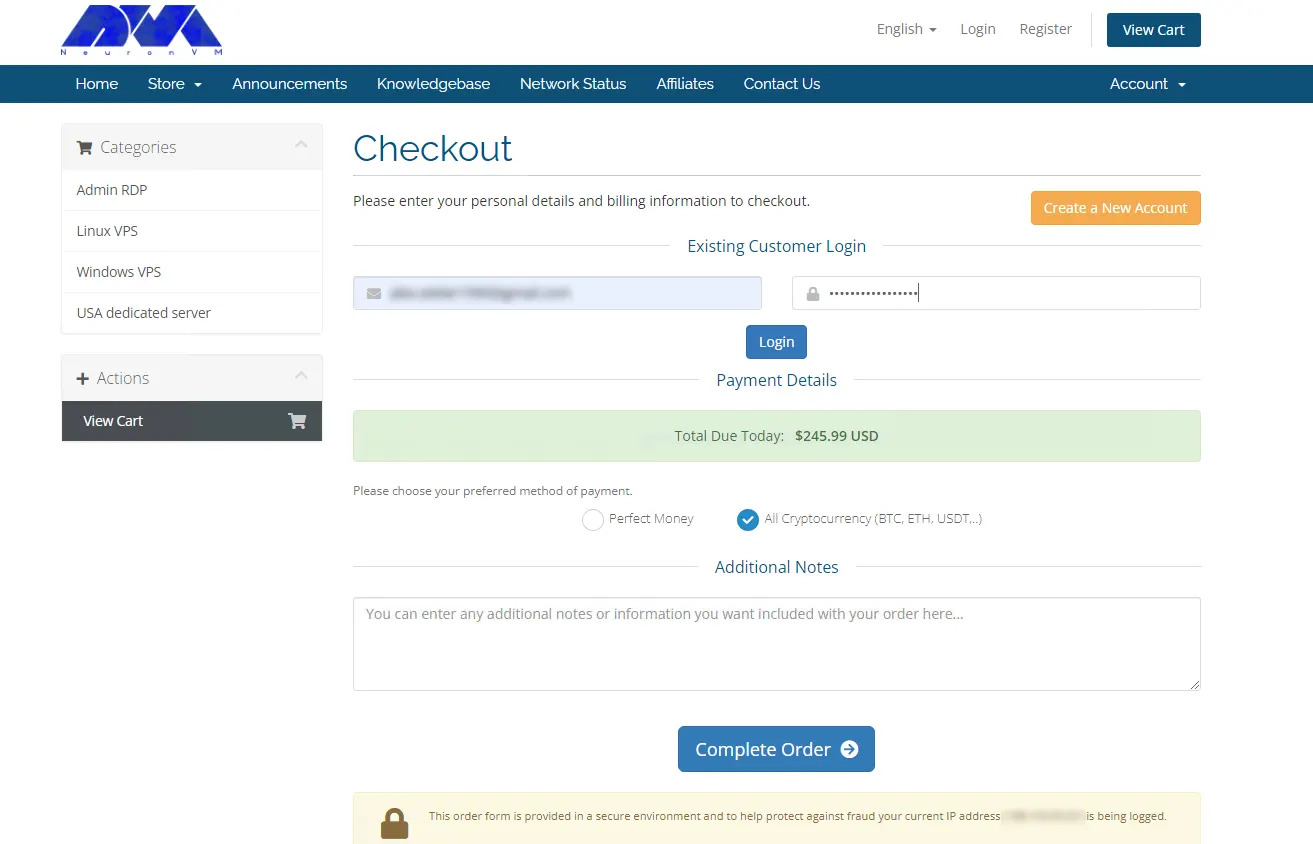
    • Fill out the form if you haven’t signed up before. After that you can choose your All Cryptocurrency and click on the Complete Order button down below.
    get game vps with bitcoin
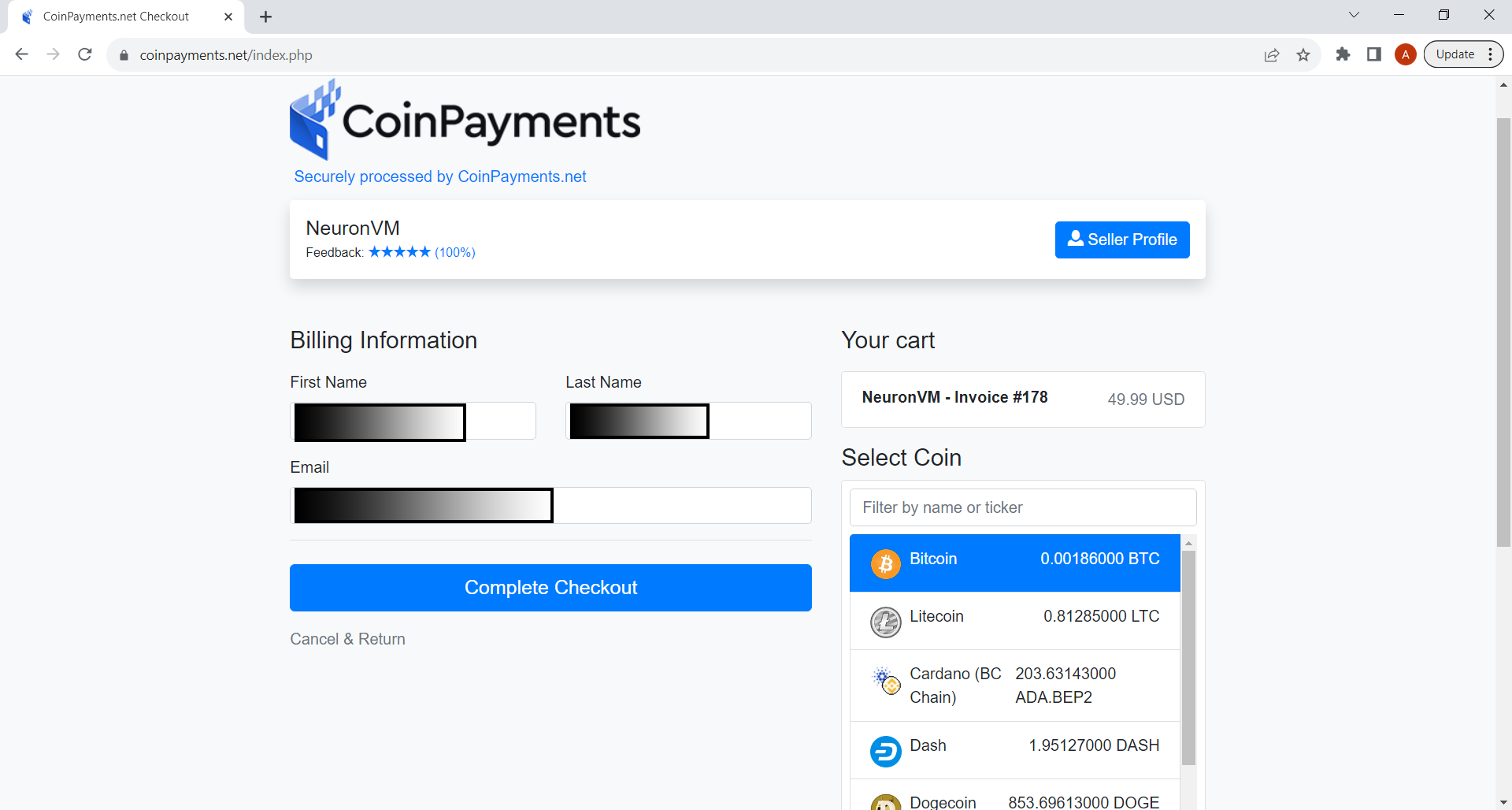
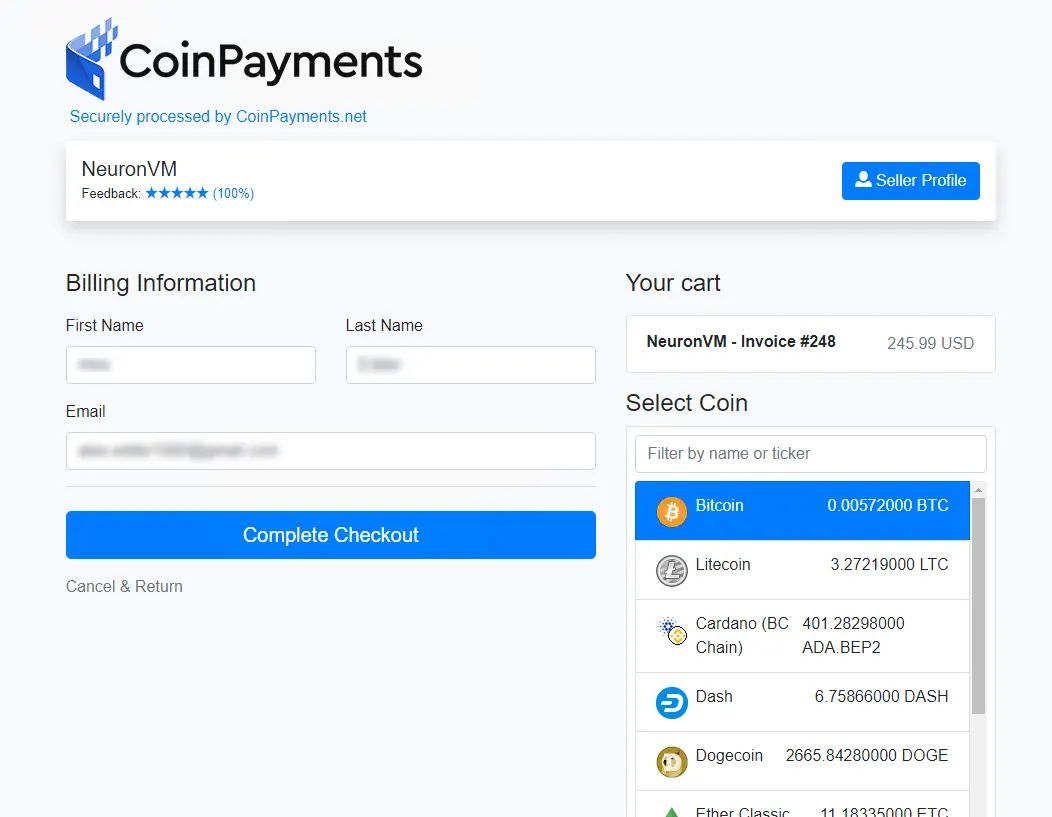
    • In the last section, you can choose Bitcoin as your preferred method of payment and finalize the purchase.
    Bitcoin Game VPS

    Final Words

    With its dedicated virtual environment, high-speed connections, and support for a vast array of games, Game VPS ensures an unparalleled gaming experience. Say goodbye to laggy servers and interruptions, and say hello to a world where you can fully immerse yourself in your favorite games. Bitcoin provides a convenient and secure payment method, allowing you to acquire your Game VPS hassle-free. Embrace the future of gaming today and get your Game VPS with Bitcoin. Your gaming adventures await!

  • The Future Is Now: Unveiling the Best Server Processor of 2024

    The Future Is Now: Unveiling the Best Server Processor of 2024

    In today’s rapidly evolving technological landscape, server processors have become the backbone of modern computing systems. These processors play a vital role in enabling the seamless functioning of various applications, from online platforms and cloud computing to data analytics and artificial intelligence. As we move toward the year 2024, an era marked by unprecedented advancements in computing power and efficiency, this article aims to delve into the future of server processors and unravel the Best Server Processor of 2024.

    We suggest you test and use the best server processors from among the dedicated server plans provided on our website.

    Current Landscape of Server Processors

    To understand the upcoming developments in server processors, it is essential first to grasp the current state of affairs. As of now, the market is dominating by a few key players, such as Intel and AMD. These companies continually strive to outperform each other in terms of processing power, energy efficiency, and scalability.

    However, the landscape could witness a significant shift in the coming years due to emerging technologies and evolving market demands.

    Emerging Technologies Shaping the Future of Server Processors

    A) Quantum Computing:

    Alongside traditional computing paradigms, quantum computing is poising to revolutionize server processors. Quantum processors, which utilize quantum bits (qubits) instead of classical bits, have the potential to solve highly complex problems exponentially faster.

    While currently in their infancy, quantum processors are projected to play a substantial role in data-intensive applications and advanced analytics by 2024.

    B) Neuromorphic Computing:

    Inspired by the human brain’s neural structure, neuromorphic computing aims to develop processors that can process information in parallel, mimicking the brain’s exceptional efficiency. Such processors have the potential to revolutionize machine learning, enabling faster and more accurate decision-making processes.

    With ongoing research and development efforts, neuromorphic computing could significantly impact the server processor landscape shortly.

    The Best Server Processor of 2024: A Breakdown

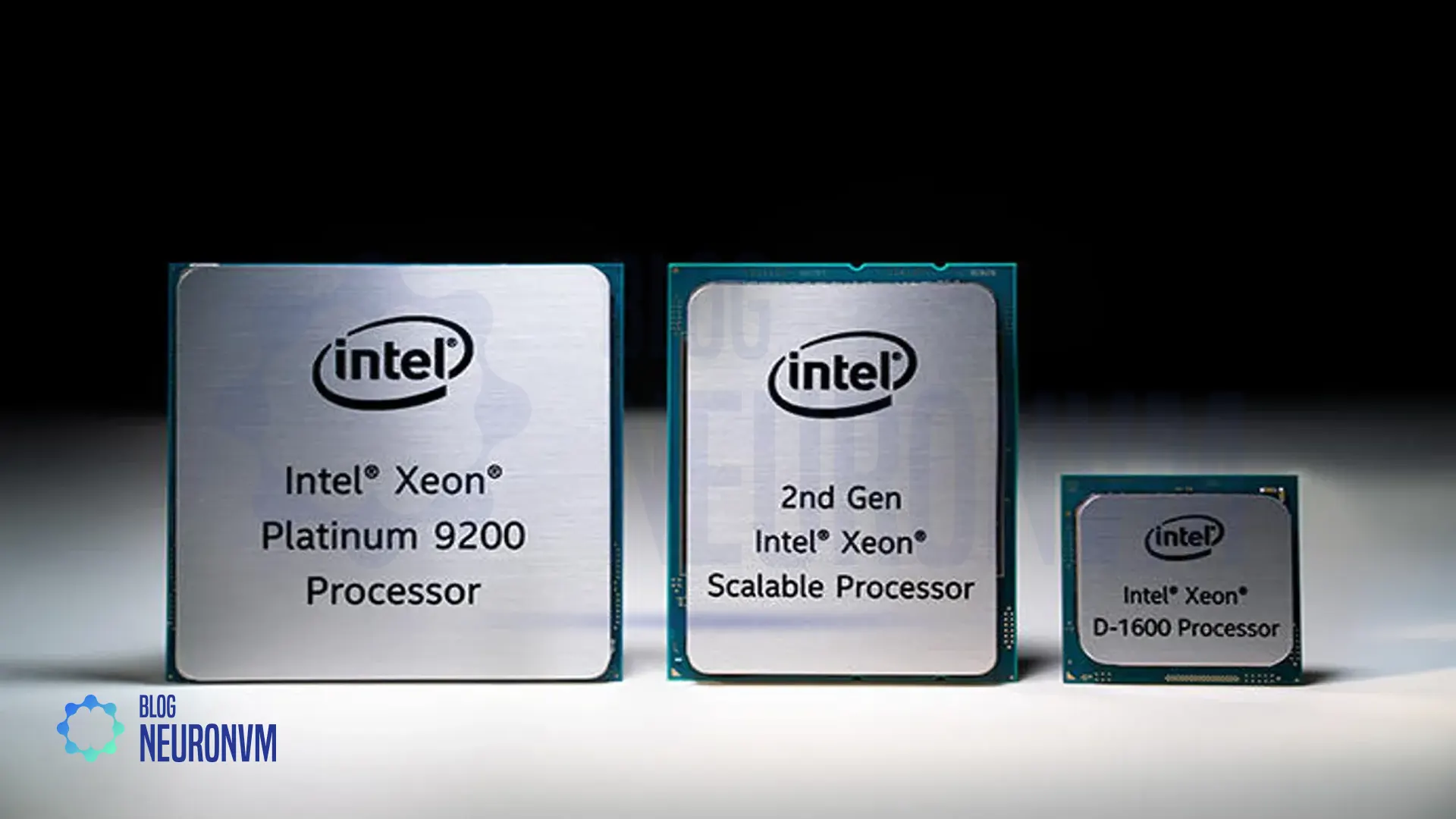
    A) Intel’s Xeon Family

    Intel has long been a dominant force in the server processor market, and it shows no signs of slowing down. The Xeon family is renowning for its excellent performance, scalability, and reliability.

    Intel Xeon Family - Best Server Processor of 2024

    By 2024, Intel is expected to introduce the next generation of Xeon processors, boasting higher core counts, improved power efficiency, and advanced security features. These processors aim to cater to the increasing demands of cloud computing and data-intensive workloads.

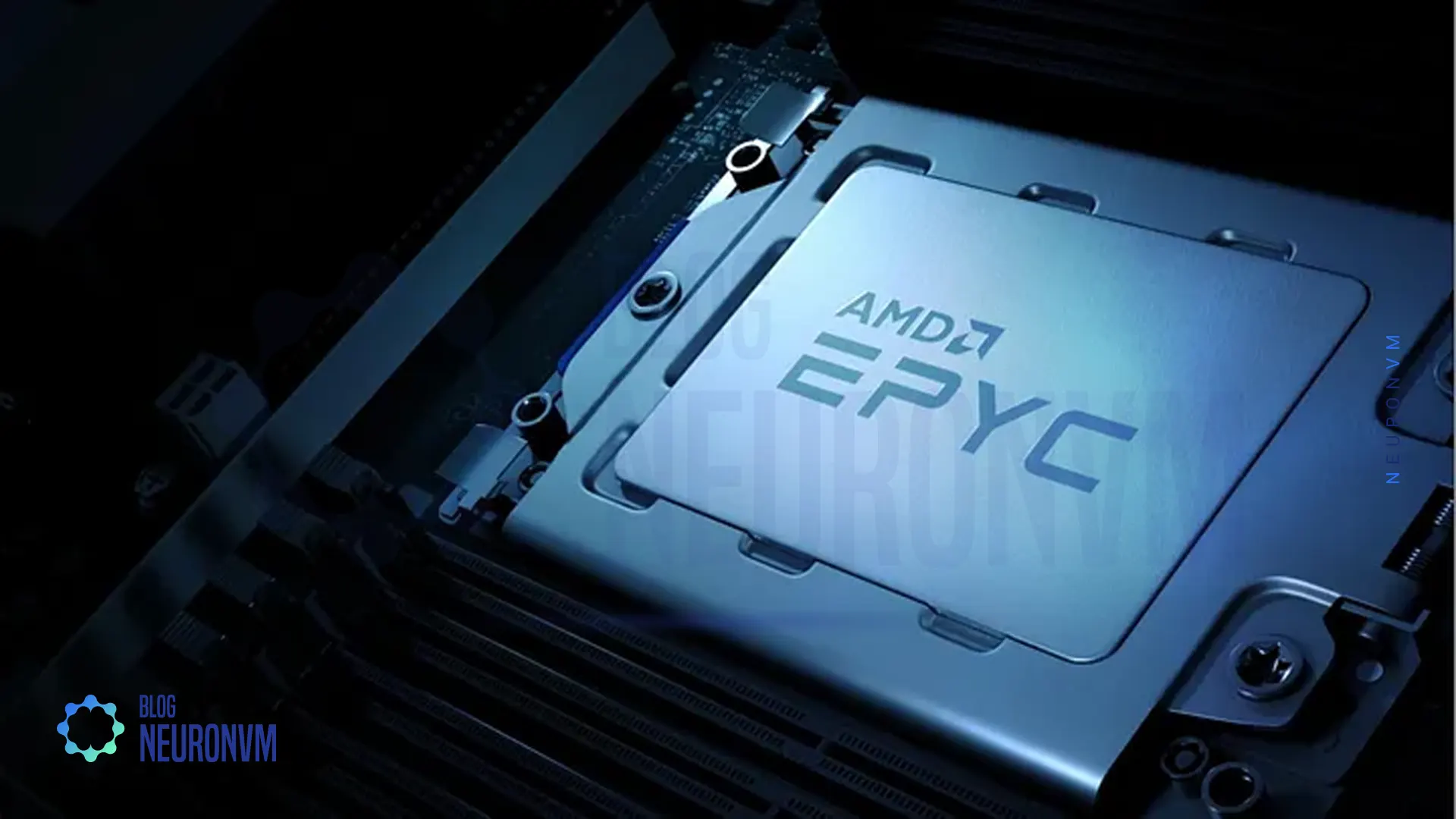
    B) AMD’s EPYC Processors

    AMD has also been making significant strides in the server processor realm, particularly with its EPYC series. With their innovative Chiplet architecture and extensive memory capacity, EPYC processors rival Intel’s offerings in terms of performance and cost-effectiveness.

    AMD's EPYC Processors - Best Server Processor of 2024

    Looking ahead, AMD is likely to continue its upward trajectory, launching enhanced EPYC processors with improved clock speeds, higher core counts, and enhanced security features to meet the evolving needs of server environments.

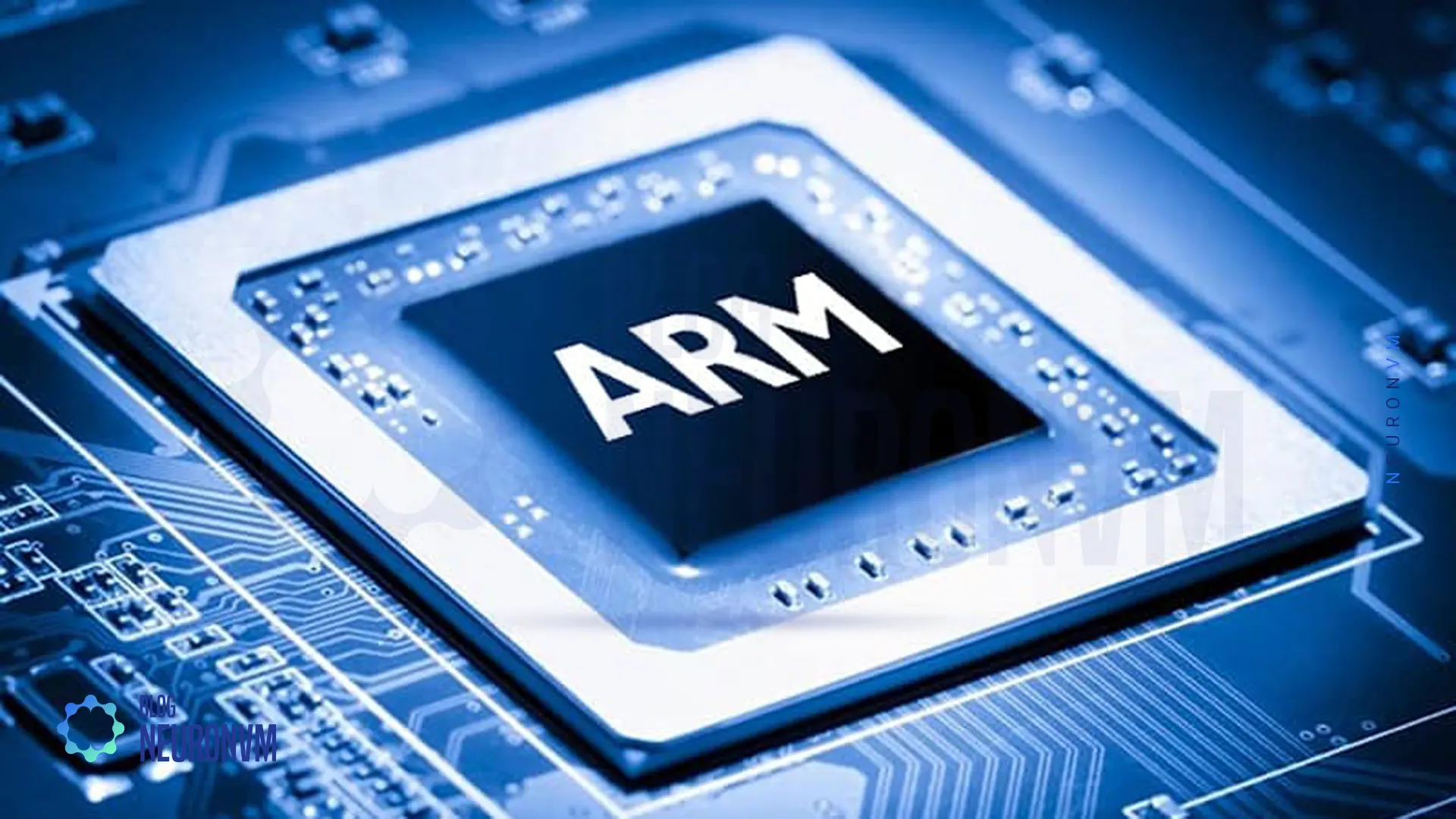
    C) ARM-Based Processors

    In recent years, ARM-based processors have gained traction due to their energy efficiency and scalability. While traditionally associated with mobile devices, ARM processors are making their way into server environments as well. Companies like Amazon have already embraced ARM-based processors for their cloud services.

    ARM-Based Processors

    In 2024, ARM will take further steps in the server processor market and offer processors with advanced features and competitive performance.

    Comparison of Server Processors

    Processor ModelCoresBase Frequency (GHz)Max Boost Frequency (GHz)Cache (MB)TDP (W)
    Intel Xeon Platinum 8280282.704.0038.5300
    AMD EPYC 7742642.253.40256225
    Intel Xeon Gold 6258R282.704.0038.5205
    AMD EPYC 7452322.353.35128155
    Intel Xeon Silver 4214122.203.201685
    AMD EPYC 7302163.003.30128155
    Comparison of features of server processors

    Conclusion

    As technology advances at an unprecedented pace, the future of server processors in 2024 is brimming with possibilities. Quantum and neuromorphic computing will likely pave new paths for innovation, while industry titans like Intel, AMD, and ARM continue to push the boundaries of performance, energy efficiency, and security. The best server processor of 2024 is expected to be a testament to these advancements, offering unparalleled computing power and scalability. Whether it be Intel’s Xeon family, AMD’s EPYC processors, or ARM-based alternatives, the future is undeniably promising. As the demand for robust computing solutions continues to rise, the server processors of 2024 will play a pivotal role in shaping the digital landscape and driving innovation across various sectors.

  • The Power of Access: Harnessing SSH Remote Connection

    The Power of Access: Harnessing SSH Remote Connection

    SSH (Secure Shell) is a network protocol that allows secure remote access and control of computer systems. It provides a secure channel over an unsecured network, greatly enhancing the security of remote connections. SSH remote connection has become an essential tool for system administrators, developers, and network engineers, enabling them to manage and administer servers and devices remotely. This article will explore the power of SSH remote connection, its benefits, and how it can be harnessed effectively.

    We have a piece of special news for Linux users, and that is that if you want to buy a Linux VPS server, you can use quality plans with excellent performance and immediate delivery.

    Understanding SSH Remote Connection

    SSH remote connection is a cryptographic network protocol that enables secure access to remote systems. It also provides authentication, encryption, and integrity of data transmitted over the network.

    SSH operates on the client-server model, with client software initiating the connection to the remote server. It should be noted that SSH utilizes public-key cryptography to authenticate the client and establish a secure connection.
    Benefits of SSH Remote Connection

    – Enhanced Security: SSH encrypts all data, including passwords, preventing eavesdropping and unauthorized access.

    – Remote Administration: SSH allows system administrators to manage servers and devices remotely, reducing the need for physical access.

    – File Transfer: SSH provides secure file transfer capabilities, allowing users to securely transfer files between systems.

    – Tunneling: SSH facilitates the creation of secure tunnels, enabling secure access to services running on remote systems.

    Effective Harnessing of SSH Remote Connection

    A) Setting up SSH

    – Install SSH server software on the remote system, ensuring proper configuration and security practices.

    Generate SSH key pairs for clients to establish secure connections.

    – Disable password-based authentication and enforce key-based authentication for added security.

    B) Securely Accessing Remote Systems

    – Open an SSH client on the local system and connect to the remote server using its IP address or hostname.

    – Provide the necessary credentials (private key and passphrase) for authentication.
    – Once connected, the user gains access to the remote system’s command-line interface or can execute specific commands remotely.
    C) Advanced Usage

    – Utilize SSH port forwarding for securely accessing services or applications running on remote systems.

    – Employ SSH agent forwarding to enable authentication without storing private keys on intermediate systems.

    – Utilize SSH-based VPN (Virtual Private Network) for secure and encrypted communication between networks.

    How to Install SSH on Windows

    To enable SSH in Windows, just follow the following path:

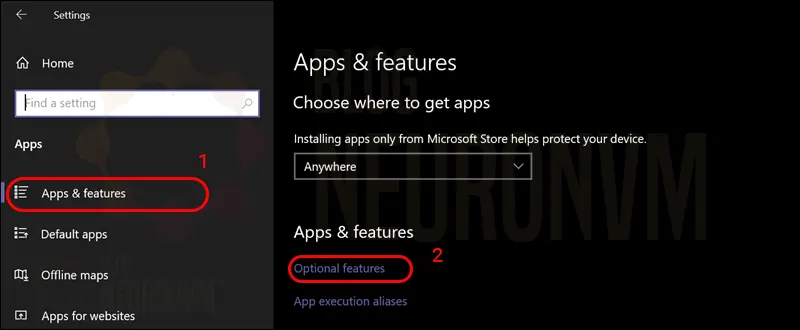
    – First, search for Settings and open it.

    – Then click on Apps & features in the left column.

    – On the right side, click Optional features:

    1 windows settings

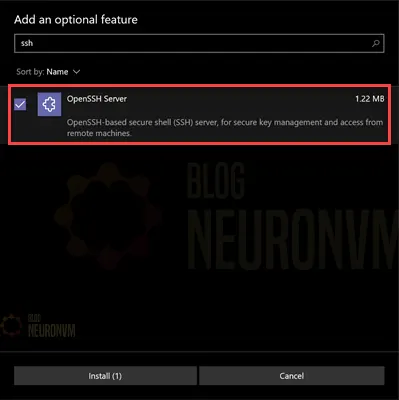
    Now it’s time to click Add a feature:

    2 windows optional features

    Type OpenSSH in the search field and install it when it appears:

    3 openssh server optional feature windows

    How to Install SSH on Linux

    On Debian/Ubuntu:

    To install the OpenSSH client component in Ubuntu and Debian, you can run the following command:

    sudo apt install openssh-client

    On CentOS/Fedora:

    Also, to install the OpenSSH client component in CentOS and Fedora, you can run the following command:

    sudo dnf install openssh-clients
    sudo yum install openssh-clients

    On Debian/Ubuntu:

    To install the OpenSSH Server component in Ubuntu and Debian, you can run the following command:

    sudo apt install openssh-server

    On CentOS/Fedora:

    Also, to install the OpenSSH Server component in CentOS and Fedora, you can run the following command:

    sudo dnf install openssh-server
    sudo yum install openssh-server

    Finally, start and enable SSH by running the following commands:

    sudo systemctl start sshd
    sudo systemctl enable sshd

    Conclusion

    SH remote connection is a powerful tool that brings numerous benefits to individuals and organizations. It provides a secure means of accessing and managing remote systems, enhancing both convenience and security. By harnessing SSH effectively, users can administer servers, transfer files securely, and create encrypted tunnels for accessing services. When properly configured and employed, SSH remote connection becomes an indispensable asset for system administrators, developers, and network engineers, empowering them to perform their tasks efficiently and securely in today’s interconnected world.

  • The Ultimate Memory Showdown: Which Browser Use the Last Memory?

    The Ultimate Memory Showdown: Which Browser Use the Last Memory?

    Nowadays, our web browsers have become an integral part of our lives. Whether browsing the internet, accessing important information, or multitasking with multiple tabs, the efficiency of our browser’s memory usage can greatly affect our overall experience. With so many browser options available, it can be challenging to determine which is the best regarding memory usage. That’s precisely why we will delve into “The Ultimate Memory Showdown: Which browser uses the least memory?” In this comprehensive tutorial, we will explore various popular web browsers, analyze their memory usage, and provide you with insights to help you make an informed decision.

    If you want to use a Windows VPS server, we suggest you use the plans provided with immediate delivery. You can easily install any browser you want on these servers and use it without any problems.

    Understanding Memory Usage in Web Browsers

    To comprehend the memory usage of different web browsers, it’s crucial to understand the concept of memory allocation in computer systems. When a browser is launched, it allocates a certain amount of memory to perform its tasks efficiently. This memory includes RAM (Random Access Memory) and cache, among other resources. Each browser handles memory allocation differently, resulting in varying levels of efficiency and performance.

    Analyzing Popular Web Browsers

    web browsers memory use

    1) Google Chrome

    Google Chrome has gained unparalleled popularity due to its extensive features and user-friendly interface. However, this browser has often faced criticism for its high memory consumption. Chrome’s multi-process architecture, where each tab runs as a separate process, can lead to increased memory usage.

    Despite this downside, Google has been actively working on optimizing memory management to enhance performance and reduce memory footprint.

    2) Mozilla Firefox

    Firefox is a renowned open-source browser known for its privacy features and customizable options. Over the years, Mozilla has focused on improving memory usage and performance. With the introduction of “Project Quantum,” Firefox has adopted a more efficient multi-process architecture known as Electrolysis (E10s).

    This update helps distribute the browser’s workload, improving memory management.

    3) Microsoft Edge

    Microsoft Edge, the successor to Internet Explorer, has made significant strides in memory management. Built on the Chromium engine, Edge shares similarities with Google Chrome in terms of memory usage. However, Microsoft has implemented specific optimizations that prioritize memory efficiency.

    Edge’s Sleeping Tabs feature helps conserve memory by freezing inactive tabs, thereby reducing memory consumption while maintaining performance.

    4) Safari

    Safari, Apple’s proprietary browser, is known for its seamless integration with macOS and iOS devices. Apple has focused on optimizing Safari in terms of speed, energy efficiency, and memory management. Safari utilizes a process isolation feature called App Nap, which suspends background tabs and conserves memory. Additionally, Safari employs cutting-edge technologies like Intelligent Tracking Prevention (ITP) to enhance privacy while minimizing memory usage.

    Performance Comparison and Memory Benchmarks

    To evaluate the memory usage of different browsers, various benchmarks, and real-world tests are conducted. These tests measure factors such as memory consumption during idle usage, the number of tabs before noticeable slowdown, and memory release efficiency after closing tabs.

    Several independent organizations regularly assess browser performance and provide comparative data that aids in understanding memory usage patterns.

    Here is a table comparing memory usage in popular web browsers:

    Web BrowserMemory Usage (minimum*)Features
    Google Chrome350 – 500 MBTabbed browsing, extensions, Omnibox (address bar with search functionality), developer tools, etc.
    Mozilla Firefox300 – 400 MBTabbed browsing, add-ons, private browsing, integrated search bar, developer tools, etc.
    Apple Safari250 – 350 MBTabbed browsing, reader mode, integrated search bar, iCloud Keychain, developer tools, etc.
    Microsoft Edge350 – 450 MBTabbed browsing, collections, integrated PDF viewer, sidebar for quick access, developer tools, etc.
    Opera200 – 300 MBTabbed browsing, built-in ad blocker, VPN, messenger integration, sidebar panel, developer tools, etc.
    Memory usage of Web Browsers

    Apart from memory usage, it’s essential to consider other factors when choosing a browser. Factors like browsing speed, privacy and security features, compatibility, extensions, and user interface play a significant role in our browsing experience. Therefore, while memory usage is an important aspect, it should be assessed in conjunction with these other factors to make a well-rounded decision.

    Conclusion

    Choosing the best browser based on memory usage depends on individual preferences and requirements. Each browser discussed in this guide offers unique features and performance characteristics. Google Chrome, despite its relatively higher memory consumption, excels in its extensive range of extensions and services. Firefox, with its focus on privacy and customization, has made great strides in optimizing memory usage. Microsoft Edge, built on the Chromium foundation but enhanced with memory-efficient features, strikes a balance between performance and resource consumption. Safari, designed for Apple users, prioritizes memory efficiency and privacy. Therefore, by considering your specific needs, assessing memory benchmarks, and exploring additional features, you can make an informed decision and choose the browser that best suits your requirements.

  • The Battle of Firewalls: Hardware vs. Software

    The Battle of Firewalls: Hardware vs. Software

    In today’s technologically advanced world, ensuring cybersecurity is of utmost importance. Firewalls play a crucial role in protecting networks and systems from potential threats. However, a common dilemma faced by organizations is whether to opt for hardware or software firewalls. This comprehensive guide will provide an in-depth analysis of both approaches. Outlining their advantages, and disadvantages, and concluding with a comparison to assist in making an informed decision.

    If you are looking for a quality VPS, we suggest you use the Windows VPS plans provided on our website.

    A. Hardware Firewalls

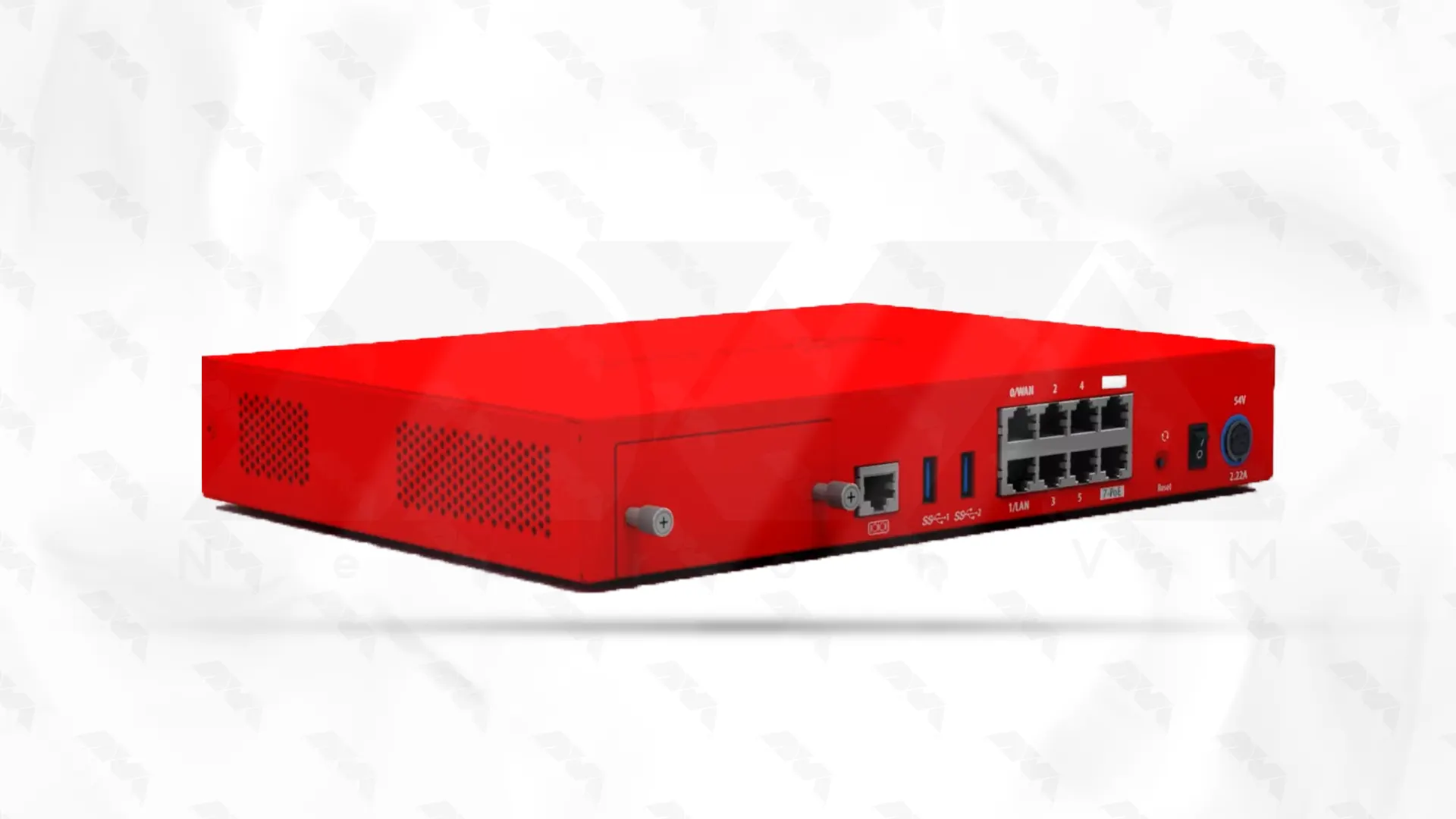
    Hardware firewalls are dedicated devices that act as a barrier between an organization’s internal network and the external internet. Here are their key features:

    hardware firewalls

    Advantages of Hardware Firewalls

    – Enhanced Security: Hardware firewalls offer robust security capabilities, inspecting incoming and outgoing traffic at the network level, and protecting against various threats. Such as malware, DoS attacks, and unauthorized access.

    – Ease of Management: Hardware firewalls are relatively simpler to set up and manage. They provide a centralized control point for network security, making it convenient to implement and enforce security policies across multiple devices.

    – Performance: Hardware firewalls are designing to handle high volumes of network traffic. Their dedicated hardware allows for efficient packet filtering, resulting in minimal impact on network performance.

    Disadvantages of Hardware Firewalls

    – Cost: Hardware firewalls may require a significant initial investment, making them less affordable for small-scale organizations.

    – Limited Scalability: Upgrading or expanding hardware firewalls can be challenging, especially if the network architecture undergoes changes.

    – Maintenance and Updates: Often require firmware updates and periodic maintenance checks which could involve additional costs and time investment.

    B. Software Firewalls

    Software firewalls are applications that installing on individual devices, providing protection at the operating system or individual software level. Let’s explore their characteristics:

    software firewalls

    Advantages of Software Firewalls

    – Cost-effectiveness: Software firewalls are generally more affordable, as they can installed on existing devices without the need for dedicated hardware.

    – Flexibility and Customization: Software firewalls allow users to configure security settings based on individual needs, providing a higher degree of customization.

    – Mobility: Software firewalls can protect devices on the go, making them suitable for remote workers or individuals operating outside a typical network environment.

    If you intend to set up a software firewall on a dedicated server, we suggest you read How to Setup a Firewall on a Dedicated Server.

    Disadvantages of Software Firewalls

    – Performance Impact: As software firewalls operate on the device itself, they can potentially consume system resources and impact overall performance, especially on older or low-powered devices.

    – Device-Specific Protection: Software firewalls primarily safeguard the device they are installing on, leaving the network susceptible to threats from other devices.

    – Managing Multiple Instances: Organizations with numerous devices require manual installation and monitoring of software firewalls on each device, resulting in more administrative effort.

    Comparison of Hardware and Software Firewalls

    Here is a comparison between hardware and software firewalls:

    AspectHardware FirewallSoftware Firewall
    InstallationInstalled as a physical device or integrated into network devicesInstalled on individual computers or servers
    PerformanceHigher performance and throughput due to dedicated hardware resourcesMay consume system resources and impact overall performance
    ScalabilityCan handle a higher number of simultaneous connectionsSuitable for smaller networks or individual computers
    ConfigurationConfiguration through a web-based interface or command line interfaceConfiguration through a graphical user interface
    CostHigher upfront cost due to dedicated hardwareGenerally lower cost as it does not require dedicated hardware
    MaintenanceMinimal maintenance requiredSoftware updates and maintenance required
    SecurityOffers strong network-wide protectionProtects individual computers or servers
    Network CoverageProtects the entire networkLimited to protecting individual devices
    Hardware Firewalls vs. Software Firewalls

    Conclusion

    Choosing between hardware and software firewalls depends on the specific needs and resources of an organization. Hardware firewalls provide robust security, centralized management, and better performance at the cost of initial investment. Software firewalls offer greater flexibility, customization, and cost-effectiveness, but may burden individual devices and require manual management. It is crucial to carefully weigh the advantages and disadvantages outlined in this guide while considering factors such as budget, network architecture, and scalability requirements to make an informed decision about the most suitable firewall solution for an organization’s cybersecurity needs.

  • The Easiest Way To Buy a Minecraft Server With Bitcoin

    The Easiest Way To Buy a Minecraft Server With Bitcoin

    In the ever-evolving world of gaming, Minecraft has emerged as a popular and immersive universe where players can create, explore, and collaborate. As the game continues to captivate individuals of all ages, the demand for dedicated Minecraft servers has skyrocketed. To cater to the growing needs of Minecraft enthusiasts, this article presents the easiest and most convenient method to buy a Minecraft server with Bitcoin. As cryptocurrencies gain traction in various industries, the intersection of Minecraft and Bitcoin offers a seamless solution for gamers seeking an efficient means of accessing their own dedicated server. We delve into the benefits and steps required to acquire a Minecraft server with Bitcoin, revolutionizing the way enthusiasts indulge in the endless possibilities of Minecraft’s virtual realm.

    Introduction to Bitcoin and Minecraft Servers

    Bitcoin is a digital currency that has gained immense popularity over the years. It is a decentralized form of currency that allows users to make transactions directly without the need for intermediaries such as banks. Minecraft, on the other hand, is a popular sandbox video game that allows players to build and explore virtual worlds. These two seemingly different entities have found a unique connection in the form of Bitcoin payments for Minecraft servers.

    Minecraft and Bitcoin

    Minecraft servers are private multiplayer networks that allow players from all over the world to connect and play together. These servers require hosting and maintenance costs, which are typically paid for with real-world currency.

    However, with the introduction of Bitcoin payments, players now have the option to purchase Minecraft servers using their Bitcoin funds. This not only provides a convenient and secure mode of payment but also opens up new opportunities for players who may have limited access to traditional payment methods.

    Benefits of Purchasing a Minecraft Server with Bitcoin

    There are several benefits to purchasing a Minecraft server with Bitcoin. Firstly, Bitcoin payments offer a higher level of privacy and security compared to traditional payment methods. When using Bitcoin, users can make transactions without revealing any personal information, ensuring their financial details remain anonymous. This added layer of security can be particularly appealing to Minecraft players, who may be concerned about their online privacy.

    Benefits of Bitcoin Minecraft Server

    Secondly, Bitcoin transactions are generally faster and more efficient than traditional payment methods. With Bitcoin, payments can be processed in a matter of minutes, eliminating the need for lengthy verification processes or waiting periods. This means that players can quickly set up and enjoy their Minecraft servers without any unnecessary delays.

    Additionally, Bitcoin transactions are not subject to geographical boundaries or financial institutions, so that players from any part of the world have equal access to purchase Minecraft servers.

    Choosing the Right Minecraft Server Hosting Provider

    Choosing the right Minecraft server hosting provider is crucial for an optimal gaming experience. There are several factors to consider when making this decision.

    Firstly, the server provider should offer reliable and high-performance servers that can handle the demands of Minecraft gameplay. It should have a strong infrastructure that minimizes lag and ensures smooth gameplay for all players.

    Additionally, the provider should offer good customer support, so that any issues or concerns can be addressed promptly. It is also important to consider the pricing plans and packages offered by the provider, ensuring that they align with your budget and gaming requirements.

    By carefully considering these factors, players can find a server hosting provider that enhances their Minecraft experience.

    At NeuronVM, we pride ourselves on being a leading Minecraft server hosting provider that offers top-quality servers at a competitive price.

    Our servers are equipped with the latest hardware and high-speed connections, ensuring excellent performance and minimal lag. Additionally, we offer a wide range of plugins that cater to various gaming preferences, providing an immersive and customizable experience.

    Our team of dedicated professionals is available round the clock to provide reliable customer support. With our affordable pricing plans, we strive to make Minecraft server hosting accessible to all gamers, without compromising on quality or performance.

    Choose NeuronVM for the best Minecraft servers and take your gaming experience to the next level.

    How to Buy Minecraft server with Bitcoin?

    I’m sure there are many of you out there who may need a fast and strong Minecraft dedicated server. I’m sure because I was in a need of the same thing a few months back. After scrolling through a lot of websites who claimed that their servers are the best. Bought one, used it for a short while and wasn’t really happy with the results.

    At NeuronVM, we started to provide Minecraft servers and so far the feedback has been great! You buy it and you use it for one week and if it didn’t fulfil your requirements (which is unlikely), you can get your money back, no question asked. So here’s a small guideline on how to buy Minecraft server with Bitcoin to make things easier for you:

    Buy Minecraft server with Bitcoin
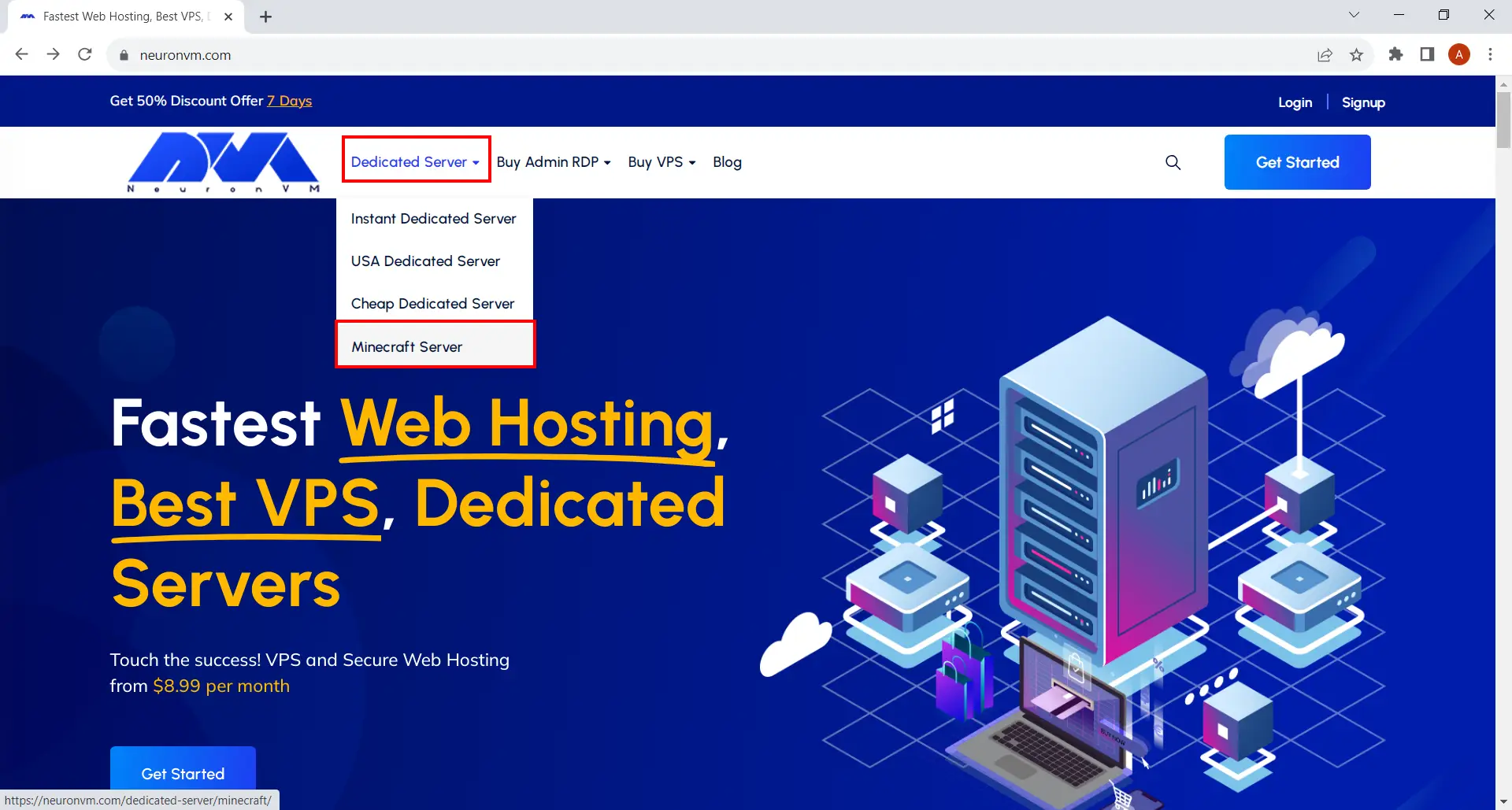
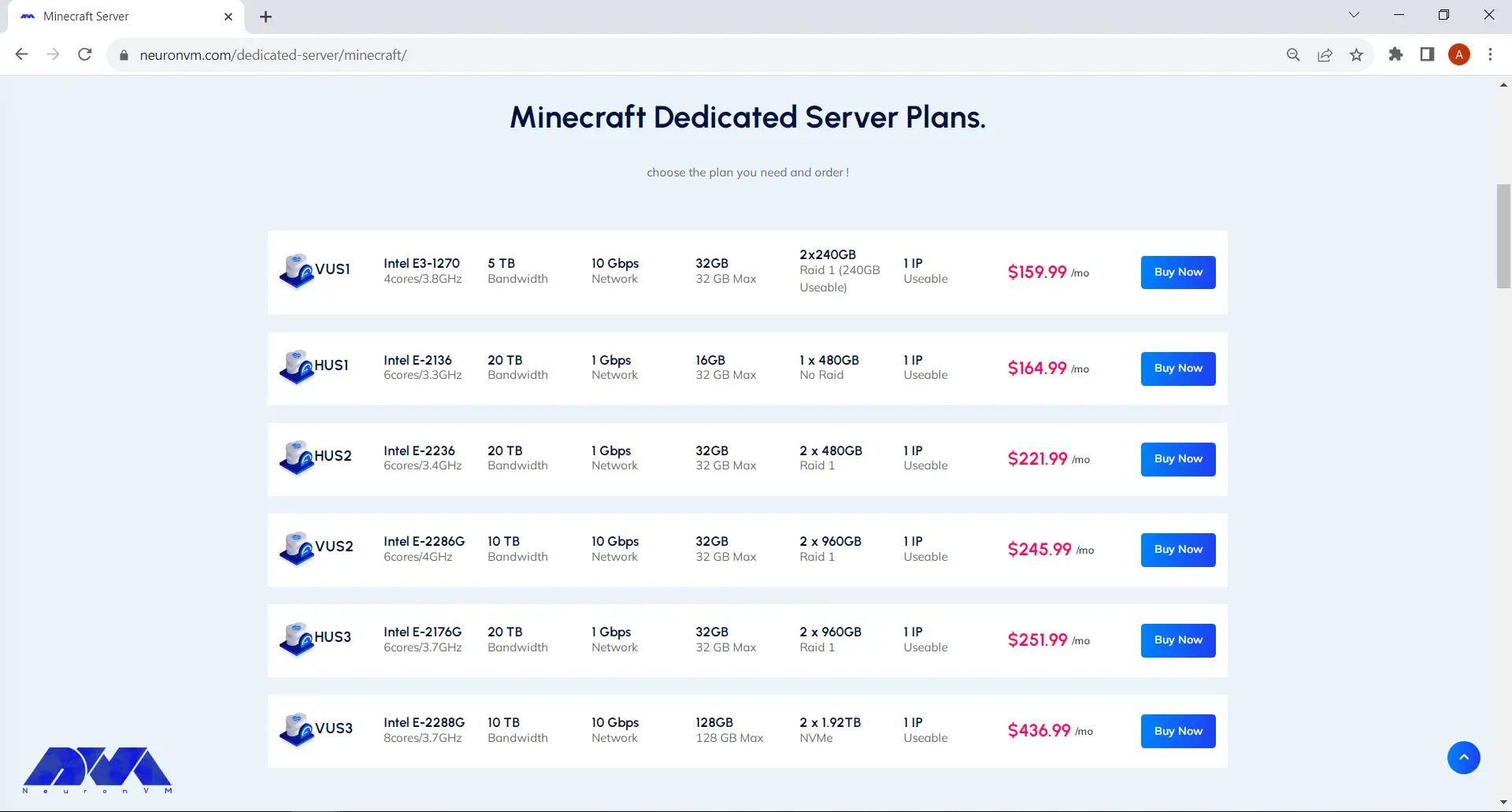
    • Choose the plan you need click on Buy Now.
    minecraft Server Plans
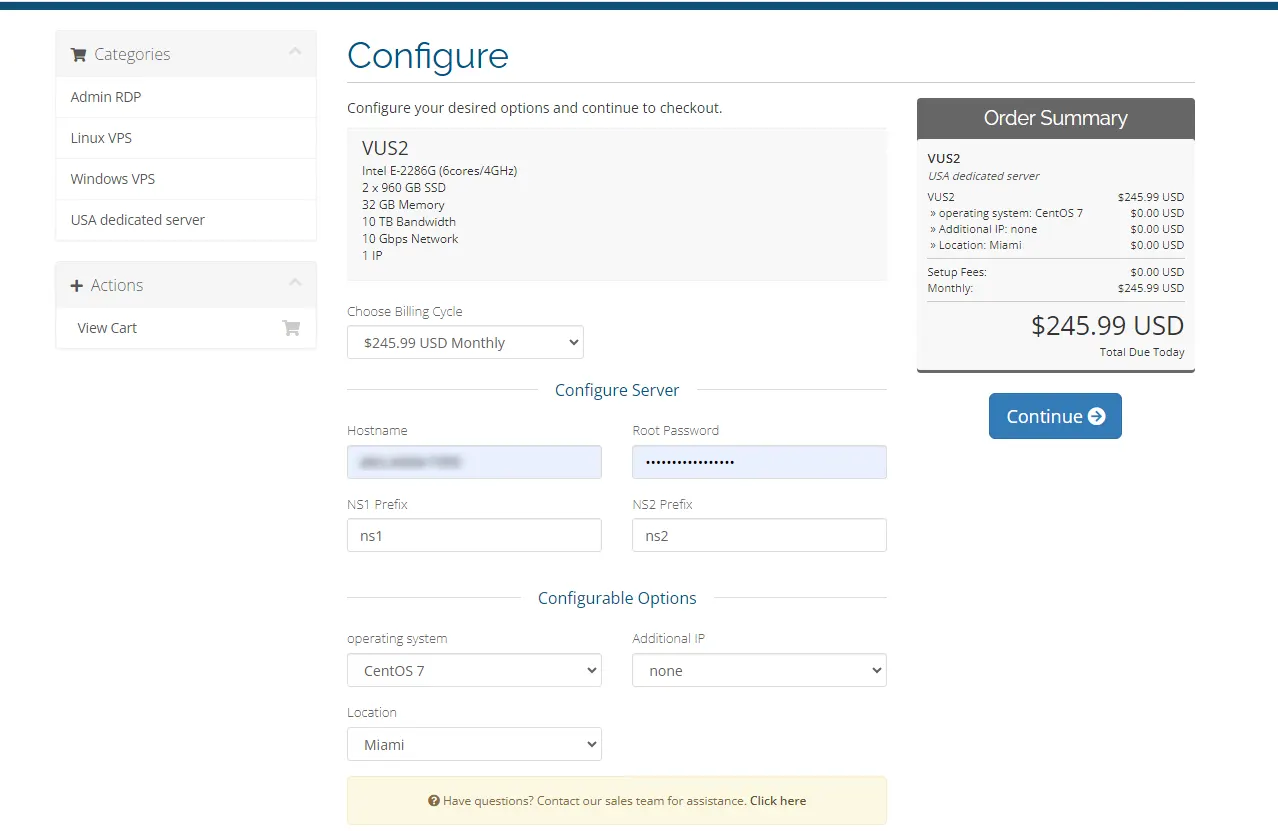
    • It will direct you to the page shown below. There’s a small form to fill under the “Configure Server” section. You can also change the options like Operating System, Location and Additional IP.
    minecraft server Shopping Cart
    • You’ll be landed on Review and Checkout pay where you can simply review the items in your shopping card and enter a promo code to apply discounts. After you’re done, click on Checkout button and proceed.
    Review & Checkout about game servers
    • Fill the form if you haven’t signed up before. After that you can choose your preferred method on payment and click on Complete Order button down below.
    login to neuronvm website
    • Now select Bitcoin from the Select Coin section and then click on Complete Checkout.
    buy server pay with bitcoin
    • Copy your bitcoin wallet information and pay easily.
    server with bitcoin

    That’s it! Our specialists will deliver your server to you in no time and you’ll be able to run your Minecraft server without worrying about anything! Remember if you had any questions you can contact us through different ways, or you can comment under this post and I will answer any related question to this topic!

    Final Words

    Playing Minecraft is so fun and engaging, but it’s most enjoyable when there’s no obstacle slowing you down. Having a strong dedicated server can really boost your experience and all the other players that you host! Plus, you don’t have to worry about paying high commissions to online payment gateways. At NeuronVM you can simply get a Minecraft server with Perfect Money, Bitcoin or any other cryptocurrency!

  • Mastering Use VPS for Forex Trading: A Genius’ Guide

    Mastering Use VPS for Forex Trading: A Genius’ Guide

    VPS (Virtual Private Server) has become an essential tool for forex traders looking to optimize their trading strategies and achieve better performance. By utilizing a VPS, traders can ensure uninterrupted trading activity, increased speed, and enhanced security. In this comprehensive guide, we will delve into the world of VPS for forex trading, providing an in-depth analysis of its benefits, practical tips, and a step-by-step guide to mastering its use.

    Understanding VPS for Forex Trading

    Forex trading requires real-time access to the markets, 24/7. However, individual traders often face challenges such as unstable internet connections, power outages, and system crashes, which can impede their trading activities. This is where VPS comes in.

    Understanding VPS for Forex Trading

    A VPS is a virtual machine that is hosted on a remote server, providing traders with a stable and secure environment to run their trading platforms and expert advisors (EAs). By leveraging VPS technology, traders can eliminate downtime and technical disruptions, ensuring seamless execution of trades.

    Advantages of Using VPS for Forex Trading

    1. Uninterrupted Trading

    VPS operates independently of a trader’s local computer and internet connection. This means trades can be executed even if the trader’s computer is turned off or experiencing connectivity issues.

    2. Reduced Latency

    VPS servers are often located near major financial institutions and data centers, enabling traders to benefit from fast and low-latency connections, which are crucial for timely trade execution.

    3. Enhanced Security

    With VPS, traders can keep their trading platforms and EAs running in a secure, isolated environment. This protects them from potential malware, viruses, and hacking attempts, ensuring the safety of their trades and account information.

    Choosing the Right VPS Provider

    Selecting a reliable VPS provider is paramount for successful forex trading. Consider the following factors when making your decision:

    Choosing the Right VPS Provider

    – Uptime Guarantee: Ensure the provider offers a high uptime guarantee, ideally 99.9% or more, to minimize the risk of downtime and potential missed trading opportunities.

    – Location: Opt for a VPS provider with server locations close to major financial hubs to reduce latency and achieve faster trade execution.

    – Scalability: Look for a provider that allows for easy scalability, enabling you to upgrade your VPS resources if needed as your trading volume increases.

    – Customer Support: Ensure the provider offers 24/7 customer support, especially during critical trading hours when prompt assistance is vital.

    You can buy the plan you need from the various VPS plans offered on the NeuronVM website and enjoy maximum speed, performance and support.

    Mastering the Use of VPS for Forex Trading

    1. Choosing the Right VPS Plan: When choosing a VPS plan for forex trading, it is important to consider your specific needs. Look for a plan that offers low latency, high uptime, and reliable performance. Consider the amount of RAM, CPU power, and storage space provided to ensure optimal trading conditions.

    Taking these factors into account will help you choose the right VPS plan for forex trading.

    2. Configuring the VPS: Install your preferred trading platform and any necessary EAs on the VPS. Configuring the VPS for forex involves setting up the virtual private server to optimize trading performance. Key steps include installing the appropriate forex trading platform, configuring the server to run the platform smoothly, and ensuring a stable internet connection for uninterrupted trading.

    Additionally, security measures like setting up firewalls and encryption are crucial to protect trading data and ensure privacy. Proper configuration helps traders access their forex accounts and execute trades efficiently.

    Mastering the Use of VPS for Forex Trading

    3. Backup and Recovery: Backup and recovery in forex refers to the process of creating copies of important data, such as trading strategies, transaction histories, and customer information, and implementing systems to restore that data in the event of a system failure or data loss.

    These measures are put in place to ensure the continuity of forex trading operations, protect against potential cyber threats, and minimize financial losses.

    4. Monitoring and Maintenance: Monitoring and Maintenance for forex VPS involves continuously monitoring the VPS server for any issues or performance disruptions. This includes checking server resources, optimizing network connectivity, and addressing any technical glitches promptly.

    Regular maintenance tasks such as software updates and security patches are performed to ensure the VPS remains stable and secure. Additionally, proactive monitoring of the trading platform is conducted to ensure uninterrupted trading operations and maximum uptime for forex traders.

    Conclusion

    Mastering the use of VPS for forex trading can greatly enhance your trading experience. By leveraging VPS technology, you can enjoy uninterrupted trading, low-latency connections, and enhanced security. Selecting the right VPS provider and configuring your VPS correctly are fundamental steps in maximizing its benefits. Always prioritize stability, security, and scalability when choosing a VPS plan. With proper monitoring and maintenance, you can optimize your forex trading activities and achieve better results in the dynamic world of forex trading.