Category: Tutorials

  • The Cost Saving Benefits of Buying Linux VPS with Discounts

    The Cost Saving Benefits of Buying Linux VPS with Discounts

    If you want to do your online business with optimal performance and more access, but you don’t want to spend a lot of money, you can use a Linux VPS server with a discount. Buying Linux VPS offers a versatile and cost-effective hosting solution for a wide range of purposes. With root access, you have the freedom to create and manage your server environment, making it an attractive option for developers, small businesses, and anyone in need of reliable and customizable hosting. So, let’s find out the cost saving benefits of buying Linux VPS. Keep reading…

    Understanding the Cost-Saving Benefits of Linux VPS

    A Linux VPS is a virtualized server that runs on a physical server but operates as an independent virtual machine (VM). It uses a Linux-based operating system (e.g., Ubuntu, CentOS, Debian) and provides users with root access. NeuronVM is one of the strong providers of Linux VPS with great discounts. Now if you want to comprehend the cost-saving benefits of Linux VPS, consider the following factors:

    the cost-saving benefits of Linux VPS

    – Linux is an open-source operating system, which is freely available for anyone to use and modify. This eliminates the cost associated with purchasing proprietary operating systems like Windows. You can use Linux on your VPS without incurring any licensing fees. Also, many Linux distributions come with various free and open-source software applications and tools.

    This reduces the need to purchase expensive commercial software. You can find open-source alternatives for tasks such as web hosting, databases, and content management systems, which further cut software-related expenses.

    – Linux VPS hosting allows you to share physical server resources (CPU, RAM, storage) with other users, while still providing isolation and dedicated resources for your virtual server. This resource-sharing model helps reduce costs because you only pay for the resources you use, making it more cost-effective than dedicated servers that require the entire server’s resources.

    – Linux VPS hosting plans often come with predictable pricing, allowing you to budget more effectively. You typically pay a fixed monthly fee, and any additional costs are usually based on resource usage, providing cost transparency.

    – Linux is inherently secure, and its open-source nature allows for rapid security updates and patches. This can help you avoid potential security breaches and associated financial losses.

    – Linux VPS hosting is highly scalable, allowing you to adjust your resources as your needs change easily. This scalability prevents overprovisioning and allows you to optimize costs based on your usage.

    These factors make the process of buying Linux VPS a cost-effective choice for individuals and businesses looking to host websites, applications, and services.

    Exploring Different Types of Discounts for Linux VPS

    Discounts on Virtual Private Servers can offer several benefits to businesses and individuals looking to host websites, applications, or other online services. Discounts on VPS hosting can significantly reduce costs while providing better performance, customization options, security, etc. However different types of discounts for Linux VPS are provided by reputable companies like NeuronVM. We have categorized these discounts as follows, you can choose any of them in order to your needs:

    • Monthly Discount
    • Three Month Discount
    • Six Month Discount
    • Yearly Discount

    Comparing the Cost of Linux VPS with other Hosting options

    You should know that if you use a Linux virtual server, you will get almost all the benefits of a dedicated server and pay less. This makes Linux servers the choice of most small and medium-sized companies. Also, unlike shared hosting, affordable Linux servers provide you with a certain amount of resources such as CPU, bandwidth, RAM, and disk space, even resources can be increased if needed. So the biggest advantage of Linux servers is that they pay less for all these benefits.

    In other words, Linux VPS hosting typically falls between shared hosting and dedicated hosting in terms of cost. While it’s more expensive than shared hosting, it offers better performance and control at a more affordable price point compared to dedicated servers.

    The specific cost of Linux VPS hosting can vary based on the provider, the amount of resources you need, and any additional features or services included in the hosting package. It’s essential to assess your website’s requirements and budget when choosing the right hosting option for your needs.

    If you examine the NeuronVM website, you will have the chance to figure out the benefits of Linux VPS and choose the best service for you.

    Tips for Finding the Best Deals on Linux VPS

    Finding the best deals for Buying Linux VPS hosting can help you save money while still getting reliable performance and features. Remember that the “best” deal may vary depending on your specific needs and budget. Take your time to research and compare options to find the Linux VPS hosting solution that suits you best.

     finding the best deals on Linux VPS

    One of the points that can be mentioned to find the best opportunity and buy VPS is to follow special days like Black Friday. Because the service providers offer effective discounts on such days that can be useful for you.

    You can choose a provider with data center locations that are geographically close to your target audience to reduce latency and improve performance.

    Some providers offer lower introductory prices that increase upon renewal. Be aware of these changes and factor them into your long-term planning.

    Before making a decision, read reviews and seek recommendations from other users to ensure the provider meets your performance and support needs.

    Some providers offer special discounts for students or non-profit organizations. If you fall into either of these categories, inquire about potential savings.

    Hosting providers often run promotions or offer discounts, especially for new customers. Keep an eye out for these promotions, which can significantly reduce your costs.

    The Importance of Choosing a Reliable Linux VPS Provider

    Choosing a reliable Linux VPS provider is crucial for individuals and businesses that rely on hosting services for their websites, applications, or other online operations. This choice can significantly impact the performance, security, and overall success of your online presence. Here are some reasons why selecting a reliable Linux VPS provider is essential:

    – A reliable VPS provider will offer a high level of uptime, ensuring that your website or application is accessible to users around the clock.

    – A reputable provider will offer high-performance VPS hosting with ample resources like CPU, RAM, and storage.

    – Security is paramount when it comes to hosting. A reliable VPS provider will have robust security measures in place to protect your server from threats like hacking, malware, and DDoS attacks.

    – Data loss can be catastrophic. A dependable VPS provider will have backup solutions in place to protect your data and provide options for disaster recovery in case of unforeseen events.

    – Good customer support is essential when you encounter issues or have questions about your VPS.

    – A reliable provider will have a robust network infrastructure with multiple data centers and redundant internet connections.

    – Research the provider’s reputation and read customer reviews. A well-established provider with a positive track record is more likely to deliver reliable services.

    – While cost shouldn’t be the only consideration, a reliable VPS provider should offer competitive pricing for the resources and features they provide.

    Our website (NeuronVM) is one of the best Linux VPS providers that includes all these benefits. You can safely and confidently benefit from the services provided on this website.

    Case Studies: Real-life Examples of Businesses Saving Money with Linux VPS Discounts

    Here are a few real-life case studies of businesses that have benefited from Linux VPS discounts:

    Linode and WebHosting:

    Linode is a popular provider of Linux VPS hosting services. Many web hosting companies use Linode’s infrastructure to host their clients’ websites. Web hosting companies like HostAdvice have reported cost savings of up to 50% by using Linode’s VPS hosting plans, especially when they take advantage of promotional offers and discounts.

    Alibaba Cloud and E-Commerce:

    Alibaba Cloud offers Linux VPS services that cater to a wide range of businesses, including e-commerce platforms. An online retailer, such as a clothing store, can leverage Alibaba Cloud’s discounts and tailored solutions to handle web traffic peaks during sales events while keeping costs in check.

    Vultr and Game Server Hosting:

    Vultr offers Linux VPS hosting with data centers in various locations, making it attractive for gaming server hosting. A game server hosting company, such as NFO Servers, has reported cost savings by using Vultr’s VPS services to provide low-latency and high-performance game hosting solutions to its customers.

    So don’t waste time and by purchasing a reliable Linux VPS service from NeuronVM, you will be included in the list of reliable and reputable business companies. Also, by providing Linux VPS services, NeuronVM is always with its users and helps them to progress and achieve success.

    How to Apply and Redeem Discounts for Linux VPS

    As we mentioned in the previous parts, NeuronVM is one of the best providers of Linux VPS with discounts. in this section, we will show the way to get this Cost saving discounts step-by-step:

    First, enter the NeuronVM website and go to the Buy VPS then choose the Buy Linux VPS option.
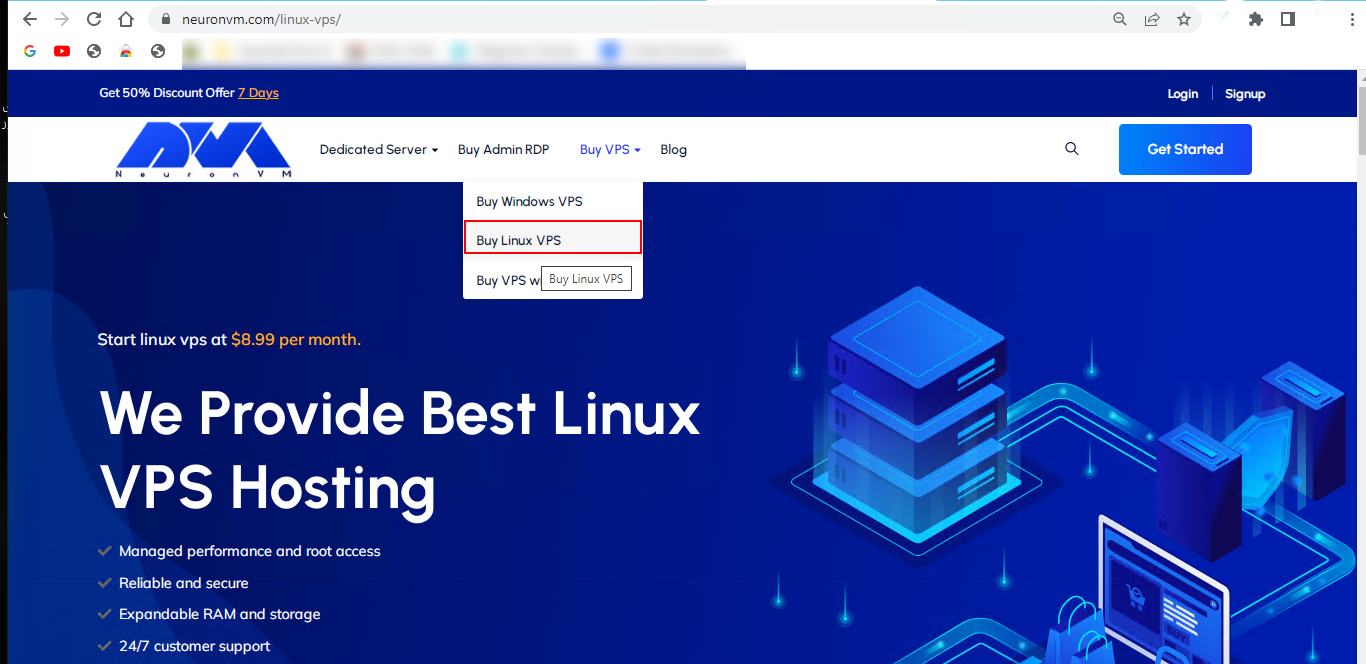
    neuronvm buy linux vps

    Now you can scroll down and choose your preferred plan to buying Linux VPS:
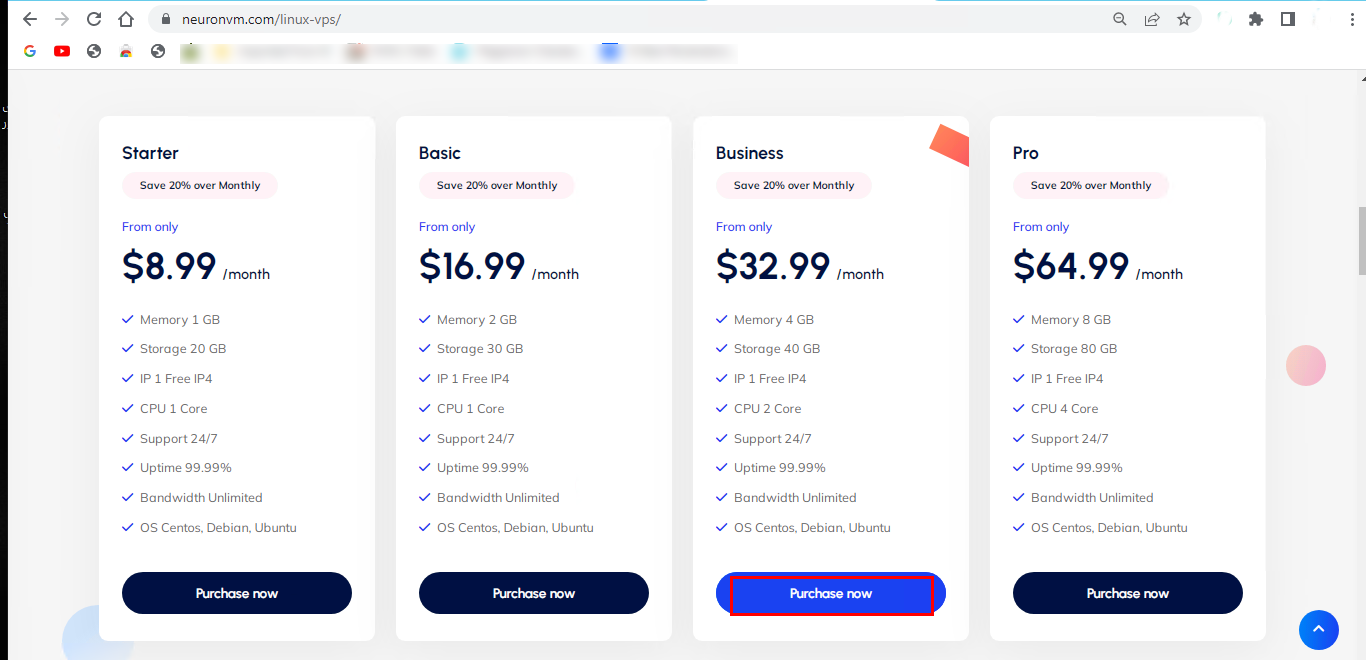
    Linux vps plans

    On this page, you can check the plan that was chosen. Here you can enter your Promo Code to get a great discount:
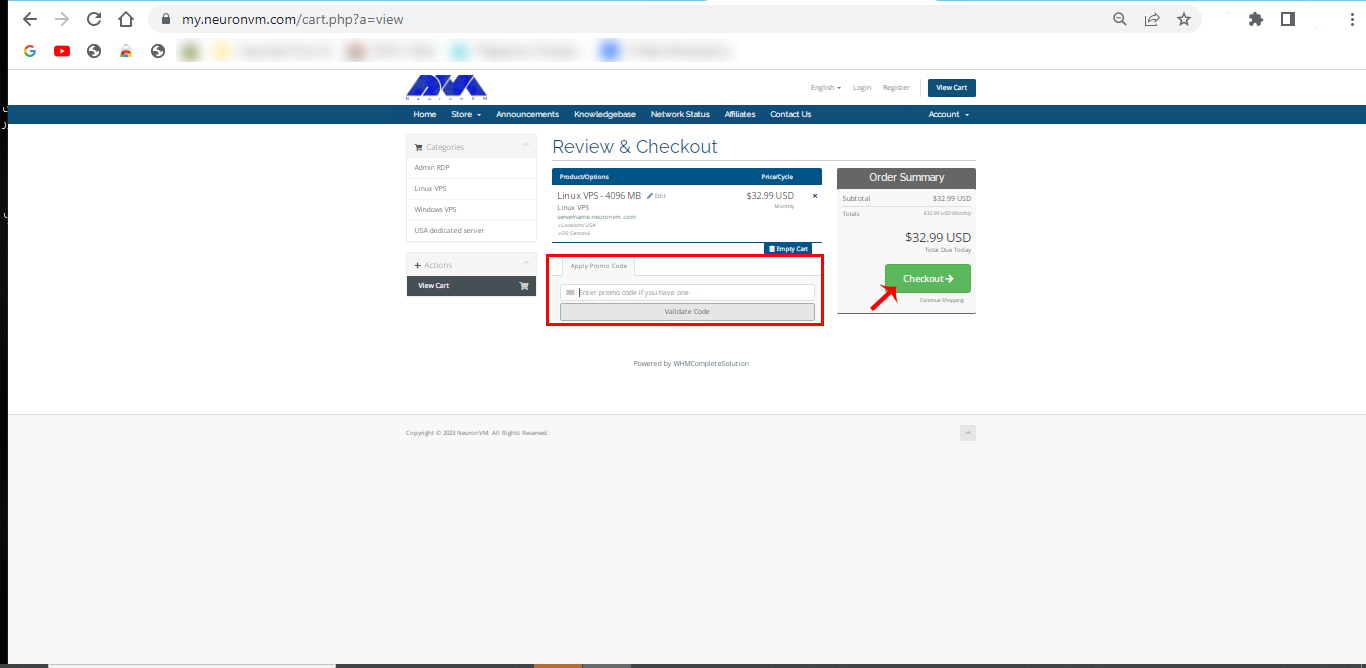
    neuronvm discount page

    In this section, you should sign in by entering your personal information or if you have an account, just click on Already Registered and enter your email and password. Press Login.
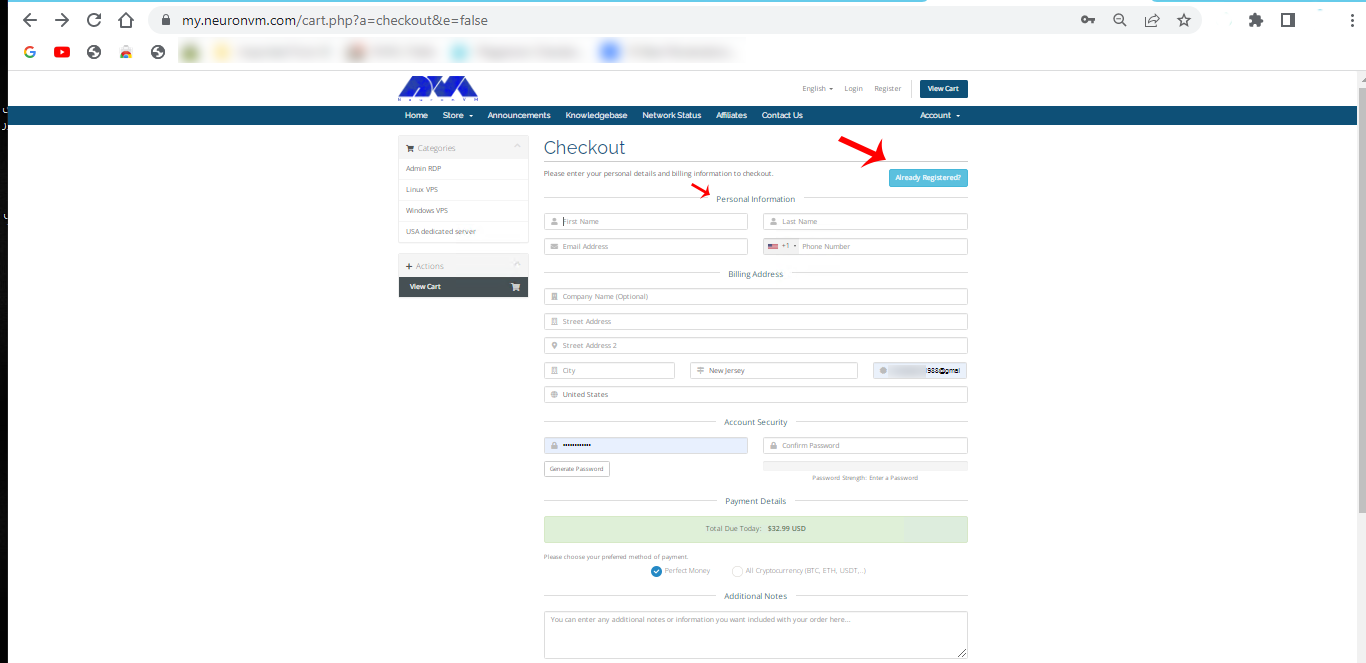
    signing page of neuronvm

    You can write additional notes (this part is optional) and choose the payment method. Click on Complete Order.
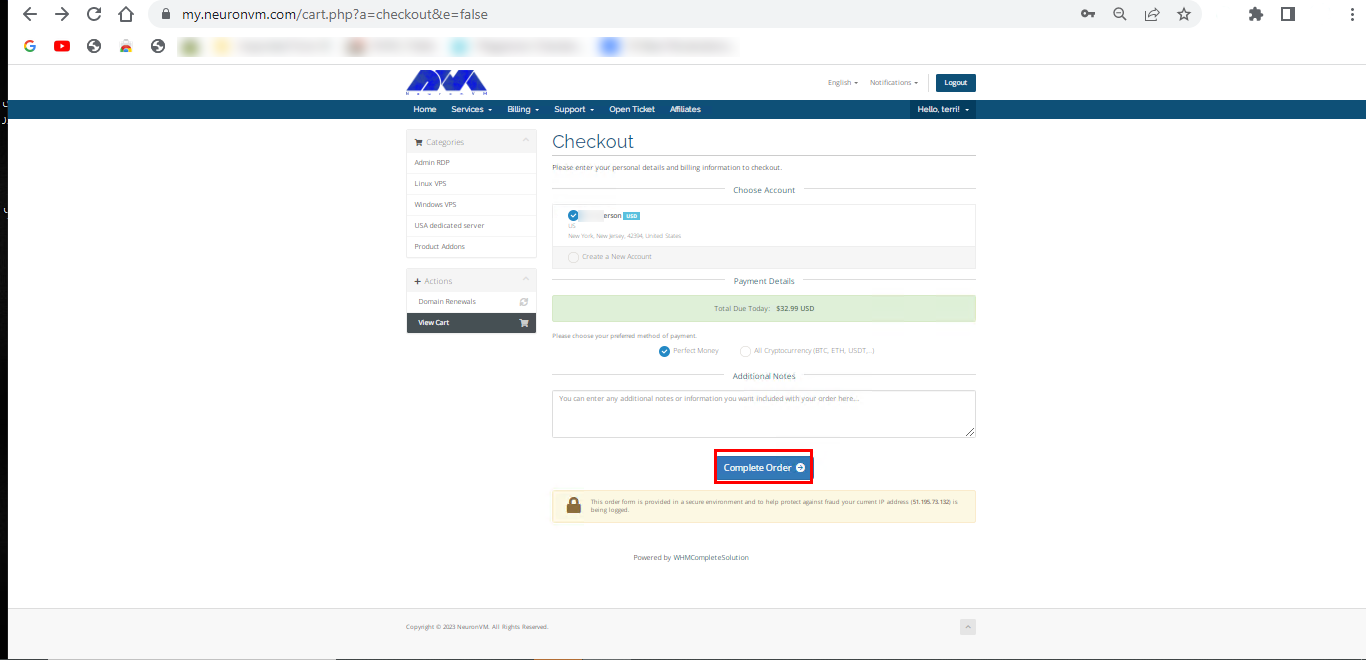
    compelet payment process

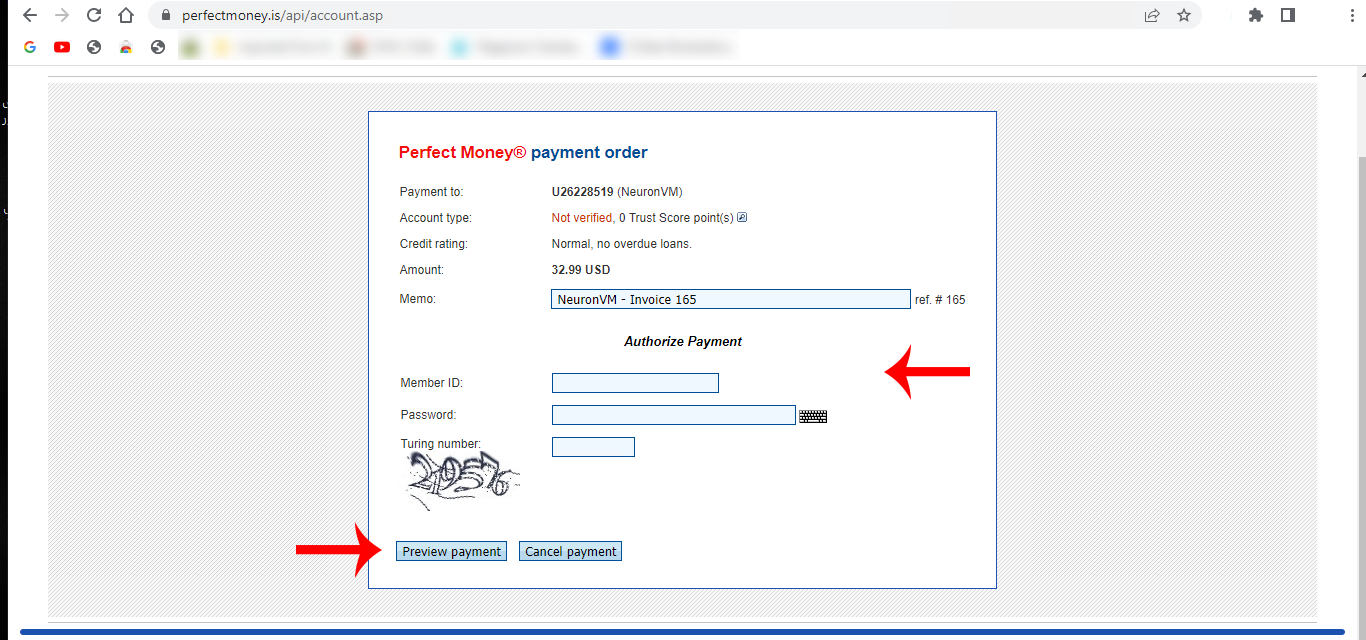
    Here the chosen method is Perfect Money. Finally, complete the payment process and enjoy your discount.

    Additional Cost-Saving Strategies for Linux VPS Users

    Cost-saving strategies for Linux VPS users can help optimize your virtual private server’s performance and reduce expenses. Here are some additional strategies to consider:

    You can use open-source software. Whenever possible, choose open-source software over proprietary alternatives. This can save on licensing costs and often results in more efficient use of resources.

    Some VPS providers offer discounts for long-term contracts. If you’re sure about your server needs, commit to a longer contract to save money.

    If you need a GUI on your VPS for certain tasks, use lightweight desktop environments like XFCE or LXDE instead of heavy-duty environments like GNOME or KDE.

    Use caching mechanisms such as Redis or Memcached to reduce database and website loading. Caching can significantly improve website performance while reducing server resource consumption.

    If you are using a database server, optimize your queries and indexing to reduce database load. Use database performance monitoring tools to identify bottlenecks.

    Configure firewall rules to limit incoming and outgoing traffic to only what is necessary. This can help reduce data transmission costs and improve security.

    Periodically check and remove any unnecessary software or services running on your VPS. This can free up resources and reduce potential security risks.

    Compare VPS hosting providers to find the most cost-effective option for your needs. Pricing can vary significantly between providers, so it’s worth shopping around. It is recommended to check out the NeuronVM Website. The affordable and impressive prices of this site will definitely attract your attention. Along with its affordable services, NeuronVM also provides professional support and updates for its users.

    Conclusion

    To maximize the cost-saving benefits of buying Linux VPS with discounts, it’s essential to research and compare offers from different hosting providers, understand the terms and conditions of the discounts, and choose a plan that aligns with your specific hosting needs and budget. Additionally, consider your long-term hosting strategy to ensure that the chosen discount plan remains cost-effective over time.
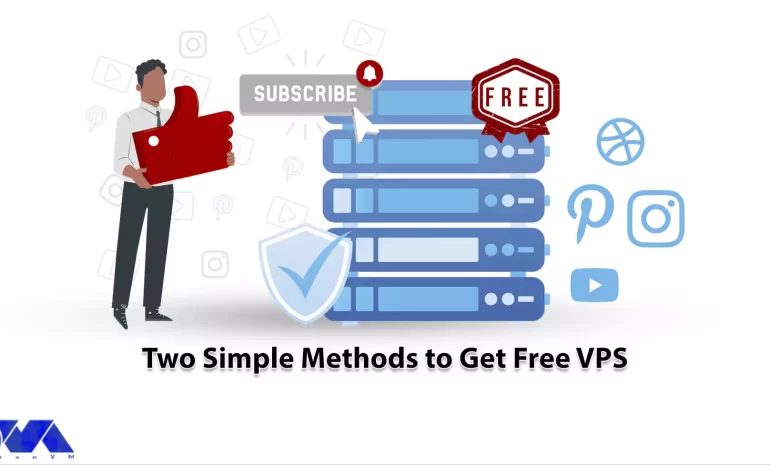

  • Two Simple Methods to Get Free VPS

    Two Simple Methods to Get Free VPS

    Today’s world offers many possibilities related to technology. One of these remarkable technologies is VPS servers. These servers are very practical and have provided many possibilities for users and business owners. This has caused various companies and sites to appear in this field and provide various services related to Virtual servers. Our website is also one of these providers, which in turn, with the help of a professional team, tries to provide Windows VPS or Linux VPS servers with the most up-to-date facilities for its users. NeuronVM aims to provide services and wants to be one of the best providers that keep its users satisfied in all aspects. The good news is that you can get free VPS servers using a few simple methods. So, stay with us until the end of this article.

    What is VPS?

    A Virtual Private Server (VPS) is a type of hosting service that combines the affordability of shared hosting with the control and flexibility of a dedicated server. It’s a popular choice for individuals, businesses, and developers who require more control over their hosting environment than what shared hosting can offer.

    To explain more clearly, VPS is a virtual server. Physical servers are divided into several virtual servers using virtualization technology. Each virtual server operates independently and has its own resources including CPU, RAM, storage, and operating system. These virtual servers are isolated from each other, which means that performance or problems on one VPS will not affect other similar physical servers.

    What Is VPS?

    Tip: You can get more information by reading different articles about VPS services and How to install VPS on the NeuronVM blog.

    How You Can Get a Free VPS Server?

    Getting a free VPS (Virtual Private Server) can be challenging, But, there are a few hosting providers that offer free VPS hosting. One of these providers is NeuronVM. Here are two ways you can potentially get a VPS server.

    Getting Free Linux VPS Through Subscribing and Following

    A Linux Virtual Private Server is a virtualized server running a Linux-based operating system. It provides users with a dedicated portion of a physical server’s resources, such as CPU, RAM, and storage, while still sharing the underlying hardware with other VPS instances on the same physical server. Linux VPS hosting is a popular choice for individuals and businesses looking for a cost-effective and flexible hosting solution.

    You can even use a Linux VPS hosting server just for a personal blog dedicated to your hobbies. Or if you are looking to design and develop a website for your business, a Linux virtual server will be suitable for you. People who have high traffic on the site or businesses that want more customization and development can benefit from these servers.

    Now, you can use NeuronVM’s free Linux VPS service to test speed and exceptional services without paying any money. All you have to do is refer to the YouTube channel and subscribe to it. Then introduce our page to 10 people so that you can benefit from our free Linux VPS servers for one month. So don’t waste your time and get your VPS!

    methods to get free VPS

    Getting Free Linux and Windows VPS Through Social Media

    There is another way you can get free Linux or Windows VPS. There are providers who claim to offer virtual servers, but this is challenging. Caution should be exercised as many of these attractive offers may come with restrictions or hidden fees. This is the only NeuronVM site to get a free one-month Linux VPS and Windows VPS subscription in a simple way:

    To get free Linux VPS or Windows VPS services, you can simply follow and subscribe to our Twitter, Instagram, YouTube, and Facebook pages at the same time. Then take advantage of the updated servers and services provided with them.

    Some Significant Benefits of Using Free VPS

    Using a free Virtual Private Server (VPS) can offer several benefits, especially for individuals or small businesses with limited budgets. However, it’s essential to be aware of the limitations and potential risks associated with free VPS services. Here are some significant benefits:

    • The most obvious advantage is that free VPS hosting requires no initial or ongoing financial commitment. so it is affordable.
    • Free VPS hosting provides a great platform to learn and experiment. You can practice server administration, web development, and other IT skills without the risk of losing money if something goes wrong.
    • This hosting service can be used to create testing and staging environments for your web applications. This helps you identify and fix problems
    • Web developers can use free VPS instances to develop and test websites and applications before launching them on a production server.
    • Free VPS services can use as an additional backup location for important data. You can also use it as temporary storage for large files.
    • If you have a low-traffic website or blog, This Server can be enough to host your content without the need for paid hosting plans.
    • If you have personal websites, blogs, or applications that do not generate significant traffic, a free VPS can be a good choice.

    Conclusion

    In summary, free VPS hosting can be a viable option for specific use cases, but it is essential to assess your needs and consider the limitations. It is also necessary to invest time and effort in managing and securing your server effectively. For critical or high-traffic projects, a paid VPS or cloud hosting service with better resources and support is usually a more reliable choice. This article was prepared to inform you about the free services provided by the NeuronVM website. GoodLuck!

  • Get Instant Activation with A Cheap Windows 10 VPS

    Get Instant Activation with A Cheap Windows 10 VPS

    Using Windows 10 VPS can help you access all Windows-activated license features. Also, Windows VPS hosting is popular among businesses and individuals who require a Windows-based environment for their applications but do not want the expense and management overhead of a dedicated physical server. It provides a flexible and scalable solution for hosting Windows-based services. Here, you are going to learn about Windows 10 VPS and find out how to get instant activation with cheap Windows 10 VPS.

    What Is Windows 10 VPS?

    A Windows VPS (Virtual Private Server) is a virtualized server environment that runs the Windows operating system. It is a type of hosting service that allows users to have dedicated access to a virtualized portion of a physical server, which runs a Windows operating system.

    Windows 10 VPS is especially useful for businesses and individuals who need a Windows environment but don’t want the expense and maintenance associated with physical hardware. It allows users to harness the power of Windows 10 while benefiting from the flexibility and cost-effectiveness of virtualization and cloud computing.

    Overall, Windows 10 VPS offers flexibility, cost savings, and the ability to run Windows-specific software in a virtualized environment. However, the specific benefits can vary depending on the hosting provider and the configuration you choose, so it’s important to carefully evaluate your requirements and choose a provider that meets your needs.

    What are the Important Benefits of Windows 10 VPS?

    Windows 10 VPS offers several important benefits for users and businesses, making it a popular choice for various applications. Here are some of the key advantages:

    – Windows 10 VPS is more cost-effective than dedicated servers since you share physical hardware resources with other users.

    – This version of Windows VPS runs the Windows 10 operating system. This server provides a familiar environment for users who are accustomed to the Windows ecosystem.

    – Windows 10 VPS can be easily scaled up or down to meet your changing resource requirements.

    – VPS hosting allows users to access their virtual server remotely from anywhere with an internet connection.

    – While Windows 10 VPS shares physical hardware with other users, it typically provides dedicated resources (CPU, RAM, and storage) to each virtual server.

    – Windows 10 VPS hosting often includes robust security features, including firewalls, intrusion detection, and regular security updates.

    – Users have a high degree of control and customization over their Windows 10 VPS environments.

    – Most VPS hosting providers offer backup and disaster recovery options. These options allow you to protect your data and quickly recover in case of unexpected events.

    – You can monitor and manage your Windows 10 VPS resources using control panels and management tools.

    – It offers 24/7 technical support. Windows 10 VPS ensures that you can get assistance whenever you need it, helping to minimize downtime and resolve issues promptly.

    Instant Activation of Windows 10 VPS on NeuronVM

    Windows 10 VPS is one of the most practical and popular services offered by different providers. NeuronVM is one of these great providers that tries to serve various up-to-date VPS and Dedicated services to the users. Here we want to introduce you to how to order an urgent cheap Windows 10 VPS service, so check the following steps carefully:

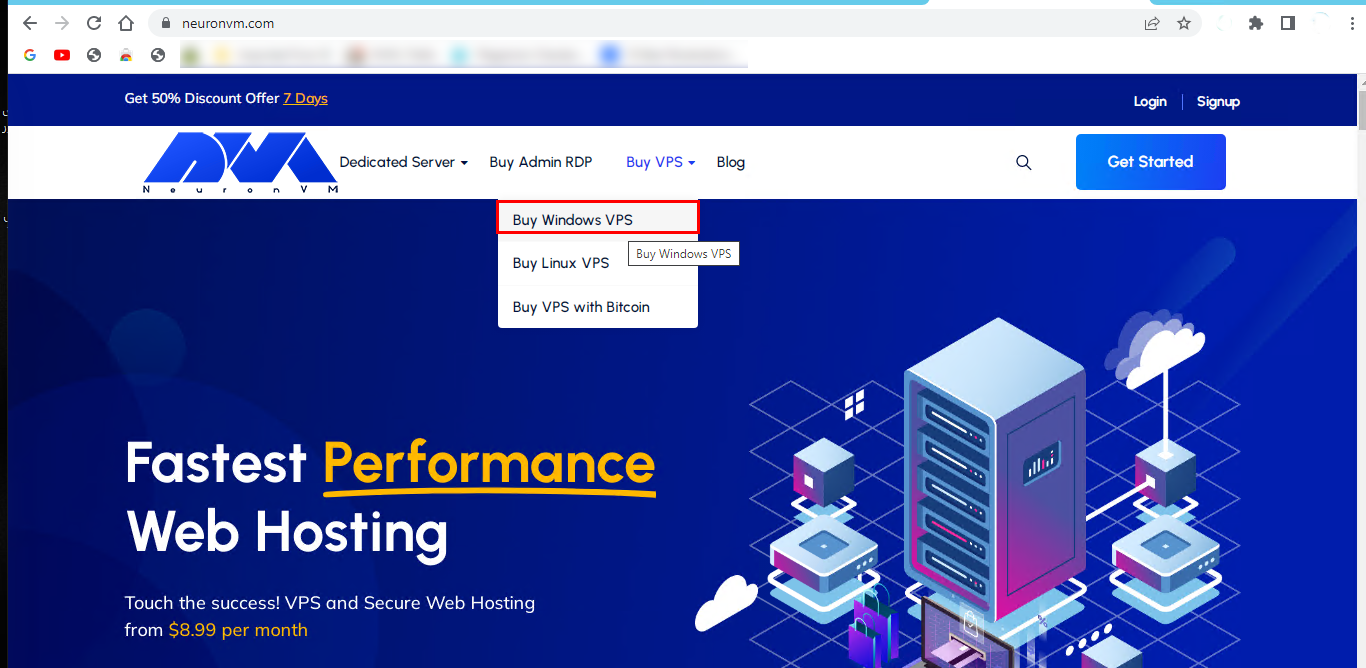
    1- First, you should refer to the main page of NeuronVM. Click on the Buy VPS icon, and select Buy Windows VPS :

    windows vps main page

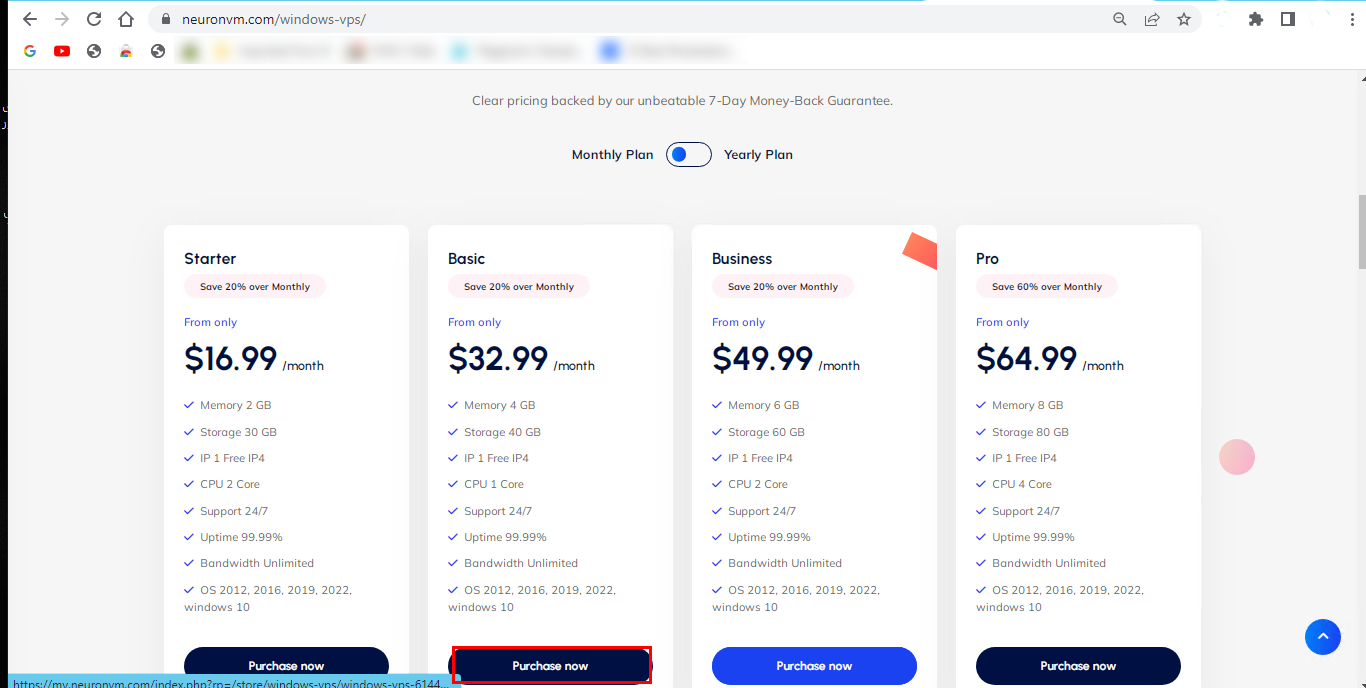
    3- Scroll down and select the most proper plan suited to your needs:

    plans for windows vps

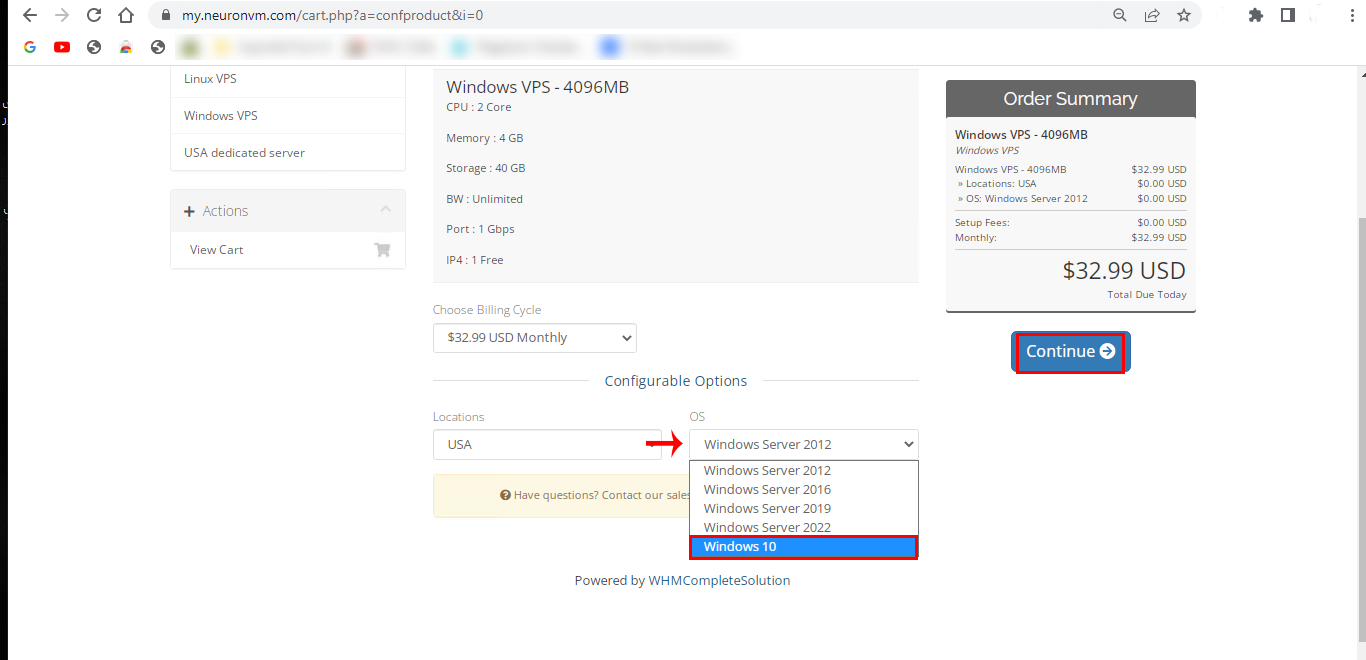
    3- Then you will be directed to the next part. You can choose the Windows 10 option among the other operating systems and also choose your Location. Press Continue.

    configuration of windows vps

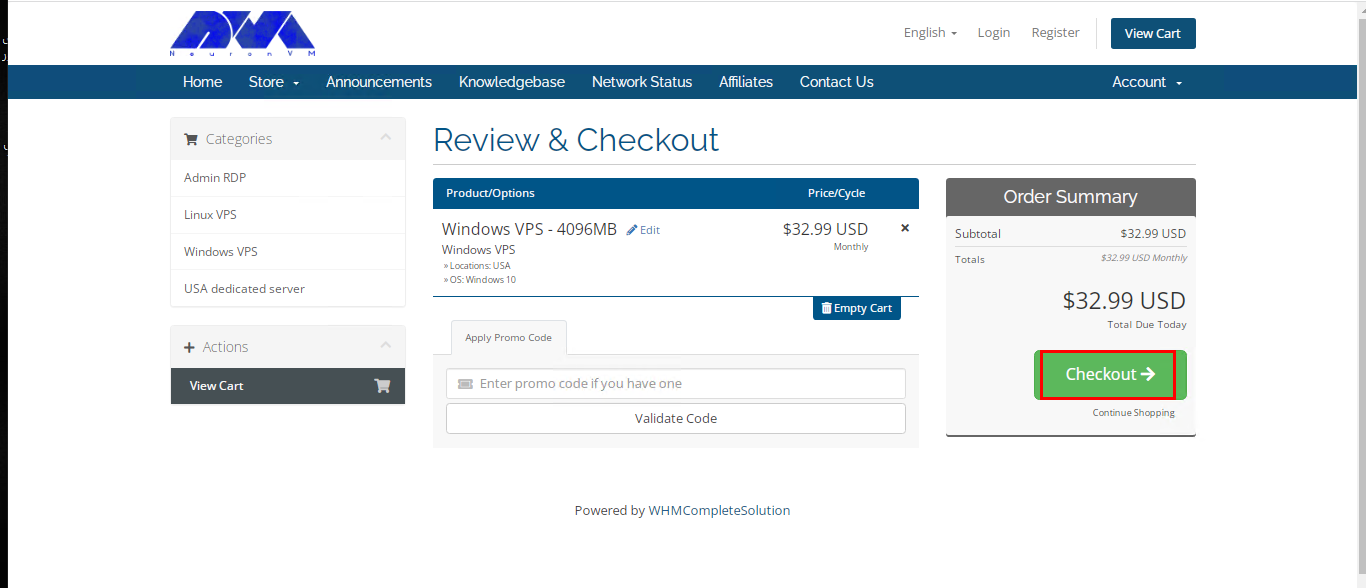
    4- Here you can review the details related to the selected service and click on the Checkout button:

    Note: You can enter the Promo Code in the related box to get a good discount:

    get instant windows 10 vps from neuronvm

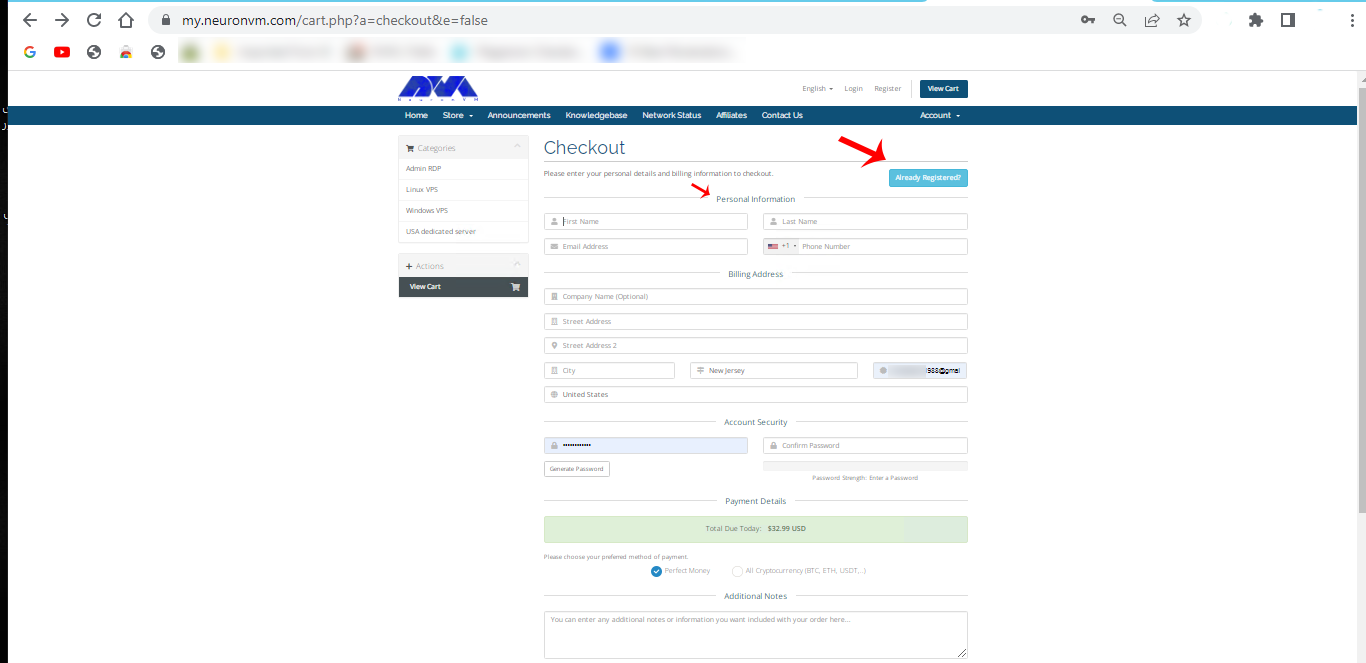
    5- This section will be displayed for you if you have not yet registered on the page. So, fill in the required items and register, or if you have already registered, press the blue button:

    signing page of neuronvm

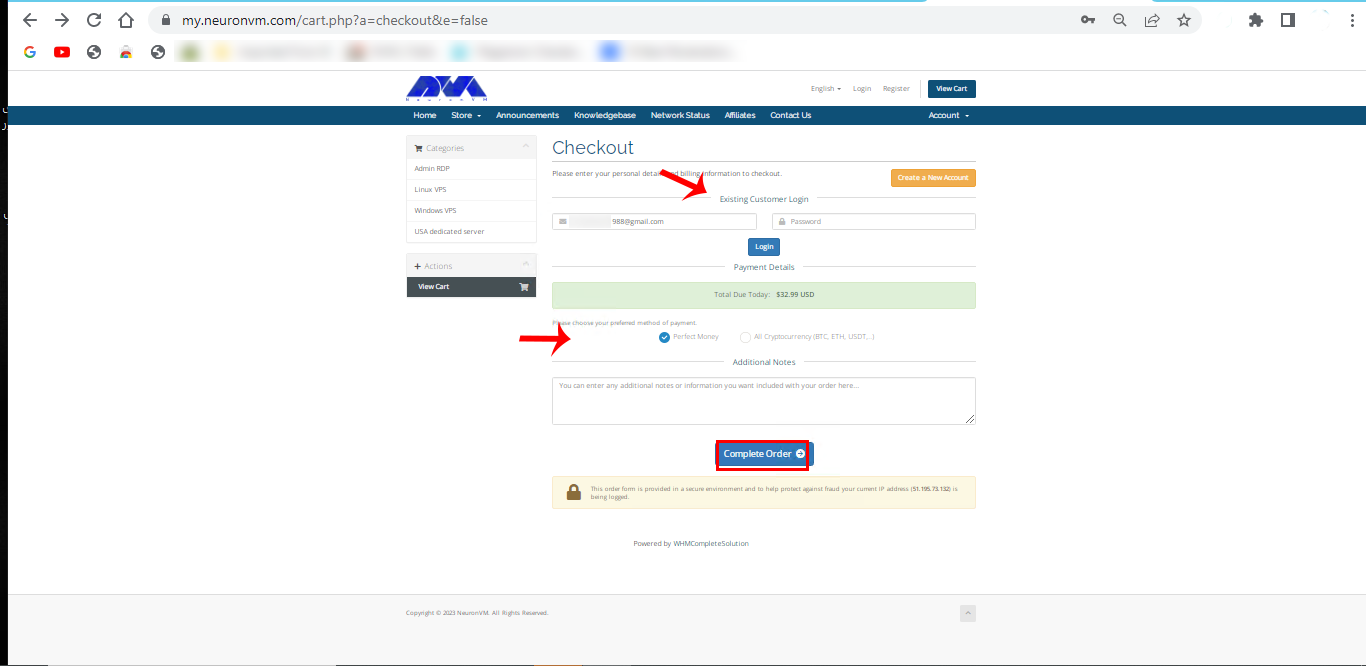
    6- Enter your email and password then press Login. Here you can choose the payment method and add any additional notes if needed. Press complete Order.

    compelte order to buy windows vps

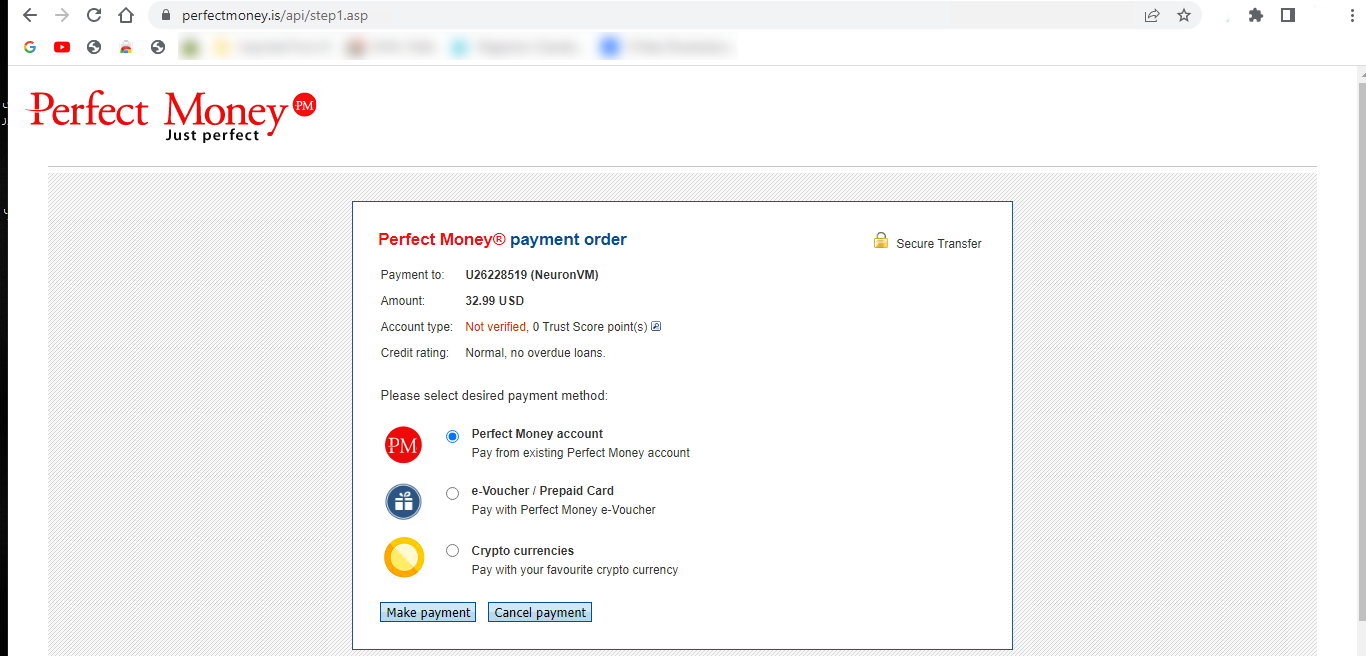
    7- You can see the payment page mark the proper option and press Make Payment.

    payment section

    8- Finally, complete your order and fill out the payment information in the second part.

    complete the payment section

    That’s it! You successfully pass the levels to buy Windows 10 VPS. You will receive related information about the purchased service through your email.

    How to Access to Windows 10 VPS

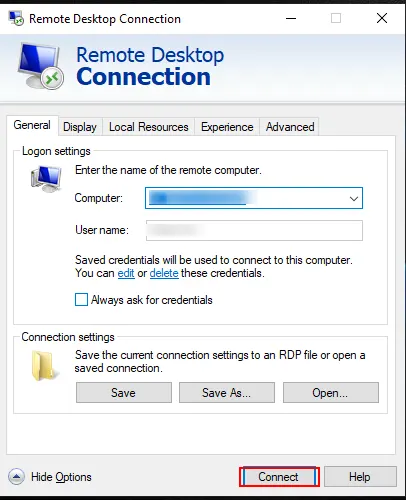
    Now that you have your own Windows 10 VPS, you can activate it on your system. Just type remote desktop in the taskbar search box. You will encounter the remote desktop window. So, enter your computer name and username then insert the password. Press Connect.

    windows 10 vps

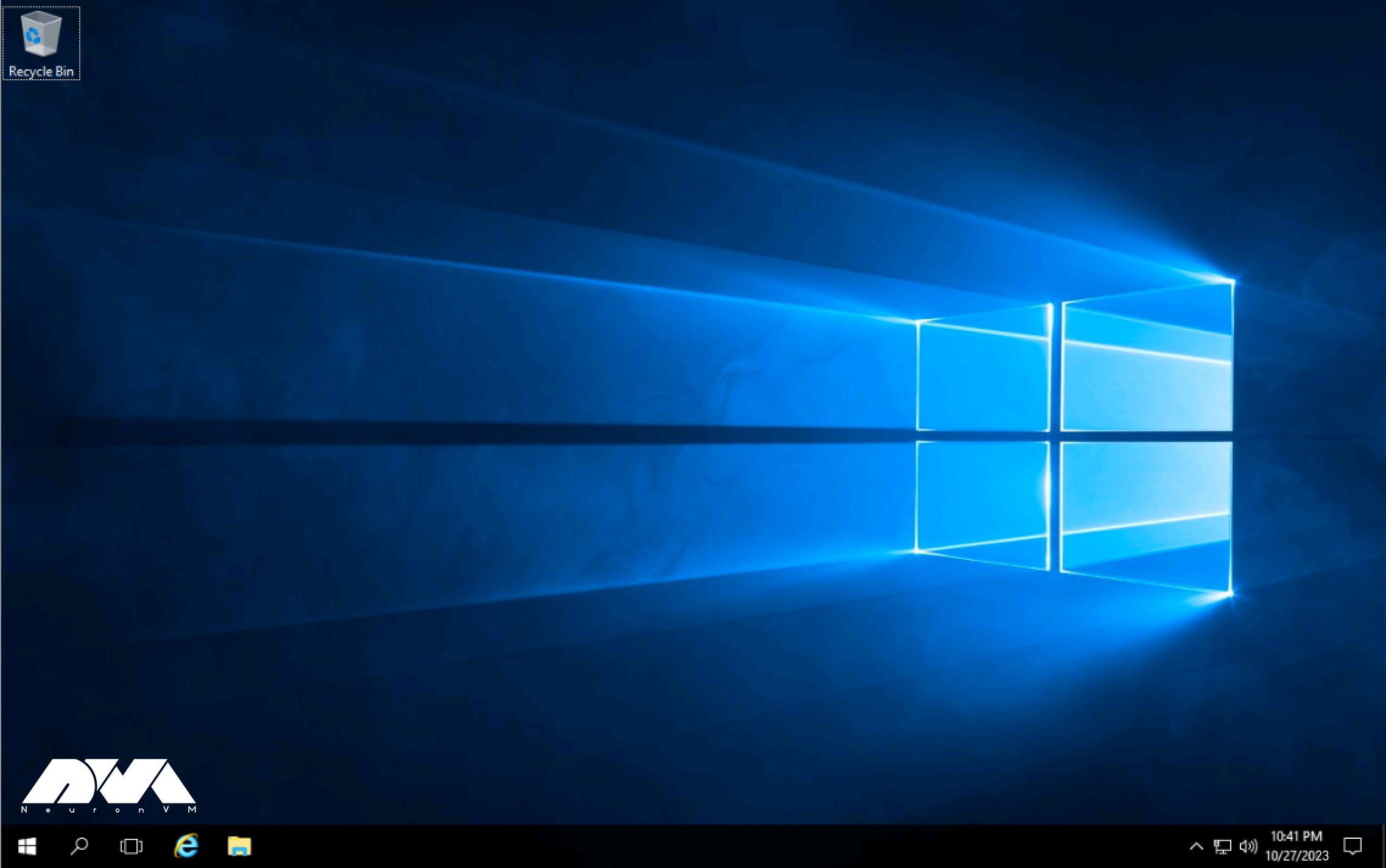
    to be directed to the Windows 10 environment.

    windows 10 environment

    Conclusion

    When selecting a Cheap Windows 10 VPS provider, consider factors such as server location, pricing, performance, customer support, and the specific Windows 10 version they offer. It is recommended to visit the websites of the providers or conduct online searches for the most up-to-date information and user reviews to make an informed decision. Here you figured out some information about Windows 10 VPS and learned how to get an instant activation. GoodLuck!

  • The Benefits Of Buying VPS With Ethereum

    The Benefits Of Buying VPS With Ethereum

    Are you looking for a fast and hassle-free way to purchase VPS hosting? Do you want to enjoy safe shopping without restrictions? So focus your attention on digital currencies like Ethereum. Follow this article to find out the benefits and how to do this. Meanwhile, NeuronVM has tried its best to provide users with the best facilities in the field of VPS hosting purchases using currencies such as Ethereum. Let’s find out what is the benefits of buying VPS with Ethereum.

    What is Ethereum (ETH)?

    Ethereum is a decentralized, open-source blockchain platform that was created to enable the development of decentralized applications (DApps) and smart contracts. It was proposed by Vitalik Buterin in late 2013, and development began in early 2014, with the network going live on July 30, 2015.

    Ethereum’s flexibility and programmability have made it a popular choice for developers and organizations looking to create blockchain-based solutions for various industries. It has played a pivotal role in the growth of the decentralized finance (DeFi) sector, non-fungible tokens (NFTs), and many other blockchain-based innovations.

    You can use Ethereum to purchase Virtual Private Servers (VPS) from certain hosting providers like NeuronVM that accept cryptocurrency as a payment method.

    What Is Ethereum?

    What are the Key Aspects of Ethereum?

    To have a better understanding of Ethereum, let’s examine some important aspects of this popular cryptocurrency:

    • Constant Development: Ethereum has a vibrant developer community constantly working on improving the platform. Ethereum has undergone several upgrades and hard forks, aiming to improve scalability, security, and sustainability.
    • Ethereum Virtual Machine (EVM): The Ethereum Virtual Machine is a runtime environment that executes smart contracts on the Ethereum network.
    • Smart Contracts: One of the most significant innovations introduced by Ethereum is the concept of smart contracts. Smart contracts are self-executing contracts with the terms and conditions of the agreement directly written into code.
    • Blockchain Technology: Like Bitcoin, Ethereum operates on a blockchain, which is a distributed ledger that records all transactions across a network of computers.
    • Decentralization: Ethereum, like other cryptocurrencies and blockchain networks, is decentralized, meaning it is not controlled by a single entity, government, or organization.
    • Ether (ETH): Ethereum has its native cryptocurrency called Ether (ETH), which is used to pay for transactions and computational services and as a store of value.

    What Are the Significant Benefits of Buying VPS By Ethereum?

    Buying a Virtual Private Server using Ethereum, a cryptocurrency, can offer several benefits, especially if you value privacy, security, and decentralization. Here we will analyze some benefits of usingEthereum to buy VPS.

    Benefits of Buying VPS By Ethereum

    Having High Security by Purchasing VPS

    When buying VPS and aiming for high security, there are several important considerations and steps you should take to ensure the safety of your server. These steps are: Choosing a reputable VPS provider, Having a secure operating system, Implementing a firewall, Using SSH, Securing database access, Regular backups, Monitoring server logs, and so on.

    Ethereum transactions are secured using blockchain technology, making it difficult for unauthorized parties to tamper with your payment. When you buy a VPS with Ethereum, you can trust that your payment information is secure.

    Remember that security is an ongoing process. Regularly assess and update your security measures to adapt to evolving threats. High-security VPS hosting requires diligence and a proactive approach to protect your data and systems.

    The Advantage of Anonymity Using Ethereum

    Ethereum transactions can be relatively anonymous, as they don’t require you to disclose personal information. This level of privacy can be appealing to users who want to maintain anonymity while purchasing online services, including VPS hosting. In other words, Another advantage of using Ethereum can be anonymity and a layer of privacy. So when you buy a VPS host from a site like neuronvm, you can be sure of the anonymity and confidentiality of your personal information and payment details.

    Also, anonymity can enable individuals to express their opinions, thoughts, and ideas without fear of retaliation or judgment. This is especially important in situations where expressing dissenting or controversial views could lead to social, professional, or legal consequences.

    In research and surveys, anonymity can encourage more honest responses from participants, especially when dealing with sensitive or stigmatized topics. People may be more willing to share their experiences and opinions when they know their responses won’t be linked back to them.

    Lastly, We can say that anonymity can help reduce biases based on factors like race, gender, age, or social status when evaluating ideas or content. It allows people to focus on the content itself rather than the identity of the person presenting it.

    Decentralization option of Ethereum When Buying VPS

    When buying VPS for hosting applications or services that require a decentralized infrastructure, you can consider various options within the Ethereum ecosystem. Ethereum is a blockchain platform that supports smart contracts and decentralized applications (DApps), making it suitable for certain decentralized hosting and computing needs.

    Ethereum is decentralized and it means it’s not controlled by a central authority. When you use Ethereum to buy a VPS, you are supporting a decentralized ecosystem that operates without intermediaries, providing you with more control over your financial transactions.

    The Power of Global Accessibility By Ethereum When Buying VPS

    Ethereum is a global cryptocurrency, and its use is not restricted by geographical boundaries. You can use Ethereum to purchase VPS hosting from providers around the world, increasing your options and accessibility. While Ethereum itself doesn’t provide VPS hosting, it can indirectly impact the accessibility and availability of VPS hosting through various mechanisms and applications built on the Ethereum blockchain.

    Here’s how the Ethereum ecosystem can potentially enhance the accessibility of VPS hosting:

    • Decentralized Applications (DApps)
    • Smart Contracts
    • Tokenization
    • Payment Flexibility
    • Trust and Transparency

    It’s worth noting that while Ethereum can improve the accessibility and transparency of VPS hosting, it doesn’t directly provide hosting services. Users should conduct due diligence when choosing VPS providers to ensure they meet their specific requirements for performance, security, and support.

    Fast Transaction With Ethereum

    Ethereum, like many other blockchain networks, aims to provide fast and secure transactions. However, transaction speed on this currency network can vary depending on several factors. These are network congestion and the gas fee you’re willing to pay.

    Ethereum transactions tend to be faster compared to traditional banking systems. This may involve delays due to intermediaries and complex verification processes. This speed can be advantageous when you need to set up your VPS quickly.

    Some features that can help you have a faster transaction on the Ethereum network are: Using Ethereum wallets that have fast transaction options, Using Layer 2 solutions, Batch transactions, setting an appropriate gas limit, and so on.

    Why You Should Choose NeuronVM to Buy VPS With Ethereum?

    As mentioned before, not all hosting providers offer cryptocurrencies like Ethereum. Only a few of them have made it possible to pay with Ethereum, one of these providers being NeuronVM. This site has tried to open the way for you as much as possible and provide you with the possibility of an easy and fast VPS purchase.

    By choosing NeuronVM, you can experience high security, reliability, speed, 24/7 technical support, and communication with professional experts. With complete confidence in the quality of its products, this site also guarantees a 7-day money-back period.

    Conclusion

    Buying a VPS using Ethereum can provide benefits such as security, privacy, decentralization, and global accessibility. However, it’s essential to be aware of the potential downsides and ensure that you are comfortable with cryptocurrency transactions. Additionally, the availability of Ethereum as a payment option may vary among VPS providers. So it’s advisable to check with your chosen provider before making a purchase. Here we tried to get you familiar with this valuable crypto and the benefits of using Ethereum to buy VPS from a provider like NeuronVM.

  • The Ultimate Guide to Trading on Windows VPS

    The Ultimate Guide to Trading on Windows VPS

    Trading on Windows VPS offers numerous advantages over traditional trading setups. One of the key benefits is the ability to access your trading platform anytime, anywhere. Unlike a physical computer, a VPS is hosted in a data center, allowing you to log in remotely from any device with an internet connection. This means you can monitor and execute trades even when you are away from your home or office, ensuring that you never miss out on profitable opportunities. Additionally, a VPS provides you with a dedicated virtual environment, free from the distractions and limitations of a regular computer. This allows your trading platform to run smoothly and efficiently, without being slowed down by other applications or processes running on your device. In this guide, we will focus on trading on Windows VPS and explore its infinite world as we move along!

    Trading on windows VPS

    Why Windows VPS is an Ideal Solution for Trading?

    Trading on Windows VPS is the perfect option for traders due to a variety of reasons. Firstly, it offers reliability by providing a stable environment that eliminates interruptions and downtime typically experienced with shared hosting services. This ensures that traders can carry out their activities without any disruptions.

    Secondly, speed is crucial in trading, and Windows VPS delivers high network speeds and low latency. This allows traders to execute trades in real time without any delays, enabling them to take advantage of market opportunities promptly.

    In addition, accessibility is simplified with Windows VPS. Traders can access their trading platforms from anywhere and at any time through remote desktop access. Furthermore, Windows VPS provides a high level of customizability, allowing traders to install and run any desired trading software or indicators.

    Overall, Windows VPS offers a reliable, fast, secure, customizable, and scalable environment that makes it an ideal hosting platform for traders in need of powerful and dedicated resources for their trading operations.

    Trading on Windows VPS

    Choosing the Right Windows VPS Provider: Factors to Consider

    When it comes to selecting a Windows VPS provider, there are several crucial factors to consider. The first thing to keep in mind is reliability. Look for a provider that guarantees high uptime and has a proven track record of delivering stable services. Additionally, performance is paramount.

    Ensure that the provider you choose offers ample resources, such as CPU, RAM, and storage, to meet your specific needs. Pricing should also be considered, but be cautious of going for the cheapest option as it may compromise on quality. Another important factor is customer support.

    Opt for a provider that offers prompt and helpful assistance whenever you need it. Taking all these factors into account, we recommend you take a look at our services. With our reliable services, high-performance resources, competitive pricing, and dedicated customer support, NeuronVM strives to provide an exceptional Windows VPS experience.

    Optimizing Resources for Trading on Windows VPS: Best Practices

    Optimizing resources for trading on a Windows VPS requires following best practices to ensure optimal performance and efficiency.

    Firstly, it is crucial to choose a VPS provider that offers high-speed internet connection and low latency for real-time trading. Additionally, allocating sufficient RAM and CPU resources to run trading software smoothly is essential.

    Regularly monitoring and optimizing resource usage by closing unnecessary programs and services, as well as keeping the VPS environment free from malware and unnecessary files, will help maximize performance.

    Implementing these best practices will enable traders to execute trades swiftly and efficiently on their Windows VPS.

    Optimizing Resources for Trading

    Top Trading Platforms Compatible with Windows VPS

    There are several top trading platforms that are fully compatible with Windows VPS, providing traders with a seamless and efficient trading experience. These platforms combine robust features, advanced charting tools, and lightning-fast order execution capabilities to cater to the needs of both beginner and advanced traders.

    Popular examples include MetaTrader 4 and 5, cTrader, and NinjaTrader. With the compatibility of these platforms with Windows VPS, traders gain the advantage of uninterrupted connectivity, enhanced security, and the ability to trade anytime, anywhere.

    Top Trading Platforms to Trade on VPS

    Troubleshooting Common Issues

    When trading on a Windows VPS, it is not uncommon to encounter certain issues that may disrupt the trading experience.

    – One common issue is a slow or unresponsive VPS. This can be due to several reasons, such as insufficient RAM, limited processing power, or high network latency. To troubleshoot this, it is recommended to check the VPS specifications and ensure that they meet the trading platform’s minimum requirements.

    Additionally, optimizing the network settings, managing background processes, and ensuring adequate cooling can help improve performance.

    – Another issue traders may face is the disconnection of the VPS from the trading platform. This can be caused by unstable internet connections or issues with the VPS provider. Users should check their network stability, ensure all necessary ports are open, and contact the VPS provider for any potential server-side problems.

    Regularly monitoring and addressing these common issues will help ensure a seamless trading experience on a Windows VPS.

    Conclusion

    In conclusion, trading on a Windows VPS offers a multitude of advantages for traders seeking efficient, reliable, and secure solutions. With the ability to remotely access the VPS from any location and operate uninterrupted 24/7, traders can seize market opportunities swiftly and effectively. Windows VPS also provides a stable environment with high processing power, low latency, and optimal network connectivity, ensuring lightning-fast trade executions. Remember if you need a VPS, NeuronVM is here for you!

  • A Step-by-Step Guide to Finding the Best RDP Provider for Your Needs

    A Step-by-Step Guide to Finding the Best RDP Provider for Your Needs

    In our previous articles, we introduced you to RDP servers and explained how to use them. RDP servers with the advantage of remote control and monitoring provide you with more access and save you money and time. Now we want to make this article wider for you and introduce you to the advantages and other key factors by presenting a step-by-step guide to find the best RDP provider for your needs.

    How to Find A Good RDP Provider?

    Finding the best Remote Desktop Protocol (RDP) provider for your needs and buying RDP services involves evaluating several factors to ensure you select a service that meets your requirements in terms of performance, security, Reputation, and cost. Here’s a step-by-step guide to help you find the right RDP provider.

    Define Your Needs Before Any Action

    Before you start looking for an RDP provider, determine your specific needs. Ask yourself questions like:

    • How much budget can you spend on this?
    • How many simultaneous connections do you need?
    • What is the proper operating system to run your RDP on, (Windows or Linux)?
    • What level of performance and resources do you need?
    • Is security a priority?
    • Will you need strong support?
    Find A Good RDP Provider

    Detailed Research to Find the Best RDP Provider

    Start by researching RDP service providers. Look for reviews, testimonials, and recommendations from trusted sources and users’ comments. Some popular RDP providers include Microsoft Azure, AWS, NeuronVM, Google Cloud, and specialized RDP hosting providers. Here are steps to conduct comprehensive research on RDP providers:

    Start by compiling a list of potential RDP providers. You can do this through internet searches, online forums, and recommendations from colleagues. Then Determine your budget and Clearly outline your specific needs and objectives. You should look for reviews and testimonials from current or former customers. Now you can review the features and services offered by each provider.

    You should consider factors such as the operating systems supported, performance, security features, and scalability. Pay attention to security, it is very critical when it comes to remote access. Do research to compare the prices of plans and so many other researches to get the right decision.

    Checking the Reputation of RDP Providers

    Investigate the reputation of each provider. Analyze and keep tracking the comments and descriptions from customers to measure providers’ performance, reliability, and customer satisfaction. Pay attention to recent reviews to ensure accuracy. Note that the reputation of an RDP provider can impact the quality of service, security, and overall user experience.

    Research the provider’s history and background and assess the security measures. Don’t forget that a positive reputation will attract lots of users and is a measure of trust. When you’re dealing with RDP providers, you often need to entrust them with sensitive data and access to your systems. A provider with a good reputation is more likely to be trustworthy and less likely to misuse your data or breach your security.

    Assessing Features and Services of the RDP Providers

    This is another crucial point in finding a suitable RDP provider and you should pay attention and examine the features and various services that are offered by RDP providers. Consider factors like supported operating systems, performance metrics (e.g., CPU, RAM, bandwidth), scalability options, security features, and any additional services or add-ons to assess the value of these providers.

    Some of the RDP providers may offer additional features like file sharing, collaboration tools, or integration with other services. Assessing these extras can help you choose a provider that enhances your remote work capabilities.

    Also, assessing the features of RDP providers is essential to selecting the right solution for your remote access needs while prioritizing security, performance, compatibility, reliability, and user experience. It ensures that you choose a provider that aligns with your specific requirements and enhances your remote work capabilities.

    Assessing Features and Services of the RDP Providers

    Evaluating the Security Measures of RDP Providers

    Security is critical when dealing with remote access. Investigate the security measures implemented by the provider, including encryption protocols, two-factor authentication, firewall protection, and data center security. RDP allows users to access remote systems and data.

    If security measures are not in place, unauthorized users could potentially gain access to sensitive information, leading to data breaches and privacy violations. You should know that RDP is a common target for cyberattacks. Without robust security measures, attackers can exploit vulnerabilities to deliver malware, ransomware, or conduct other malicious activities on remote systems.

    Overall, security is essential for RDP providers to protect both the providers themselves and their customers from a wide range of threats, including data breaches, cyberattacks, and regulatory violations. Implementing robust security measures helps maintain the confidentiality, integrity, and availability of remote desktop services.

    Comparing the Prices of Different Providers

    Compare the pricing plans of different RDP providers. Pay attention to any hidden costs, additional fees, or discounts for longer-term commitments. Make sure the pricing aligns with your budget.

    Look at the different plans or tiers offered by the RDP provider. They may offer varying levels of resources, such as CPU, RAM, and storage. Consider the pricing model, whether it’s subscription-based, pay-as-you-go, or a one-time payment. Choose the one that aligns with your budget and usage patterns.

    Also, you can evaluate the amount of CPU, RAM, and storage provided in each plan. Ensure that the resources meet your performance requirements without overpaying for excess capacity you won’t use.

    By carefully considering these points, you can make an informed decision when comparing the prices of RDP providers and select the one that best suits your business or personal requirements.

    Testing the Performance of RDP Providers

    The performance of an RDP provider can significantly impact your remote working or server management experience. Here are several factors to consider when testing the performance of RDP providers:

    • Latency: Latency measures the delay between a user’s input and the corresponding action on the remote desktop.
    • Bandwidth: Adequate bandwidth is essential for transmitting data between the client and the remote desktop.
    • Connection Stability: A stable connection is crucial for uninterrupted work.
    • Image Quality: RDP should provide clear and crisp display quality. Test different resolutions, color depths, and multimedia content to evaluate image quality.
    • Performance under Load: Test how the RDP provider handles multiple concurrent users or heavy workloads. Assess performance degradation.
    • File Transfer: Assess the speed and reliability of file transfers between the local and remote systems.
    • Session Management: Evaluate features like session disconnect and reconnection, session sharing, and resource allocation for different users.
    • Scalability: Consider how well the RDP provider scales with your organization’s growth. Ensure it can handle an increasing number of users and resources.
    • Updates and Maintenance: Consider the ease of updating and maintaining the RDP solution, including patch management and software updates.

    Assessing the Customer Support

    The quality of customer support provided by RDP service providers can vary widely depending on the company and its specific offerings. When evaluating RDP providers for customer support, there are a number of things to consider, including communication channels, response time, documentation and resources, the level of knowledge and expertise, user reviews, trial period, and accessibility of the support team.

    It’s important to remember that customer support can be a crucial aspect of your decision when choosing an RDP provider, as technical issues or downtime can impact your business operations. Therefore, conducting thorough research and possibly reaching out to the provider’s support team with pre-sales questions can give you a sense of their level of commitment to customer service.

    Reading the Terms of Services of the RDP Provider

    Thoroughly review the terms of service to avoid any misunderstandings or contractual issues in the future. After conducting extensive research, carefully weigh the pros and cons of each provider. Choose the one that best aligns with your requirements, budget, and overall objectives.

    What Is the Impact of A Good RDP Provider For You?

    The great thing about reputable and qualified RDP providers is that they automatically create an account for you. As a result, you don’t need to worry about managing servers. All you have to do is choose a plan that gives you full control over the server and hardware and software components.

    Another thing is to choose a service that has good customer support and a good guide to help you solve any problems you may have. Therefore, the right choice will make you expand your business soon and enjoy a quality and hassle-free service.

    Conclusion

    Once you’ve considered all these factors, you should have a clearer vision of which RDP provider aligns best with your needs. Remember that the “best” provider can vary greatly depending on your unique requirements, so prioritize those aspects that are most crucial for your specific use case.

  • The Ultimate Guide to Buy RDP: Everything You Need to Know

    The Ultimate Guide to Buy RDP: Everything You Need to Know

    If you have read our previous articles, you must be familiar with the RDP server and know what advantages it brings to you. Here, we will try to provide an ultimate guide to buy RDP and introduce you to everything you need to know. Buying RDP is not a difficult task, but you should be careful to make your purchase at affordable prices. Some providers offer premium RDP servers at cheap prices. Choosing high-quality but low-cost servers is one of the priorities of users. You should know important things about servers and key points in choosing and buying RDP in order to make your purchase easily and confidently. Go ahead and enjoy an easy process to buy RDP!

    A Comprehensive Explanation of RDP

    RDP stands for Remote Desktop Protocol, and it is a proprietary protocol developed by Microsoft. RDP allows a user to remotely connect to and control another computer or server over a network connection. It is commonly used for remote administration, technical support, and accessing virtual desktops.

    A Comprehensive Explanation of RDP

    This platform is a network communication tool that enables a user to connect to and interact with a remote computer or server from a different location over a network, typically the Internet. It facilitates the remote control of the host system’s desktop, applications, and resources as if the user were physically present at the remote machine. Its security features, multi-platform support, and resource-sharing capabilities make it a valuable tool for professionals. Now, keep studying to get more!

    Why Buy RDP?

    You can provide remote input and display through network connections by using RDP and running it on the server. Now read on to find out why you should use RDP:

    – With the help of RDP, you will be able to save time. In other words, you can do things like download, update programs, or even backup and maintain any desktop program from just one system. So, time is saved, and you can focus on your other business matters.

    – With RDP, users will only wait for changes to be applied to their device page as resources are done for each application on the server. This makes RDP a popular hosting for applications with high amounts of bandwidth and processing power.

    – Everything is encrypted in RDP, so remote desktop connections are safe from hackers. So, if you buy an RDP server, don’t worry about your security.

    – If you have an RDP host, you can access your system from home or anywhere using a web browser. You can also access your device from any other system. This allows you to have complete monitoring and control of other devices remotely.

    – If you want to provide a reliable solution for your business, it will probably be expensive. But this is not true for RDP servers. Because you don’t have to invest in virtual servers hosting your own programs or pay to maintain your servers. On the other hand, employees can also access their desktop computers from their devices and save on hardware costs.

    – By using RDP there is no need to carry flash drives, and there is no need to install any software. Since everything is in one place, accessing your data and files is easy, as long as you have an internet connection.

    – You don’t need to worry about any configuration on your desktop or network. You just need to connect to your server.

    Types of RDP Available in the Market

    There are several types of RDP available in the market, and all are provided in NeuronVM, each with its own features and capabilities. Here are some of the most common types:

    • Windows RDP 10
    • Windows RDP 2012
    • Windows RDP 2016
    • Windows RDP 2019
    • Windows RDP 2022

    Factors to Consider Before Buying RDP

    When looking to buy Admin RDP, it’s essential to consider several key features to ensure that you choose the right server for your specific needs. RDP servers allow you to remotely access and manage a computer or server, making them a valuable tool for various purposes. Here are some key features to consider when you want to buy RDP servers:

    Factors to consider before buying RDP
    • Choose an RDP server that runs your preferred operating system, whether it’s Windows, Linux, or another OS. The choice of OS should align with your specific use case and software requirements.
    • Look for RDP servers that offer robust security features, including encryption, firewalls, and authentication mechanisms, such as multi-factor authentication (MFA).
    • The performance of the RDP server is critical. Look for servers with powerful CPUs, sufficient RAM, and fast storage (SSD recommended) to ensure smooth operation.
    • Evaluate the availability of remote management tools that come with the RDP server. These tools should simplify server administration and troubleshooting tasks.
    • Ensure the server has a reliable network connection with sufficient bandwidth for your needs.
    • Ensure compatibility with the devices and software you plan to use for remote access. RDP should be compatible with various client devices and operating systems.
    • Data protection is crucial. Check if the RDP server offers backup and recovery options, which can help you safeguard your data in case of unexpected issues.
    • Evaluate the total cost of ownership, including upfront costs, ongoing maintenance expenses, and any licensing fees for the RDP server software or operating system.

    There are a lot of other features that you have to consider when buying RDP or Admin RDP; here, we mentioned the most important ones.

    Choosing the Right RDP Provider

    Choosing the right Remote Desktop Protocol provider is essential to ensure secure and efficient remote access to your computers or servers. In this section, we will discuss three factors that should be prioritized when choosing a professional provider.

    The RDP service provider should include various payment methods. You can access all these payment methods from our website and have a safe and comfortable purchase. Of course, another important issue is to pay attention to the amount of services provided and their prices in an agency. Is the received service worth the money paid or not?

    For more information regarding the best RDP providers, refer to Discover the Best Affordable RDP Providers in 2023.

    How to Buy RDP Online

    Buying RDP online is not a challenging task, and you can go through this process successfully by following a few simple steps. We have previously presented articles in this regard, for example, How to buy Admin RDP with Perfect Money.

    Setting up and Configuring your RDP

    After you have prepared the RDP server you want, it is time to implement it on your system and make the relevant settings to run this platform.

    To setup RDP on your system, follow the steps below:

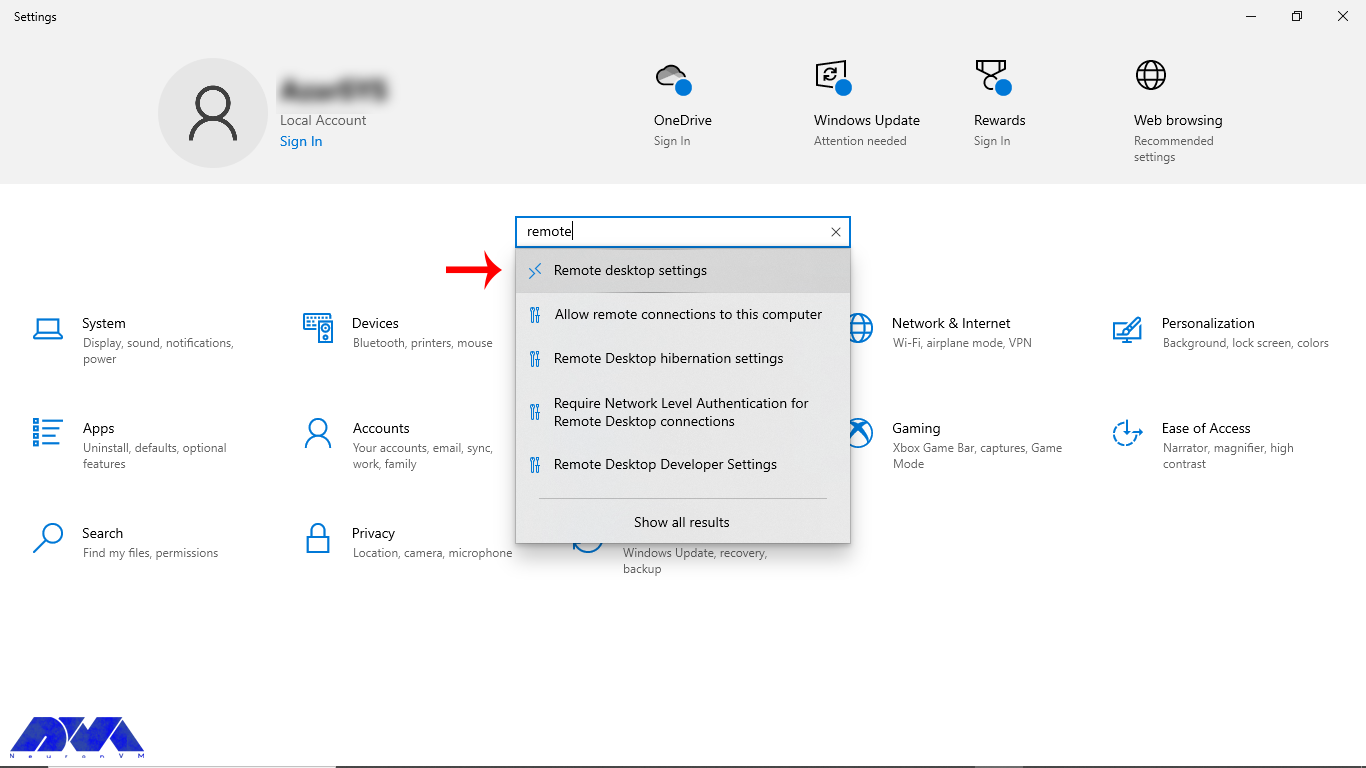
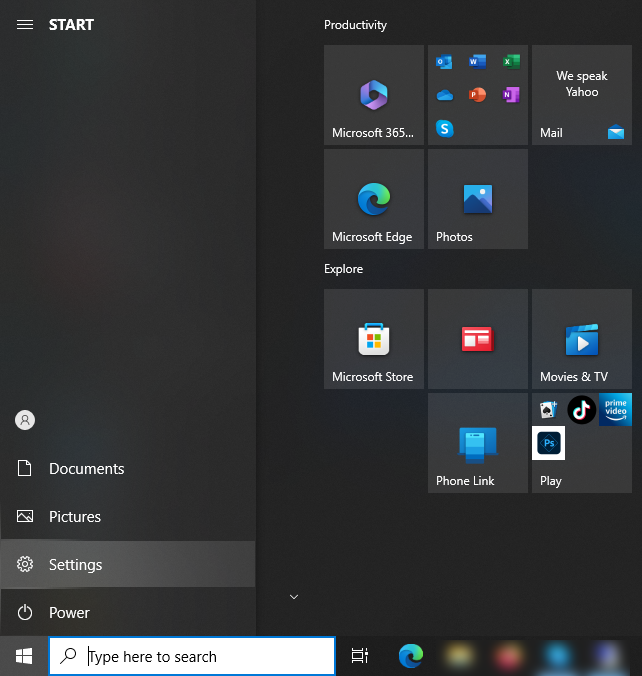
    1- Press Start on your desktop environment and click on the Setting icon on the left.

    configure RDP

    2- Choose the System group followed by the Remote Desktop item.

    remote desktop setting

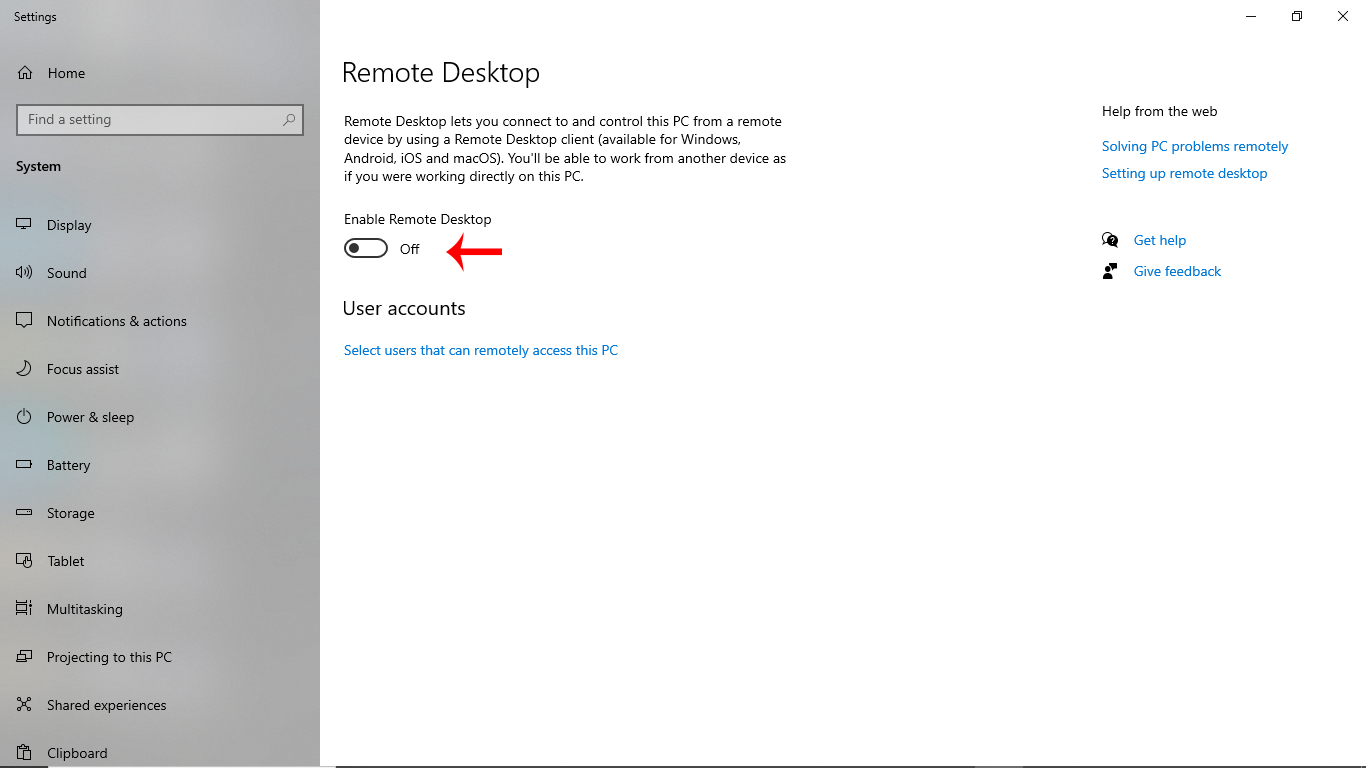
    3- You can choose the slide button to enable Remote Desktop.

    enable remote desktop

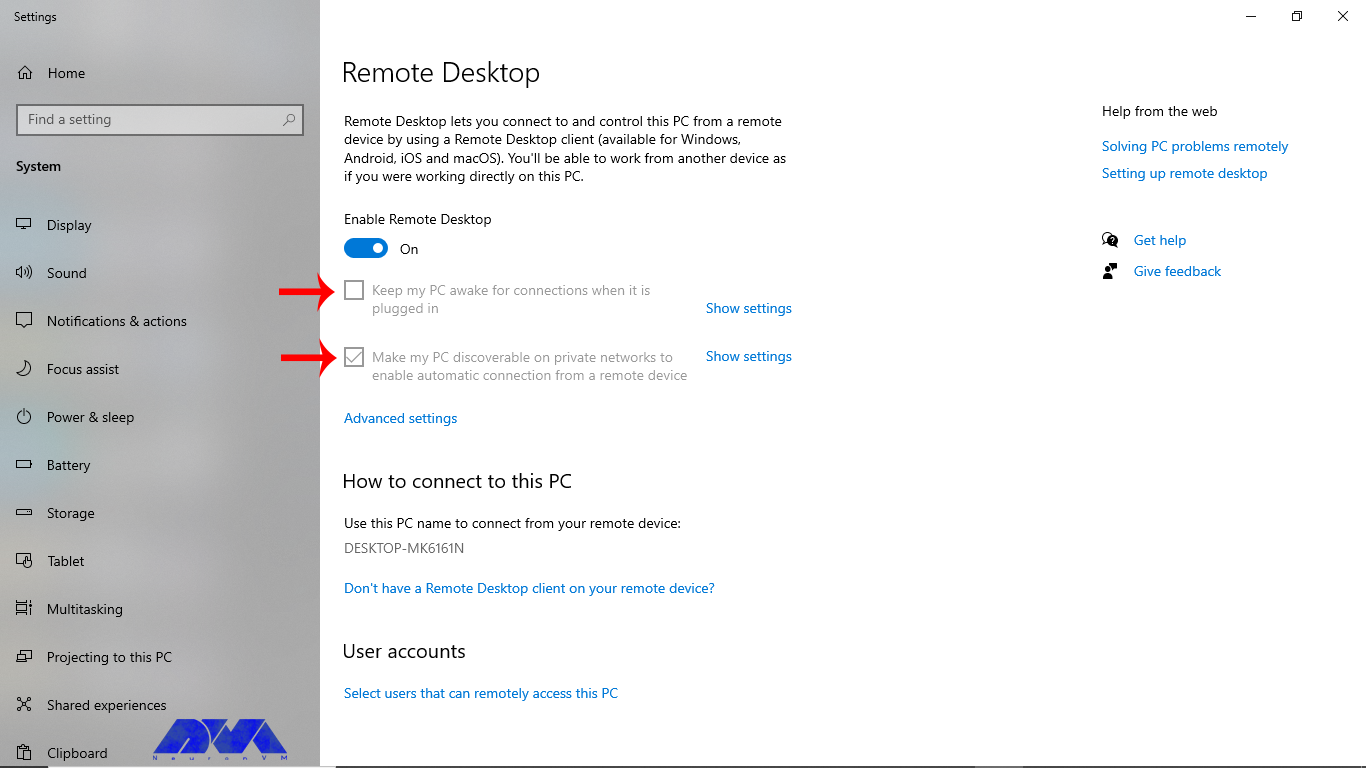
    4- Keep your device awake and discoverable to ease the connection, and then press Show Setting.

    make pc discoverable

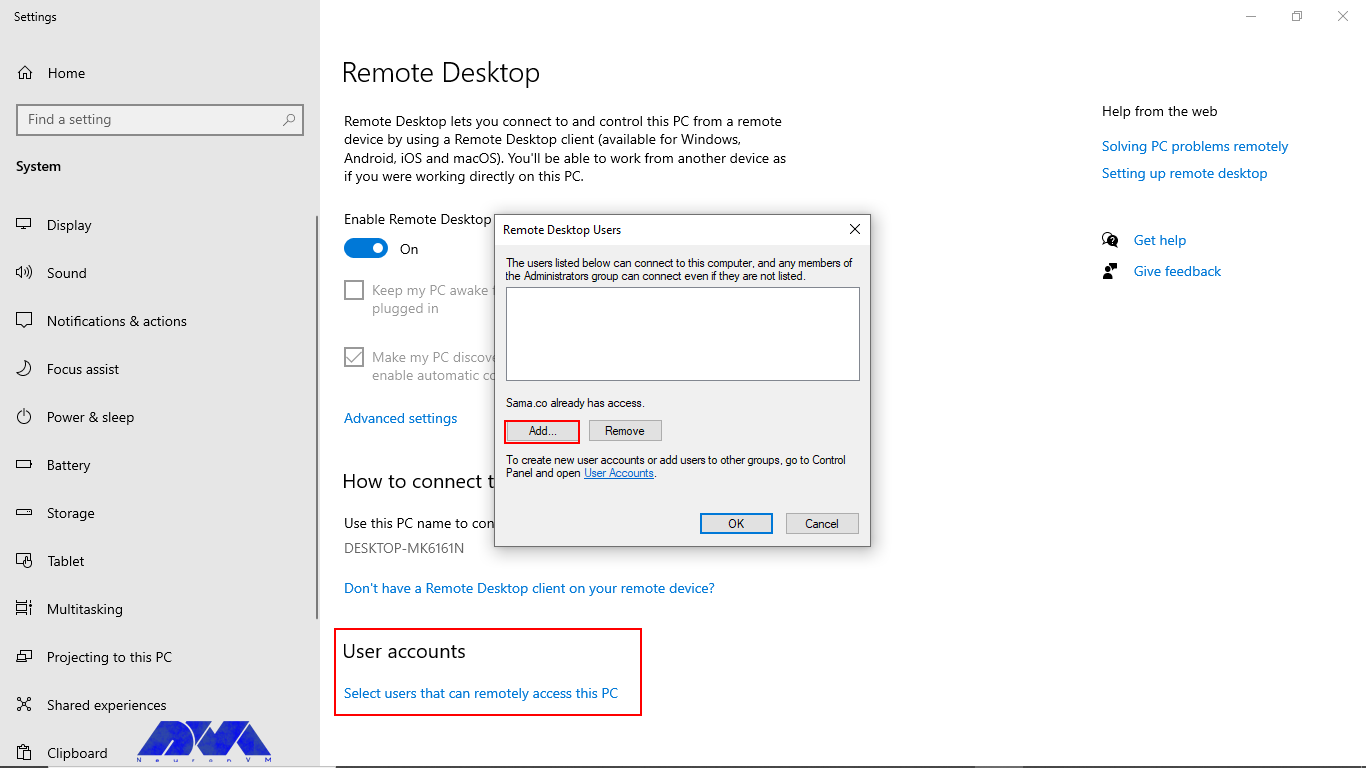
    5- Now, you can add the number of users you want to allow to connect remotely.

    add users for rdp connection

    Tip: The administrator group can access it automatically.

    6- Save and make note of the PC name under the part of How to connect to this PC.

    That’s it! Now you can use Your RDP server easily.

    Tips for Maximizing the Benefits of RDP

    Remote Desktop Protocol is a valuable tool for remotely accessing and managing Windows-based computers. To maximize the benefits of RDP, consider the following tips:

    Tips for maximizing the benefits of RDP

    – Security: Always use strong, complex passwords for RDP access. Also, you can enable Network Level Authentication (NLA) to add an extra layer of security. Use a VPN or firewall to restrict RDP access to trusted IP addresses.

    – Change Default Port: Consider changing the default RDP port (3389) to a custom port to reduce the risk of automated attacks.

    – Keep Software Updated: Keep both the local and remote computers updated with the latest security patches and RDP updates.

    – Limit Access Permissions: Only grant RDP access to users who need it. Or Assign the least privilege necessary to perform required tasks.

    – Use Network Level Authentication (NLA): NLA requires users to authenticate before establishing an RDP session, adding an extra layer of security.

    – Enable RDP Logging: Enable RDP logging to monitor who is accessing the server and for troubleshooting purposes.

    – Set Session Time Limits: Configure session timeout settings to automatically log out idle sessions to free up resources.

    – Optimize Network Connection: Ensure a stable and high-speed internet connection for smooth RDP performance.

    – Monitor RDP Sessions: Use monitoring tools to keep track of RDP sessions, including login/logout times and activities.

    – Backup and Recovery: Regularly back up critical data and system configurations to ensure you can recover in case of issues.

    – Disable Copy-Paste and Drive Redirection: In sensitive environments, consider disabling features like clipboard sharing and drive redirection to prevent data leaks.

    – Test and Document: Conduct thorough testing of RDP connections before deploying them in production.

    – Monitor for Anomalies: Setup alerting and monitoring for unusual or suspicious RDP activities.

    – Regularly Audit and Review: Periodically review and audit your RDP setup to identify and address any potential security weaknesses.

    What Are the Main Advantages to Buy RDP from NeuronVM?

    NeuronVM is one of the main providers that offer great and up-to-date services like RDP or Admin RDP, Cheap VPS, and so on. So, if you are looking for a secure and worry-free service provider with full support, NeuronVM is a wise choice. Let’s see what can be the significant advantages of buying RDP from NeuronVM:

    – You will have 24/7 professional support.

    – You can be sure about the security of your information because a lot of sensitivity has been spent on this matter.

    – There is a wide range of locations to choose from. (60+ Locations)

    – You will have the ability to pay with digital currencies like Bitcoin.

    – Unlimited bandwidth is another amazing advantage of RDP servers in NeuronVM

    – High-quality and affordable RDP prices

    – The ability to expand RAM and storage

    In What Cases Can RDP Be Used?

    RDP can be used in various scenarios and for different purposes, depending on the needs of users. These cases can be:

    • Remote administration by IT administrators to remotely manage and troubleshoot servers and workstations.
    • Telecommuting and Remote Work to help employees access their work computers from home or other remote locations.
    • Server Hosting and Data Centers in which providers use RDP to manage and maintain servers and virtual machines hosted in remote locations.
    • Remote Training and Collaboration for remote training sessions and collaborative work.
    • Software Development and Testing in which Developers can use RDP to access remote development and testing environments.
    • Security Monitoring to remotely access security cameras.
    • Monitoring systems and security appliances to observe and manage security incidents.
    • And Remote Access for Personal Use and personal computers and devices.

    Common Issues and Troubleshooting to Buy RDP

    Buying RDP services can raise various legal, security, and ethical concerns. Here are some issues you may encounter when buying RDP and potential solutions:

    1- RDP can be vulnerable to security threats if not properly configured or if you are purchasing services from untrustworthy sources.

    Solution:

    – Choose reputable RDP service providers with a track record of security.

    – Use strong, unique passwords and enable multi-factor authentication.

    – Regularly update and patch the RDP software and underlying operating system.

    – Restrict access to only trusted IPs.

    – Employ security software to detect and prevent unauthorized access.

    2- Using RDP means your data and potentially sensitive information are transmitted over the Internet. This could be intercepted or accessed by unauthorized parties.

    Solution:

    – Use secure, encrypted RDP connections.

    – Consider using a Virtual Private Network (VPN) in conjunction with RDP for an additional layer of security.

    – Be cautious about sharing sensitive information while using RDP.

    3- Some RDP service providers may not offer reliable uptime, customer support, or adequate resources.

    Solution:

    – Research and choose RDP providers with a good reputation and reliable service.

    – Look for customer reviews and testimonials.

    – Consider a trial period before making a long-term commitment.

    4- RDP services can have associated costs, which can add up over time.
    Solution:

    – Budget for RDP expenses.

    – Consider free or open-source alternatives if cost is a concern.

    Conclusion

    The specific features and requirements for an RDP server will vary depending on your use case and business needs. It’s important to thoroughly assess your requirements and choose an RDP server solution that is compatible with your goals and budget. Notice that while RDP is a versatile tool, security considerations are paramount when using it. At last, We tried to present ideal content to help you choose the proper RDP service and enjoy a perfect and secure connection to control and manage users’ devices.

  • Unveiling the Benefits of Buying RDP for Your Business

    Unveiling the Benefits of Buying RDP for Your Business

    We have discussed RDP servers in detail in our previous articles. RDP is a remote desktop protocol. This technology has enabled users to access and control other devices remotely through the Internet. People with different jobs can use this platform and access files, run programs, or manage servers. In this section, we will examine the benefits of buying RDP for your business.

    An Introduction RDP Servers

    RDP servers are software applications or services running on a computer that enables remote access to that computer’s desktop and resources. Besides, it is a valuable tool for remote administration, technical support, and remote work scenarios, but you should configure and use it with security in mind to protect the remote computer and its data from unauthorized access.

    If you want to have a better understanding of Admin RDP, it is like mouse movements and user keystrokes are transmitted to other people’s systems remotely, but this work is done by the Internet instead of radio waves. Then, you will see the user’s desktop screen on the main computer.

    An Introduction RDP Servers

    What Are the Benefits of Buying RDP Servers?

    Using Admin RDP Server in a business environment can offer several significant benefits:

    – Cost Savings

    – Enhanced Security

    – Centralized Data

    – Disaster Recovery

    – Scalability

    – Remote Access

    – Easy Collaboration

    – Support and Maintenance

    – Improved Productivity

    – Client Compatibility

    Now, let’s analyze each of these factors separately.

    Buying RDP Can Save Money

    Businesses can save money on hardware and maintenance costs by centralizing resources on a server and providing remote access via RDP. This reduces the need for expensive workstations or laptops and can extend the lifespan of existing hardware.

    Using Remote Desktop Protocol servers can potentially lead to cost savings in certain scenarios. It can reduce hardware costs, Centralized RDP servers are typically more power-efficient than individual PCs or workstations. This can lead to significant savings on electricity bills, and managing and maintaining a central RDP server environment can be more cost-effective than maintaining multiple individual workstations.

    Lastly, You can implement robust security measures at the server level and ensure that data is regularly backed up, reducing the risk of data loss and associated recovery costs.

    Save Money by buying RDP

    RDP Can Help to Secure Your Connection

    Remote Desktop Protocol (RDP) can help secure your connection when used properly, but it can also pose security risks if not configured and managed correctly. This protocol is a proprietary protocol developed by Microsoft that allows users to connect to and control a remote computer over a network. RDP typically offers robust security features. These features include encryption and multi-factor authentication, to protect data during remote connections. In addition, centralizing resources on a server allows for better control over security policies and access permissions.

    Here are some ways RDP can help secure your connection, along with considerations for maintaining security like using strong encryption to protect the data transmitted between the local and remote computers, authentication before granting access to a remote computer, having an additional layer of security that ensures the user is authenticated before a remote desktop session is established, or configure your firewall to allow RDP traffic only from trusted IP addresses or networks. Also, You can enforce strong password policies for RDP accounts to prevent brute-force attacks.

    The Effect of Centralized Data in RDP Servers

    Centralized data in RDP servers can have several advantages and considerations. RDP is a proprietary protocol developed by Microsoft that allows users to connect to a remote computer over a network connection. Centralized data refers to the practice of storing and managing data on a central server rather than on individual client devices.

    Storing data and applications on a central server through RDP ensures that all users have access to the latest files and software versions. This reduces data silos and version control issues.

    Disaster Recovery Plan on RDP Servers

    Creating a Disaster Recovery Plan (DRP) for Remote Desktop Protocol servers is crucial to ensure business continuity in the event of unexpected disasters or disruptions. RDP servers are often critical components of an organization’s infrastructure, and any downtime can lead to significant financial and operational losses.

    RDP can be part of a disaster recovery plan. In the event of a hardware failure or other disaster, employees can quickly access their work environment from an alternate location, minimizing downtime.

    Remember that a well-structured Disaster Recovery Plan is a dynamic document that should evolve with your organization’s needs and the changing threat landscape. Regularly test, update, and improve your plan to ensure that it remains effective in protecting your RDP servers and the critical data they contain.

    Scalability Option on RDP Servers

    RDP can easily scale to accommodate growing business needs. Adding new users or expanding server resources can be done relatively quickly and without significant disruption. Scalability options for Remote Desktop Protocol (RDP) involve strategies and configurations to ensure that your RDP server infrastructure can efficiently handle an increasing number of remote desktop users.

    Some scalability options for RDP are listed here: Load balancing, creating Terminal Services Farms, virtualization technologies like VMware, resource allocation, network configuration, and security consideration in a way that Implement Quality of Service (QoS) policies to prioritize RDP traffic and ensure a smooth user experience, especially when bandwidth is limited.

    The choice of scalability option depends on your organization’s specific requirements, budget, and existing infrastructure. It’s essential to balance performance, scalability, and security when implementing RDP scalability solutions to ensure a seamless remote desktop experience for your users while maintaining the integrity of your network and data.

    Buy RDP for full Remote Access

    RDP enables employees to access their work computers or servers from anywhere using an internet connection. This is especially valuable in today’s increasingly mobile and remote work environments, as it allows for flexibility in work locations. The primary purpose of Full Remote Access Using RDP is to allow individuals or administrators to manage and use a computer located in a different physical location.

    This is incredibly useful for scenarios such as IT support, remote work, server management, or accessing a home computer while traveling. For security reasons, it’s crucial to use strong, unique passwords for RDP access.

    Note that before you can use RDP, you need to enable it on the target (remote) computer. This is typically done by going into the computer’s settings and allowing it to accept remote connections.

    full remote access by buying RDP

    The Possibility of Easy Collaboration With Buying RDP

    Nowadays, remote work has become a common thing and companies are looking for remote technologies with increasing advancements and expansion across borders. However, this process is associated with various challenges. RDP servers are powerful tools that can help improve teamwork in an environment and control activities remotely.

    In this way, team members can access similar files and programs from all over the world. These members can collaborate and share their ideas in real-time on a project regardless of location or distance. Also, buying RDP provides a secure environment for members. You can access various files and programs without worrying about data breaches.

    In summary, collaboration with RDP enables multiple users to work together on a remote computer or server, and share resources. It’s a versatile technology widely used for remote work, technical support, and collaborative tasks where remote access and control are essential.

    Support and Maintenance in RDP Services

    Support and maintenance in Remote Desktop Protocol (RDP) services refer to the ongoing activities and services provided. So you can be sure of the smooth functioning, security, and availability of RDP-based remote desktop solutions. As you know, RDP is a protocol developed by Microsoft that allows users to connect to and control remote computers over a network.

    IT teams can more easily support and maintain remote servers and workstations through RDP. Software updates, troubleshooting, and system maintenance can be performed remotely, reducing the need for on-site visits.

    Technical support involves offering assistance to end-users and IT personnel who use RDP services. It includes addressing user issues, troubleshooting problems, and providing guidance on how to use RDP effectively. Technical support can be provided through various channels like email, phone, or live chat.

    Support and maintenance in RDP services are critical for ensuring that remote desktop solutions remain secure, reliable, and efficient. These activities help organizations provide remote access to resources while minimizing downtime and addressing any issues that may arise.

    How Does Buying RDP Improve Productivity?

    One of the characteristics of a good remote desktop tool is that it increases productivity by adding advantages such as flexibility, improving access to important data, and adding efficiency. You can also automate important tasks such as connecting devices and editing meetings, as well as speed up work monitoring and increase productivity.

    RDP can boost productivity by eliminating the need for employees to be physically present in the office. It enables employees to work from home, travel, or any location with internet access. They can reduce commute times and improve work-life balance.

    The Impact of Client Compatibility on RDP Servers

    Client compatibility in a Remote Desktop Protocol (RDP) server refers to the ability of different RDP clients to connect and work effectively with a specific RDP server. RDP is a proprietary protocol developed by Microsoft for remote desktop access and management of Windows-based systems.

    A wide range of devices and operating systems support RDP, making it accessible to users with various hardware and software preferences. Ensuring client compatibility is crucial for a smooth and secure remote desktop experience.

    Different versions of Windows and other operating systems come with their own RDP client implementations. Compatibility can be affected by the specific version of the RDP client running on the user’s device and the version supported by the RDP server. For example, Windows 10 includes an RDP client that is compatible with Windows Server 2016 and other versions.

    To ensure client compatibility in an RDP server environment, it’s important to carefully assess the specific client requirements, server capabilities, and network configurations. Regularly updating and maintaining both clients and servers can help mitigate compatibility issues and enhance the overall remote desktop experience.

    What Are The Best Practices When Buying RDP?

    When buying RDP for remote access, it’s crucial to follow best practices. This way you can ensure the security and reliability of your connections. Here are some key best practices for using RDP:

    – Implement multi-factor authentication (MFA) whenever possible to add an extra layer of security.

    – Ensure that both the RDP client and server software are regularly updated with the latest security patches and updates.

    – Implement the principle of least privilege (PoLP) to restrict access to only the resources necessary for the user’s tasks.

    – Implement network-level security measures such as intrusion detection/prevention systems (IDS/IPS) to monitor and block suspicious traffic.

    – Configure RDP to limit the number of concurrent sessions to prevent abuse and resource exhaustion.

    – Keep both the client and server endpoints secure by using up-to-date antivirus software and regularly patching operating systems and applications.

    – NLA requires users to authenticate before establishing an RDP session, adding an additional layer of security.

    – Configure RDP to automatically disconnect idle sessions to reduce the risk of unauthorized access.

    – For security reasons, consider disabling the clipboard and drive redirection in RDP sessions to prevent data leakage.

    – Periodically review and update your RDP access policies to adapt to evolving security threats and business requirements.

    – Implement regular data backups and disaster recovery plans to ensure business continuity in case of a security incident.

    Other Alternative Programs for RDP

    As we covered in this article, RDP is a popular choice for remote desktop access to Windows systems, there are alternatives available for cross-platform use, such as:

    • Virtual Network Computing (VNC)
    • TeamViewer,
    • AnyDesk
    • SSH for command-line access to Unix/Linux systems.

    Conclusion

    While RDP offers many benefits, it’s essential to implement it securely to reduce potential risks such as unauthorized access or data breaches. RDP server includes using strong authentication methods, keeping software up-to-date, and following best practices for network security. With the information mentioned above, we conclude that if you want to have access to all users in your business and control or monitor them, using RDP services will be a wise action.

  • 2 Ways to Migrate from cPanel to CWP

    2 Ways to Migrate from cPanel to CWP

    Migrating from cPanel to CWP can be a seamless process if you follow the right steps. cPanel, a popular control panel for managing web hosting environments, has a free alternative called CWP that offers similar functionality. Whether you’re switching hosting providers or seeking a change, this guide will walk you through the steps to migrate your website from cPanel to CWP successfully. By following these instructions, you can ensure a smooth transition and minimize any downtime or disruption to your website and email services. You can simply get a VPS and start your journey from cPanel to CWP.

    What is a Web Hosting Control Panel?

    A web hosting control panel is an interface that allows website owners to manage various aspects of their hosting account. It provides a centralized platform to control and configure different settings, such as managing domains, email accounts, databases, FTP accounts, and more. Essentially, it acts as a control panel for your web hosting services.

    Using a web hosting control panel has several benefits. First, it simplifies the management of your hosting account, even for beginners. Second, instead of manually configuring each aspect of your hosting account, you can easily make changes and updates through the control panel, which saves you a lot of time. Additionally, some popular control panels like cPanel and CWP offer additional functionalities like automated backups, website builders, and one-click installations, making it easier to set up and maintain your website.

    Some website owners might decide to change the control panel to the one that suits them better. CWP and cPanel are two of the most common control panels out there. In the next section, we’re gonna talk about the key differences between these two.

    Migrate from cPanel to CWP

    CWP and cPanel Key Differences

    cPanel and CWP (CentOS Web Panel) are both popular web hosting control panels that provide users with an interface to manage their websites and server settings. While they are similar in many aspects, there are some key differences you need to know about.

    One major difference is the operating system they are built on. cPanel is primarily designed for Linux-based servers, while CWP is specifically built for the CentOS operating system. This means that if you are using a different Linux distribution, cPanel may be a better choice for compatibility.

    Another difference lies in their pricing models. cPanel is a commercial control panel that requires a paid license, which can be quite expensive for small-scale users. On the other hand, CWP is an open-source control panel that is available for free. This makes CWP a more cost-effective option, especially for those on a tight budget. So, if you are using CentOS as your server operating system and looking for a free control panel, CWP can be a great choice.

    The rest of the article will focus on the process of migrating from cPanel to CWP.

    Migrate from cPanel to CWP.

    There are two methods for Migrating from cPanel to CWP, and each method requires a few steps. We have covered both methods in this article. The first one is the manual ways, in which you’ll read the complete guide on how to do it.

    First Method

    • In the first step, you have to set up a new server with CentOS 7 and install CWP. Ensure that the server meets the system requirements for this control panel.
    • Take a backup of the cPanel account. Log in to your cPanel account on the old server. Then, navigate to the Backup section and click on Download a Full Website Backup.
    Download Backup
    • Next, you will see this window. Select Secure Copy (SCP) and click on Generate Backup.
    Generating Backup
    • Choose a destination and click on Generate Backup. Wait until the backup process is complete and download the backup file to your local computer.
    • Transfer the backup to the new server. Connect to the new server via FTP or any other file transfer method and upload the backup file to a directory on the new server. Restore the backup in CWP.
    • Log in to CWP on the new server. Navigate to the File Manager section and then select Advanced File Manager.
    Advanced file manager
    • You will see a list of folders. Click on the “home” folder.
    selecting home directory
    • You can see the Upload option on the top bar on this page. Click on that and upload your backup file there.
    Uploading the backup
    • Navigate to the User Accounts section on the left side menu, then select cPanel Account Restore.
    • In the drop-down menus under Account Import, choose the backup file name. If the file name is not visible, it indicates that you did not save it under the /home directory. Follow the instructions mentioned earlier to upload the backup file to the /home directory.

    cPanel Account Restore
    • Go through this step as the picture shown below and click the Import button:
    Import

    That’s it! Here’s one way to migrate from cPanel to CWP. Now it’s time to learn about the second method which is a relatively easier way to do it.

    Second Method

    • Log in to your CWP control panel using your credentials.
    • On the left-hand menu, locate and click on the “cPanel” option.
    • From the expanded menu, select “cPanel to CWP Migration.”
    • In the migration interface, you will see several input fields to fill in the cPanel server details.
      These fields include:


    Server IP: Enter the IP address of your cPanel server.

    Username: Provide the cPanel username associated with the account you want to migrate.

    Password: Enter the cPanel account password.
    API Key: This is an optional field. If you have an API key for your cPanel server, you can enter it here.

    • Once you have filled in the required information, click on the “Test & Save” button to initiate the connection and verify the details provided.
    Second way of migrating cPanel to CWP

    By following these steps, you can easily migrate your website from cPanel to CWP using the built-in migration feature, simplifying the process and saving time and effort.

    Conclusion

    Migrating from cPanel to CWP (CentOS Web Panel) can be a smooth and efficient process with proper planning and execution. By following the step-by-step instructions and utilizing the available tools and resources, users can successfully transfer their websites, email accounts, databases, and other essential data from cPanel to CWP. While the migration process may require some technical knowledge and experience, the benefits of switching to CWP, such as cost savings, improved performance, and increased control, make it a worthwhile endeavor for many users.

    Here at NeuronVM, we offer Linux VPS servers with the OS of your choice. We also have an article addressing how you can install CWP on CentOS 8, which might come in handy.