Category: Tutorials

  • Get a Secure Bitcoin VPS in Minutes Anywhere

    Get a Secure Bitcoin VPS in Minutes Anywhere

    Starting an online business has many aspects that must be considered to succeed. For example, finding employees, training them, or developing the desired product. Another important thing in this regard is having a virtual private service that you can trust. The important points in having a virtual server are having full control, root access, and good performance. Especially if you have a high-traffic website, using VPS is the best option. Bitcoin VPS is one of the most secure servers among the various VPS services. Let’s learn how to get a secure Bitcoin VPS.

    What Is Bitcoin VPS?

    Bitcoin was created in 2009 by an anonymous person or group of people using the pseudonym Satoshi Nakamoto and is based on a whitepaper titled “Bitcoin: A Peer-to-Peer Electronic Cash System.” Now when we say Bitcoin VPS, that means you can buy any VPS service like Linux VPS, Windows VPS, or other services using Bitcoin.

    When using a Bitcoin VPS, it’s essential to keep security and privacy in mind, especially if you are dealing with cryptocurrencies. Make sure you follow best practices for securing your server and consider using hardware wallets or cold storage solutions to store your Bitcoins securely, rather than keeping them directly on the server.

    Additionally, be cautious of phishing attempts or malicious software targeting cryptocurrency users, as the digital currency space can attract various threats.

    What are the Benefits of Choosing VPS Using Bitcoin?

    Choosing a VPS provider that accepts Bitcoin as a payment method can offer several benefits, particularly for those who value privacy, security, and flexibility. Here are some advantages of using Bitcoin to pay for your VPS:

    – Privacy: Paying with Bitcoin allows you to maintain a higher level of privacy compared to traditional payment methods.

    – Security: Bitcoin transactions are secured by cryptographic protocols, making them highly secure.

    – Global Accessibility: Bitcoin is a decentralized digital currency that can be used worldwide. It doesn’t rely on traditional banking systems or currency exchange rates.

    – Fast Transactions: Bitcoin transactions are often processing faster than traditional banking methods, especially for international payments. This can result in quicker VPS activation and access to your server resources.

    – Control: Bitcoin payments give you more control over your finances. You don’t need to rely on third-party payment processors, banks, or credit card companies.

    – Avoiding Financial Censorship: In some cases, traditional payment methods can be subject to censorship or restrictions imposed by financial institutions or governments. Bitcoin provides a censorship-resistant payment option.

    – Flexibility: You can make Bitcoin payments using various wallet software and platforms. This action gives you flexibility in how you choose to manage your Bitcoin holdings.

    – Global Economy: Bitcoin is not tied to any specific country’s economy, making it less susceptible to inflation or currency devaluation.

    Overall, paying for a VPS with Bitcoin can be a valuable option for individuals and businesses seeking greater privacy, security, and financial control when acquiring hosting services.

    Where Can We Buy a Bitcoin VPS?

    Improve your online presence, start your VPS, and use cryptocurrencies like Bitcoin. Some providers allow you to pay with Bitcoin. You can easily get the server you need from anywhere in the world, without restrictions.

    The availability of Bitcoin as a payment option for VPS providers may vary, so you should check this before purchasing.

    The possibility of payment by Bitcoin is only possible on some server providers, NeuronVM is one of them. This site has tried its best to provide all its virtual services with up-to-date features and strong support. Also for more access, it has made the possibility of payment by Bitcoin.

    How to Get a Bitcoin VPS?

    As we mentioned before, the availability of Bitcoin as a payment option for VPS providers may vary, so you should check this before purchasing. Fortunately, NeuronVM is an ideal option in this field.

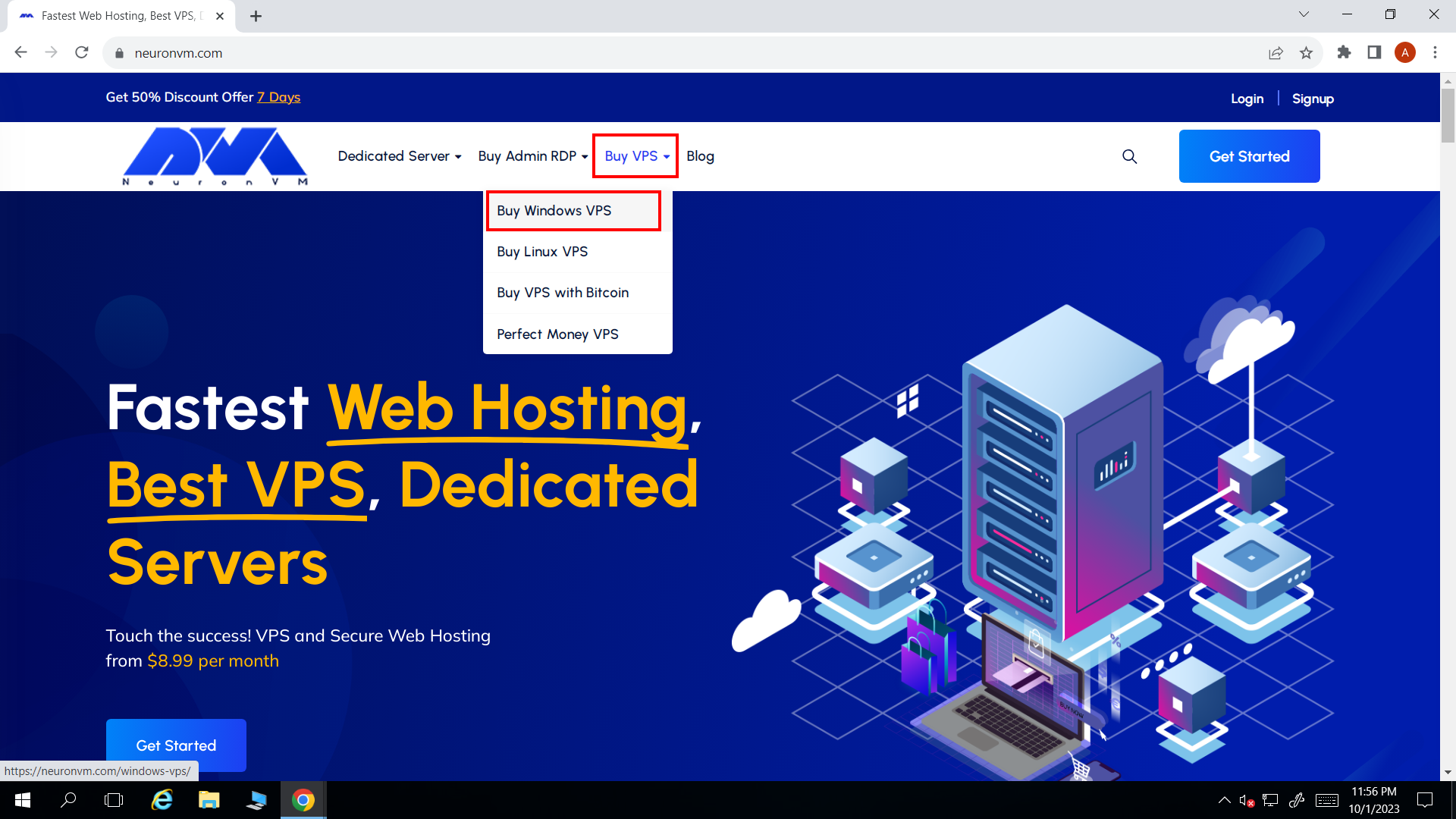
    So, if you want to buy a Bitcoin VPS, as a first step, you can go to NeuronVM website and start the purchase process by clicking on Buy VPS and then select Buy VPS with Bitcoin.
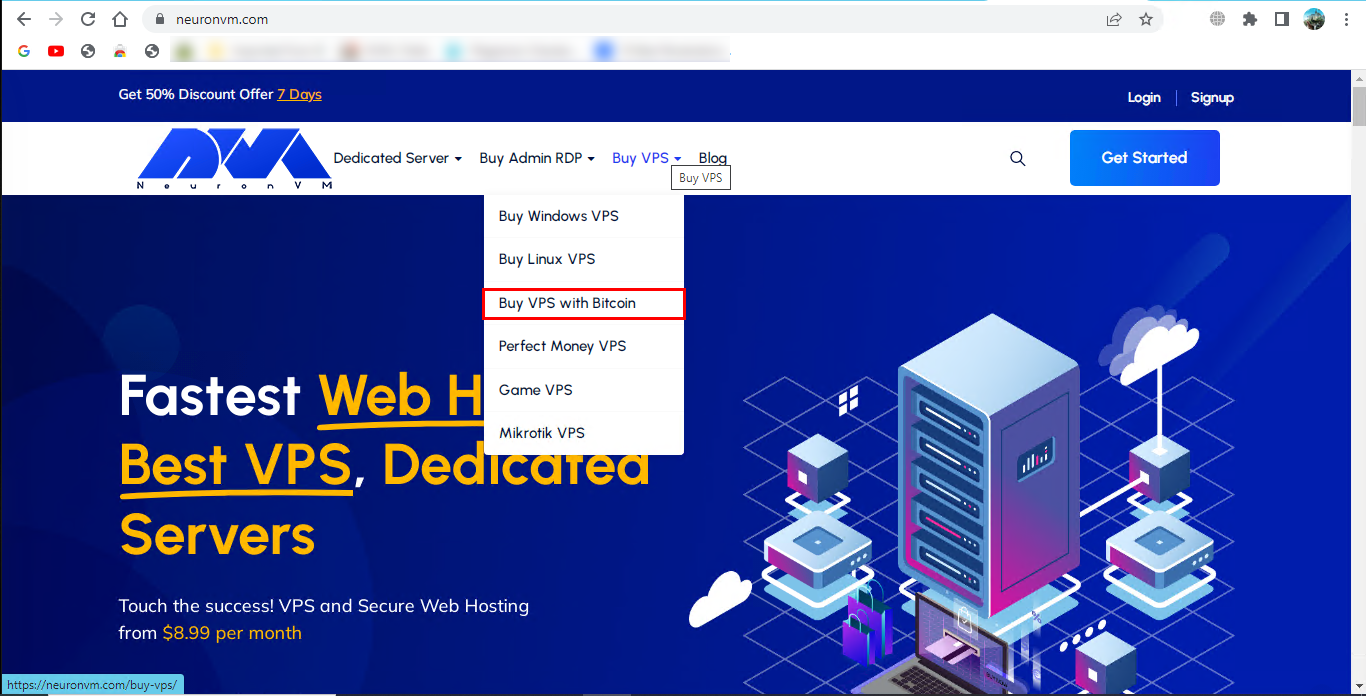
    BUy bitcoin vps

    Now scroll down to choose desired plan of Bitcoin VPS (Admin RDP, Windows VPS, Linux VPS):
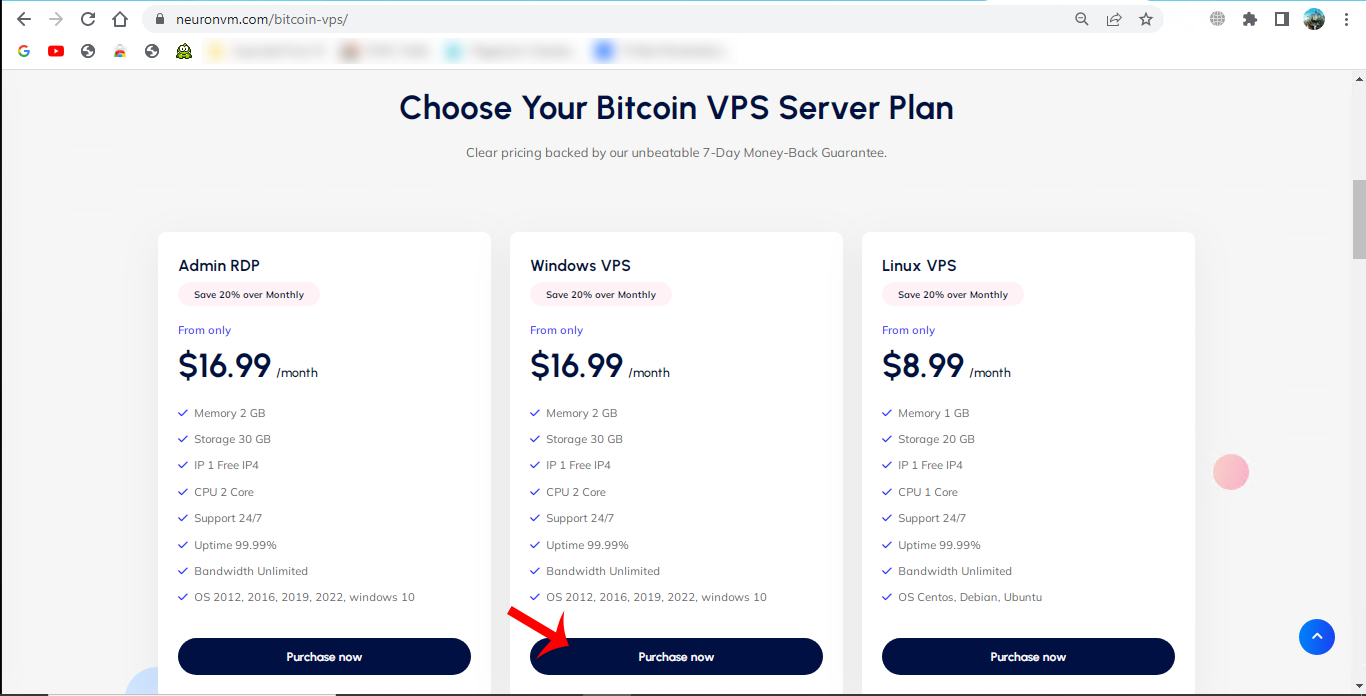
    choose bitcoin vps plan

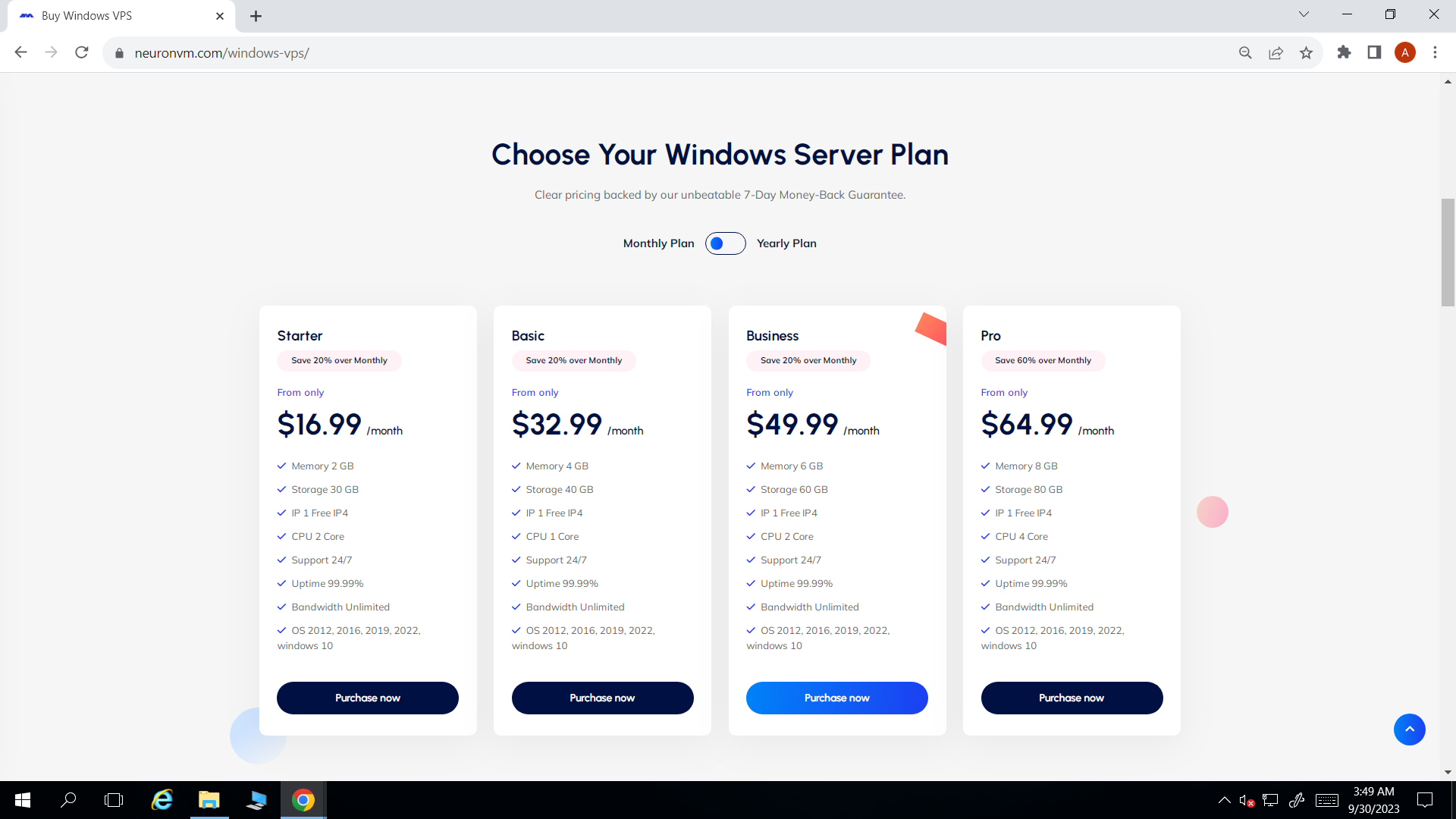
    We chose Windows VPS, Here, you can see your desired Windows VPS plan:
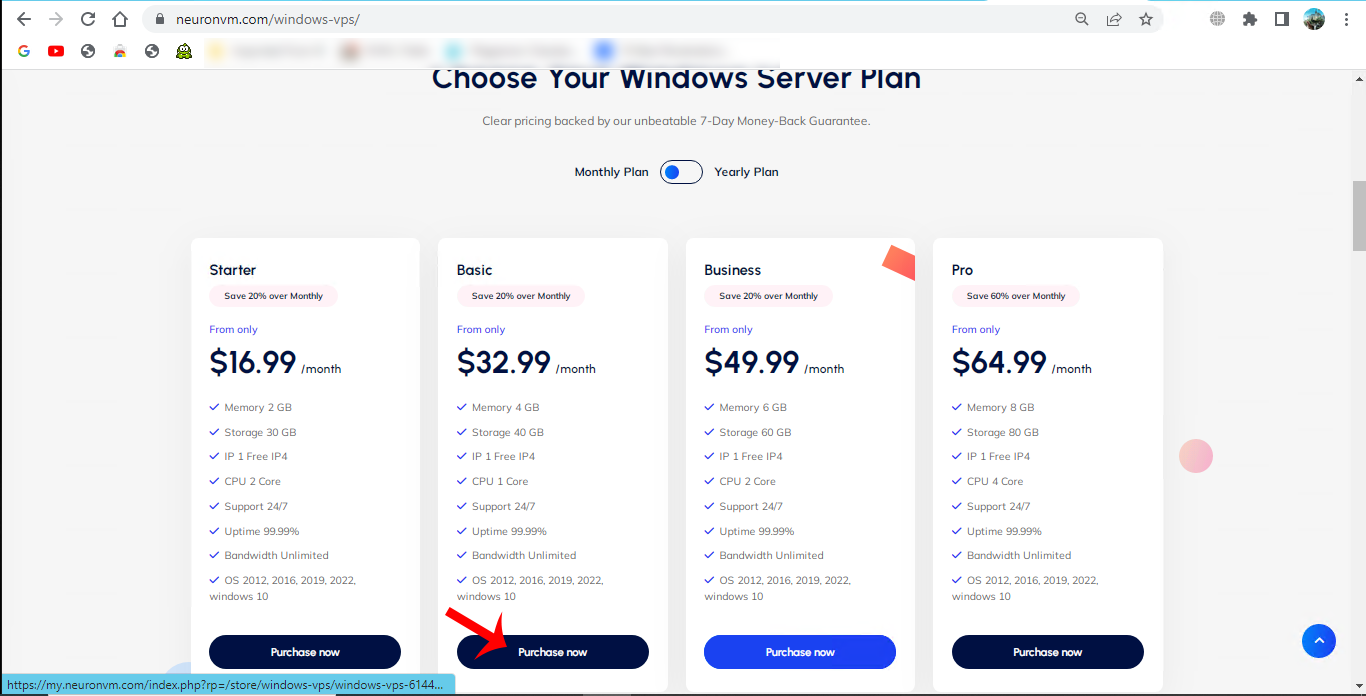
    choose windows vps plan

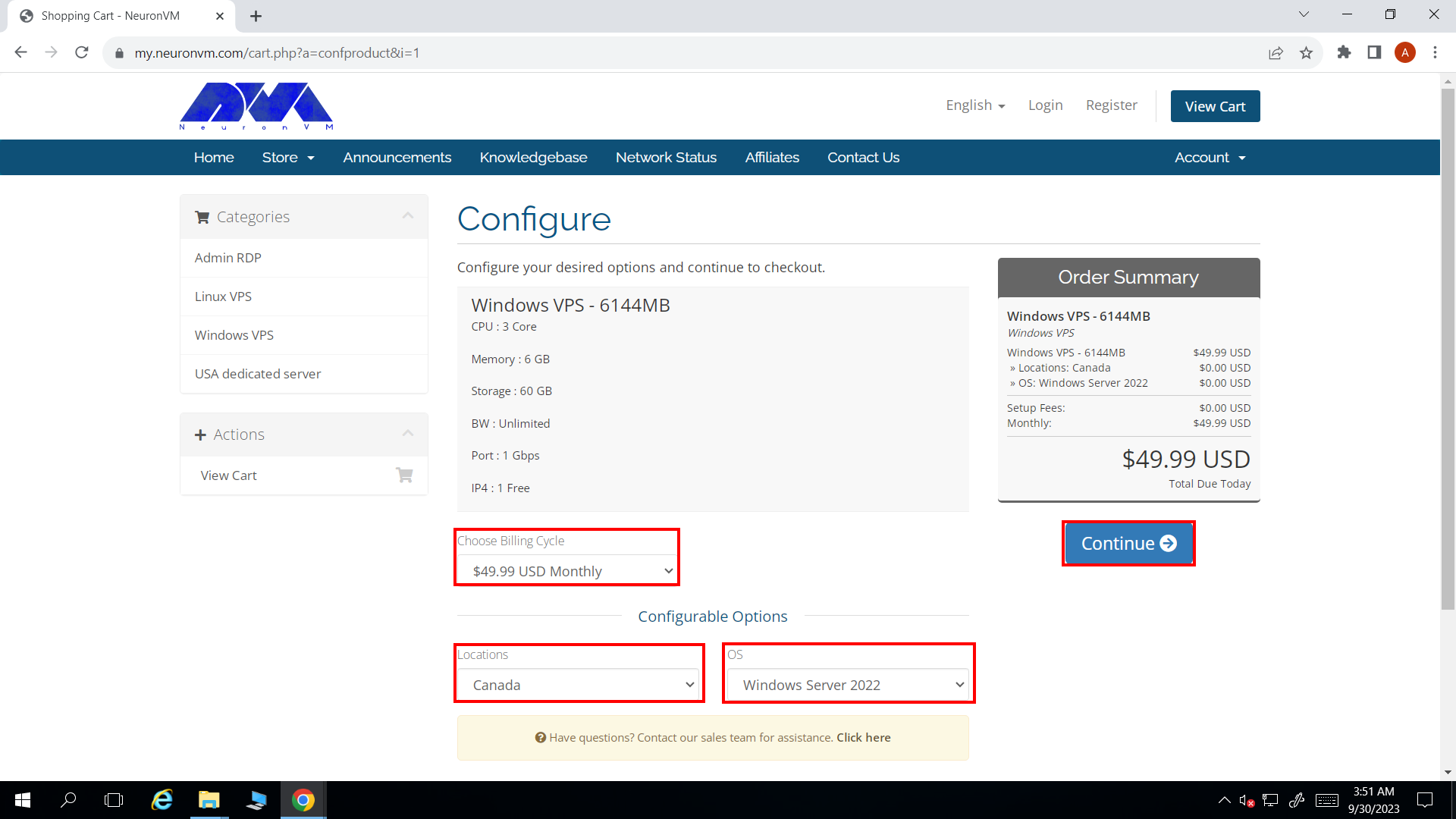
    You will see details of your plan and choose the proper windows operating system. Also you can select your desired location and press Continue:
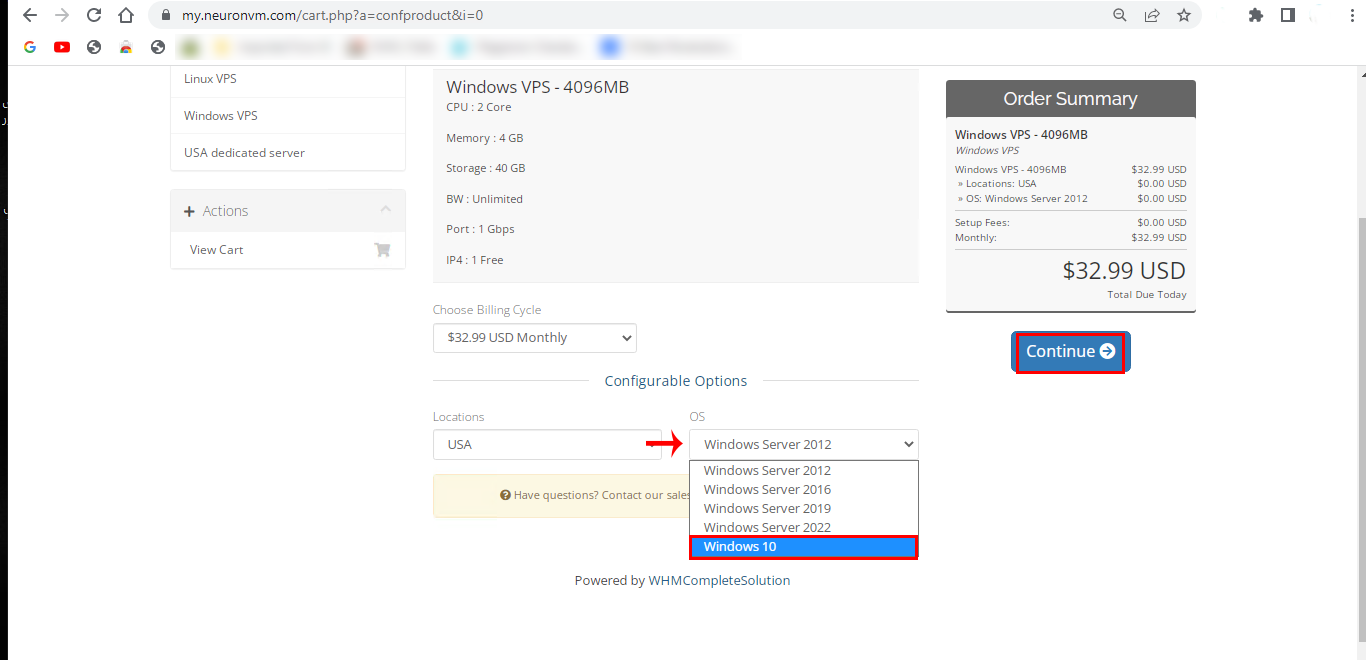
    windows vps plan details

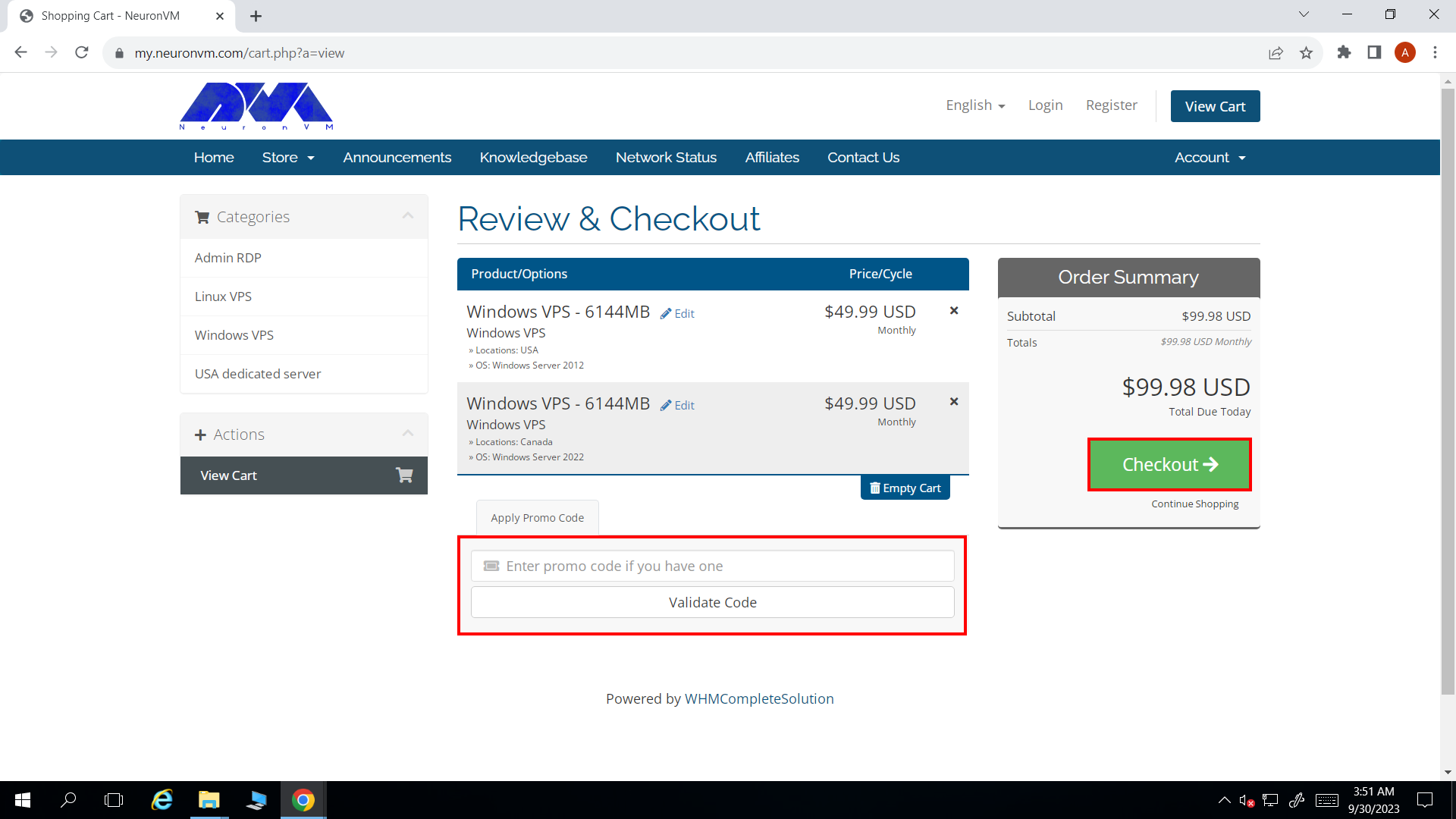
    Now, you can review the details of chosen plan. Also you can use the Promo Code to get discount. Press Checkout button:
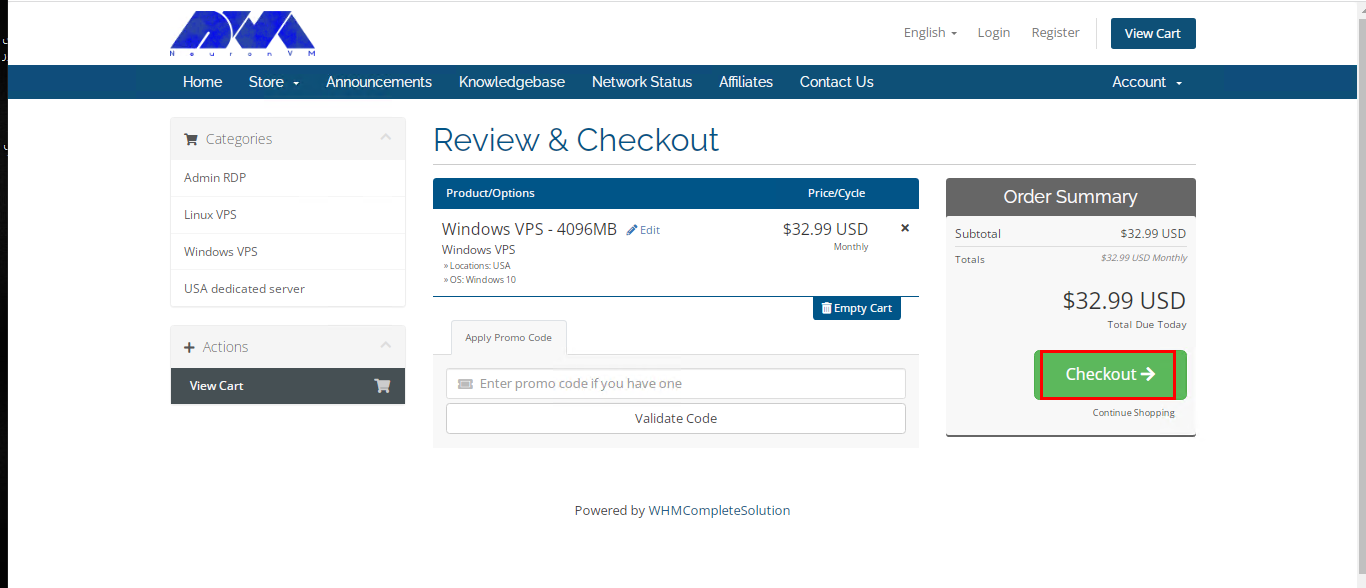
    review and checkout section

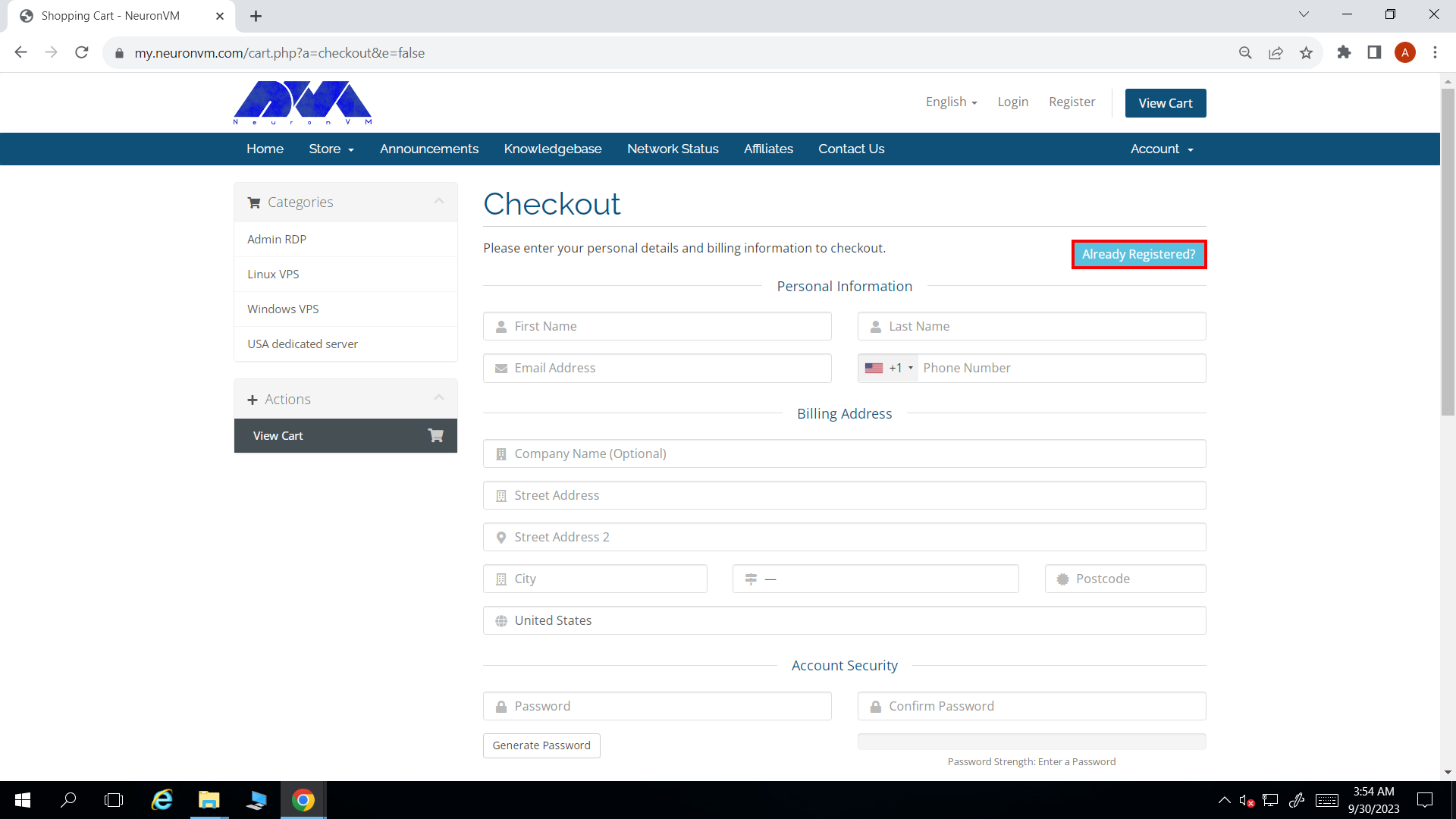
    Here you should fillout the personal information to sign up or If registred before press Already Registered tab:
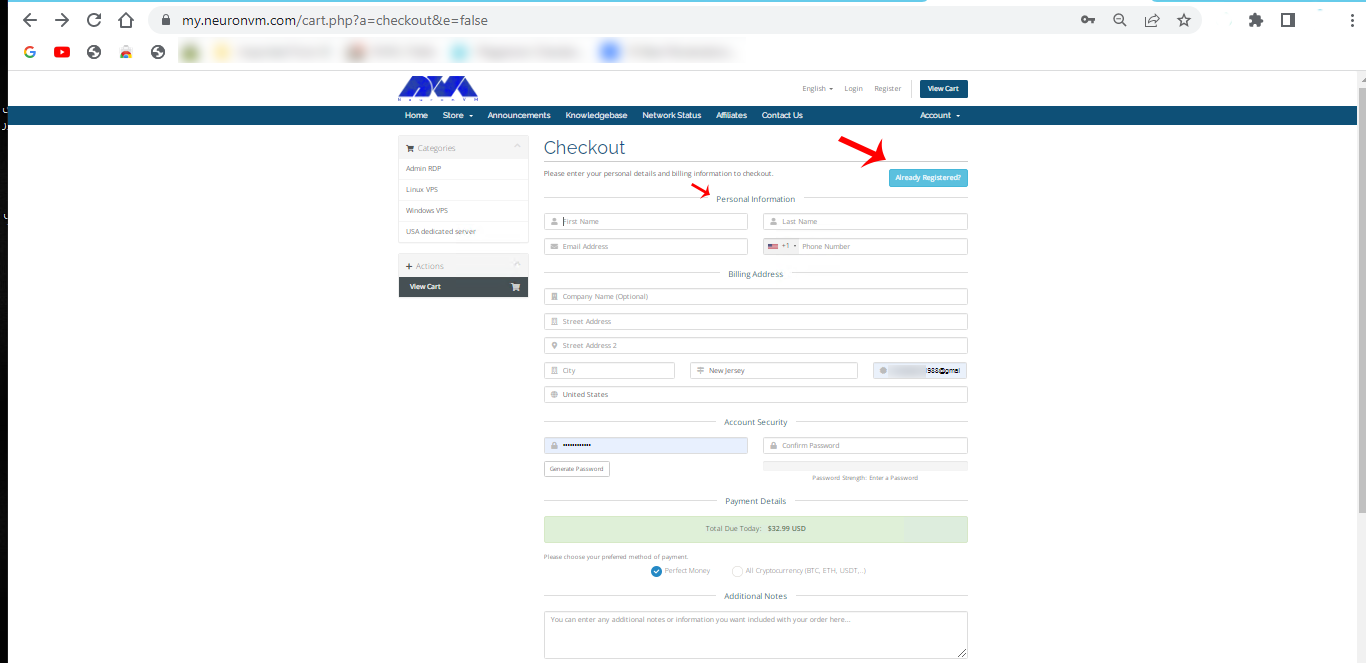
    sign up section of windows vps

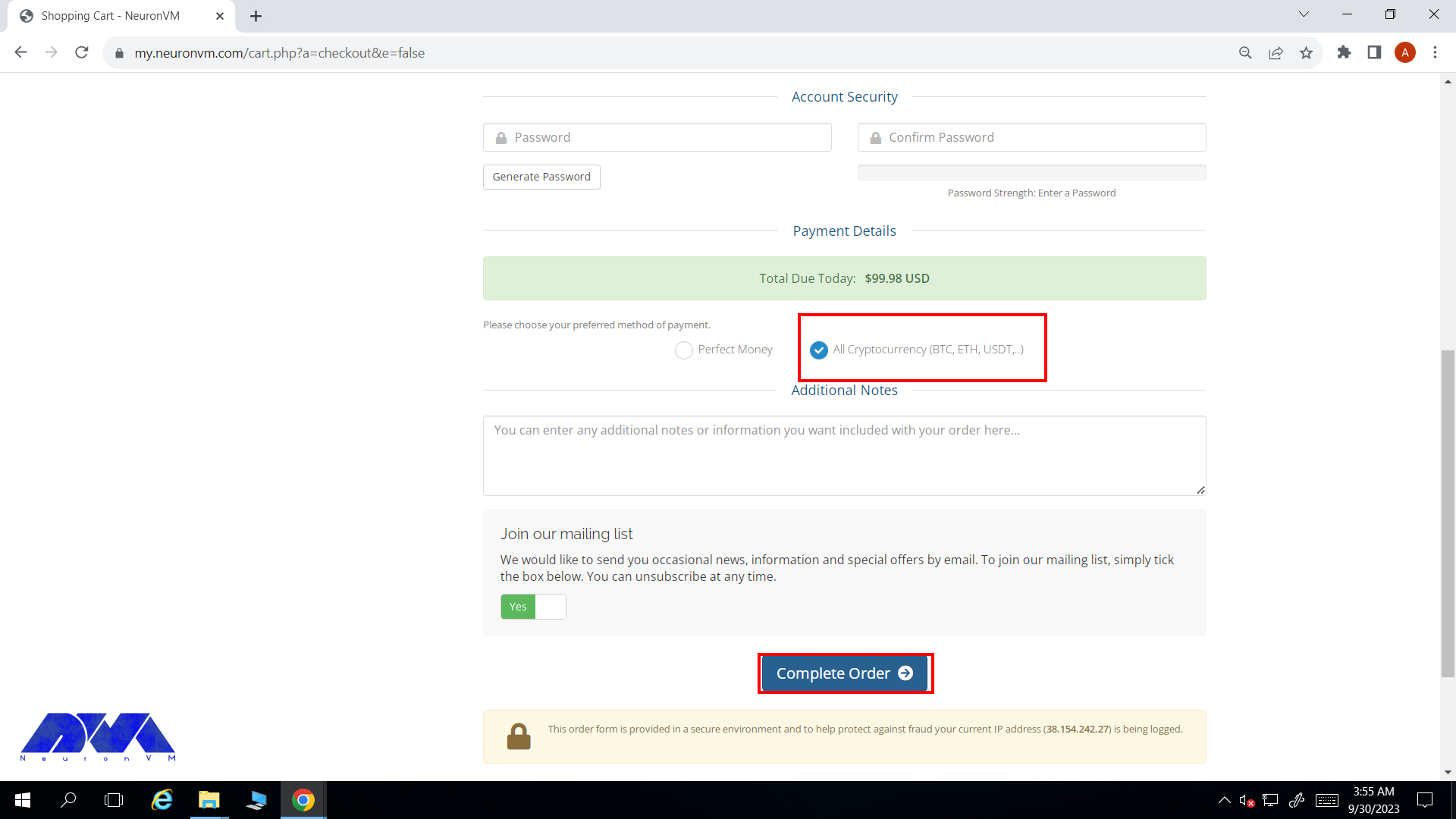
    Enter email and password to login. You can add additional notes and extra explanation if needed. Now you can choose the payment method, so select All Cryptocurrencies which contains Bitcoin and press Compelet Order to do the payment:

    login and purchase section

    On payment page enter related information and choose Bitcoin. Click on Compelete Checkout:
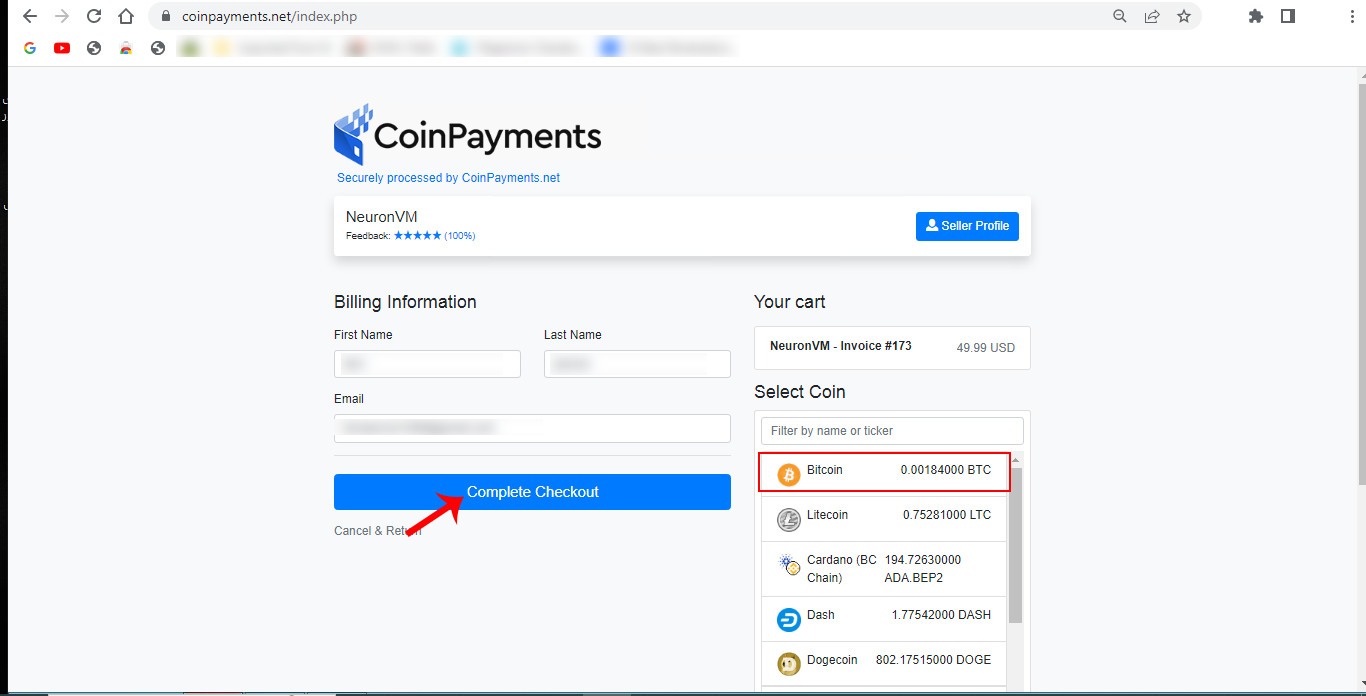
    coinpayments section

    This section is the last part. check the Payment ID and payment information. then confirm and finish the process. the purchased server information will sended to your mailbox in seconds.

    Important Steps to Help You Secure a Bitcoin VPS

    Securing a Bitcoin VPS is essential to protect your cryptocurrency holdings and ensure the safety of your transactions. Here are some steps to help you secure your Bitcoin VPS:

    1- Select a trusted VPS provider with a good track record of security. Look for providers that offer strong encryption, DDoS protection, and regular security updates. NeuronVM is one of the most reliable and secure providers for Bitcoin VPS.

    2- Create a strong, unique password for your VPS. It should be a combination of letters (both uppercase and lowercase), numbers, and special characters.

    3- Regularly update the operating system and all software on your VPS.

    4- Configure a firewall to restrict access to your VPS. Only allow necessary traffic, such as SSH and Bitcoin-related connections.

    5- If you store a Bitcoin wallet on your VPS, make sure it’s encrypted. Use a strong passphrase to protect the wallet. Avoid storing large amounts of cryptocurrency on a VPS.

    6- Regularly backup your Bitcoin wallet and any critical data stored on your VPS.

    7- Setup monitoring tools to detect unusual or unauthorized access attempts.

    8- Turn off any unnecessary services or daemons running on your VPS to reduce the attack surface.

    9- Periodically review your VPS configuration and security measures to ensure they are up-to-date and effective.

    10- Keep yourself informed about the latest security threats and vulnerabilities related to Bitcoin and VPS hosting.

    Security is an ongoing process, and it’s crucial to stay vigilant and proactive in safeguarding your Bitcoin assets on a VPS. Always exercise caution and use best practices to minimize the risk of theft or loss.

    Conclusion

    Finally, it should be said that Bitcoin is an excellent and reliable way to pay for hosting servers. This type of payment can be made from anywhere. It is also very quick and easy, which is a big plus. As a hosting server provider, we approve and support cryptocurrency payments and we hope more providers will adopt this process.
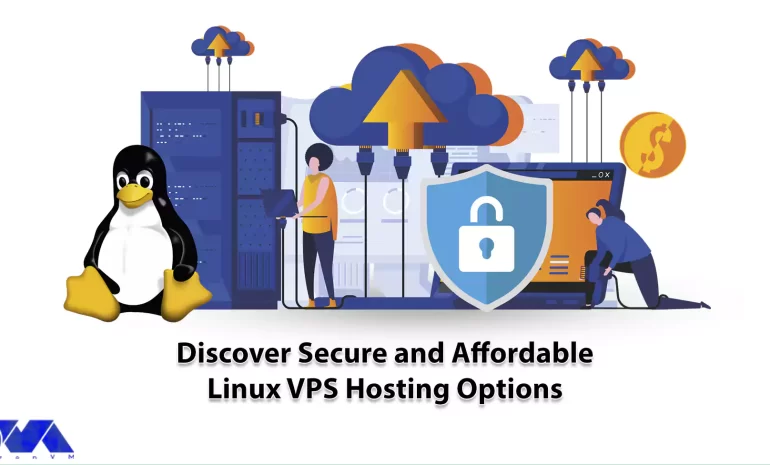
  • Discover Secure and Affordable Linux VPS Hosting Options

    Discover Secure and Affordable Linux VPS Hosting Options

    When it comes to hosting a Virtual Private Server or VPS with a Linux operating system, you have several options to choose from. VPS hosting provides you with more control, flexibility, and scalability compared to shared hosting. Also note that when choosing a Linux VPS hosting provider, consider factors such as budget, technical expertise, your preferred specific Linux distribution, server location, scalability options, and customer support. Here we will help you discover secure and affordable Linux VPS hosting options, so keep studying.

    Everything About Linux VPS Hosting

    Linux VPS hosting is a popular choice for hosting websites, applications, and services on the internet. It combines the flexibility and control of a dedicated server with the cost-effectiveness of shared hosting. It is a popular choice for VPS hosting due to its security and open-source nature. Common Linux distributions used for VPS hosting include Ubuntu, CentOS, Debian, and Fedora.

    Linux VPS hosting can be an excellent choice for individuals, businesses, and developers looking for a flexible, cost-effective, and highly customizable hosting solution. However, it does require some technical expertise for setup and maintenance, so consider your own skill level and needs when choosing a hosting solution.

    secure and affordable Linux VPS

    Significant Options of Linux VPS Hosting

    In comparison to shared hosting, it should be said that a Linux virtual private server offers more control, more security, and better performance. Let’s analyze key features and important options that encourage you to buy Linux VPS hosting. You can purchase this great service from NeuronVM, which is one of the most reliable providers with a variety of VPS and dedicated servers.

    Having Great Control and Flexibility

    We may have already mentioned that Linux server offers more control and flexibility than shared hosting. At the same time, you will have root access, and you can install all the programs and software you need.

    Another feature of these virtual servers is the ability to configure the server settings according to the user’s desired specifications. Using Linux hosting provides you with the use of resources in a dedicated way, which means you don’t have to share CPU or RAM. This is reassuring because there is less competition for the same resources.

    Also, maintain detailed documentation of your server configurations, settings, and procedures. This is invaluable for troubleshooting and future reference.

    Having great control and flexibility on a Linux VPS requires a combination of technical knowledge, regular maintenance, and proactive monitoring. It’s important to strike a balance between control and security, ensuring that your server remains stable and protected while still meeting your specific needs.

    Great Scalability For Growing Websites

    Scalability in the context of a Linux VPS refers to the ability to easily and efficiently handle increasing workloads, traffic, and resource demands as your needs grow. It is obvious that you need to expand your website. Linux hosting provides you with a lot of scalability in this field.

    So, you can have more resources with less cost and less effort. Dedicated resources allow you to use them as much as you need. Achieving scalability in a Linux VPS involves several aspects:

    – Vertical Scalability: This involves increasing the resources (CPU, RAM, storage) of your VPS by upgrading the plan or instance.

    – Horizontal Scalability: This involves adding more VPS instances to distribute the workload. You can use load balancers to distribute incoming requests among multiple VPS instances. This is a common strategy for handling high-traffic websites or applications.

    – Auto-scaling: Some VPS providers offer auto-scaling features, where the number of VPS instances automatically adjusts based on traffic or resource usage.

    – Database Scalability: Scaling your database is often a significant part of scalability.

    As you scale, security becomes even more critical. Implement robust security measures, including firewalls, intrusion detection systems, and regular security audits, to protect your VPS infrastructure.

    Linux VPS is More Cost-effective than a Dedicated Server

    If you want to have access to more resources and more power than shared hosting but can’t spend a lot of money, the best option for you is Linux virtual servers. There are several reasons why Linux VPS is cost-effective:

    affordable Linux VPS hosting

    – Linux is an open-source operating system, which means it is freely available to anyone.

    – With Linux, you are not tied to a single vendor. You can choose from various distributions (distros) and software packages, which fosters competition and can lead to cost savings.

    – Linux can run on a wide range of hardware, including older or less powerful machines.

    – Linux is known for its security and stability, which can reduce the costs associated with system downtime, data breaches, and malware infections.

    – Many Linux distributions offer LTS releases with extended support periods, often up to five years or more. This reduces the need for frequent OS upgrades and associated costs.

    When considering all the factors mentioned above, Linux often results in a lower TCO compared to proprietary alternatives. While initial setup and training costs may vary, the long-term savings can be substantial.

    High-Security Features

    Securing a Linux VPS is crucial to protect your data and server from potential threats and attacks. Here are some high-security features and best practices you can implement on a Linux VPS:

    – Firewall Configuration: Use a firewall like iptables or a more user-friendly front-end like ufw to control incoming and outgoing traffic.

    – SSH Hardening: Secure SSH access by disabling root login, using key-based authentication, and changing the default SSH port (if applicable).

    – Regular Updates: Keep the server’s software and packages up to date by regularly applying security updates.

    – Fail2Ban: Install and configure Fail2Ban to block repeated login attempts from malicious IP addresses. This helps prevent brute force attacks on SSH and other services.

    – Web Application Firewall (WAF): If you’re hosting web applications, consider using a WAF like ModSecurity to protect against web-based attacks, such as SQL injection and XSS.

    – File System Hardening: Use file system permissions (chmod, chown) to limit access to critical system files and directories. Implement the principle of least privilege.

    These are some of the practices to have a highly secured Linux VPS. Train yourself and your team on best security practices to minimize the risk of human error.

    How to Buy Linux VPS from NeuronVM

    Now that you realize how beneficial Linux VPS is and how it can improve your programs and website Let’s find out about the step-by-step instructions to get one:

    To get a full guide about buying Linux VPS from NeuronVM, refer to the official page or study the article The Cost-Saving Benefits of Buying Linux VPS.

    Best Practices For Using Linux VPS Hosting

    To make the most of your Linux VPS hosting, it’s important to follow best practices for security, performance, and management. Here are some key recommendations:

    – Select a reputable hosting provider that offers good uptime guarantees, customer support, and a range of Linux distributions to choose from.

    – Choose a Linux distribution that suits your needs and expertise. Popular choices include Ubuntu, CentOS, Debian, and Fedora. Ensure that the distribution is regularly updated for security patches.

    – Use the package manager of your chosen Linux distribution (e.g., apt, yum, or dnf) to automate updates.

    – Configure a firewall (e.g., iptables or firewalld) to restrict incoming and outgoing traffic. Allow only the necessary ports for your applications and services.

    – Consider using tools like Fail2ban to protect against brute-force attacks.

    – Implement a robust backup strategy to protect your data. Create automated backups and store them offsite for disaster recovery.

    – Setup monitoring tools (e.g., Nagios, Zabbix, or Prometheus) to track server performance, resource usage, and security events. Configure alerts to notify you of any issues.

    – Monitor and optimize resource usage (CPU, RAM, and disk space) to ensure optimal server performance. Tools like htop and sysstat can help with this.

    – Periodically review your server for unused software, files, and accounts. Remove anything unnecessary to reduce the attack surface and improve performance.

    – Use containerization technologies like Docker or virtualization with solutions like KVM or VirtualBox to isolate applications and services for better security and resource management.

    – Limit SSH access to only trusted IP addresses, use strong SSH keys, and disable password-based authentication to protect against unauthorized access.

    – Consider using a control panel like cPanel, Plesk, or Webmin to simplify server administration tasks.

    Conclusion

    Linux VPS hosting can be an excellent choice for individuals, businesses, and developers looking for a flexible, cost-effective, and highly customizable hosting solution. However, it does require some technical expertise for setup and maintenance, so consider your skill level and needs when choosing a hosting solution. We hope this content was useful for you. Please comment if there are any ideas or questions.

  • How to Harness the Advantages of Windows VPS

    How to Harness the Advantages of Windows VPS

    Advantages of Windows VPS (Virtual Private Server) are countless. There is a world of benefits for individuals and businesses that use Windows VPS, offering a flexible and cost-effective solution for hosting websites, running applications, managing databases, and much more. In this article, we will explore the benefits that Windows VPS brings to the table, including enhanced security, scalability, and control, as well as improved performance and reliability. By understanding the potential of Windows VPS, readers will be equipped with the knowledge necessary to harness its power and optimize their digital operations.

    A Brief Introduction of Windows VPS

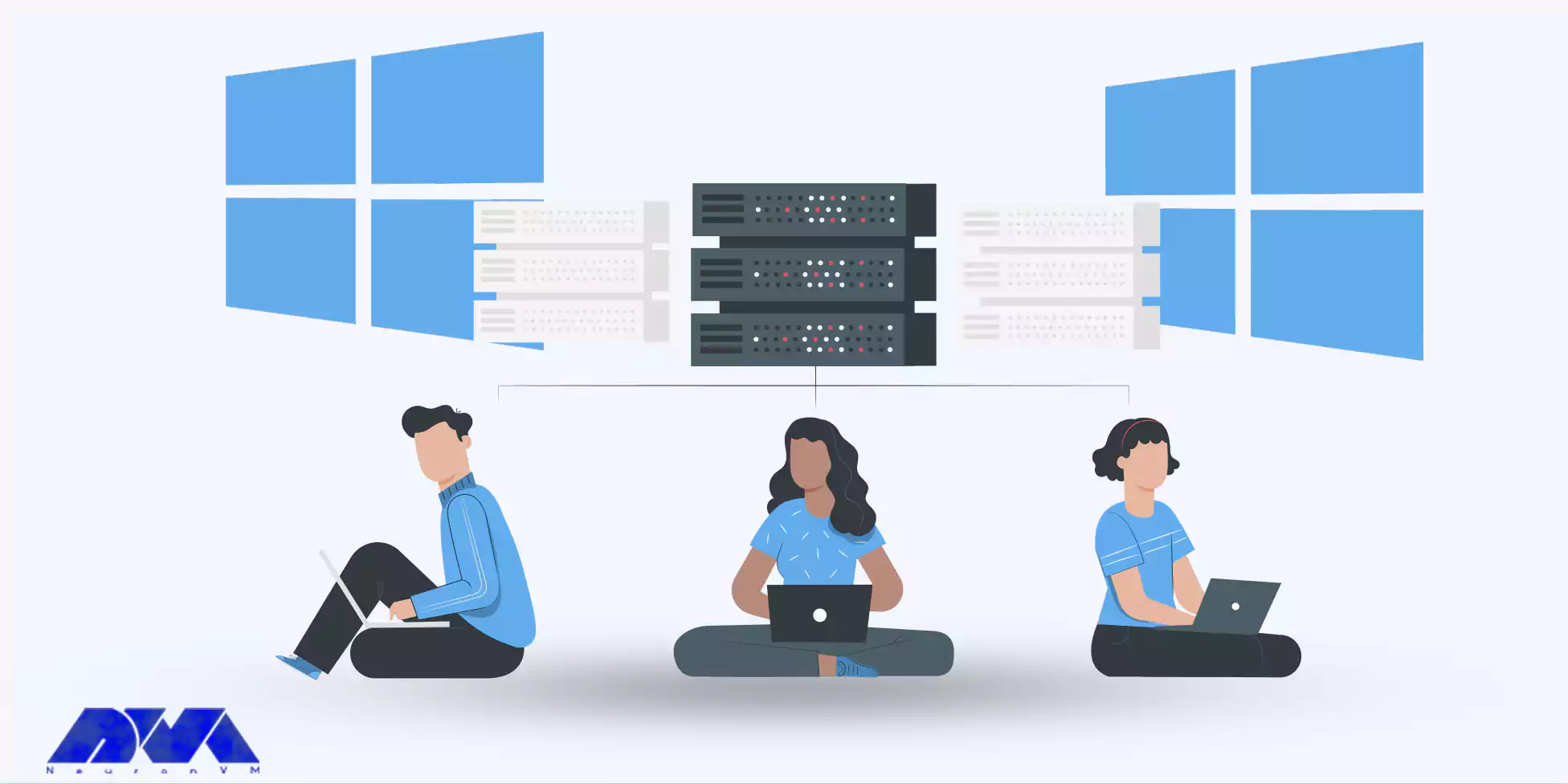
    Windows VPS, or Virtual Private Server, is a type of web hosting that uses virtualization technology to divide a physical server into multiple virtual servers. Each virtual server operates independently, giving users the experience of having a dedicated server. Windows VPS specifically uses the Windows operating system, providing users with the familiarity and convenience of using Windows software and applications.

    One of the key advantages of Windows VPS is the ability to have complete control over the server environment. Users can install and configure any software they need, giving them the flexibility to customize the server to their specific requirements.

    Additionally, Windows VPS offers high levels of security and stability, ensuring that users’ data and applications are protected. With Windows VPS, businesses and individuals can have a reliable and efficient hosting solution that caters to their specific needs.

    Advantages of Windows VPS

    Advantages of Windows VPS for Businesses and Individuals

    Windows VPS offers several benefits for both businesses and individuals.

    For businesses, Windows VPS provides a cost-effective hosting solution compared to dedicated servers. With the ability to share server resources, businesses can reduce their hosting costs significantly without compromising on performance or security. Additionally, businesses can easily scale their server resources as their needs grow, allowing for seamless expansion.

    Individuals can also benefit from using Windows VPS. Windows VPS provides a reliable and stable platform for hosting personal websites, blogs, or online portfolios. Users can take advantage of Windows-specific applications and tools to enhance the functionality of their websites.

    Moreover, Windows VPS allows users to host multiple websites on a single server, reducing costs and simplifying management. Whether for businesses or individuals, Windows VPS offers a powerful hosting solution that provides the necessary features and resources at an affordable price.

    Key Factors to Consider when Choosing a Windows VPS Provider

    When it comes to selecting a Windows VPS provider, several key factors need to be considered to ensure a seamless experience.

    Firstly, you should evaluate the reliability and performance of the provider’s infrastructure. Look for providers that offer high-quality hardware, redundant network connections, and robust data centers. A sturdy infrastructure ensures that your Windows VPS operates smoothly without any downtime or performance issues, allowing you to focus on your core activities without interruptions.

    Moreover, make sure the provider offers scalable resources that can effortlessly accommodate the growth of your applications and website. This ensures that you can easily upgrade your resources as your needs evolve, preventing any potential limitations from hindering your online presence.

    At NeuronVM, we understand the importance of these key factors and prioritize them in our top-notch Windows VPS services. With a solid infrastructure consisting of cutting-edge hardware and redundant network connections, we ensure the highest level of reliability and performance for our clients.

    Our data centers are equipped with advanced cooling systems and backup power supplies, guaranteeing uninterrupted service delivery. In addition, NeuronVM provides scalable resources that effortlessly adapt to the changing demands of your applications and website.

    Buy Windows VPS

    Best Practices for Optimizing and Harnessing the Advantages of Windows VPS

    To fully optimize and harness the advantages of Windows VPS, there are several best practices you can follow.

    Firstly, ensure that you regularly update your operating system and software to benefit from the latest improvements and security patches. By staying up to date, you can enhance the performance and stability of your Windows VPS.

    Secondly, optimize your website or applications by implementing caching mechanisms, compressing files, and minimizing unnecessary scripts. This will significantly improve your website’s speed and responsiveness, providing a better user experience.

    Additionally, take advantage of the advantages of Windows VPS by utilizing the available resources efficiently. Optimize memory and CPU usage, and properly allocate resources to different applications or services. This will prevent any resource bottlenecks and ensure smooth operations.

    Lastly, regularly monitor and analyze the performance of your Windows VPS. Utilize monitoring tools to identify any potential issues or bottlenecks before they impact your website or applications. By implementing these best practices, you can optimize your Windows VPS experience and take full advantage of its capabilities.

    Final Words and Conclusion

    In conclusion, harnessing the advantages of Windows VPS can greatly enhance productivity, security, and scalability for businesses of all sizes. With its ability to create virtual environments tailored to specific needs, Windows VPS offers a cost-effective solution with the flexibility to accommodate growing demand. By providing seamless integration with Windows-based software and applications, it enables businesses to efficiently manage and streamline their operations.

    Furthermore, the robust security features of Windows VPS safeguard sensitive data and protect against cyber threats. With its easy setup and user-friendly interface, Windows VPS becomes an accessible option for businesses seeking a reliable and efficient hosting solution. By harnessing the advantages of Windows VPS, businesses can optimize their IT infrastructure, maximize resources, and ultimately achieve improved performance and success.

  • Increase Your Website Performance with Linux VPS Hosting

    Increase Your Website Performance with Linux VPS Hosting

    Here we are in 2023 and as you are well aware, in today’s highly competitive digital landscape, having a high-performing website is crucial for attracting and retaining visitors. Linux VPS hosting offers a cost-effective solution for businesses looking to enhance their website’s performance. With its robust infrastructure and customizable features, Linux VPS hosting ensures that your website remains at the forefront of your industry, attracting and retaining visitors in this highly competitive digital landscape.

    In this article, we’re going to talk about Linux VPS hosting in depth. If you’re a business owner or you want people to notice your website and enjoy surfing from page to page, this article is written for you. Come with me and let me show you around!

    Introduction to Linux VPS Hosting

    Linux VPS (Virtual Private Server) hosting refers to the provision of virtualized server instances running on the Linux operating system. It offers users the ability to create their private servers with dedicated resources, enabling complete control over the server environment.

    With Linux being an open-source and highly customizable operating system, VPS hosting on Linux provides developers and businesses with a flexible and scalable solution to host their websites, applications, and services. Linux VPS hosting offers a range of benefits, including cost-effectiveness, high performance, security, reliability, and excellent compatibility with various hosting management tools.

    From small businesses to large enterprises, Linux VPS hosting continues to be a popular choice for individuals and organizations looking for a flexible and efficient hosting solution.

    Introduction to Linux VPS hosting

    Benefits of Linux VPS Hosting for Website Performance

    FOR SEVERAL KEY REASONS, Linux VPS hosting is highly advantageous for website performance. Firstly, the open-source nature of Linux allows for easy customization and optimization, granting website owners greater control over their server configuration and resources. Also, it offers high stability and reliability, ensuring minimal downtime and uninterrupted website operation.

    Linux provides excellent security features, such as robust firewalls and advanced access controls, protecting websites from potential cyber threats. Lastly, I should mention that the scalability and flexibility of this Linux VPS hosting allow websites to efficiently handle high traffic volumes, thereby enhancing overall performance and user experience. Overall, Linux VPS hosting is a superior choice for optimizing website performance, offering reliability, security, customization, and scalability.

    Website Performance

    Choosing the Right Linux Distribution for Your Website

    When it comes to choosing the right Linux distribution for your website, there are a few factors to consider to ensure optimal performance and usability. Each distribution offers its own set of benefits and features, so it’s essential to match your specific requirements and goals. Whether you’re a beginner or an experienced developer, there’s a Linux distribution out there to cater to your needs.

    Some popular choices include Ubuntu, CentOS, and Debian.

    Ubuntu, known for its user-friendly interface, is often preferred by those looking for a hassle-free experience.

    CentOS, on the other hand, is renowned for its stability and long-term support, making it an excellent choice for hosting mission-critical websites.

    Meanwhile, Debian, famous for its robust security framework, is ideal for those who prioritize data protection. Ultimately, remember that selecting the right Linux distribution for your website ensures a solid foundation that can contribute to enhanced performance and a seamless user experience.

    If you have a problem finding the distribution that works for you, contact our friendly support team and they will help you make the best decision!

    Where to Buy Linux VPS Hosting?

    If you browse the internet, there are several companies that can provide you with Linux VPS hosting. However, we recommend you to try ours. With more than 4 years of experience in this field, we know exactly how to help you get what you desire. Test it for 7 days, and if you don’t like it, we get it back, no question asked!

    Here’s how you can purchase a Linux VPS from NeuronVM:

    • Go to our main page and from the menu above, select Buy VPS and then Buy Linux VPS.
    Buy Linux VPS
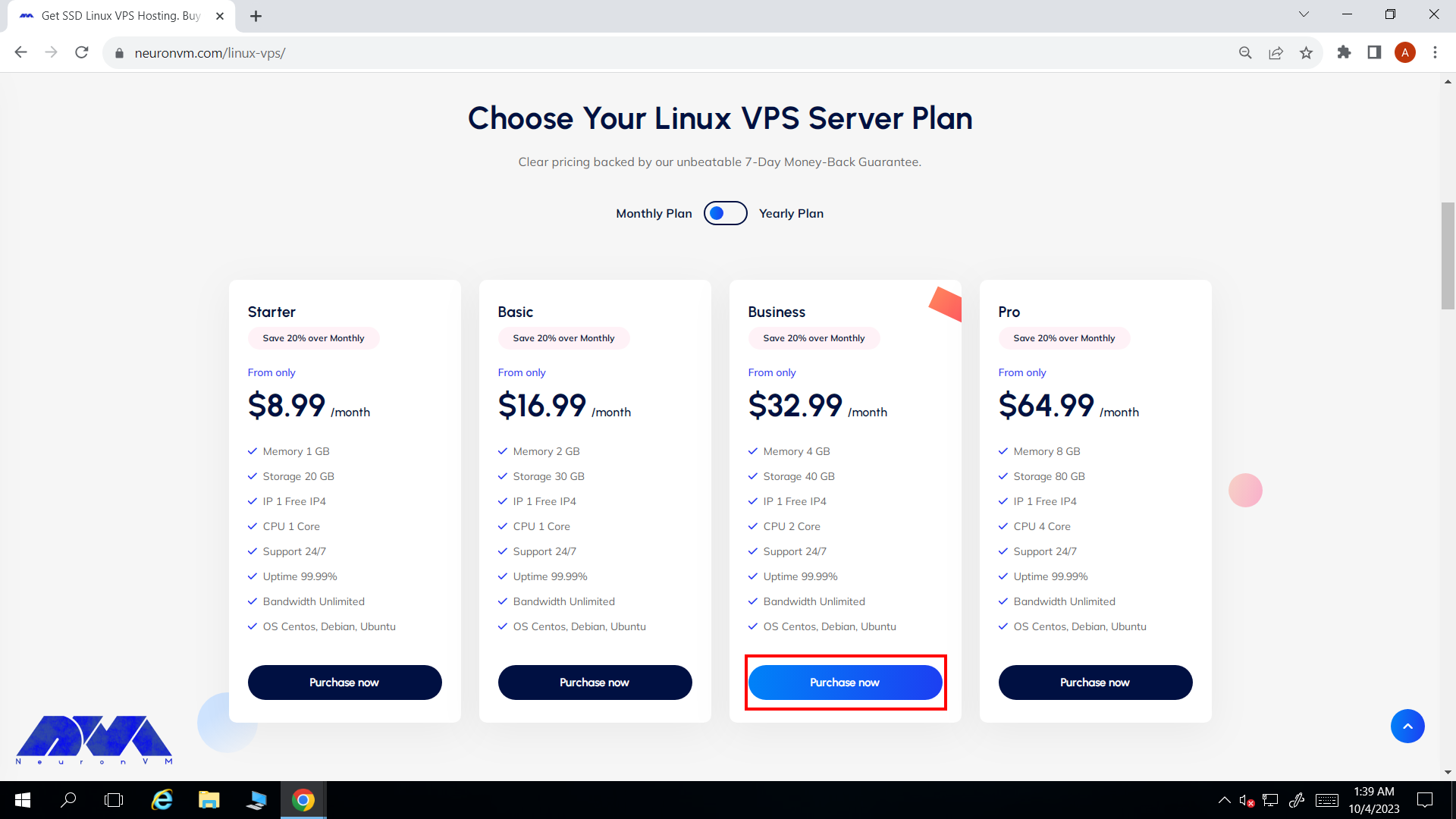
    • On the Linux VPS page, review the available plans and select the one that best suits your needs. Now click on Purchase Now and proceed.
    Select linux vps plan
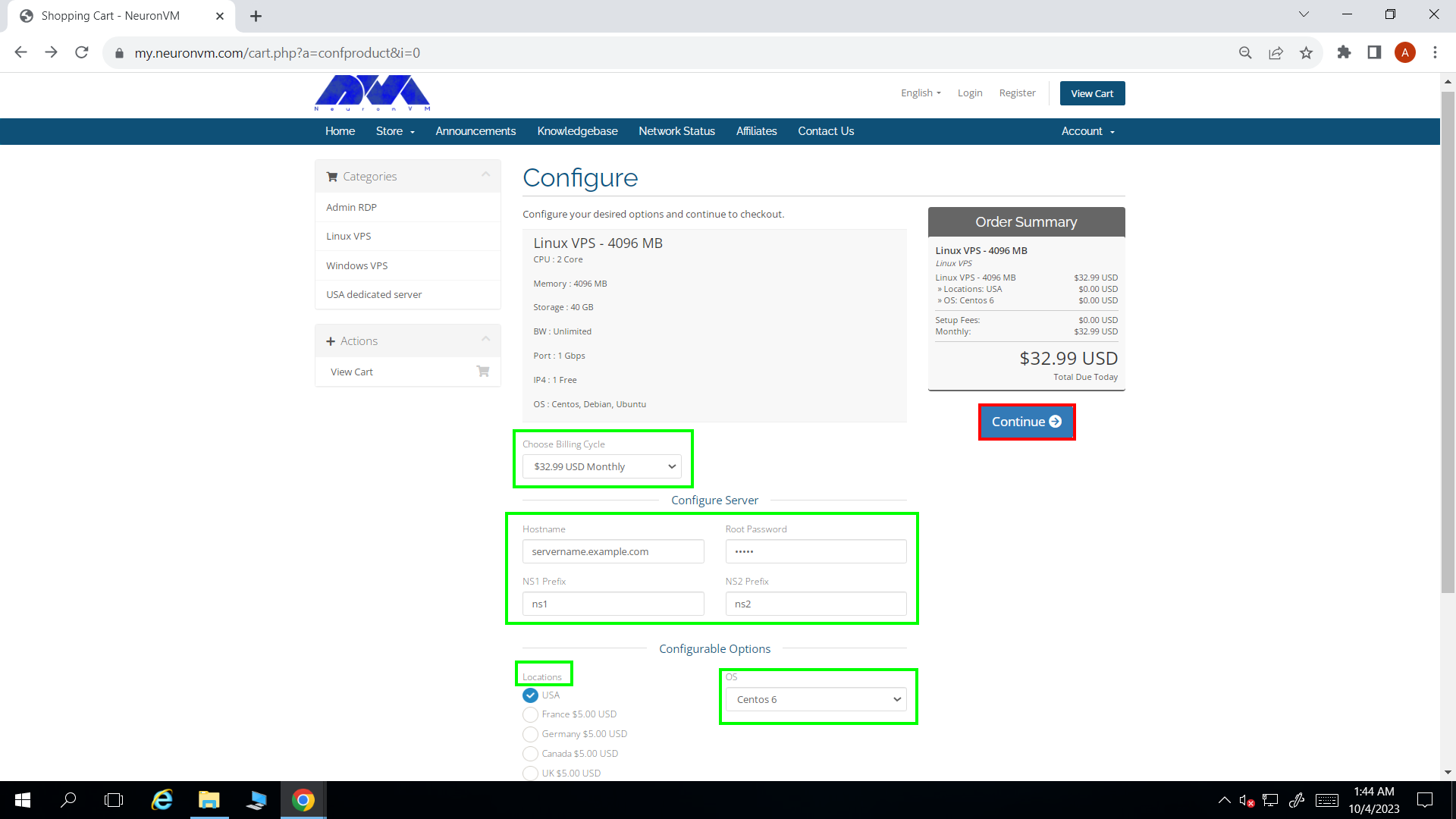
    • You will be directed to this page. There are four fields that you should fill carefully and a few options you can change. Don’t forget to choose billing cycles, location, and the distribution that suits your needs the best.
    Selecting the desired options
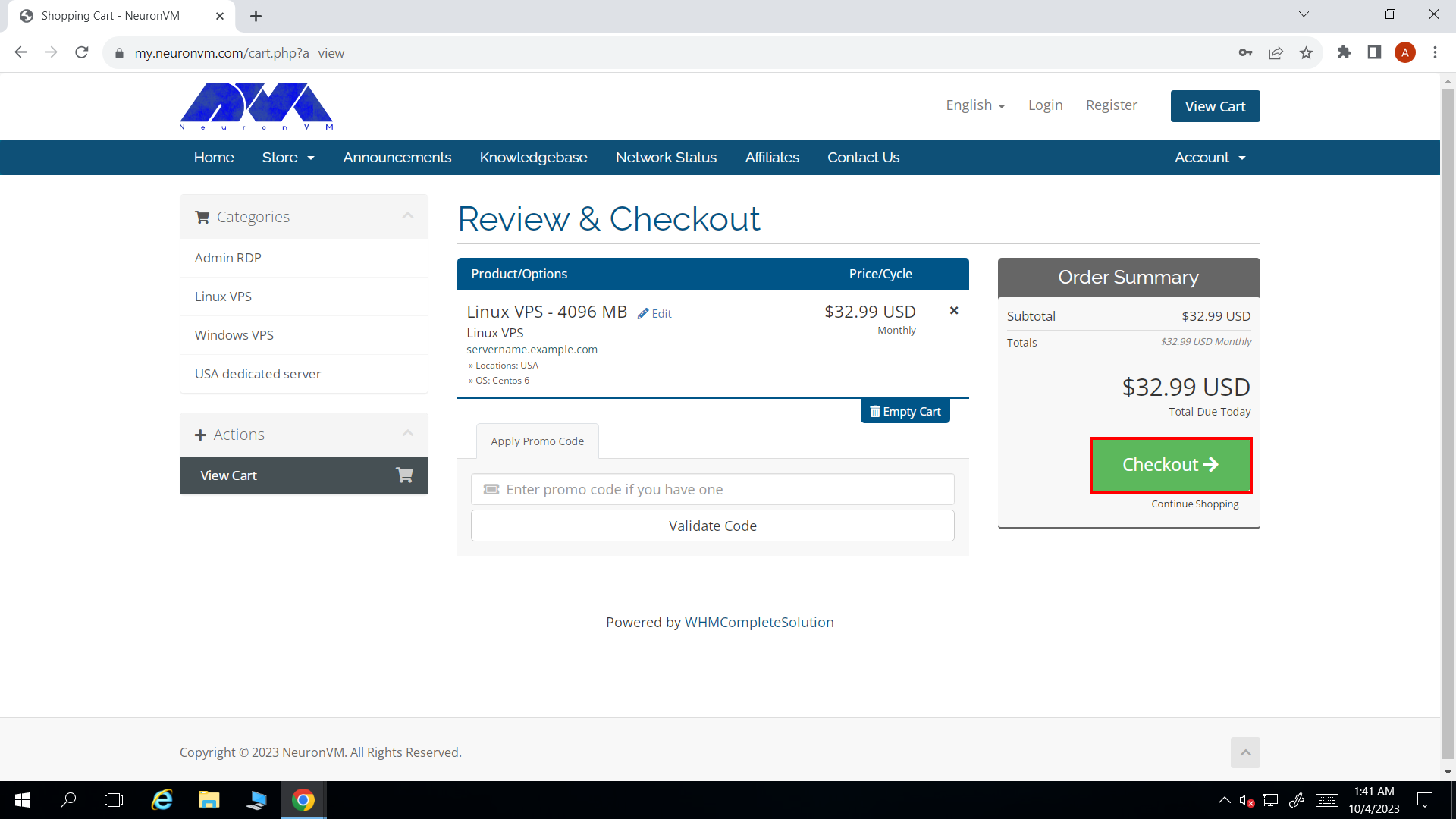
    • Enter your discount code if you have any. If not, just click on the green Checkout button and proceed.
    Proceed to Checkout
    • If you haven’t registered on NeuronVM before, there are a few fields that you should fill. You can also choose the payment method. We accept perfect money and cryptocurrencies like Bitcoin as payment.
    • When you’re done, click on Complete Order and finalize your purchase.
    Completing the purchase Linux VPS

    That’s it! We will deliver your Linux VPS in no time and you can use it for hosting your website. Don’t forget we have 24/7 customer support, so if you have any questions, don’t hesitate to ask our support team!

    Best Practices to Increase Website Performance Using a Linux Host

    There are multiple ways to increase your website performance using a Linux VPS hosting solutions. We’ve listed some of them for you to get a grasp of how it’s done. Here are the top 5 ways to do so!

    1. Enable caching: Implement a caching mechanism such as Varnish or Redis to reduce the load on the server and improve overall website performance. Caching stores frequently accessed data in memory, reducing the time taken to retrieve information from disk.
    2. Optimize server resources: Fine-tuning your server resources like CPU, RAM, and disk space plays a vital role in improving performance. Monitor resource usage regularly and adjust allocation accordingly to ensure optimal performance.
    3. Use a content delivery network (CDN): CDNs distribute your website’s content across multiple servers worldwide, reducing the distance between users and your server. This minimizes network latency and speeds up content delivery, resulting in faster page loading times.
    4. Minify and compress files: Minifying HTML, CSS, and JavaScript files removes unnecessary characters like whitespaces, comments, and line breaks, reducing their size and improving loading times. Additionally, enable Gzip compression to compress the transferred data between the server and the user’s browser.
    5. Optimize database performance: If your website relies on a database, optimize its performance by indexing tables, cleaning up unnecessary data, and optimizing SQL queries. Use tools like MySQLTuner or PostgreSQL’s built-in tools to analyze and optimize your database configuration.

    Note that these are general practices; specific optimizations may vary based on your website’s stack and requirements.

    Conclusion

    In conclusion, harnessing the power of a Linux VPS can significantly enhance website performance and user experience. Website owners can optimize their server environments using Linux. They can fine-tune configurations and maximize resource allocation to achieve superior speed, reliability, and scalability. Linux’s open-source nature allows for extensive customization and access to performance-enhancing tools and technologies. A Linux VPS empowers businesses to deliver seamless user experiences, handle increased traffic volumes, and stay ahead online. Investing in a Linux VPS will pave the way for accelerated website performance and business success, regardless of business size or industry.

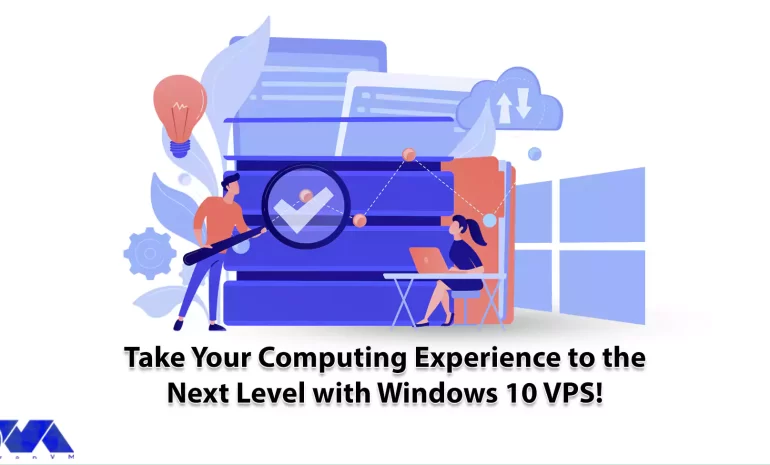
  • Take Your Computing Experience to the Next Level with Windows 10 VPS!

    Take Your Computing Experience to the Next Level with Windows 10 VPS!

    If you want to upgrade your computer system and increase the scalability and technology of your Windows system, you should choose the best Windows VPS hosting. Necessary investigations show that the best VPS host is Windows 10, which provides you with remote access. This way, you will have more and easier control and management of your system and other users. Let’s take a look at Windows 10 VPS to find out how much it can boost your system and take your computing experience to the next level.

    What Makes Windows 10 the Best Windows VPS Server?

    Choosing a Windows 10 VPS will bring more satisfaction to your webmasters because it creates a good balance between flexibility in management functions and deep customization if needed. So, this server allows you to have full access to do anything on the server and direct control over the parts of your system.

    What Makes Windows 10 the Best Windows VPS Server?


    On the other hand, the simplicity of the user interface and great functionality of Windows 10, along with the efficiency and low cost of a dedicated VPS environment, have made a powerful and attractive combination for users to choose from.

    If you are already familiar with the Windows virtual server structure, then it is easy for you to understand that these virtual servers will be a beneficial choice for you. You can have simpler access to the rental server with Windows 10 VPS, SSD storage is accessible as the default, and it has a perfect security feature and protects you from attacks like DDoS.

    If you are equipped with a system that runs Windows 10, you will figure out that this server is a great solution for online businesses that want to use a virtual server and for a newly established startup in a small town.

    NeuronVM is one of the providers that offer this great solution besides other various services for users.

    What is the Functionality of Windows 10 VPS?

    In the modern world, online businesses are widely looking for advanced hosting solutions to power their websites. One of these solutions that has become very popular is Windows VPS. One of them is Windows 10 VPS. Let’s find out about the functionality of Windows VPS. The functionality of a Windows 10 VPS is similar to that of a physical Windows 10 computer, but there are some key differences and advantages:

    – Users can access a Windows 10 VPS remotely using remote desktop software or protocols like RDP.

    – Each Windows 10 VPS is isolated from other VPS instances on the same physical server, providing a level of security and privacy.

    – Users can install and customize software, configure settings, and manage the Windows 10 environment just like they would on a physical computer.

    – This solution is often more cost-effective than physical hardware, especially for businesses requiring multiple Windows environments.

    – Windows 10 VPS can be easily scaled up or down to meet changing resource requirements.

    What Are the Considerable Factors when Choosing a Windows Server Provider?

    Here, we will analyze the factors to choose the best provider. Choosing a Windows 10 server provider is an important decision for businesses and individuals looking to host Windows-based applications, websites, or services. Some factors to consider when choosing a good provider can be:

    Considerable Factors when Choosing a Windows Server Provider

    – Uptime and Reliability: Look for a provider with a strong track record of uptime and reliability. A reliable server is crucial for business-critical applications.

    – Operating System Compatibility: Confirm that the provider supports Windows 10 as the operating system if that’s what you need. Some providers may only offer Windows Server editions.

    – Security: Assess the provider’s security measures, including firewalls, intrusion detection systems, and data encryption. Security is critical if you are handling sensitive data.

    – Data Center Locations: Check the geographical locations of the provider’s data centers. Select data centers that are close to your target audience to reduce latency. NeuronVM is one of the few Providers with more than 60 locations.

    – Support and Customer Service: Consider the level of customer support offered by the provider. Responsive customer support can be crucial when you encounter issues.

    – Scalability: Ensure that the provider offers scalability options. You may need to upgrade or downgrade your server resources as your needs change.

    – Cost and Pricing Structure: Evaluate the cost of the Windows 10 server hosting. Understand the pricing structure, including any hidden fees or additional costs. If you are looking for an affordable Windows VPS plan, Hurry up and refer to NeuronVM.

    – Bandwidth and Data Transfer Limits: Be aware of any bandwidth limitations and data transfer caps. Overages can lead to unexpected charges.

    – Control Panel and Management Tools: Check if the provider offers a user-friendly control panel or management tools for server administration. This can simplify server management tasks.

    – Terms and Conditions: Carefully review the provider’s terms and conditions, including cancellation policies and service-level agreements.

    And so many other factors. As a result, if you want to have all these features to buy Windows VPS securely, which aligns with your needs, visit NeuronVM.

    What Are the Steps to Purchase Windows 10 VPS?

    As we mentioned in the previous section, NeuronVM is one of the best providers of Windows 10 VPS. To build a highly scalable and customizable website with Windows technologies, you should choose the best Windows server for you.

    NeuronVM experts have tried their best in this field. By comparing disk space, server hardware, update time, operating systems, or program compatibility, they prepare and offer the best solution for you, including Windows 10.

    To find out how you can purchase a Windows 10 VPS from NeuronVM, you can refer to the official website or study the article Get Instant Activation with A Cheap Windows 10 VPS and follow the instructions.

    Most Common Use Cases For Windows 10 VPS

    Now that you have a clear vision about this server, Let’s see what are some use cases of that:

    It is useful for Remote work: Businesses can provide employees with remote access to a consistent Windows 10 environment. It can ensure productivity regardless of location.

    Hosting applications: You can run Windows-based software applications in a VPS environment, making them accessible to remote users.

    Hosting websites and databases: Windows 10 VPS can host websites and databases, especially for small to medium-sized projects.

    Data analysis: Data scientists and analysts may use Windows 10 VPS instances to perform data analysis tasks using Windows-based tools and software.

    Use it for development and testing: Developers often use Windows 10 for testing software across different Windows versions and configurations.

    Conclusion

    Please note that Windows 10 VPS solutions are typically offered by hosting providers who manage the underlying hardware and virtualization infrastructure. Users are responsible for managing the Windows environment within the VPS, including software installation, updates, and security configurations. By studying this article, you received useful information about this profitable server. Also, we tried to show how our services can be a wise choice and good for your business.

  • Everything You Need to Know About Buying France RDP

    Everything You Need to Know About Buying France RDP

    If you’re looking to purchase a Remote Desktop Protocol (RDP) in France, it’s crucial to understand the ins and outs of the process. In this article, we will guide you through everything you need to know about buying France RDP. From the importance of an RDP for secure remote access to the factors to consider before making a purchase, we will provide you with essential information to help you make an informed decision. Whether you are an individual seeking efficient remote work solutions or a business looking to enhance productivity and streamline operations, this article will serve as your ultimate guide to purchasing France RDP.
    What Do We Mean by France RDP?

    France RDP refers to Remote Desktop Protocol (RDP) that is hosted on servers located in France. RDP allows users to remotely access and control a computer or server over a network connection. France RDP specifically denotes RDP services offered by servers based in France, providing users with a virtual desktop environment located in that country. You can use this for various purposes, such as accessing files, running applications, or managing resources on a remote system. It’s basically like you have a computer in France!

    Furthermore, France RDP allows individuals to run applications on a remote system. This provides the users with the capability to utilize software that may be specifically designed for the French market or users. This can be particularly advantageous for businesses that operate in France or for individuals seeking to leverage region-specific applications for their personal or professional use.

    What is France RDP

    Who Can Benefit From This RDP?

    Different groups of people can benefit from buying France RDP. The first group would be business people. If you have a French-based business, you can use France RDP to access their work computers from anywhere. IT professionals can also benefit from France RDP as it allows them to manage and support remote devices and troubleshoot technical issues without physically being present.

    You can use France RDP in educational institutions to enable remote learning and provide access to educational resources and software that may be available only on campus. Government agencies in France can benefit from RDP for secure access to confidential data. This enables remote work for employees in various departments while ensuring the protection of sensitive information.

    Basically, anyone who may need to have a computer in France can also benefit from buying a France RDP. Also, individuals in France can benefit from RDP for various purposes, such as accessing personal files and documents, securely browsing the internet, or utilizing specific software applications remotely.

    How can benefit from France RDP

    The Advantages of Using France RDP

    There are several advantages of using a France RDP (Remote Desktop Protocol) server:

    • High-performance: France RDP servers are typically equipped with powerful hardware and they provide fast and efficient remote access to applications and files.
    • Geographic proximity: If you are located in Europe, using a France RDP server ensures low latency and faster connection speeds. This is due to the geographical proximity.
    • Compliance with local laws: If you require compliance with French data protection laws, using a France RDP server ensures that your data is stored and processed within the country, meeting regulatory requirements.
    • Internet freedom: France generally upholds internet freedom with minimal censorship and restrictions. This can allow you to access content and websites without limitations.
    • Enhanced security: France RDP servers often implement robust security measures to protect your data, such as firewalls, encryption, and multi-factor authentication ensuring a secure remote connection.
    • Access to local resources: By using a France RDP, you can access services that might be restricted or limited to France. Services like local websites, streaming platforms, or online services.
    • Scalability and flexibility: France RDP servers offer scalable solutions. This allows you to easily adjust the resources and performance of your remote desktop environment based on your needs.
    • Technical expertise: France boasts a highly skilled IT workforce and a developed technological infrastructure. This ensures reliable support and assistance for any technical issues you may encounter.

    Overall, using a France RDP server provides numerous advantages. These advantages include high performance, compliance with local laws, increased security, geographic proximity, and access to local resources.

    Advantages of France RDP

    Where and how to buy France RDP?

    If you are looking to buy France Admin RDP, there are various options available for you to choose from. One of the key considerations when making this purchase is the method of payment.

    Many providers offer the flexibility of using cryptocurrencies such as Bitcoin, Ethereum, and USDT, which provide secure and anonymous transactions. These digital currencies offer a quick and hassle-free way to buy France RDP without revealing your personal or financial information.

    Additionally, some providers also accept trusted online payment platforms like Perfect Money. This option allows you to conveniently purchase France RDP using your preferred payment method. With these options, users can easily find a payment method that suits their needs and preferences.

    When it comes to the process of Buying France RDP, it is important to find a reliable and reputable provider. Here at NeuronVM, we are providing France RDP at a reasonable price. Our high-performance servers and robust security measures guarantee a smooth and secure experience for users.

    Let me show you how you can purchase France RDP from our website fast and easy:

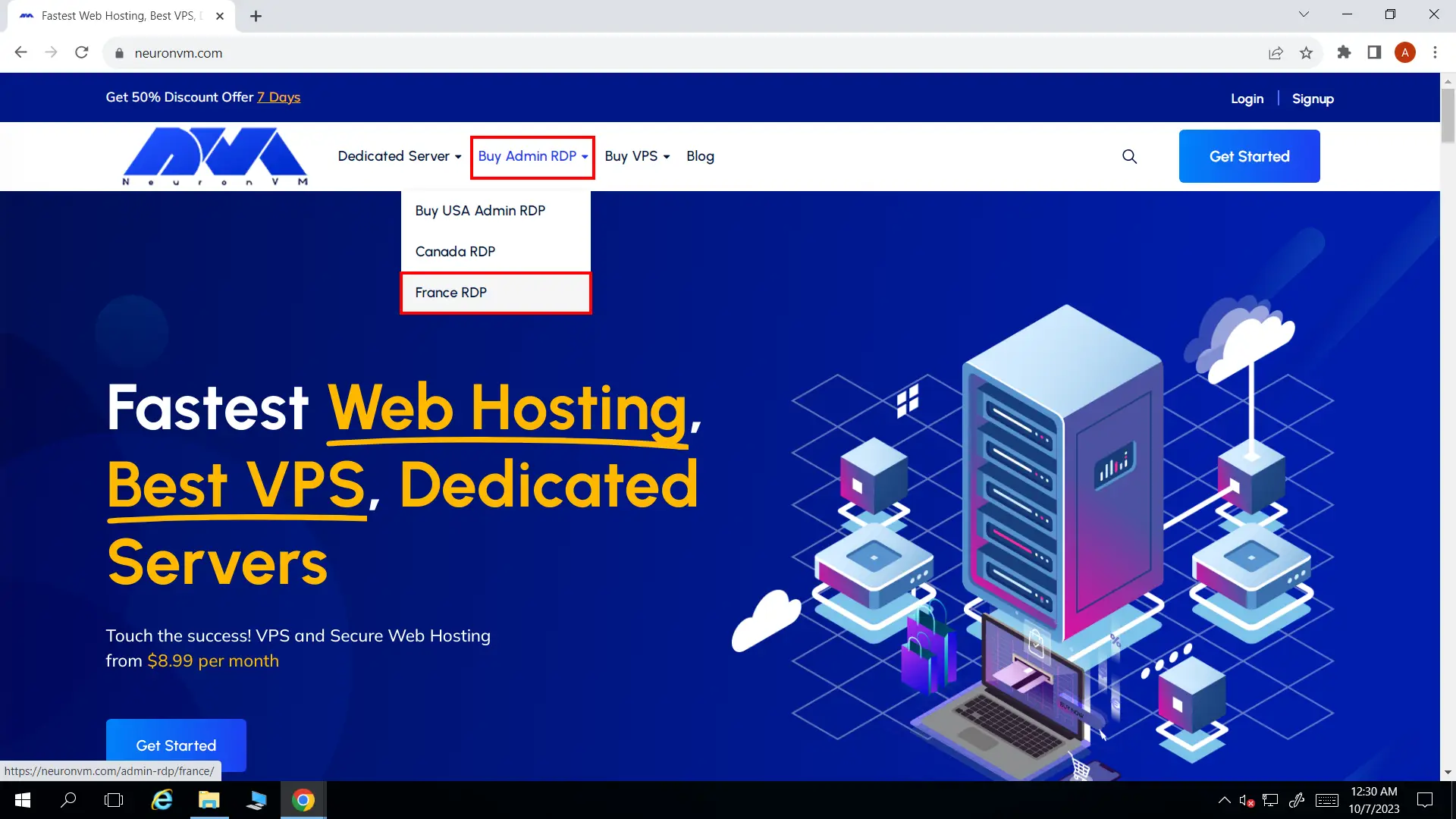
    • Head over to our main page. From the top menu select Buy Admin RDP and then select France RDP.
    Buy France RDP
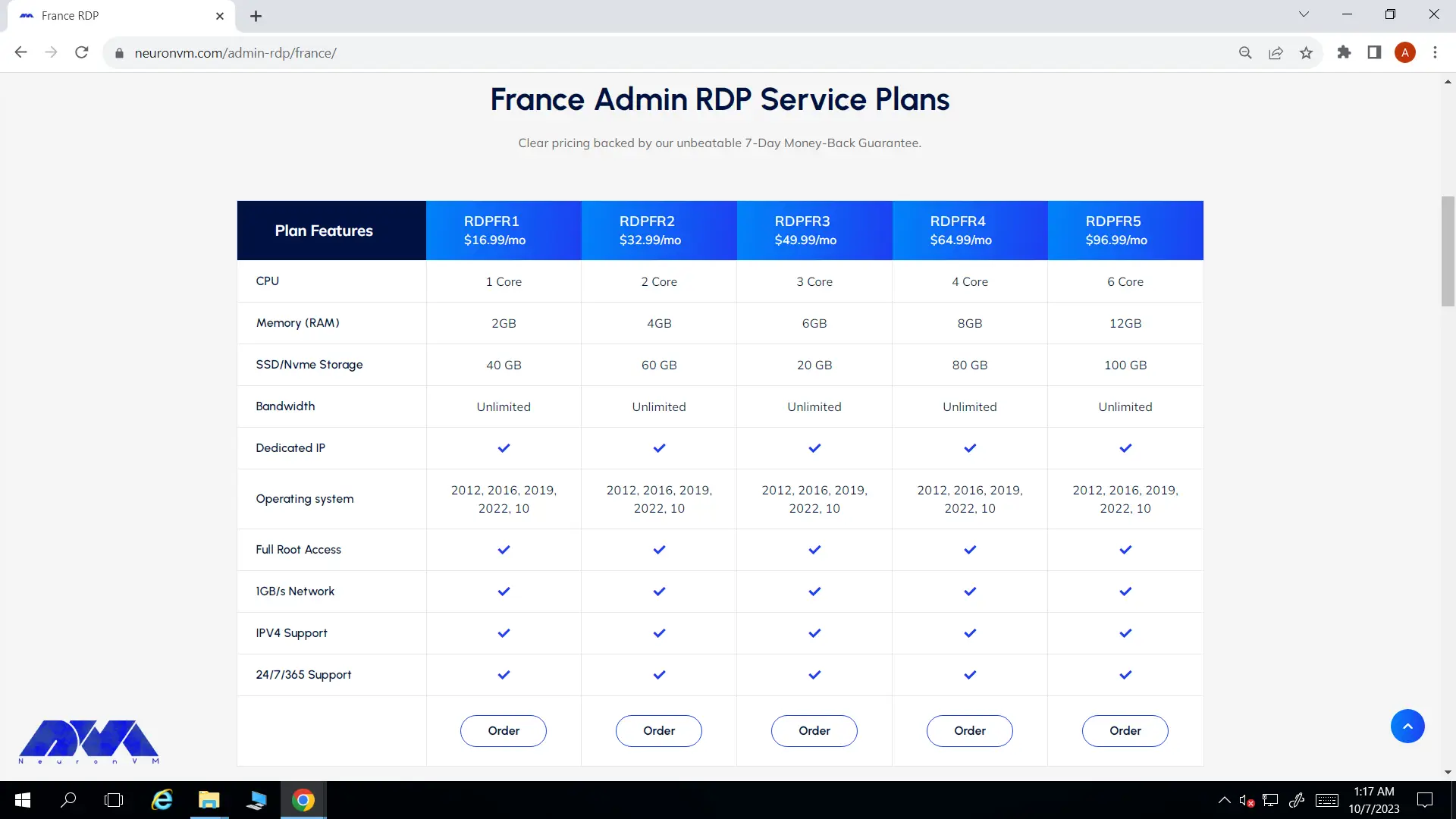
    • Select your preferred plan from the list. I suggest you read the plan features carefully before purchasing the RDP.
    france rdp Plans
    • Choose OS and the billing cycle of your choice and hit Continue.
    Configure
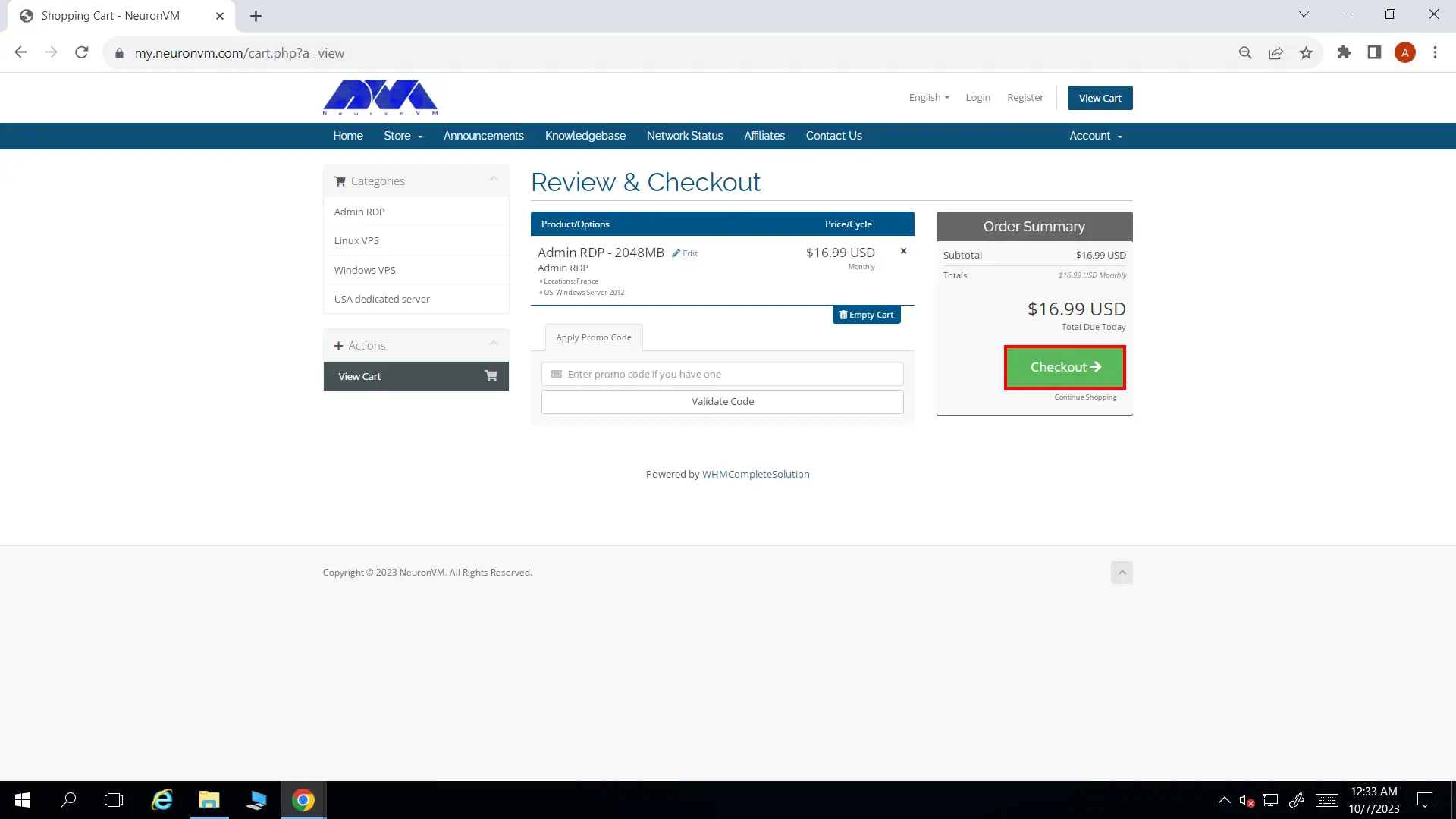
    • If you have a promo code, enter it in the box shown on this page. Click on Checkout and proceed.
    Review and Checkout
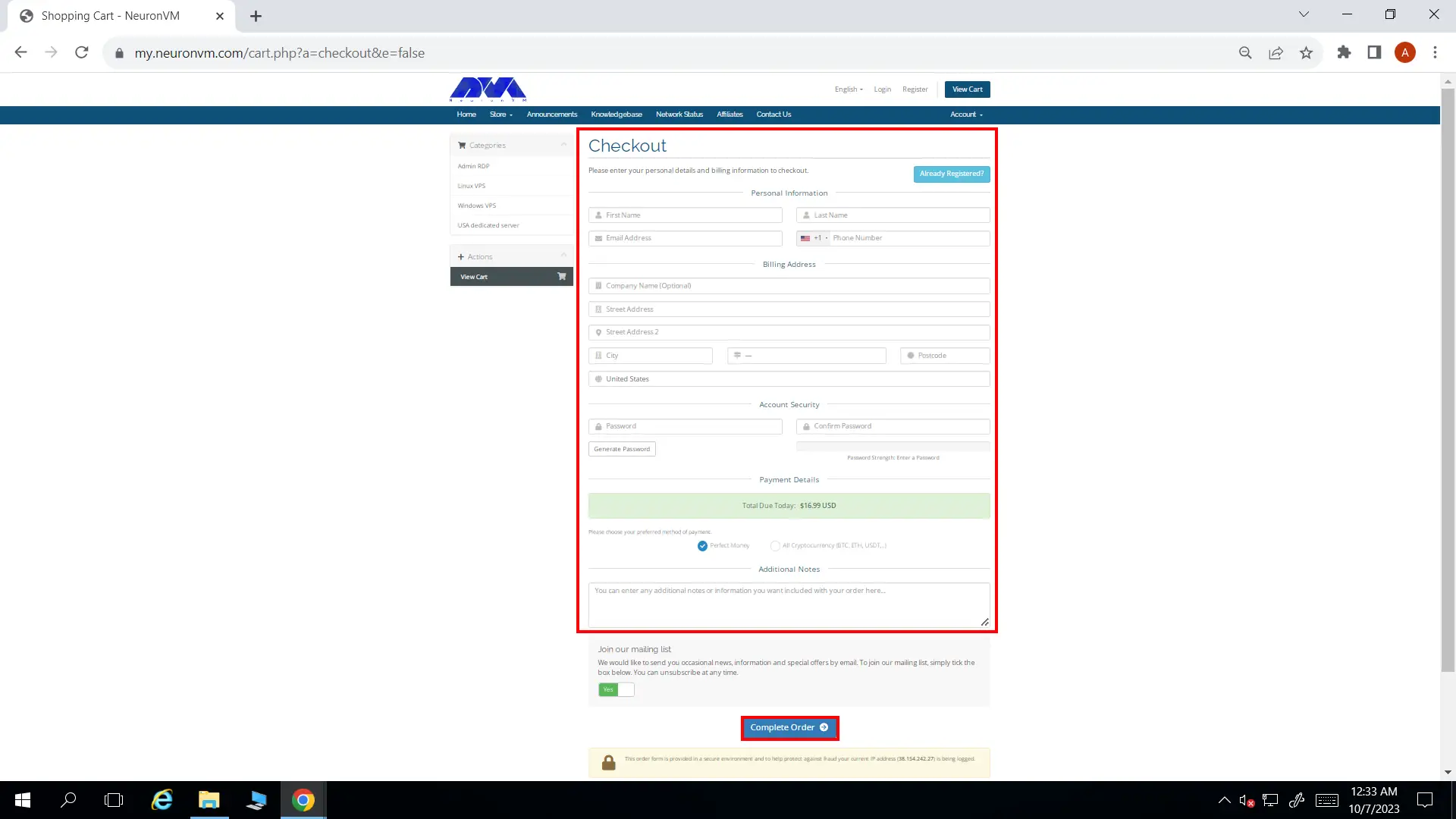
    • If you haven’t signed up before, you should fill out the form on this page. Once you’re done, you can choose cryptocurrency or perfect money to pay for the services. Then click on Complete Order and finalize your order.
    Completing order

    Once you purchased France RDP, we will instantly deliver it to you. Remember you can always contact our support team. We are here for you 24/7!

    Conclusion

    In conclusion, purchasing a France RDP offers numerous advantages, such as improved online security and unrestricted access to French services. Businesses and individuals seeking a secure and efficient way to connect remotely will greatly benefit from this service. With various providers available online, acquiring a France RDP has never been easier, ensuring seamless connectivity and enhanced online experiences.

  • Boost Your Remote Access with an Admin RDP Server

    Boost Your Remote Access with an Admin RDP Server

    In order to have a better understanding of admin RDP, it can be said that admin RDP is part of a larger server that provides a dedicated IP and other things such as RAM, CPU, and storage by RDP to your server. You will have almost no restrictions if you have administrative access to the remote desktop server. Using Admin RDP allows you to manage the Security of the server independently and if you want to configure your server this platform is ideal for you. This article presents to make you more familiar with RDP and examine the way to boost your remote access with an admin RDP server.

    What is the Exact Meaning of Admin Access in RDP?

    In the context of the Remote Desktop Protocol or RDP, Admin Access usually refers to administrative access or administrative privileges on the remote computer or server. It helps you to control other devices remotely, in other words, when a user has “Admin Access” in an RDP session, it means they have been granted administrative privileges on the remote computer.

    It is important to note that granting administrative access should be done with caution, as it gives users significant control over the remote system. Only trusted people should be given administrator access. This access should be limited to those who need it for legitimate purposes, such as system administration or troubleshooting.

    In RDP, administrators typically authenticate using their credentials, and when they establish an RDP session with a remote computer, they can perform administrative tasks as if they were physically present on the machine. Please note that the specific permissions and features for admin access in RDP can vary depending on the version of Windows and the configuration of the remote computer.

    There are various providers that offer admin RDP service and NeuronVM is one of the best. By choosing NeuronVM as your RDP provider, you will have a professional support team 24/7. Also, you will have the authority to customize your server and enjoy using Admin RDP. So hurry up and take your RDP server for the best performance.

    explanation of admin access in RDP

    How Admin RDP Server Boosts Remote Access?

    Buy Admin RDP that is a powerful tool and can boost remote access capabilities in several ways. Let’s analyze these practical ways:

    Admin RDP can boost remote access efficiency by eliminating the need for physical access to a computer. This is especially useful in scenarios where the remote computer is located in a different geographic location.

    – It provides administrators with full control over a remote computer, allowing them to perform tasks as if they were physically present at the machine. This includes installing and configuring software, troubleshooting issues, and managing files and settings.

    – Admin RDP sessions can be configured with strong security measures, such as encryption, and authentication. This helps ensure that remote access is secure and protected from unauthorized access.

    – Admins can use RDP to troubleshoot and resolve issues on remote computers, even if the end-user is not tech-savvy.

    – Admin users can access and manage system resources on the remote computer, such as the registry, event logs, and performance monitoring tools.

    – RDP supports multiple concurrent user sessions on a Windows Server. It can be useful for scenarios where multiple administrators need to access the same server simultaneously.

    – You can use admin RDP to remotely apply updates, patches, and security fixes to remote computers.

    – Admins can use RDP to monitor the performance and health of remote computers, generate reports, and proactively address issues before they become critical.

    How Admin RDP Server Boosts Remote Access?

    What Kind of Administrative Privileges are Given in RDP?

    As mentioned, administrative access has some privileges for users. These privileges are very important so that they allow you to have all the necessary access permissions. We can explain and specify the impressive privileges of admin access as follows.

    • Full control: Users with admin access can perform almost any action on the remote computer, including installing and removing software, changing system settings, creating and deleting user accounts, and more.
    • Security and policy management: They can configure security settings, set group policies, and manage user permissions.
    • Access to system resources: Administrators can access and manipulate system files, folders, and registry settings that are normally restricted to normal users.
    • Restart and Shutdown: Administrators can restart or shut down the remote computer.
    • Task Manager: Administrators can use Task Manager to view and manage processes running on a remote computer.
    • Event log: They can view and clear the event log for troubleshooting and monitoring purposes.
    • Configure Remote Desktop Services: Access settings related to RDP and configure Remote Desktop Services.
    • User Account Management: The ability to create, change, or delete user accounts on the remote computer.

    Requirements to Use RDP Server With Remote Access

    Using Remote Desktop Protocol with administrative privileges for remote access to a Windows computer requires several prerequisites and configurations to ensure security and functionality. Here are the basic requirements:

    – You need a Windows edition that supports RDP. Windows Professional, Enterprise, and Ultimate editions support RDP for remote administration.

    – You must have administrative privileges on the target machine.

    – Ensure that both the local and remote computers have an active internet connection, or they are on the same local network.

    – On the target (remote) computer, you should enable the Remote Desktop service. Check and configure this by going to “Control Panel” > “System and Security” > “System” > “Remote settings” and then selecting “Allow Remote Assistance connections to this computer.”

    – The target computer should have a static IP address.

    – Make sure that the Windows Firewall or any third-party firewall software on the target computer allows incoming RDP connections on port 3389.

    – On the local computer (the one you are using to connect to the remote computer), you need an RDP client.

    – You’ll need the username and password of the administrative account on the remote computer to establish an RDP connection.

    – If you want to allow multiple users to connect simultaneously to the remote computer, you may need to set up Remote Desktop Services (RDS) and purchase appropriate licenses.

    Troubleshooting Issues with Remote Access in Admin RDP Server?

    RDP is a valuable tool for remote administration of Windows servers. Here are some common issues with remote access in admin RDP and potential solutions:

    1- You may encounter authentication problems

    Solution:

    Verify that you are using the correct username and password. If using Network Level Authentication (NLA), ensure that the remote computer is up-to-date with security patches.

    2- In case of encountering licensing problems

    Solution:

    Ensure that your RDP licensing is up to date. If you’re running into licensing problems, you might need to contact Microsoft support or your licensing provider.

    3- Connection problems

    Solution:

    Ensure that the target machine has RDP enabled. Check the firewall settings to allow RDP traffic (port 3389 by default). Verify that the remote computer is reachable over the network. If you’re using a VPN, make sure it’s connected.

    4- Client or server connection issues

    Solution:

    Check the configuration settings on both the client and server side. Ensure that they match and that there are no conflicting settings. You may also want to update the RDP client to the latest version.

    Conclusion

    Note that while Admin RDP can greatly enhance remote access capabilities, it should be used with caution and proper security measures. Access should be restricted to authorized personnel, strong authentication methods should be employed. Also, network security should be in place to prevent unauthorized access or attacks. Additionally, compliance with legal and regulatory requirements should be considered when using Admin RDP for remote access. Now that you figured out what can be the effect of the Admin RDP server, don’t waste your time and dive into the site and buy Admin RDP.

  • Windows VPS and Bitcoin: How To Purchase Safely

    Windows VPS and Bitcoin: How To Purchase Safely

    Windows VPS and Bitcoin have become increasingly popular in recent years, as both offer unique advantages for businesses and individuals. A Windows VPS, or Virtual Private Server, provides users with an independent server environment within a larger physical server. This allows for greater control, reliable performance, and enhanced security. On the other hand, Bitcoin is a decentralized digital currency that facilitates secure and private transactions without the need for intermediaries. Combining these two technologies can provide users with a safe and anonymous way to purchase a Windows VPS, ensuring their online activities remain secure and protected. This is what we’re going to talk about in this article. If you want to buy a Windows VPS securely, paying via cryptocurrencies (especially Bitcoin) is your best bet! Now let’s dive in for more!

    Buy Windows VPS with Bitcoin

    Benefits of Windows VPS for Your Business

    Windows VPS is a powerful solution that offers numerous advantages for businesses in various industries. With Windows VPS, you can enjoy greater control over your server, increased flexibility, and enhanced security. Unlike shared hosting, a Windows VPS provides dedicated resources, ensuring better performance and reliability for your business operations.

    Additionally, it enables you to customize your server environment to meet your specific needs and preferences, allowing for seamless integration with your existing systems and software. This flexibility is particularly important as businesses today face ever-changing technological requirements and increasing demands from their customers.

    Moreover, Windows VPS offers scalability, enabling you to easily expand your server resources as your business grows. This means you can easily accommodate a higher volume of traffic, handle more intensive workloads, and support additional applications without experiencing any downtime or compromising the performance of your website or online services.

    Furthermore, Windows VPS provides excellent security measures, safeguarding your valuable data and protecting your business from potential cyber threats. This aspect is crucial given the rising frequency and sophistication of cyber attacks. By choosing a Windows VPS, you can have peace of mind knowing that your business information is stored on a highly secure and reliable server.

    Buy Windows VPS with crypto

    Through the integration of Bitcoin payments, purchasing a Windows VPS becomes even more convenient and secure. Bitcoin, being a decentralized digital currency, ensures fast and anonymous transactions, eliminating the need for credit card or banking information.

    This enhances the privacy and protection of your financial data while allowing you to make seamless and hassle-free payments for your Windows VPS. By embracing the world of Windows VPS and Bitcoin, you can optimize your business operations, stay ahead of the curve, and ensure the utmost security and convenience for your organization.

    Why Bitcoin?

    You may wonder what is the big deal with Bitcoin. I’ve used PayPal and other traditional ways my whole life, so why would I change it to Bitcoin? Well, Buying a Windows VPS with Bitcoin offers numerous benefits, making it a desirable option. Firstly, Bitcoin provides a secure and anonymous way to conduct transactions.

    With its decentralized nature and advanced encryption techniques, Bitcoin ensures a high level of privacy and protection for the buyer. Furthermore, using Bitcoin allows for swift transactions, eliminating the need for lengthy processes associated with traditional payment methods.

    Windows VPS and Bitcoin go hand in hand, enabling seamless and hassle-free transactions that promote efficiency and convenience. So, whether you’re an individual seeking a reliable and secure VPS for personal use, or a business owner in the market for a robust hosting solution, opting for Bitcoin payments grants you flexibility, ease, and peace of mind.

    Windows VPS and Bitcoin

    Choosing the Right Windows VPS Provider that Accepts Bitcoin

    When it comes to selecting a Windows VPS provider that accepts Bitcoin, it is essential to choose a reliable and trusted platform. For tech enthusiasts and privacy-conscious individuals, NeuronVM stands as a premier website that offers seamless solutions.

    With NeuronVM, purchasing Windows VPS through Bitcoin has never been easier. As the preferred payment method for many, Bitcoin ensures anonymity and security, aligning perfectly with NeuronVM’s commitment to customer privacy.

    Whether for personal or professional use, NeuronVM provides a user-friendly interface, robust server options, and top-notch customer support, making it the go-to destination for anyone looking to buy Windows VPS with Bitcoin. Visit NeuronVM today and enjoy a hassle-free experience while acquiring your Windows VPS.

    How to Safely Purchase Windows VPS with Bitcoin?

    If you want to buy a Windows VPS using Bitcoin, we are here to show you the way around!

    • Open your browser navigate to our website and then click on Windows VPS from the Buy VPS menu.
    how to buy vps with bitcoin
    • On the Windows VPS page, carefully review the available plans and select the one that best suits your needs. Consider factors such as CPU, RAM, storage, and bandwidth allocation.
    Choose windows vps Plan
    • Once you’ve chosen the desired plan, scroll down and you’ll see three options that can be customized based on your preference.
    • Here, you can select your preferred billing cycle (monthly, quarterly, yearly, etc.), location (choose a server location closest to your target audience for optimal performance), and operating system (Windows Server edition).
    • After making the necessary selections, click on the “Continue” button. This will take you to the next step in the purchasing process.

    Configure vps server
    • If you have a discount code, you can enter it in the designated field. This will automatically apply the discount to your total amount. Once you’ve entered the code, click on the green “Checkout” button.
    Discount Code
    • On the following page, you will need to provide your personal information, including your name, email address, and your phone number to create an account. Fill in all the required fields accurately.
    Fill the register form in neuronvm
    • After entering your personal information, scroll down to find the “Payment Details” section. Here, you’ll see various payment options. Choose “All Cryptocurrency (BTC, ETH, USDT,…)” as your payment method.
    • Click on “Complete Order” and pay with bitcoin!
    how to buy bitcoin vps server

    That’s basically it! NeuronVM will deliver your Windows VPS instantly and without any setup fee. If you have any issues following this guide, contact our friendly support team and we will help you right away!

    Conclusion

    All in all, it is crucial to take necessary precautions when purchasing Windows VPS using Bitcoin to ensure a safe transaction. Researching and selecting a reputable VPS provider is essential to avoid potential scams or fraudulent services. Additionally, utilizing secure payment methods and verifying the legitimacy of the seller can further enhance safety. By following these steps, you can confidently navigate the process of purchasing Windows VPS with Bitcoin, minimizing the risks associated with such transactions.

  • Why NeuronVM is the Best Place to Buy USA Admin RDP?

    Why NeuronVM is the Best Place to Buy USA Admin RDP?

    Have you ever thought about what admin RDP is and what positive effects it can have on your business? If you have read our previous articles, you are familiar with this widely used service, and you know how much it can help you. In this article, we want to introduce you to USA admin RDP and show how NeuronVM can be the best place to buy USA admin RDP. So keep studying until the end.

    Learn More About USA Admin RDP

    Admin RDP typically refers to Remote Desktop Protocol access with administrative privileges. Remote Desktop Protocol is a proprietary protocol developed by Microsoft that allows the user to connect to a remote computer over a network connection. When you have administrative RDP access, it means you have the highest level of control and access rights to a remote Windows computer or server. But If it is specified as “USA admin RDP” it implies that the remote server or desktop is physically located in the United States or that the service is being offered by a U.S.-based provider.

    With Admin RDP, you have full control over the remote system. You can perform tasks such as installing and uninstalling software, configuring settings, managing user accounts, and more. RDP access should be granted only to trusted users because it provides extensive control over a system. Access should be carefully managed to prevent unauthorized use.

    Learn More About USA Admin RDP

    What to consider when buying USA Admin RDP?

    When considering buying a USA Admin RDP, which typically provides remote access to a Windows-based server or computer with administrative privileges, you need to be cautious and make an informed decision. Here are some important factors to consider:

    • The type of RDP is important. An Admin RDP typically grants you administrative control over the remote server or computer. Make sure it meets your specific requirements.
    • Ensure you get the USA Admin RDP from a reputable and trusted provider. Look for reviews, recommendations, and customer feedback. Avoid purchasing RDP from unknown or suspicious sources to reduce the risk of scams or poor service.
    • Since you are looking for a USA Admin RDP, verify that the server is physically located in the United States. This can be important for low-latency connections.
    • Ensure the provider offers reliable customer support and guarantees a high level of uptime.
    • Compare pricing plans from different providers. Be wary of exceptionally low prices, as they may indicate a lack of quality or security. NeuronVM offers affordable prices with high quality and up-to-date services.
    • Carefully review the terms of service and acceptable use policy of the provider. Ensure they don’t violate any legal or ethical boundaries.
    • Inquire about data backup and recovery options.
    • Assess the performance of the RDP, including CPU, RAM, and storage specifications. Ensure it meets your requirements for running the applications or tasks you intend to use it for.
    • Understand the provider’s refund and cancellation policies in case you need to make changes or cancel your subscription. You will have the chance to test and 7 days refund payback in NeuronVM if you are not fully satisfied.
    • Determine how many users can access the RDP simultaneously, as some providers may limit the number of concurrent users.

    Why You Should Choose NeuronVM as a Provider?

    The factors mentioned above are very important points that you should pay attention to when buying USA admin RDP. But the important thing is that you can guarantee all these things by purchasing NeuronVM RDP servers. The NeuronVM site is one of the most reliable and prominent sites that is fully trying to satisfy its users and be with its users in all stages of purchase and use, with the help of an experienced and expert staff.

    At the same time, this provider of USA RDP services, which provides ease-to-use panels and equips users with the best hardware and software, and full access increases the pleasure of using Admin RDP services. Also, suppose you are looking for dedicated resources, the ability to upgrade the server in the shortest possible time, the highest utilization, low ping time, etc. In that case, NeuronVM is sure to be a great option for all your needs.

    Another important point about this USA RDP provider is that this site also allows users to purchase services using digital currencies, and this way, you can make your purchase in the easiest and fastest way possible from anywhere in the world. And get your server as soon as possible.

    What are the Features of NeuronVM USA Admin RDP?

    NeuronVM, as a USA admin RDP provider, considers all aspects of security for you and tries to ensure that you can purchase this service safely and use it without any worries. So, let’s examine the basic features of this server on the NeuronVM site.

    What Are the Features of NeuronVM USA Admin RDP?
    • By purchasing USA Admin RDP from NeuronVM, you can receive and manage your service immediately after purchase.
    • Another advantage of NeuronVM is 24/7 support and a specialized support team to help you at any time and solve your technical problems.
    • By providing a user-friendly control panel, this site allows the user to take full control of his panel, manage it, and customize it according to his taste.
    • As already mentioned, NeuronVM, with confidence in its services, has also enabled a 7-day money-back guarantee so that if you are not satisfied, you can get back the amount paid.
    • Another outstanding feature of NeuronVM is a 100% uptime guarantee. That means you can experience full and lag-free access with NeuronVM’s rock infrastructure. Also, know that your USA Admin RDP is always up and running.
    • Finally, the most important advantage of NeuronVM is that by serving from more than 60 locations worldwide, it has provided complete access and shown a lot of flexibility in providing different servers.

    Tip: To learn about how to buy a USA admin RDP, you can refer to the guide Buy USA Admin RDP by Crypto.

    Best Practices For Securing USA Admin RDP

    Here are some practices for securing RDP access in a USA administrative context:

    – Ensure that your RDP client and server software are up to date with the latest security patches and updates.

    – Avoid default passwords and implement a password policy that enforces regular password changes.

    – Set account lockout policies to prevent brute force attacks. After a certain number of failed login attempts, the account should be locked out temporarily.

    – Only allow RDP access to users who absolutely need it. Implement the principle of the least privilege.

    – Changing the default RDP port (TCP 3389) can help thwart automated scans looking for RDP servers.

    – Isolate RDP servers from the public internet whenever possible.

    – Keep detailed logs of RDP access attempts and review them regularly for suspicious activity. Consider using intrusion detection systems (IDS) and intrusion prevention systems (IPS) to detect and block malicious activity.

    – Ensure that RDP sessions are encrypted using strong encryption protocols, such as TLS.

    – Regularly back up critical data and have a disaster recovery plan in place in case of a security breach.

    – Ensure that your RDP configuration complies with relevant regulatory requirements, such as those specified by NIST, HIPAA, or other applicable standards.

    Conclusion

    Remember that administrative RDP access is a powerful tool that should be used responsibly and securely. Unauthorized access to RDP can lead to security breaches and data loss. Always follow best practices for securing remote connections and regularly review and update your security measures to stay protected against evolving threats. Meanwhile, USA Admin RDP is the most powerful that is served from the United States and is one of the best services on the NeuronVM website. We hope this guide was useful enough for you. Try this service and enjoy full access and hassle-free usage to rock your business and reach your goals.