In today’s digital landscape, ensuring the security of computer networks and systems is of utmost importance. Penetration testing, also known as ethical hacking, plays a crucial role in identifying vulnerabilities and strengthening the overall security posture. One such powerful tool used by security professionals is Aircrack-ng, a suite of wireless network assessment tools. This article aims to show you how to install Aircrack-ng on Kali Linux, a popular ethical hacking operating system, enabling you to harness the capabilities of this versatile tool for effective penetration testing. For this tutorial, you can also useLinux VPS and save yourself a lot of time and resources. So, let’s dive in and explore the installation process step-by-step, unlocking the potential of Aircrack-ng on your Kali Linux environment.
Requirements
Kali Linux OS:Aircrack-ng is usually pre-installed in Kali Linux. Make sure you have the latest version of Kali Linux installed.
Root Access: You need to have root access or superuser privileges to install and use Aircrack-ng.
Wireless Adapter: Aircrack-ng requires a compatible wireless adapter that supports monitor mode and packet injection. Not all wireless adapters are compatible, so ensure that you have a supported adapter. You can check the Aircrack-ng website for a list of compatible wireless adapters.
Dependencies: Aircrack-ng has some dependencies that you need to install. To install these dependencies, open a terminal and run the following command:
If you need to buy Linux VPS server, we suggest you to use the various plans offered on our website, which have a wide variety of locations and immediate delivery.
Aircrack-ng Installing Methods on Kali Linux
Once you have met these requirements, you should be able to install and use Aircrack-ng on Kali Linux.
A. Installing Aircrack-ng on Kali Linux Using the apt Package Manager
Well, now it’s time to learn how you can install Aircrack-ng on Kali Linux using the apt package manager. This is the first method of the two methods explained in this article.
Open a Kali Linux terminal.
Update the package lists by running the command:
sudo apt update
Install Aircrack-ng by running the command:
sudo apt install aircrack-ng
The installation process will begin, and you will be prompted to confirm the installation. Type ‘Y‘ and hit Enter.
Once the installation is complete, you can start using Aircrack-ng.
That’s it! Using this method you can easily download and install Aircrack-ng on your Kali Linux machine. Some people may prefer to manually install this tool. If you’re one of those people, we’ve written the next section for you.
B. Aircrack-ng Manual Installation on Kali Linux
Another way of installing Aircrack-ng is the manual installation from the source. Here’s how:
Open a Kali Linux terminal.
Download the latest version of Aircrack-ng by running the command
Extract the downloaded archive by running the command:
tar -zxvf aircrack-ng-1.6.tar.gz
Change into the extracted directory by running the command:
cd aircrack-ng-1.6
Compile Aircrack-ng by running the command:
make
Install Aircrack-ng by running the command:
sudo make install
The installation process will be complete, and you can start using Aircrack-ng.
And here’s how you can manually install Aircrack-ng on your machine. Both methods are somehow similar but you can choose the method that suits you better.
Troubleshooting Common Issues
There are certain factors that you need for Aircrack-ng to run smoothly. We gathered a short list of them for you, so you can find the issue easier and faster.
Monitor mode not supported: Some wireless cards do not support monitor mode, which is required for certain Aircrack-ng functions. Check if your card supports it.
Driver issues: Ensure that your wireless card is compatible with Aircrack-ng and you’ve installed the correct drivers.
Interface not detected: If Aircrack-ng does not detect your wireless interface, try restarting the network manager or manually configuring the interface using commands like “ifconfig” or “iwconfig.”
Incorrect password or handshake capture: Make sure you have captured a valid handshake or have the correct password when attempting to crack a Wi-Fi password.
Insufficient signal strength: Weak signal strength can affect the success rate of Aircrack-ng attacks. Try moving closer to the target access point or using a more powerful wireless card.
False positives: Some antivirus software may falsely detect Aircrack-ng as a malicious tool. Disable or whitelist Aircrack-ng in your antivirus software if necessary.
Conclusion
In conclusion, Aircrack-ng is a powerful tool for assessing the security of wireless networks. By understanding its capabilities and following the installation guide provided, you can successfully install Aircrack-ng on Kali Linux. Remember to ensure compatibility with your wireless card, troubleshoot any issues that may arise, and exercise responsible and ethical usage. With Aircrack-ng at your disposal, you can enhance your network security knowledge and protect against potential vulnerabilities.
Nmap is one of the most useful tools for network administrators or security analysts because they need to have a thorough understanding of the devices and services running on a Kali network. This tool is very useful for network exploration and security auditing. So let’s see how to install and work with Nemap on Kali Linux.
What is Nmap?
Nmap is a well-known and practical tool for exploring the network, which is also widely used in terms of security. You can use this tool to discover hosts and services in computer networks or scan vulnerabilities and ports. It is worth noting that Nmap can be used for free on Linux OS or Linux VPS, Windows OS or VPS, and Mac.
Some of the remarkable features of this tool are the ability to scan large networks and detect open ports, operating systems, and other network services. Network vulnerabilities can be weak passwords, misconfigured services, or outdated software.
Note: You can benefit from the features of this great tool on NeuronVM‘s Linux servers.
How to Start Nmap on Kali Linux?
You can use the following command to start and scan your network. This is the basic command:
nmap [Scan Type] [Options] [Targets]
How to Work With Nmap? (Scan Types)
You can use various ways to scan the network using Nmap. We will examine these scan Types for you:
TCP Connect Scan (-sT):
Completes a full TCP connection to each specified port, providing reliable results but easily detectable.
SYN Stealth Scan (-sS):
Initiates a SYN scan by sending SYN packets to target ports, without completing the full connection, making it less detectable.
UDP Scan (-sU):
Scans for open UDP ports, commonly used for services like DNS and DHCP, provide insight into potential vulnerabilities.
ACK Scan (-sA):
Sends ACK packets to target ports to determine firewall rules, useful for understanding network filtering.
FIN Scan (-sF):
Sends FIN packets to target ports, aiming to identify open ports by observing how they respond to unexpected connection termination requests.
Xmas Tree Scan (-sX):
Sets the FIN, PSH, and URG flags in the TCP header, used to identify firewall behavior based on how it handles unusual flag combinations.
Null Scan (-sN):
Sends null packets (with no TCP flags set) to target ports, useful for identifying firewall configurations.
Idle Scan (-sI):
Utilizes an idle system as a “zombie host” to perform scans more discreetly and reduce the chance of detection.
Version Detection (-sV):
Attempts to determine service and version information on open ports, providing details about the software running on the target.
OS Fingerprinting (-O):
Tries to identify the operating system of the target by analyzing subtle differences in how the system responds to certain packets.
Nmap Scan Options
In this section, we will mention a number of Nmap options that can use to customize the scan. These options are:
-p: To determine which ports to scan.
-sV: To identify the version of services running on the target host.
-o: To specify running operating system on the target host.
-v: Used to increase the verbosity of output on Nmap.
Some Examples of Nmap Usage on Kali Linux
These are some examples to show the way of scanning via Nmap:
For Ping Scan
the command below will scan the 192.168.1.0/24 network and give the list of online and responsive hosts:
nmap -sP 192.168.1.0/24
For UPD Scan
This command can use for scanning target host for example (192.168.1.1) and give the list of UPD services on open ports:
nmap -sU 192.168.1.1
For Custom Port Scan
You can use this one for scanning port 80 on the target host 192.168.1.1 and informing you whether the port is open or closed:
nmap -p 80 192.168.1.1
Some Advance Options Of Nmap on Kali Linux
In addition to these basic functional features, Nmap offers advanced tools and scripts that can be used to perform more comprehensive scans. Here we will mention some of them:
Ability to scan scripts
There is a large library of scripts available in Nmap that you can use to identify potential vulnerabilities on a target host. These scripts can use in combination with other types of scans to perform a comprehensive security analysis of a network.
The Possibility of Stealth Scanning
You can use Nmap for stealth scans. This is designed to prevent detection by firewalls or intrusion detection systems. Techniques like fragmented packet scanning or idle scanning are used here.
Operating System Fingerprint
Using this option will help you detect operating systems running on a target host by analyzing responses to different packets sent to the device.
Conclusion
These are some commonly used Nmap scan types, options, and advanced features each serving different purposes in network reconnaissance. Now, having a better understanding of Nmap and learning how to use it, you can ensure its security by monitoring your network. Always ensure you have permission before scanning any network.
The battle between Kali Linux and Arch Linux is a showdown between two powerhouses. Kali Linux, known for its penetration testing capabilities, is favored by cybersecurity professionals. Arch Linux, on the other hand, boasts a minimalistic approach and offers a highly customizable experience. In this article, you will clearly see the result of the comparison between Kali Linux vs Arch Linux.
The Origin Story
Kali Linux and Arch Linux are two popular Linux distributions that emerged from different origins and serve distinct purposes. Before we start and introduce and compare these two distributions for you, we suggest you to test and use the Linux VPS server plans provided on our website.

Kali Linux, formerly known as Backtrack, was initially developed by Mati Aharoni and Devon Kearns of Offensive Security as a specialized distribution for penetration testing and digital forensics. It was first released in 2006 and became popular within the security testing community due to its vast array of pre-installed security tools and utilities. Kali Linux is designed for ethical hacking and security auditing, providing a robust platform for professionals and enthusiasts in the cybersecurity field.
On the other hand, Arch Linux was created by Judd Vinet in 2002 as a minimalist and lightweight distribution focused on simplicity, customization, and flexibility. Arch Linux follows a rolling release model, which means that users have access to the latest software updates without the need for reinstalling the entire operating system. Its philosophy of “Keep It Simple, Stupid” (KISS) appeals to advanced Linux users who prefer to build their systems from the ground up and have complete control over every aspect of their installation.
Although Kali Linux and Arch Linux have different goals, they both share an open-source foundation and have vibrant communities supporting their development. Both distributions enjoy active user bases and periodically receive updates and bug fixes to ensure their security and functionality.
Kali Linux vs Arch Linux: Usability and User Experience
First of all, it should be noted that Kali Linux and Arch Linux both have different focuses, so their usability and user experience may vary.
Kali Linux comes pre-installed with a wide range of security and hacking tools, making it ideal for experienced security professionals. However, for a mainstream user who only requires general computing tasks, Kali Linux may not be the most user-friendly option. It requires a high level of technical knowledge and may not provide a seamless out-of-the-box experience.
On the other hand, Arch Linux is highly customizable distribution that follows a “do-it-yourself” philosophy. Arch Linux provides a more hands-on experience, allowing users to configure and optimize their system according to their specific needs. While this level of customizability can be empowering for experienced users, it may not be the best choice for beginners or those who prefer a more plug-and-play experience.

In terms of user experience, Kali Linux is focused on a specific niche and provides specialized tools for penetration testing and security assessments. Its user interface is tailored to these tasks, with an emphasis on efficiency and accessibility to security tools. However, for day-to-day tasks like web browsing, multimedia, or gaming, the user experience may not be as polished or optimized.
Arch Linux, on the other hand, provides a minimal and lightweight base system, allowing users to customize and install their preferred desktop environment, applications, and utilities. This flexibility offers a more tailored and user-friendly experience, but it also requires a higher degree of technical expertise to set up and maintain.
Package Management Systems
Kali Linux uses the Advanced Packaging Tool (APT) package management system. APT is known for its ease of use and powerful features. It allows users to install, upgrade, and remove software packages easily using simple commands like apt-get. APT also provides extensive dependency management, which ensures that all required libraries and dependencies are installed along with the requested package. Kali Linux also provides its own repositories with a wide range of security and hacking-related tools.

On the other hand, Arch Linux uses its own package manager called Pacman. Pacman is a lightweight and flexible package management system designed specifically for Arch Linux. It follows a minimalist approach and aims to provide a simple and efficient package installation process. Pacman uses a rolling release model, which means that packages are constantly updated to their latest versions. It also has a built-in package build system called the Arch Build System (ABS), which allows users to easily create and install custom packages.
In summary, both APT and Pacman have their own strengths and are suited for different types of users. APT is often preferred for its user-friendly interface and extensive package repositories, while Pacman is favored for its simplicity and rolling release model.
Community Support and Philosophies
Community Support:
Kali Linux: Kali Linux has a large and active community support base due to its popularity among the cybersecurity community. It has a dedicated forum, IRC channel, and various online communities where users can seek help, share knowledge, and discuss topics related to Kali Linux tools and usage.
Arch Linux: Arch Linux also has a strong and active community support system. It has an official forum, IRC channels, and a Wiki page. The Arch Linux community is known for its helpfulness, but it is more focused on user self-sufficiency and encourages users to find solutions on their own by providing extensive documentation.

Philosophies:
Kali Linux: Kali Linux is geared towards penetration testing, security auditing, and digital forensics. It is designed to provide a comprehensive toolkit of specialized tools for cybersecurity professionals. Kali Linux follows a philosophy of “hack responsibly” and promotes ethical hacking and education in the field of cybersecurity.
Arch Linux: Arch Linux follows a minimalist and do-it-yourself (DIY) philosophy. It aims to provide a lightweight and minimal base system that allows to build customized Linux environment according to preferences. Arch Linux focuses on simplicity, user-centricity, and providing the latest bleeding-edge software packages.
Kali Linux has a massive community support base with a focus on cybersecurity, hacking, and forensics, while Arch Linux has an active community that emphasizes self-sufficiency and encourages users to build their customized Linux systems. Choose Kali Linux if you specifically need cybersecurity tools, and choose Arch Linux if you prefer a minimal base system with extensive customization options.
General Overview: Kali Linux vs Arch Linux
In the table below, we have generally compared Kali Linux and Arch Linux. Note that this table provides an overview and may not cover all aspects of each distribution. It is always recommended to research and evaluate specific needs before choosing a Linux distribution.
Features
Kali Linux
Arch Linux
Purpose
Penetration testing
Customizable environment
Target audience
Security professionals
Advanced Linux users
Ease of use
Intermediate
Advanced
Package manager
Apt
Pacman
Number of packages
Extensive
Minimal
Rollingrelease
No
Yes
Stability
Stable
Rolling release
Community support
Excellent
Active and knowledgeable
Documentation
Comprehensive
Extensive and detailed
Customization
Limited
Highly customizable
Hardware support
Wide range
Varies
Installation
Full installation image
Minimal installation image
Default desktop environment
Gnome
None
Security features
Extensive
Limited
Update frequency
Periodically
Continuously
Use cases
Penetration testing, digital forensics
General-purpose use
Final Words
In conclusion, both Kali Linux and Arch Linux offer powerful features and flexibility for different purposes. Kali Linux is designed for penetration testing and security auditing, while Arch Linux is a minimalistic and customizable distribution suitable for advanced users. In this article, we tried to fully compare Kali Linux and Arch Linux, but if you still have any doubts or questions about this, ask us in the comments section.

Kali Linux, a powerful operating system, has emerged as a game-changer for cybersecurity enthusiasts and professionals worldwide. With its arsenal of awesome tools, Kali Linux empowers users to penetrate systems, conduct ethical hacking, and enhance their security defenses. The vast range of these tools covers everything from network analysis, password cracking, and wireless attacks to digital forensics and vulnerability assessment. These meticulously crafted tools, designed and developed by an expert community, equip users with unparalleled capabilities to uncover vulnerabilities, simulate real-world attacks, and fortify their systems against malicious threats.
Whether you’re a beginner or an advanced user, Kali Linux tools offer an immersive and exhilarating experience in the world of cybersecurity. Diving into the realm of network analysis, tools like Wireshark and Nmap enable users to visualize and understand network traffic, perform deep packet inspection, and identify potential weaknesses. For those interested in password security, John the Ripper and Hydra prove invaluable by efficiently cracking encrypted passwords through brute-force attacks and dictionary-based methods. As you progress further, you stumble upon tools like Metasploit and Burp Suite, which provide the ability to emulate actual attacks and test the resilience of systems against various exploits. Additionally, the extensive collection of digital forensics tools allows users to investigate incidents, recover deleted files, and analyze system artifacts. Thus, these tools not only expand your knowledge but also ensure you’re armed with the necessary skills to safeguard your digital assets.
Below, you can see an infographic showcase of the most popular and common Kali Linux tools in 13 different categories. Sure there are way more tools that you can use for penetration testing, but these are the essential ones. Hope this post gives you the bigger picture you may need! You can also download the PDF file if you want to have a closer look!
You can use SkipFish for web application security scanning, which helps identify vulnerabilities and security issues in web applications. This open-source tool was developed by Google and is designed to evaluate the security status of web applications by performing various tests and scans. We will focus on SkipFish and will try to help you figure out how to install SkipFish on Kali Linux. So read this article carefully to get the best scanner for scanning web applications.
A full Introduction to SkipFish
SkipFish is a type of penetration testing tool that works automatically. It is open-source and was created on GitHub for security researchers. You can use this tool to collect information and test the security of websites, VPS, Admin RDP, and dedicated servers.
SkipFish has a simple structure and is one of the best penetration testing tools. This tool can target many integrated tools for testing in the target system. SkipFish can also be used to detect the security of active web applications. It can be used by security professionals, developers, and system administrators to identify potential weaknesses in web applications before they are exploited by attackers.
In the next section, you will find out some significant and practical features of SkipFish:
What Are the Significant Features of SkipFish?
SkipFish is a perfect tool for tracking enumeration.
You can use SkipFish for scanning all websites and webpages.
It is an open-source intelligence tool.
It contains a wide range of modules such as wananga, metagoofil, etc.
SkipFish is able to detect vulnerabilities in CMS such as WordPress, Joomla, and others.
SkipFish contains more than 15 modules that can be used in penetration testing.
This scanning tool is capable of detecting a wide range of subtle detects, and different security checks that involve blind injection vectors. In other words, it has Cutting-edge security logic.
SkipFish supports a wide range of odd web frameworks and mixed-technology sites like on-the-fly wordlist creation.
Another SkipFish feature is high-speed this feature contains highly optimized HTTP handling, minimal CPU footprint, and pure C code.
How to Install SkipFish on Kali Linux
Let’s start the installation process using the step-by-step instructions here:
The first step to installing the SkipFish tool is moving to the desktop and then typing the command below:
Now SkipFish will be installed in your Kalli Linux system.
As the second step, you should move SkipFish into the tool directory with the following command:
cd skipfish ls skipfish -h
At last, you will be able to see the tool’s help menu that is now active. You can use all of the flags with the tool. As soon as you download the tool, you can learn how to utilize it.
Tip: Most of the time you don’t need to install SkipFish because it comes pre-installed in Kali Linux.
What Is the Usage of SkipFish?
After the installation part, You can type the command below in the terminal to check its option:
sudo skipfish -h
We will show the usage of SkipFish with some examples.
Example 1: Use the SkipFish tool for scanning a WordPress website with the help of an IP address:
skipfish -o 202 http://192.168.1.***/wordpress
You can see the tool’s report here:
Example 2: You can scan bodegeit with the following command:
As a result, you can view all relevant data such as data, scan time, HTTP requests to hosts, HTTP errors, etc.
What Is the functionality of SkipFish?
SkipFish is a command line tool that can be run on different operating systems. To configure the scanning process, it needs to specify the target URL and various options. The generated report can be viewed in the browser to understand the security findings. The way this tool works is that it works using dictionary-based crawlers and recursive crawling and creates a map in the console of the site in question.
With the help of this tool, you can have all active security checks in the domain. Finally, SkipFish produces a report that can be further used for security assessments.
Note that security scanning tools like SkipFish are only part of a comprehensive security strategy. Regular manual security tests, code reviews, and other security measures are necessary to ensure the overall security of web applications.
Conclusion
SkipFish is now installed on your Kali Linux system and ready to be used. As we mentioned above, SkipFish is a web application security scanner, so make sure to use it responsibly and only on systems and applications you have permission to scan. Please note that software and repositories may change over time, so it’s best to refer to the official SkipFish repository or documentation for any updates or changes. Happy coding!
Kali Linux is a Debian distribution operating system that comes with many installed tools. This operating system is provided to help with security checks and penetration testing. In this post, we decided to introduce a powerful password-generation tool in Kali Linux (Crunch).
What is Kali Linux?
When we use the word Linux, we mean the entire Linux operating system. All Linux operating systems have different distributions, each of which has its name and is privately distributed and supported by a company. One of the types of Linux distribution is Kali Linux.
Kali Linux is a security version of the Linux operating system that is mostly designed for security penetration testing. With the variety of plugins and security applications that come with it, this operating system makes it a suitable tool for penetration testing, reverse engineering, and security research.
Kali Linux is actually a unique operating system that is using by everyone, both good and bad. It can be used to discover and fix security vulnerabilities. One of the applications of Kali Linux is hacking with Kali Linux and penetration testing with Kali Linux, which both security experts and hackers do. In other words, Kali is like a sharp knife in the toolbox.
What is Crunch and how does it work?
The crunch tool is a tool in the field of creating a password list and is one of the most powerful in this field. In other words, the Crunch tool is a word list generator where you can use a standard or any character set to generate word lists. Word lists are creating by combining and permuting a set of characters. You can select the number of characters and the size of the list.
This program supports numbers and symbols, uppercase and lowercase letters separately, and Unicode. Among the important features of this tool, the following capabilities can be mentioned:
The possibility of generating a password list with 2 different combinations and replacement methods
Support letters, numbers, symbols
Ability to combine letters, numbers, symbols
Ability to be case-sensitive
The ability to stop and resume the password list creation process
How to install Crunch in Kali Linux
Before starting the installation, we recommend that you use the Linux VPS server plans provided on our website and benefit from the high quality and speed of these servers. After getting familiar with Crunch and its capabilities in the previous sections, now it’s time to learn how to install it. Installing Crunch on Kali Linux is very easy, just run the following command:
sudo apt install crunch
This will download and install the crunch package from the official Kali Linux repository. You may need to enter your password and confirm the installation.
To check if Crunch is installed correctly, you can run the following command:
crunch -h
This will display the help page of Crunch, which shows the usage, syntax, and options of the tool. You can also see some examples of how to use Crunch to generate wordlists.
Generating passwords with Crunch
After installing Crunch, at this stage, we want to teach you how to generate passwords with Crunch. To do this, you must follow the steps below.
To create a word list of specific numbers, you can run the following command. Note that this command produces a list of 110 one- and two-digit number words with all combinations of the numbers 0, 1, 2, 3, 4, 5, 6, 7, 8, 9. It is interesting to know that you can use the alphabet.
crunch 1 2 0123456789
Now you can save the created word list in a file by running the following command. The command you see creates a list, and then it copies the same into a text file called wordlist.txt:
crunch 1 2 0123456789 >wordlist.txt
Now you can use the following command to save the list of words in a file with the -o option:
crunch 1 2 0123456789 -o wordlist.txt
Another way to create a password list is to use the rainbow charset file that you can see below:
You can use the pattern to create a list of words. In the following command, you can use 4 characters, @ % and ^:
crunch 10 10 -t manav^%%%%
,: used for all capital letters.
@: Used for all lowercase letters.
%: Used for all numeric characters.
^: Used for all special characters.
Finally, to create a list of words by changing strings or characters, you can use the following command:
crunch 1 10 -p Hello Manav
Tips for creating strong and secure passwords
As you read in this article, Crunch is a password-generation tool in Kali Linux. But it is interesting to know some tips about generating strong passwords. A good and secure password is one that cannot be guessed and is not exposed by the methods used by hackers. Hackers use Kali Linux OS to find your password by combining numbers, letters, and symbols. They can easily find short passwords in seconds.
As such, strong passwords consist of a combination of upper and lower case letters, numbers, and special symbols such as punctuation. A good password should be at least 12 characters long, although we recommend using a longer password. In general, the following are the necessary parameters for a good and secure password:
1) A good password has at least 12 characters; The longer your password is, the better.
2) It has uppercase and lowercase letters, numbers, and symbols; A password that is a combination of these is harder for hackers to find.
3) It’s not made of a memorable keyboard track.
4) It is not made according to your personal information.
Every year, breaches of users’ information and privacy cause huge financial and credit losses to organizations, half of which are caused by cyber-attacks. By conducting a penetration test, companies can prevent data breaches caused by cyber-attacks. Because penetration testing projects include attack simulation along with other techniques. Penetration testing allows businesses to identify vulnerabilities in their IT infrastructure. In the rest of this article, we will tell you how to become a Metasploit Expert on Kali Linux.
Understanding the basics of penetration testing
Penetration testing, also known as Pen Test, is one of the most common and standard methods of security and penetration testing of web applications. Pen Test runs simulated attacks on the website from inside and outside to find out which parts of our website have security weaknesses. It is recommended that all websites in the world use Pen Test so that they can find out the security weakness of their site before hackers and correct it quickly.
The main issue here is that many web applications request sensitive user data and store it in their database. This makes web applications a mine of valuable information. Therefore, hackers have shown great interest in databases. The situation becomes dire when we consider the generality of web applications!
By performing pen test, we pursue the following goals:
Detecting system vulnerabilities that were previously unknown
Checking the effectiveness of the current website security rules
Testing active security components on a site such as a firewall and DNS
Identifying the weakest parts of the program
Identifying the appropriate parts of the site for data leakage
Getting started with Kali Linux
Kali Linux is a security distribution of Linux derived from Debian and used specifically for computer crime prevention and advanced penetration testing. This version was developed through the BackTrack rewrite by Mati Aharoni and Devon Kearns of Offensive Security.
Kali Linux includes several hundred tools that have been assembled to perform various tasks in the field of information security, such as penetration testing, security research, computer crimes, and reverse engineering.
Kali Linux has more than 600 penetration testing applications installed on it, each of which you need to discover. Each program has its own flexibilities and uses. Kali Linux has done a great job of separating these useful tools into the following categories:
Information gathering
Vulnerability analysis
Wireless attacks
Web applications
Exploit tools
stress test
Criminological tools
wiretapping and forgery
Password attacks
Maintenance accesses
Reverse Engineering
Reporting tools
Hardware hacking
In the rest of this article, we will teach how to install and set up Metasploit on Kali Linux.
Installing and setting up Metasploit on Kali Linux
Before starting the installation and configuration process, we recommend you use the Linux VPS server plans provided on our website. In this section, we want to teach you how to install and run Metasploit. To do this, simply run the following command in the Kali terminal:
sudo apt install metasploit-framework
One thing to note is that the Metasploit Service Framework requires the PostgreSQL database service to run. Therefore, you can activate the PostgreSQL service using the following command:
sudo systemctl enable --now postgresql
Now you can start PostgreSQL by running the following command:
sudo /etc/init.d/postgresql start
Confirm PostgreSQL using the following command:
systemctl status postgresql@*-main.service
or
sudo /etc/init.d/postgresql status
Considering that PostgreSQL’s default port is 5432, it is necessary to confirm that the service is active:
sudo ss -ant | grep 5432
In the next step, it is necessary to enter the Rapid7 signature key with the following command:
Start the Metasploit PostgreSQL database by running the following command:
sudo msfdb init
or
sudo msfdb run sudo msfdb init && msfconsole
You can now configure the Metasploit Framework Service and launch the Metasploit Service Framework (msf) console on your system. Therefore, in the first step, you need to check the database connection:
sudo msfconsole -q
msf5 > db_status
Metasploit modules and functionalities
Metasploit modules are the main components of the Metasploit framework. A module is a piece of software that can perform a specific action such as scanning or exploiting. Every task you can do with Metasploit is defined in a module.
There are four main types of Metasploit modules:
1) Exploit modules: These modules execute code on a target using a vulnerability. Exploit modules can be used to gain access, elevate privileges, or execute commands on a target system.
2) Auxiliary modules: These modules perform various support tasks such as scanning, fingerprinting, sniffing, or brute-forcing. Auxiliary modules can be used to gather information, test for vulnerabilities, or launch denial-of-service attacks.
3) Payload modules: These modules define the code that is executed on a target after a successful exploit. Payload modules can be used to create a shell, execute commands, upload or download files, or create processes on a target system.
4) Post-exploitation modules: These modules are executed after the successful implementation of the exploit and payload. Post-exploitation modules can be used to maintain access, collect data, rotate to other targets, or cover routes to a target system.
To use Metasploit modules you must search for them using the search command and appropriate search operators such as name, platform, type, program, author, etc. You can also use the show command to view a list of all available modules of a specific type.
For example, to search for an exploit module for Windows that has the name “ms08-067”, you can use the following command:
To view all the payload modules, you can use the following command:
show payloads
Exploitation techniques using Metasploit
Exploitation techniques using Metasploit are the methods and steps that you can use to exploit vulnerabilities in systems or applications with the help of Metasploit modules and tools.
These are some of the exploitation techniques using Metasploit that you can use to test or compromise systems or applications:
1)Automated exploitation: Metasploit Pro can build an attack plan based on the service, operating system, and vulnerability information it has for the target system and use it to execute an automated exploit. An attack plan defines the exploit modules that Metasploit Pro will use to attack target systems. To run an automated exploit, you need to specify the hosts you want to exploit and the minimum reliability settings that Metasploit Pro should use.
2) Autopwn: Autopwn is a tool that can be used to automatically execute all exploits against open ports of a target system. This is a feature of Metasploit Express and Metasploit Pro, but can also be used with the Metasploit framework using the db_autopwn command. Autopwn requires a database to store scan results and exploit options.
3) AutoSploit: AutoSploit is a Python-based tool that uses Shodan and Metasploit modules to automate mass exploitation of remote hosts. This allows you to search for targets based on keywords or filters in Shodan and then launch Metasploit exploits against them. You can also customize exploit options and load-outs or use random ones. Scan and/or exploit results appear in the Metasploit console and in the output file(s).
4) Manual Exploitation: Manual Exploitation is the process of selecting and configuring an Exploit Module according to the target system or application, setting required options such as RHOSTS, RPORT, LHOST, LPORT, etc. Manual exploitation gives you more control and flexibility over the exploitation process, but it also requires more knowledge and skill.
Post-exploitation and gaining control
Post-exploitation and gaining control are the processes of performing actions on a target system or network after successful exploitation. It can include collecting information, maintaining access, escalating privileges, pivoting to other targets, or covering tracks. Gaining control can involve creating shells, executing commands, uploading or downloading files, or spawning processes on a target system.
Some of the tools and techniques you can use to post-exploit and gain control include:
1) Meterpreter: Meterpreter is a powerful payload that runs in memory and provides an interactive shell for the target system. It supports various commands and modules that can perform post-exploitation tasks, such as collecting system information, removing passwords, taking screenshots, recording keystrokes, migrating processes, etc.
2) Post-Exploitation Modules: Metasploit has a class of modules called post-exploitation modules that are executed after the successful execution of the exploit and payload. These modules can perform various actions on the target system or network, such as collecting data, maintaining access, routing to other targets, or masking routes. For example, the post/windows/gather/hashdump module dumps password hashes from the SAM database on a Windows system.
3) C2 frameworks: C2 frameworks are tools that allow you to remotely control vulnerable machines through a command and control (C&C) infrastructure. C2 frameworks can help you manage multiple sessions, execute commands, transfer files, or perform further attacks on the target network. Some popular C2 frameworks include Cobalt Strike, Covenant, Empire, etc.
4) Privilege escalation techniques: Privilege escalation is the process of obtaining higher privileges or access rights on a target system or network. The increase in score can be vertical (from a lower score to a higher score) or horizontal (from one user account to another with the same score level). Elevation can be achieved by exploiting vulnerabilities in the system or application, misconfiguration, weak passwords, etc.
Advanced Metasploit techniques and tools
Advanced Metasploit techniques and tools are methods and features that you can use to perform more complex and sophisticated penetration testing tasks with Metasploit. Some advanced Metasploit techniques and tools include:
1) Database Support: Metasploit can integrate with a database to store and manage scan results, hosts, services, vulnerabilities, credentials, loot, etc. It can help you organize and analyze data and share it with other users or tools. Metasploit supports PostgreSQL, MySQL, and SQLite databases.
2) Evading anti-virus: Metasploit can help you evade antivirus detection by using various techniques such as encoding, encryption, obfuscation, or polymorphism. You can use the msfvenom tool to generate payloads with different codecs or formats or use escape modules to create executables that can bypass standard antivirus solutions.
3) Exploit ranking: Metasploit assigns a ranking to each exploit module based on its reliability, stability, and side effects. The ranking can help you choose the best exploit for your target system or application. The ranking levels are excellent, great, good, normal, average, low, and manual.
4) Hashes and password cracking: Metasploit can help you collect and crack password hashes from various sources such as Windows SAM database, Linux shadow files, or network protocols.
5) Metasploit plugins: Metasploit plugins are Ruby scripts that extend the functionality of Metasploit by adding new features or commands. You can use the load command to load a plugin or the show plugins command to view the available plugins. Some useful plugins are auto_add_route, sounds, wmap, etc.
6) Payload UUID: Payload UUID is a feature that allows you to track and identify your shipments by assigning an identifier (UUID). This can help you manage loads and multiple meetings more easily and also avoid conflicts or collisions. You can use msfvenom tool to generate payload with UUID.
Metasploit best practices and ethical considerations
Regarding Metasploit’s best practices, you should know that you need to use a VPS or VPN server or a proxy to hide your real IP address and protect your anonymity. In other words, it is recommended not to expose your identity or location to the target or third parties. The next thing is to watch out for payloads that can cause damage to the target system or network. Do not use payloads that can delete files, corrupt data, or disrupt services unless you have a specific reason and permission to do so.
Keep your Metasploit up to date with the latest exploits and patches. Do not use outdated or unreliable exploits that may fail or cause unintended consequences.
In the following, we will explain some ethical considerations that you should keep in mind when using Metasploit.
Do not harm the target system or network beyond the scope of penetration testing or exploitation. In other words, don’t use Metasploit to harm, disrupt, or steal data or resources. We recommend that you do not violate the laws or regulations of the country or region where you are conducting penetration testing or exploitation. Do not use Metasploit to attack systems or networks protected by law or owned by government, military, or critical infrastructure entities.
One of the most important ethical issues when using Metasploit tools is not to disclose vulnerabilities or exploits you discover or use to anyone who might exploit them. Do not share or sell information or tools you obtain from Metasploit to hackers, criminals, or competitors. Do not impersonate the owner or administrator of the target system or network. We also recommend that you do not use Metasploit to gain unauthorized access to accounts, credentials, or privileges that do not belong to you.
Becoming a certified Metasploit expert
If you want to become a certified Metasploit expert, you have a few options to learn. You must learn how to:
Perform network discovery and vulnerability scanning
Exploit and validate vulnerabilities
Conduct phishing campaigns and test web applications
Use post-exploitation modules and pivot techniques
Report production and project management
Master the Metasploit console and command line interface
Use Metasploit modules, exploits, payloads, and utilities
Avoid antivirus detection and bypass security controls
Conduct spear-phishing attacks and social engineering campaigns
Use Meterpreter for post-exploitation detection and manipulation
These are some of the options you can consider if you want to become a certified Metasploit expert.
Conclusion
Today, the Metasploit framework has more than 1,677 Metasploit applications organized on more than 25 platforms and operating systems, including Java, Android, Python, PHP, Cisco, and more. Static payloads that enable port forwarding and communication between networks and shell worker payloads that allow users to execute random scripts or commands against the host and target are among Metasploit payloads. In this article, we tried to explain Metasploit Zero to Hero to you to become a Metasploit Expert on Kali Linux.
Today, we’re diving into the world of network protocol analysis with Wireshark in Kali Linux. Wireshark is an awesome open-source tool that captures and analyzes network traffic. It helps you understand how different protocols work and ensures the security and efficiency of your network. Let’s explore the power of Wireshark and how it can make your network troubleshooting a breeze!
Introduction to Kali Linux and its features
If you are a bit familiar with what’s going on in the IT world, you probably know that Kali Linux is a powerful and versatile operating system widely used for ethical hacking, penetration testing, and digital forensics. It is specifically designed for security professionals and enthusiasts, providing a wide range of tools and utilities for testing and assessing the security of computer systems. With its user-friendly interface and extensive collection of pre-installed software, Kali Linux allows users to identify vulnerabilities, simulate attacks, and enhance the overall security posture of their systems.
There are many key tools that come with Kali Linux that makes the experience of using this OS a pure delight. Wireshark is one of these awesome tools that is used by experts to troubleshoot network issues, analyze and develop software and communication protocol. We recommend you use the Linux VPS server plans prepared for you on our website in line with this tutorial.
What is Wireshark and how does it work?
So, imagine you’re someone who’s really into the tech world, and you’re trying to solve a mystery in the digital world. Well, Wireshark is one of the best tools in Kali Linux that you can use to see what’s really happening behind the scenes. It’s a super cool network protocol analyzer that lets you peek into the communication between devices on a network.
Now, here’s the cool part: Wireshark works by capturing and analyzing the packets of data that flow through a network. It’s like listening in on all the conversations happening between devices. You can think of these packets as tiny envelopes containing information, like who’s sending it, where it’s going, and what it contains. This tool sniffs out these packets and displays them in a user-friendly interface, showing you the core details of each conversation.
But there’s more! Wireshark doesn’t just show you the packets; it also decodes the data, so you can understand what’s actually being said. It can dissect various network protocols like HTTP, TCP, and DNS, and display the contents of each packet in a readable format. This helps you troubleshoot network issues, analyze network performance, and even detect potential security threats. With Wireshark, you become the Sherlock Holmes of the digital world, solving mysteries one packet at a time.
How to Install Wireshark on Kali Linux
So let’s see how you can install this awesome tool on your Kali machine. Here’s a short instruction for you:
1. Open the terminal on your Kali Linux system. You can do this by clicking on the terminal icon in the taskbar or by pressing Ctrl+Alt+T.
2. You can update your package lists by executing the command below:
sudo apt update
3. Once the update is complete, you can install Wireshark by running the following command:
sudo apt install wireshark
4. During the installation process, you’ll be prompted to configure Wireshark to allow non-superusers to capture packets. Press the ‘Tab‘ key to select ‘Yes‘ and hit ‘Enter’ to continue.
5. After the installation is complete, you may need to add yourself to the ‘wireshark’ group to be able to capture packets without running Wireshark with superuser privileges. Run the following command:
sudo usermod -aG wireshark your_username
Replace ‘your_username‘ with your actual username.
6. Finally, log out and log back in for the group changes to take effect.
That’s it! You’ve successfully installed Wireshark on Kali Linux. You can now launch it by searching for it in the applications menu or by running the ‘wireshark’ command in the terminal. Remember to use this tool responsibly and adhere to ethical guidelines when capturing and analyzing network traffic.
Network protocol analysis using Wireshark
Network protocol analysis using Wireshark is a powerful technique that allows for in-depth examination and troubleshooting of network traffic. Wireshark, a widely-used network packet analyzer, captures and displays network packets, enabling users to analyze various protocols such as TCP, UDP, HTTP, and more.
By examining packet headers and contents, it helps identify potential issues, bottlenecks, or anomalies within the network. Wireshark provides valuable insights into network behavior, helping network administrators and analysts understand the flow of data, detect potential security threats, and optimize network performance. Its user-friendly interface, extensive filtering options, and robust analysis capabilities make it an essential tool for network troubleshooting, performance tuning, and ensuring the smooth operation of networks.
Troubleshooting Wireshark Issues in Kali Linux
Like any other tool we use, Wireshark is not free of trouble. Don’t worry though, we got your back! Here are five common issues that users face when using Wireshark and a brief explanation on how to solve the issue.
Issue: Wireshark not capturing packets
Troubleshooting:
Verify that you have sufficient privileges to capture packets by running Wireshark with root/administrator privileges using the “sudo” command.
Check if the network interface you are trying to capture is correctly selected in Wireshark’s interface list.
Ensure that no other applications or services are already using the network interface, as this may conflict with Wireshark’s packet capturing.
Issue: No network interfaces are listed in Wireshark
Troubleshooting:
Check if the necessary drivers for your network interfaces are installed. Use the “lsmod” command to verify if the required kernel modules are loaded.
Ensure that the network interface is properly connected and recognized by the operating system. Use the “ifconfig” command to check the interface status.
Restart the network-manager service or the entire system to refresh the network interfaces list in Wireshark.
Issue: Wireshark displays only local traffic
Troubleshooting:
Confirm that your network interface is set to promiscuous mode, allowing it to capture all network traffic. Go to “Capture Options” in Wireshark and check the “Enable promiscuous mode” box.
Verify that your network interface is connected to a network with active traffic. If you are testing on a local network, ensure that other devices are generating network traffic.
Issue: Wireshark captures packets but shows them as encrypted or unreadable
Troubleshooting:
Check if the captured packets are encrypted using protocols like SSL/TLS. In such cases, you may need to configure Wireshark to decrypt the traffic by providing the necessary encryption keys or certificates.
Ensure that you have the required decryption plugins installed in Wireshark to handle specific encryption protocols. Install any missing plugins or update the existing ones.
Issue: Wireshark crashes or becomes unresponsive
Troubleshooting:
Ensure that you are using the latest version of Wireshark and that it is compatible with your Kali Linux distribution. Update Wireshark if necessary.
Disable unnecessary protocols and dissectors in Wireshark’s preferences to reduce the processing load.
Check if your system has enough resources (CPU, memory) to handle the packet capturing and analysis. Close any other resource-intensive applications running concurrently.
Remember to consult the Wireshark documentation or community forums for more specific troubleshooting steps if needed.
Conclusion
In conclusion, Wireshark is an excellent network protocol analyzer in Kali Linux. It offers a user-friendly interface, powerful features, and extensive protocol support, making it a valuable tool for network administrators, security professionals, and anyone interested in analyzing and troubleshooting network traffic. Wireshark’s ability to capture, dissect, and analyze network packets in real time provides valuable insights into network performance, security vulnerabilities, and potential threats. Its availability in Kali Linux further enhances its functionality and usefulness for network monitoring and analysis. Overall, Wireshark is a reliable and indispensable tool for network analysis in Kali Linux.
If you are looking for a popular operating system that is useful in security positions and for computer forensic experts, you should turn your attention to Kali Linux. This operating system has many features that are very important in the field of cyber security. This article is presented for exploring the features of Kali Linux and will try to give a comprehensive overview of that.
What is Kali Linux?
Kali Linux is an open-source Linux distribution that is based on Debian and introduced in 2013. The Kali Linux operating system is a powerful tool developed to perform tasks such as ethical hacking and manipulation of network tools. The most important advantage of this system is that it is free. To install and run Kali Linux, we recommend you use our high-speed and high-quality Linux VPS servers.
What are the Most Significant Features of Kali Linux?
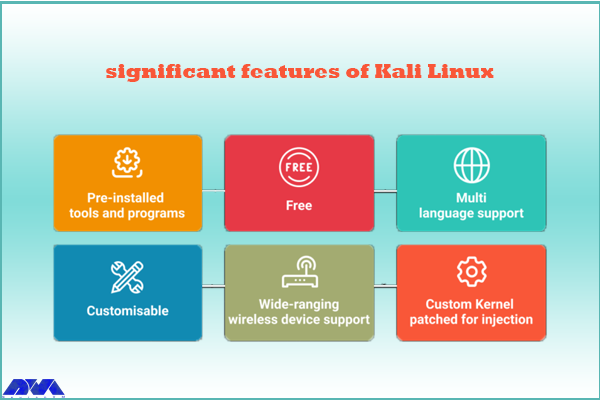
The perception of penetration testing has changed over the years. Kali Linux is also a penetration testing tool and is one of the systems that comes with many features. These features are as follows:
– Kali Linux contains more than 600 penetration testing tools like Burn Suite, Nmap, Wireshark, Air crack-ng, Metasploit framework, John the Ripper, and so on. These are practical tools for penetration testing and hacking.
– Kali Linux is provided free and open-source.
– It is capable of supporting various USB and wireless devices and interfaces.
– Packages and repositories in Kali Linux are GPG signed.
– Filesystem Hierarchy Standard (FHS) is maintained in Kali Linux.
– It supports multiple languages.
– The users can customize Kali Linux appearance as their choice cause it is completely customizable.
– It supports MRMEL and ARMHF which makes it available on a wide range of ARM devices like Raspberry Pi.
– Another prominent feature of Kali is that it supports accessibility features for visually impaired users with voice feedback and braille hardware support.
– There is regular customization and patching of the kernel for any vulnerability in Kali Linux.
What are Some Other Special Features of Kali Linux?
– Live Boot system is supported by Kali Linux using a USB device without any touching of the host operating system.
– ISOs are customizable on Kali Linux. Every security researcher has their own needs. Users can produce a custom-optimized ISO file with a selected set of meta-packages.
– Kali is equipped with an encryption mechanism for persistent volume(s). This way, The saved files are able to be secured using Luks Nuck containers.
– You can use Kali from the Windows Subsystem for Linux or WSL. Use Win-Kex for this reason.
– Kali NetHunther is a free, open-source Android application and is useful for common attacks such as Bluetooth attacks or USB HID attacks, and so on.
– Another feature is Kali Undercover. You can blend the appearance of Kali with Windows OS. So, if you activate the Kali Undercover feature, the menu and your desktop will look like Windows OS.
– Kali is able to support any platform. You can run Kali on ARM, Bare Metal, Cloud, Containers like Ducker and Alsovirtual box, and VMware.
What are the Negative Points Of Kali Linux?
– This operating system is a little bit complicated and is not beginners friendly.
– If you run this system from a virtual machine, It’s possible that all the hacking tools do not work properly.
– A lot of junk space is taken by Kali.
Conclusion
Kali Linux is one of the most advanced operating systems for penetration testing and as mentioned in this article, it contains more than 600 tools such as Nmap and Wireshark. It is mainly used for advanced penetration testing and security auditing. we recommended this platform to professionals and advanced users because it is not beginners friendly. Read this content to get more familiar with the greater features of Kali Linux. If you have any questions, leave a comment here.
FAQ
Is Kali a good choice for gaming?
Game developers don’t focus on Linux because it contains just 2% of the users. As a result, It is not designed for hardcore gaming and Kali is not either.
How much RAM is needed for Kali Linux?
You can setup Kali as your basic secure shell server with no desktop with 128 MB RAM but note that 512 is recommended. Also, 2 GB of disk space is needed.